

In modern eCommerce, customers expect quick answers, personalized recommendations, and a smooth shopping experience. Traditional website search and support systems often struggle to understand customer intent or provide instant assistance.
The AI Shop Assistant for Odoo brings an intelligent, AI-powered shopping experience directly to your Odoo Website. It acts as a virtual shopping assistant that helps customers find products, answer product-related questions, check availability, receive recommendations, and get assistance throughout their shopping journey.
The AI Shopping Assistant supports text, voice, and image-based interactions, allowing customers to communicate naturally with the chatbot. It can also identify products from uploaded images and use the store’s real product catalog to provide relevant shopping assistance.
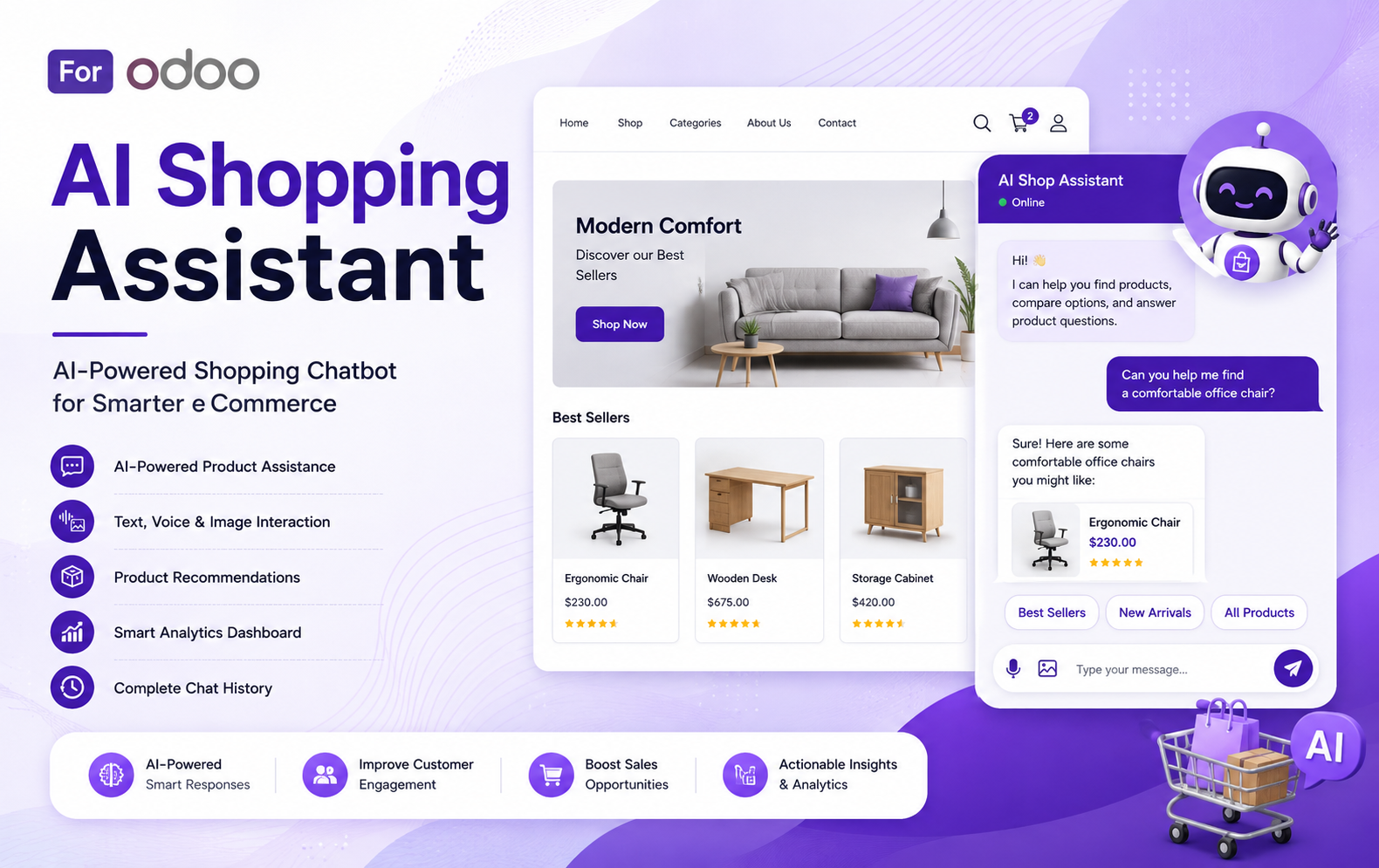
Key Features at a Glance
- AI-Powered Product Assistance
Get instant AI-powered answers to product, pricing, availability, and store-related queries. - Text, Voice & Image Interaction
Let customers interact using text, voice, or uploaded product images. - Intelligent Product Recommendations
Recommend relevant products based on customer needs, preferences, and shopping intent. - Smart Product Search & Discovery
Help customers quickly find suitable products and explore the right categories. - Real-Time Product Availability
Allow customers to check product availability directly through the AI assistant. - Personalized Shopping Experience
Provide tailored assistance and recommendations for every customer’s shopping journey. - AI-Powered Customer Support
Automate common customer queries and provide instant responses 24/7. - Conversation History
Store and review complete customer conversations, including messages, timestamps, and customer details. - Dashboard & Analytics
Track conversations, visitors, recommendations, assisted orders, response time, and sales impact. - Flexible AI Configuration
Configure AI provider settings, conversation behavior, recommendations, widget appearance, and usage limits.
Use Cases: Who Needs This module?
Quick User Guide (Visual Walkthrough)
Scroll up to revisit the detailed image-wise walkthrough.
Step 1: Open the Dashboard to monitor total conversations, active visitors, questions asked, products recommended, assisted orders, and average response time effectively.
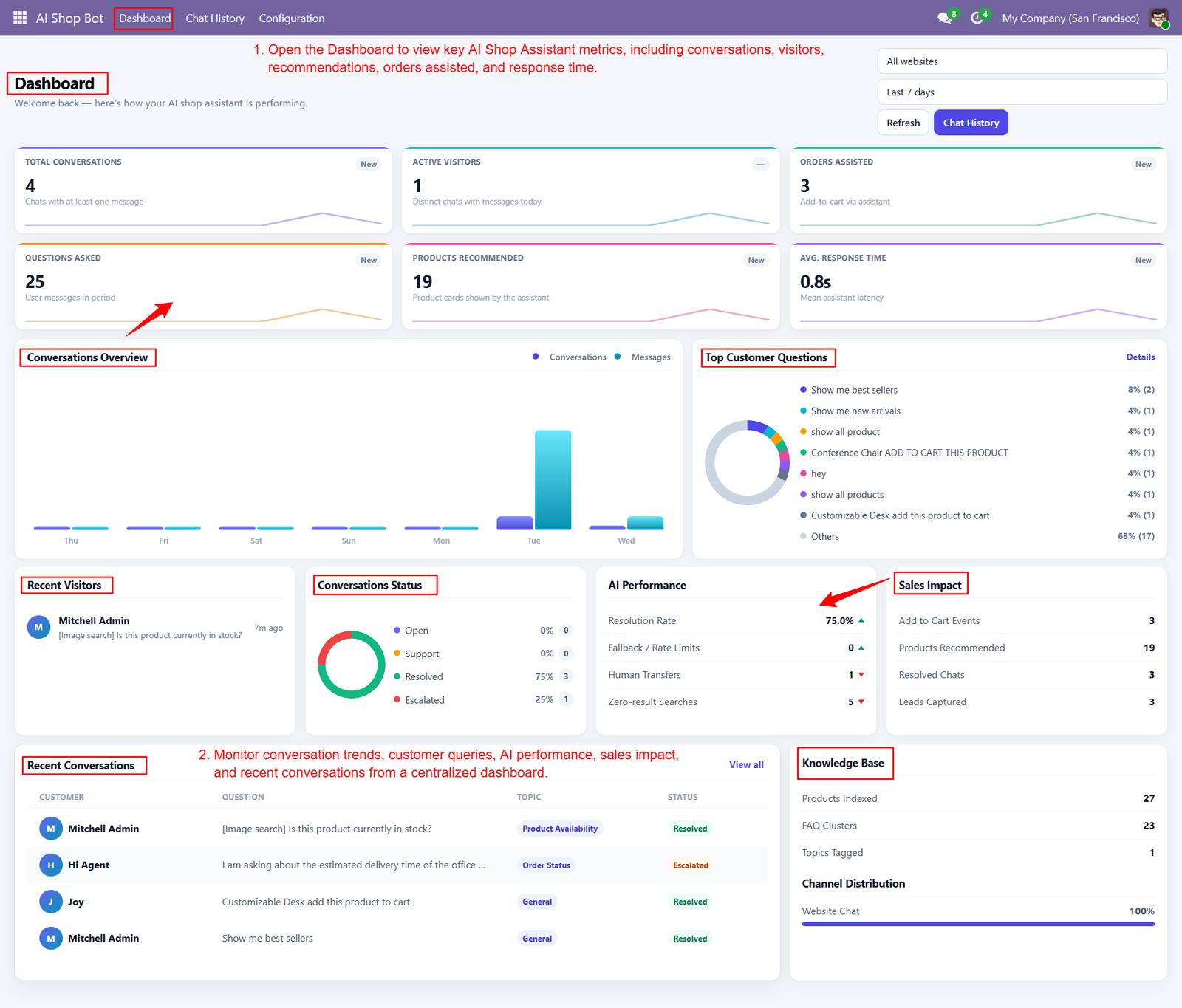
- Track conversation trends through visual analytics, helping businesses understand customer engagement patterns and identify periods with increased chatbot activity quickly.
- Monitor top customer questions to discover frequently requested products, information, and services, enabling businesses to improve their shopping experience continuously.
- Analyze recent visitors and their interactions to understand customer behavior, shopping intent, and the effectiveness of AI-powered assistance across channels.
- Review conversation statuses including open, support, resolved, and escalated interactions to identify unresolved customer issues and improve service quality effectively.
- Measure AI performance using resolution rates, fallback rates, human transfers, and zero-result searches to evaluate chatbot effectiveness and accuracy consistently.
- Track sales impact through add-to-cart events, recommended products, resolved chats, and leads captured, providing valuable insights into commercial performance effectively.
- Monitor assisted orders and product recommendations to understand how effectively the AI Shop Assistant contributes to customer purchasing decisions successfully.
- Use the Conversations Overview chart to compare daily conversation and message volumes, making customer interaction trends easier to understand quickly.
- Review Recent Conversations to quickly access customer questions, conversation topics, statuses, and interactions requiring additional attention from support teams efficiently.
- Monitor active visitors to understand how many unique customers are currently interacting with the AI Shop Assistant during selected periods.
- Track questions asked during specific reporting periods to identify customer interests and optimize products, content, and chatbot responses accordingly efficiently.
- Upload product images to help AI identify similar products and guide customers toward relevant items available in your store catalog.
- Get intelligent product recommendations tailored to customer queries, shopping intent, preferences, and requirements for a more personalized online shopping experience.
- Explore product categories easily through conversational suggestions, allowing customers to discover suitable products without manually navigating multiple website pages online.
- Check product availability through the chatbot and quickly understand whether a selected product can currently be purchased from your store.
- Ask the AI assistant to add products directly to your cart and simplify the journey from product discovery toward checkout.
- Receive instant personalized answers about products, store information, categories, and shopping options quickly without waiting for human customer support assistance.
- Use the chatbot during checkout-related shopping journeys to receive helpful product guidance while continuing to browse your Odoo website seamlessly.
- Interact naturally with the assistant using conversational questions instead of relying only on traditional keyword-based product searches across website categories.
Step 2: Open Configuration and select your desired website to begin setting up the AI Shop Assistant according to your business requirements.
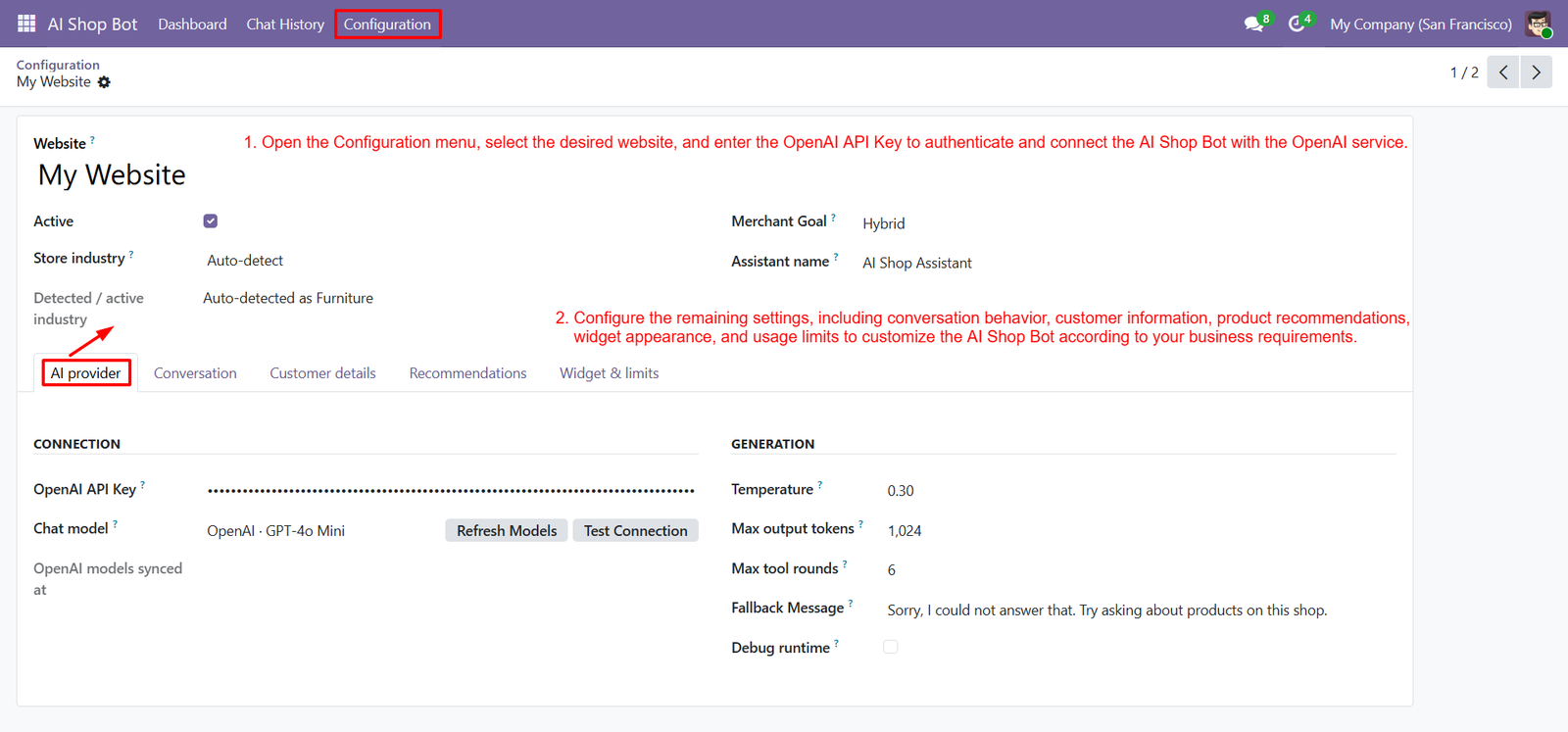
- Enter the OpenAI API Key securely to authenticate the assistant and connect your Odoo website with the selected AI service.
- Select the appropriate chat model to control how the AI Shop Assistant processes customer questions and generates helpful shopping responses.
- Use the Refresh Models option to synchronize available OpenAI models and ensure your configuration uses the latest officially supported model.
- Test the AI connection before launching the assistant to verify that your OpenAI credentials and selected model are configured correctly.
- Configure temperature settings to control response creativity and maintain consistent AI-generated answers suitable for your online store, business, and customers.
- Set maximum output tokens to control response length and manage how much information the AI assistant provides during customer conversations.
- Configure maximum tool rounds to control how many actions the AI assistant can perform while processing customer shopping requests efficiently.
- Set a fallback message that customers receive when the AI assistant cannot currently answer their product or store-related questions successfully.
- Enable or disable debug runtime settings according to your testing and troubleshooting requirements during AI Shop Assistant configuration process effectively.
- Use the Conversation tab to customize how the assistant communicates with customers and manages interactions throughout their shopping journey effectively.
Step 3: Open Website Configuration and navigate to the Website section to manage settings for enabling AI shopping assistance on your storefront.
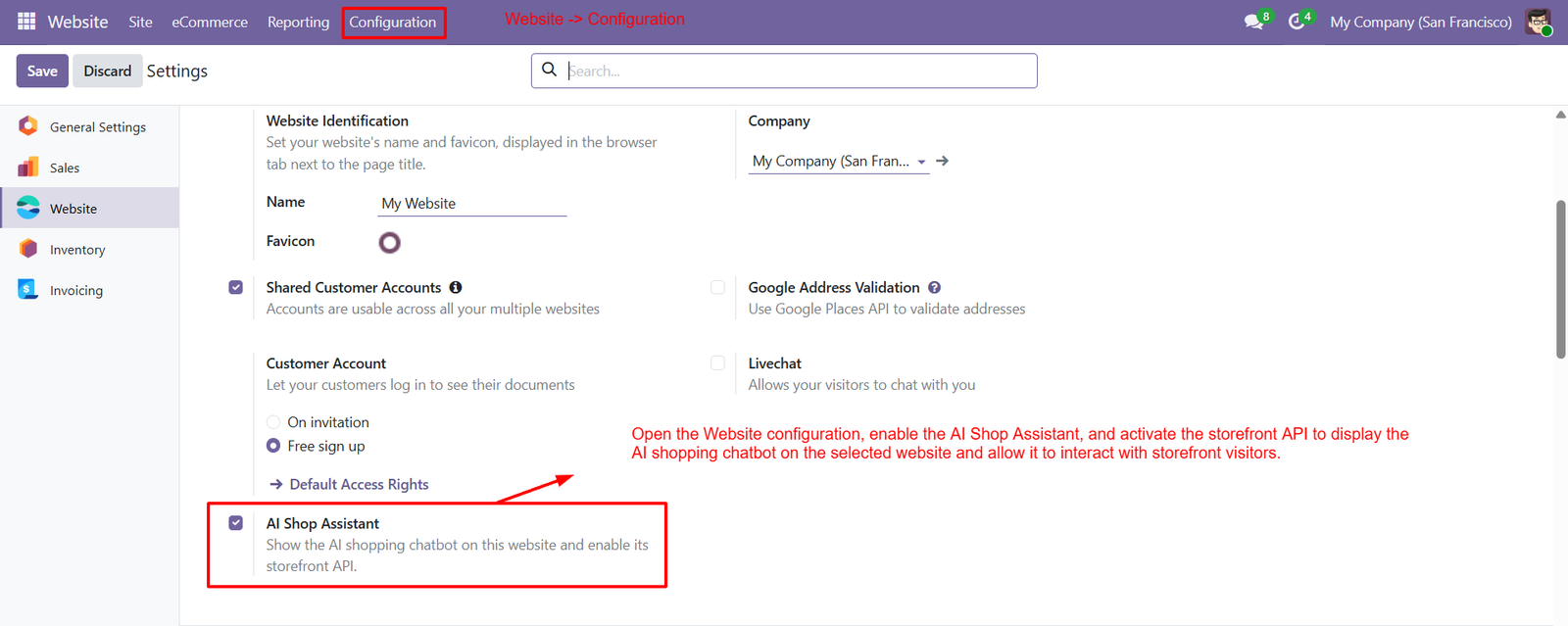
- Locate the AI Shop Assistant option within Website settings and enable it to make the shopping chatbot available to visitors.
- Activating AI Shop Assistant enables an AI-powered chatbot that helps website visitors discover products and receive personalized shopping assistance instantly.
- Enable the Storefront API to allow the AI Shop Assistant to interact with website products, categories, and shopping information dynamically.
- Once enabled, the chatbot can access relevant storefront data and provide customers with accurate product-related answers during their shopping journey.
- AI Shop Assistant works directly on your Odoo website, allowing visitors to communicate with the assistant without leaving the storefront.
- The configuration provides a centralized way to activate AI shopping functionality while maintaining your Odoo website settings and customer experience.
- Businesses can use AI Shop Assistant to answer customer questions, recommend products, and provide shopping guidance throughout the online storefront.
- Enabling the assistant helps reduce repetitive customer support requests by automatically handling common product and store-related questions from website visitors.
- The AI chatbot can improve product discovery by helping customers find items based on their questions, preferences, and shopping requirements.
- Storefront API activation allows the assistant to communicate with your website environment and deliver relevant product information during customer conversations.
- Website administrators can control AI shopping availability by enabling or disabling the assistant according to their operational and business requirements.
- The AI Shop Assistant creates a shopping experience by combining conversational assistance with product discovery directly inside your Odoo website.
Step 4: Open the Odoo website storefront and launch the AI Shop Assistant to provide customers with instant, intelligent shopping guidance anytime.
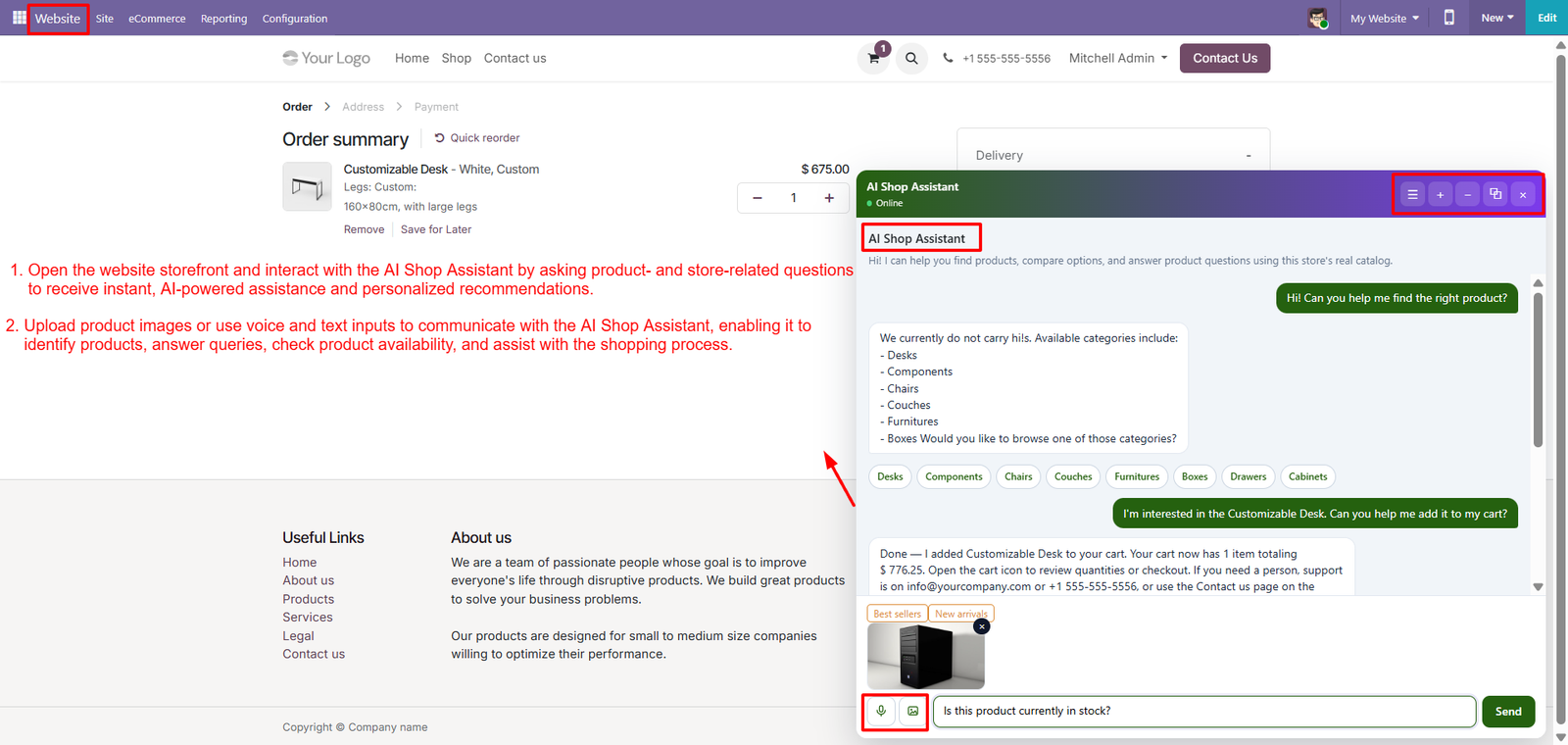
- Ask product-related questions naturally and receive AI-generated responses based on your store catalog, categories, products, pricing, availability, and customer needs.
- Use voice input to communicate with the AI assistant, making product discovery faster, easier, and more convenient for every customer.
- Upload product images to help AI identify similar products and guide customers toward relevant items available in your store catalog.
- Get intelligent product recommendations tailored to customer queries, shopping intent, preferences, and requirements for a more personalized online shopping experience.
- Explore product categories easily through conversational suggestions, allowing customers to discover suitable products without manually navigating multiple website pages online.
- Check product availability through the chatbot and quickly understand whether a selected product can currently be purchased from your store.
- Ask the AI assistant to add products directly to your cart and simplify the journey from product discovery toward checkout.
- Receive instant personalized answers about products, store information, categories, and shopping options quickly without waiting for human customer support assistance.
- Use the chatbot during checkout-related shopping journeys to receive helpful product guidance while continuing to browse your Odoo website seamlessly.
- Interact naturally with the assistant using conversational questions instead of relying only on traditional keyword-based product searches across website categories.
Step 5: Open Chat History to review complete customer conversations, including customer details, chat IDs, timestamps, message counts, and interaction records conveniently.
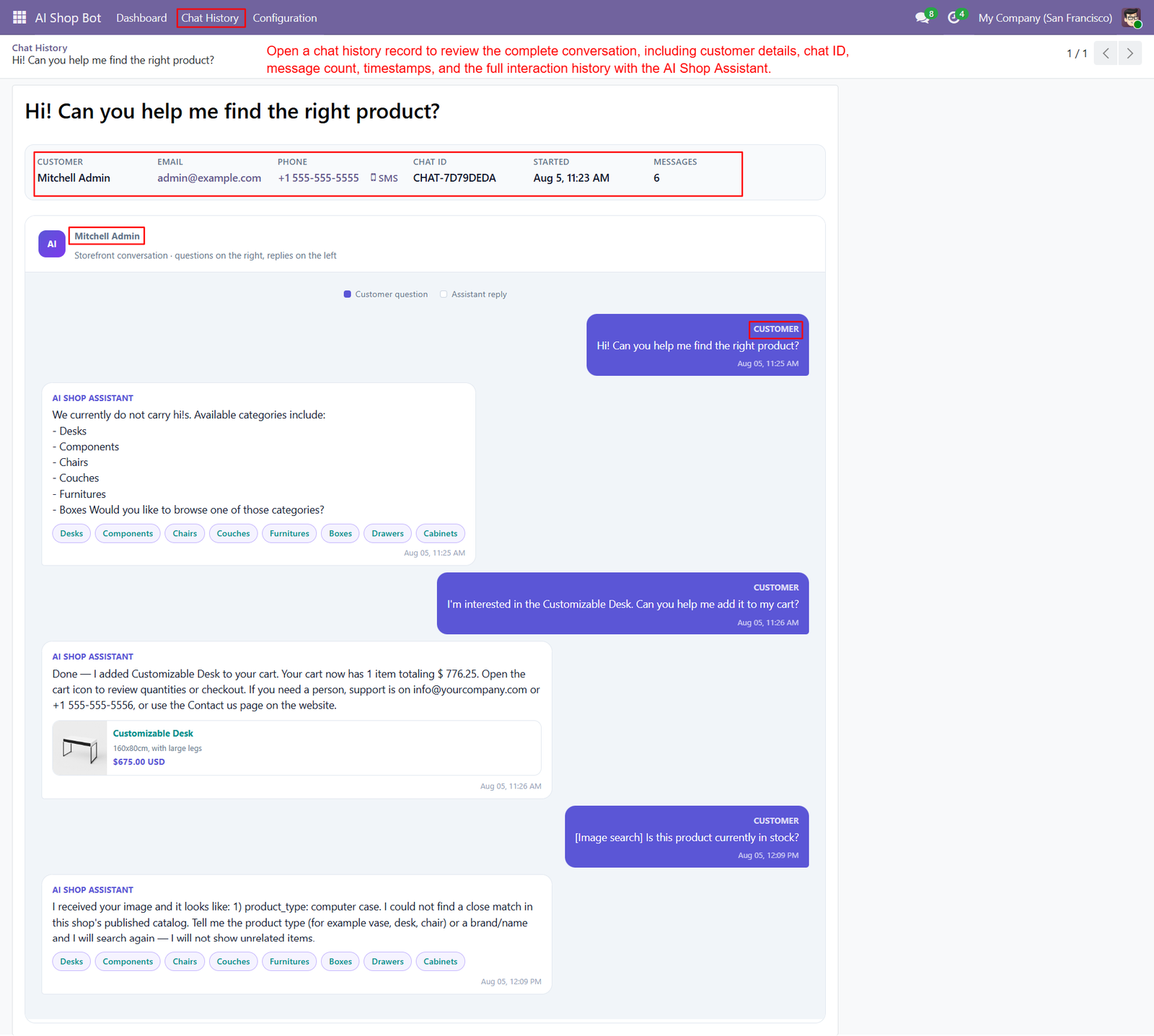
- Review customer names, email addresses, phone numbers, chat identifiers, conversation start times, and total messages within each stored conversation record.
- Examine complete conversations between customers and the AI Shop Assistant to understand questions, responses, recommendations, and shopping interactions more clearly.
- Track customer questions and AI responses chronologically, making it easier to understand how shoppers interact with the assistant throughout their journeys.
- Review product discovery conversations where customers ask the assistant for suitable products, categories, recommendations, or shopping guidance based on needs.
- Analyze category suggestions provided by the AI assistant when requested products are unavailable or customers need help exploring alternative options.
- Monitor conversations where customers request products to be added into their shopping carts through natural language interactions with the assistant.
- Review AI responses confirming successful cart additions, including product information, quantities, totals, and instructions for continuing toward checkout smoothly efficiently.
- Examine image-based customer queries and review how the AI assistant interprets uploaded images while searching for relevant products within catalogs.
- Use conversation history to identify unsuccessful image searches and understand why customers may need additional product details or clearer images.
- Review recommended product cards displayed by the assistant, including product names, descriptions, prices, and relevant shopping information easily quickly online.
- Analyze customer requests for product availability and review how the AI assistant responds using available store catalog information during conversations.
- Use stored chat records to understand recurring customer requirements and identify opportunities for improving product information, recommendations, and customer support.
- Review timestamps associated with customer messages and assistant responses to understand conversation timing, response patterns, and shopping activity more effectively.
Why Use the AI Shopping Assistant for Odoo Module?
- Enhance Customer Experience: Provide instant, AI-powered assistance throughout the customer’s shopping journey.
- Faster Product Discovery: Help customers quickly find relevant products using conversational search and recommendations.
- 24/7 AI Support: Answer common product and store-related questions without requiring constant human assistance.
- Personalized Recommendations: Suggest products based on customer queries, preferences, and shopping intent.
- Multi-Modal Interaction: Allow customers to communicate using text, voice, and image inputs.
- Improve Customer Engagement: Create an interactive shopping experience that keeps visitors engaged with your website.
- Increase Sales Opportunities: Guide customers toward suitable products and assist with adding items to their cart.
- Product Availability Checks: Let customers quickly ask whether products are currently available.
- Image-Based Product Discovery: Help identify products or find similar items using uploaded images.
- Centralized Chat History: Store and review complete customer conversations for support and analysis.
- Performance Analytics: Monitor conversations, recommendations, assisted orders, response time, and AI performance.
- Sales Impact Tracking: Measure add-to-cart events, recommended products, resolved chats, and captured leads.
- Configurable AI Settings: Customize AI behavior, recommendations, customer details, widget appearance, and usage limits.
- Reduced Support Workload: Automate repetitive customer questions and allow support teams to focus on complex requests.
- Better Shopping Decisions: Give customers relevant information and guidance before they make purchasing decisions.
- Odoo Website Integration: Provide AI-powered shopping assistance directly within the existing Odoo eCommerce storefront.
- Actionable Customer Insights: Analyze conversations and frequently asked questions to understand customer needs better.
- Scalable Customer Assistance: Support growing website traffic without increasing the workload of customer support teams.
- Smarter eCommerce Experience: Combine AI assistance, product discovery, recommendations, and analytics in one solution.
- Future-Ready Online Store: Transform a traditional Odoo store into an intelligent, conversational, and customer-focused shopping platform.