

Managing customers and payments across multiple currencies can be challenging for businesses operating in international or multi-location markets. Manual currency calculations, exchange-rate tracking, and payment reconciliation can make the Point of Sale process more complicated.
Advance POS Multi Currency for Odoo provides a convenient way to manage multiple currencies directly within the Odoo Point of Sale. Businesses can configure supported currencies, manage exchange rates, display product prices in different currencies, and accept payments in the customer’s preferred supported currency.
The module also provides currency tracking across payments, receipts, invoices, POS sessions, register closing, and daily sales reports, giving businesses better visibility into foreign-currency transactions.

Key Features at a Glance
- Monitor sales trends, active currencies, exchange rates, payments, currency usage, and alerts through one centralized dashboard for efficient management.
- Add required company currencies, activate them, manage exchange rates, and make selected currencies available for Point of Sale transactions.
- Enable multi-currency separately for each POS, select supported currencies, define default currency, and configure display and change policies.
- Select specific currencies that cashiers can accept within POS, providing businesses with flexibility for different customer payment preferences.
- Set a default currency for each Point of Sale, ensuring consistent pricing and transaction processing throughout daily operations.
- Switch between configured currencies inside the POS shop and view product prices automatically according to the selected currency.
- Allow customers to pay using supported currencies while automatically displaying applicable exchange rates and converted payment amounts during checkout.
- Automatically calculate converted payment values using configured exchange rates, reducing manual calculations and helping cashiers process transactions accurately.
- Configure and manage currency exchange rates, allowing businesses to maintain appropriate conversion values for multi-currency POS transactions.
- Configure how currency information appears within POS, helping businesses present prices and transaction amounts clearly to customers and cashiers.
- Select the customer’s preferred payment currency during checkout and immediately view the corresponding tender amount and POS equivalent.
- Display payment currency, paid amount, exchange rate, and POS equivalent directly on receipts for transparent transaction information and tracking.
- Generate POS invoices containing payment currency, tender amount, exchange rate, and POS equivalent information for improved transaction documentation.
- Review payments by currency while closing POS registers, including tender amounts and equivalent values calculated using the store currency.
- View detailed daily sales information including payment currency, tender amount, POS equivalent amount, exchange rate, and order details.
Use Cases: Who Needs This module?
1. International Retail Stores
Retail businesses serving customers from different countries can accept supported foreign currencies directly through their POS.
2. Multi-Location Businesses
Businesses operating across different markets can configure currencies and manage currency-related POS transactions according to their requirements.
3. Tourist Shops
Stores serving international tourists can display product prices in supported currencies and allow customers to pay using their preferred currency.
4. Hotels & Hospitality Businesses
Hotels and hospitality businesses dealing with international customers can simplify multi-currency checkout and maintain clear payment records.
5. Travel & Tourism Businesses
Travel-related businesses can benefit from convenient foreign-currency payment processing when serving customers from different countries.
6. International E-Commerce & Retail Operations
Businesses with customers using different currencies can use multi-currency POS features to provide flexible payment options.
7. Businesses Accepting Foreign Currency Payments
Companies that regularly receive payments in currencies other than their store currency can track tender amounts, exchange rates, and POS equivalents.
8. Retail Businesses With Currency-Sensitive Pricing
Businesses can switch currencies in the POS shop and display product prices according to the selected currency.
9. Businesses Requiring Detailed Currency Reporting
Companies that need visibility into currency-wise payments can use receipts, invoices, register closing, and Daily Sales reports to track transactions.
10. Businesses Looking to Reduce Manual Calculations
Organizations that want to reduce manual currency calculations can use automatic conversion and exchange-rate information during POS payment processing.
Quick User Guide (Visual Walkthrough)
Scroll up to revisit the detailed image-wise walkthrough.
Step 1: Centralized Dashboard — Centralized dashboard provides a complete overview of multi-currency POS performance, helping managers monitor operations, payments, currencies, rates, and alerts efficiently.

Step 2: Active Currency Management: Manage active currencies efficiently by adding required company currencies, reviewing their availability, and preparing them for multi-currency POS transactions effectively.

Step 3: Enable Multi Currency: Activates multi-currency functionality, allowing configured currencies to become available for selected Point of Sale operations.

- Supported POS Currencies: Provides a centralized list where administrators can manage currencies and determine which currencies are available for POS transactions.
- Active Currency Count: Displays the number of active currencies, helping administrators quickly understand the configured multi-currency environment for business operations.
- Currency Selection: Allows administrators to choose currencies such as EUR, CAD, BDT, and ALL for supported POS operations.
- Currency Activation: Lets administrators enable individual currencies, ensuring required currencies remain available within the company’s multi-currency configuration and POS environment.
- Used on POS: Identifies currencies assigned to Point of Sale configurations, helping administrators understand actual POS currency availability and usage.
- Add a Line: Provides an easy way to include another supported company currency within the multi-currency configuration list when requirements change.
- Manage Currencies and Rates: Provides access to currency management, enabling administrators to maintain currencies and exchange rates from one location.
- POS Currency Configuration: Controls how multi-currency works within selected POS systems, including supported currencies, default currency, and display preferences.
- Default POS Currency: Defines the primary currency used by the Point of Sale, providing a consistent starting currency for everyday transactions.
- Change and Display Policy: Determines how currency changes and information are presented during POS operations, supporting clearer cashier and customer interactions.
- Cash Acceptance: Allows administrators to specify whether a configured currency can be accepted for cash payments during Point of Sale transactions.
- Card Acceptance: Allows businesses to determine whether customers can use a configured currency when completing card payments within Point of Sale.
- Display Only: Allows a currency to appear for informational price display without making it available for payment transactions within POS.
- Active POS Currency: Controls whether a configured currency remains enabled for the selected Point of Sale and available during transactions.
- Supported Currency Selection: Helps businesses tailor accepted currencies according to operational requirements, ensuring each POS configuration uses appropriate currency options.
Step 4: Multi-Currency Activation: Enable multi-currency functionality for the selected Point of Sale, allowing customers to transact using configured supported currencies during checkout.

- Allowed Currency Count: View the number of currencies permitted for the POS, providing administrators with quick visibility into available currency configurations.
- Default Display Currency: Set the default display currency for the POS, ensuring product prices initially appear in the preferred business currency.
- Price Display Mode: Configure the price display mode to show base and converted values, helping customers understand pricing across different currencies.
- Product Card Prices: Enable product card prices so customers and cashiers can clearly view currency-based product pricing directly within the POS.
- Change Policy: Define the change policy for transactions, including the Ask Cashier option, giving cashiers control during currency-based payment handling.
- Currency Cash Drawer: Enable the currency cash drawer option to support appropriate cash handling when processing transactions involving configured POS currencies.
- Exchange Rate Policy: Configure the exchange rate policy for the POS, helping determine how currency conversion rates are managed during transactions.
- Rate Margin: Set a rate margin percentage to accommodate business-specific exchange-rate adjustments when processing multi-currency POS transactions and payments.
- Stale Rate Hours: Define stale-rate hours to help identify when configured exchange rates may require attention before processing further transactions.
- POS Currency Table: Manage configured POS currencies from one dedicated table, providing clear visibility into currency availability and transaction-related settings.
- Accept Cash: Choose whether a configured currency can be accepted for cash payments, providing flexible payment configuration for POS transactions.
- Accept Card: Configure whether customers can use a selected currency for card payments, supporting flexible multi-currency payment options within POS.
- Display Only Currency: Mark currencies as display-only when businesses want customers to view converted prices without accepting those currencies as payments.
- Currency Enabled Status: Enable or disable individual currencies within the POS, ensuring only required currencies remain available for active transactions.
- Add POS Currency: Use Add a Line to include additional configured currencies, making it easier to expand supported currency options when needed.
Step 5: Currency Switcher: Easily switch between configured currencies such as USD, CAD, EUR, and BDT directly from the POS interface during sales operations.
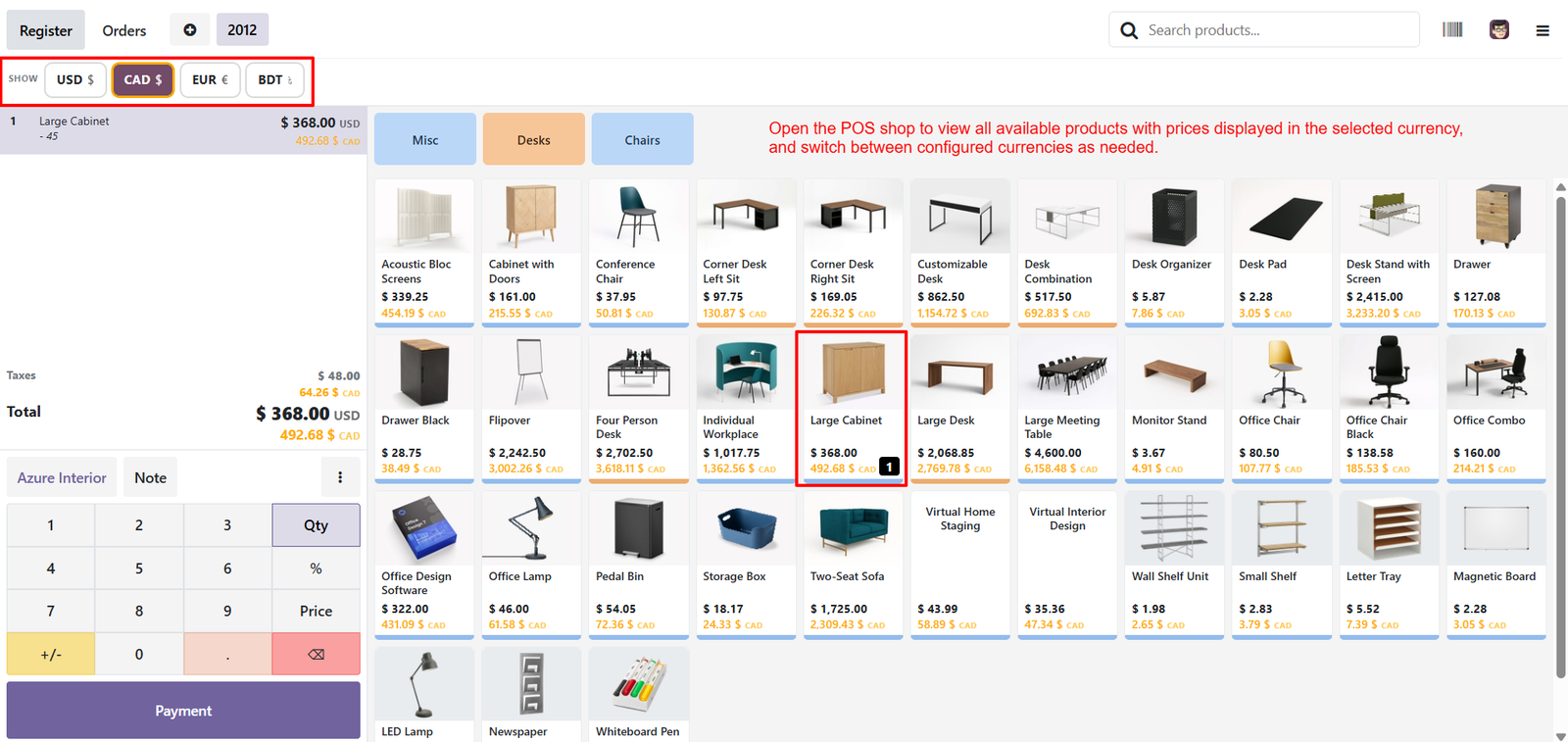
- Multi-Currency Product Pricing: View product prices in the selected currency, helping customers understand costs clearly before completing their purchase successfully.
- Real-Time Currency Selection: Choose the required currency instantly from the POS currency bar without leaving the active sales screen easily.
- Multiple Currency Support: Provide customers with flexible pricing options by supporting several configured currencies within one Odoo Point of Sale.
- Converted Product Prices: Display both base and converted prices for products, making currency comparison easier during everyday POS sales transactions.
- Easy Currency Switching: Cashiers can quickly change the active currency whenever needed while browsing products and processing customer orders efficiently.
- Clear Price Visibility: Show currency symbols and converted amounts directly on product cards, improving transparency for customers and cashiers during checkout.
- Foreign Customer Convenience: International customers can view familiar currency values, making product selection and purchasing decisions easier at the POS.
- Currency-Based Catalog: Browse the complete product catalog while maintaining prices according to the currently selected POS transaction currency conveniently.
- Selected Currency Highlight: Clearly identify the active currency through the highlighted currency button, helping cashiers avoid confusion during transaction processing.
- Multi-Currency Cart: Add products to the cart while displaying their corresponding converted values, supporting accurate order review before payment easily.
- Transparent Order Totals: View subtotal, taxes, and total amounts with corresponding currency values, providing clearer financial information throughout the sales process.
- Currency-Aware Taxes: Display tax amounts alongside converted currency values, helping cashiers and customers understand the complete payable transaction amount clearly.
- Quick Currency Access: Keep configured currencies readily accessible at the top of the POS screen for faster currency selection during checkout.
- Flexible Retail Operations: Support retail businesses serving customers from different regions by providing convenient access to multiple configured currencies efficiently.
- Currency Conversion Support: Present converted product amounts automatically according to configured exchange rates, reducing the need for manual calculations during sales.
Step 6: Preferred Payment Currency: Select the customer’s preferred payment currency during checkout, enabling transactions to process with applicable exchange rates and converted amounts automatically.

- Multiple Payment Currencies: Choose from configured currencies such as USD, CAD, EUR, or BDT before completing payment according to specific customer payment requirements.
- Clear Currency Selection: View the selected payment currency clearly within checkout, helping cashiers confirm the chosen currency before processing customer payments successfully today.
- Applicable Exchange Rate: Display the applicable exchange rate during checkout, providing transparent information about how the selected payment currency converts to store currency.
- Automatic Payment Conversion: Automatically calculate the converted payment amount, reducing manual calculations and helping cashiers process foreign currency transactions more accurately during checkout.
- Card Payment Support: Support card payments in configured currencies, allowing customers to complete purchases using their preferred available payment currency conveniently during checkout.
- Cash Payment Support: Support cash payments in configured currencies when enabled, giving businesses flexibility when handling different currency payment requirements during checkout operations.
- POS Equivalent Amount: Display the POS equivalent amount alongside the selected currency, helping cashiers understand the transaction value in store currency during checkout.
- Payment Currency Information: Show the payment currency and exchange rate directly within the payment line, providing useful transaction information before final payment validation.
- Quick Currency Selection: Allow customers to select a supported currency without leaving the payment screen, creating a smoother and faster checkout experience overall.
- Transparent Total Amount: Display the total amount prominently in the POS, while payment currency information remains visible for easier transaction verification during checkout.
- Currency Payment Buttons: Provide clear currency buttons within the Pay In section, making supported payment currencies quickly accessible during checkout operations for cashiers.
- Exchange Information: Show currency-specific exchange information beneath the payment options, helping cashiers understand the current conversion used during checkout for transactions.
- Flexible Payment Processing: Support flexible payment processing by allowing configured currencies to be selected according to available POS payment settings and operational requirements.
- Converted Payment Values: Display converted payment values alongside original amounts, improving transparency when customers pay using currencies different from the store currency directly.
- Payment Verification: Enable cashiers to verify payment currency, tender amount, exchange rate, and converted value before validating the transaction successfully and accurately.
Step 7: Payment Confirmation: Display a clear payment successful message after completing the transaction, helping cashiers confirm that the customer’s payment processed successfully.

- Paid Amount Display: Show the completed transaction amount prominently, allowing cashiers to quickly verify the payment value before starting another customer order.
- Selected Currency: Display the selected payment currency on the receipt, making it clear which currency was used during the transaction.
- Tender Amount: Show the tender amount paid by the customer in the selected currency, providing transparent payment information for transaction verification purposes.
- Exchange Rate: Include the applicable exchange rate on the receipt, helping customers understand how their payment currency relates to the store currency.
- POS Equivalent: Display the POS-equivalent amount alongside the foreign-currency payment, providing a clear reference to the transaction’s store-currency value.
- Payment Method: Clearly identify the payment method, such as Card, together with the selected currency for better transaction documentation and tracking.
- Currency Transparency: Provide currency information directly on receipts, helping customers understand the relationship between their payment amount and store currency value.
- Receipt Printing: Allow cashiers to print the full receipt after successful payment, providing customers with a physical transaction record for reference.
- Digital Receipt: Provide an option to send the receipt digitally, making transaction information conveniently accessible to customers after completing their purchase.
- Email Receipt: Enter the customer’s email address to send transaction details electronically, supporting convenient and paperless receipt delivery after payment completion.
- Payment Editing: Provide an Edit Payment option after successful payment, allowing authorized users to review or modify payment details when necessary.
- Currency Verification: Present currency, exchange rate, and payment amount together, helping cashiers and customers verify transaction details before leaving the store.
- Transaction Tracking: Maintain selected payment currency and exchange information on receipts, supporting easier tracking of foreign-currency transactions after checkout completion.
- Customer Convenience: Provide customers with detailed payment information on receipts, improving clarity when purchases involve currencies different from the store currency.
- Clear Payment Breakdown: Show payment information in an organized receipt section, making foreign-currency tender details easier to locate and understand quickly.
Step 8: Invoice Generation: Generate detailed invoices directly from POS orders, ensuring completed multi-currency transactions receive properly documented financial records for customers.

- Invoice Numbering: Display a unique invoice number clearly, helping businesses identify, organize, and reference individual POS transactions for accounting activities.
- Payment Currency: Show the selected payment currency on invoices, making transactions easier for customers and businesses to understand and verify.
- Tender Amount: Record the actual tender amount paid in the selected currency, providing transparent payment information within the invoice document.
- Exchange Rate: Display the applicable exchange rate on invoices, allowing users to understand how foreign payments relate to currency values.
- POS Equivalent: Include the POS-equivalent amount alongside foreign-currency payment details, providing a reference to the transaction value in store currency.
- Payment Method: Identify the payment method used, such as Card, alongside currency information for complete and transparent payment documentation purposes.
- Currency Column: Display the transaction currency within invoice line details, helping users quickly identify the currency associated with product pricing.
- Rate Details: Include currency conversion rate information within invoice details, supporting understanding and verification of foreign-currency transaction calculations accurately consistently.
- Exchange Amount: Show the exchanged amount on the invoice, giving customers and businesses visibility into converted values during POS transactions.
- Payment Summary: Present payment information within the invoice summary, helping users review paid amounts, currency, exchange rates, and remaining balances.
- Amount Due: Clearly display the amount due after payment, allowing users to confirm whether the POS transaction has been settled.
- Paid Transaction: Record the payment status and paid amount, providing a clear indication that the POS order has received payment.
- Payment Currency Section: Provide dedicated payment currency information, helping businesses track foreign-currency payments separately from local store-currency transaction totals accurately.
- Exchange Rate Transparency: Show the applied exchange rate on invoices, improving transparency and helping customers understand foreign-currency payment calculations clearly.
- Total Exchange: Display the total exchanged value in the selected currency, providing a view of converted payment amounts on invoices.
Step 9: Payments by Currency: Review payments grouped by currency during register closing, providing clear visibility into foreign-currency collections and corresponding transaction values.

- Currency-Wise Tender: View the total tender amount collected in each payment currency, helping cashiers accurately understand foreign-currency collections during register closing.
- POS Equivalent: Display the POS-equivalent value for foreign-currency payments, allowing businesses to compare tender amounts against the store currency.
- Payment Count: View the number of payments processed in each currency, providing useful transaction volume information during POS register closing.
- CAD Payment Tracking: Track CAD payments separately with their corresponding tender amount and POS-equivalent value for accurate currency-wise register reconciliation.
- Session Total: Display the overall session total in the store currency, maintaining consistent register totals despite foreign-currency payment activity.
- Cash Summary: Review cash opening, cash-in/out, counted amounts, and differences during register closing for comprehensive payment reconciliation and verification.
- Card Summary: Monitor card payment totals, counted amounts, and differences, helping cashiers verify card collections before closing the POS register.
- Customer Account: Display customer account payment information alongside other payment methods, providing a complete overview during register closing activities.
- Currency Payment Transparency: Provide informational tender totals based on payment-time currency without changing the register totals maintained in the store currency.
- Tender Information: Clearly display tender amounts for each currency, making it easier for cashiers to understand actual foreign-currency collections.
- Currency Reconciliation: Compare foreign-currency tender values with POS-equivalent amounts, supporting accurate review and reconciliation of multi-currency payments during closing.
- Register Closing: Integrate currency-wise payment information directly into the Closing Register screen, simplifying end-of-session review for POS cashiers and managers.
- Payment Difference Tracking: Review counted amounts and differences for configured payment methods, helping identify discrepancies during the register closing process.
- Foreign Currency Visibility: Improve visibility into foreign-currency collections by displaying currency, payment count, tender amount, and POS-equivalent information together clearly.
- Store Currency Reference: Maintain the store currency as the reference for session totals while separately displaying foreign-currency tender information for better tracking.
Step 10: Sales Summary: Sales Summary displays individual products, quantities, and amounts, helping businesses review daily sales activity and transaction values accurately within reports.

- Tax Summary: Tax Summary presents applicable tax rates and amounts, allowing businesses to understand tax contributions within daily POS sales reports clearly.
- Payment Summary: Payment Summary shows cash, card, and total payment values, providing a concise overview of daily payment collection activity for managers.
- Payment Currency Breakdown: Payment Currency Breakdown organizes transactions by currency, helping businesses identify foreign-currency orders and payment volumes during selected reporting periods easily.
- Tender Amount: Tender Amount displays the amount received in each payment currency, providing clear visibility into actual customer payment collections during operations.
- POS Equivalent: POS Equivalent shows foreign-currency payments converted into store currency values, supporting easier comparison and financial reporting across completed transactions daily.
- Average Rate: Average Rate displays the average exchange rate applied to currency payments, helping users review conversion values within daily sales reports.
- Order Payment Currency Detail: Order Payment Currency Detail provides individual order information, including payment currency, paid amount, order total, and applied exchange rate clearly.
- Currency Identification: Currency Identification clearly shows the payment currency associated with each order, making foreign-currency transactions easier to review and understand easily.
- Paid Amount: Paid Amount records the tender received for individual orders, providing useful information for payment verification and transaction reconciliation during reporting.
- Exchange Rate Detail: Exchange Rate Detail shows the conversion rate applied to individual payments, improving transparency when reviewing foreign-currency transaction calculations within reports.
- Order Reference: Order Reference connects currency payment details with specific POS orders, making individual transactions easier to trace and reconcile accurately during.
- Total POS Equivalent: Total POS Equivalent summarizes converted currency values, providing a consistent store-currency reference for reviewing foreign-currency payment activity during daily operations.
- Currency-Based Payment Tracking: Currency-Based Payment Tracking helps businesses monitor payment activity by currency, supporting better visibility into international customer transactions and collections reporting.
- Daily Currency Analysis: Daily Currency Analysis combines orders, payments, tender amounts, POS equivalents, and rates, providing comprehensive visibility into currency transaction performance overall.
- Invoice References: Invoice References appear within the report, helping businesses connect daily sales transactions with their corresponding invoice records for further review.
Why Use the Advance POS Multi Currency for Odoo Module?
- Simplified Multi-Currency Management: Manage multiple currencies directly within Odoo POS, simplifying foreign currency sales, payments, conversions, receipts, invoices, and reporting through integrated workflow.
- Flexible Customer Payments: Provide customers with convenient currency choices during checkout, allowing supported foreign currencies to be selected without disrupting POS sales processes.
- Clear Product Pricing: Display product prices in selected currencies, helping customers understand converted values clearly while allowing cashiers to switch currencies during transactions.
- Automatic Currency Conversion: Automatically calculate converted payment amounts using configured exchange rates, reducing manual calculations and supporting more consistent foreign currency transaction processing.
- Centralized Currency Control: Maintain active currencies centrally, allowing administrators to add, activate, review, and manage currencies before making them available for POS operations.
- Accurate Exchange Rates: Configure exchange rates for supported currencies, providing essential conversion information required for accurate foreign currency pricing and payment processing efficiently.
- POS-Specific Currency Control: Control currency availability for individual POS configurations, allowing businesses to determine which currencies cashiers can accept or display during transactions.
- Flexible Payment Methods: Support different payment methods by currency, enabling businesses to configure cash, card, and display-only options according to operational needs daily.
- Transparent Receipts: Show payment currency, tender amount, exchange rate, and POS equivalent on receipts, improving transparency and simplifying foreign currency transaction verification.
- Detailed Invoices: Include currency and exchange information on invoices, providing detailed documentation that helps businesses review and reconcile completed multi-currency POS transactions.
- Register Closing Visibility: Review payments by currency during register closing, making foreign currency collections easier to understand alongside store-currency session totals and summaries.
- Comprehensive Daily Reporting: Analyze daily sales with currency breakdowns, including orders, payments, tender amounts, POS equivalents, average rates, and individual payment details comprehensively.
- Centralized Performance Monitoring: Monitor multi-currency performance through a centralized dashboard, providing visibility into sales trends, active currencies, payments, exchange rates, and currency alerts.
- Stale Rate Identification: Identify stale exchange rates through dashboard alerts, helping administrators recognize currencies that may require review before processing additional POS transactions.
- Manual Rate Monitoring: Track manually maintained currency rates through alerts, giving administrators better visibility into currencies requiring direct exchange-rate management and periodic review.
- Unused Currency Detection: Identify unused active currencies through dashboard alerts, helping businesses review configurations and determine whether inactive currency options remain necessary.
- Currency-Wise Sales Analysis: Compare sales performance across currencies using visual charts, helping managers understand currency-wise transaction values and identify leading foreign payment currencies.
- Foreign Currency Insights: Monitor foreign-currency sales share and payment activity, helping businesses evaluate customer adoption and understand the role of multi-currency transactions overall.
- Quick Reporting Access: Provide quick access to currency management, rate updates, rate history, payment charts, session charts, and currency reports from the dashboard.
- Complete POS Workflow: Create a complete multi-currency POS workflow covering configuration, pricing, checkout, payments, receipts, invoices, register closing, daily sales, and reporting seamlessly.