

Affiliate marketing is one of the most effective ways to increase sales without expanding your marketing budget. Instead of relying solely on paid advertisements, businesses can build a network of affiliates who promote products and earn commissions for successful referrals.
The Affiliate Program module for Odoo simplifies this entire process by providing a centralized affiliate management platform. From affiliate registration and referral tracking to commission management, subscriptions, marketing assets, analytics, and payouts, everything can be managed directly within Odoo.
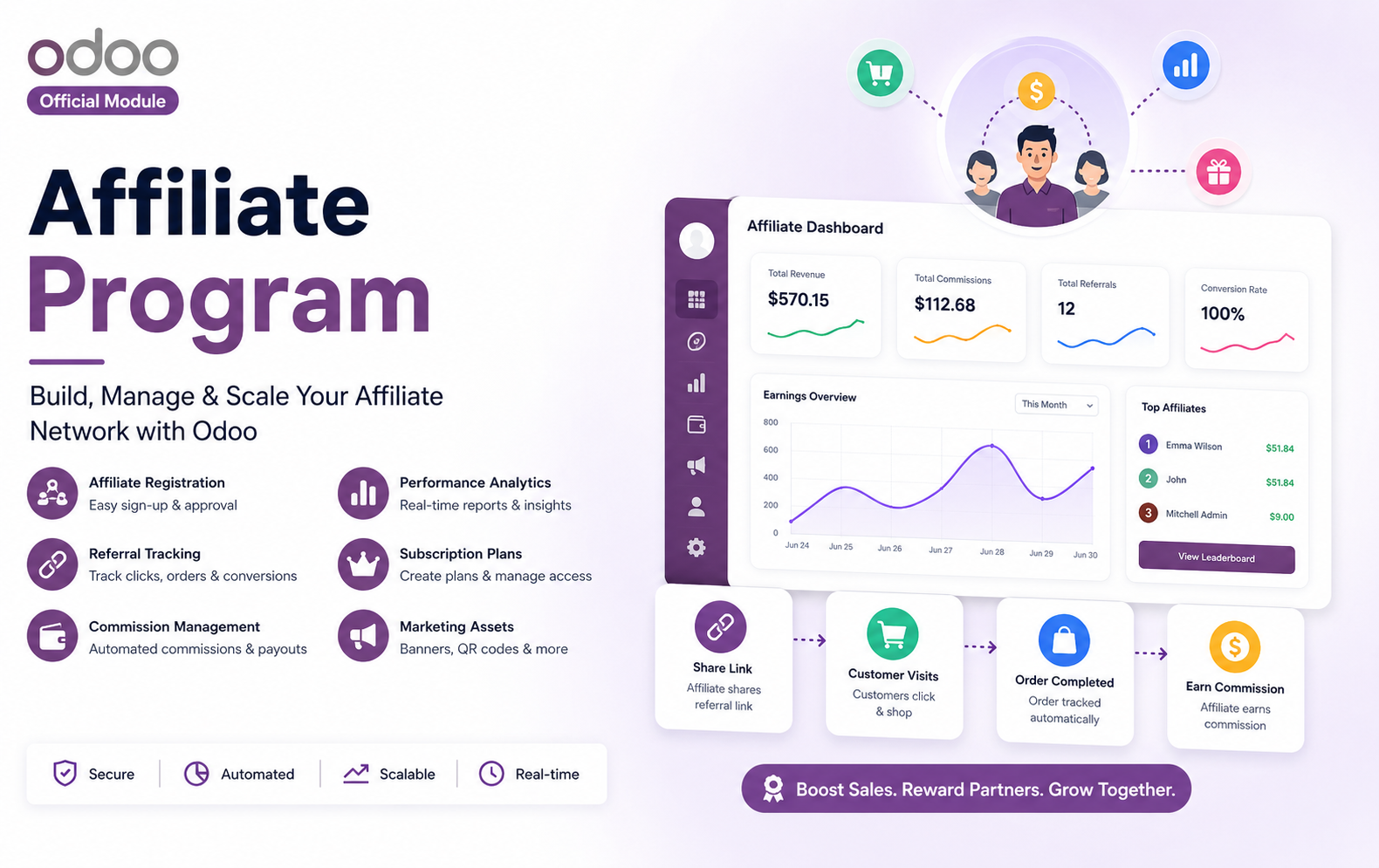
Key Features at a Glance
Use Cases: Who Needs This Module?
- Increase online sales by allowing affiliates to promote products using unique referral links and earn commissions for successful purchases.
- Expand market reach through affiliate partners who promote products to new customers while automating commission tracking and payouts.
- Build a partner network that promotes software subscriptions, licenses, or digital products with automated referral tracking and recurring commissions.
- Enable vendors, influencers, and business partners to refer buyers while managing commissions, affiliate performance, and marketing resources from one platform.
- Create affiliate campaigns for clients, monitor referral performance, and manage affiliate payouts with detailed reports and analytics.
- Reward affiliates for referring students to online courses, certifications, webinars, and training programs through automated commission management.
- Offer subscription-based affiliate plans with premium features, recurring billing, and exclusive marketing resources for affiliates.
- Encourage dealers, distributors, and business partners to generate qualified leads and sales through structured affiliate programs.
- Allow influencers, bloggers, YouTubers, and content creators to promote products using personalized referral links and earn commission on every successful sale.
- Generate more client inquiries and bookings by rewarding affiliates who refer consulting, healthcare, legal, financial, or professional services.
- Manage affiliate programs across multiple branches while tracking referrals, commissions, and business performance from a centralized Odoo system.
- Organizations already using Odoo Website, Sales, eCommerce, CRM, Subscriptions, or Accounting can seamlessly integrate affiliate marketing into their existing business processes without third-party software.
Quick User Guide (Visual Walkthrough)
Scroll up to revisit the detailed image-wise walkthrough.
Create and configure multiple affiliate programs by defining program names, referral code prefixes, commission structures, descriptions, eligibility rules, and activation settings effortlessly.
Step 1: Click Upload the Module in the Apps section.
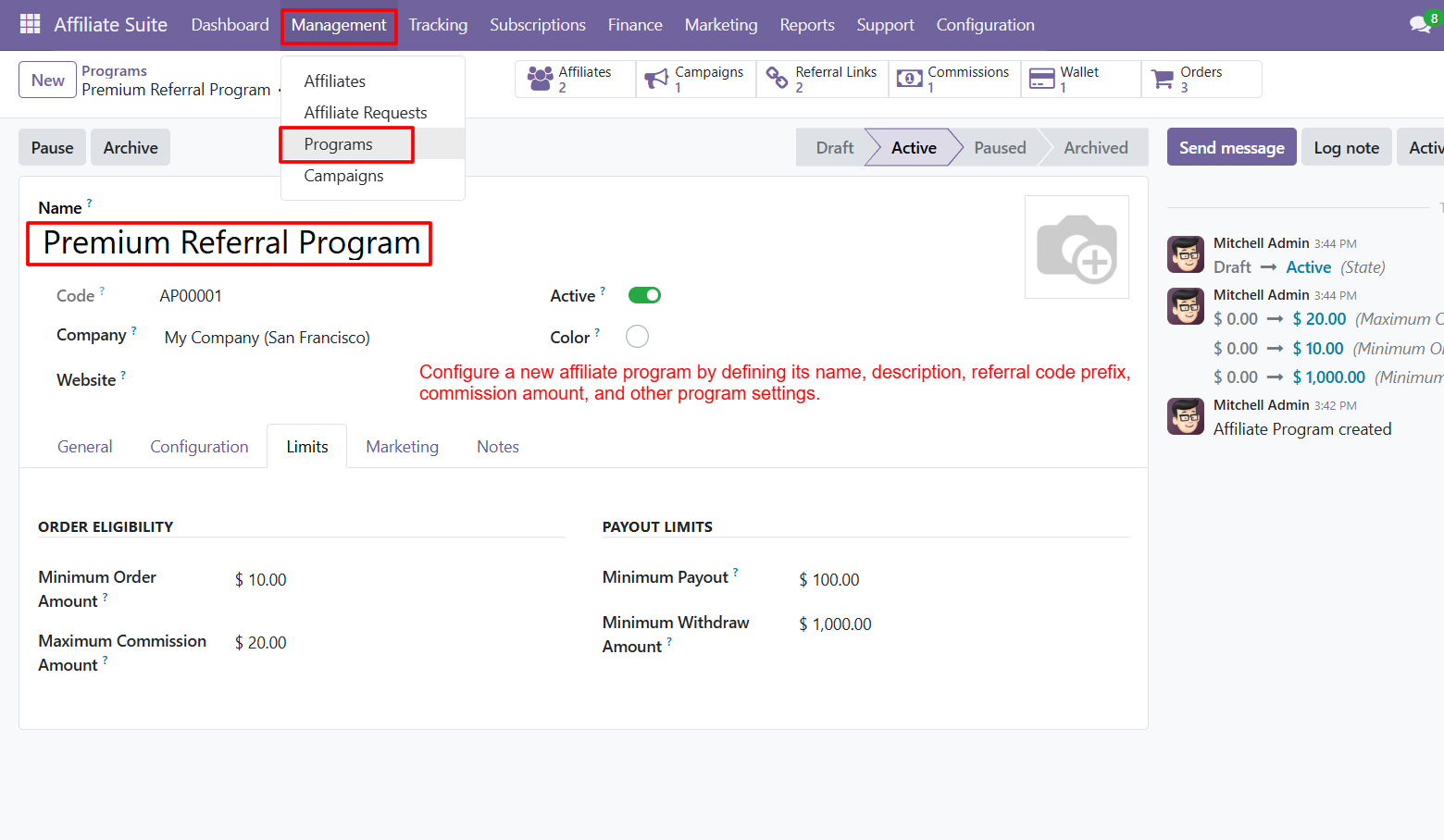
Step 2: Drag & drop the ZIP file or select from your system.
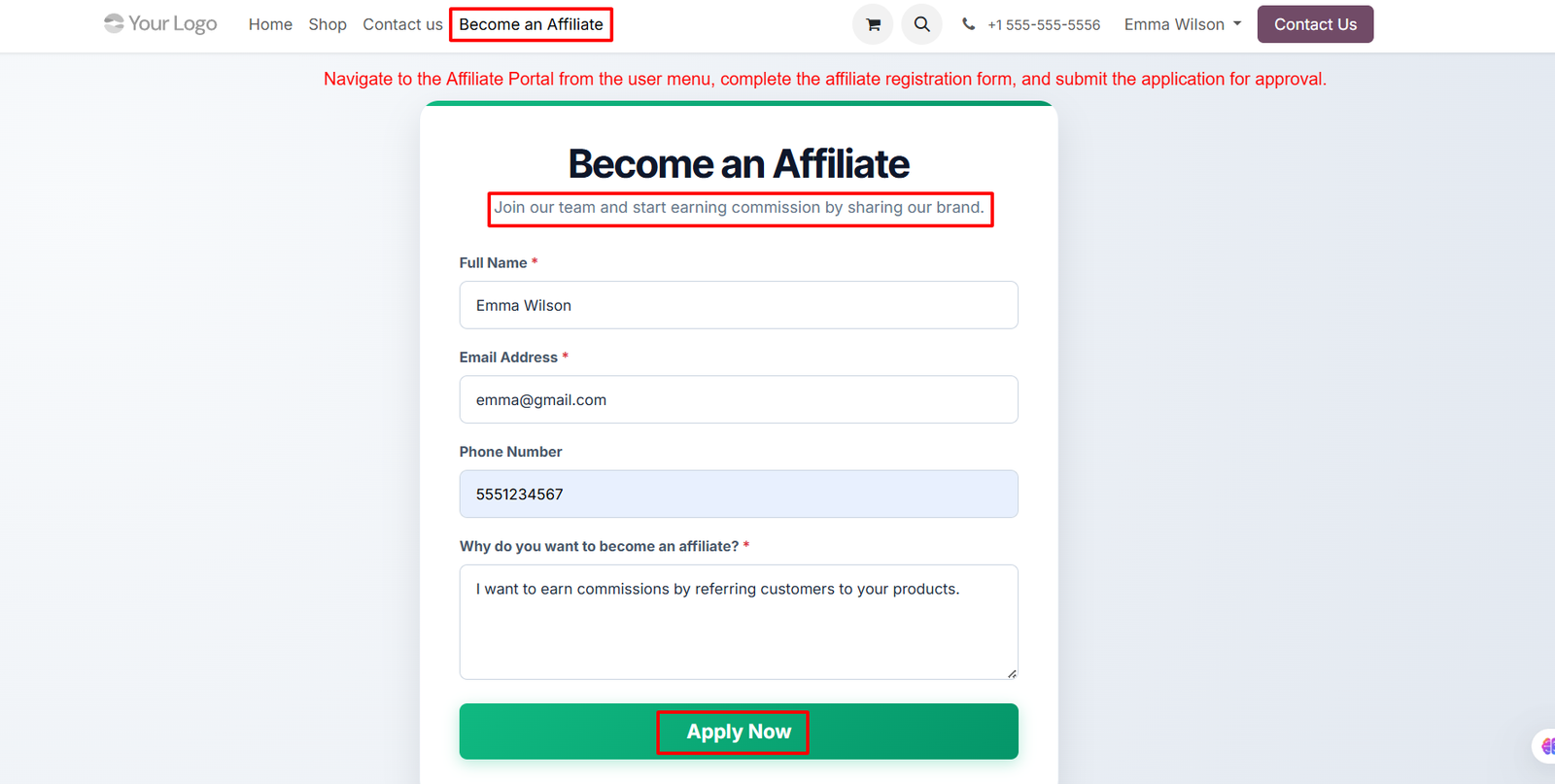
Step 3: Review submitted affiliate applications from the backend, verify applicant information, assign appropriate affiliate programs, and approve eligible users with confidence.
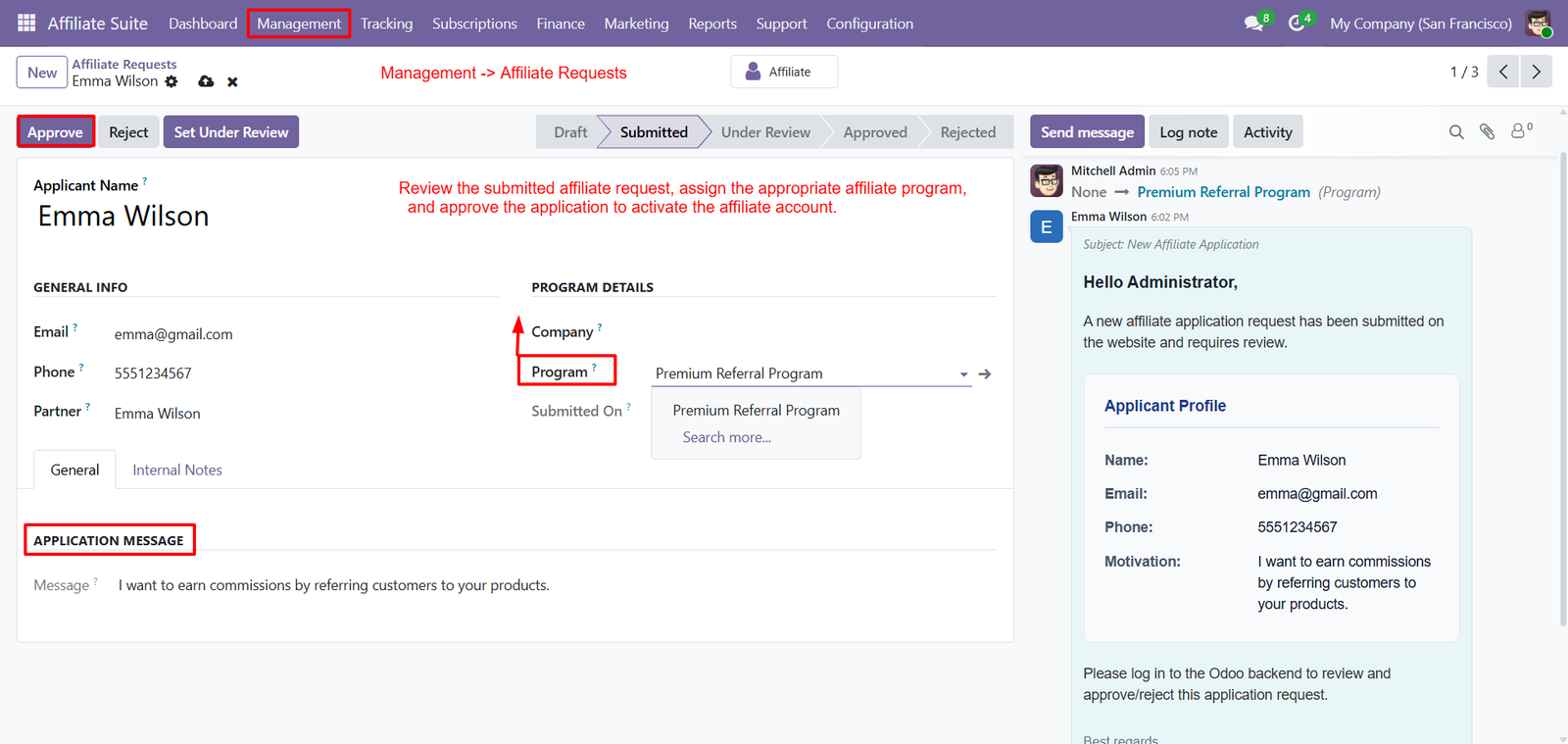
- Assign the most suitable affiliate program before approval, ensuring every affiliate receives the correct commission structure, referral rules, and program benefits.
- Approve, reject, or place affiliate applications under review using a structured workflow that simplifies affiliate onboarding and administrative decision-making processes.
- View complete applicant information, including name, email address, phone number, company details, and motivation before making approval decisions for transparency.
- Read affiliate application messages submitted during registration to better understand business goals, promotional strategies, and reasons for joining the affiliate program.
- Automatically activate approved affiliate accounts, allowing users to access their affiliate dashboard, referral links, commissions, marketing assets, and performance reports instantly.
- Track every approval action through integrated activity logs, internal notes, and communication history, ensuring complete visibility throughout the affiliate approval process.
- Send messages directly to applicants from the approval screen, improving communication, providing feedback, and keeping affiliates informed about application status updates.
- Assign affiliate requests to specific affiliate programs, enabling businesses to organize partners according to commission policies, campaigns, products, or promotional objectives.
- Centralize affiliate application management within Odoo, reducing manual effort while ensuring a secure, organized, and efficient affiliate approval workflow for administrators.
Step 4: Access a personalized affiliate dashboard to monitor referral performance, commissions, earnings, clicks, conversions, orders, and overall account activity in real time.
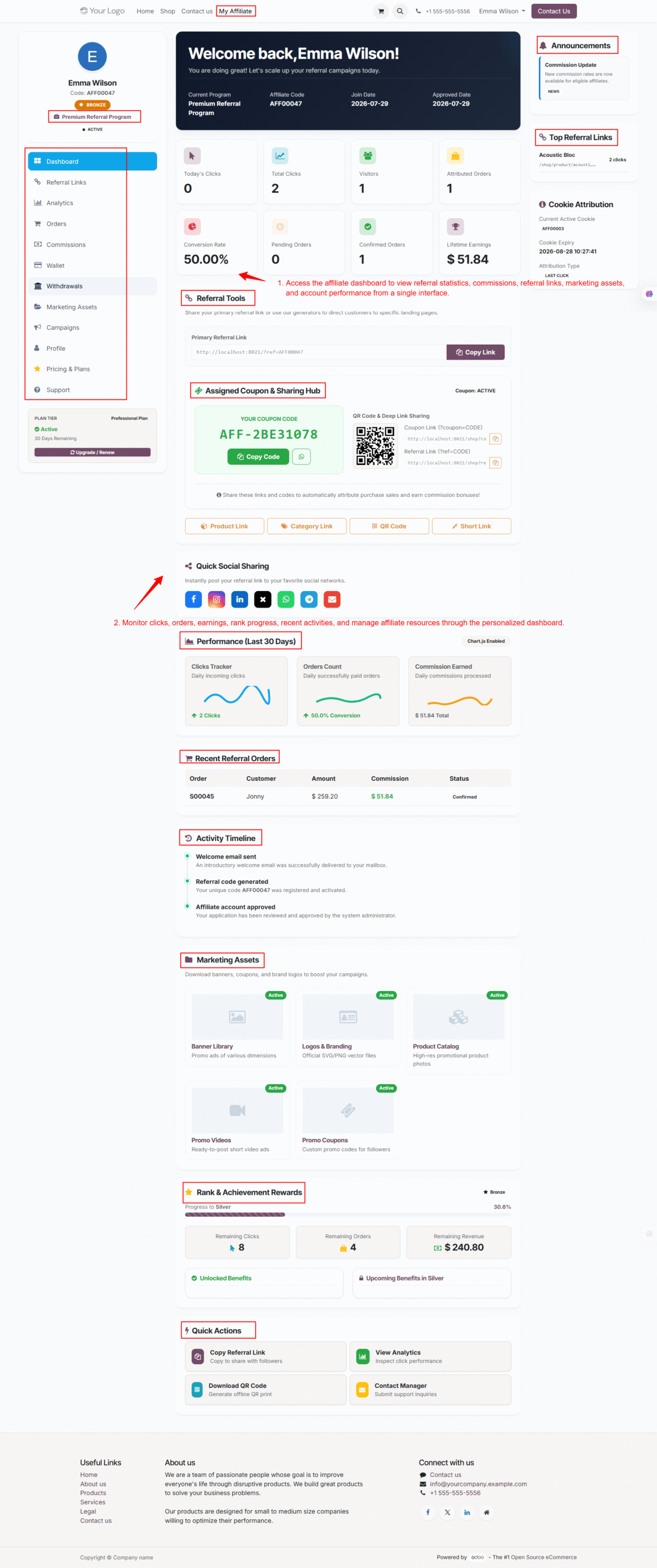
- View referral statistics, total clicks, visitors, confirmed orders, attributed orders, and lifetime earnings from a centralized dashboard for better performance tracking.
- Generate and manage referral links, short links, product links, category links, and QR codes for effective affiliate product promotions everywhere.
- Share referral links instantly through integrated social media sharing options, helping affiliates reach wider audiences and generate more referral opportunities efficiently.
- Access assigned coupon codes and QR codes that simplify customer referrals, improve promotional campaigns, and increase affiliate-driven sales conversions consistently.
- Analyze performance trends using interactive charts displaying clicks, commissions, conversion rates, and referral activity over the last thirty days for insights.
- Review recent referral orders, commission amounts, customer information, and transaction status to monitor affiliate sales performance and earning history accurately.
- Track account activities through the activity timeline, including referral generation, account approvals, welcome messages, and other important affiliate milestones automatically.
- Download and access marketing assets such as banners, logos, promotional videos, product catalogs, and coupons to enhance affiliate marketing campaigns effectively.
- Monitor achievement progress, unlock rewards, access quick actions, manage campaigns, and optimize affiliate performance using one comprehensive dashboard within Odoo.
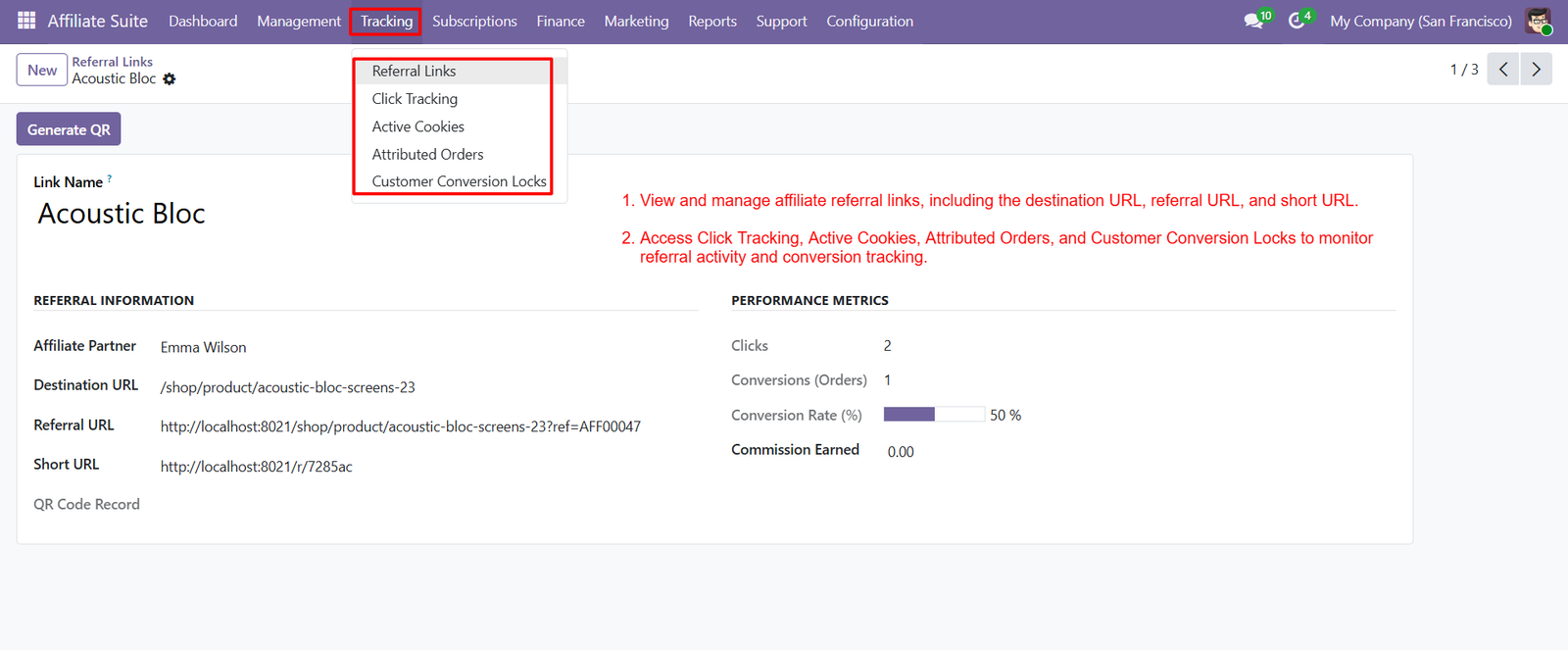
Step 5: Generate unique referral links for every affiliate, allowing accurate customer tracking, improved campaign management, and automated commission attribution across all referrals.
Step 6: Create flexible affiliate subscription plans by configuring billing cycles, pricing, renewal options, feature access, and plan visibility for different business requirements.
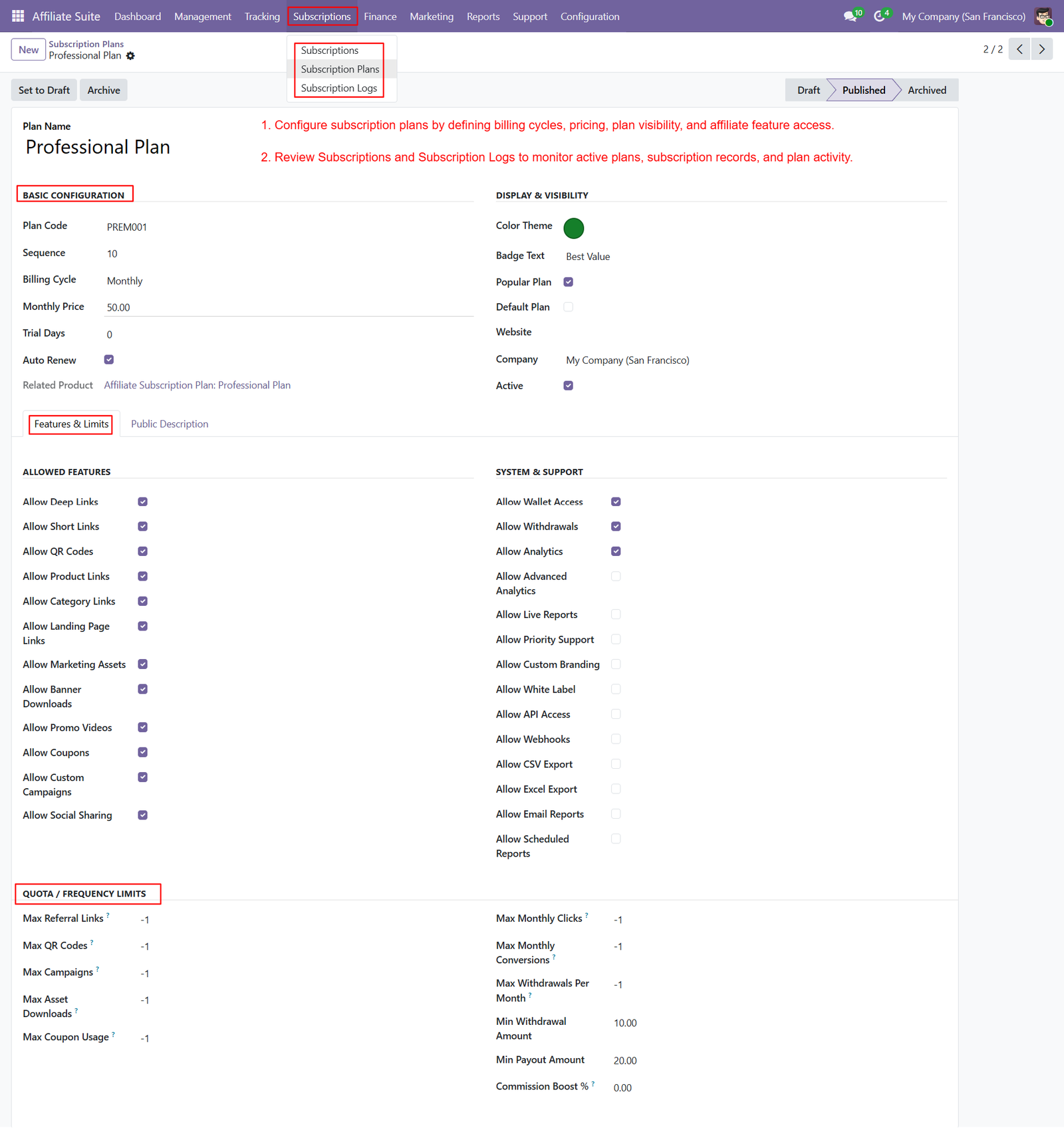
- Offer monthly, yearly, or custom subscription plans that provide affiliates with premium features, exclusive benefits, and advanced marketing capabilities effortlessly.
- Configure trial periods and automatic renewal settings to simplify subscription management while improving affiliate retention and recurring revenue opportunities consistently.
- Control affiliate feature access by enabling referral links, QR codes, marketing assets, analytics, wallet access, and withdrawal permissions through subscription plans.
- Define quota limits for referral links, QR codes, campaigns, downloads, clicks, conversions, and withdrawals to effectively manage affiliate resource utilization.
- Create popular, default, and featured subscription plans with customized color themes, badge labels, and attractive plan visibility for better engagement.
- Monitor active subscriptions, subscription history, and subscription logs from a centralized interface, ensuring complete visibility into affiliate membership activities.
- Configure minimum payout amounts, withdrawal limits, commission boost percentages, and monthly usage restrictions to maintain controlled affiliate financial operations.
- Enable advanced features such as analytics, priority support, custom branding, API access, scheduled reports, and export capabilities for premium subscribers.
- Manage affiliate subscription plans centrally within Odoo, providing scalable membership options while improving affiliate experience, business growth, and revenue generation.
Step 7: Manage affiliate withdrawal requests from a centralized finance module, ensuring secure payout processing, approval workflows, and accurate commission payment management efficiently.
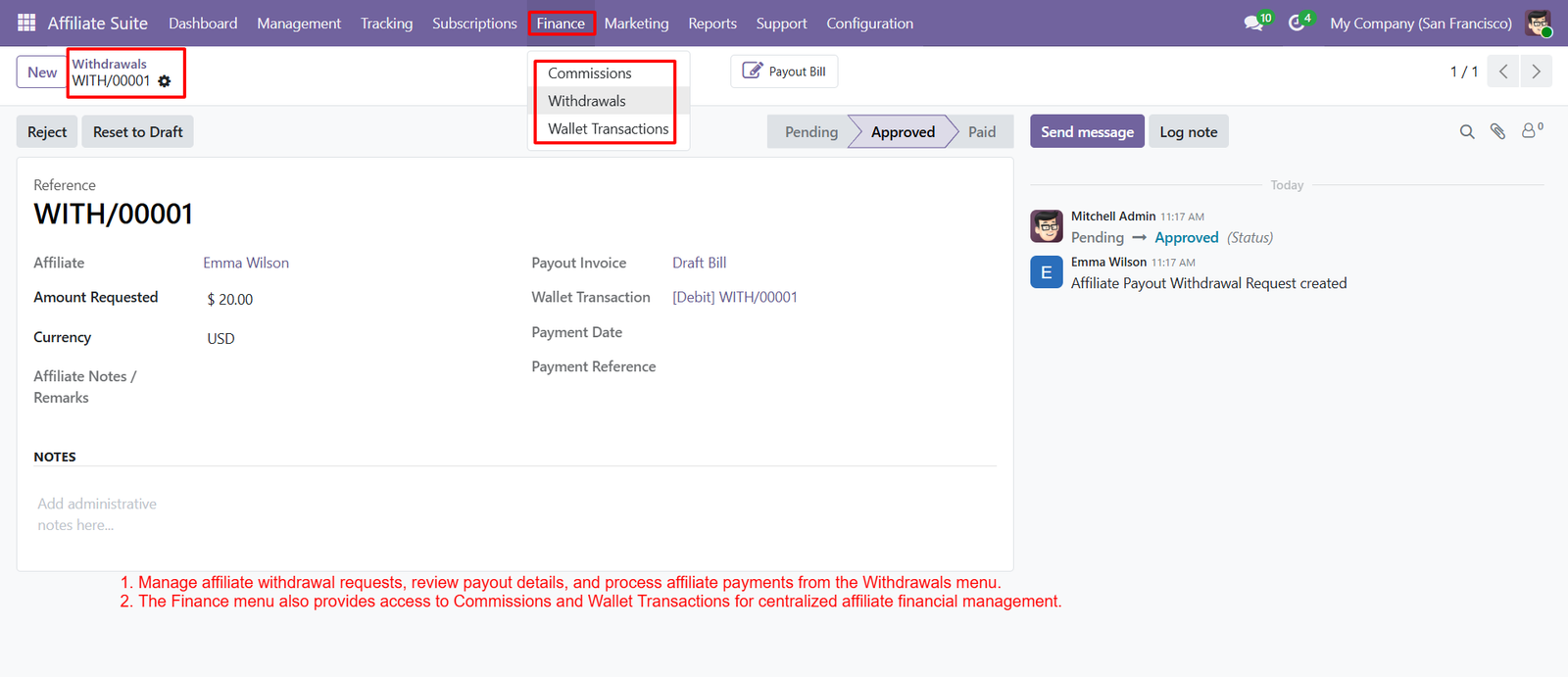
- Review withdrawal requests with complete payment details, requested amounts, currencies, wallet transactions, and payout references before approving affiliate payments confidently.
- Approve, reject, or reset withdrawal requests using a structured workflow that simplifies financial operations while maintaining transparent affiliate payment records consistently.
- Access commission records, withdrawal history, and wallet transactions from one centralized finance menu for complete visibility into affiliate financial activities.
- Track every payout request through integrated activity logs, ensuring administrators can monitor status changes, approvals, and payment processing without confusion or delays.
- Generate payout bills directly from approved withdrawal requests, streamlining accounting processes and improving financial management across affiliate payment operations effortlessly.
- Monitor affiliate wallet balances and transaction history to ensure commission earnings, deductions, withdrawals, and payment records remain accurate and transparent always.
- Process affiliate payments using structured approval stages, reducing manual errors while maintaining secure, organized, and auditable financial transaction workflows within Odoo.
- Store affiliate notes, payment references, invoices, and administrative remarks alongside withdrawal requests, providing complete documentation for future financial reviews and audits.
- Centralize affiliate commission management, wallet transactions, withdrawal approvals, and payout processing into one finance module, improving efficiency, transparency, and business financial control.
Step 8: Create and manage marketing assets including banners, logos, promotional images, and downloadable resources to support affiliate product promotion effectively everywhere.
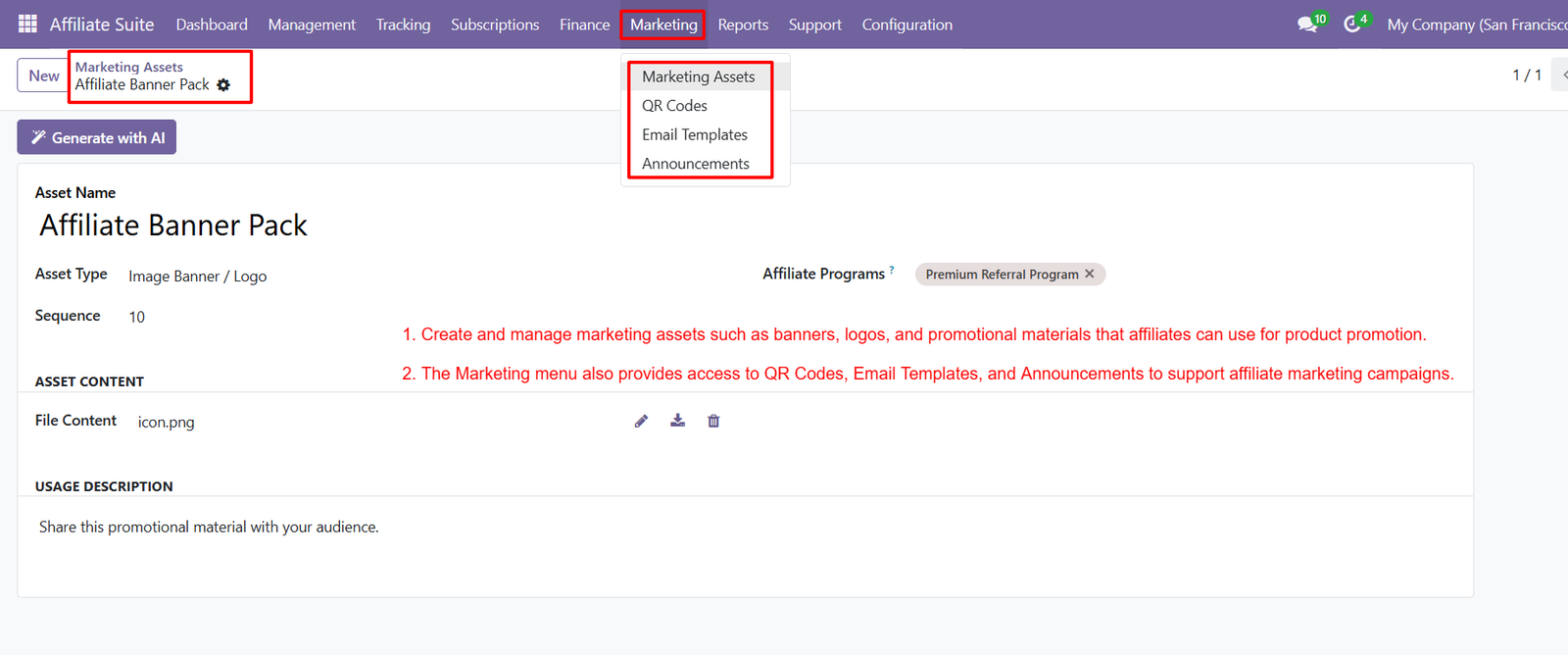
- Assign marketing assets to specific affiliate programs, ensuring affiliates receive relevant promotional materials tailored to their campaigns and target audiences.
- Upload high-quality banners, logos, and promotional files that affiliates can download and use across websites, social media, and marketing campaigns.
- Generate QR codes for products and referral campaigns, helping affiliates promote businesses through both online and offline marketing channels efficiently.
- Create professional email templates for affiliate communication, enabling businesses to share promotions, updates, newsletters, and campaign announcements consistently with affiliates.
- Publish announcements to notify affiliates about new campaigns, product launches, promotional offers, important updates, and upcoming business opportunities in real time.
- Organize marketing assets by type, sequence, and affiliate program, ensuring easy management and quick access from the centralized marketing module.
- Enable affiliates to download approved promotional materials directly from their dashboard, improving campaign consistency and reducing manual content distribution efforts.
- Update, replace, or remove marketing assets anytime, ensuring affiliates always access the latest promotional resources, branding materials, and campaign content.
- Centralize banners, QR codes, email templates, announcements, and promotional resources within Odoo, simplifying affiliate marketing management while improving campaign effectiveness and engagement.
Step 9: Monitor affiliate performance using Leaderboard reports that compare clicks, referrals, conversions, commissions, earnings, and rankings across all registered affiliates accurately.
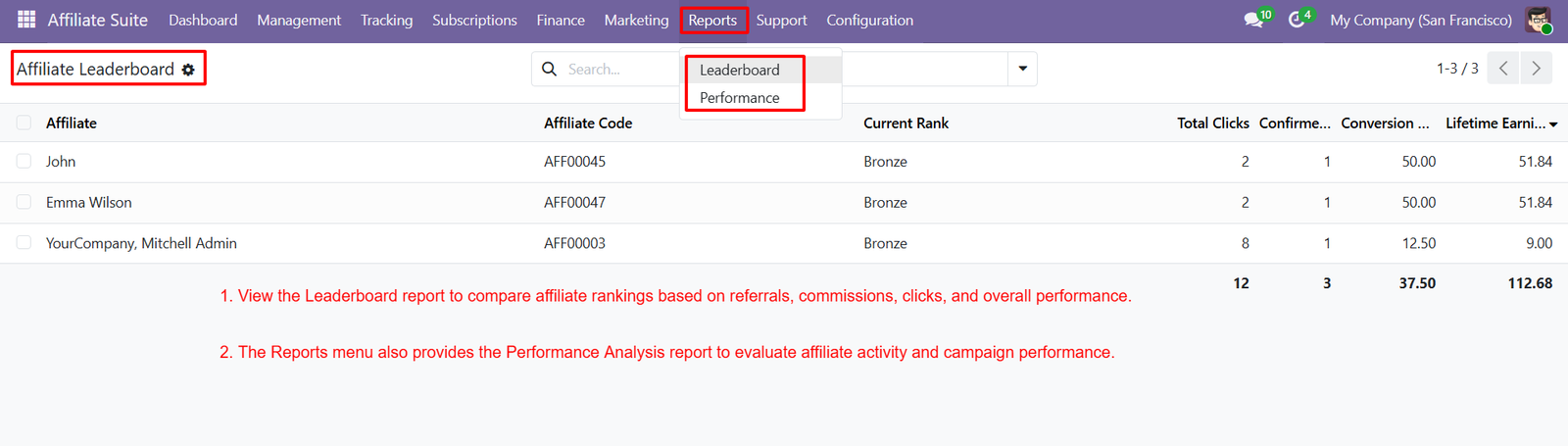
- View affiliate rankings based on referral performance, helping administrators identify top-performing partners and reward outstanding contributors with confidence and transparency.
- Analyze total clicks, confirmed orders, conversion rates, and lifetime earnings to measure affiliate campaign effectiveness and overall business growth comprehensively.
- Compare multiple affiliates side by side using centralized performance reports, making it easier to evaluate productivity and optimize affiliate marketing strategies.
- Access Performance Analysis reports to monitor referral activity, campaign results, commission trends, and customer conversions through detailed business insights and metrics.
- Generate data-driven reports that help businesses identify successful affiliate campaigns, improve marketing decisions, and maximize return on investment through analytics.
- Track affiliate performance continuously using real-time reporting tools, ensuring accurate monitoring of referrals, commissions, conversions, and business performance at every stage.
- Evaluate affiliate engagement by reviewing referral statistics, conversion percentages, click volumes, and earnings, enabling better incentive planning and campaign optimization efforts.
- Use comprehensive reporting dashboards to monitor affiliate activities, compare historical performance, and identify improvement opportunities for long-term referral program success.
- Centralize affiliate reporting and performance analysis within Odoo, providing actionable insights that support strategic decisions, business expansion, and sustainable affiliate program growth.
Step 10: Allow affiliates to submit support tickets directly from their dashboard, ensuring quick communication, issue reporting, and timely assistance from administrators effectively.
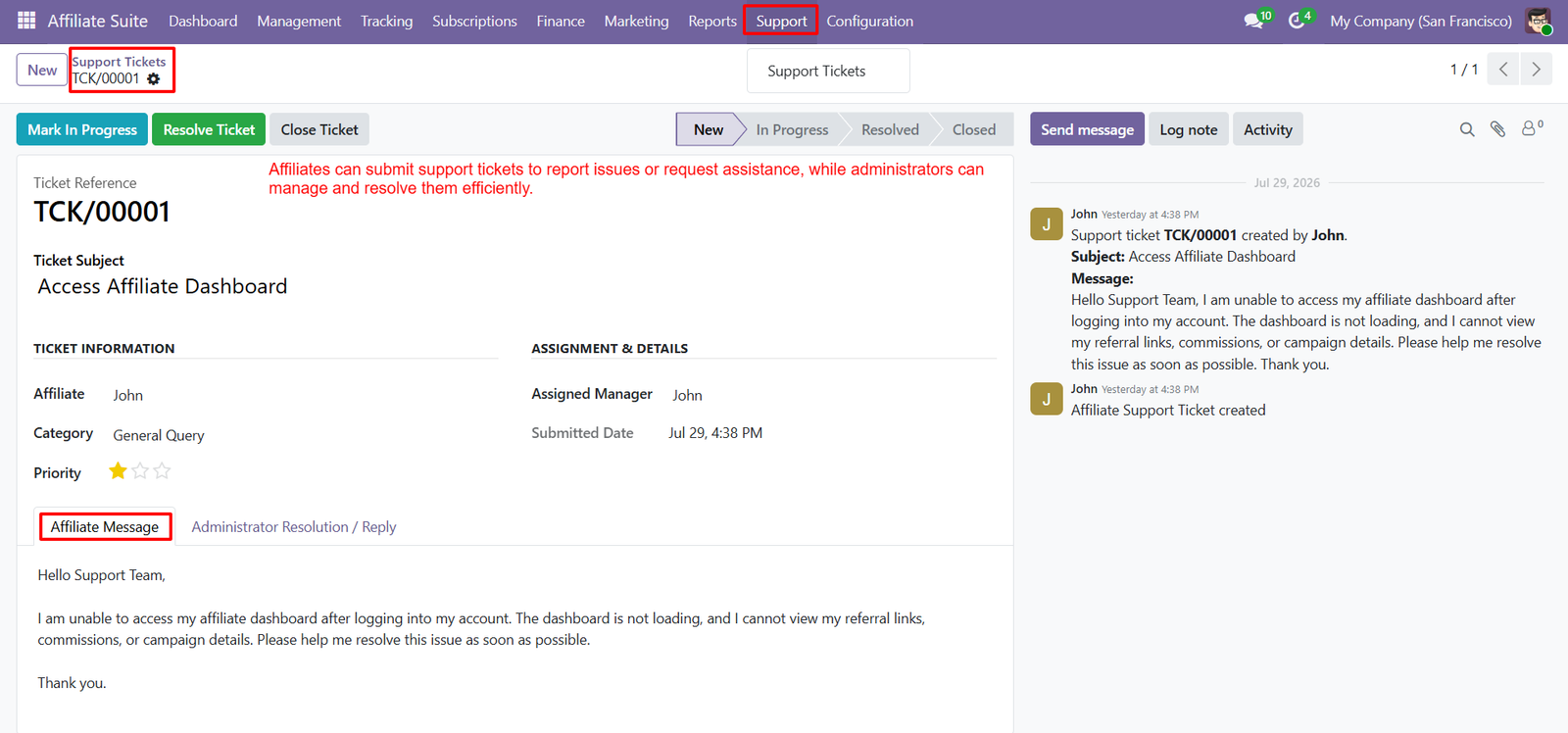
- Manage support tickets through organized workflows, allowing administrators to review, assign, update, resolve, and close affiliate requests efficiently within Odoo.
- Track ticket status using multiple stages including New, In Progress, Resolved, and Closed for complete support request lifecycle management.
- View complete ticket information including affiliate details, categories, priorities, assigned managers, submission dates, and communication history from one interface.
- Enable affiliates to describe issues in detail, helping administrators understand problems quickly and provide accurate, efficient, and personalized support responses consistently.
- Assign support tickets to responsible managers, ensuring every affiliate inquiry receives proper attention, faster resolution, and improved customer service quality always.
- Communicate directly with affiliates through integrated messaging, allowing administrators to share updates, request additional information, and provide timely issue resolutions.
- Maintain complete activity logs for every support ticket, ensuring transparent communication history, administrative actions, and ticket progress throughout the resolution process.
- Categorize support requests by priority and issue type, helping businesses organize workloads, improve response times, and deliver exceptional affiliate support experiences.
- Centralize affiliate support management within Odoo, improving communication, reducing response delays, enhancing issue resolution efficiency, and strengthening long-term affiliate relationships.
Step 11: Configure customer discount rules by defining discount types, values, eligibility conditions, usage limits, and applicable affiliate programs for promotional campaigns effectively.
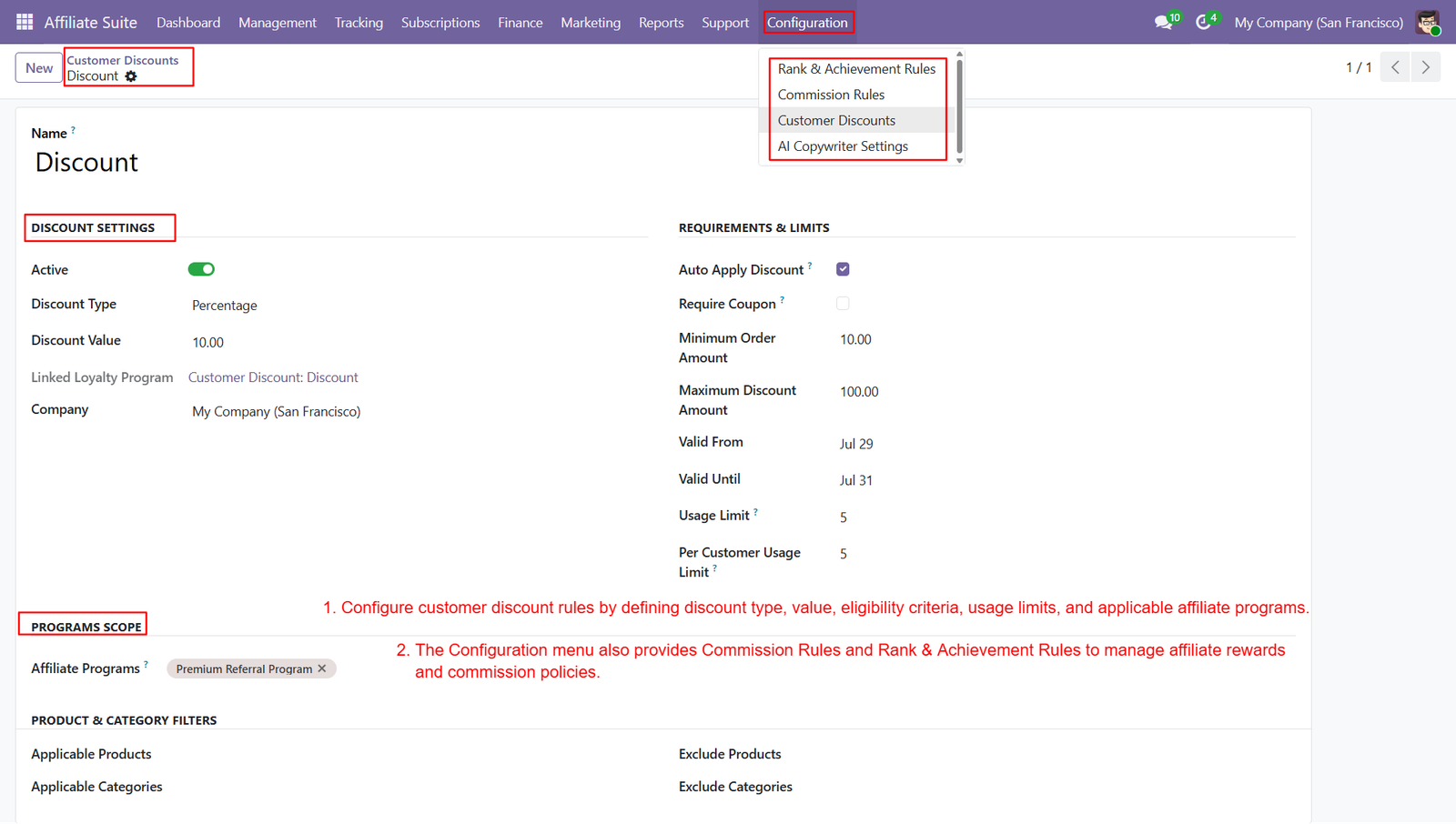
- Create percentage-based or fixed discount offers that encourage customer purchases while increasing affiliate-driven sales and improving overall business revenue consistently.
- Apply discounts automatically or require coupon codes, providing businesses with flexible promotional strategies tailored to different marketing campaigns and customer segments.
- Set minimum order amounts, maximum discount values, validity periods, and customer usage limits to maintain complete control over promotional offers.
- Link discount rules with specific affiliate programs, ensuring promotions remain targeted and commissions are accurately attributed to eligible affiliate partners.
- Configure applicable products and categories while excluding selected items, allowing businesses to create highly targeted customer discount campaigns with precision.
- Define commission rules that automate affiliate earnings based on configurable policies, ensuring transparent commission calculations and accurate reward distribution across programs.
- Create rank and achievement rules to reward top-performing affiliates with badges, incentives, commission boosts, and milestone-based recognition for outstanding performance.
- Manage affiliate rewards, discounts, commission policies, and promotional configurations from one centralized configuration module, simplifying overall affiliate program administration efficiently.
- Centralize customer discounts, commission rules, rank achievements, and affiliate program settings within Odoo, improving flexibility, transparency, and long-term business growth.
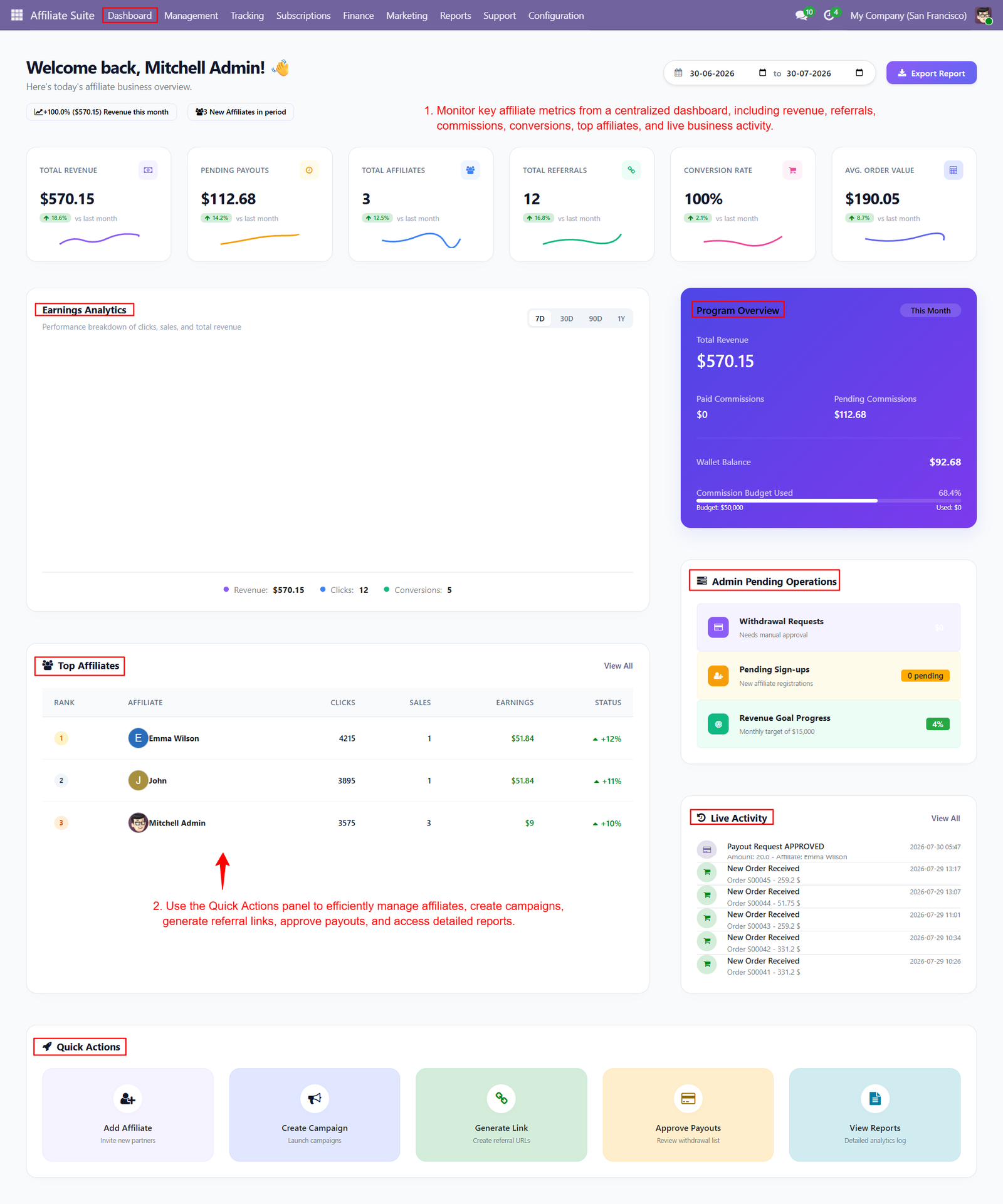
Step 12: Monitor key affiliate metrics including revenue, referrals, commissions, conversions, pending payouts, and affiliate growth from one centralized dashboard efficiently every day.
Why Use the DHL Shipping Integration for Odoo Module?
- Seamless DHL Integration: Connect your Odoo store directly with DHL shipping services for streamlined order fulfillment.
- Automated Shipping Rates: Calculate and apply DHL shipping charges directly to customer orders.
- Easy Shipment Creation: Create DHL shipments directly from Odoo delivery orders with minimal manual effort.
- Automatic Tracking Number: Generate and store DHL tracking numbers automatically for better shipment visibility.
- Shipping Label Generation: Automatically generate printable DHL shipping labels directly from Odoo.
- Real-Time Shipment Management: Monitor shipment status, tracking information, and delivery activities from a centralized dashboard.
- Centralized Shipping Orders: Manage DHL shipping orders, customers, delivery references, costs, and tracking numbers in one place.
- Flexible Delivery Methods: Configure DHL delivery methods, pricing rules, margins, and invoicing policies according to business requirements.
- Secure API Configuration: Manage DHL API credentials and integration settings through a dedicated account configuration interface.
- Better Customer Experience: Provide customers with transparent shipping costs and reliable DHL delivery options during checkout.
- Reduced Manual Work: Automate repetitive shipping tasks, reducing data entry and improving overall operational efficiency.
- Complete Shipment Visibility: Access tracking numbers, shipping labels, delivery orders, and shipment history directly within Odoo.
- Efficient Warehouse Operations: Simplify package preparation with automatically generated DHL shipping labels and shipment documentation.
- Multi-Order Management: Manage multiple DHL shipments efficiently through centralized shipping orders and generated label lists.
- Improved Logistics Control: Track shipping costs, shipment statuses, delivery information, and DHL activities from a unified platform.