

Managing addresses manually in an ERP system can be time-consuming and can also lead to incomplete or incorrect information. Whether you are creating a customer, adding a vendor, processing a website order, managing employees, or configuring your company details, accurate address information is essential.
The All in One Address Auto Complete module for Odoo simplifies this process by providing real-time address suggestions and automatic address completion powered by the Geoapify Autocomplete API.
Instead of manually entering every address field, users can simply type a few characters, select the correct location from the suggestions, and automatically populate the available address information.
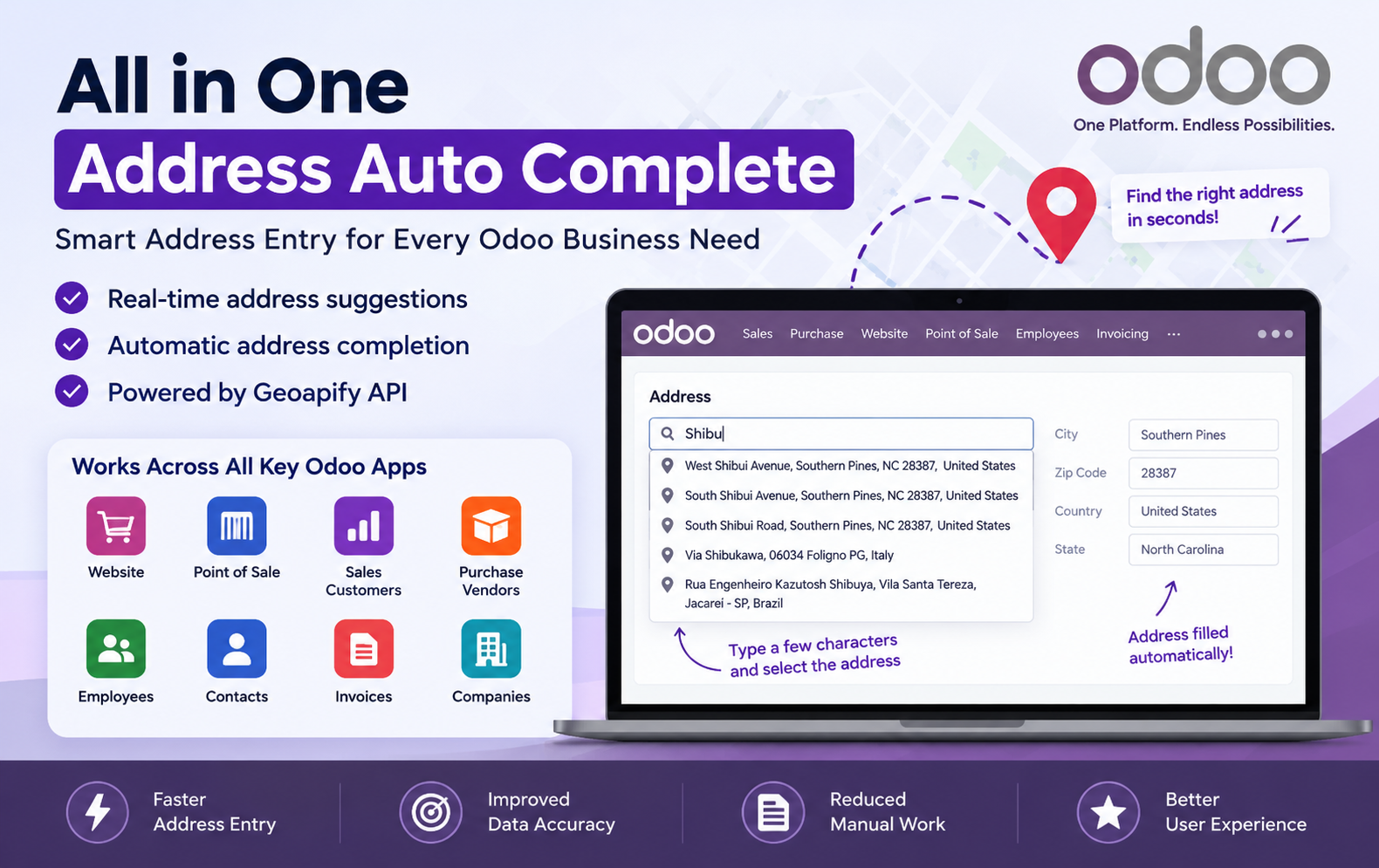
Key Features at a Glance
- Geoapify API Integration – Connect Odoo with Geoapify API to retrieve accurate, real-time address suggestions.
- Real-Time Address Suggestions – Get relevant location suggestions instantly while typing a few characters.
- Automatic Address Completion – Automatically populate available address fields after selecting the appropriate suggestion.
- Website Checkout Autocomplete – Simplify customer address entry directly during Odoo Website checkout.
- Sales Customer Autocomplete – Quickly search and complete customer addresses while creating Sales customers.
- POS Customer Autocomplete – Search customer locations and automatically fill address details in Point of Sale.
- Purchase Vendor Autocomplete – Quickly add accurate vendor addresses while creating or updating Purchase vendors.
- Employee Address Autocomplete – Easily search and complete employee private addresses using location suggestions.
- Contact Address Autocomplete – Maintain accurate contact addresses with quick location-based address suggestions.
- Invoice Address Autocomplete – Simplify invoice address management with automatic address information completion.
- Company Address Autocomplete – Configure company addresses quickly by selecting the correct suggested location.
- Reduced Manual Data Entry – Minimize repetitive typing by automatically filling available address information.
- Improved Address Accuracy – Help reduce incorrect or incomplete address information across Odoo records.
- Consistent Address Information – Maintain standardized and consistent address details across different business operations.
- Faster Customer Data Entry – Enable sales and POS users to create customer records more efficiently.
- Faster Vendor Management – Save time when entering and maintaining supplier address information.
- User-Friendly Address Search – Provide a simple search experience where users type characters and select locations.
- Multiple Odoo Applications – Extend address autocomplete functionality across Website, POS, Sales, Purchase, Employees, Contacts, Invoices, and Companies.
- Better User Experience – Make address management faster, easier, and more convenient for Odoo users.
- Streamlined Address Management – Centralize and simplify address entry throughout business processes using intelligent autocomplete.
Use Cases: Who Needs This module?
- Businesses selling products through Odoo Website can help customers enter their delivery addresses faster during checkout with real-time address suggestions.
-
Sales teams that frequently create new customer records can quickly search and select accurate customer addresses instead of entering every field manually.
-
Retail businesses using Odoo Point of Sale can search and autocomplete customer addresses directly while creating POS customer records.
-
Procurement teams can quickly enter vendor addresses when creating or updating supplier records, reducing repetitive manual data entry.
-
HR teams can use address suggestions when entering employees’ private addresses, making employee information management more convenient.
-
Companies with many contacts can use autocomplete to maintain address information more efficiently and consistently.
-
Businesses managing invoice addresses can use address autocomplete to simplify address entry and maintain consistent information.
-
Companies managing multiple business entities can quickly configure company addresses by searching and selecting the appropriate location.
-
Organizations working with customers, vendors, and contacts across different locations can benefit from searchable address suggestions.
-
Any Odoo business that wants faster address entry, fewer address-entry errors, improved data accuracy, and a better user experience can benefit from the module.
Quick User Guide (Visual Walkthrough)
Scroll up to revisit the detailed image-wise walkthrough.
Step 1: Geoapify API Configuration: Configure the Geoapify API Key in Odoo General Settings to activate real-time address suggestions and automatic address completion functionality.

Step 2: Website checkout address autocomplete lets customers enter a few characters and quickly select relevant address suggestions for faster checkout completion.

Step 3: Sales Customer Address Autocomplete helps users quickly search customer locations by entering a few characters and selecting the relevant address.

- Create Customer records faster by using address suggestions instead of manually entering complete street, city, ZIP, state, and country information.
- Enter partial address text in the Address field to display matching locations and choose the appropriate suggestion for the customer.
- Relevant address suggestions appear automatically while typing, helping sales users find suitable customer locations without navigating through separate address screens.
- Selecting a suggested location automatically populates available address details, reducing repetitive typing and making customer creation more efficient overall easily.
- The feature helps sales teams reduce manual data entry when creating new customers with complete and consistent address information efficiently.
- Customer address autocomplete simplifies daily Sales operations by making location searches faster, easier, and more convenient for users quickly and easily.
- Users can search addresses using only a few characters, making it easier to find locations when address details are unavailable.
- The address suggestion list provides matching locations, allowing users to select the correct customer address from available search results quickly.
- Automatic address completion helps populate corresponding fields after selection, minimizing the effort required to enter each customer location information manually.
- Sales teams can maintain cleaner customer records by selecting suggested addresses and reducing inconsistencies caused by manually typed location details.
- Faster customer address entry saves time during customer creation, allowing sales representatives to focus more on customer and quotation activities.
- The module integrates address autocomplete directly into the Sales customer form, providing a convenient location search experience within Odoo easily.
- Customer creation becomes simpler when users can type partial locations, review suggestions, and select the address matching the customer’s destination.
- Address autocomplete can reduce common typing mistakes by helping users choose location suggestions rather than entering every address component manually.
- The Sales customer form provides an integrated address search experience that supports quicker entry and more convenient customer information management.
Step 4: Point of Sale customers can search locations by entering few address characters, making customer creation faster and more convenient overall.

- Users can enter partial address information and receive relevant location suggestions directly within the POS customer address field quickly.
- Selecting the appropriate suggested address automatically populates available address details, reducing repetitive manual typing during POS customer creation significantly.
- POS users can quickly find customer locations without manually entering complete street, city, state, and country information themselves.
- Address suggestions simplify customer registration by providing matching locations as users type information into the address field during creation.
- The autocomplete feature helps POS teams save valuable time when creating new customer records with accurate address information efficiently.
- Users can select the correct location from multiple suggestions, helping maintain relevant address information within POS customer records easily.
- Address autocomplete reduces repetitive data entry by automatically completing available address information after users select an appropriate suggestion.
- The POS customer form provides an integrated address search experience, eliminating unnecessary navigation between different screens during customer creation.
- Users can search customer addresses directly from POS, making location entry simpler and more convenient for everyday retail operations.
- Real-time address suggestions help POS employees quickly identify locations without manually typing every individual address field during customer creation.
- Automatic address completion helps reduce typing mistakes by populating available information from the selected location suggestion within POS.
- POS businesses handling frequent customer registrations can benefit from faster address searches and simplified customer information management during operations.
- The module makes POS customer address entry more efficient by combining location searching and automatic information completion within one field.
- Users simply type a few characters, review matching locations, and select the appropriate address for customer records quickly.
Step 5: Vendor Address Autocomplete helps users quickly search supplier locations by entering a few characters and selecting relevant suggestions.

- Create vendor records faster by searching addresses instead of manually entering complete street, city, ZIP, state, and country information.
- Enter partial address information in the vendor Address field to display matching locations and choose the appropriate suggestion quickly.
- Relevant vendor address suggestions appear while typing, helping users identify and select the correct supplier location efficiently.
- Selecting a suggested address automatically fills available address details, reducing repetitive manual typing during vendor creation.
- Purchase teams can save time by using address suggestions instead of manually entering every vendor address field individually.
- The autocomplete feature simplifies vendor management by providing searchable location suggestions directly within the Purchase vendor form.
- Users can search vendor locations using only a few characters, making address entry faster and more convenient during procurement activities.
- Multiple matching locations are displayed so users can select the appropriate address from available suggestions for each vendor.
- Automatic address completion reduces manual work by populating available address information after selecting the required vendor location.
- Vendor address entry becomes easier when users can search locations and select relevant suggestions directly from the Address field.
- The module helps reduce typing mistakes by allowing users to choose suggested locations instead of entering address details manually.
- Purchase teams can maintain consistent vendor information by selecting appropriate address suggestions during supplier record creation and updates.
Step 6: Employee Address Autocomplete helps HR users quickly search private employee locations by entering a few characters into the address field.

- Users can enter partial private address information and receive relevant location suggestions within the employee form for faster data entry.
- Selecting the appropriate suggested location automatically completes available address details, reducing repetitive typing during employee record creation and information management.
- HR teams can search employee private addresses without manually entering every street, city, ZIP, state, and country detail individually themselves.
- The autocomplete feature makes employee address management more convenient by providing searchable location suggestions directly within the employee information form.
- Users can type a few characters in Private Address and select the matching location from the displayed address suggestions quickly.
- Relevant address suggestions help users identify employee locations efficiently without navigating away from the employee record during address entry processes.
- Automatic address completion reduces manual work by automatically filling available address information after the user selects an appropriate location suggestion.
- The feature can help reduce address entry mistakes by allowing users to select relevant locations rather than typing details manually.
- Employee address entry becomes faster when HR users can search locations and select matching suggestions from the autocomplete results list.
- Businesses managing employee records can simplify private address entry by using location suggestions during employee information updates and record creation.
- The employee form provides an integrated address search experience, helping users maintain address information efficiently within the Odoo Employees application.
- Users can quickly search employee locations by entering partial text, reviewing matching suggestions, and selecting the required address location quickly.
- Address suggestions reduce repetitive typing and make private address completion more convenient for HR teams managing employee records daily effectively.
- Selecting a suggested location helps populate available address information, making employee private address entry simpler and more efficient overall today.
- The autocomplete functionality supports faster employee information management by simplifying how users search and select private address locations efficiently daily.
Step 7: Company Address Autocomplete helps businesses quickly search company locations by entering a few characters into the address field during configuration.
- Users can enter partial company address information and receive relevant location suggestions within the company configuration form for data entry.
- Selecting the appropriate suggested location automatically completes available company address details, reducing repetitive manual typing during company configuration and setup.
- Companies can search locations without manually entering complete street, city, ZIP, state, and country information individually during address configuration processes.
- The autocomplete feature simplifies company address management by providing searchable location suggestions directly within Odoo company settings for administrators easily.
- Users can type a few characters in the Address field and select matching locations from displayed suggestions during company setup.
- Relevant address suggestions help administrators identify the correct company location efficiently without navigating away from the company configuration screen easily.
- Automatic address completion reduces manual work by filling available company address information after selecting the appropriate location suggestion during setup.
- The feature helps reduce address entry mistakes by allowing administrators to select relevant locations instead of typing details during setup.
- Company address entry becomes faster when administrators can search locations and select matching suggestions from the available autocomplete results easily.
- Businesses managing company records can simplify address entry by using location suggestions during company information updates and configuration activities efficiently.
- The company form provides an integrated address search experience, helping users maintain company address information efficiently within Odoo settings efficiently.
- Administrators can quickly search company locations by entering partial text, reviewing suggestions, and selecting the required address location during setup.
- Address suggestions reduce repetitive typing and make company address completion more convenient for administrators managing business information daily within Odoo.
- Selecting a suggested location helps populate available company address information, making configuration simpler and more efficient overall for administrators easily.
- The autocomplete functionality supports faster company information management by simplifying how users search and select business locations efficiently during configuration.
Why Use the All in One Address Auto Complete for Odoo Module?
Managing addresses manually across different Odoo applications can take time and may lead to incomplete or inconsistent information. All in One Address Auto Complete simplifies this process with real-time address suggestions and automatic completion powered by the Geoapify Autocomplete API.
1. Faster Address Entry
Enter just a few characters and select the relevant address suggestion instead of manually typing the complete address.
2. Reduce Manual Data Entry
The module automatically populates available address information after selecting a suitable location, reducing repetitive typing.
3. Improve Address Accuracy
Selecting relevant address suggestions can help reduce errors caused by manually entering street, city, ZIP Code, state, and country details.
4. Consistent Address Information
Use the same autocomplete-based approach across supported Odoo records to maintain more consistent address information.
5. Better Website Checkout Experience
Customers can search for their address during Website checkout and select a relevant suggestion to complete available address details.
6. Simplify Customer Management
Sales and POS users can quickly search and select customer locations when creating or editing customer records.
7. Easy Vendor Address Management
Purchase teams can use address suggestions when creating or updating vendor records, making supplier address entry more convenient.
8. Support Employee Addresses
HR users can search and select locations when entering employee private addresses, simplifying employee information management.
9. Manage Contact Addresses Easily
Contact records can benefit from address suggestions, helping users enter and maintain address information efficiently.
10. Simplify Invoice Addresses
The module supports invoice address management with autocomplete functionality for faster and more consistent address entry.