

Managing shipping manually can make order fulfillment time-consuming, especially when businesses need to calculate delivery charges, create shipments, track orders, and generate shipping labels.
The Australia Post Shipping Integration for Odoo connects Australia Post shipping operations directly with Odoo. Businesses can configure Australia Post credentials, calculate shipping rates from Sales Orders, create shipments, generate tracking references, download shipping labels, and monitor shipping activities from a centralized dashboard.
Key Features at a Glance
- Australia Post Configuration: Configure Australia Post as a delivery provider with credentials, company, delivery product, and required shipping settings.
- Shipping Rate Calculation: Calculate Australia Post shipping charges directly from Odoo Sales Orders and automatically apply the delivery cost.
- Automatic Delivery Charges: Apply calculated Australia Post delivery charges automatically to customer orders during the shipping process.
- Shipment Creation: Create Australia Post shipments directly from Odoo after confirming and processing customer delivery orders.
- Shipment Validation: Validate delivery orders to generate Australia Post shipment information and initiate the shipping workflow.
- Tracking Reference Generation: Generate a unique Australia Post tracking reference after successfully creating and validating the shipment.
- Shipment Tracking: Manage Australia Post shipment tracking references directly from Odoo delivery records and shipping information.
- Shipping Label Generation: Generate Australia Post shipping labels containing essential shipment, tracking, and delivery information.
- PDF Shipping Labels: View and download generated Australia Post shipping labels conveniently in PDF format for shipment processing.
- Centralized Shipping Dashboard: Monitor shipments, delivery statuses, shipping labels, recent orders, and shipping activities from one centralized dashboard.
- Shipment Performance Monitoring: Review shipment performance and monitor delivery information through the centralized Australia Post shipping dashboard.
- Delivery Status Overview: View delivered, in-transit, cancelled, and returned shipment statuses from the centralized dashboard.
- Recent Shipment Management: Access recent Australia Post shipments with customer, order, tracking, status, and delivery information.
- Shipping Label Management: View generated shipping labels with tracking numbers, delivery orders, and related Sales Orders in one place.
- Delivery Management: View Australia Post deliveries in a centralized list and open individual records for detailed shipment management.
Use Cases: Who Needs This module?
1. Australian E-commerce Businesses
Online stores can calculate Australia Post delivery charges, add shipping costs to customer orders, and manage shipments directly from Odoo.
2. Retail Businesses
Retailers can manage customer deliveries, generate tracking references, and create Australia Post shipping labels from their Odoo system.
3. Businesses Using Odoo Sales
Companies using Odoo Sales can select Australia Post as the delivery method and calculate shipping costs directly from Sales Orders.
4. Businesses Using Odoo Inventory
Inventory teams can manage delivery orders, validate shipments, generate tracking references, and access shipping information within Odoo.
5. Online Order Fulfillment Teams
Fulfillment teams can streamline the workflow from order confirmation and shipping-rate calculation to shipment creation and label generation.
6. Australian Warehouses
Warehouses can configure valid Australian warehouse addresses and manage Australia Post deliveries through a centralized Odoo workflow.
7. Businesses Requiring Shipping Labels
Companies that regularly prepare parcels can generate and download Australia Post shipping labels in PDF format for shipment processing.
8. Logistics & Shipping Teams
Shipping teams can monitor delivery statuses, tracking references, recent shipments, labels, and shipping activities from one dashboard.
9. Businesses Managing Multiple Deliveries
Companies handling multiple Australia Post orders can use the centralized delivery and shipping-label sections to organize shipment information.
10. Odoo-Based E-commerce Operations
Businesses looking to keep sales, delivery charges, shipments, tracking references, and shipping labels within Odoo can use this integration for their Australia Post shipping workflow
Quick User Guide (Visual Walkthrough)
Scroll up to revisit the detailed image-wise walkthrough.
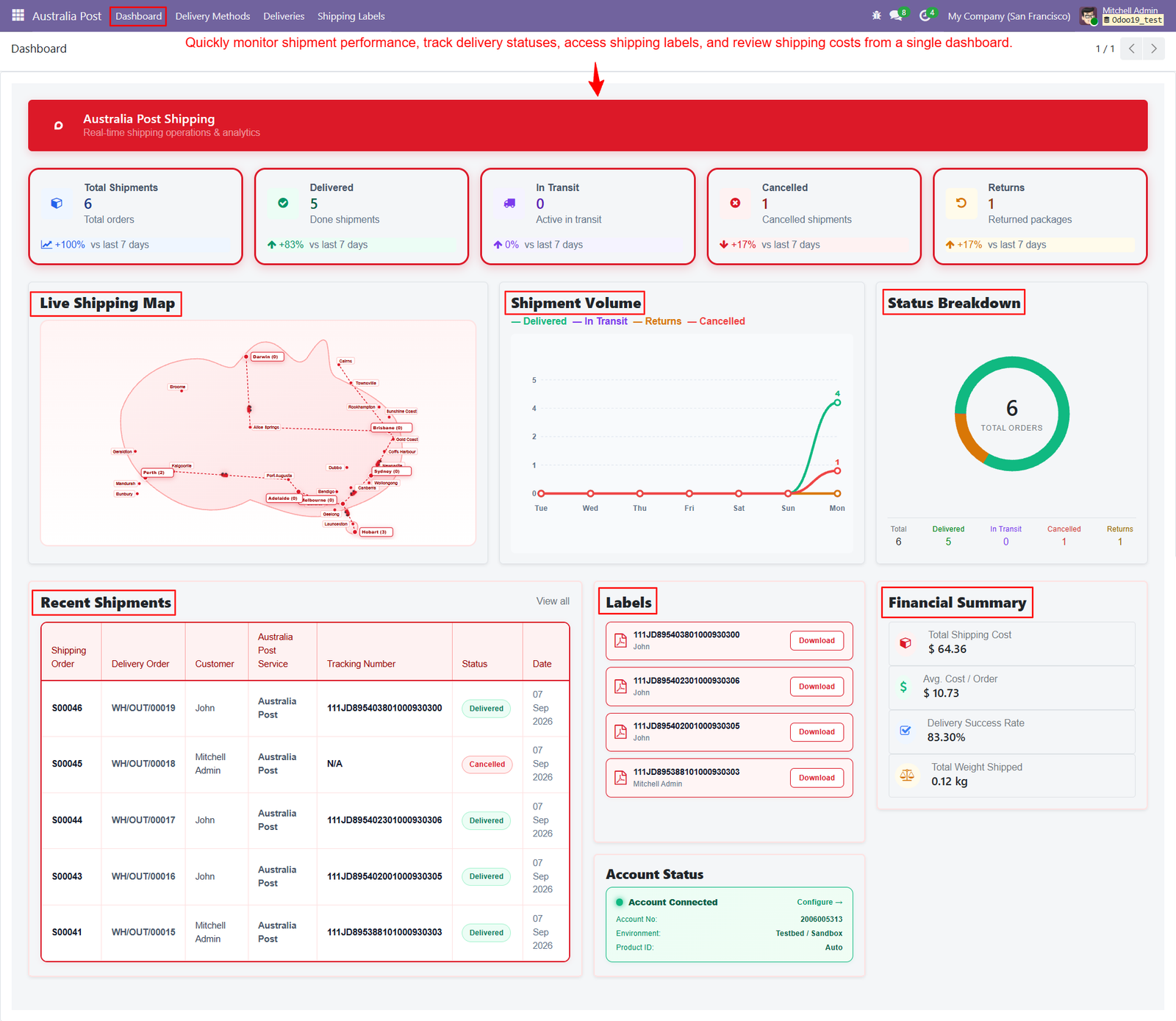
Step 1: Centralized Dashboard: Centralized dashboard provides a clear overview of Australia Post shipments, delivery statuses, shipping labels, recent orders, and activities within Odoo.
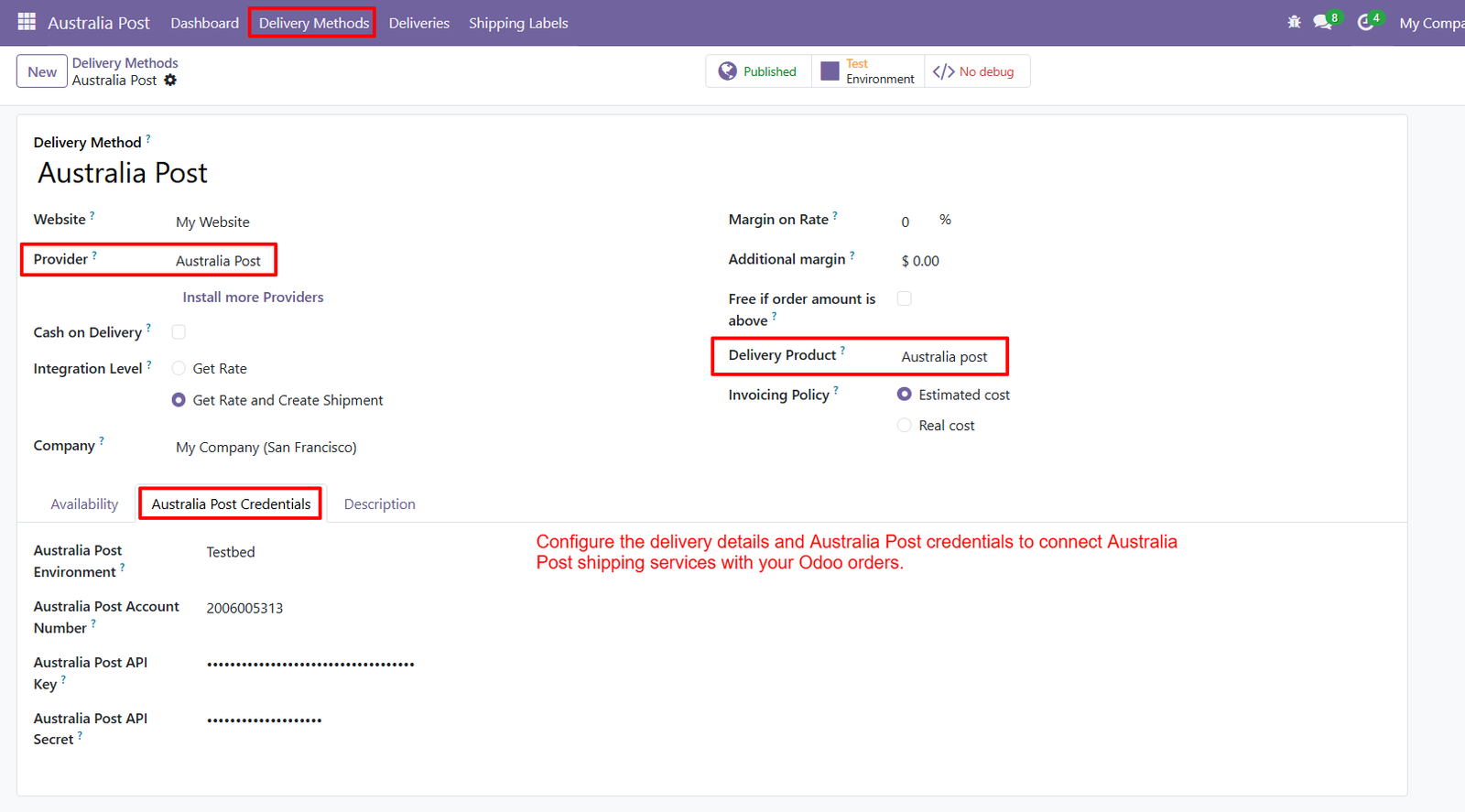
Step 2: Shipping Provider Configuration: Configure Australia Post as the shipping provider, select your company, delivery product, and required shipping settings directly within your Odoo.
Step 3: Select Australia Post: Select Australia Post as the preferred delivery method to apply its shipping service and calculated delivery charges during checkout online.
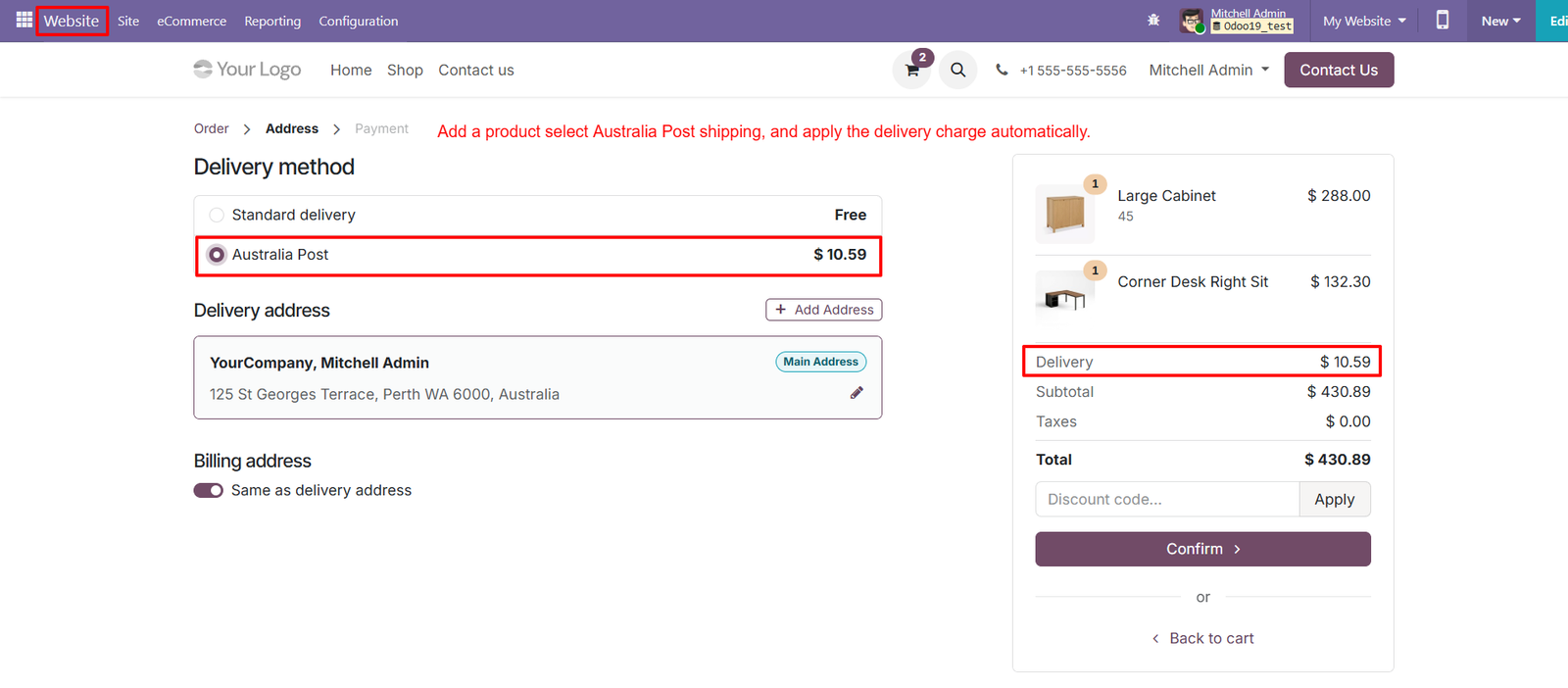
- Easy Delivery Selection: Customers can choose Australia Post from available delivery methods while reviewing their order and delivery address before final confirmation successfully.
- Clear Shipping Charge: The selected Australia Post method displays the calculated delivery charge clearly within the checkout order summary for customer review purposes.
- Automatic Shipping Cost: Shipping charges are automatically reflected in the order total after selecting Australia Post as the preferred delivery method online clearly.
- Order Cost Visibility: Customers can review product prices, delivery charges, taxes, and final totals together before confirming their order successfully through checkout.
- Delivery Address: The delivery address section displays the customer’s configured Australian address required for Australia Post shipping during checkout correctly and securely.
- Address Management: Users can add or update a delivery address before selecting Australia Post as the shipping method for their order online.
- Streamlined Checkout: The checkout interface keeps delivery selection and address information together, making the shipping process easier for customers to complete successfully.
- Shipping Cost Breakdown: Australia Post shipping charges appear separately under Delivery, helping customers clearly understand the additional cost associated with their selected shipping service.
- Delivery Method Comparison: Customers can compare Standard delivery with Australia Post before selecting their preferred shipping option during the checkout process online today.
- Displayed Shipping Price: The Australia Post option clearly displays its calculated price, allowing customers to understand shipping costs before completing checkout directly.
- Active Shipping Method: Once selected, Australia Post becomes the active shipping method and its charge is included clearly in the order summary.
- Updated Order Total: The delivery charge updates the checkout total automatically, keeping shipping costs visible alongside product subtotal and applicable taxes for customers.
- Address Verification: Customers can verify their delivery location before confirming Australia Post shipping, helping ensure accurate order fulfillment and delivery processing smoothly.
- Integrated Checkout: The checkout workflow connects product selection, delivery address, Australia Post shipping, and order totals within one streamlined customer experience for customers.
- Website Shipping Option: Businesses can present Australia Post as an available shipping option for customers ordering products through their Odoo website store online.
Step 4: Shipment Validation: Validate the Odoo delivery order to initiate Australia Post shipment processing and generate the required tracking information successfully.
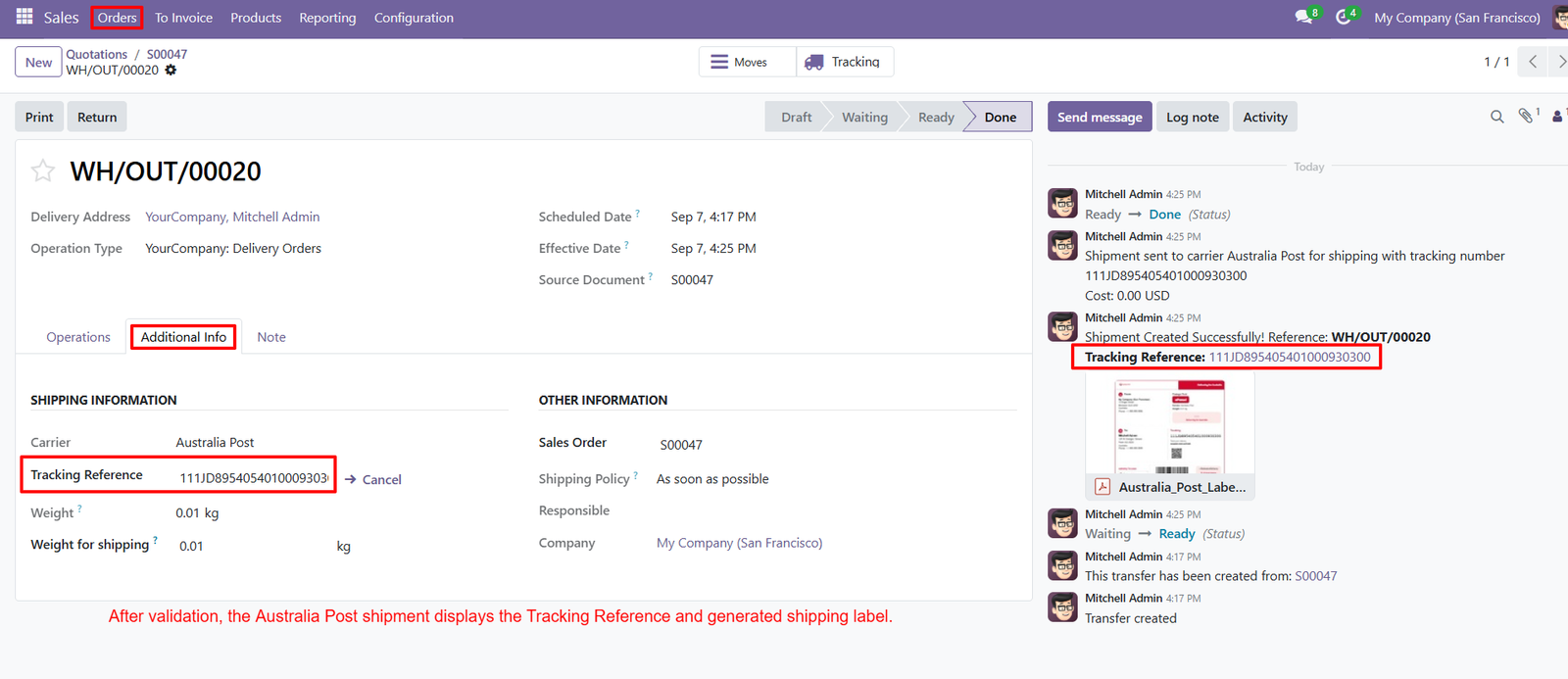
- Tracking Reference: After shipment creation, Odoo displays the Australia Post tracking reference directly within the delivery order for easy access.
- Carrier Information: The delivery record clearly identifies Australia Post as the selected carrier responsible for processing the shipment.
- Shipment Creation: Australia Post shipment is created successfully after validating the delivery, connecting the shipment with its Odoo delivery record.
- Sales Order Reference: The delivery record displays the related Sales Order, helping users connect shipment information with the original customer order.
- Delivery Order: Each shipment is associated with a unique delivery order reference, making shipment records easier to identify and manage.
- Shipping Information: The Additional Info section provides important shipping information, including carrier, tracking reference, weight, and shipping weight details.
- Tracking Management: Users can access the generated tracking reference from the delivery record for managing Australia Post shipment information efficiently.
- Shipment Status: The delivery workflow displays shipment progress through Odoo status stages, helping users understand the current delivery processing stage.
- Shipment Notification: Odoo records shipment creation messages in the activity area, providing visibility into successful Australia Post shipment processing.
- Generated Shipping Label: After shipment creation, the delivery record provides access to the generated Australia Post shipping label for further processing.
- Label Attachment: The Australia Post shipping label appears as an attachment within the delivery communication area for convenient document access.
- Shipping Weight: The delivery record displays the shipment weight, helping maintain accurate shipping information for Australia Post delivery processing.
- Shipping Policy: The delivery record shows the configured shipping policy, providing users with additional information about how the shipment should be handled.
- Delivery Address: The shipment record displays the configured delivery address, connecting customer destination information with the Australia Post delivery process.
- Effective Date: Odoo records the effective date of the delivery, providing useful information about when shipment processing was completed.
Step 5: PDF Shipping Label: Generate Australia Post shipping labels in PDF format directly from Odoo for convenient printing and shipment processing requirements.
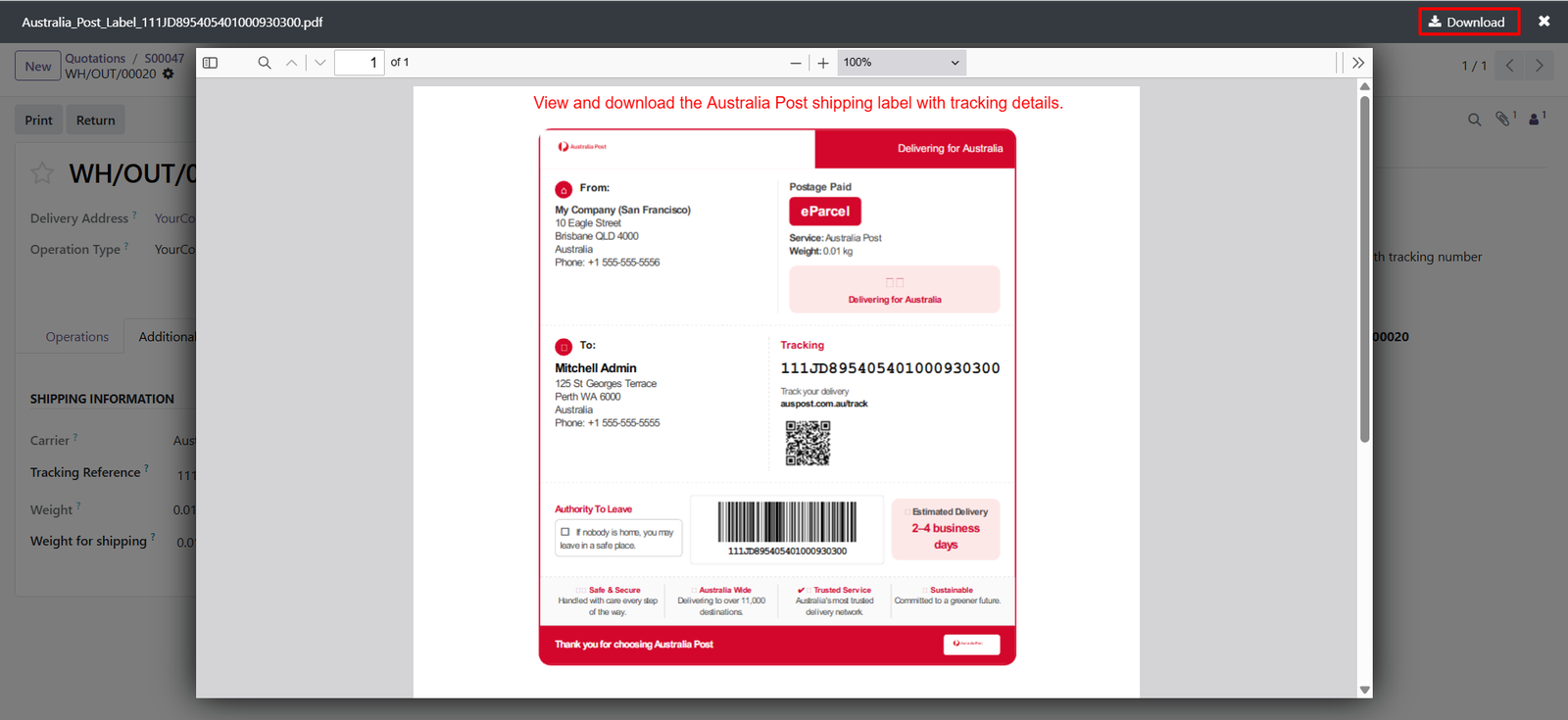
- Download Label: Download the generated Australia Post shipping label using the Download option available within the Odoo document viewer easily.
- Tracking Number: The shipping label clearly displays the Australia Post tracking number for identifying and managing the shipment throughout delivery.
- Sender Information: The label includes sender information such as company name, address, and contact details required for shipment processing purposes.
- Recipient Information: Display recipient name, delivery address, and contact information clearly on the generated Australia Post shipping label for accurate delivery.
- Australia Post Service: The label identifies Australia Post as the selected shipping service used for processing and delivering the customer shipment.
- Shipment Weight: Display the shipment weight on the label, providing essential package information for Australia Post shipping and delivery processing.
- Barcode: Generate a machine-readable barcode containing the shipment tracking information for efficient package identification and processing during delivery operations.
- QR Code: Include a QR code on the shipping label to provide additional shipment tracking information for convenient scanning and identification purposes.
- Tracking Section: The dedicated tracking section displays the tracking number and tracking information clearly for easier shipment monitoring by users.
- Estimated Delivery: The generated label displays estimated delivery information, helping recipients understand the expected timeframe for their Australia Post shipment.
- Authority To Leave: The label includes an Authority To Leave section, allowing applicable delivery instructions to be represented on shipments.
- Postage Information: Display postage-related information on the generated label, helping identify the configured shipping and postage details for shipment processing.
- Delivery Destination: Clearly present the recipient’s destination information on the label, supporting accurate package handling and delivery by Australia Post.
- Professional Label Layout: The generated shipping label organizes sender, recipient, tracking, service, barcode, and delivery information within a structured document layout.
- Shipment Identification: Tracking numbers and barcodes make individual Australia Post shipments easier to identify throughout the delivery and fulfillment process.
Step 6: Centralized Deliveries: View all Australia Post deliveries in one list with sales orders, delivery orders, customers, tracking numbers, and statuses.
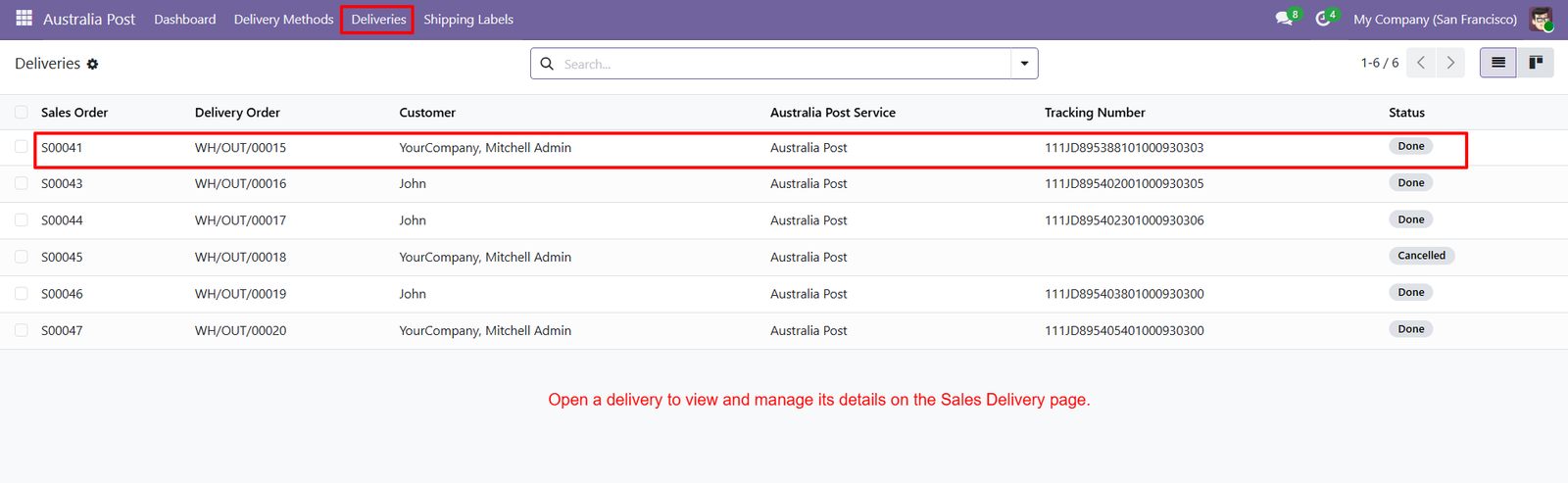
- Sales Order Reference: Each delivery record displays its related Sales Order, making it easier to connect shipments with customer purchases.
- Delivery Order Reference: Users can identify individual warehouse delivery orders quickly, helping teams locate and manage specific Australia Post shipments.
- Customer Information: The deliveries list displays customer names alongside order and shipment details for convenient identification and operational management purposes.
- Australia Post Service: Each record clearly identifies Australia Post as the shipping service used for processing the corresponding customer delivery.
- Tracking Number: Generated tracking numbers appear directly in the deliveries list, allowing users to access shipment identification information quickly today.
- Delivery Status: Status indicators show completed or cancelled deliveries, helping users understand the current state of each Australia Post shipment.
- Completed Deliveries: Records marked Done indicate successfully completed delivery operations and provide associated shipment information for further reference when needed.
- Cancelled Deliveries: Cancelled records remain visible, allowing users to identify unsuccessful delivery operations and review corresponding order information when required.
- Search Function: The search field helps users locate specific delivery records quickly when managing multiple Australia Post shipments within Odoo.
- Delivery Navigation: Users can open delivery records directly from the list to access detailed Sales Delivery information and manage shipments.
- Shipment Management: Opening a delivery provides access to its corresponding Sales Delivery page for reviewing and managing shipment-related information efficiently.
- Order Tracking: Delivery records combine order references and tracking numbers, creating a convenient overview for monitoring Australia Post shipments within Odoo.
- Customer Delivery Overview: Users can review customer names, order references, tracking information, and statuses together from the centralized deliveries screen.
- Shipment Organization: Centralized delivery records organize Australia Post shipments systematically, making daily logistics operations easier to review and manage efficiently.
- Operational Visibility: The deliveries list provides clear visibility into active shipment records, completed deliveries, cancelled orders, and tracking information efficiently.
Step 7: Centralized Shipping Labels: View all generated Australia Post shipping labels together, making label management easier for users handling multiple customer shipments.
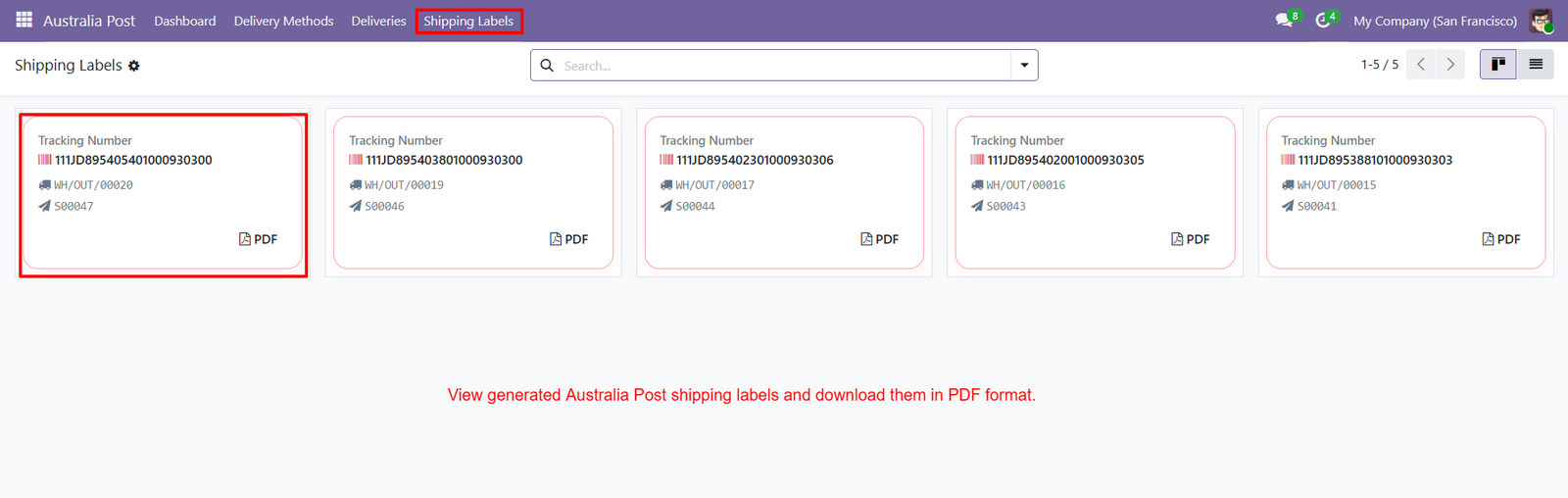
- Tracking Number Display: Each label card clearly displays its tracking number, helping users quickly identify and manage individual Australia Post shipments.
- Delivery Order Reference: Shipping label cards show the related delivery order, connecting generated labels with corresponding Odoo delivery records.
- Sales Order Reference: Each shipping label displays its associated Sales Order, allowing users to connect labels with original customer orders easily.
- PDF Label Access: Users can access the generated Australia Post shipping label directly through the PDF option available on each label card.
- Quick PDF Download: The PDF option provides convenient access to generated labels, allowing users to retrieve documents for shipment processing efficiently.
- Multiple Label Management: Multiple generated Australia Post labels can be displayed together, helping users manage several shipments from one centralized screen.
- Shipment Identification: Tracking numbers, delivery orders, and Sales Orders provide essential information for identifying each generated shipping label within Odoo.
- Organized Label Cards: Each generated label appears inside an organized card layout containing tracking, delivery, order, and PDF information.
- Easy Label Navigation: Users can quickly locate required shipping labels by reviewing their tracking numbers and related delivery information from the centralized screen.
- Search Labels: The available search field helps users locate specific shipping label records when managing multiple generated labels within Odoo.
- Tracking Visibility: Displaying tracking numbers prominently provides quick visibility into shipment identification information associated with generated Australia Post labels.
- Delivery Integration: Shipping labels remain connected with their related Odoo delivery orders, supporting organized shipment document management.
- Sales Integration: Each label maintains a connection with its related Sales Order, helping users trace shipping documents back to customer orders.
- Centralized Label Management: Businesses can manage generated Australia Post shipping labels from one dedicated Shipping Labels section within their Odoo system.
- Easy Document Access: Users can access PDF shipping documents directly from individual label cards without searching through separate shipment records.
Step 8:Create Sales Order: Create Sales Orders in Odoo and add required products before calculating Australia Post shipping costs through the integrated shipping workflow.
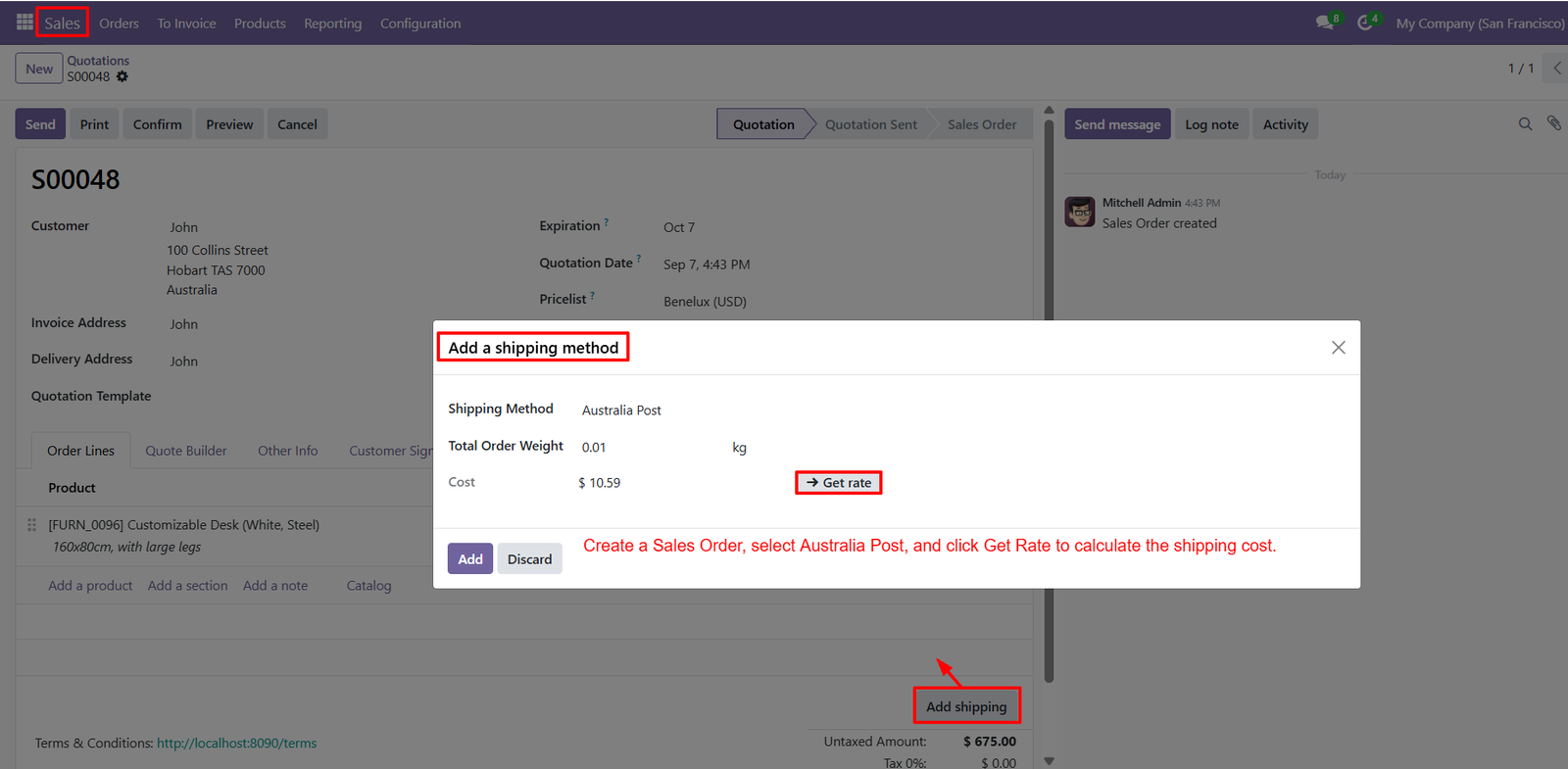
- Add Shipping: Add Shipping lets users include Australia Post delivery services directly within Sales Orders without leaving the standard Odoo order workflow.
- Select Australia Post: Select Australia Post as the shipping method when adding delivery services to the customer Sales Order for accurate shipping calculation.
- Get Shipping Rate: Click Get Rate to calculate the applicable Australia Post shipping cost based on the order information and configured delivery settings.
- Review Shipping Cost: Displayed shipping costs help users review Australia Post delivery charges before adding the shipping method to their Sales Order directly.
- Order Weight: Total Order Weight displays the shipment weight used during Australia Post rate calculation for the selected customer Sales Order here.
- Shipping Method Details: The shipping method popup clearly displays Australia Post, total order weight, calculated cost, and Get Rate action directly for users.
- Rate Retrieval: Get Rate provides an action for retrieving the Australia Post shipping cost directly from the Sales Order interface within Odoo.
- Review Calculated Rate: After calculating the rate, users can review the returned shipping cost before adding Australia Post delivery charges to their order.
- Add Shipping Method: Add the calculated Australia Post shipping method to the Sales Order using the Add button after reviewing the displayed rate.
- Discard Option: Discard allows users to close the shipping method popup without adding the displayed Australia Post method to their Sales Order.
- Rate Information: The shipping method window keeps Australia Post rate information visible alongside the related Sales Order, simplifying overall shipping cost review.
- Integrated Calculation: Integrated shipping calculation connects Sales Orders with Australia Post delivery services, keeping product orders and shipping costs together within Odoo.
- Sales Order Shipping: Businesses can calculate Australia Post delivery costs during Sales Order preparation, helping maintain shipping information within the Odoo order workflow.
- Delivery Charge Calculation: Shipping rate calculation provides a convenient way to determine Australia Post delivery charges before confirming the customer Sales Order successfully.
- Cost Visibility: The displayed Australia Post cost gives users immediate visibility into the calculated delivery charge associated with the current customer order.
Why Use the Australia Post Shipping Integration for Odoo Module?
The Australia Post Shipping Integration for Odoo simplifies shipping operations by connecting Australia Post services directly with Odoo. Businesses can calculate shipping rates, manage deliveries, generate tracking references, and download shipping labels without switching between multiple platforms.
Key Benefits
1. Simplified Shipping Management: Manage Australia Post shipping operations directly within Odoo, reducing manual work and simplifying the entire order fulfillment process.
2. Accurate Shipping Rates: Calculate Australia Post shipping charges directly from Sales Orders and automatically apply the calculated delivery cost to customer orders.
3. Automated Shipment Creation: Create Australia Post shipments through Odoo delivery orders, simplifying shipment processing and keeping essential shipping information organized.
4. Easy Shipment Tracking: Generate tracking references after shipment validation, allowing businesses to access shipment information directly from their Odoo delivery records.
5. Quick Shipping Label Generation: Generate and download Australia Post shipping labels in PDF format, simplifying shipment preparation and documentation management.
6. Centralized Shipping Dashboard: Monitor shipment performance, delivery statuses, recent shipments, shipping labels, and financial information through a single centralized Odoo dashboard.
7. Streamlined Order Fulfillment: Connect Sales Orders, shipping rate calculation, delivery validation, shipment creation, and label generation within one integrated shipping workflow.
8. Better Delivery Visibility: Access delivery records, customer information, tracking numbers, and shipment statuses from one location for easier shipping management.
9. Organized Shipping Documentation: Keep generated shipping labels, tracking references, Sales Orders, and delivery records connected within the Odoo system for convenient access.
10. Improved Operational Efficiency: Reduce repetitive shipping tasks by managing Australia Post rates, shipments, tracking information, and labels directly within Odoo.