

Managing business-to-business relationships requires more than simply creating customer records and processing sales orders. B2B businesses need structured company onboarding, employee management, role-based access, approval workflows, credit controls, order visibility, and reliable activity tracking.
The B2B Company Accounts module for Odoo provides a centralized solution for managing these requirements. It enables companies to register directly from the website, allows administrators to review and approve company applications, and provides approved business customers with dedicated tools for managing their employees, orders, credit information, and company activities.
Key Features at a Glance
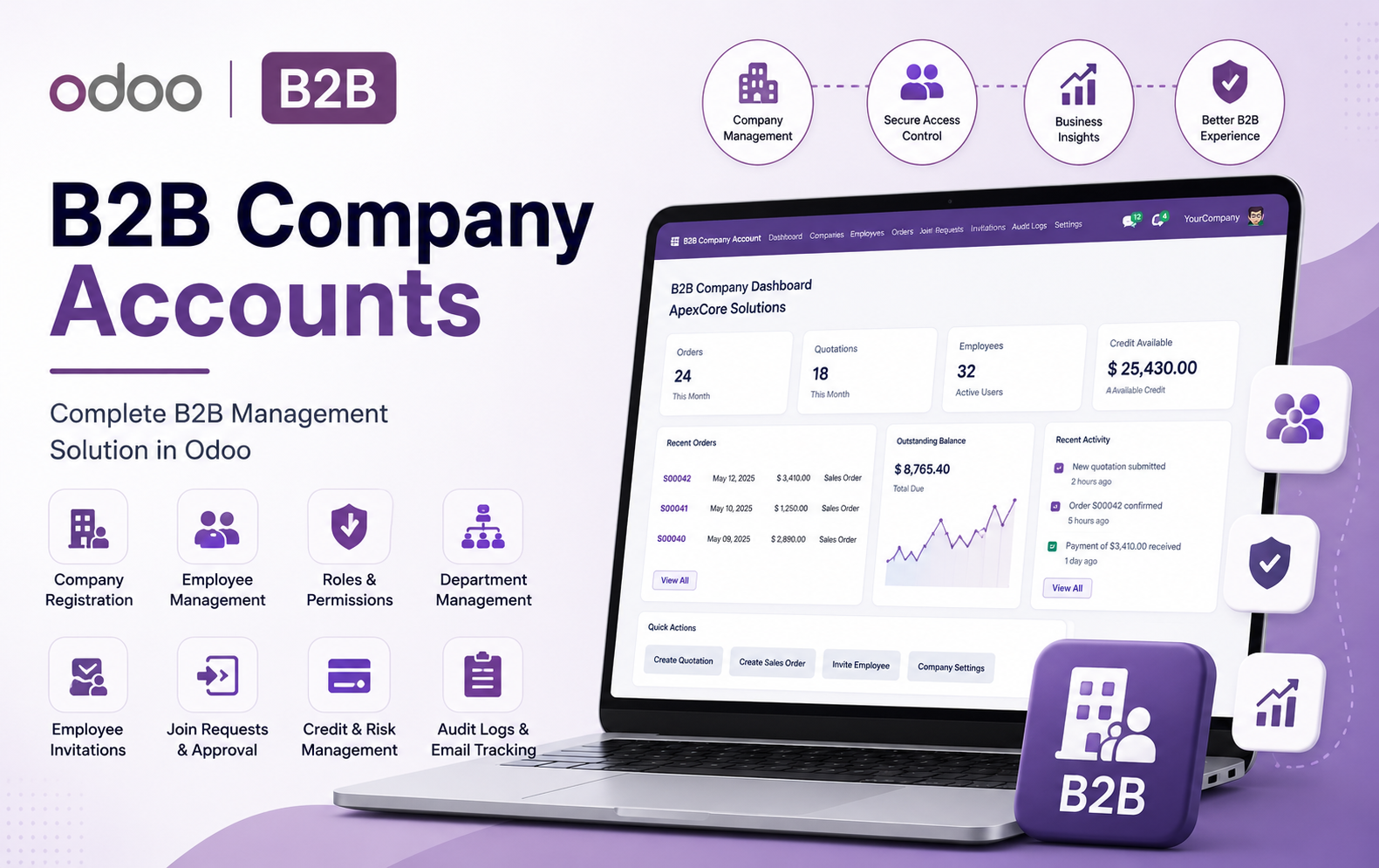
- B2B Company Registration – Allow businesses to submit company registration requests directly from the website with complete company and contact information.
- Company Approval Workflow – Administrators can review, approve, reject, and activate company registration requests through a centralized approval process.
- Dedicated B2B Dashboard – Provide company users with centralized access to orders, quotations, employees, credit, activities, KPIs, and important business information.
- Company Profile Management – Maintain company details, contact information, company codes, financial settings, and other essential business information.
- Employee Management – Manage employees connected to each B2B company, including accounts, roles, departments, access permissions, and account status.
- Role-Based Permissions – Create customized company roles and control access to orders, users, financial information, and other B2B operations.
- Department Management – Create departments, assign department heads, and organize company employees according to their business functions.
- Employee Invitations – Invite employees securely through email links while assigning their company, role, department, and required access permissions.
- Invitation Tracking – Track invitation status and easily send, resend, revoke, or monitor employee invitations throughout the onboarding process.
- Company Join Requests – Allow users to request membership in existing B2B companies using company codes or secure invitation links.
- Join Request Approval – Administrators can review submitted membership requests and approve or reject users before granting company access.
- Credit Limit Management – Configure company-specific credit limits and provide controlled visibility into available financial credit.
Use Cases: Who Needs This module?
- Retail Stores – Reward customers, employees, and partners for generating referral-based POS sales.
- Supermarkets & Grocery Stores – Create referral programs to attract new customers and increase repeat purchases.
- Furniture Stores – Track affiliate-generated sales and automatically calculate commissions for referral partners.
- Electronics Stores – Incentivize affiliates to promote products and generate additional in-store sales.
- Fashion & Apparel Stores – Reward customers, influencers, and sales partners for bringing new buyers.
- Franchises & Retail Networks – Manage affiliates, commissions, referral codes, and settlements across POS operations.
- Showrooms & Dealerships – Track referral partners and reward them for successfully generated sales.
- Pharmacies & Specialty Stores – Build structured referral programs while maintaining transparent commission records.
- Employee Referral Programs – Allow employees to earn commissions or rewards for bringing new customers and generating POS sales.
- Customer Referral Programs – Encourage existing customers to refer new buyers using unique referral codes.
- Partner & Reseller Networks – Manage partner commissions, wallet balances, referrals, and settlements from a centralized Odoo system.
- Businesses Using Odoo POS – Any POS-based business looking to automate affiliate sales tracking, commission calculation, wallet management, rewards, and settlements can benefit from this module.
Quick User Guide (Visual Walkthrough)
Scroll up to revisit the detailed image-wise walkthrough.
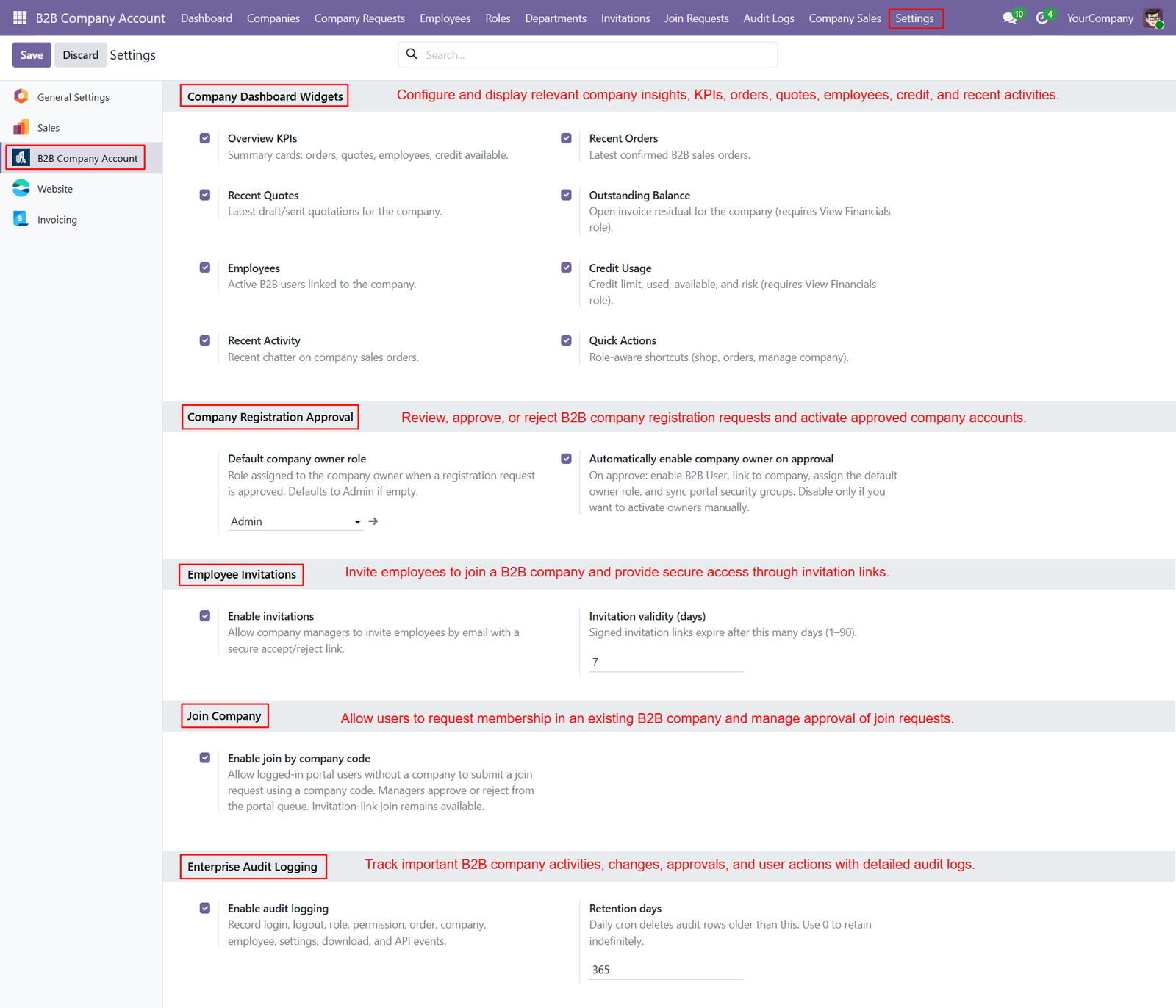
Step 1: Dashboard Widgets – Configure dashboard widgets to display KPIs, recent orders, quotations, employees, credit usage, outstanding balances, activities, and quick actions for users.ies.
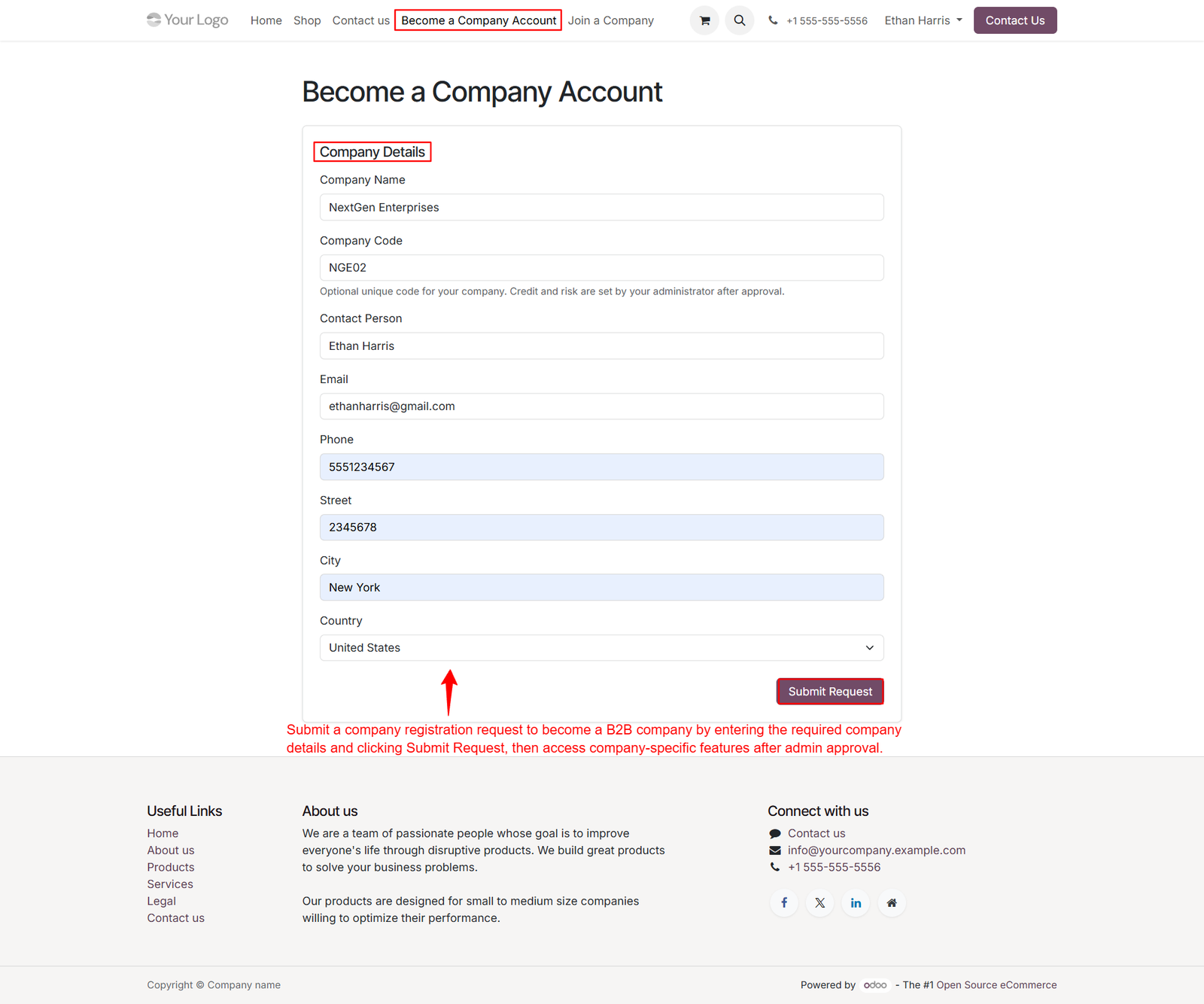
Step 2: Company Account Registration – Allow businesses to register for B2B company accounts directly through the website using a simple, structured registration form.
Step 3: Company Request Review – Review submitted B2B company requests from one centralized screen, verifying business details before approving new company accounts for controlled onboarding.
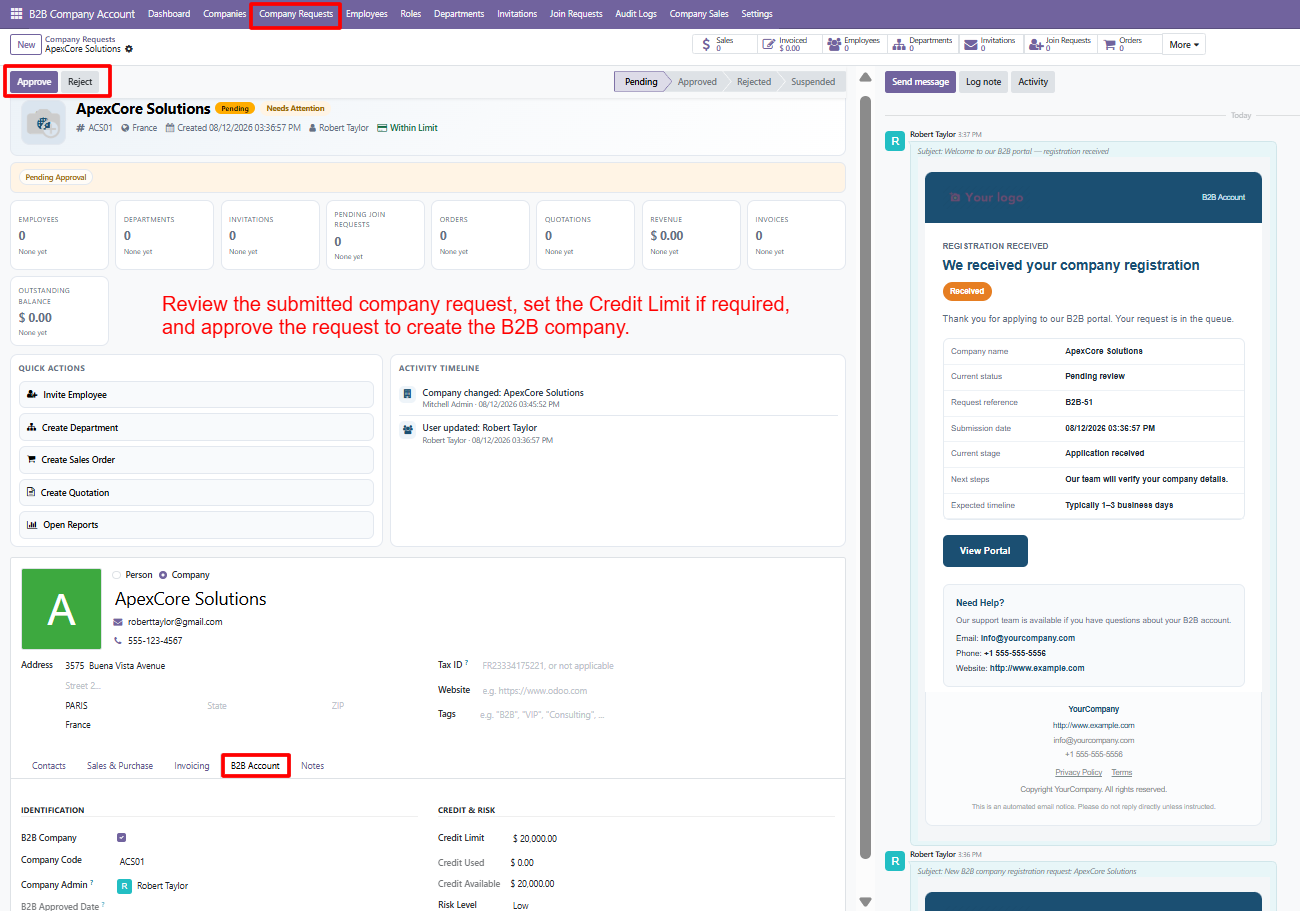
- Company Approval – Approve eligible company registrations quickly using the dedicated approval action, activating approved businesses for further B2B management and portal access.
- Request Rejection – Reject unsuitable company applications when submitted information does not meet business requirements, maintaining effective control over new B2B customer onboarding.
- Request Status Tracking – Monitor registration status through workflow stages including pending, approved, rejected, and suspended, providing administrators visibility into company requests and progress.
- Credit Limit Configuration – Set appropriate credit limits during approval, helping businesses establish controlled purchasing capacity and supporting responsible financial management for B2B customers.
- Employee Overview – View employee counts directly from company requests, providing administrators quick insight into workforce size and current company account activity levels.
- Department Visibility – Track departments associated with each company, helping administrators understand organizational structure before approving and configuring B2B company accounts effectively efficiently.
- Invitation Monitoring – Monitor employee invitations from the company request screen, giving administrators visibility into onboarding activities and planned user access during onboarding.
- Join Request Visibility – Review pending join requests to understand additional users seeking company membership before granting access to the B2B organization properly securely.
- Sales Order Monitoring – Monitor sales orders associated with companies, helping administrators understand purchasing activity and customer engagement from one centralized request interface efficiently.
- Quotation Tracking – Track quotations for registered companies, allowing administrators to review potential business transactions alongside company registration and approval information properly today.
- Revenue Monitoring – Monitor company revenue directly from the request dashboard, providing useful financial context when evaluating and managing B2B customer relationships effectively.
- Invoice Information – Review invoice information and outstanding balances to understand financial obligations before approving or configuring company accounts for ongoing business transactions.
Step 4: Centralized Dashboard – Access orders, quotations, employees, credit availability, outstanding balances, recent activities, and essential company information conveniently from one centralized dashboard easily.
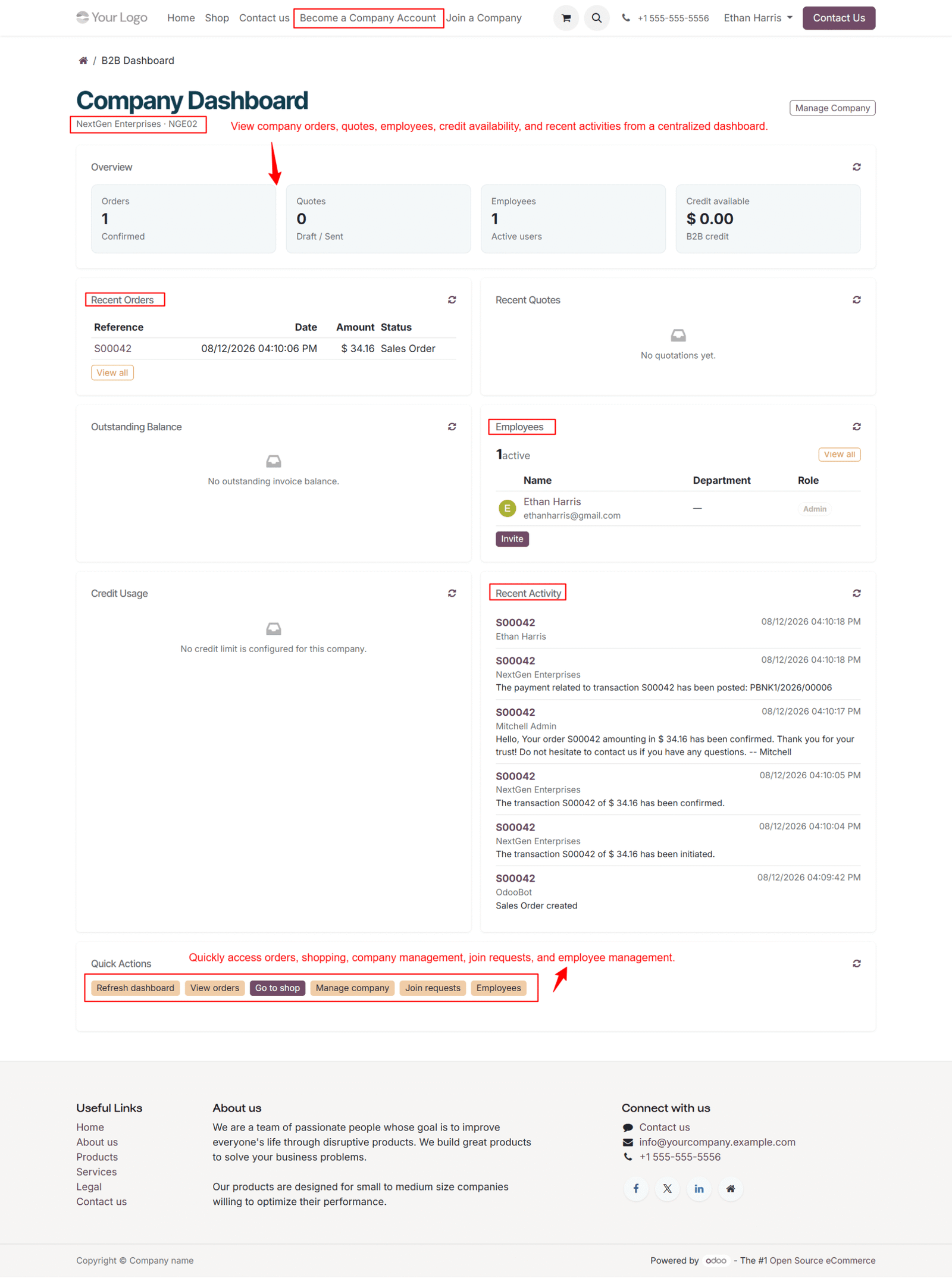
- Company Overview – View company name, unique company code, and current account information directly from the dedicated B2B dashboard for quick business identification.
- Order Summary – Monitor confirmed sales orders and quickly review transaction references, dates, amounts, and statuses directly from the centralized company dashboard interface.
- Quotation Visibility – Access recent quotations from one location, helping company users track potential purchases and review business opportunities efficiently for better planning.
- Employee Overview – View active employees, their email addresses, departments, and assigned roles for better company workforce management and improved organizational visibility overall.
- Credit Availability – Display available B2B credit directly on the dashboard, helping authorized users understand their remaining purchasing capacity and financial position accurately.
- Outstanding Balance – Monitor unpaid invoice balances from the dashboard, giving financial users quick visibility into current company receivables and outstanding obligations easily.
- Credit Usage – Track credit utilization and configured limits, helping companies maintain better financial control over B2B purchasing activities and customer spending effectively.
- Recent Activity – Monitor recent company events, including orders, payments, confirmations, transactions, and user activities through a centralized activity timeline for better visibility.
- Quick Actions – Access frequently used options such as refreshing dashboards, viewing orders, shopping, managing companies, join requests, and employees quickly and conveniently.
- Dashboard Refresh – Refresh dashboard information whenever required to view updated company orders, employees, financial information, and recent activities without leaving the dashboard.
- View Orders – Navigate directly to company orders from the dashboard, making it easier to review transactions and monitor purchasing history efficiently every day.
Step 5: My Account Access – Access My Account to manage B2B dashboard, orders, employees, join requests, invoices, payments, addresses, and account information conveniently from place.
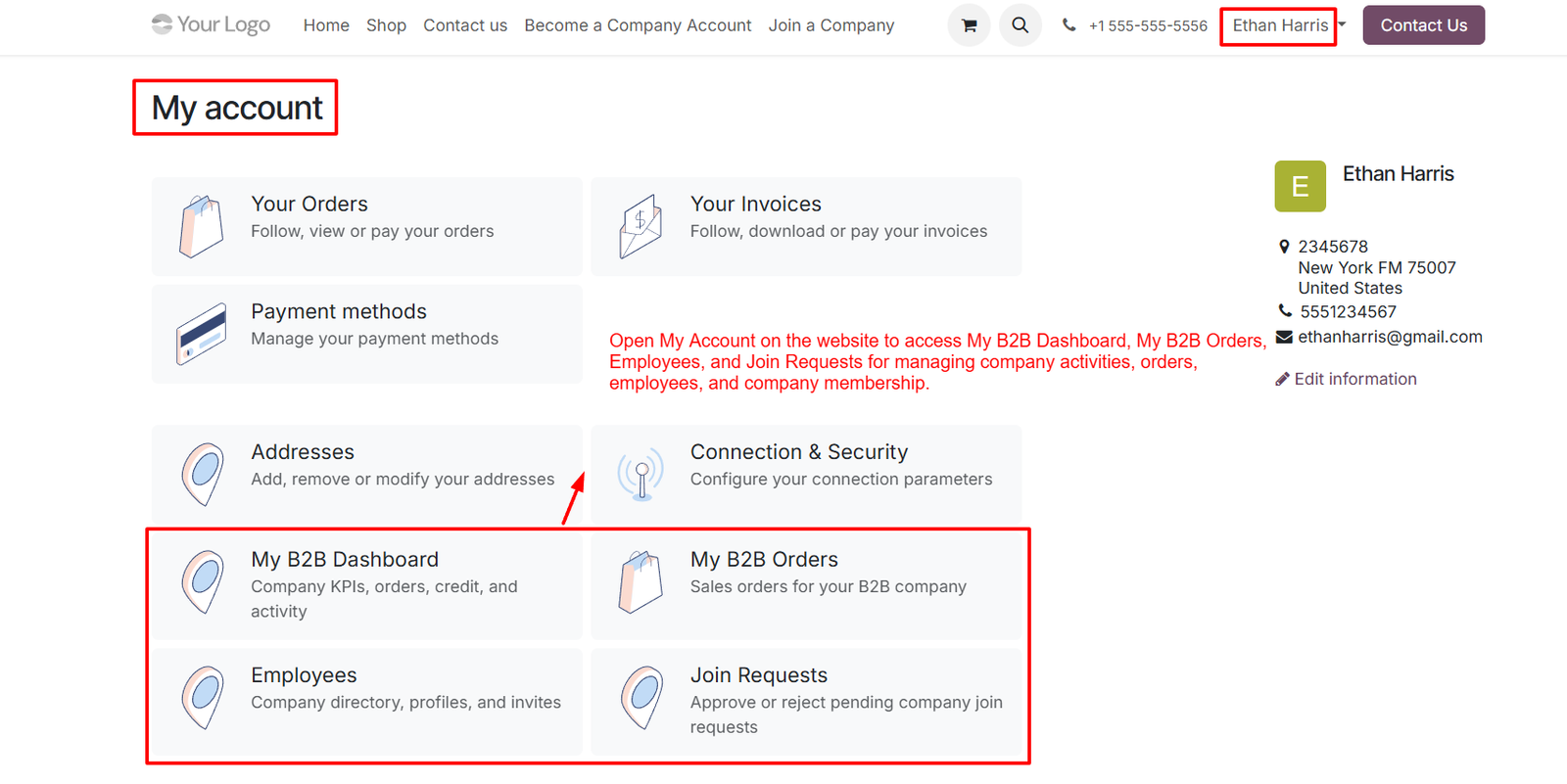
- My B2B Dashboard – Open My B2B Dashboard to monitor company KPIs, orders, credit availability, employees, recent activities, and important business information efficiently today.
- My B2B Orders – Access My B2B Orders to view sales orders associated with your company and monitor purchasing transactions through the website account.
- Employee Management – Manage Employees from My Account to access company directories, employee profiles, invitations, roles, and relevant workforce information conveniently online today.
- Join Request Management – Manage Join Requests to review pending company membership requests and approve eligible users seeking access to your B2B company account.
- Order Management – Access Your Orders to follow, view, and manage business orders directly through the website account interface for convenient purchasing activities.
- Invoice Management – View Your Invoices to follow, download, or manage invoices associated with your account, improving financial visibility and payment management processes.
- Payment Methods – Manage Payment Methods to maintain available payment options and support smoother transactions for business purchases through your customer account easily.
- Address Management – Manage Addresses to add, remove, or modify business addresses required for deliveries, billing, and other B2B transactions efficiently online today.
- Connection & Security – Configure Connection and Security settings to manage account connection parameters and maintain appropriate security controls for your B2B access securely.
- Profile Information – View Profile Information to quickly access your name, contact details, email address, phone number, and registered business address information easily.
- Account Information Editing – Edit Account Information to update personal or contact details whenever required, helping maintain accurate customer records across your B2B account.
- Company Activities – Access Company Activities through dedicated B2B dashboard options to monitor important business operations, orders, employees, and membership activities effectively today.
Step 6: Centralized Employee Management – Manage all employees linked to B2B companies from one centralized Odoo interface, simplifying user administration and organizational control effectively.
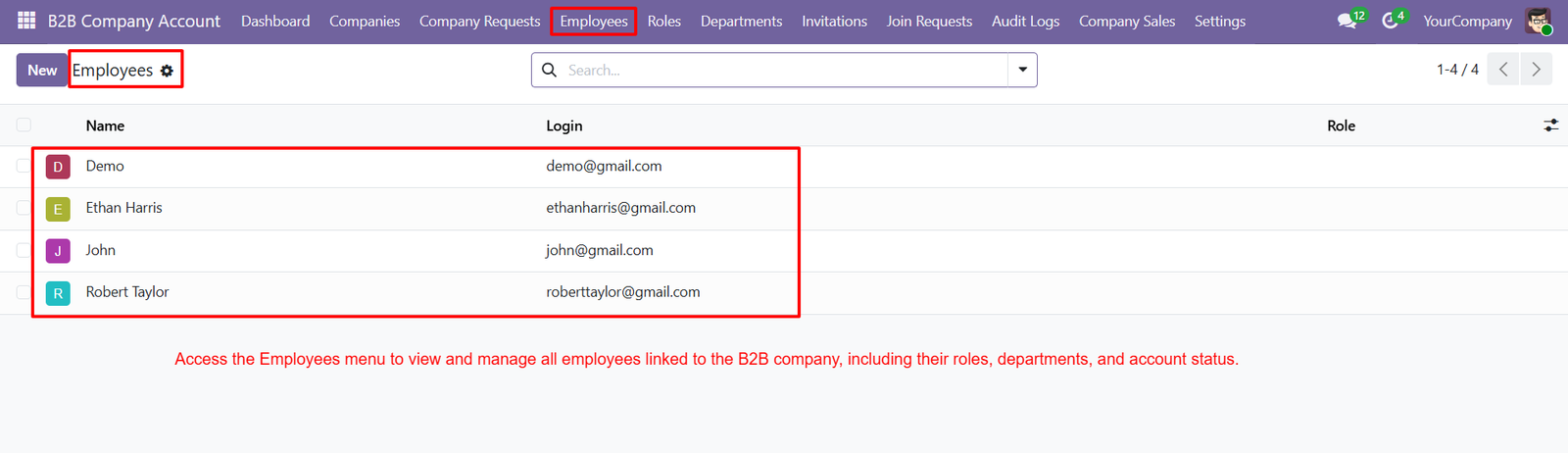
- Employee Directory – Maintain a structured employee directory containing user names, login credentials, assigned roles, and company-related access information for administrators.
- Employee Name Visibility – Display employee names clearly within the management list, helping administrators quickly identify users and manage company memberships efficiently from Odoo.
- Login Information – View employee login email addresses directly from the employee list, making user identification and account management easier for administrators daily.
- Role Management – Assign appropriate roles to employees, ensuring each company user receives access permissions based on their responsibilities and organizational requirements.
- User Account Tracking – Monitor employee accounts from a centralized list, helping administrators identify active users and manage their company access efficiently within Odoo.
- Employee Search – Quickly search employee records using the available search functionality, making it easier to locate specific users within large organizations efficiently.
- Employee Creation – Create new employee records directly through the Employees section, supporting efficient onboarding and structured company user management processes within Odoo.
- Company Employee Linking – Link individual employees with appropriate B2B companies, ensuring users remain associated with the correct organization and business account securely.
- Access Control – Manage employee access according to assigned roles, helping organizations maintain controlled visibility and secure access to B2B company features.
- Organizational Visibility – Provide administrators with a complete overview of company employees, supporting better workforce organization and centralized user administration across departments.
- Role-Based Employee Access – Connect employees with predefined roles, enabling businesses to provide different levels of functionality according to specific responsibilities and permissions.
- B2B User Administration – Simplify administration of B2B company users by providing a dedicated employee management section within the centralized Odoo application interface.
Step 7: Customized Roles – Create customized roles for B2B employees, ensuring every user receives permissions appropriate to their responsibilities and access requirements within Odoo.
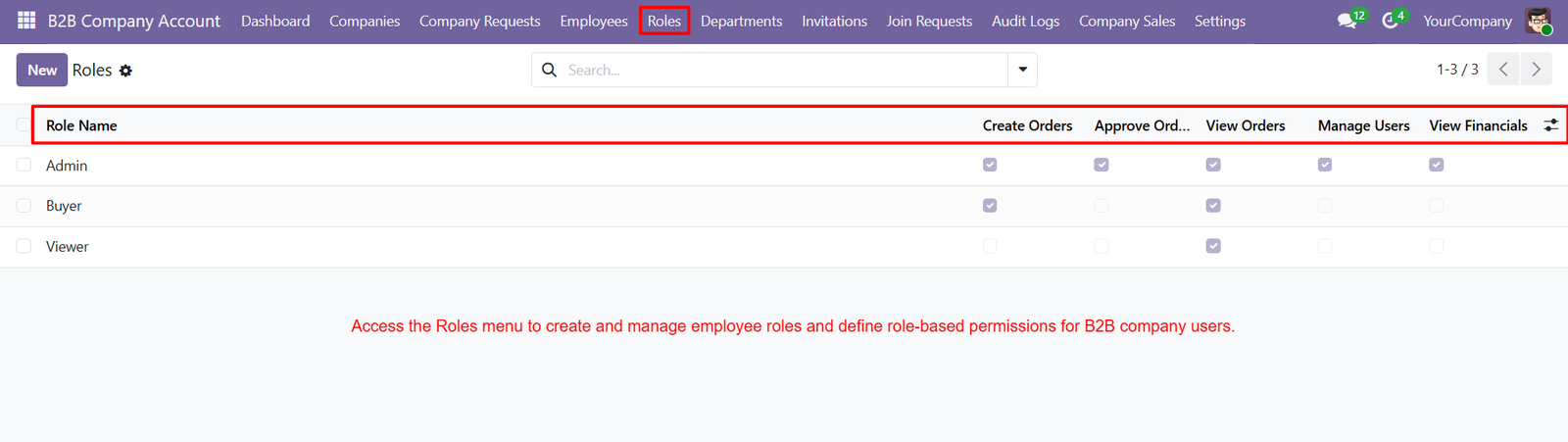
- Admin Role – Admin roles provide comprehensive permissions for managing orders, users, financial information, and other important B2B company operations securely and efficiently.
- Buyer Role – Buyer roles allow employees to create orders and view orders while restricting sensitive administrative and financial management permissions appropriately securely.
- Viewer Role – Viewer roles provide read-only access to orders, allowing users to monitor business information without creating or managing transactions directly securely.
- Create Orders Permission – Create Orders permission allows authorized employees to prepare and submit B2B sales orders according to assigned company responsibilities efficiently online.
- Approve Orders Permission – Approve Orders permission enables designated users to review and approve orders, supporting controlled purchasing workflows within B2B companies effectively today.
- View Orders Permission – View Orders permission allows employees to monitor sales orders, transaction details, and purchasing activities without requiring broader administrative access rights.
- Manage Users Permission – Manage Users permission gives authorized administrators control over company employees, user access, roles, and account management activities securely and efficiently.
- View Financials Permission – View Financials permission restricts sensitive financial information to authorized users, protecting credit limits, balances, and related business data securely effectively.
- Role-Based Access Control – Role-based access control helps businesses assign specific permissions to employees, reducing unauthorized access and improving overall B2B security significantly today.
- Flexible Permission Configuration – Administrators can combine multiple permissions within roles, creating flexible access configurations that match different employee responsibilities and business workflows effectively.
- Simplified Employee Onboarding – Roles simplify employee onboarding by allowing administrators to assign predefined permission sets instead of configuring individual access rights repeatedly manually.
- Multiple Role Types – Businesses can create separate roles for administrators, buyers, viewers, and other users based on specific operational requirements and responsibilities clearly.
Step 8: Create Dedicated Departments – Create dedicated departments to organize B2B company employees according to business functions, responsibilities, teams, and operational requirements efficiently and clearly.
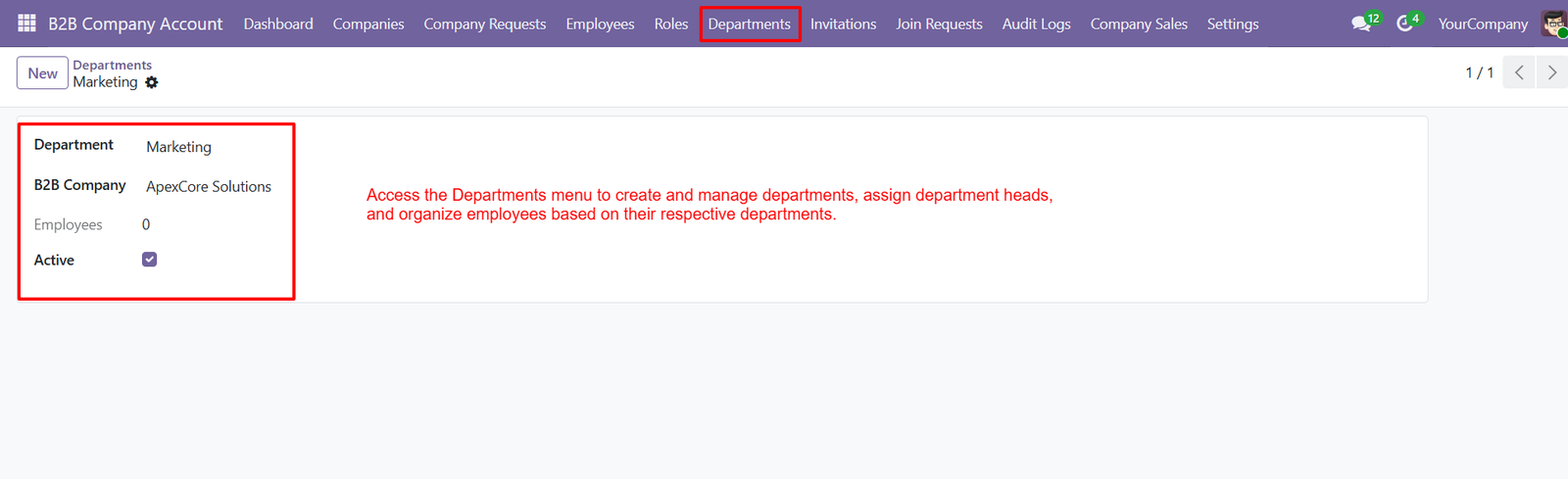
- Assign Department Heads – Assign a department head to each department, providing clear leadership, coordination, accountability, and responsibility for employee management activities effectively.
- Company Department Linking – Link departments directly with B2B companies, ensuring employees remain organized within the correct company structure and operational hierarchy consistently.
- Employee Count Tracking – Track the total number of employees assigned to each department, helping administrators understand workforce distribution and departmental capacity easily.
- Active Department Control – Keep departments active or inactive using simple status controls, allowing administrators to manage organizational changes without deleting records permanently.
- Employee Organization – Organize employees by department to simplify workforce management, improve visibility, and support better communication across different business functions effectively.
- Multiple Departments – Create multiple departments for different business areas, enabling companies to structure employees according to specific operational and managerial needs efficiently.
- Department Ownership – Maintain clear departmental ownership by assigning responsible department heads who can coordinate employees and oversee daily departmental activities effectively.
- Workforce Visibility – Improve workforce visibility by viewing department information, company association, employee counts, and active status from one centralized interface easily.
Step 9: Create Employee Invitations – Create employee invitations by assigning the B2B company, role, and department before sending secure access invitations to selected employees efficiently.
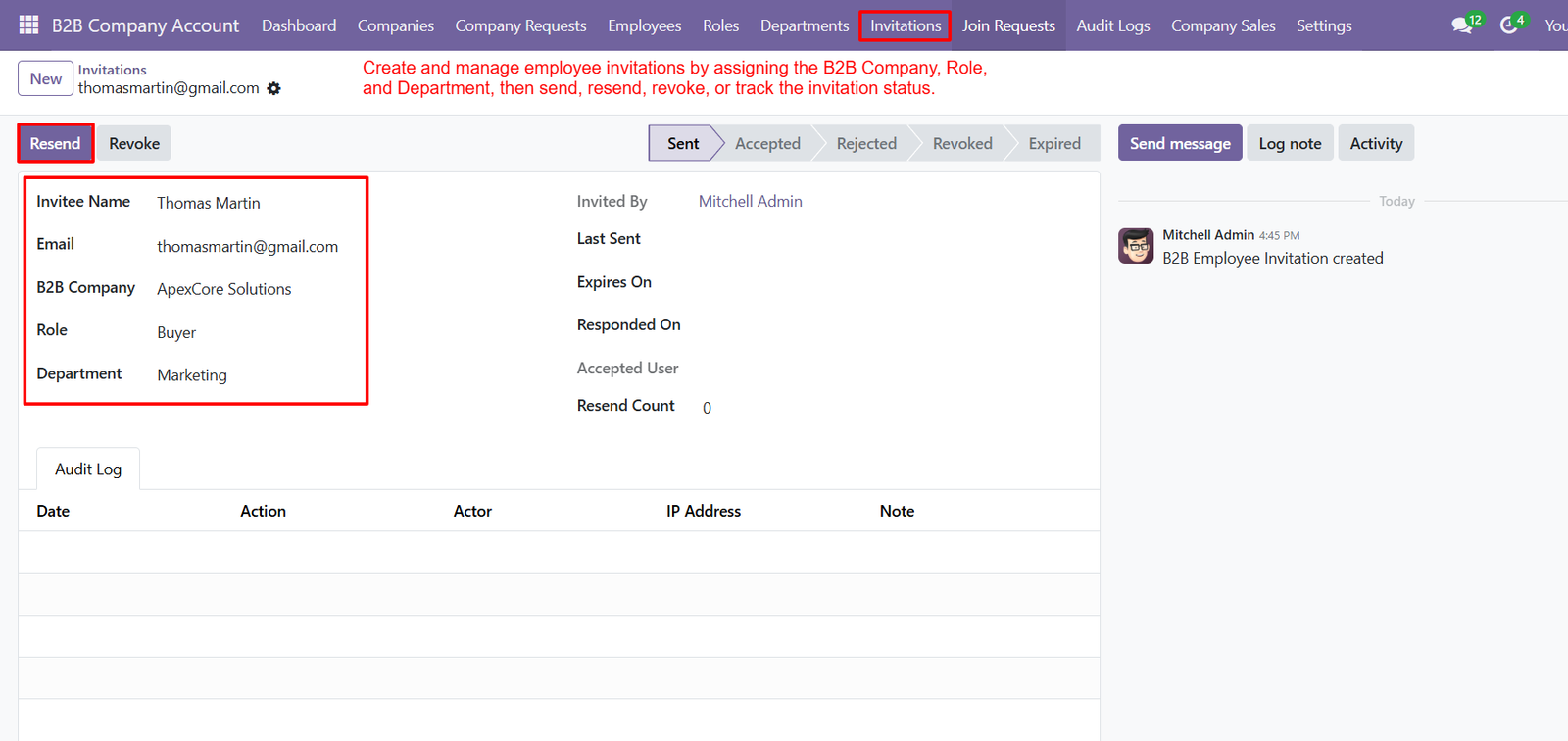
- Assign B2B Company – Assign each invitation to a specific B2B company, ensuring employees receive appropriate access according to their organization and responsibilities clearly.
- Role Assignment – Select appropriate roles during invitation creation to provide employees with permissions matching their responsibilities and required company operations effectively.
- Department Selection – Choose a department for every invitation, helping organize employees according to functional teams and internal company structures effectively within Odoo.
- Email Invitations – Send invitations directly to employee email addresses, providing a convenient and structured process for onboarding new B2B users quickly.
- Invitation Status Tracking – Track invitation status through Sent, Accepted, Rejected, Revoked, and Expired stages for complete visibility into employee onboarding progress efficiently.
- Resend Invitations – Resend invitations when employees miss previous emails, ensuring they can receive another opportunity to complete their account registration successfully.
- Revoke Invitations – Revoke invitations whenever necessary, preventing unused or unauthorized invitation links from providing access to company resources securely and immediately.
- Invitation Expiry – Monitor invitation expiration dates to ensure temporary access links remain valid only within the configured onboarding period safely and consistently.
- Invitation Creator Tracking – Record the person who created each invitation, providing accountability and helping administrators identify responsible users during onboarding activities efficiently.
- Last Sent Date – Track the last sent date to understand when an invitation was delivered and determine whether another reminder is necessary promptly.
- Response Tracking – Capture response dates to identify when employees accepted or rejected invitations, supporting better onboarding monitoring and follow-up activities effectively.
- Accepted User Identification – Identify accepted users after successful registration, making it easier for administrators to connect invitations with created employee accounts accurately.
Step 10: Automated Invitation Email – Automatically send professional invitation emails to employees, allowing them to securely access and join their assigned B2B company account.
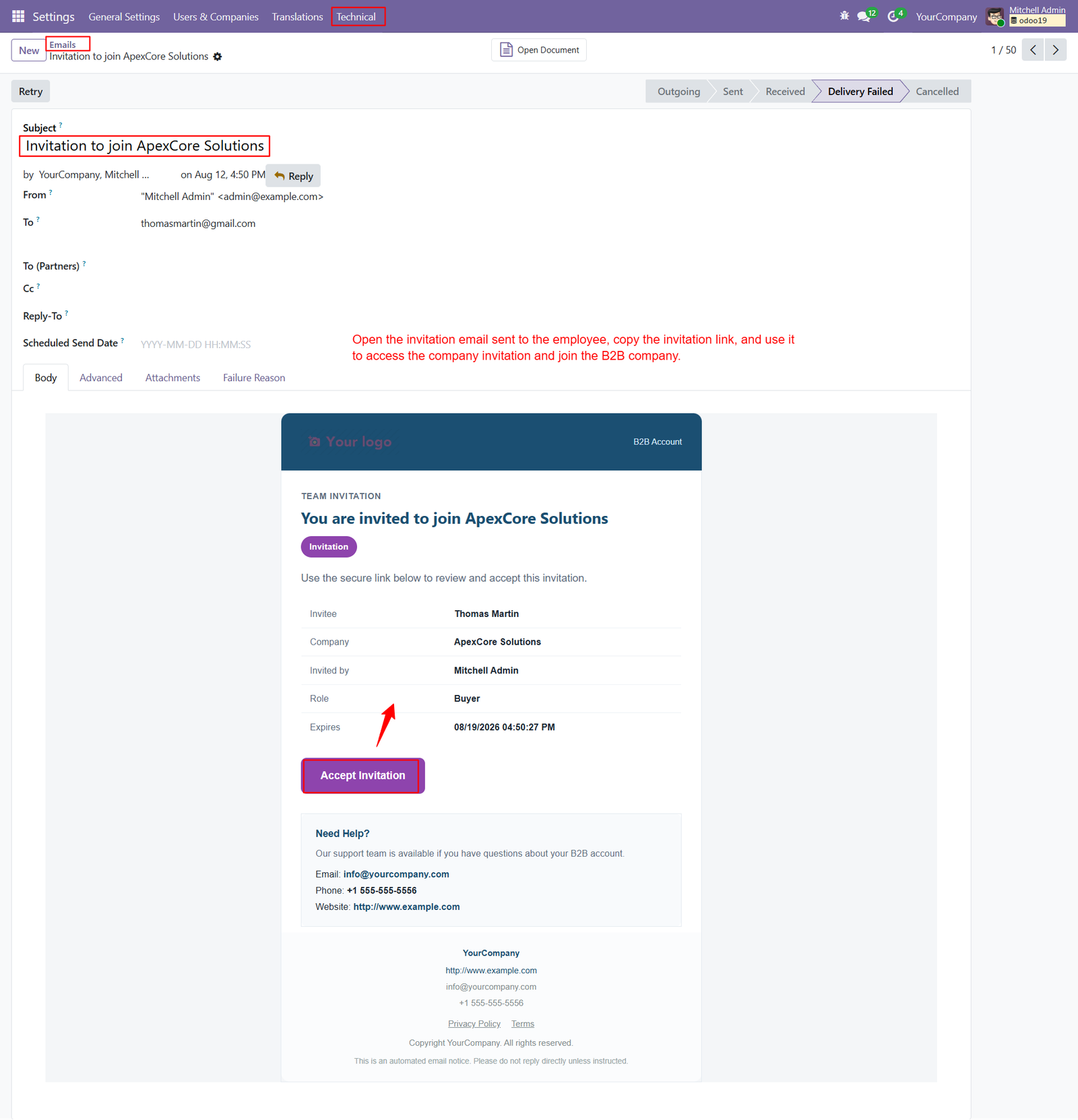
- Company-Specific Invitation – Each invitation clearly displays the assigned company name, helping employees understand which B2B organization they are being invited to join.
- Employee Identification – Display the invited employee’s name within the email, creating a personalized onboarding experience and reducing confusion during registration.
- Role Information – Clearly show the assigned employee role inside the invitation email, helping users understand their responsibilities and access permissions beforehand.
- Invited By Details – Display the administrator or responsible person who created the invitation, providing transparency and improving accountability throughout employee onboarding processes.
- Invitation Expiry Date – Show the invitation expiration date clearly, ensuring employees understand how long the secure invitation remains available for acceptance.
- Accept Invitation Button – Provide a dedicated Accept Invitation button that allows employees to quickly access the registration process and join their company securely.
- Secure Invitation Link – Generate a secure invitation link within the email, providing employees with controlled access to their assigned B2B company environment.
- Professional Email Template – Use a structured email template containing company branding, invitation information, employee details, role information, and secure acceptance options.
- Company Branding – Display company branding within invitation emails, creating a consistent professional appearance and helping employees recognize legitimate company communications easily.
- Invitation Status Management – Monitor invitation delivery and processing statuses, helping administrators identify whether invitations are successfully sent, received, or experiencing delivery issues.
- Email Delivery Tracking – Track email delivery states such as outgoing, sent, received, failed, and cancelled for improved communication monitoring and administrative control.
- Retry Failed Emails – Retry failed invitation emails directly from the email record, helping administrators resend important onboarding communications when delivery problems occur.
- Invitation Communication – Enable administrators to communicate invitation-related information through email, ensuring employees receive clear instructions before accessing their B2B company account.
- Email Attachments Support – Support attachments within invitation emails, allowing administrators to provide additional documents or resources required during the employee onboarding process.
Step 11: Join Company Feature – Employees can easily join an existing B2B company by submitting a company code or secure invitation link through website.
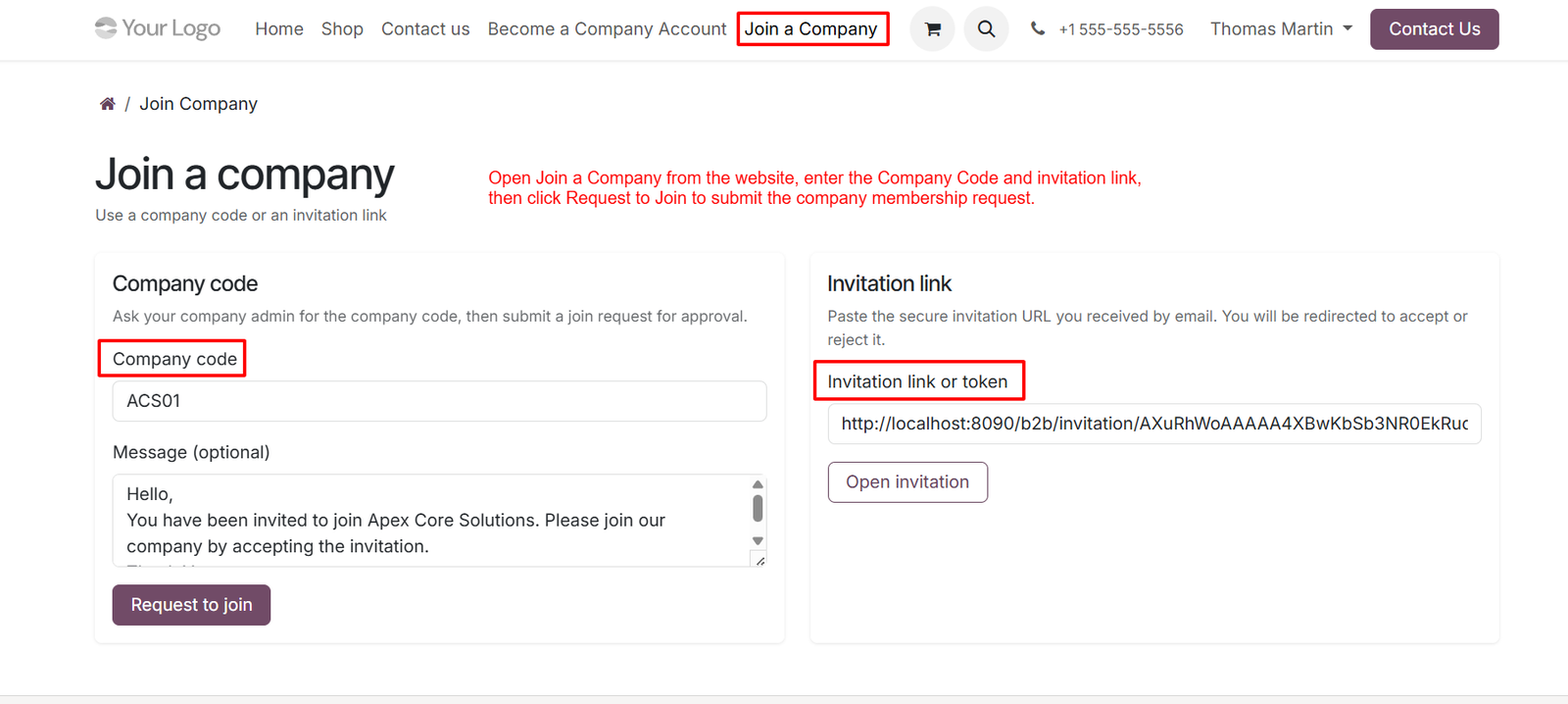
- Company Code Joining – Enter a unique company code provided by the administrator to submit a membership request for joining the selected B2B company.
- Invitation Link Joining – Use a secure invitation link received through email to quickly access and join the assigned B2B company account.
- Optional Join Message – Add an optional message while submitting a company join request, allowing users to communicate additional information with administrators.
- Request To Join – Submit a membership request using the company code, allowing administrators to review and approve or reject requests accordingly.
- Secure Invitation Token – Invitation links contain secure tokens that help identify specific invitations and provide controlled access to the joining process.
- Open Invitation – Open a received invitation directly from the website by entering the invitation link or token into the provided field.
- Company Identification – Company codes help identify the correct B2B organization, ensuring membership requests are submitted to the intended company accurately.
- Administrator Approval – Submitted company membership requests can be reviewed by administrators before users receive access to company-specific resources.
- Flexible Joining Options – Users can join companies through either a company code or invitation link, providing flexibility for different onboarding scenarios.
- Website-Based Joining – The Join a Company page provides a centralized website interface where users can submit membership requests conveniently.
- Invitation Acceptance – Secure invitation links allow users to review invitation details and proceed with accepting membership into their assigned company.
- Invitation Rejection – Users can access invitation links and choose whether to accept or reject invitations according to their requirements.
Step 12: Review Membership Requests – Review submitted membership requests and verify requester details carefully before approving access to the selected B2B company account securely today.
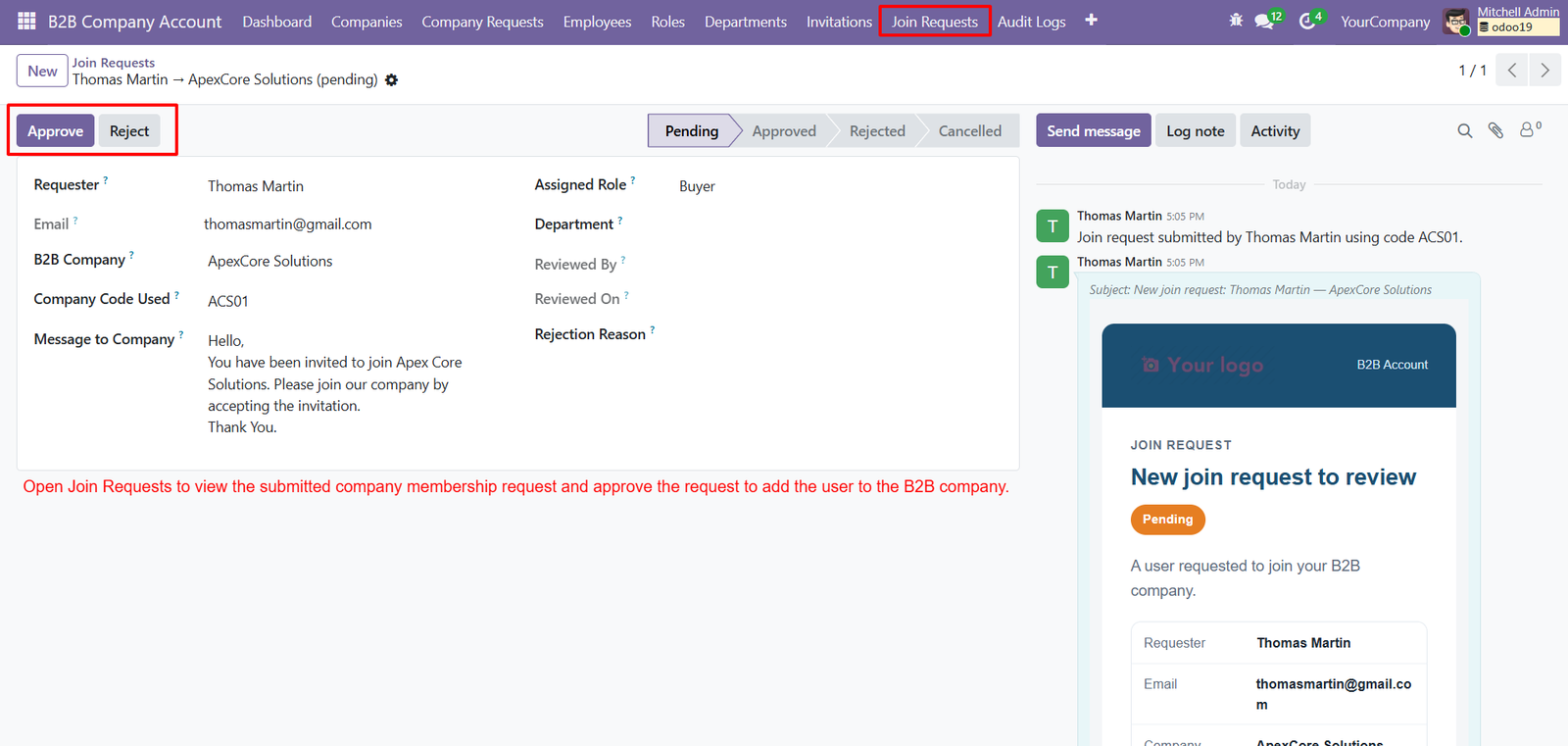
- Approve Join Requests – Approve valid join requests to add users directly into the company, enabling authorized access to B2B resources and daily operations.
- Reject Requests – Reject unsuitable membership requests when submitted information does not meet company requirements, maintaining controlled access and organizational security standards effectively.
- Requester Information – Track requester information including name, email, company, and company code used for complete membership verification and administrative review processes efficiently.
- Assigned Role – Display the assigned role for each requester, helping administrators confirm responsibilities before approving membership within the selected B2B company account.
- Department Assignment – Record the department associated with requests, supporting organized employee placement and accurate company workforce management after successful membership approval processes.
- Request Messages – Capture messages submitted by users, allowing administrators to understand joining intentions and additional information before making approval decisions effectively beforehand.
- Status Tracking – Monitor request status through Pending, Approved, Rejected, and Cancelled stages, providing clear visibility throughout the complete membership approval workflow process.
- Reviewer Tracking – Record the administrator who reviewed each request, creating accountability and maintaining transparency throughout the company membership management process effectively always.
- Review Date – Store review dates to provide administrators with a clear timeline of when membership requests were evaluated and processed successfully afterward.
- Rejection Reasons – Maintain rejection reasons for declined requests, helping companies document decisions and communicate appropriate explanations to unsuccessful applicants clearly and professionally.
- Request Notifications – Send notifications when new join requests arrive, ensuring company administrators can review membership applications without unnecessary delays or missed requests.
- Company Code Verification – Use company codes to identify intended organizations, helping administrators verify that users are requesting access to correct B2B companies accurately.
Step 13: Key Performance Indicators – Monitor companies, employees, requests, invitations, orders, sales, quotations, balances, and credit through centralized dashboard performance indicators.
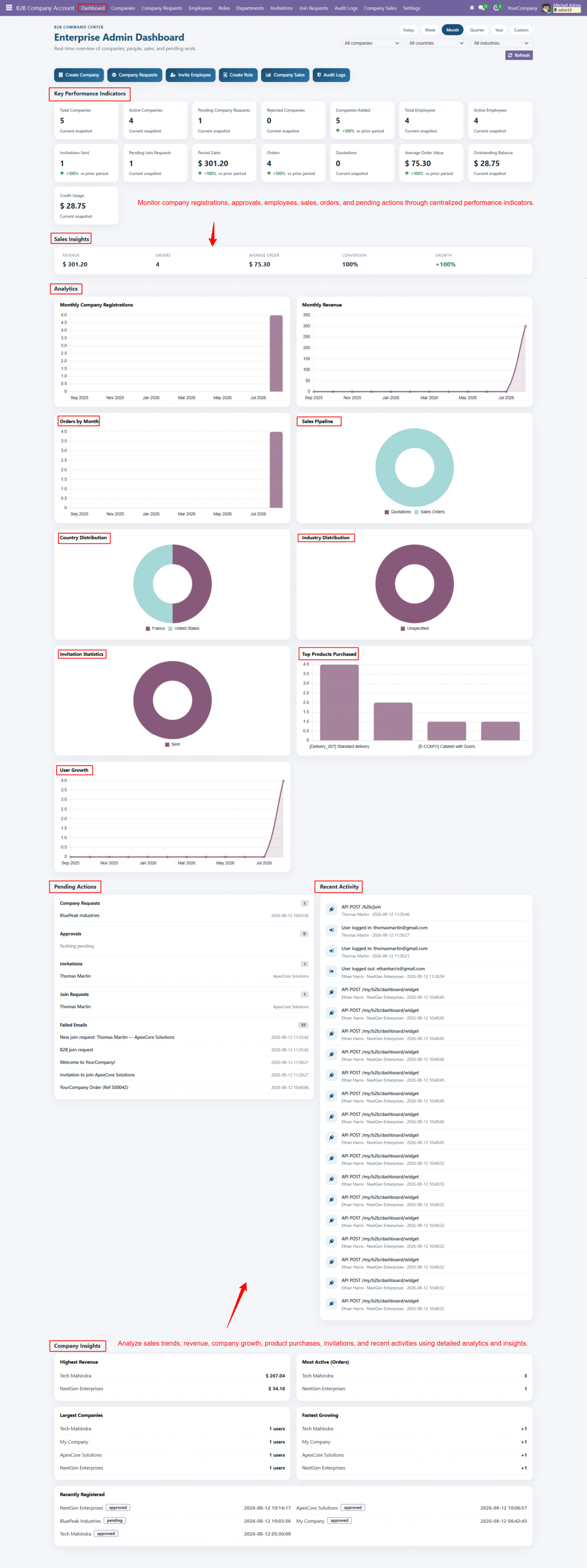
- Company Overview – View total companies, active companies, pending requests, rejected companies, and newly added companies for quick organizational performance monitoring.
- Employee Monitoring – Track total and active employees across B2B companies, helping administrators understand workforce growth and current user activity effectively.
- Invitation Statistics – Monitor invitations sent and pending join requests to understand employee onboarding progress across different B2B company accounts efficiently.
- Sales Performance – Analyze total sales, orders, average order value, and conversion metrics to evaluate overall B2B sales performance effectively.
- Revenue Tracking – Monitor revenue trends through dashboard analytics, helping administrators identify growth patterns and understand financial performance across different periods.
- Order Analytics – Analyze monthly orders and order trends to understand purchasing activity and identify important changes in B2B customer demand.
- Sales Pipeline – Visualize quotations and sales orders through pipeline charts, providing administrators with clear insights into current sales opportunities and progress.
- Country Distribution – Analyze company distribution across different countries, helping businesses understand geographical reach and identify important regional opportunities effectively.
- Industry Distribution – Review company distribution by industry, enabling administrators to understand customer segments and evaluate business concentration across different sectors.
- Invitation Growth – Analyze invitation statistics to understand employee onboarding activity and measure how effectively companies are expanding their connected workforce.
- Top Products Purchased – Identify frequently purchased products through visual analytics, helping businesses understand customer preferences and improve product planning decisions effectively.
- User Growth Analytics – Track user growth over time to evaluate platform adoption and understand how quickly B2B company participation is increasing.
Step 14: Email Notification Monitoring – Monitor B2B email notifications for company registrations, approvals, invitations, join requests, order updates, and delivery status changes efficiently and securely.
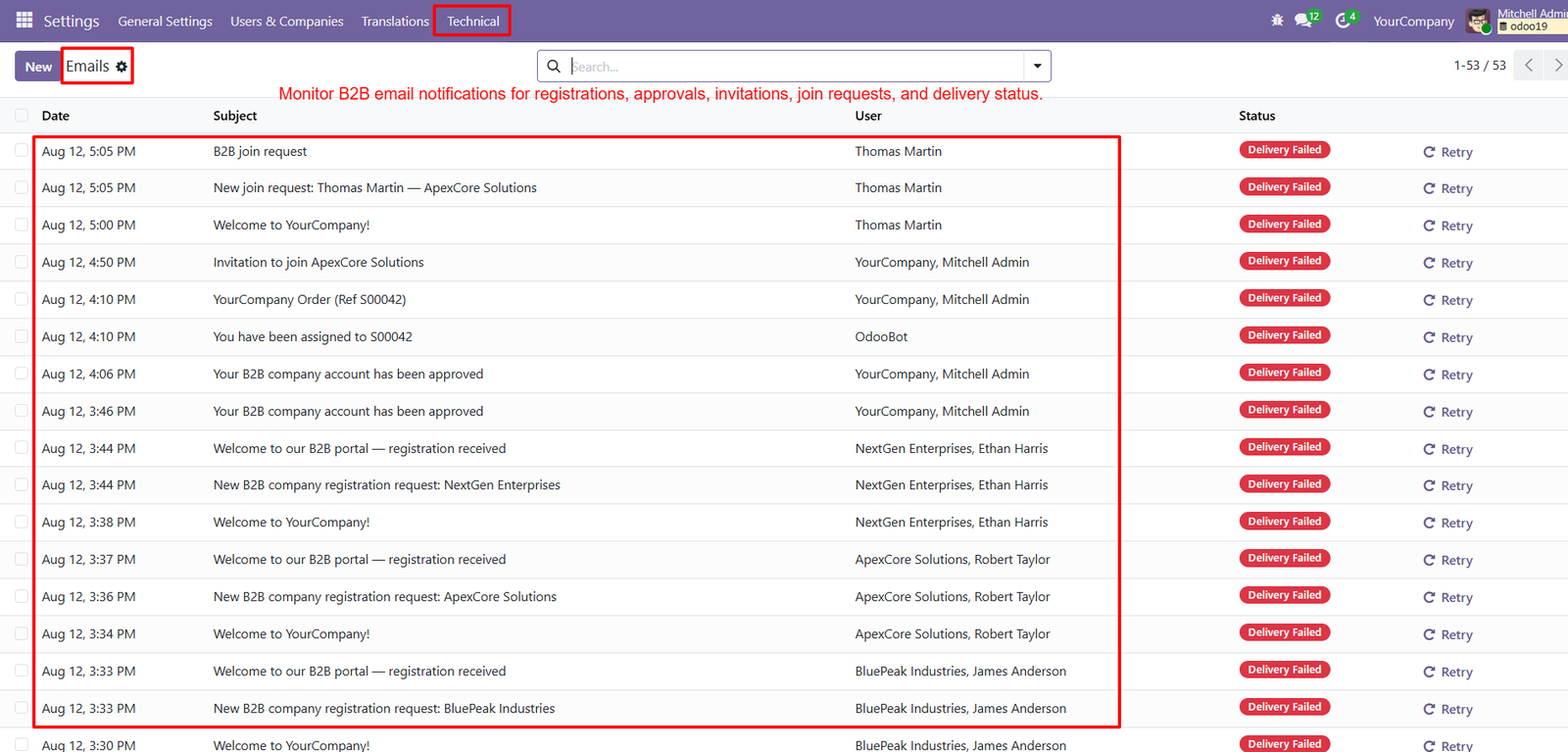
- Centralized Email Tracking – Centralized email tracking provides administrators with complete visibility into every B2B notification, helping them monitor communication activities from one place.
- Registration Notifications – Registration emails notify administrators when new B2B companies submit account applications, ensuring requests are reviewed promptly without missing important submissions.
- Approval Notifications – Approval notifications inform companies about successful account activation, creating a transparent onboarding experience and confirming access to B2B portal features.
- Employee Invitations – Invitation emails keep employees informed about company invitations, assigned roles, departments, acceptance links, expiration dates, and required onboarding actions easily.
- Join Request Alerts – Join request emails alert company administrators whenever users request membership, enabling faster review, approval, rejection, and communication with applicants directly.
- Order Notifications – Order notification emails provide important sales order updates, helping companies stay informed about purchases, confirmations, assignments, and transaction progress continuously.
- Delivery Status Tracking – Delivery status tracking highlights failed email deliveries, allowing administrators to identify communication issues and retry important messages when necessary quickly.
- Retry Failed Emails – Retry functionality helps administrators resend failed notifications, improving communication reliability and ensuring important B2B messages reach their intended recipients successfully.
- Clear Email Subjects – Email subjects clearly identify registration, invitation, approval, order, and join request communications, making notification management faster and easier for administrators.
- Recipient Information – User information displayed alongside emails helps administrators quickly identify recipients, companies, and responsible users associated with each B2B notification easily.
- Timestamp Visibility – Timestamp visibility allows administrators to understand when notifications were generated, supporting better communication tracking and accurate activity monitoring across companies.
- Delivery Failure Indicators – Delivery status indicators immediately highlight unsuccessful email deliveries, helping administrators detect communication failures and take corrective action without unnecessary delays.
Why Use the B2B Company Accounts in Odoo Module?
The B2B Company Accounts in Odoo module helps businesses efficiently manage company registrations, employees, roles, departments, approvals, orders, credit, and B2B activities from one centralized platform.
- Simplify B2B Registration – Allow businesses to submit company account requests directly through the website.
- Centralized Company Management – Manage B2B companies, employees, departments, roles, and activities from one place.
- Streamline Approval Workflows – Review, approve, reject, or manage company registration requests efficiently.
- Role-Based Access Control – Assign specific permissions to company users according to their responsibilities.
- Employee Management – Easily invite, manage, and organize employees under their respective B2B companies.
- Company Dashboard – Provide companies with centralized access to orders, quotes, employees, credit, and recent activities.
- Credit & Risk Management – Monitor credit limits, credit usage, available credit, and company risk levels.
- Join Request Management – Allow users to request membership and enable administrators to approve or reject requests.
- Email Notifications – Keep users informed about registrations, approvals, invitations, orders, and join requests.
- Audit Logging – Track important company activities, user actions, approvals, and system changes for better accountability.
- Better B2B Collaboration – Create a structured environment for companies and their employees to work together.
- Improved Business Visibility – Access company sales, revenue, orders, registrations, and performance insights through dashboards.
- Faster Operations – Reduce manual administrative work by automating important B2B company workflows.
- Secure Company Access – Ensure employees access company-specific information according to their assigned roles and permissions.
- Scalable B2B Management – Manage multiple companies and their employees efficiently as your business grows.
- Better Customer Experience – Give business customers a professional portal for managing company-related activities and orders.
- Centralized Communication – Track important B2B emails, invitations, approvals, and membership-related communications.
- Organized Departments – Create departments and assign employees to maintain a structured company hierarchy.
- Actionable Analytics – Analyze company registrations, sales, orders, invitations, users, products, and business performance.
- Complete B2B Solution – Bring company onboarding, employee management, permissions, sales, credit, communication, and analytics together within Odoo.