

Managing shipping manually can quickly become complicated for eCommerce businesses. From calculating shipping costs and creating shipments to generating labels and tracking deliveries, every additional manual step increases the possibility of errors and delays.
The DHL Shipping Integration for Odoo provides a seamless way to connect your Odoo system with DHL and manage the complete shipping process directly from Odoo.
With this integration, businesses can calculate DHL shipping rates, offer DHL delivery during checkout, create shipments, generate tracking numbers, print shipping labels, and monitor shipping activity from a centralized dashboard.
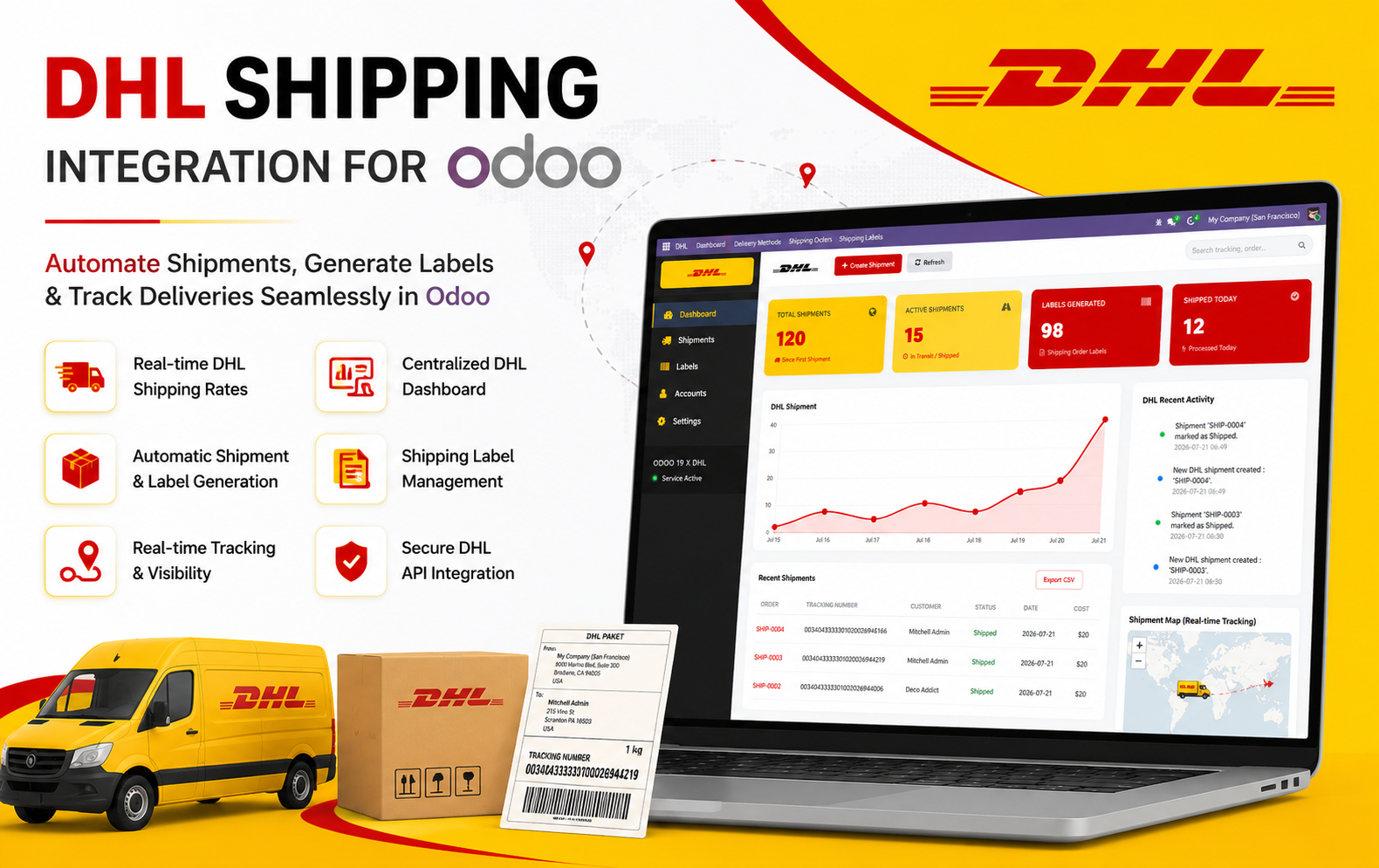
Key Features at a Glance
- Centralized DHL Shipping Dashboard
Monitor shipments, shipping activities, generated labels, shipment trends, and account status from one centralized dashboard. - Real-Time DHL Shipping Rates
Automatically calculate and apply DHL shipping charges during Website checkout and Sales Order processing. - Automatic Shipment Creation
Create DHL shipments directly from Odoo by validating the Delivery Order, reducing manual shipping work. - Automatic Tracking Number Generation
Automatically receive and store DHL tracking numbers in the related Delivery Order and Shipping Order. - DHL Shipping Label Generation
Generate printable DHL shipping labels automatically and access them directly from Odoo. - Complete Shipping Order Management
Manage customers, Sales Orders, Delivery Orders, tracking numbers, shipping costs, carriers, and shipment status in one place. - Centralized Shipping Label Management
View, access, download, and print all generated DHL shipping labels from a dedicated menu. - DHL Website Checkout Integration
Allow customers to select DHL as their preferred delivery method during Odoo Website checkout. - Sales Order DHL Shipping Support
Add DHL shipping to Sales Orders and apply the calculated shipping charges before confirming the order. - Shipment History & Tracking
View previous DHL shipments with tracking numbers, customers, destinations, shipping costs, dates, and statuses. - Secure DHL API Integration
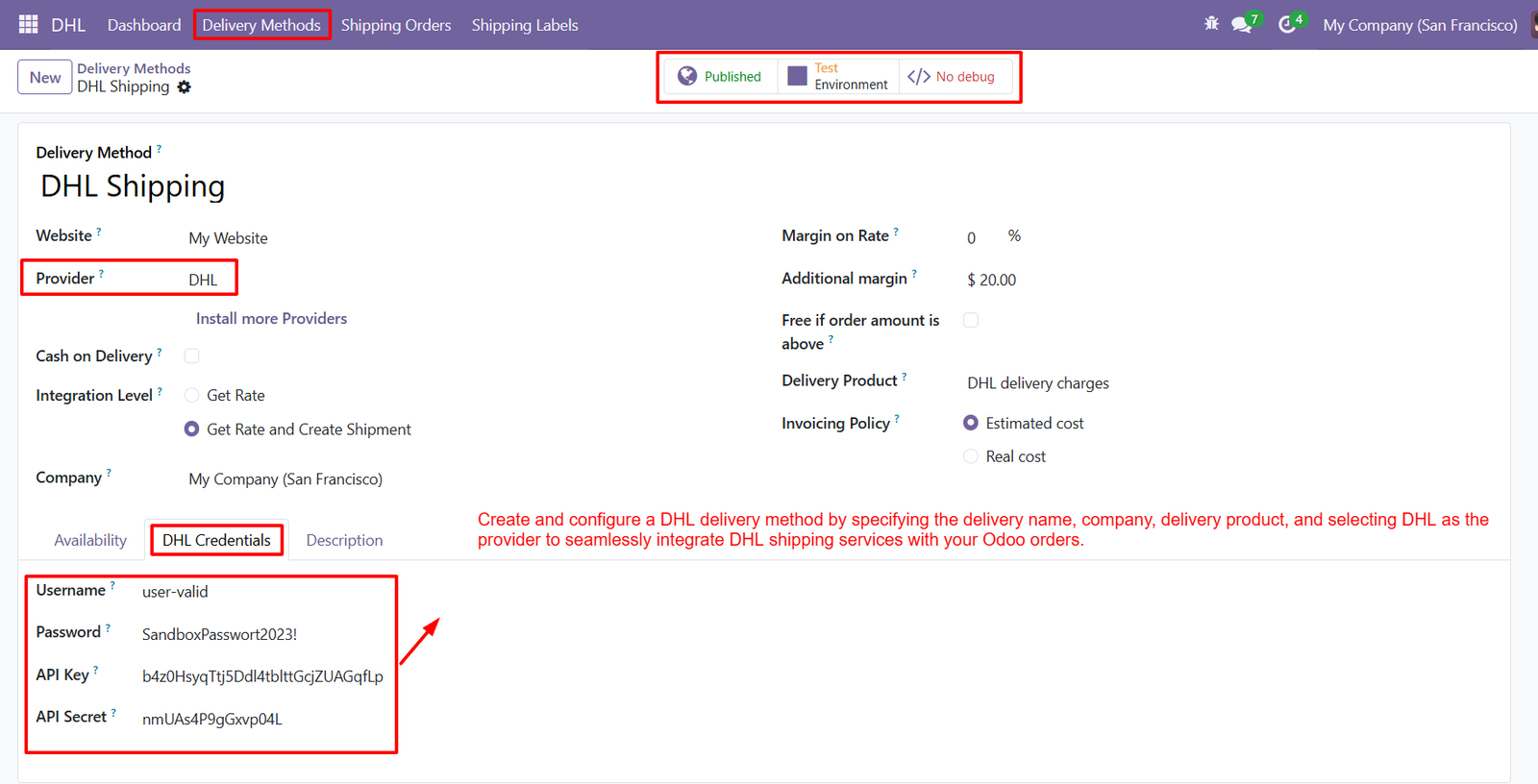
Configure DHL API credentials and connect Odoo securely with DHL shipping services. - Real-Time Shipment Visibility
Track shipment activity and monitor shipping operations through dashboard statistics, recent activity, and shipment tracking information. - DHL Account Configuration
Manage DHL account information, API configuration, environment settings, and integration credentials from Odoo. - CSV Shipment Export
Export shipment information in CSV format for reporting, analysis, and operational management. - Easy Label & Shipment Access
Quickly navigate between Delivery Orders, Shipping Orders, Tracking Numbers, and generated DHL labels for efficient fulfillment.
Use Cases: Who Needs This module?
The DHL Shipping Integration for Odoo is ideal for businesses that rely on DHL for order fulfillment and want to automate shipping operations directly from Odoo.
1. eCommerce Businesses
Online stores can offer DHL as a delivery option during checkout, automatically calculate shipping charges, create shipments, and generate shipping labels.
2. Retail Businesses
Retailers can manage customer orders, delivery operations, tracking numbers, and DHL shipping costs from a single Odoo platform.
3. Wholesalers & Distributors
Businesses processing large volumes of orders can automate shipment creation and reduce manual shipping-related tasks.
4. Manufacturers
Manufacturers can connect their warehouse delivery workflow with DHL to efficiently ship finished products to customers and distributors.
5. Multi-Order Fulfillment Businesses
Businesses handling multiple shipments every day can use the centralized dashboard to monitor shipments, labels, tracking numbers, and shipping statuses.
6. International eCommerce Sellers
Businesses shipping products across different countries can use DHL services while maintaining shipping information directly within Odoo.
7. Warehouse & Logistics Teams
Warehouse teams can streamline the process from Delivery Order → DHL Shipment → Tracking Number → Shipping Label, reducing repetitive data entry.
8. Odoo Website Stores
Businesses using the Odoo Website and eCommerce platform can allow customers to select DHL shipping during checkout and automatically add delivery charges to the order.
9. Businesses Requiring Shipping Tracking
Companies that need better shipment visibility can manage DHL tracking numbers and shipment records directly within Odoo.
10. Businesses Looking to Automate Shipping
Any business that wants to reduce manual shipping operations, improve order fulfillment, and manage DHL shipments from a centralized Odoo environment can benefit from this module.
Quick User Guide (Visual Walkthrough)
Scroll up to revisit the detailed image-wise walkthrough.
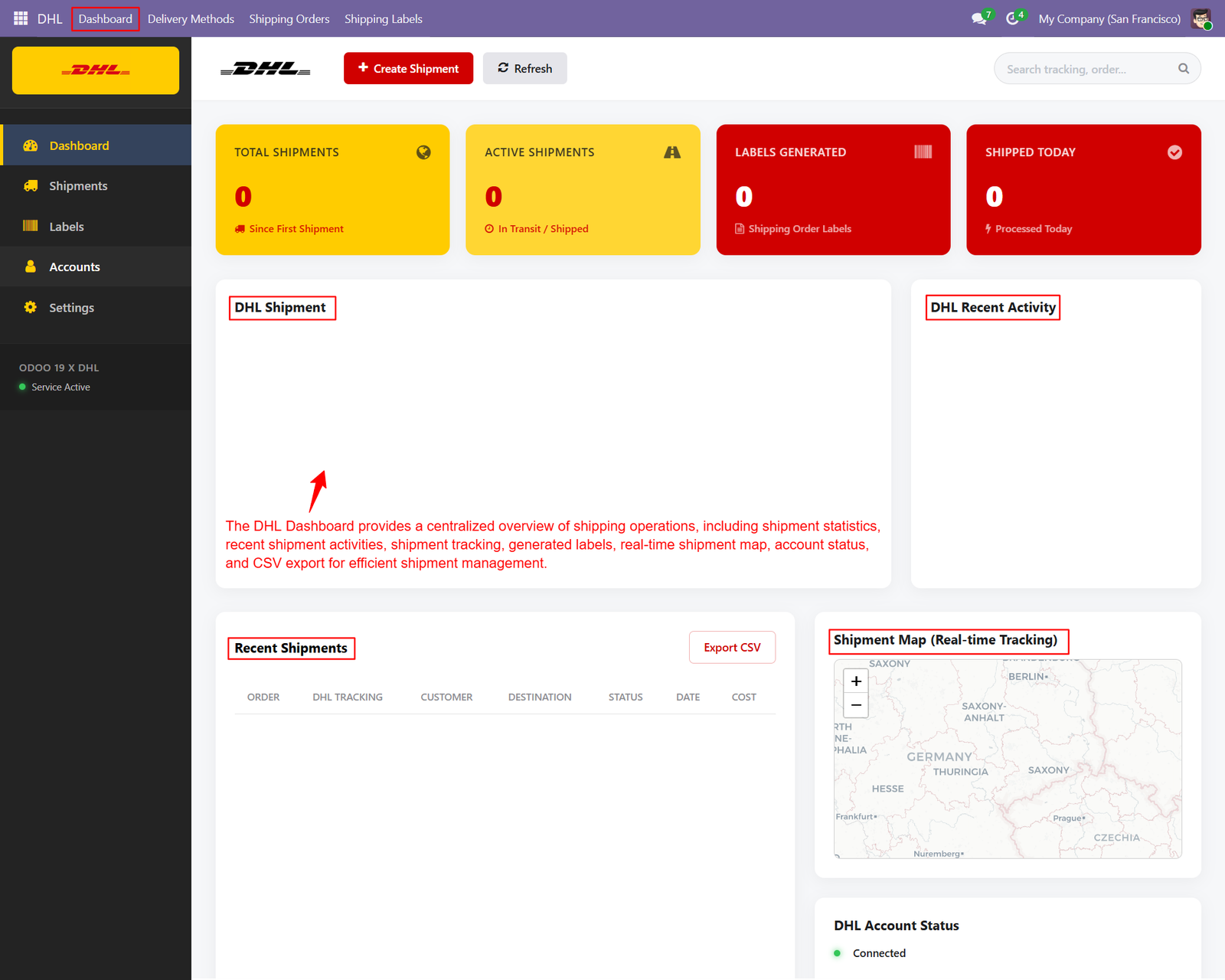
Step 1: Managing multiple shipments can become challenging when businesses need to monitor shipment status, tracking information, generated labels, shipping costs, and delivery activities across different systems
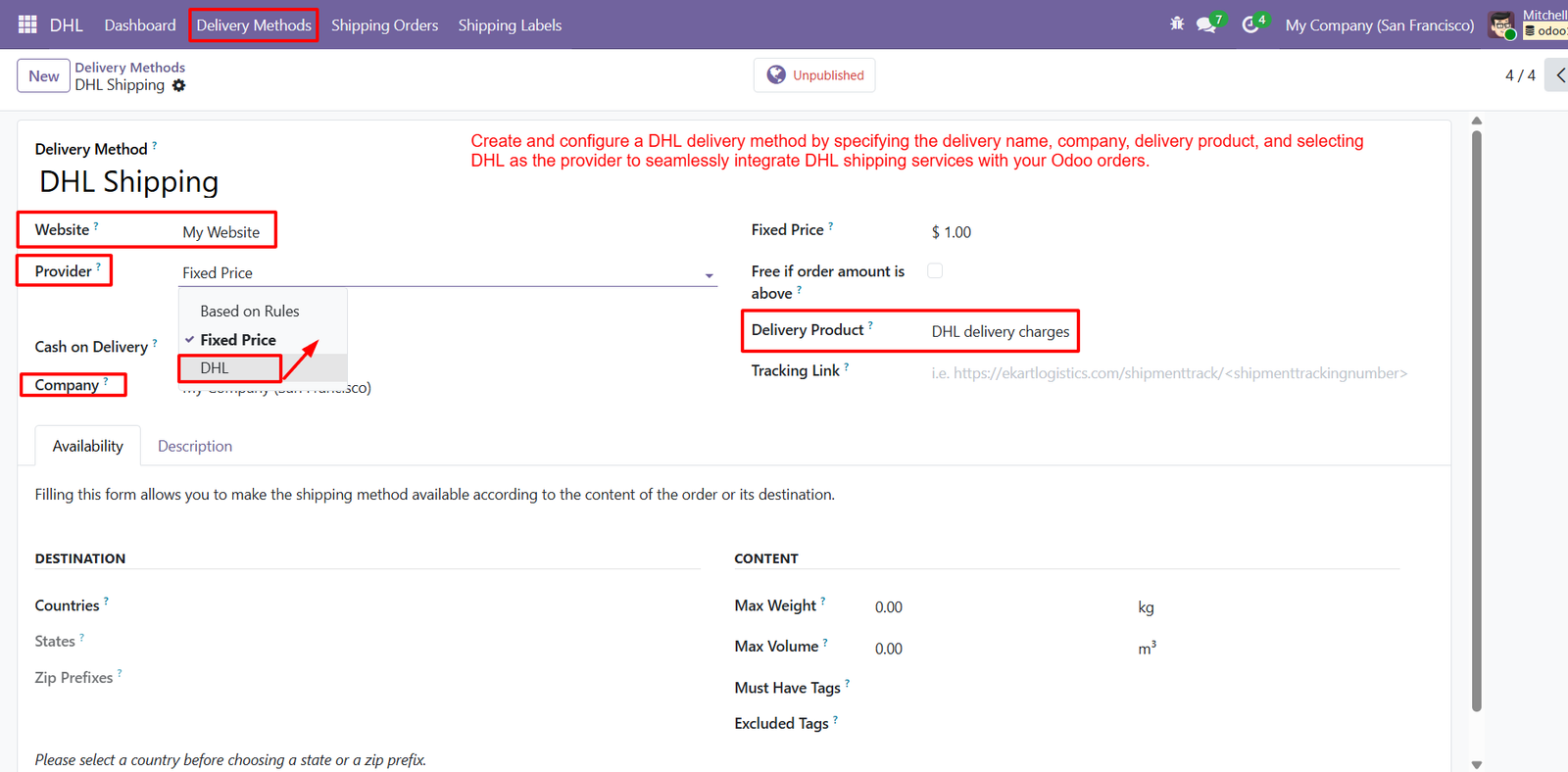
Step 2: Configure DHL delivery methods effortlessly by selecting website, provider, company, delivery product, pricing, and tracking options for smooth shipping easily.
Step 3: Publish DHL shipping methods to make them available, test configurations safely, and manage debugging options directly within your Odoo workflow.
Step 4: Customers can select DHL Shipping during checkout, ensuring reliable delivery options and transparent shipping charges are automatically added to orders.
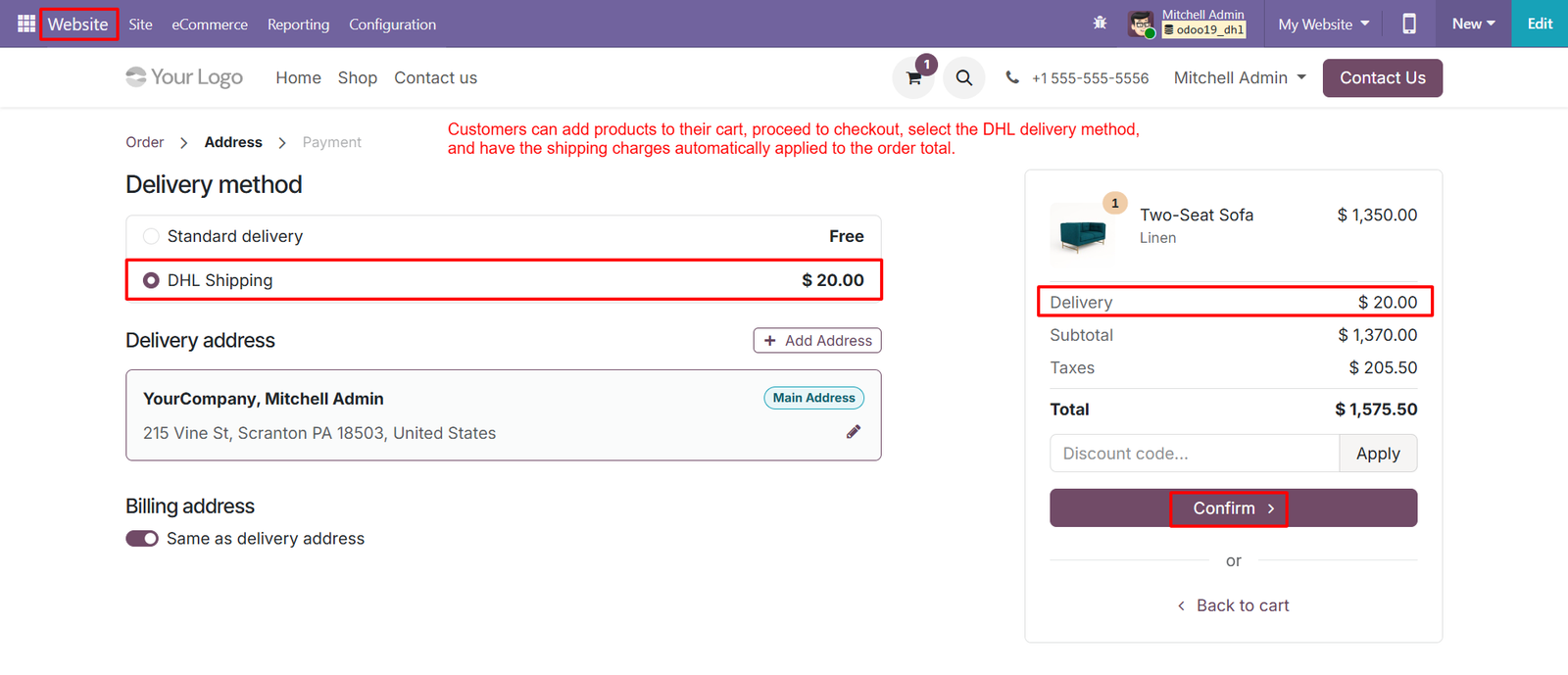
- Customers can select DHL Shipping during checkout, ensuring convenient delivery choices and transparent shipping charges before confirming their orders online.
- DHL Shipping appears alongside standard delivery, allowing customers to compare available options and choose the service that best suits requirements.
- Shipping charges are automatically added to the order total when customers select DHL, reducing calculations and simplifying checkout for customers.
- Customers can review the DHL delivery fee before confirming their order, providing complete transparency throughout the entire checkout experience easily.
- The delivery address is clearly displayed, helping customers verify destination details before selecting DHL Shipping and completing their purchase successfully.
- Customers can add a new delivery address directly during checkout, making DHL shipments flexible for different destinations and recipients easily.
- Billing and delivery addresses can remain identical, simplifying checkout while ensuring accurate information is maintained for DHL order processing securely.
- The order summary displays DHL delivery charges separately, helping customers understand how shipping costs contribute to their final purchase amount.
- Customers can switch between delivery methods before confirmation, providing greater flexibility when choosing DHL or other available shipping services easily.
- DHL shipping charges are automatically reflected in the subtotal, ensuring accurate order calculations without requiring customers to enter fees manually.
Step 5: Validate the delivery order after confirmation to automatically create DHL shipments, generate tracking references, and prepare shipping labels efficiently.
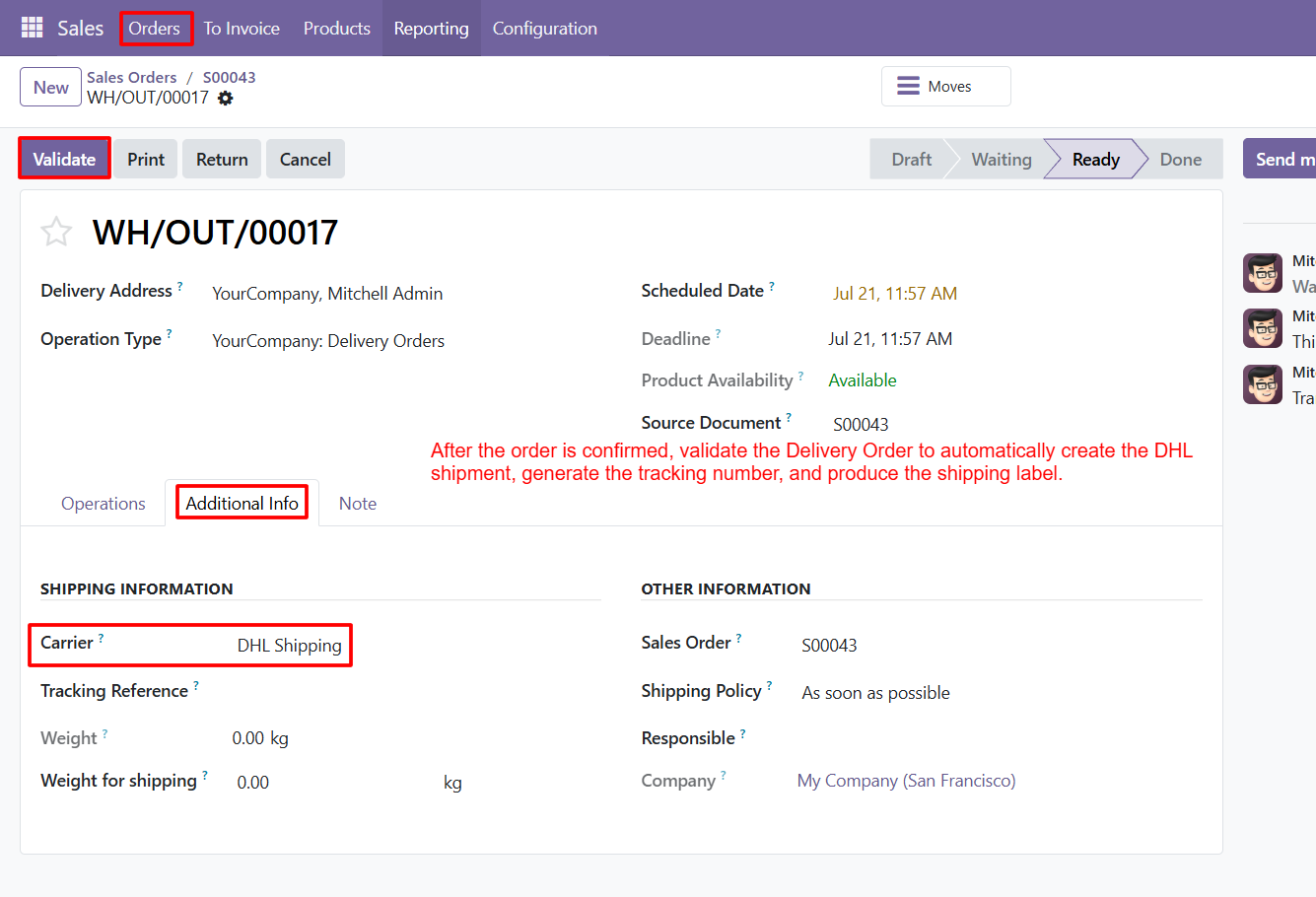
- Validate the delivery order after confirmation to automatically create the DHL shipment, generate tracking references, and prepare shipping labels efficiently.
- Select DHL Shipping as the carrier to connect Odoo delivery orders with DHL services for streamlined shipment processing and fulfillment.
- Validation moves the delivery order forward, confirming products, delivery details, and shipping information before DHL shipment creation begins within Odoo.
- After validation, DHL integration can generate shipment details, helping businesses reduce manual work and accelerate their overall order fulfillment process.
- Tracking references provide shipment visibility, allowing businesses and customers to monitor DHL deliveries throughout the transportation and fulfillment journey easily.
- The delivery order displays DHL Shipping as the assigned carrier, ensuring shipping operations remain connected with the selected logistics provider.
- Scheduled dates and deadlines help businesses organize delivery operations while ensuring DHL shipments are processed according to planned fulfillment timelines.
- The Product Availability status confirms inventory readiness, helping businesses validate delivery orders confidently before initiating DHL shipment processing and fulfillment.
- The source document links the delivery order with its originating sales order, providing traceability throughout the complete DHL fulfillment workflow.
- Shipping information displays carrier, tracking reference, weight, and shipping weight, providing essential details for accurate DHL delivery management operations efficiently.
Step 6: DHL shipment creation is completed automatically after validation, helping businesses streamline delivery workflows and reduce manual shipping tasks efficiently.
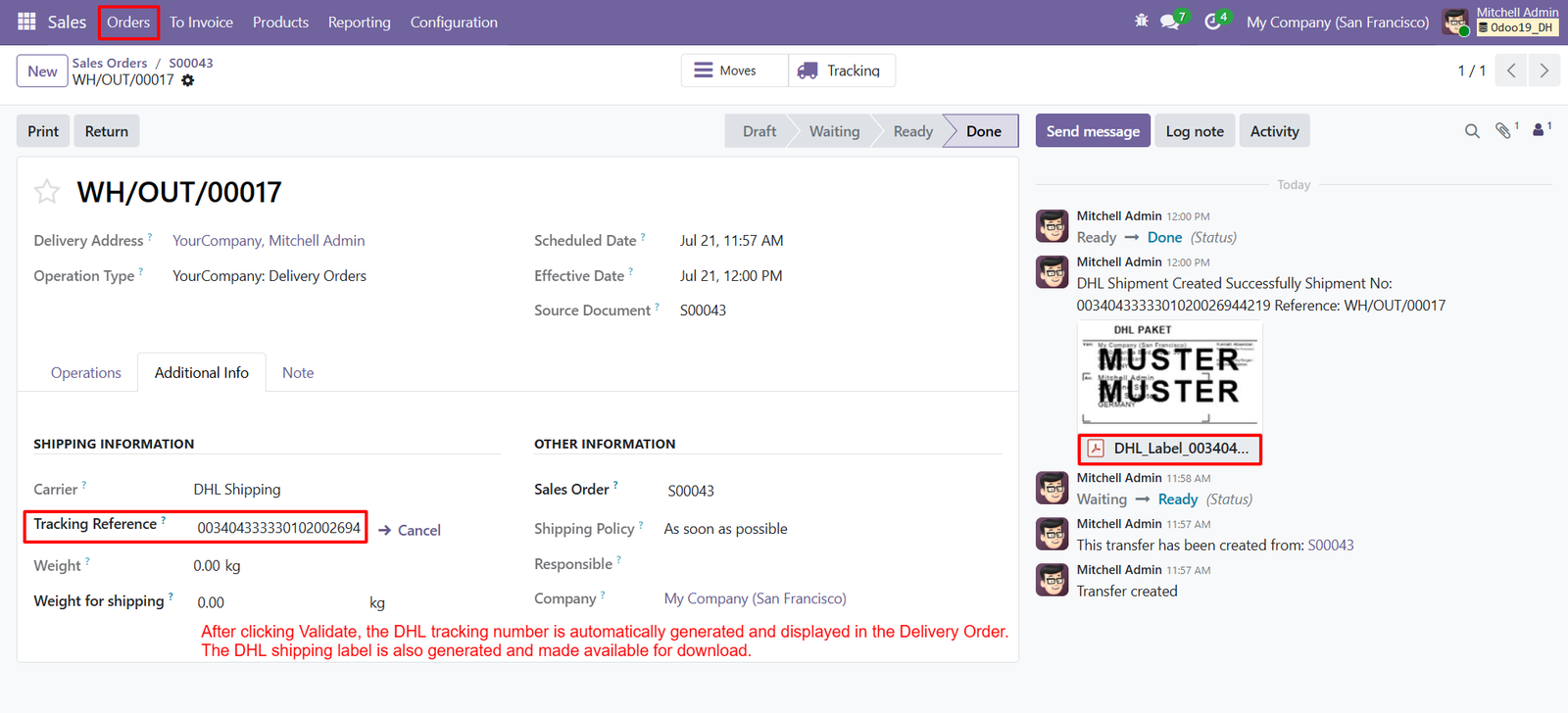
After validation, Odoo marks the delivery order as Done, confirming successful processing and completion of the DHL shipping workflow automaticaThe DHL tracking reference is automatically generated after validation, providing a unique identifier for monitoring each shipment throughout delivery easily.
Step 7: The generated DHL label displays complete shipment information, helping businesses verify package details before dispatching orders to customers securely.
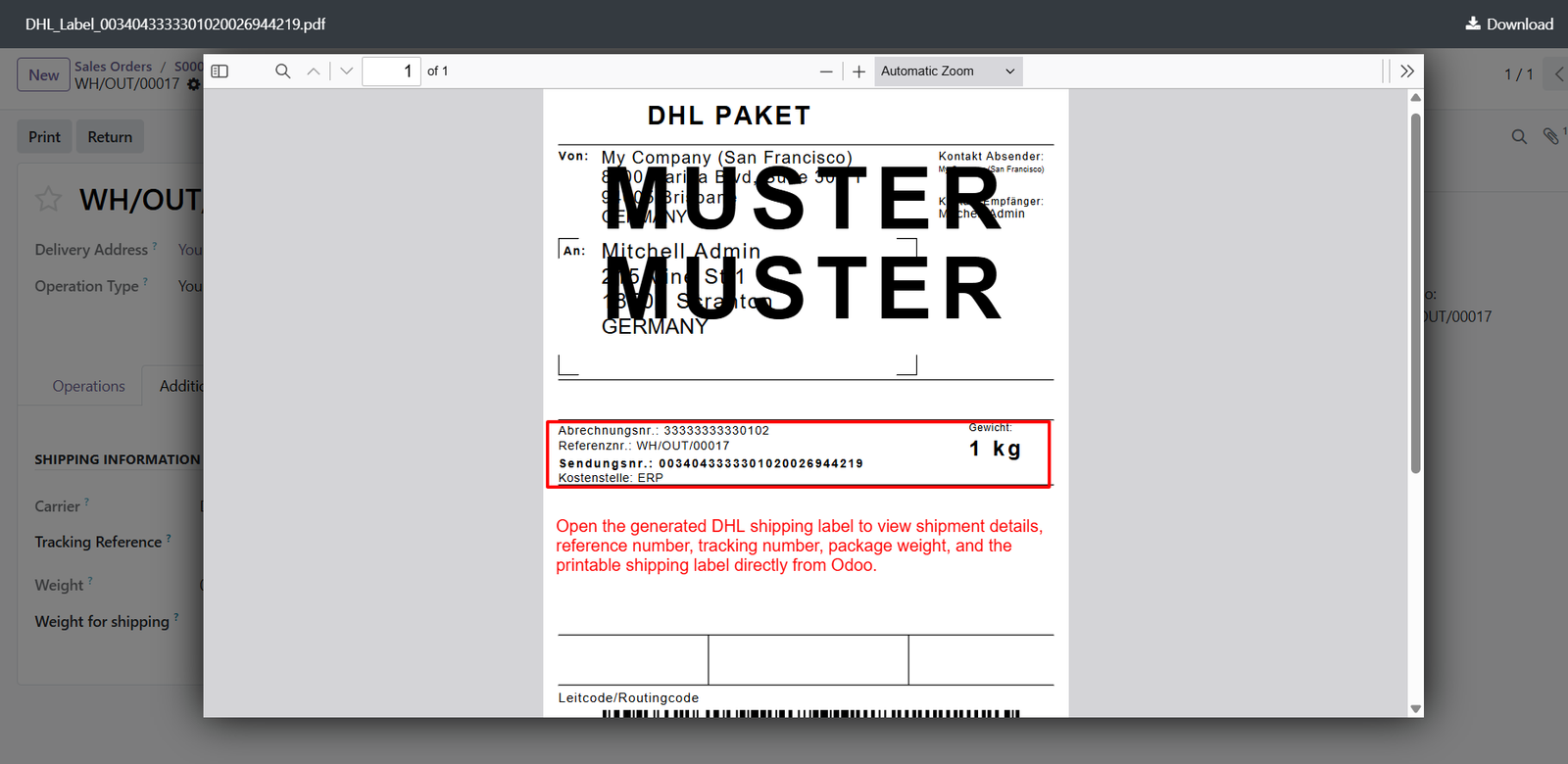
- The shipping label includes sender information, allowing logistics teams to identify the originating company and maintain accurate shipment documentation easily.
- Recipient details are clearly displayed on the DHL label, supporting accurate delivery and reducing potential address related shipping errors during fulfillment.
- The DHL label contains shipment reference information, making it easier to connect physical packages with corresponding Odoo delivery orders efficiently.
- A unique DHL shipment number is displayed, providing a reliable identifier for tracking packages throughout the complete delivery journey easily.
- Package weight appears directly on the generated label, helping warehouse teams verify shipment information before handing parcels to DHL for delivery.
- The label provides billing reference information, supporting accurate shipment identification and simplifying logistics documentation for businesses using DHL services within Odoo.
- Odoo generates the DHL shipping label automatically, reducing manual document preparation and improving efficiency during warehouse fulfillment operations significantly.
- Users can open the generated DHL PDF label directly from Odoo, making shipping documentation accessible whenever required during order processing.
- The printable DHL label helps warehouse employees prepare packages efficiently by providing essential shipment information in one centralized document for dispatch.
- Shipment references on the label improve traceability, allowing teams to connect physical packages with their corresponding digital records quickly.
Step 8: Shipping orders provide a centralized view of DHL shipments, including tracking numbers, delivery details, shipping costs, customers, and labels.
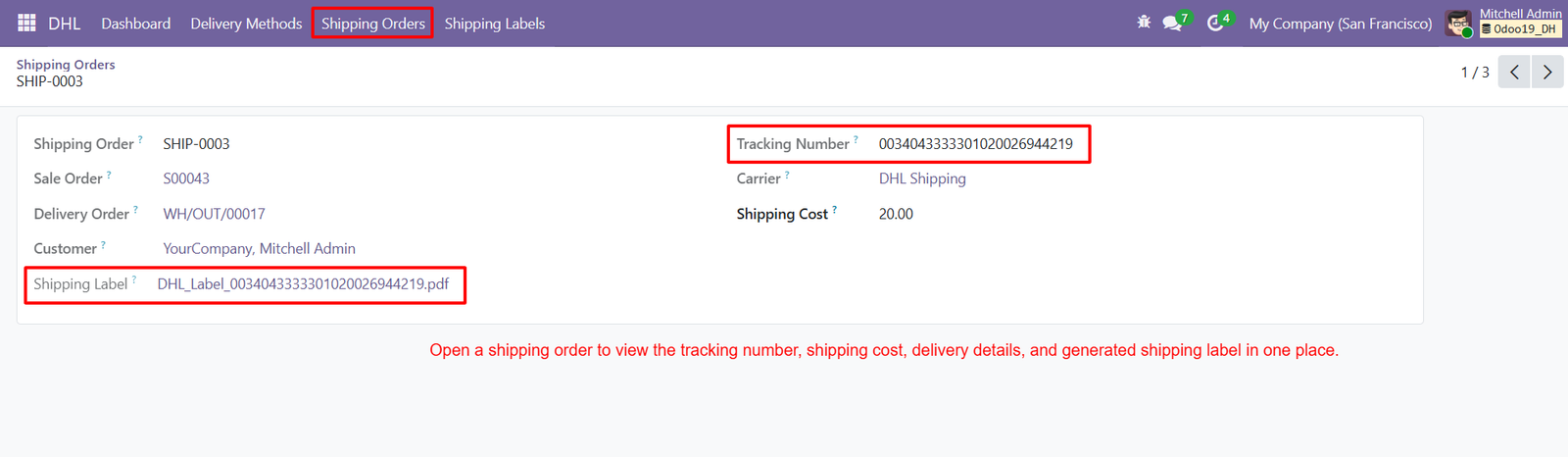
- Each shipping order receives a unique identifier, making DHL shipment management organized and easy to reference within Odoo efficiently.
- The linked sales order connects shipment information with the original customer purchase, maintaining complete order traceability throughout fulfillment operations.
- Delivery order references allow users to quickly access corresponding warehouse operations and verify DHL shipment processing details from one place.
- Customer information is displayed within shipping orders, helping businesses identify recipients and maintain accurate shipment records during delivery management.
- The tracking number provides a unique identifier for monitoring DHL shipments and improving delivery visibility throughout the transportation process easily.
- DHL Shipping is displayed as the assigned carrier, clearly identifying which logistics provider is responsible for the shipment during fulfillment.
- Shipping costs are recorded within the shipping order, helping businesses maintain accurate financial information for every DHL delivery efficiently.
- Generated DHL shipping labels remain accessible from the shipping order, allowing users to retrieve documentation whenever required for package dispatch.
- Users can open the attached DHL label directly from the shipping order, simplifying printing and package preparation for warehouse teams quickly.
- Shipping orders connect tracking information with delivery records, creating better shipment traceability and centralized logistics management within Odoo efficiently.
Step 9: View all DHL shipping orders centrally, including customers, sales orders, delivery orders, carriers, tracking numbers, costs, and statuses.
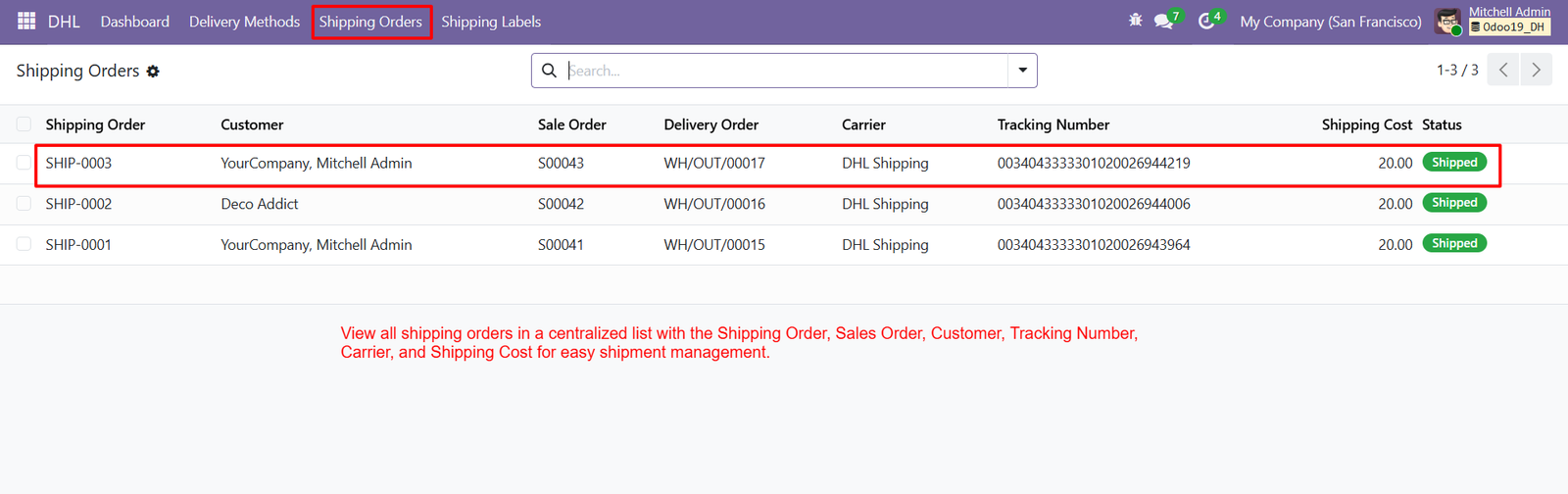
- The Shipping Orders list provides a centralized dashboard for monitoring multiple DHL shipments and managing delivery information efficiently from Odoo.
- Each shipping order receives a unique reference, helping users quickly identify and manage individual DHL shipments within their operations.
- Customer names are displayed alongside shipping orders, allowing businesses to identify recipients and maintain organized shipment records for better management.
- Linked sales orders provide direct traceability between customer purchases and their corresponding DHL shipping transactions within Odoo’s workflow.
- Delivery order references connect warehouse operations with DHL shipments, making fulfillment tracking easier and more transparent for business teams.
- The carrier column clearly identifies DHL Shipping, helping users recognize which logistics provider handles each shipment within the centralized list.
- Unique tracking numbers are displayed for every shipment, enabling businesses to maintain accurate shipment identification and delivery monitoring throughout transportation.
- Shipping costs are visible directly within the order list, helping businesses review DHL delivery expenses quickly without opening individual records.
- Shipment statuses such as Shipped provide immediate visibility into current DHL delivery progress across multiple orders within the centralized dashboard.
- Multiple DHL shipping orders can be reviewed together, allowing teams to compare shipment information and monitor fulfillment activities more efficiently.
Step 10: Shipping label records provide centralized access to linked shipping orders, delivery orders, tracking numbers, creation dates, and downloadable PDF labels.
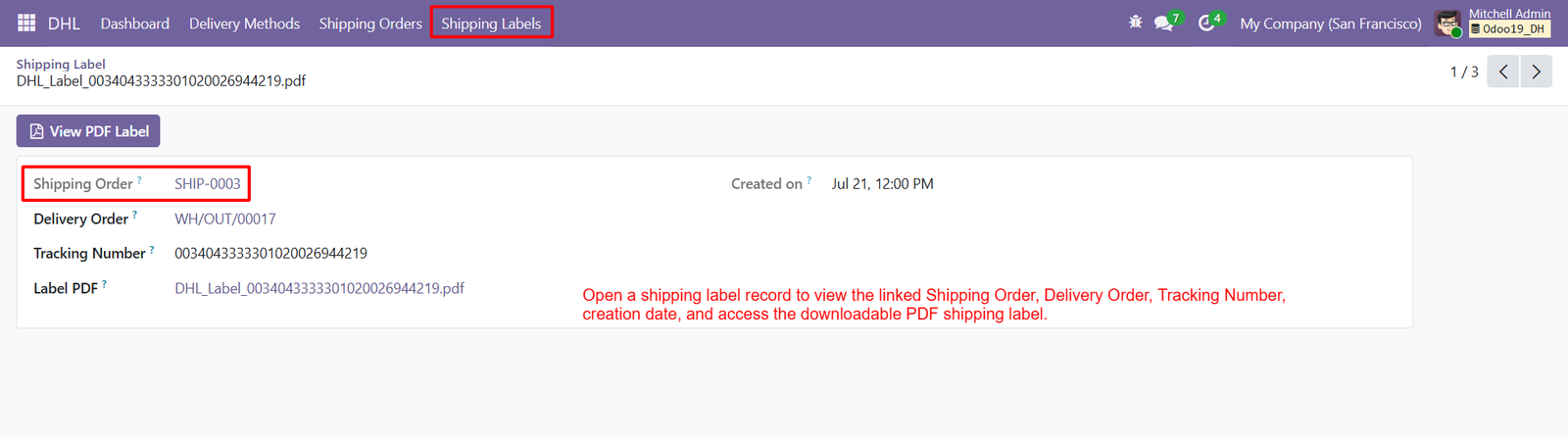
- Each shipping label connects directly with its corresponding shipping order, maintaining complete traceability throughout the DHL fulfillment workflow within Odoo.
- The delivery order reference helps users quickly identify the warehouse operation associated with each generated DHL shipping label for dispatch.
- Tracking numbers are displayed clearly, allowing businesses to identify shipments and maintain accurate delivery records throughout the transportation process easily.
- The label PDF provides direct access to the generated DHL shipping document, making package preparation faster and more convenient for teams.
- Users can click View PDF Label to open the generated shipping document directly from the shipping label record within Odoo.
- The creation date records when the DHL label was generated, supporting better shipment documentation and operational tracking for businesses efficiently.
- Downloadable PDF labels allow warehouse teams to print required shipping documents before packages are handed over to DHL for delivery.
- Shipping labels maintain important shipment references, helping businesses connect digital records with physical packages throughout their logistics operations easily.
- The centralized shipping label record reduces manual searching by keeping shipment documentation and tracking information together in one place within Odoo.
- Users can access the related shipping order directly, simplifying navigation between label records and complete shipment information for quick management.
Step 11: View all generated DHL shipping labels centrally, making shipment documentation easier to access, review, organize, and manage efficiently within Odoo.
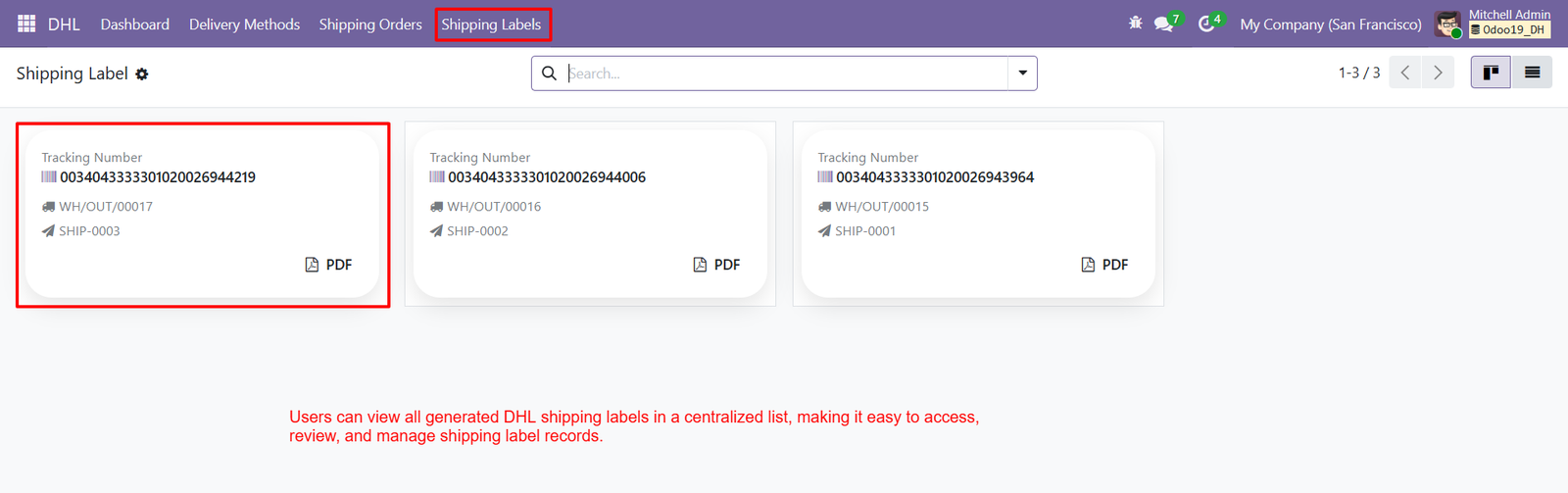
- Each shipping label card displays its tracking number, helping users quickly identify individual DHL shipments and monitor delivery records easily.
- Tracking numbers provide unique shipment references, supporting accurate package identification and improving overall DHL delivery management for businesses using Odoo.
- Delivery order references appear on each label card, connecting shipping labels with corresponding warehouse operations for better fulfillment traceability within Odoo.
- Shipping order references are displayed alongside labels, helping users connect generated DHL documents with their respective shipment records quickly.
- Users can access multiple DHL shipping labels from one centralized interface, reducing navigation time and simplifying document management for warehouse teams.
- Each label card provides a PDF option, allowing users to open or access printable DHL shipping documentation whenever required during fulfillment.
- The card-based layout presents shipment information clearly, helping users review tracking numbers and associated orders without opening individual records first.
- Centralized shipping labels improve operational efficiency by keeping important DHL documentation organized and accessible from one dedicated Odoo interface.
- Users can quickly identify shipment records by reviewing tracking numbers displayed prominently on each DHL shipping label card within Odoo.
Step 12: Add DHL Shipping to sales orders by selecting the delivery method, allowing customers to receive accurate shipping charges during checkout.
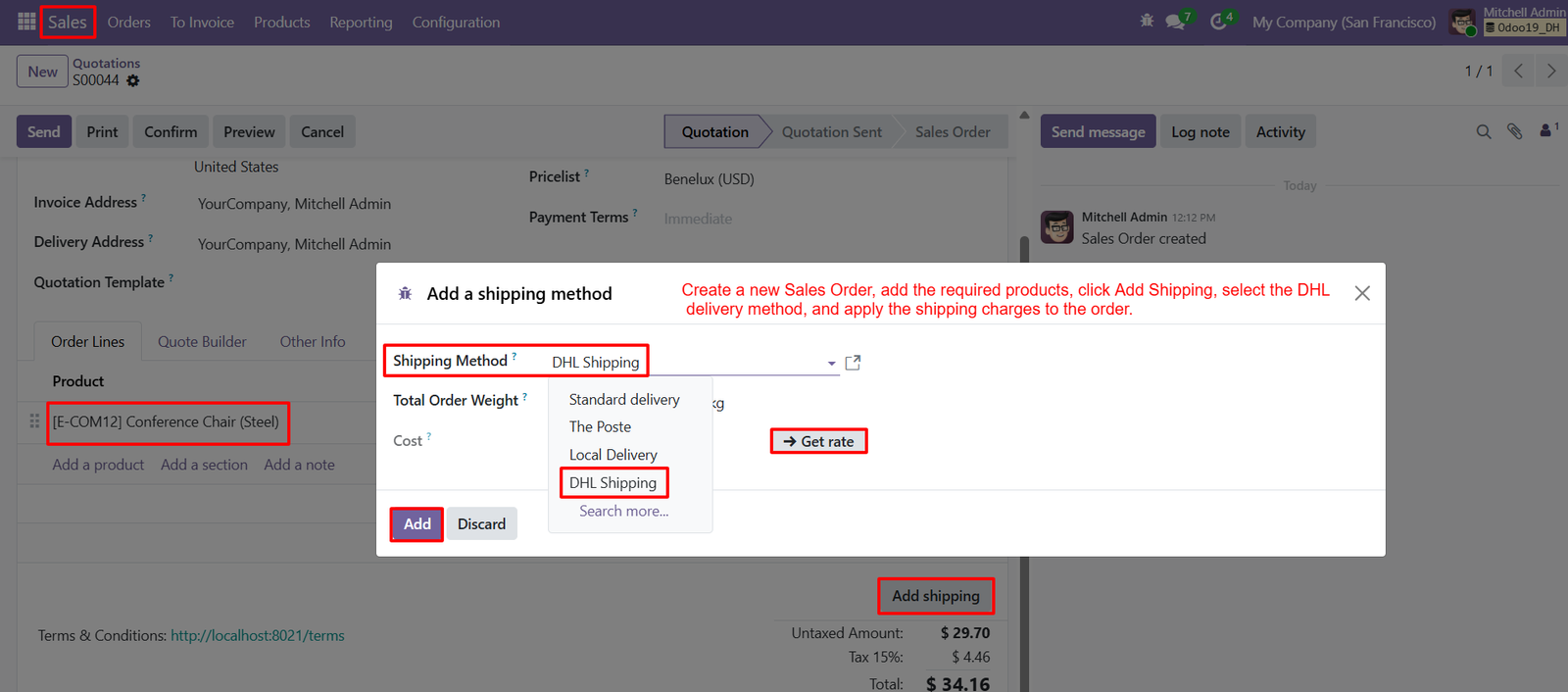
- The Add Shipping option enables users to include delivery services directly within sales orders without manually creating separate shipping entries during processing.
- Users can select DHL Shipping from available delivery methods, providing customers with a reliable carrier option for their orders during checkout.
- The shipping method dropdown displays multiple delivery options, allowing businesses to choose DHL according to specific fulfillment requirements for each order.
- Selecting DHL Shipping automatically connects the sales order with the configured DHL delivery method, simplifying shipping management within Odoo for businesses.
- Users can retrieve DHL shipping rates by clicking Get Rate, helping determine applicable delivery costs before confirming the sales order easily.
- The Get Rate feature helps businesses calculate shipping charges dynamically, reducing manual calculations and improving pricing accuracy for customer orders during checkout.
- Total order weight is considered during DHL rate calculation, supporting more accurate shipping costs based on package requirements for delivery.
- DHL delivery charges can be added directly to the sales order, ensuring shipping costs are included within the final transaction automatically.
- The shipping method window displays the calculated cost, allowing users to review DHL charges before adding shipping to orders within Odoo.
- Businesses can compare DHL Shipping with standard delivery and other available methods before selecting the most suitable carrier for customers.
Step 13: The DHL dashboard provides centralized visibility into total shipments, active shipments, generated labels, shipped orders, and recent shipment activities efficiently.
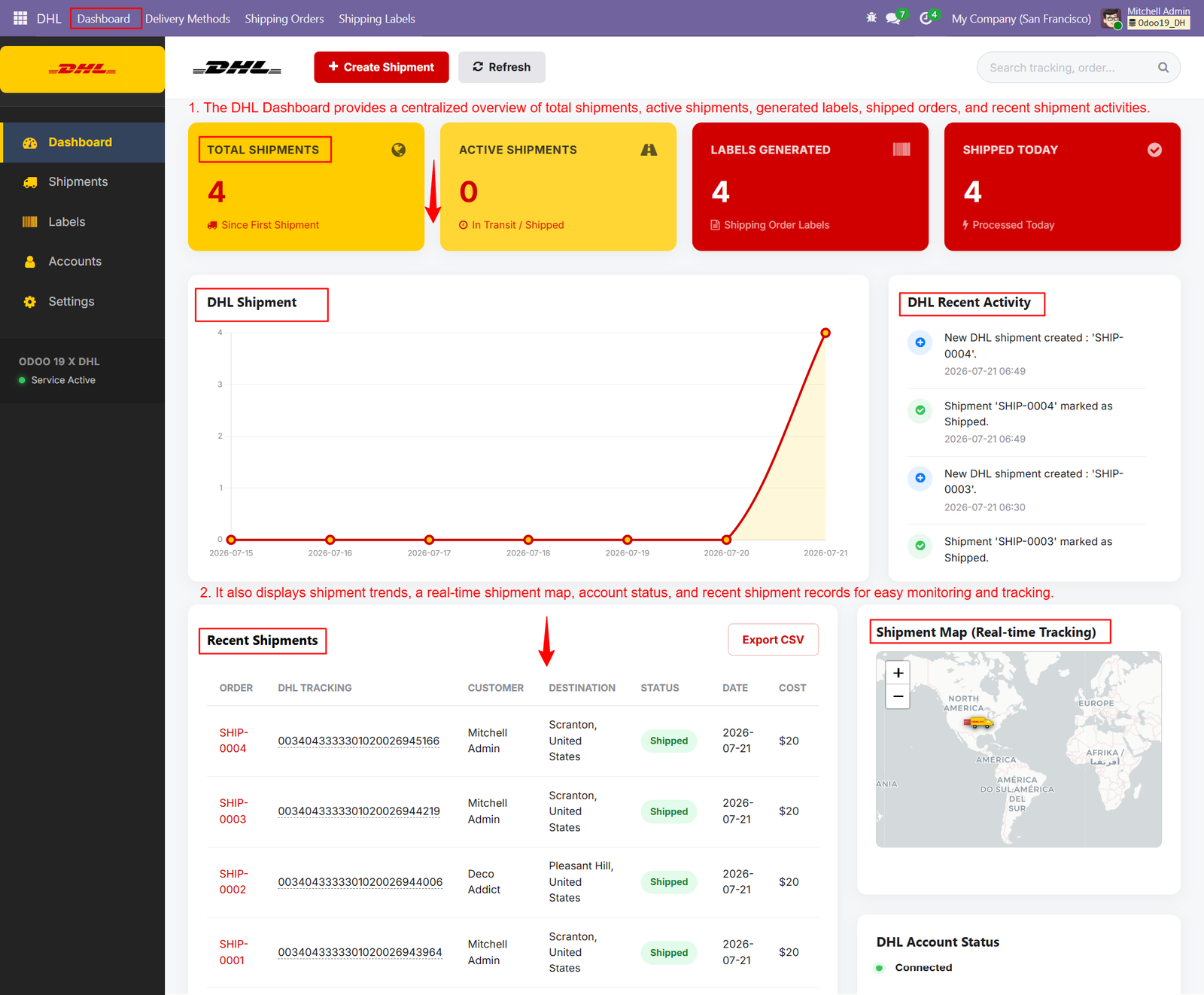
- Users can create new DHL shipments directly from the dashboard, simplifying shipment management and reducing navigation across multiple Odoo screens.
- Total Shipments displays the overall number of DHL shipments created, helping businesses quickly understand their complete shipping volume and activity.
- Active Shipments shows shipments currently in transit or shipped, providing quick visibility into ongoing delivery operations and fulfillment progress daily.
- Labels Generated displays the number of shipping labels created, helping warehouse teams monitor documentation readiness for packages awaiting dispatch operations.
- Shipped Today highlights shipments processed during the current day, enabling businesses to track daily DHL fulfillment performance efficiently every day.
- The DHL Shipment chart visualizes shipment trends over time, helping users identify changes in shipping activity and monitor operational performance.
- DHL Recent Activity records newly created and shipped shipments, providing users with timely updates about important fulfillment events and changes.
- Recent Shipments presents order references, DHL tracking numbers, customers, destinations, statuses, dates, and costs within one centralized dashboard for management.
- Users can export recent shipment information as CSV, making it easier to analyze DHL shipping records and maintain external reports.
- The shipment map provides real-time tracking visibility, helping businesses understand shipment locations and monitor delivery movements across different geographic destinations.
Step 14: DHL Shipping History provides centralized access to shipping orders, tracking numbers, customers, destinations, costs, dates, and shipment statuses.
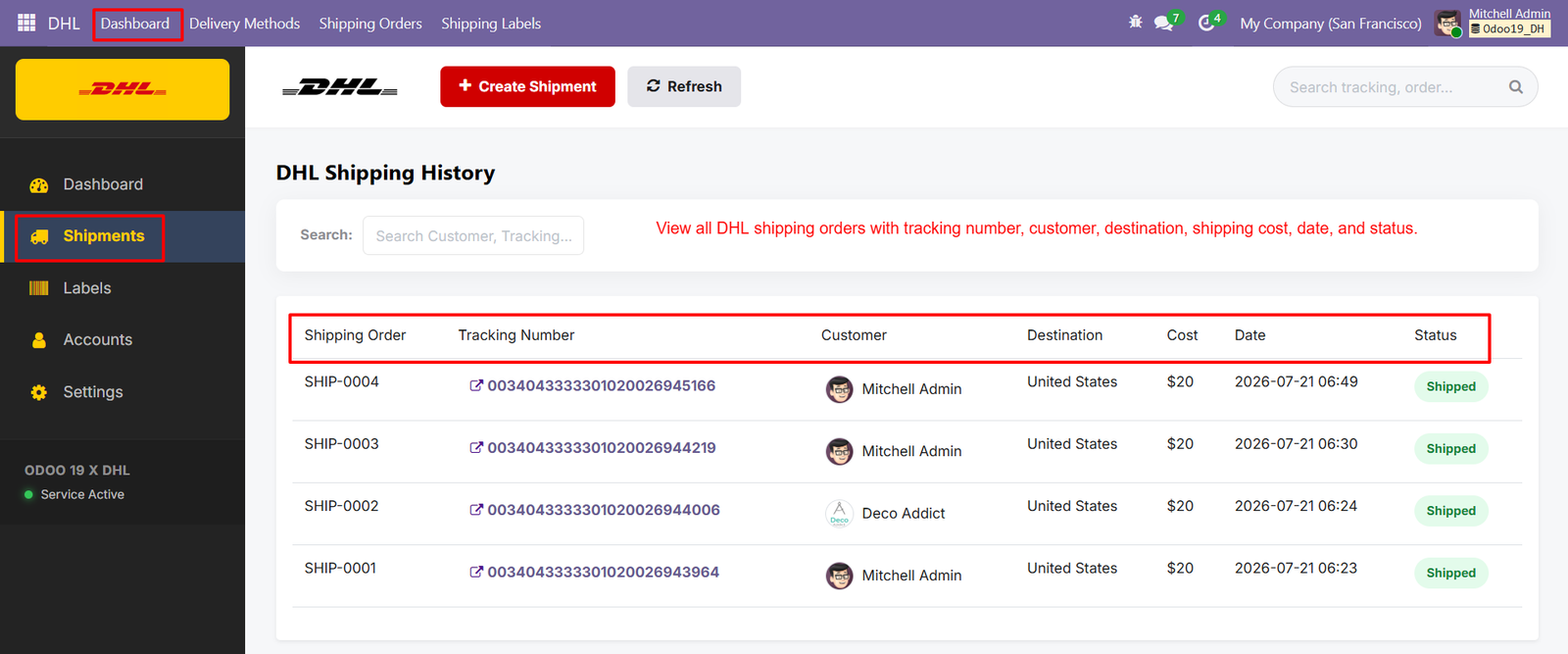
- Users can view complete DHL shipping records in one organized interface, making shipment monitoring faster and more efficient for businesses.
- Each shipping order displays a unique reference number, helping users identify and manage individual DHL shipments easily within Odoo.
- Tracking numbers are clearly displayed, allowing users to access shipment information and monitor package movement throughout the delivery process efficiently.
- Customer information appears alongside each shipment, helping businesses identify recipients and maintain accurate DHL shipping records for future reference.
- Destination details provide clear visibility of where each DHL shipment is being delivered, supporting better logistics planning and coordination.
- Shipping costs are displayed for every order, helping businesses monitor DHL delivery expenses and maintain accurate shipping cost records.
- Shipment dates show when DHL orders were processed, providing useful information for tracking fulfillment timelines and operational performance efficiently.
- Status indicators clearly show shipped orders, giving users immediate visibility into completed DHL delivery operations from the centralized history.
- The search feature allows users to find shipments quickly using customer names or tracking information, reducing manual record searching.
- Users can search customer and tracking details directly, making it easier to locate specific DHL shipments within large shipping histories.
Step 15:DHL Generated Labels provides centralized access to created shipping labels, tracking numbers, source documents, creation dates, and available actions within Odoo.
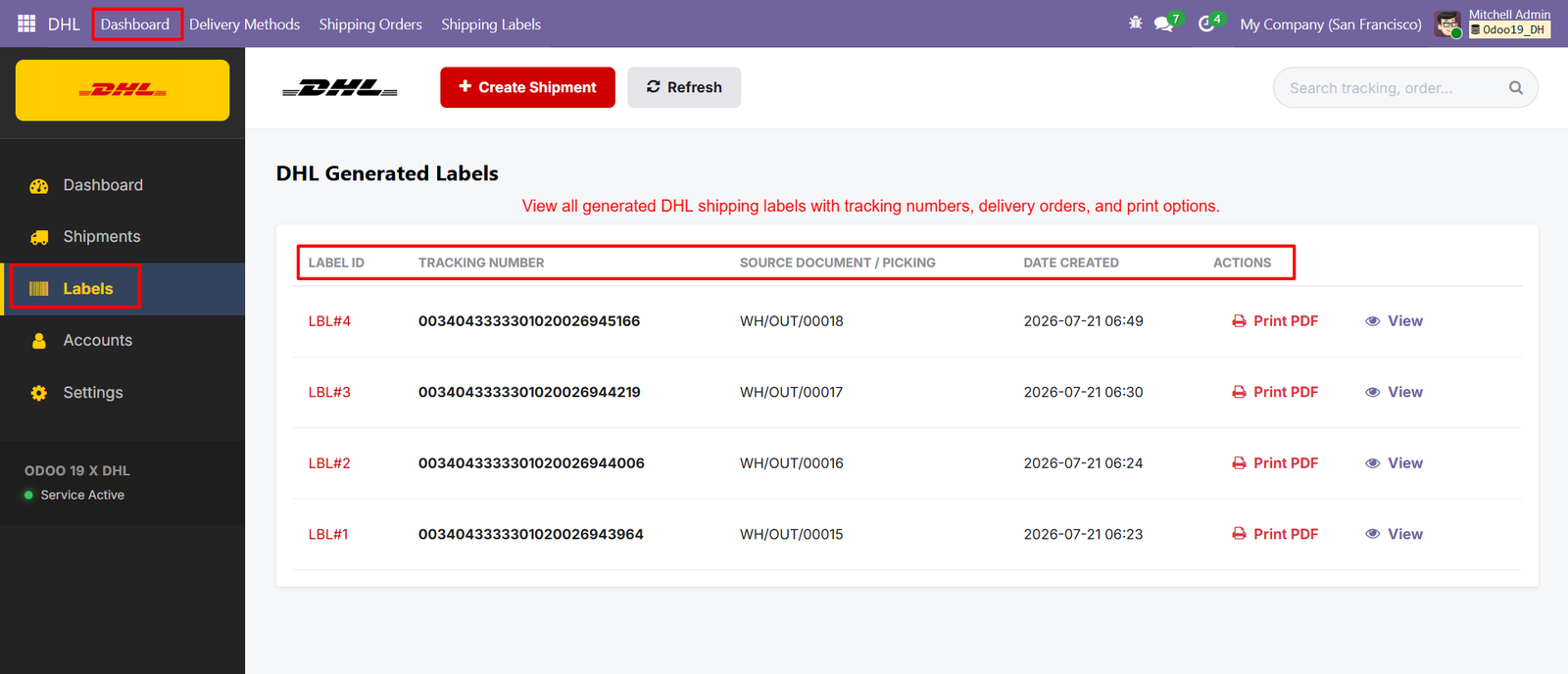
- Each generated label receives a unique Label ID, helping users identify individual DHL shipping documents quickly during daily operations easily.
- Tracking numbers are displayed prominently, allowing businesses to identify shipments and maintain accurate package tracking information throughout delivery operations.
- Source documents connect generated DHL labels with warehouse picking records, providing complete traceability between shipments and delivery operations within Odoo.
- The Date Created field records when each DHL label was generated, helping businesses maintain accurate shipping documentation and timelines efficiently.
- Users can print DHL shipping labels directly by selecting the Print PDF action available beside each generated label record quickly.
- The View option allows users to inspect individual shipping label details before printing or managing the corresponding DHL shipment within Odoo.
- Generated labels remain organized in a centralized table, making it easier for warehouse teams to locate required shipping documents quickly.
- Tracking information combined with source documents helps businesses connect physical packages with their corresponding digital delivery records throughout fulfillment operations.
- The label list provides quick visibility into multiple DHL shipping documents without requiring users to open each individual shipment separately.
- Print PDF functionality simplifies warehouse preparation by providing immediate access to printable DHL labels for outgoing packages during dispatch operations.
Step 16: DHL Account Configuration centralizes shipping credentials, API settings, base URLs, and account information, simplifying integration management within Odoo for businesses.
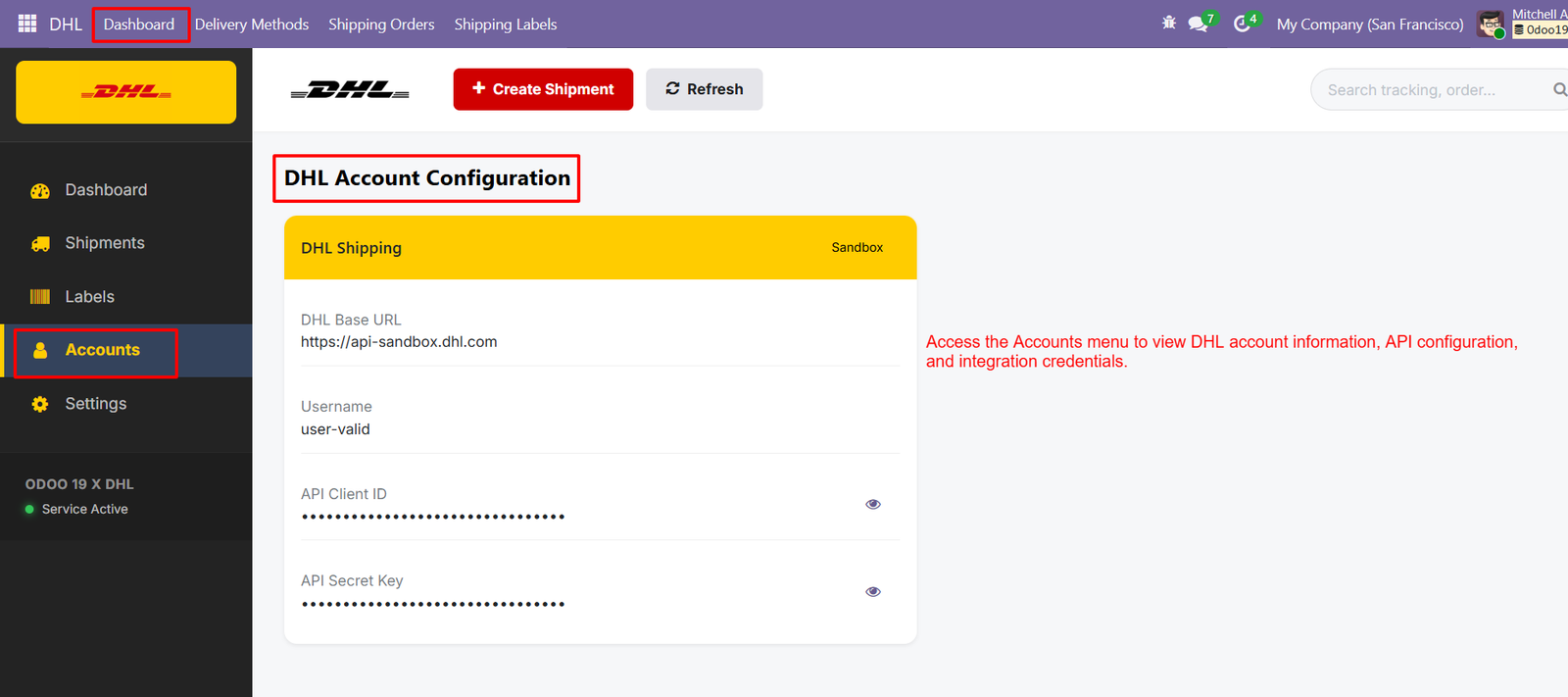
- The Accounts menu provides quick access to DHL configuration details, helping administrators review essential integration information from one centralized location.
- DHL Base URL identifies the endpoint used for connecting Odoo with DHL services, supporting reliable communication between both systems securely.
- Sandbox environment enables businesses to test DHL integration configurations safely before switching operations to production shipping services for live transactions.
- The configured username helps authenticate DHL service access, ensuring authorized users can connect Odoo with the appropriate shipping account securely.
- API Client ID provides an identification credential required for establishing authenticated communication between Odoo and DHL shipping services securely today.
- API Secret Key works alongside the client ID to authenticate API requests and establish secure communication with DHL shipping services.
- Credential fields are masked by default, helping protect sensitive DHL authentication information from unnecessary exposure within the configuration interface securely.
- Eye icons allow authorized users to reveal masked credentials when verification is required during DHL integration configuration or troubleshooting activities.
- Centralized credential management reduces configuration complexity by keeping DHL authentication details organized within a dedicated account management section efficiently here.
- Administrators can review the active DHL account configuration to confirm that required API credentials and connection settings are properly maintained.