

Managing rice mills, grain warehouses, and agricultural commodities involves much more than simply tracking stock. Businesses need to manage goods receipts, weighing, commodity lots, quality parameters, warehouse storage, blending, dispatch, costs, and traceability while keeping every movement accurately recorded.
Odoo Rice Mill & Commodity Inventory Management provides a centralized solution for managing the complete commodity lifecycle—from receiving raw materials to dispatching finished commodities.
Whether you operate a rice mill, grain processing unit, commodity warehouse, or agricultural business, this solution helps improve inventory accuracy, quality control, warehouse visibility, and operational efficiency.

Key Features at a Glance
Use Cases: Who Needs This module?
- Manage paddy receiving, rice processing, commodity lots, quality checks, storage, blending, inventory, and dispatch operations.
- Track incoming grains, quality parameters, commodity batches, warehouse stock, processing activities, costs, and finished goods.
- Manage commodity storage across warehouses, godowns, bins, and storage locations while maintaining accurate lot-level inventory.
- Record supplier receipts, vehicle details, weighing information, moisture levels, quality results, and commodity lot creation.
- Track purchased rice lots, inventory availability, supplier information, customer orders, dispatches, costs, and commodity movements.
- Maintain detailed records of commodity quantities, weights, bags, storage locations, quality status, and inventory availability.
- Manage export-ready rice lots, quality information, warehouse inventory, customer dispatches, documentation, and complete lot traceability.
- Track raw materials, commodity quality, inventory consumption, blending operations, production lots, and finished commodity inventory.
- Manage different agricultural commodities with detailed lot, supplier, warehouse, quality, inventory, and cost information.
- Control commodity purchasing, warehouse storage, lot availability, customer dispatches, inventory movement, and stock reporting.
- Combine multiple commodity lots, manage blend recipes, calculate input/output quantities, track costs, and maintain blend genealogy.
- Centralize supplier receipts, purchase references, weighing, quality inspections, commodity lots, and procurement-related inventory information.
- Monitor stock across multiple warehouses, storage units, godowns, and bins with centralized inventory visibility.
- Businesses requiring strict inspection of moisture, purity, broken grains, foreign matter, damaged grains, and other quality parameters can manage quality workflows efficiently.
- Companies that need to trace commodities from supplier → receipt → lot → quality → blend → warehouse → dispatch → customer can benefit from the module.
Quick User Guide (Visual Walkthrough)
Scroll up to revisit the detailed image-wise walkthrough.
Step 1: Quick Start guides rice mill teams through configuration, receiving, commodity lots, quality checks, blending, reports, dashboard monitoring, and daily operations.

Step 2: Use the Commodity Inventory Setup Wizard to configure essential company information before starting rice mill and commodity warehouse operations efficiently.

Step 3: Monitor available commodity lots, pending quality checks, receipts, dispatches, and daily activities directly from one centralized operations management dashboard system.
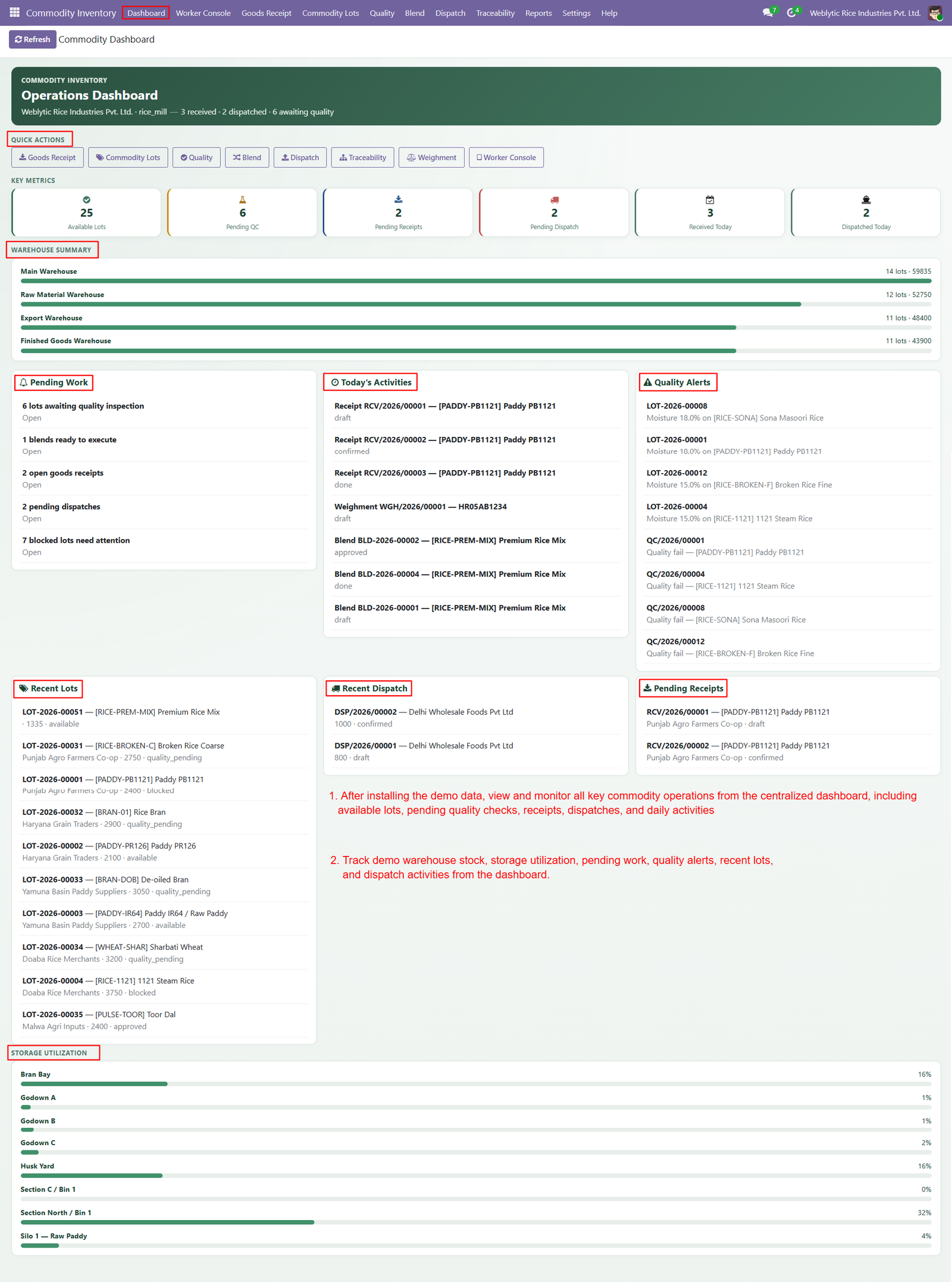
- Use Quick Actions to access Goods Receipt, Commodity Lots, Quality, Blend, Dispatch, Traceability, Weighment, and Worker Console screens quickly and efficiently.
- Track key inventory metrics including available lots, pending quality checks, pending receipts, pending dispatches, received quantities, and dispatched quantities accurately.
- Review warehouse summaries to understand commodity stock levels across Main Warehouse, Raw Material Warehouse, Export Warehouse, and Finished Goods Warehouse.
- Monitor pending work including quality inspections, blend orders, open goods receipts, pending dispatches, and blocked lots requiring immediate operational attention.
- Review today’s activities to follow recent receipts, weighments, blend orders, and other important commodity inventory transactions directly from the dashboard.
- Identify quality alerts quickly by reviewing lots and quality checks requiring inspection, approval, correction, or additional operational attention immediately.
- View recent commodity lots with product, quantity, warehouse, supplier, and quality status information for faster inventory monitoring and control purposes.
- Monitor recent dispatches with customer details, dispatched quantities, and shipment status to maintain visibility across outgoing commodity operations effectively.
- Review pending receipts to identify incoming commodity transactions that remain unfinished and require confirmation or further processing by warehouse teams.
- Analyze storage utilization across bins, godowns, yards, and storage sections to understand available capacity and improve warehouse planning decisions effectively.
- Use dashboard quality alerts to identify moisture concerns and failed quality results before affected commodity inventory moves forward for processing.
- Monitor commodity inventory through visual progress bars that provide quick comparisons of warehouse stock and storage utilization percentages efficiently.
- Access important commodity operations directly through dashboard buttons, reducing navigation time and helping teams complete daily warehouse activities efficiently.
- Use available lot information to understand current inventory readiness and identify commodities that can support blending, reservations, or dispatches.
Step 4: Configure commodity products with essential details including commodity type, variety, grade, moisture percentage, sales, purchases, and inventory information accurately.

- Mark products as commodities to enable specialized inventory management features designed specifically for rice, grains, pulses, and agricultural commodities.
- Use the dedicated Commodity tab to maintain commodity-specific information separately from standard product configuration and inventory details within Odoo.
- Select the appropriate commodity type, such as Rice, to categorize products correctly for organized commodity inventory and operational management.
- Configure default varieties like Parboiled to standardize product information and simplify commodity receiving, lot creation, quality checking, and inventory operations.
- Assign default grades such as Premium to products, helping maintain consistent quality classifications throughout commodity inventory management processes and workflows.
- Set typical moisture percentages for commodity products to establish expected quality levels and support effective incoming commodity inspection procedures.
- Manage commodity product information directly from the Odoo product interface without requiring separate product records for specialized commodity operations.
- Connect commodity product configuration with receiving workflows to ensure relevant product details are available during goods receipt processing operations.
- Use commodity-specific product settings to improve consistency when creating commodity lots from incoming receipts and warehouse transactions efficiently.
- Maintain accurate commodity classification by combining product names, commodity types, varieties, grades, and typical moisture information within Odoo.
- Configure products according to business requirements, allowing rice mills and grain businesses to manage different commodity categories systematically and efficiently.
- Use predefined default values to reduce manual data entry and accelerate commodity product setup during everyday warehouse operations effectively.
Step 5: Create goods receipts by recording supplier, commodity, quantity, warehouse, storage unit, vehicle number, and moisture details for incoming inventory accurately.

- Select the supplier responsible for delivering commodities, ensuring every incoming receipt remains connected with accurate vendor information for future tracking.
- Choose the required commodity product, such as Parboiled Rice, to ensure received inventory is correctly classified within the system.
- Enter received commodity quantities accurately to maintain reliable inventory records and support subsequent lot creation, quality inspection, and warehouse operations.
- Assign the appropriate warehouse during receiving to ensure incoming commodities are directed toward the correct storage facility efficiently and accurately.
- Select a specific storage unit for received commodities, helping warehouse teams maintain organized inventory placement and location-level visibility throughout operations.
- Record vehicle numbers during receipt processing to maintain transportation details and strengthen commodity movement tracking across receiving operations effectively.
- Capture moisture percentages during receiving to provide important commodity quality information before inventory proceeds toward inspection and processing activities.
- Enable quality checks on receipts to ensure incoming commodities are inspected before becoming available for subsequent inventory operations and processing.
- Allow authorized supervisors to skip quality checks when necessary, providing controlled flexibility for urgent receiving requirements and operational circumstances.
- Use the Create Receipt button to quickly generate a goods receipt after entering all required commodity receiving information accurately.
- Connect goods receipts with commodity lots, allowing businesses to maintain detailed batch-level records for every incoming commodity shipment received.
- Improve receiving accuracy by capturing supplier, product, quantity, warehouse, storage, vehicle, and moisture information within one streamlined interface.
- Reduce manual documentation by centralizing essential receiving information and creating structured records for incoming commodities within the Odoo system.
- Support warehouse teams by providing clear receiving information that helps identify where each commodity shipment should be stored after arrival.
Step 6: Review quality checks created from goods receipts to verify commodity condition before approving received inventory for further processing and storage operations.

- View essential quality information including product, commodity type, lot, receipt, inspector, company, inspection date, and overall quality result status.
- Evaluate moisture percentage to ensure incoming rice meets predefined moisture limits before allowing the commodity to proceed through operations.
- Check broken grain percentage against configured minimum and maximum values to maintain consistent commodity quality standards during receiving inspections.
- Measure foreign matter percentage to identify unwanted materials and ensure received commodities meet established quality requirements before inventory approval.
- Inspect damaged or discolored grains to determine whether incoming commodity batches satisfy predefined quality standards and acceptance requirements accurately.
- Evaluate chalky grains percentage to maintain consistent rice quality and identify commodity batches requiring additional review before further processing activities.
- Verify purity percentage against configured quality limits to ensure received rice satisfies the required purity standards before inventory approval.
- Compare actual parameter values with minimum and maximum limits to automatically determine whether individual quality measurements pass or fail.
- Use parameter-level Pass or Fail results to quickly identify quality issues affecting incoming commodity batches during inspection processes.
- Add inspection notes to quality parameters, allowing users to document observations, findings, or important information related to commodity quality.
- Load configured quality parameters automatically to simplify inspections and ensure standardized quality criteria are applied consistently across commodity receipts.
- Review the overall inspection result to determine whether the commodity successfully meets required quality standards before continuing operations.
- Use the Confirm Quality action to approve completed inspections and allow qualifying commodity receipts to proceed through receiving workflows.
- Maintain inspector information within quality records, creating accountability and clear ownership for every commodity inspection performed within Odoo.
Step 7: Manage individual commodity lots with detailed product, variety, vendor, warehouse, storage, purchase reference, and arrival information for complete inventory visibility.

- Track unique lot numbers to maintain accurate batch-level identification throughout receiving, quality inspection, storage, blending, reservation, and dispatch operations.
- Record commodity types and varieties within each lot to maintain organized product classifications for rice mill inventory management requirements.
- Connect each commodity lot with its supplier and purchase reference for better procurement tracking and historical inventory analysis purposes.
- Assign warehouses, storage units, stacks, bins, and locations to maintain precise physical placement information for every commodity lot.
- Track available weight, reserved weight, total weight, and received weight to maintain accurate quantity information throughout inventory operations.
- Manage available bags, reserved bags, total bags, and bag types for precise commodity packaging and inventory tracking requirements.
- Record bag tare weight and average bag weight to support accurate calculations and improve commodity inventory measurement during warehouse operations.
- Maintain commodity quality information including grade, moisture, broken percentage, foreign matter, and purity for every individual inventory lot.
- Monitor quality status and approval information to identify whether commodity lots have successfully completed required quality inspection procedures.
- Link the latest quality check with each commodity lot to provide quick access to previous inspection results and approvals.
- Track purchase rates and estimated inventory values to provide better financial visibility into commodity inventory and procurement costs.
- Use lot statuses such as Draft, Quality Pending, Approved, Available, Reserved, and Sold to control commodity lifecycle operations.
- Reserve available commodity quantities for upcoming dispatches while maintaining clear visibility of committed and remaining inventory across lots.
- Use actions such as Transfer, Reserve, Blend, Block, Mark Sold, Archive, and Refresh Stock to manage lots efficiently.
Step 8: Create blend orders by selecting approved input commodity lots, defining output products, warehouse locations, recipes, operators, and supervisors for controlled blending.

- Select suitable input lots and verify available weights before adding quantities required for accurate and efficient commodity blending operations directly.
- Track each input lot with product, commodity, quality grade, moisture, purchase cost, and line cost information for better blending control.
- Use purchase costs from selected lots to calculate line costs and understand the financial impact of every blending operation accurately.
- Define expected output weight before execution to compare planned quantities with actual production results after completing the blending process successfully.
- Record actual output weight to measure production performance and identify quantity differences between expected and completed blending results accurately effectively.
- Monitor loss weight during blending to identify material differences and maintain better control over commodity handling and operational efficiency consistently.
- Calculate loss percentage automatically to provide clear visibility into blending efficiency, material consumption, and potential operational discrepancies during processing activities.
- Capture output moisture, broken percentage, and purity values to maintain consistent quality information for every finished blended commodity product management.
- Allow supervisor quality override when necessary, providing authorized users with flexibility to adjust output quality information during exceptional blending situations.
- Calculate output quality values from selected input lots, helping users maintain consistent and traceable quality standards throughout commodity blending operations.
- Track average purchase price across input lots to support accurate costing and better financial analysis for blended commodity products overall.
- Calculate average cost and estimated cost automatically, giving managers clearer visibility into the financial value of planned blending operations accurately.
- Record actual cost after execution to compare final expenses against estimated costs and improve commodity blending cost management decisions effectively.
- Assign output storage locations such as finished goods stacks to ensure blended products are placed correctly after successful processing operations.
Step 9: Create commodity dispatch orders by selecting customers, warehouses, vehicles, weighments, and required commodity lots for accurate shipment processing and tracking.

- Select the appropriate customer to maintain clear delivery records and ensure every commodity shipment reaches its intended destination correctly.
- Choose the warehouse and source storage location to identify exactly where commodity inventory will be picked for dispatch operations.
- Link weighment records with dispatch orders to maintain accurate weight information and improve transparency throughout the commodity shipment process.
- Assign vehicle numbers to every dispatch for better transportation tracking, documentation, accountability, and delivery coordination across warehouse operations efficiently.
- Select specific commodity lots during dispatch to maintain complete traceability from warehouse inventory through customer delivery and final shipment confirmation.
- Display product details clearly within dispatch lines, helping operators verify the correct commodity before processing and confirming shipment information accurately.
- Track commodity lot numbers during dispatch to ensure inventory movements remain identifiable, organized, and traceable throughout the entire delivery process.
- Record commodity grades during shipment preparation to help operators verify quality requirements before releasing products from warehouse inventory for delivery.
- Capture dispatch weight accurately to ensure shipped quantities match available inventory and prevent discrepancies during commodity shipment processing operations.
- Record bag quantities alongside weights, providing better control over packaged commodities and simplifying loading, transportation, and delivery verification activities.
- Review total quantity before dispatch confirmation to verify that the shipment matches planned requirements and available warehouse inventory accurately.
- Monitor total bags in the dispatch order to maintain accurate packaging information and support efficient loading and transportation planning.
- Use dispatch workflow stages including Draft, Allocated, Weighed, Confirmed, and Dispatched for better visibility into shipment progress and status.
- Confirm dispatch details before processing to ensure customer, warehouse, vehicle, commodity lot, weight, and packaging information remains accurate throughout.
Step 10: Search commodity lots using lot numbers, products, vendors, customers, blends, dispatches, purchase references, or other available filters easily.

- Enter the lot number directly to quickly locate specific commodity inventory and review its traceability information from one centralized screen.
- Filter matching lots by product name to identify all inventory batches associated with a particular rice commodity efficiently and accurately.
- Use vendor filters to trace commodity lots back to their suppliers and understand sourcing information throughout daily warehouse operations efficiently.
- Search by customer to identify commodity lots associated with specific buyers and review their related shipment and inventory details quickly.
- Filter by blend number to connect processed commodity lots with their corresponding blending operations and source inventory records efficiently easily.
- Use dispatch numbers to trace shipped commodity lots and quickly identify their associated customer delivery and shipment information accurately efficiently.
- Search using purchase references to connect received commodity lots with original procurement documents and supplier transactions for better traceability control.
- Review matching lot cards showing product, supplier, warehouse, quantity, bags, and current status for faster inventory identification and verification quickly.
- Traceability provides centralized visibility into commodity movement, helping teams follow inventory from procurement through storage, blending, and final dispatch operations.
- Identify sold lots quickly using status indicators, allowing users to understand whether commodity inventory remains available or has been dispatched.
- Connect commodity lots with their warehouses to determine where specific inventory batches were received, stored, managed, or dispatched accurately.
- Use product information to trace specific rice varieties across different lots and understand their movement throughout commodity inventory operations efficiently.
- Locate required inventory quickly by combining multiple search filters, reducing manual effort and improving accuracy when investigating commodity lot records.
Step 11: View complete commodity lot information including product, vendor, warehouse, storage, weight, bags, grade, moisture, broken percentage, and inventory value.

- Track every commodity lot from creation through approval, availability, blending, reservation, dispatch, and final customer delivery with complete visibility.
- Use the Business Timeline to understand every important activity performed on a commodity lot throughout its operational lifecycle.
- Monitor lot approval history to verify when quality checks were completed and inventory became available for further warehouse operations.
- Track when specific lots become available, helping warehouse teams understand inventory readiness before allocation, blending, reservation, or dispatch activities.
- Identify blend consumption details and determine how much commodity inventory was consumed during specific blending operations accurately and efficiently.
- Connect commodity lots with dispatch records to understand exactly when inventory was reserved and shipped to customers.
- View customer delivery information directly within traceability, providing clear visibility into the final destination of commodity inventory.
- Track inventory reservations and identify which dispatch order consumed or reserved specific quantities from individual commodity lots accurately.
- Monitor warehouse location changes to understand where commodity lots were stored during different stages of their operational lifecycle.
- Review sold status to confirm that commodity inventory has been successfully dispatched and completed through the customer delivery process.
- Access linked documents associated with commodity lots to maintain supporting records and simplify verification during operational reviews or audits.
- Use lot genealogy to understand relationships between original inventory, blending activities, resulting products, and downstream commodity movements efficiently.
- Review warehouse information to identify storage locations and maintain better control over commodity inventory throughout warehouse operations.
- Analyze inventory details including available quantities, reserved quantities, consumed amounts, and sold status for accurate stock visibility.
Step 12: Access comprehensive commodity reports covering lot stock, aging, lifecycle, warehouse movement, vendors, blending, consumption, costs, performance, genealogy, traceability, and quality.

- Use the Lot Register report to review commodity batches, products, vendors, warehouses, quantities, quality statuses, and current inventory states efficiently.
- Analyze Lot Stock Summary reports to understand available quantities, reserved stock, sold inventory, and overall commodity inventory positions across warehouses.
- Monitor Lot Aging reports to identify older commodity batches, helping teams prioritize inventory movement and reduce prolonged storage risks effectively.
- Review Lot Lifecycle reports to follow commodity batches from creation and approval through availability, processing, reservation, dispatch, and completion stages.
- Use Warehouse Lot Summary reports to compare commodity inventory across storage locations and understand stock distribution throughout different warehouses efficiently.
- Analyze Vendor Lot Summary reports to review supplier-wise commodity quantities, quality results, warehouse locations, and inventory batches systematically and accurately.
- Review Blend History reports to understand previous blending operations, consumed lots, output products, quantities, and processing activities accurately and efficiently.
- Use Recipe Usage reports to identify commodity recipes utilized across blending operations and understand ingredient requirements for efficient production planning.
- Analyze Input Lot Consumption reports to track commodity quantities consumed from individual lots during blending and processing operations for reconciliation.
- Review Output Lot Register reports to monitor generated commodity batches, quantities, products, statuses, and relationships with completed blending operations efficiently.
- Use Blend Cost Analysis reports to evaluate input costs, processing expenses, and financial impact associated with commodity blending activities accurately.
- Analyze Blend Performance reports to compare expected outputs, actual outputs, losses, and efficiency across different commodity blending operations systematically, accurately.
Step 13: Configure the business profile to identify whether your operation functions as a rice mill, grain warehouse, or another commodity business.

- Set smart defaults for warehouses, storage locations, bag types, grades, and quality statuses to simplify daily commodity inventory operations significantly.
- Choose a default warehouse so newly created commodity transactions automatically use the preferred storage facility for faster, consistent daily processing.
- Set the default storage location to ensure commodities are directed toward the correct warehouse area automatically for smooth daily operations.
- Define a default bag type to standardize packaging information and maintain consistent bag calculations throughout commodity receiving and dispatch operations.
- Select a default quality grade to help users maintain standardized quality information when creating and managing commodity inventory records consistently.
- Set the default quality status to control how newly created commodity lots are initially classified before inspection, approval, or processing.
- Enable automatic lot generation to assign unique lot numbers whenever commodity receipts are created, improving identification, tracking, and traceability operations.
- Require quality checks on receipts to prevent commodity receipts from being confirmed until required inspections and quality validations are completed.
- Configure moisture alert thresholds to identify commodities exceeding acceptable moisture levels and support timely quality decisions during warehouse inventory operations.
- Use Commodity Settings to manage core configuration options that control how the commodity inventory module behaves across different business workflows.
- Configure receipt register settings to maintain consistent processing and documentation for incoming commodity shipments received from suppliers during daily operations.
- Manage weighment settings to standardize vehicle, gross weight, tare weight, and net quantity information during commodity receiving and dispatch operations.
- Configure bin transfers to control movement of commodity inventory between storage locations while maintaining accurate warehouse records and complete traceability.
- Manage storage units to define warehouse areas, godowns, stacks, bins, and other locations used for organized commodity inventory storage efficiently.
Step 14: Access the Worker Console to manage receiving, dispatch, weighing, lots, blending, receipts, dispatches, and blend orders from one centralized workspace.

- Monitor open weighments directly from the console to identify pending weighing tasks and complete commodity weight records efficiently during operations.
- Track open receipts to quickly identify incoming commodity transactions requiring attention, processing, confirmation, or warehouse receiving activities from workers.
- Monitor open dispatches from one screen to ensure pending customer shipments are processed, confirmed, and dispatched without unnecessary delays.
- Use the Receive shortcut to quickly create commodity receipts and capture supplier, product, quantity, warehouse, vehicle, and storage details efficiently.
- Use Dispatch to process outgoing commodity shipments by accessing customer orders, selected lots, weights, bags, warehouse locations, and delivery information.
- Open Weigh directly from Worker Console to record vehicle weights, tare values, gross weights, and net commodity quantities accurately during operations.
- Manage commodity Lots quickly from the console, helping workers access inventory batches, quantities, quality information, storage locations, and statuses efficiently.
- Access Blend operations directly to create, review, and execute commodity blending activities using selected input lots and predefined recipes efficiently.
- Use the Receipts shortcut to review existing commodity receipt records and monitor receiving activities without navigating through multiple application menus repeatedly.
- Access Dispatches from the console to review shipment records, monitor delivery progress, and manage completed or pending commodity dispatch activities efficiently.
- Open Blend Orders quickly to review blending transactions, monitor processing stages, and manage commodity input and output information from one location.
- Monitor daily completed activities through the Done Today metric, providing workers with quick visibility into successfully completed operational tasks.
- Centralize frequently used commodity operations through large action buttons, reducing navigation time and helping workers complete routine tasks faster daily.
- Provide workers with a simplified interface focused on essential operational activities, making commodity inventory management easier for warehouse teams daily.
Why Use the Odoo Rice Mill & Commodity Inventory Management Module?
The Odoo Rice Mill & Commodity Inventory Management Module is designed to simplify and centralize rice mill, grain warehouse, and commodity inventory operations. It helps businesses manage receiving, weighing, quality inspection, commodity lots, blending, dispatch, traceability, and reporting from one integrated platform.
- Centralized Commodity Management: Manage rice, grains, varieties, grades, and commodity products from a single system.
- Easy Goods Receiving: Record suppliers, quantities, vehicles, warehouses, storage locations, moisture, and other receipt details efficiently.
- Accurate Weighment: Capture gross weight, tare weight, net weight, and bag quantities for reliable inventory records.
- Quality Control: Monitor moisture, broken grains, purity, foreign matter, and other quality parameters before approving inventory.
- Lot-Based Inventory: Create and manage individual commodity lots for accurate stock identification and traceability.
- Smart Blending: Combine multiple commodity lots using recipes while tracking input quantities, output quantities, costs, and quality.
- Complete Traceability: Follow each lot from receipt and quality approval through blending, reservation, dispatch, and customer delivery.
- Warehouse Management: Track commodities across warehouses, godowns, stacks, bins, and storage locations.
- Faster Dispatch: Manage customer shipments with commodity lots, weights, bags, vehicles, and warehouse information.
- Worker-Friendly Console: Give warehouse workers quick access to receiving, weighing, lots, blending, receipts, and dispatch operations.
- Operational Dashboard: Monitor available lots, pending quality checks, receipts, dispatches, warehouse utilization, alerts, and daily activities.
- Detailed Reports: Analyze stock, aging, lifecycle, vendor activity, blending, consumption, costs, performance, genealogy, and warehouse movements.
- Better Inventory Accuracy: Maintain synchronized information about available, reserved, consumed, and dispatched commodity quantities.
- Improved Decision Making: Provide managers with centralized operational and inventory information for faster, data-driven decisions.
- Reduced Manual Work: Replace scattered spreadsheets and manual tracking with structured digital workflows inside Odoo.
- Better Accountability: Maintain activity histories and transaction records for greater transparency across commodity operations.
- Configurable Workflows: Configure business profiles, smart defaults, quality requirements, moisture thresholds, storage settings, recipes, grades, and bag types.
- Scalable Operations: Support growing rice mills and commodity warehouses with organized processes and centralized inventory control.
- Integrated Odoo Environment: Connect commodity operations with the broader Odoo ecosystem for smoother business management.
- End-to-End Visibility: Manage the complete commodity lifecycle—from receiving raw materials to quality checks, storage, blending, dispatch, and delivery.