

Affiliate marketing is an effective way for businesses to increase sales through customer referrals, employees, partners, and other sales networks. However, managing affiliates, referral codes, commissions, wallets, settlements, and rewards manually can become complicated—especially for businesses processing a high volume of Point of Sale (POS) transactions.
The POS Affiliate Program for Odoo provides a complete affiliate management solution integrated directly with Odoo Point of Sale. It enables businesses to create and manage affiliates, assign referral codes, configure commission plans and rules, track POS referrals, automatically generate commissions, manage affiliate wallets, process settlements, and reward affiliates through badges and performance-based incentives.
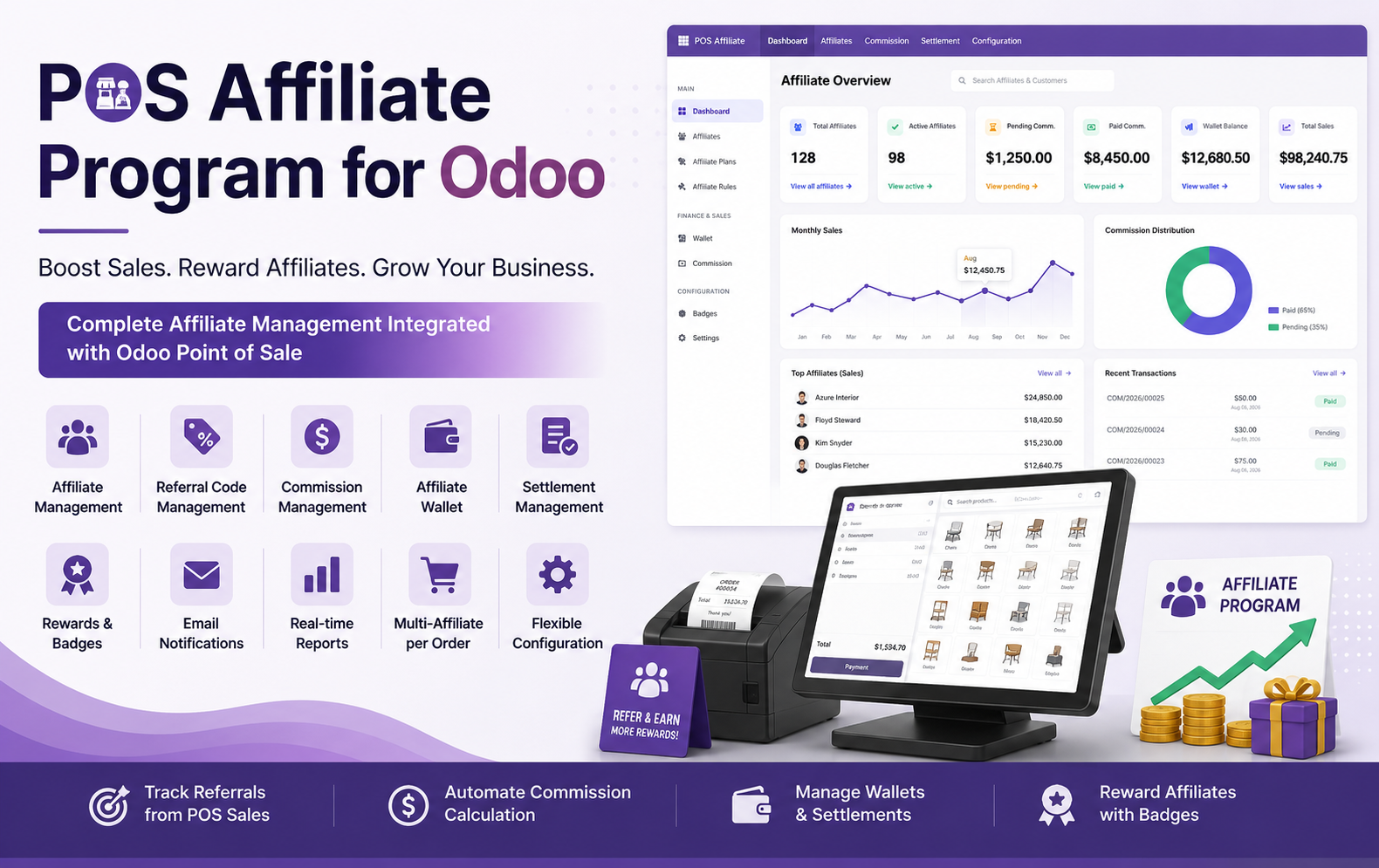
Key Features at a Glance
Use Cases: Who Needs This module?
- Retail Stores – Reward customers, employees, and partners for generating referral-based POS sales.
- Supermarkets & Grocery Stores – Create referral programs to attract new customers and increase repeat purchases.
- Furniture Stores – Track affiliate-generated sales and automatically calculate commissions for referral partners.
- Electronics Stores – Incentivize affiliates to promote products and generate additional in-store sales.
- Fashion & Apparel Stores – Reward customers, influencers, and sales partners for bringing new buyers.
- Franchises & Retail Networks – Manage affiliates, commissions, referral codes, and settlements across POS operations.
- Showrooms & Dealerships – Track referral partners and reward them for successfully generated sales.
- Pharmacies & Specialty Stores – Build structured referral programs while maintaining transparent commission records.
- Employee Referral Programs – Allow employees to earn commissions or rewards for bringing new customers and generating POS sales.
- Customer Referral Programs – Encourage existing customers to refer new buyers using unique referral codes.
- Partner & Reseller Networks – Manage partner commissions, wallet balances, referrals, and settlements from a centralized Odoo system.
- Businesses Using Odoo POS – Any POS-based business looking to automate affiliate sales tracking, commission calculation, wallet management, rewards, and settlements can benefit from this module.
Quick User Guide (Visual Walkthrough)
Scroll up to revisit the detailed image-wise walkthrough.
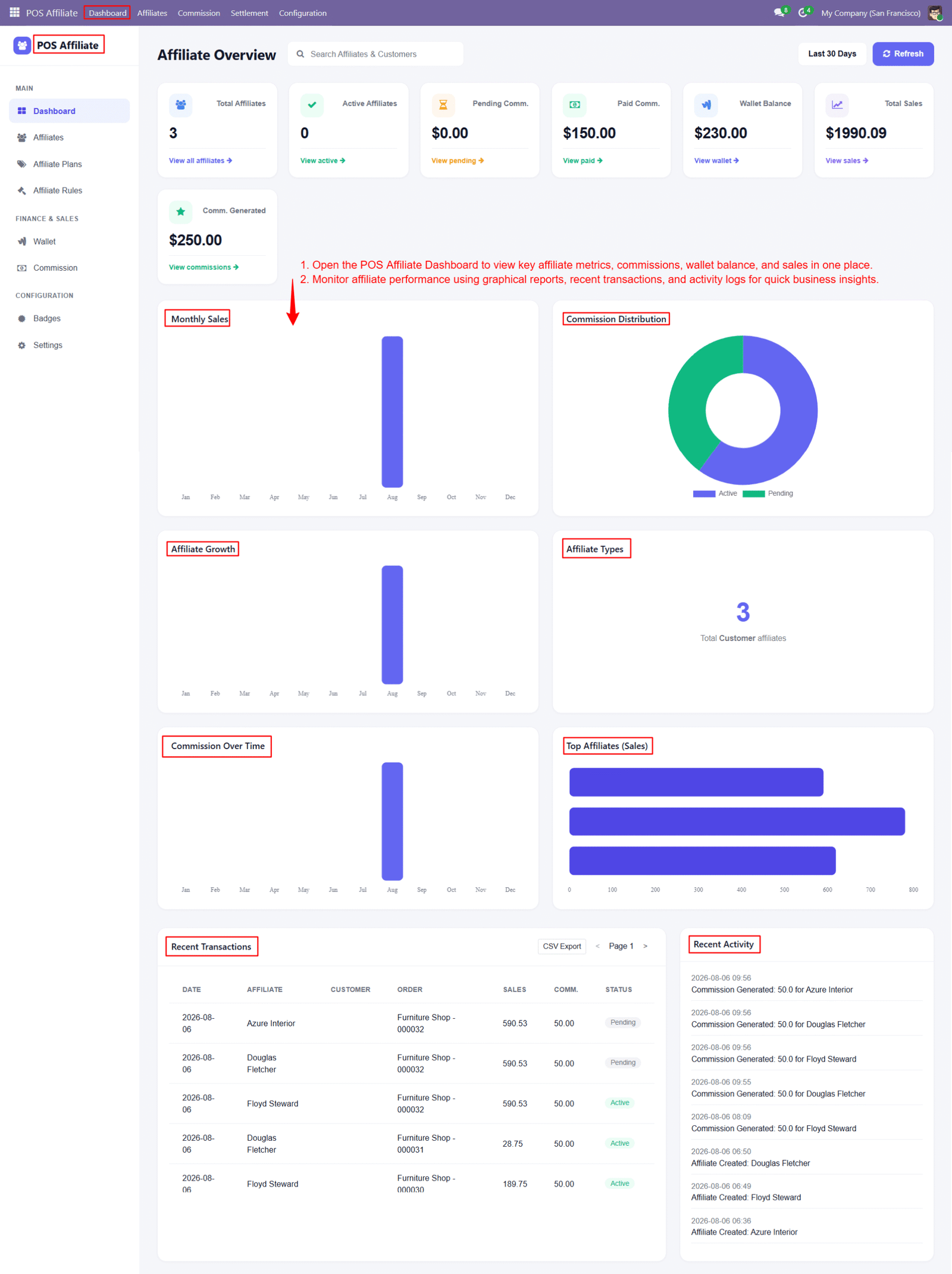
Step 1: Get a complete overview of your affiliate program from one centralized dashboard, including affiliates, commissions, wallet balances, sales, and recent activities.
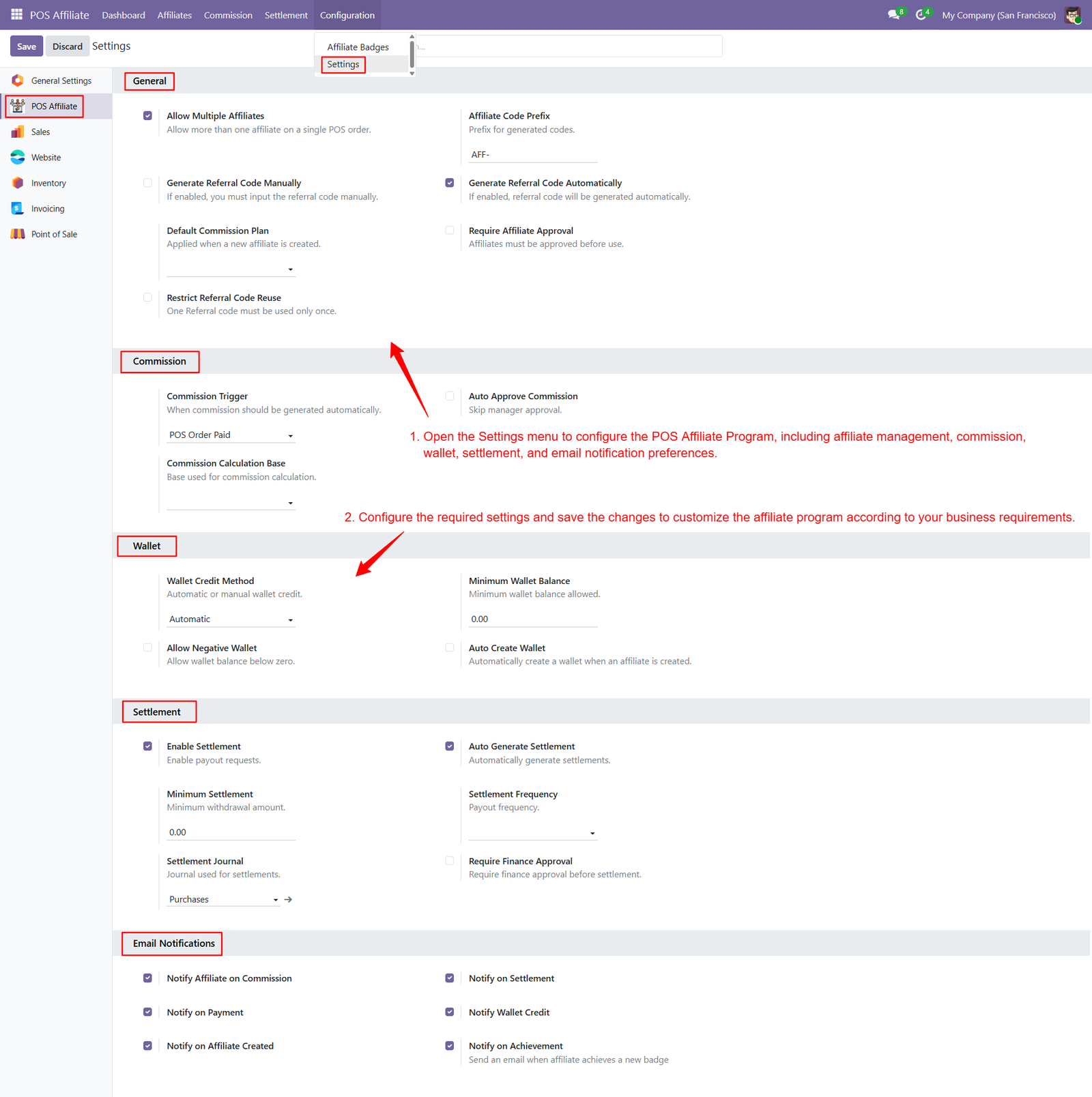
Step 2: Configure POS Affiliate settings to control affiliate participation, referral codes, commission automation, wallet management, settlements, and notification preferences efficiently centrally.
Step 3: Define fixed or percentage-based commission models according to your business requirements and affiliate performance strategies for different sales programs.
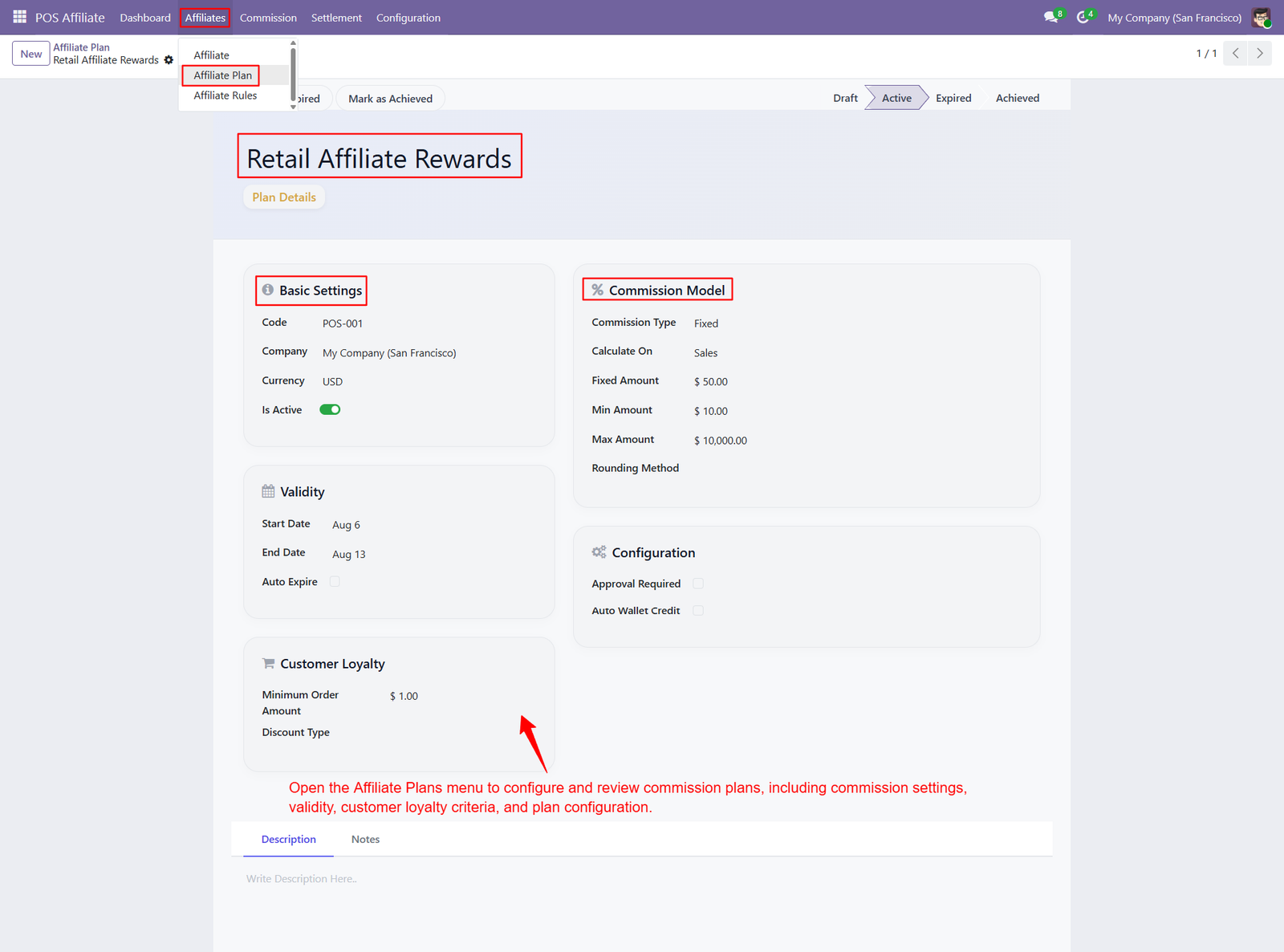
- Sales-Based Commission Calculation
Calculate affiliate commissions based on sales values, ensuring consistent and transparent rewards for successful referral-driven POS transactions and purchases. - Minimum Commission Amount
Set a minimum commission amount to ensure affiliates receive meaningful rewards even when generated sales values are relatively small. - Maximum Commission Limit
Define maximum commission limits to control affiliate payouts and maintain predictable commission expenses across different sales transactions. - Commission Rounding Method
Configure rounding methods for commission calculations to maintain accurate financial records and consistent affiliate payout calculations across transactions. - Plan Validity Period
Define start and end dates for affiliate plans to control when specific commission programs become active or expire automatically. - Automatic Plan Expiration
Enable automatic expiration to deactivate affiliate plans after their configured validity period without requiring manual administrative intervention or monitoring. - Affiliate Plan Activation
Activate or deactivate affiliate plans whenever required, providing administrators with greater flexibility when managing changing promotional and commission programs. - Approval Requirement
Configure approval requirements for affiliate plans to ensure commissions are reviewed and authorized according to your organization’s internal processes. - Automatic Wallet Credit
Enable automatic wallet credit so eligible affiliate commissions can be transferred directly into affiliate wallets after successful commission generation. - Customer Loyalty Conditions
Configure minimum order amounts and loyalty-related conditions to create commission plans that encourage valuable customer purchases and repeat business.
Step 4: Use Products criteria to configure affiliate commissions for selected products, allowing businesses to create targeted incentives for product-specific referral sales.
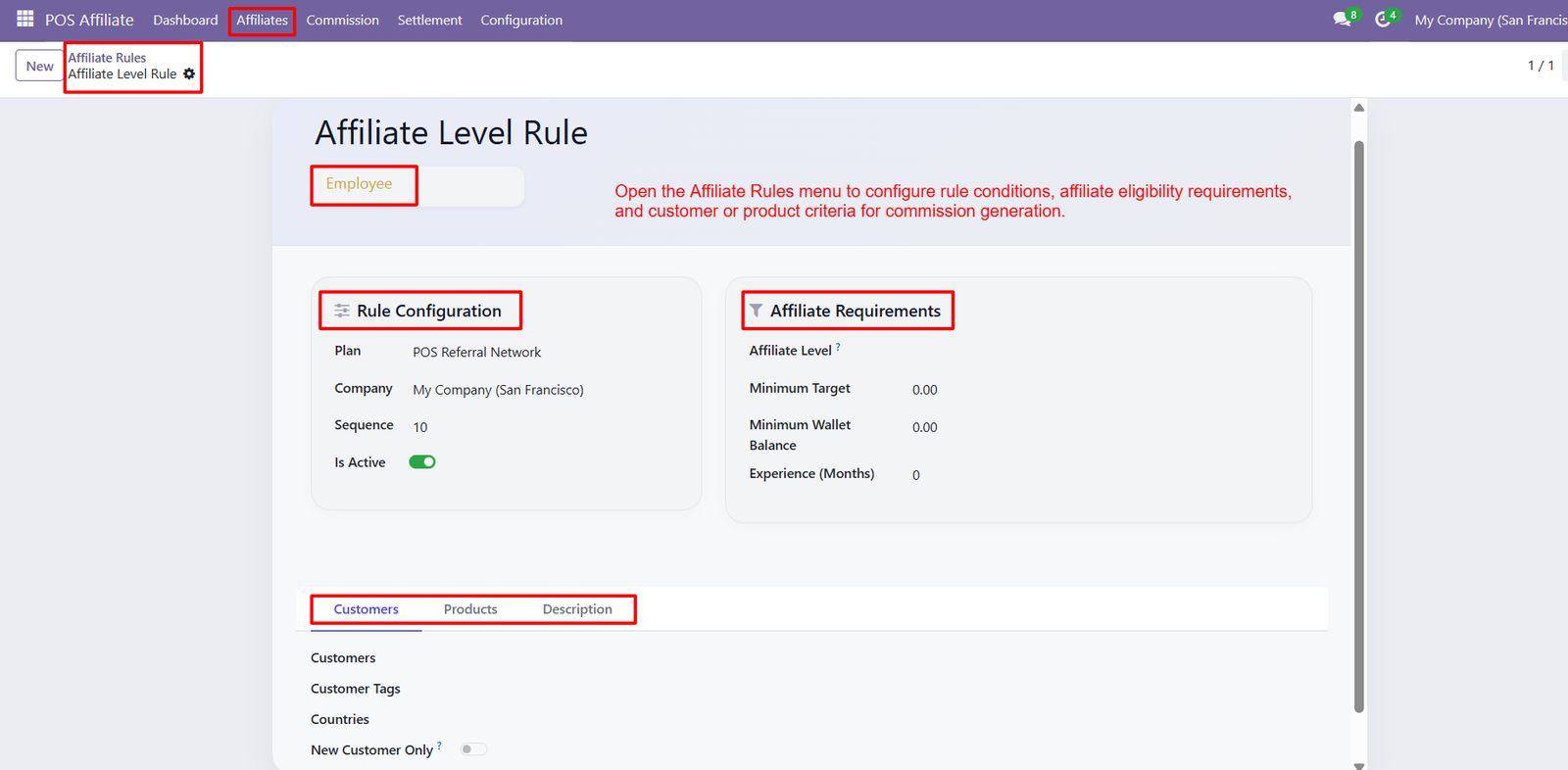
- Rule Configuration
Configure affiliate rules with specific plans, sequences, activation status, and eligibility conditions to automate accurate commission generation for POS transactions. - Affiliate Level Requirements
Set affiliate levels to establish different eligibility tiers and determine which affiliates qualify for specific commission rules based on performance. - Minimum Sales Target
Define minimum sales targets to ensure affiliates generate required business volume before becoming eligible for configured commissions and performance rewards. - Minimum Wallet Balance
Set minimum wallet balances as eligibility conditions, helping businesses create commission rules based on affiliate wallet performance and financial activity. - Affiliate Experience
Track affiliate experience in months and use tenure requirements to determine eligibility for specific commission plans and performance rewards program-wide. - Customer-Based Rules
Apply customer-based conditions by selecting customers who qualify for specific affiliate commission rules and targeted referral programs efficiently within Odoo. - Customer Tag Conditions
Use customer tags to create targeted commission rules for specific customer groups, enabling flexible affiliate incentives based on customer classifications. - Country-Based Eligibility
Configure country-based eligibility to apply commission rules according to customer locations and support region-specific affiliate marketing strategies effectively for businesses.
Step 5: Create affiliate profiles with essential customer information, affiliate type, commission plan, referral code, wallet balance, and approval status for management.
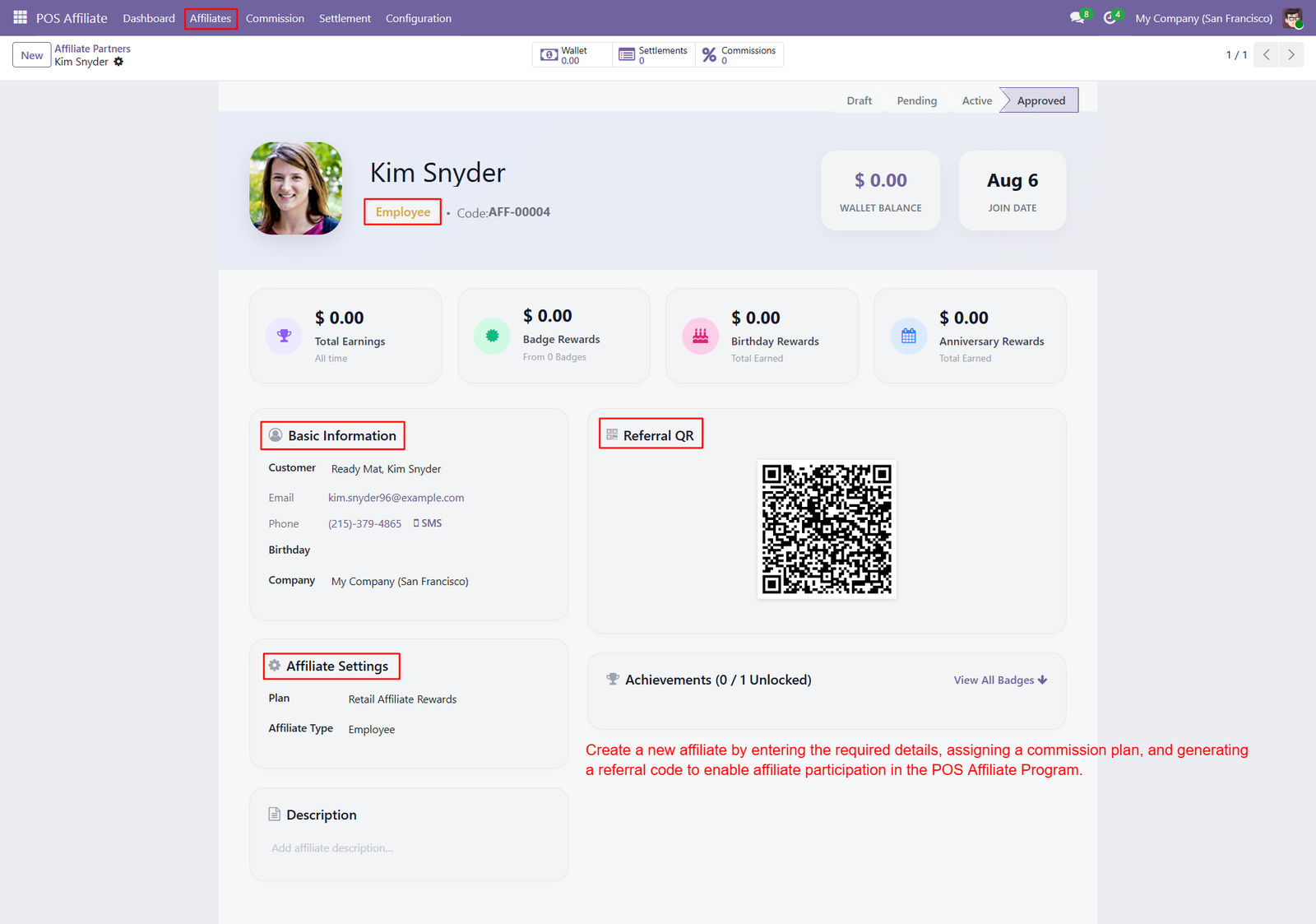
- Unique Referral Codes
Assign affiliates unique referral codes that customers can use to identify referrals and accurately track associated POS sales and commissions. - Referral QR Code
Generate referral QR codes for affiliates, allowing customers to quickly access referral information and associate purchases with the correct affiliate. - Commission Plan Assignment
Assign suitable commission plans to affiliates, ensuring POS sales follow commission structures, eligibility conditions, limits, and reward configurations for businesses. - Affiliate Earnings Tracking
Track total earnings, badge rewards, birthday rewards, and anniversary rewards directly from affiliate profiles for transparent performance monitoring and reporting. - Wallet Balance Monitoring
Display affiliate wallet balances prominently, helping administrators quickly understand available earnings and financial status for individual affiliates at any time. - Complete Affiliate Information
Maintain detailed affiliate information including customer association, email, phone, birthday, and company details for accurate records and effective communication efficiently. - Achievement Monitoring
Monitor affiliate achievements through the dedicated section and identify unlocked badges earned from configured performance conditions and defined targets successfully. - Affiliate Approval Workflow
Manage affiliate participation through workflow statuses including Draft, Pending, Active, and Approved for controlled onboarding and program administration processes efficiently.
Step 6: Access the Referral option directly from the POS order interface to manage affiliate assignments without interrupting the checkout process.
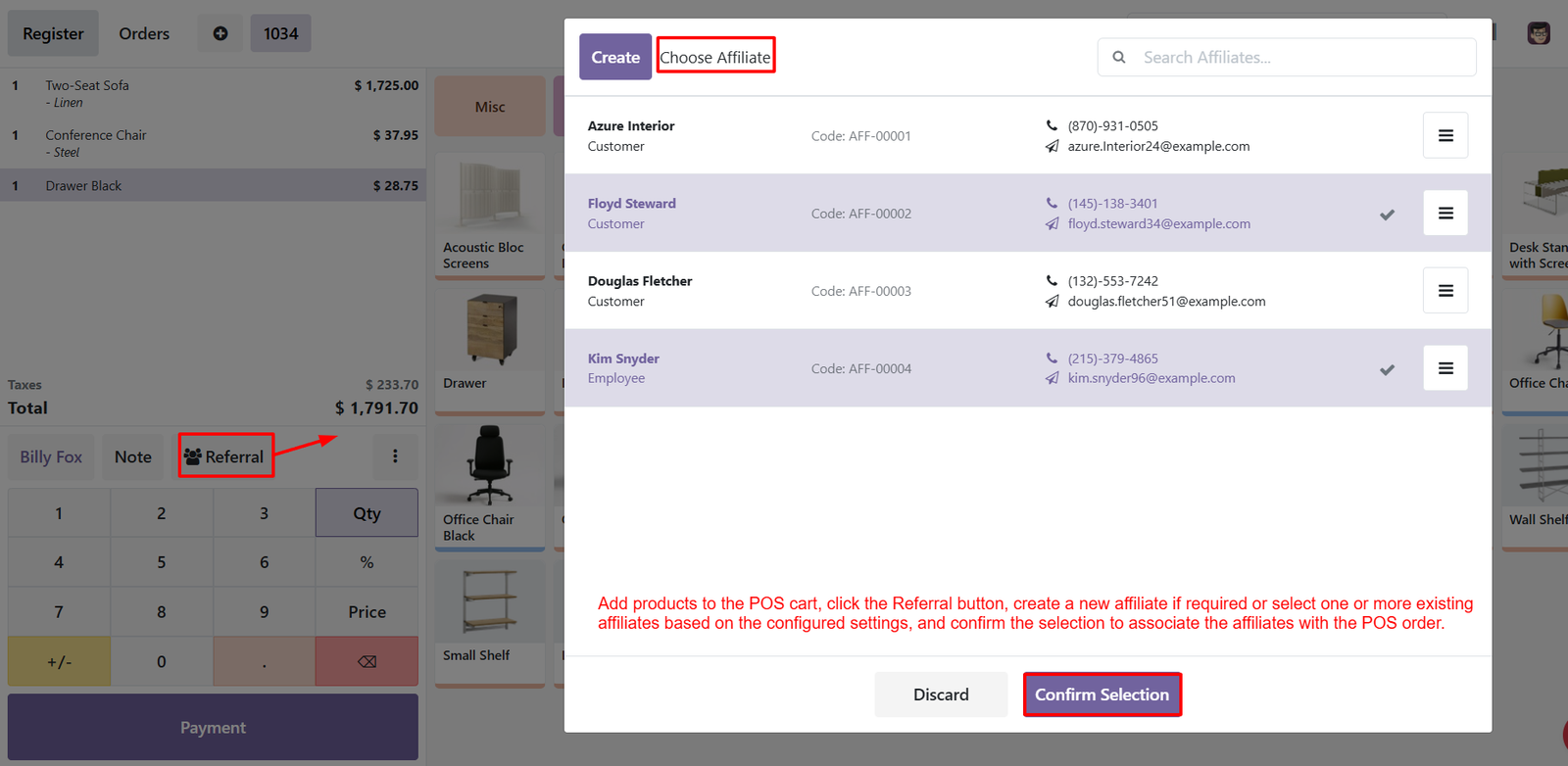
- Affiliate Selection
Search and select existing affiliates from the available list before confirming their association with the current POS order. - Multiple Affiliate Assignment
Select multiple affiliates for a single POS order when multiple referral partners contribute to the same customer purchase. - Affiliate Search
Quickly find affiliates using the search field by entering relevant names or available affiliate information within the POS selection window. - Affiliate Identification
View affiliate names, types, referral codes, phone numbers, and email addresses to identify the correct referral partner accurately. - Referral Code Visibility
Display unique affiliate referral codes during selection, helping cashiers verify and associate the correct affiliate with POS transactions. - Customer Affiliate Support
Select customer-type affiliates directly from the POS interface to properly track referrals and calculate commissions for eligible purchases. - Employee Affiliate Support
Select employee-type affiliates for POS orders, enabling businesses to reward employees for generating qualified sales through referrals. - Affiliate Confirmation
Confirm selected affiliates using the Confirm Selection button to associate referral partners with the current POS order before payment. - Flexible Referral Management
Manage affiliate assignments directly during POS checkout, providing businesses with a simple and efficient referral tracking workflow for everyday transactions.
Step 7: Access affiliate wallet details directly from the POS order through the More Options menu without leaving the current sales transaction.
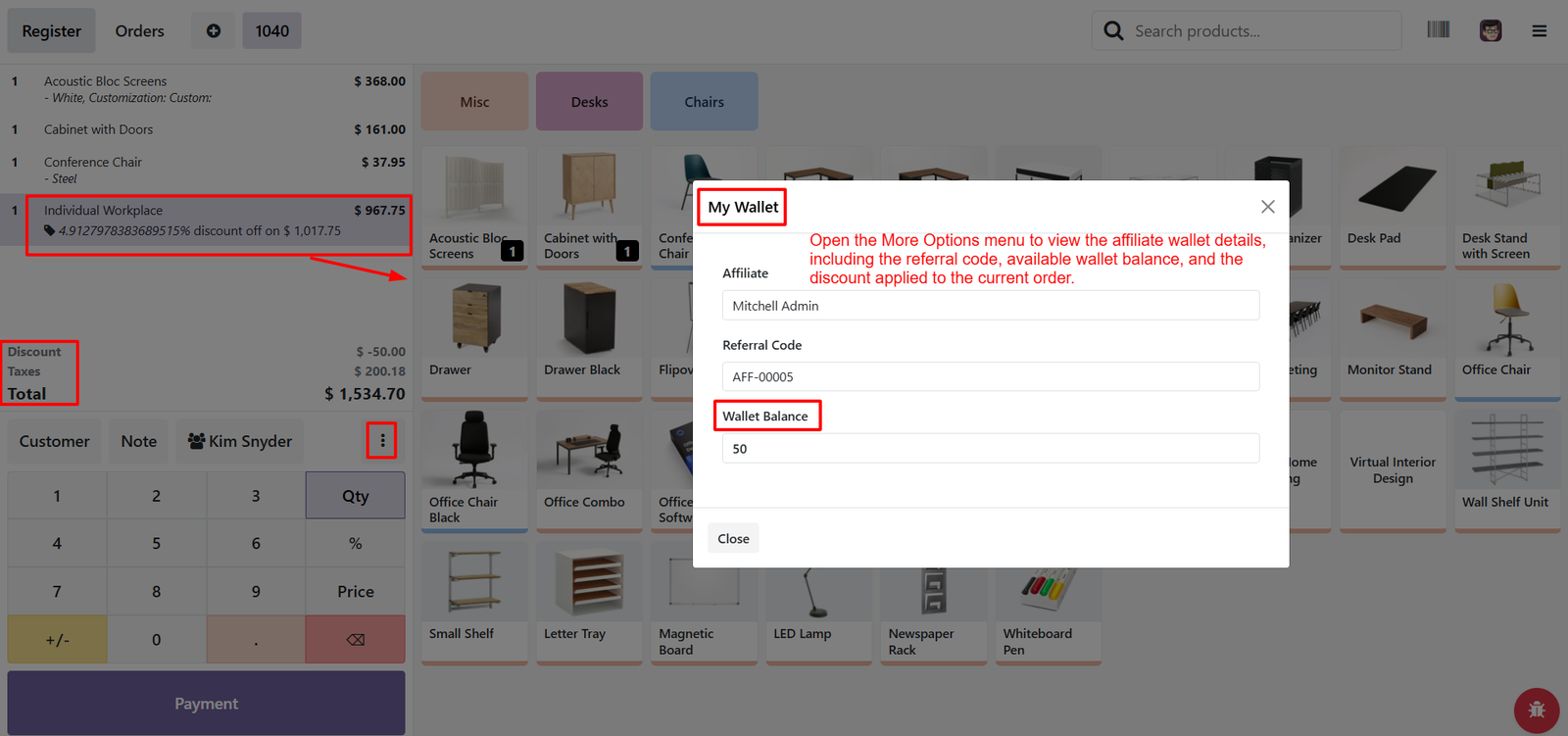
- Affiliate Identification
View the assigned affiliate name directly in the wallet window to quickly confirm which referral partner is linked with order. - Referral Code Visibility
Display the affiliate referral code within POS, helping cashiers identify referral partners and maintain accurate commission tracking throughout transactions. - Wallet Balance Display
Check the affiliate’s current wallet balance directly from the POS interface for quick financial visibility during customer checkout. - Applied Discount Tracking
Review affiliate-related discounts applied to the current POS order, helping cashiers understand promotional adjustments before completing the transaction. - Order-Level Affiliate Information
Connect affiliate information with individual POS orders, making referral tracking more transparent and simplifying commission management for completed customer purchases. - Simplified POS Workflow
Provide quick access to affiliate wallet information without navigating away from the POS screen, improving cashier efficiency during everyday sales. - Transparent Affiliate Management
Display essential affiliate wallet information in one place, helping businesses maintain transparency between referrals, discounts, wallet balances, and POS transactions.
Step 8: Review generated commission records with affiliate names, POS orders, sale amounts, commission values, applied rules, and current commission status easily.
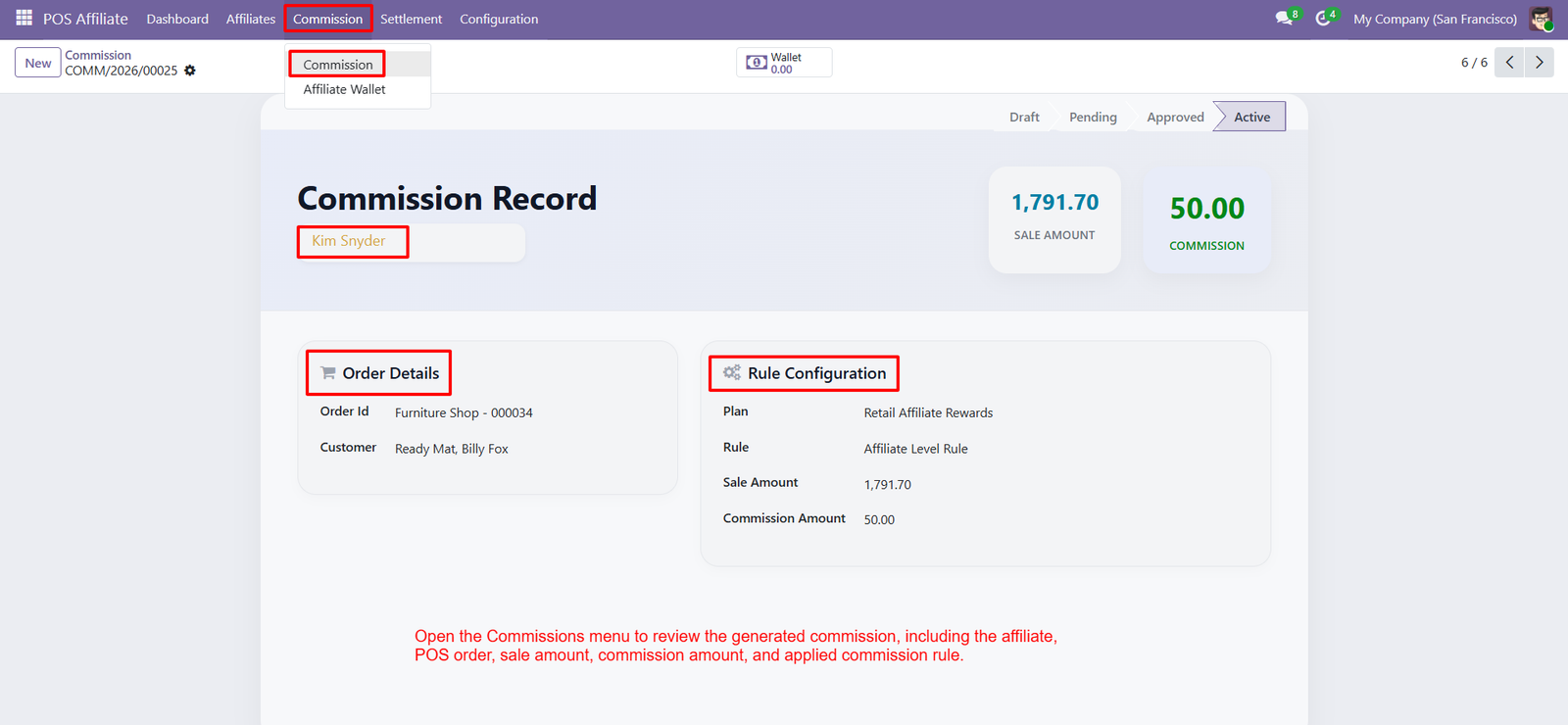
- Affiliate Commission Tracking
Track the affiliate associated with each commission record to maintain accurate referral attribution and transparent earnings management across POS sales. - POS Order Reference
View the complete POS order reference connected to each commission, making transaction-level commission tracking easier for administrators and managers daily. - Sale Amount Monitoring
Monitor total sale amounts and compare them with generated commissions to evaluate affiliate performance and control commission expenses effectively consistently. - Commission Amount Tracking
Review the exact commission amount generated from each eligible POS transaction according to configured affiliate plans and commission rules accurately. - Applied Commission Rules
Identify the commission plan and rule applied to each transaction, ensuring accurate calculations and transparent affiliate reward processing for businesses. - Commission Status Management
Use commission workflow statuses such as Draft, Pending, Approved, and Active to manage commission reviews and approval processes within Odoo. - Centralized Commission Records
Access commission records from the dedicated Commission menu to maintain centralized visibility over affiliate earnings and POS referral performance efficiently.
Step 9: View total affiliate earnings from all eligible transactions and rewards, providing clear visibility into overall financial performance and accumulated income.
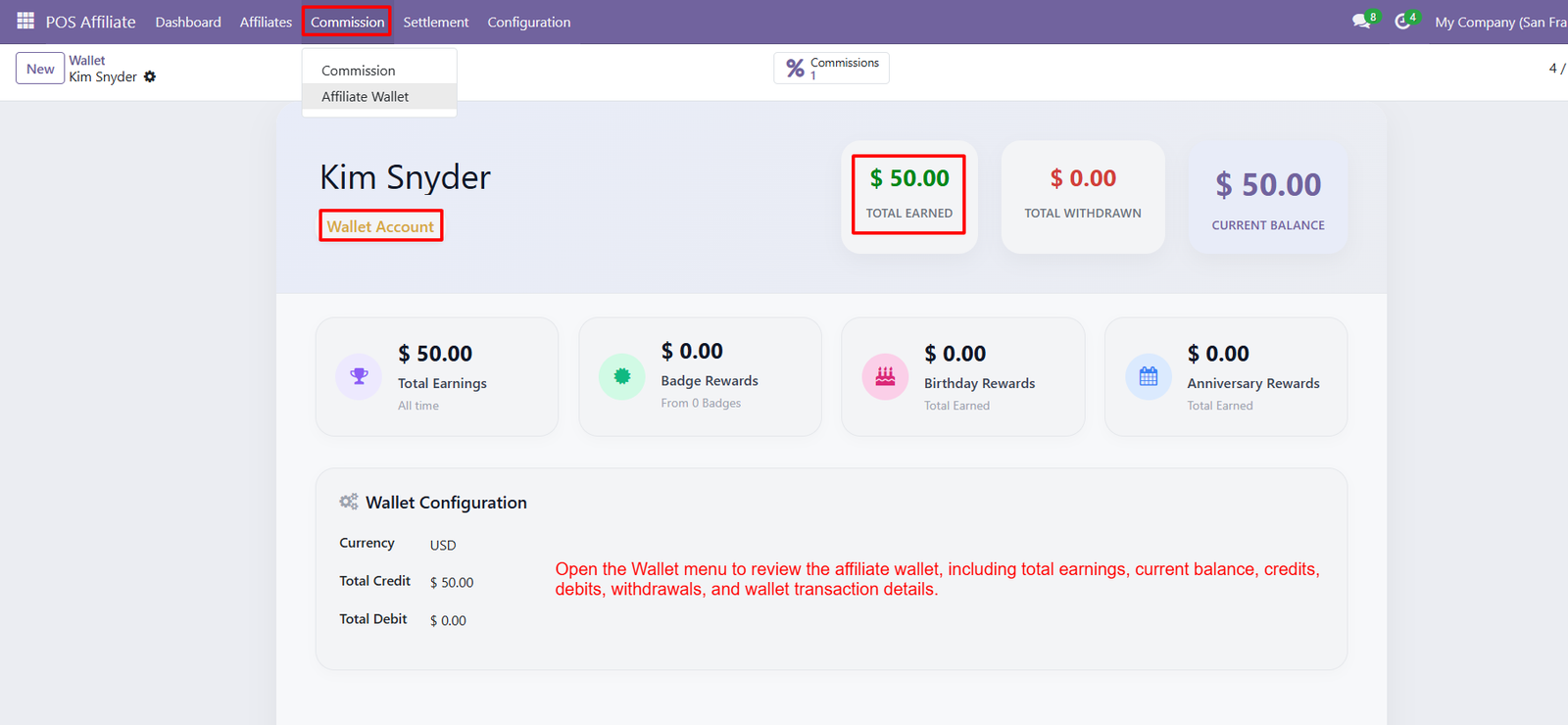
- Current Wallet Balance
Monitor the affiliate’s current wallet balance to understand available funds after considering credits, debits, withdrawals, and transactions. - Total Withdrawals
Track total amounts withdrawn by affiliates, helping administrators maintain accurate payout records and monitor historical withdrawal activity. - Total Credit Tracking
Review total wallet credits generated from commissions and other eligible rewards to maintain transparent affiliate financial records. - Total Debit Tracking
Monitor wallet debits associated with withdrawals, adjustments, or other transactions for accurate and complete affiliate account management. - Badge Rewards Tracking
View rewards earned through affiliate badges and achievement programs, helping businesses recognize and monitor performance-based affiliate incentives. - Birthday Rewards
Track birthday rewards earned by affiliates as configured, providing an additional incentive and personalized reward opportunity within the affiliate program. - Anniversary Rewards
Monitor anniversary rewards accumulated by affiliates, supporting long-term engagement and recognition through configured affiliate reward programs. - Wallet Configuration Details
Review wallet currency and financial configuration information to maintain consistent accounting and accurate affiliate transaction records across the system. - Centralized Wallet Management
Manage affiliate earnings, credits, debits, withdrawals, rewards, and current balances from one centralized wallet interface within the Odoo Affiliate system.
Step 10: Settlement Records: Review affiliate settlement records with complete affiliate, wallet, settlement amount, financial details, remarks, and current settlement status information.
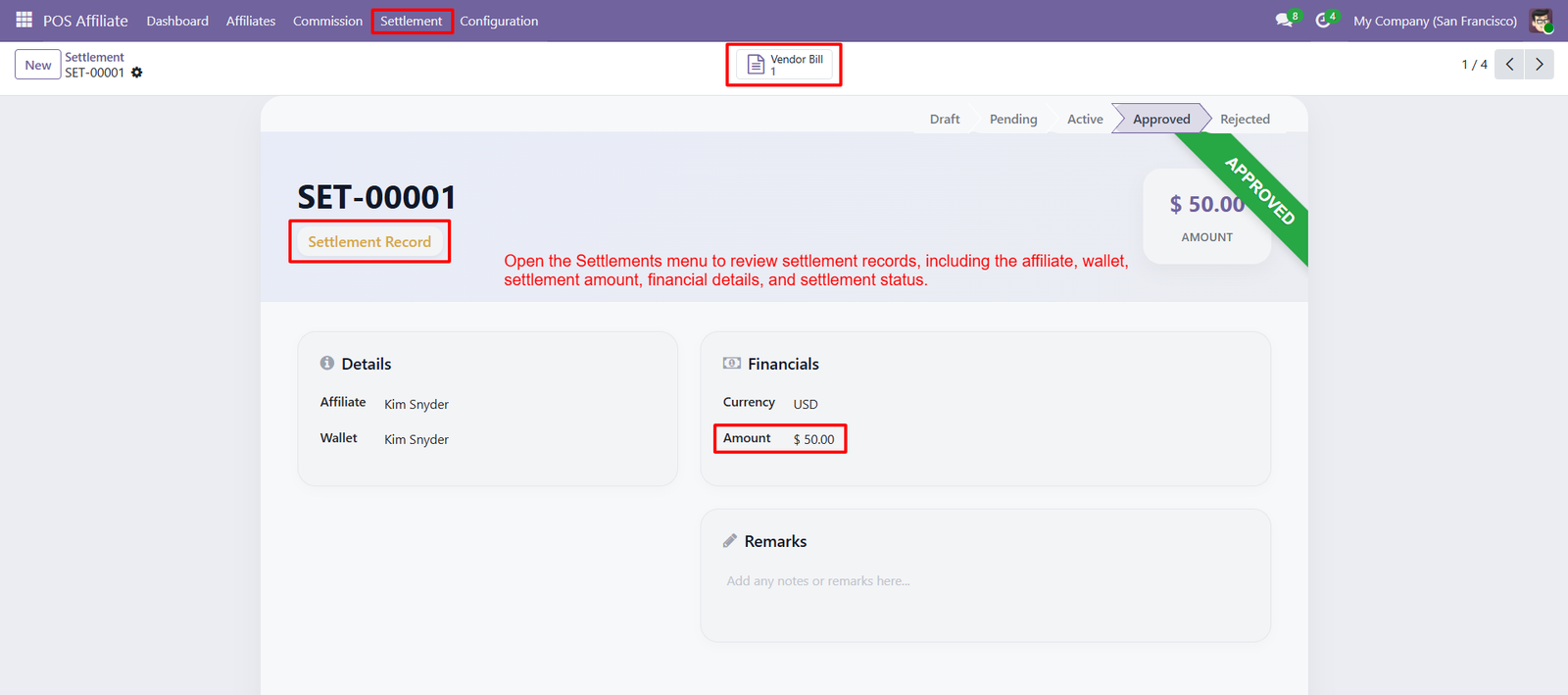
- Affiliate Identification: Easily identify the affiliate associated with each settlement, ensuring accurate payout tracking and transparent financial management across affiliate accounts.
- Wallet Integration: Connect settlements directly with affiliate wallets, making it easier to manage balances and process eligible affiliate payouts efficiently.
- Settlement Amount: Clearly view the settlement amount approved for an affiliate, helping administrators maintain accurate and transparent payout calculations.
- Financial Details: Access important financial information including currency and settlement amount for better accounting control and accurate affiliate payment processing.
- Settlement Status: Track settlement progress through Draft, Pending, Active, Approved, and Rejected stages for improved workflow visibility and administrative control.
- Approval Workflow: Manage settlement approvals through dedicated workflow stages, ensuring authorized settlements are reviewed before completing affiliate payout processing.
- Vendor Bill Integration: Access related vendor bills directly from settlement records, simplifying financial reconciliation and connecting affiliate settlements with accounting processes.
- Settlement Remarks: Add important notes and remarks to settlement records, helping teams maintain additional information, explanations, or internal processing instructions.
- Transparent Payout Management: Maintain transparent affiliate payout operations by keeping settlement details, amounts, statuses, wallets, and financial information organized centrally.
Step 11: Achievement Recognition: Affiliate badges motivate partners by recognizing achievements and rewarding performance through clearly defined conditions, targets, bonuses, and milestone based incentives.
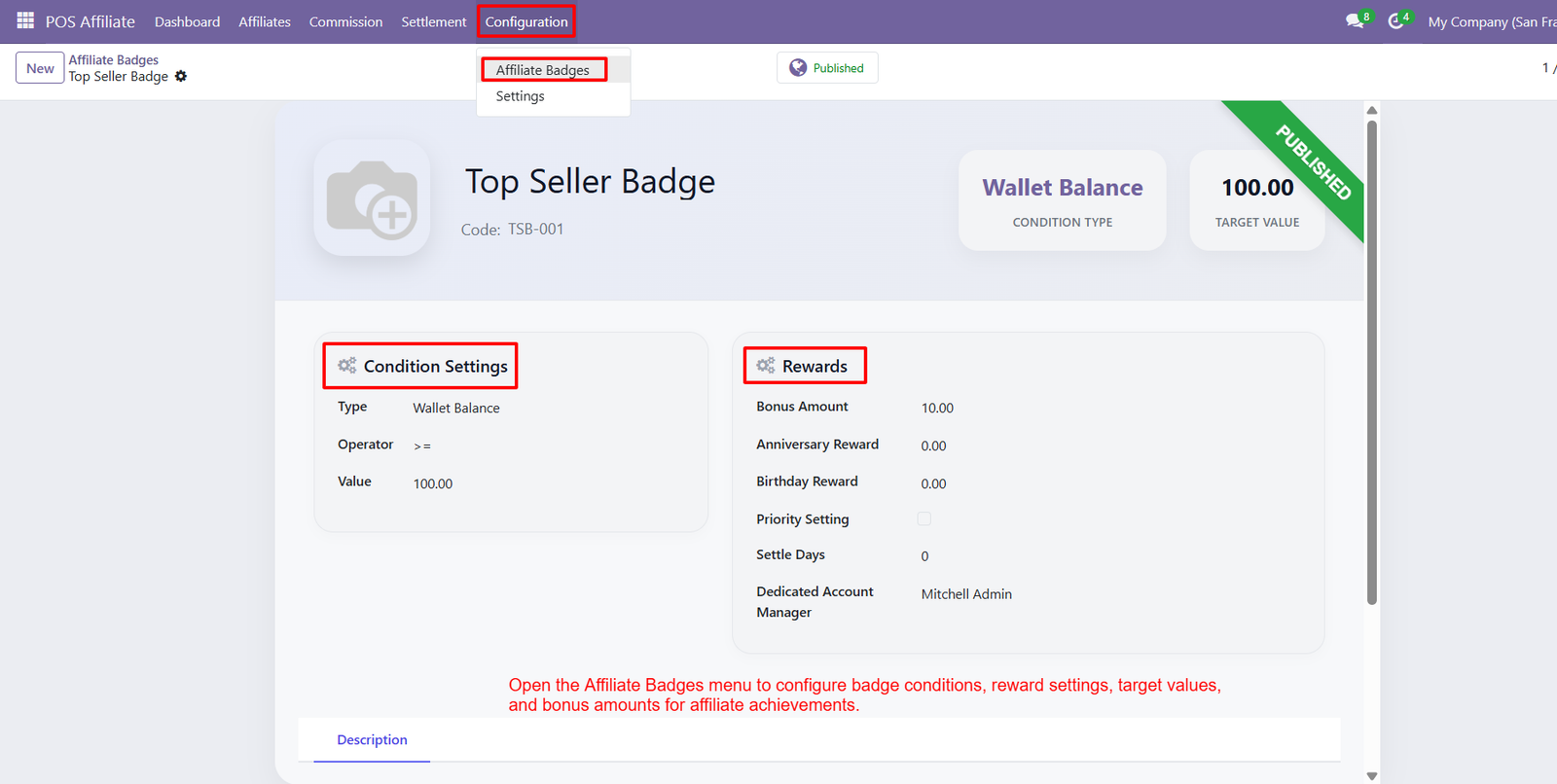
- Condition Settings: Condition settings allow businesses to define badge eligibility using wallet balance, operators, and target values for achievement tracking across affiliates.
- Wallet Balance Conditions: Wallet balance conditions help identify affiliates reaching specific financial milestones, automatically supporting recognition and encouraging stronger participation within referral programs.
- Reward Configuration: Reward configuration enables businesses to assign bonus amounts, anniversary rewards, and birthday rewards, creating attractive incentives for high performing affiliates.
- Target Values: Target values establish measurable achievement goals, helping affiliates understand required performance levels and encouraging focused efforts toward earning valuable badges.
- Priority Settings: Priority settings help businesses manage multiple badge achievements effectively, ensuring important rewards receive appropriate consideration within the affiliate recognition program.
- Settlement Days: Settlement days can configure badge rewards, helping businesses control payout timing while maintaining organized, predictable, and efficient affiliate reward management.
- Dedicated Account Manager: Dedicated account managers can be assigned to badges, providing responsible oversight for affiliate achievements, rewards, and ongoing performance related activities.
- Published Badges: Published badges make achievement programs visible and actionable, helping affiliates understand recognition opportunities and motivating them toward measurable performance goals.
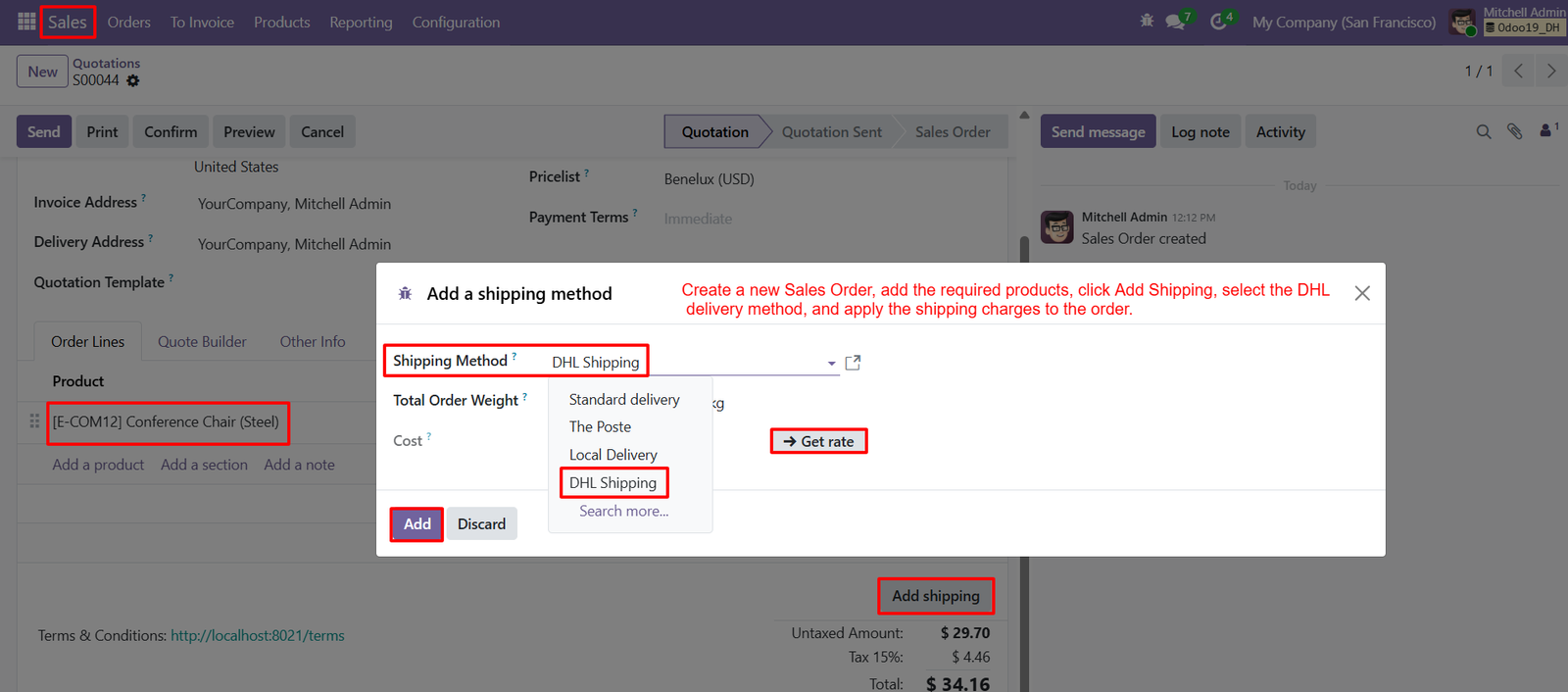
Step 12: Add DHL Shipping to sales orders by selecting the delivery method, allowing customers to receive accurate shipping charges during checkout.
- Condition Settings: Condition settings allow businesses to define badge eligibility using wallet balance, operators, and target values for achievement tracking across affiliates.
- Wallet Balance Conditions: Wallet balance conditions help identify affiliates reaching specific financial milestones, automatically supporting recognition and encouraging stronger participation within referral programs.
- Reward Configuration: Reward configuration enables businesses to assign bonus amounts, anniversary rewards, and birthday rewards, creating attractive incentives for high performing affiliates.
- Target Values: Target values establish measurable achievement goals, helping affiliates understand required performance levels and encouraging focused efforts toward earning valuable badges.
- Priority Settings: Priority settings help businesses manage multiple badge achievements effectively, ensuring important rewards receive appropriate consideration within the affiliate recognition program.
- Settlement Days: Settlement days can configure badge rewards, helping businesses control payout timing while maintaining organized, predictable, and efficient affiliate reward management.
- Dedicated Account Manager: Dedicated account managers can be assigned to badges, providing responsible oversight for affiliate achievements, rewards, and ongoing performance related activities.
- Published Badges: Published badges make achievement programs visible and actionable, helping affiliates understand recognition opportunities and motivating them toward measurable performance goals.