

Managing shipping operations efficiently is essential for businesses that process orders through eCommerce platforms and ERP systems. From calculating delivery costs to generating shipping labels and monitoring shipments, manual shipping processes can consume valuable time.
The Purolator Shipping Integration for Odoo by Weblytic Labs connects Odoo Sales, Website, and Inventory with Purolator shipping services. It enables businesses to retrieve shipping rates, compare available delivery services, generate shipping labels, and manage shipment information directly from Odoo.
With a centralized shipping workflow, businesses can simplify order fulfillment, improve shipping visibility, and reduce repetitive manual tasks.
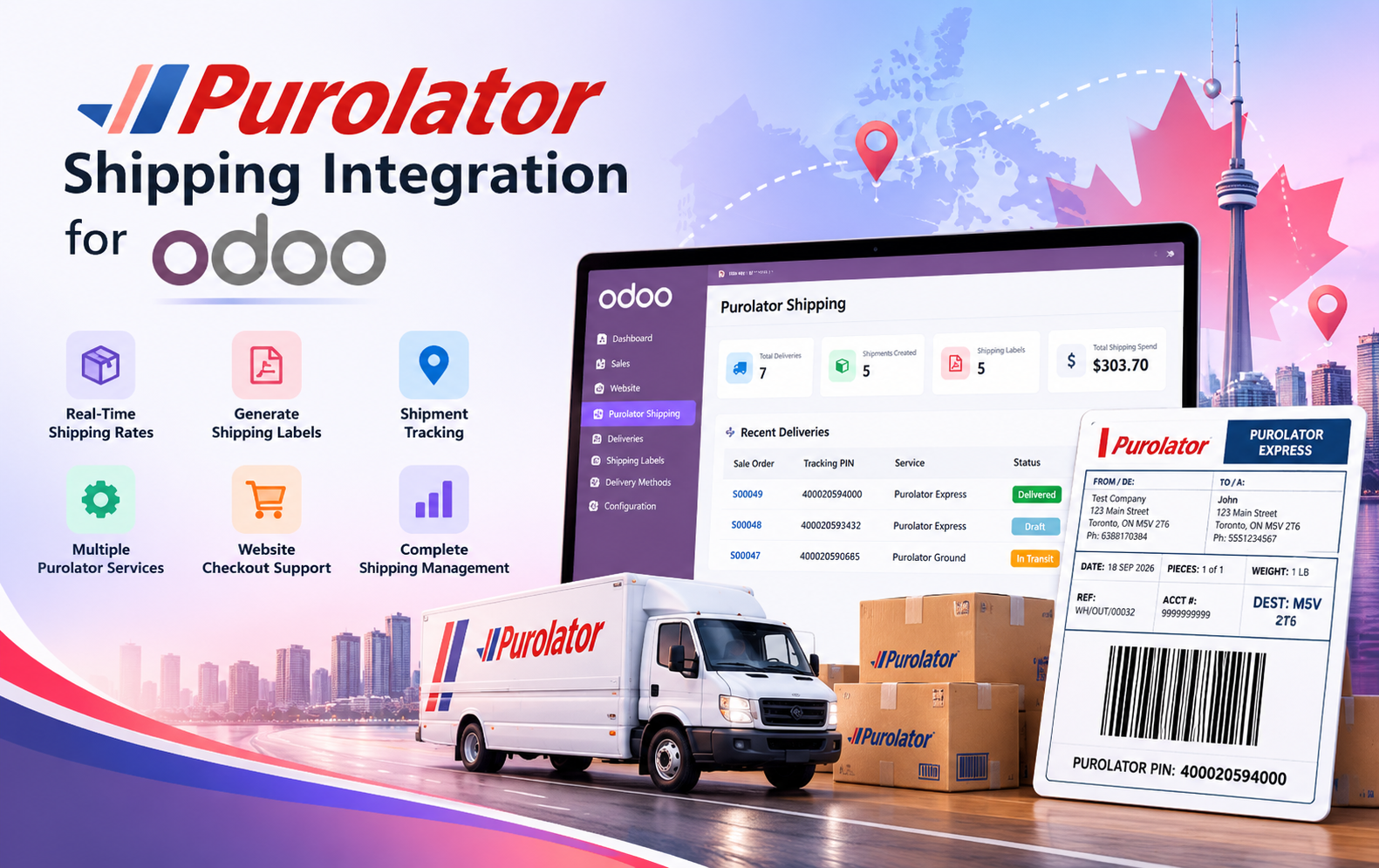
Key Features at a Glance
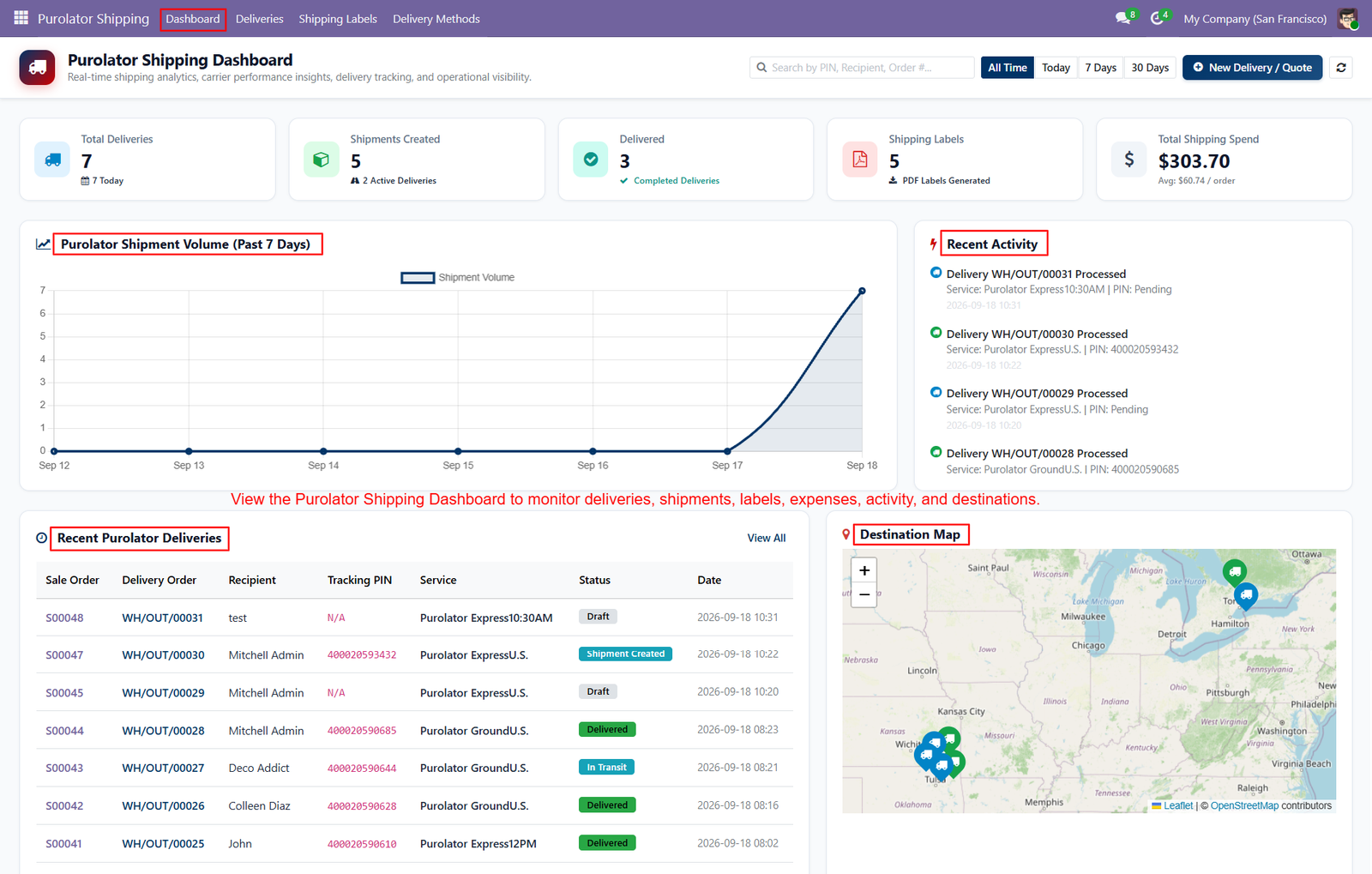
- Centralized Shipping Dashboard: Monitor Purolator deliveries, shipment statistics, generated labels, shipping expenses, recent activities, shipment volumes, and destination information from one centralized Odoo dashboard.
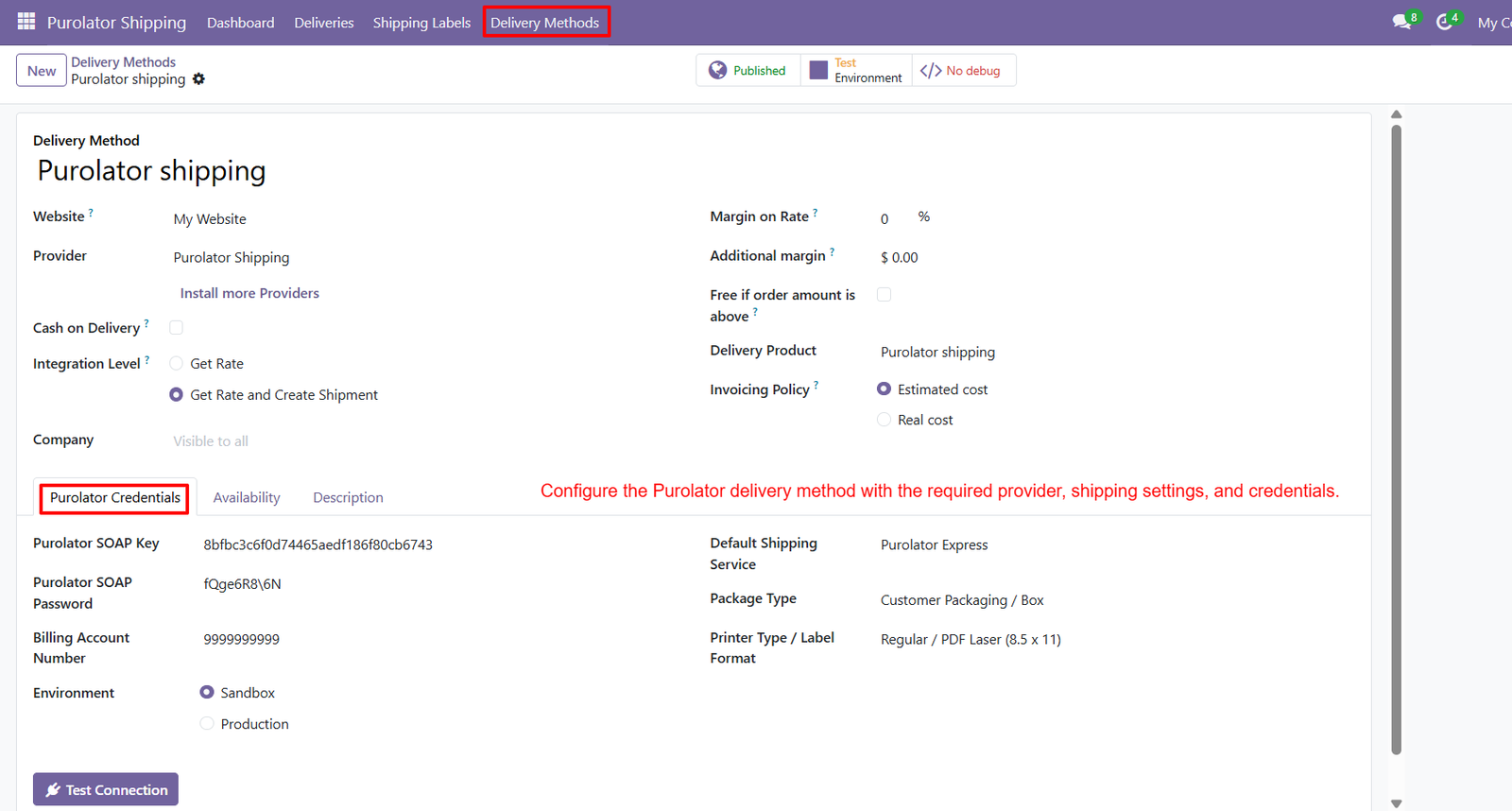
- Delivery Method Configuration: Configure Purolator shipping providers, delivery products, integration levels, default shipping services, package types, label formats, environments, and required API credentials.
- Real-Time Shipping Rates: Retrieve available Purolator shipping rates directly from Odoo Sales Orders and website checkout to evaluate delivery costs before selecting suitable shipping services.
- Multiple Shipping Services: Access available Purolator delivery services, including Express, Ground, Quickship, and return services, depending on the options returned by Purolator.
- Shipping Rate Comparison: Compare available Purolator shipping services, estimated delivery dates, and shipping charges to select appropriate delivery options for customer orders.
- Website Checkout Integration: Allow customers to select Purolator Shipping during Odoo website checkout and review available delivery services and associated shipping costs before confirming orders.
- Sales Order Integration: Add Purolator shipping to Odoo Sales Orders, retrieve available rates, select preferred services, and manage shipping charges within the existing order workflow.
- Automatic Shipment Creation: Validate Delivery Orders to create Purolator shipments through the configured integration and make shipment details available within Odoo.
- Shipping Label Generation: Generate Purolator shipping labels during shipment processing, providing the necessary shipment information for subsequent package handling and fulfillment activities.
- PDF Shipping Labels: Open and download generated Purolator shipping labels as PDF documents for printing, packaging, and shipment processing directly from Odoo.
- Shipment Tracking PINs: Access Purolator tracking PINs associated with generated shipments to identify deliveries and review their corresponding tracking information within Odoo.
- Delivery Management: Manage Purolator deliveries through a dedicated Odoo menu containing delivery orders, recipients, tracking PINs, shipping services, scheduled dates, costs, and statuses.
- Shipping Label Management: View generated shipping labels in a dedicated interface displaying tracking PINs, delivery orders, shipping services, label dates, active statuses, and PDF access.
- Shipping Cost Visibility: Review shipping charges associated with deliveries and monitor overall shipping expenses through the dashboard and delivery management interface.
- Shipment Status Monitoring: Review available Purolator shipment statuses alongside Odoo delivery statuses to understand shipment progress and manage fulfillment records more efficiently.
- Delivery Date Information: Review estimated delivery dates returned with available Purolator shipping rates to compare delivery options before confirming the preferred shipping service.
- Shipment Reference Management: Access shipment references and related Sales Orders to connect Purolator shipping information with the corresponding Odoo fulfillment records.
- Shipping Environment Configuration: Configure the available Purolator integration environment, including Sandbox and Production options, according to the intended connection and testing requirements.
- Connection Testing: Use the available Test Connection option to check the configured Purolator connection before proceeding with shipping operations in Odoo.
- Shipment Activity Overview: Review recent shipping activities, shipment volumes, delivery records, and destination information through the dashboard to maintain better visibility into daily shipping operations.
Use Cases: Who Needs This Module?
- eCommerce Businesses: Businesses selling products online can integrate Purolator shipping into Odoo to retrieve delivery rates, offer shipping options, generate labels, and manage customer orders efficiently.
- Retail Businesses: Retailers managing product deliveries can use the integration to compare shipping services, review delivery costs, create shipments, and organize shipping operations within Odoo.
- Odoo Website Owners: Businesses operating an Odoo eCommerce website can offer Purolator delivery options at checkout, allowing customers to review available services and shipping charges before confirming orders.
- Warehouse and Inventory Teams: Warehouse teams can process Odoo Delivery Orders, create Purolator shipments, generate shipping labels, and access shipment references during order fulfillment.
- Sales and Order Management Teams: Sales teams can retrieve Purolator shipping rates directly from Sales Orders, compare available delivery services, select preferred options, and manage shipping charges.
- Canadian Shipping Businesses: Businesses using Purolator services for Canadian deliveries can centralize shipping configuration, rate retrieval, shipment creation, and label management within their Odoo environment.
- Logistics and Operations Teams: Operations teams can monitor shipment activity, delivery statuses, shipping expenses, tracking PINs, and scheduled dates through dedicated Odoo shipping menus.
- Businesses Handling Multiple Delivery Services: Companies requiring different Purolator service options can review available Express, Ground, Quickship, and return services, depending on the services returned by Purolator.
- Businesses Managing Shipping Documentation: Companies processing frequent shipments can access generated PDF shipping labels from Odoo, making shipping documents easier to retrieve, download, and print.
- Businesses Seeking Centralized Shipping Management: Organizations wanting to manage shipping rates, delivery orders, shipment references, labels, and shipping costs in one system can benefit from this Odoo integration.
Quick User Guide (Visual Walkthrough)
Scroll up to revisit the detailed image-wise walkthrough.
Step 1: Centralized Shipping Dashboard: Monitor all Purolator shipping operations, including deliveries, shipments, generated labels, shipping expenses, recent activities, and destination information from one convenient Odoo dashboard.
Step 2: Easy Delivery Method Configuration: Configure Purolator Shipping in Odoo by setting the provider, delivery product, integration level, shipping preferences, credentials, and other essential delivery settings.
Step 3: Seamless Website Checkout Integration: Integrate Purolator shipping into Odoo Website checkout, allowing customers to review available delivery services, compare shipping charges, and select preferred options before ordering.
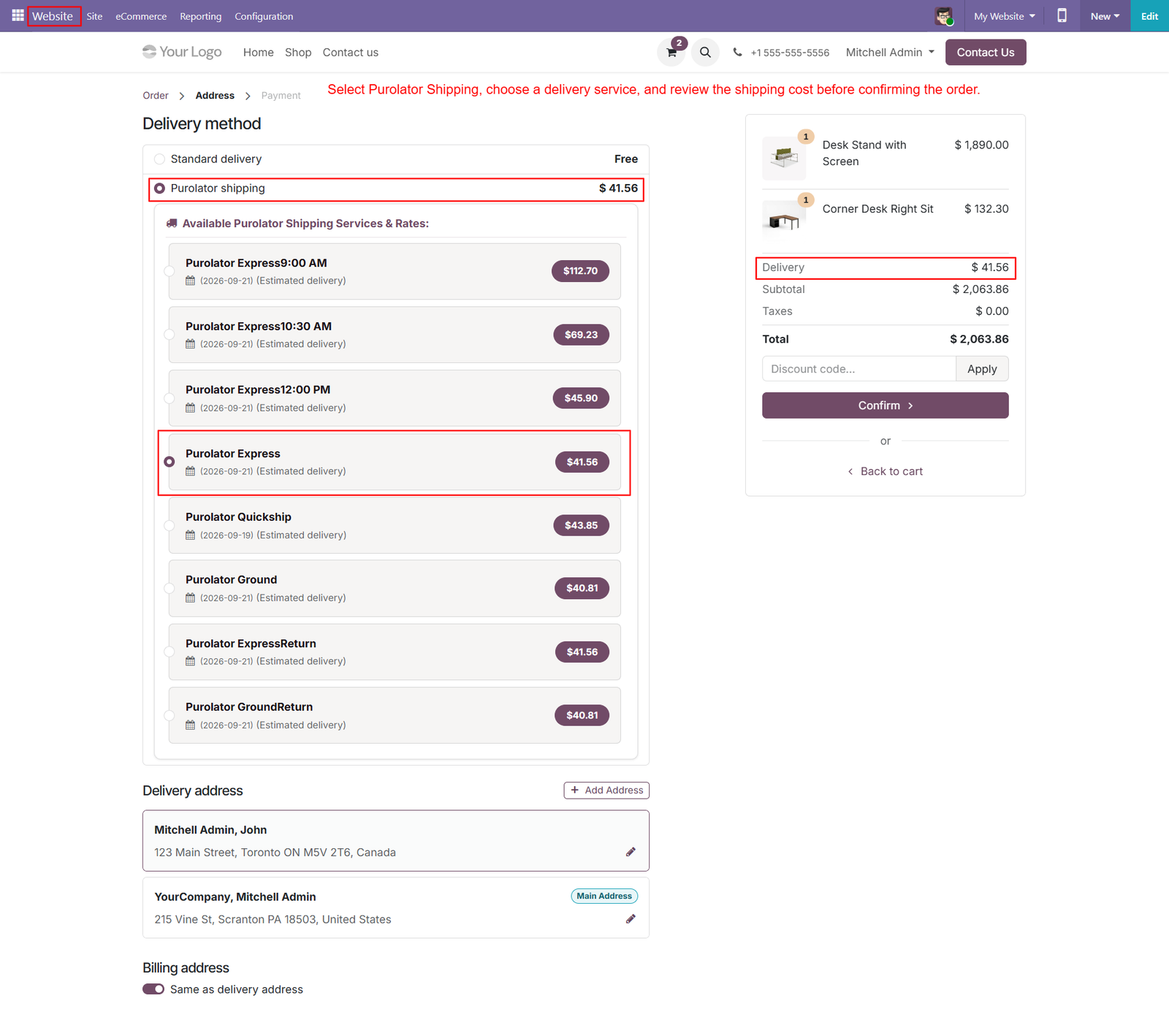
- Multiple Delivery Service Options: Display available Purolator Express, Ground, Quickship, and return services at checkout, depending on the services returned by Purolator for the shipment.
- Real-Time Shipping Rate Retrieval: Retrieve available Purolator shipping rates during checkout so customers can review delivery charges before confirming their purchases through the Odoo website.
- Estimated Delivery Date Display: Show estimated delivery dates alongside available shipping services, helping customers compare delivery options and select services that suit their shipping preferences.
- Transparent Shipping Cost Display: Display the selected shipping charge in the order summary, helping customers understand delivery expenses before confirming their purchases through the Odoo checkout process.
- Express Shipping Selection: Allow customers to select available Purolator Express services, including supported time-specific options, when choosing suitable delivery methods for their orders.
- Ground Shipping Options: Present available Purolator Ground services during checkout, allowing customers to review the associated delivery estimates and charges before selecting their preferred shipping option.
- Quickship Delivery Selection: Offer available Purolator Quickship services at checkout, enabling customers to compare the displayed shipping cost and estimated delivery date with other available options.
- Return Shipping Service Options: Display supported Purolator return services when available, helping businesses accommodate relevant return-shipping workflows through their configured Odoo shipping integration.
- Interactive Delivery Method Selection: Let customers select Purolator Shipping from the available delivery methods and review supported services before proceeding with order confirmation.
- Shipping Cost in Order Summary: Include the selected Purolator delivery charge in the checkout order summary, providing customers with clear visibility into their shipping expenses.
- Canadian Address Support: Support the documented checkout workflow using a Canadian shipping address, allowing customers to review available Purolator services for their configured delivery destination.
- Delivery Address Management: Display delivery address information during checkout so customers can review the destination details associated with their order before completing the purchase.
- Billing Address Selection: Provide the available billing address section, including the same-as-delivery-address option, as part of the Odoo checkout experience.
- Product Order Summary: Display ordered products, quantities, prices, and delivery charges together, helping customers review important purchase information before confirming their orders.
- Shipping Service Price Comparison: Present available delivery services with their respective charges, enabling customers to compare shipping costs and choose an appropriate option for their order.
Step 4: Delivery Order Validation: Validate Odoo Delivery Orders to initiate the configured Purolator shipping workflow, create shipments, generate shipping labels, and access tracking references.
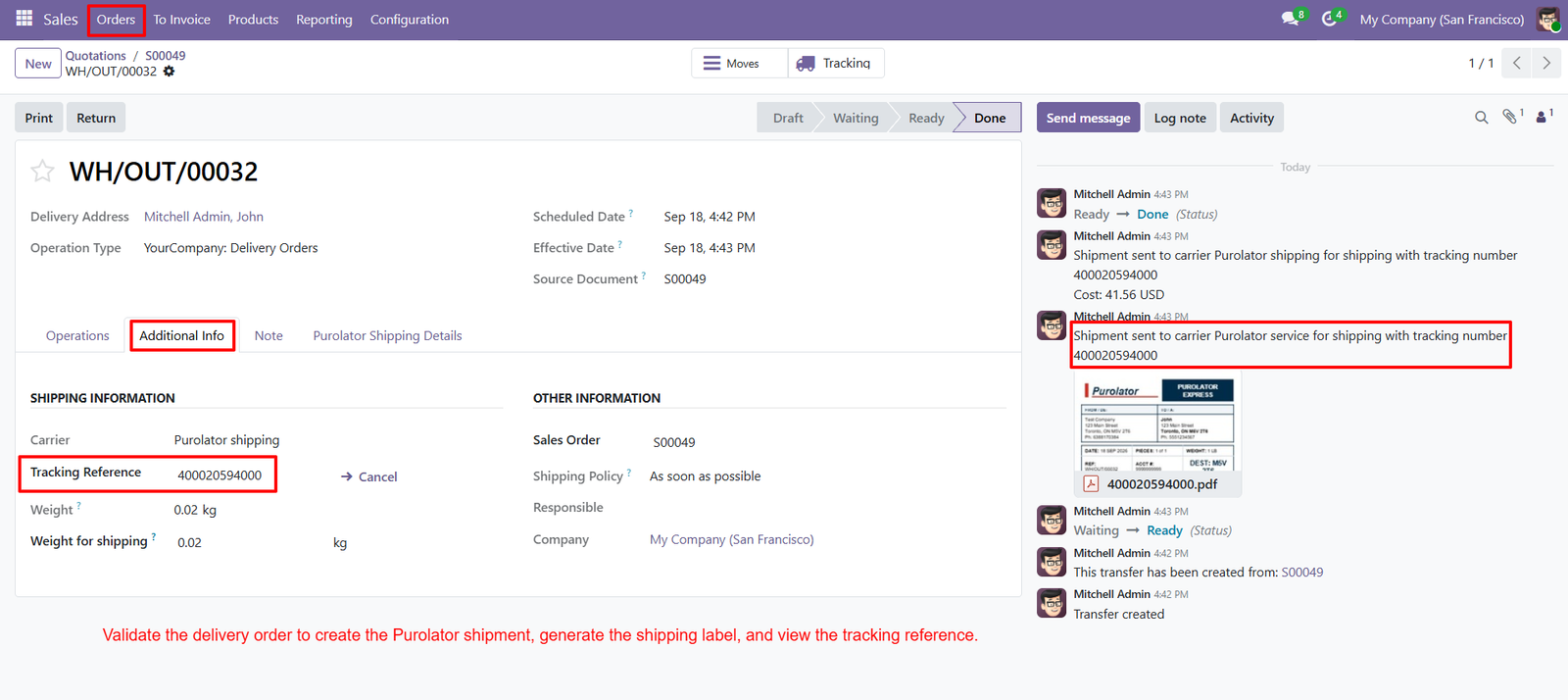
- Purolator Shipment Creation: Process delivery orders through the configured integration to create Purolator shipments and associate shipping information with the corresponding Odoo fulfillment records.
- Tracking Reference Management: Access the generated tracking reference from the Delivery Order’s Additional Info tab to identify shipments and review their associated shipping information.
- Carrier Information Visibility: View Purolator Shipping as the assigned carrier in the delivery record, helping users identify the shipping provider associated with each processed order.
- Sales Order Connection: Access the originating Sales Order reference from the Delivery Order to connect customer orders with their corresponding shipment and fulfillment information.
- Delivery Address Information: Review the delivery address associated with the shipment to verify destination details recorded in Odoo before completing relevant fulfillment activities.
- Scheduled Delivery Date: View the scheduled date displayed on the Delivery Order to understand planned fulfillment timing and coordinate shipping operations with warehouse activities.
- Effective Delivery Date: Review the effective date recorded on the Delivery Order to understand when the delivery operation was completed or processed within Odoo.
- Shipment Weight Information: Access the recorded shipment weight from the Additional Info tab to review package information associated with the delivery and shipping workflow.
- Shipping Weight Details: Review the Weight for Shipping field to understand the shipping weight recorded for the delivery order during Purolator shipment processing.
- Purolator Shipping Details Tab: Access the dedicated Purolator Shipping Details tab to review carrier-specific information available for the configured shipment within Odoo.
- Shipment Processing History: Review delivery order chatter messages to understand recorded shipment activities, including shipment creation, carrier submission, and associated tracking references.
- Shipping Label Attachment: Access the generated shipping label attachment from the delivery record’s chatter to review the document associated with the processed shipment.
- PDF Shipping Label Access: Open the attached Purolator shipping label PDF to review shipment information and prepare the label for printing and package processing.
- Tracking PIN Visibility: Review the tracking reference recorded in the delivery information and shipment messages to identify the corresponding Purolator shipment within your records.
- Delivery Status Workflow: Monitor the Odoo delivery status progression through stages such as Waiting, Ready, and Done to understand the fulfillment process.
Step 5: PDF Shipping Label Generation: Generate Purolator shipping labels through the configured Odoo shipping workflow, providing shipment information required for package identification, processing, and delivery.
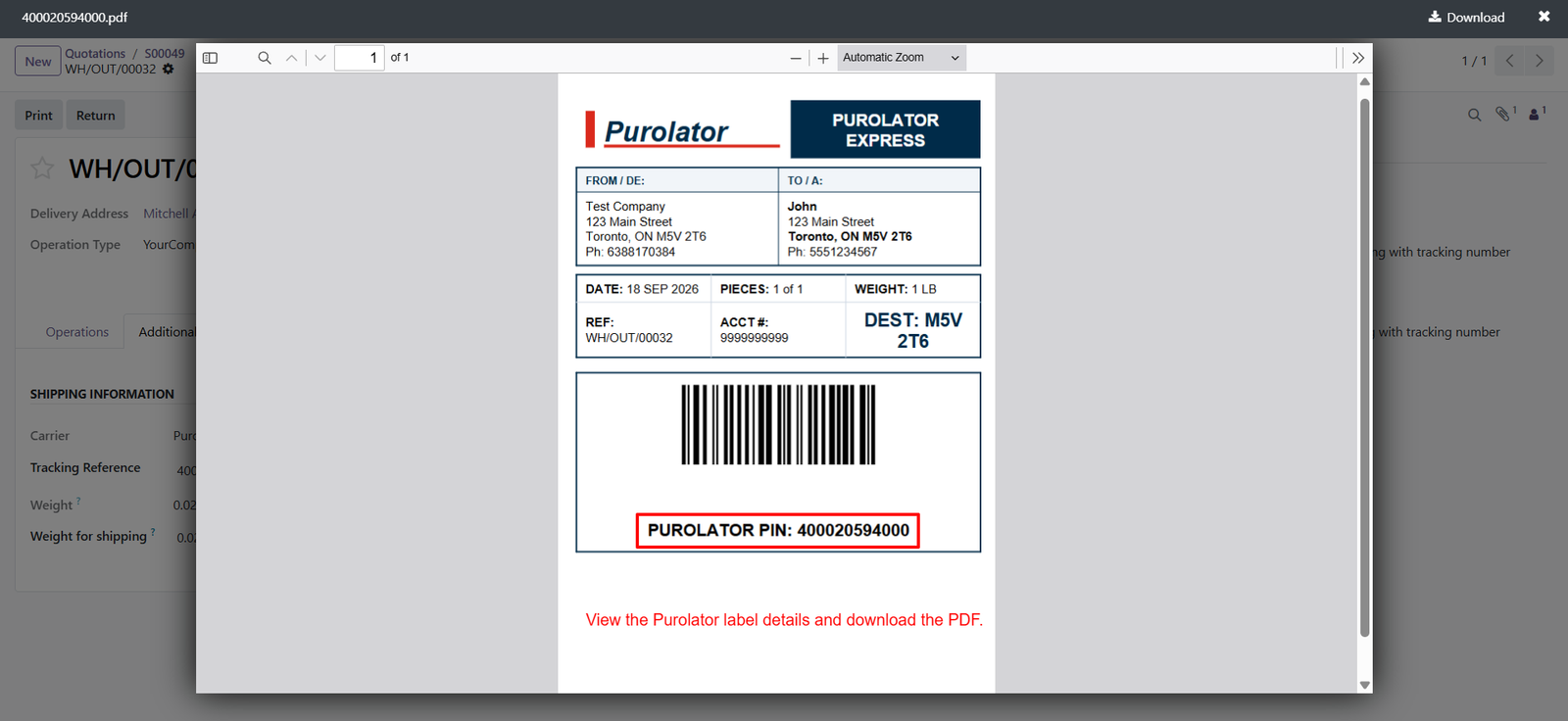
- Purolator Branding: Display Purolator branding and the selected shipping service on generated labels, helping users identify the carrier responsible for handling the shipment.
- Sender Information: Include sender details such as company name, address, and phone number on the shipping label to identify the shipment’s origin.
- Recipient Information: Display recipient details, including the recipient’s name, delivery address, and phone number, helping identify the intended destination of the shipment.
- Shipping Service Identification: Display the applicable Purolator service, such as Purolator Express, on the label to identify the selected shipping option for processing.
- Tracking PIN Display: Include the Purolator tracking PIN on the generated shipping label, allowing users to identify the shipment using its assigned tracking reference.
- Barcode on Shipping Label: Generate a shipping label containing a barcode to support shipment identification and processing through compatible carrier handling workflows.
- Shipment Reference Number: Display the related Odoo Delivery Order reference on the shipping label, connecting the shipping document with the corresponding fulfillment record.
- Shipping Date Information: Include the shipment date on the generated label to provide a reference for shipment processing and shipping documentation.
- Package Quantity Details: Display the number of pieces associated with the shipment, helping identify package quantities during shipping preparation and handling.
- Package Weight Information: Show the recorded package weight on the shipping label to provide relevant shipment information for handling and identification purposes.
- Billing Account Information: Display the configured Purolator billing account number on the shipping label to associate shipment documentation with the appropriate shipping account.
- Destination Postal Code: Highlight the destination postal code on the shipping label, helping identify the shipment’s delivery area during carrier processing and sorting.
- PDF Label Preview: Open the generated Purolator shipping label in a PDF viewer to review shipment details before downloading or printing the document.
- Shipping Label Download: Download the generated shipping label as a PDF document, making it convenient to save, retrieve, and prepare labels for shipment processing.
- Print-Ready Shipping Documentation: Use the generated PDF label for printing according to the configured label format and supported printer requirements within your shipping workflow.
Step 6: Centralized Delivery Management: Manage all Purolator delivery records from one Odoo interface, including Sales Orders, Delivery Orders, recipients, tracking PINs, shipping services, costs, and statuses.
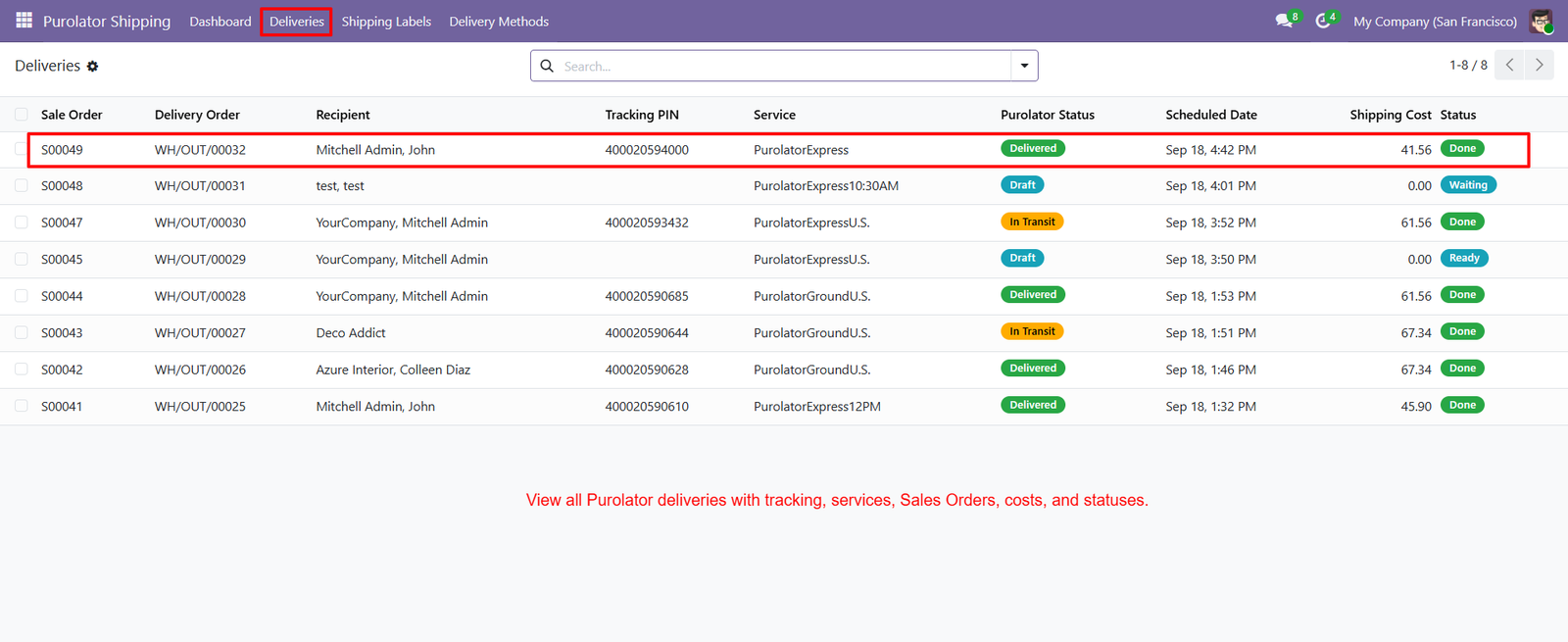
- Sales Order Reference: Identify the Sales Order associated with each delivery record, helping users connect customer purchases with corresponding shipping and fulfillment information within Odoo.
- Delivery Order Tracking: View related Delivery Order references to locate fulfillment records quickly and review shipment information associated with specific customer orders.
- Recipient Information: Review recipient names displayed alongside delivery records to identify shipment destinations and associate deliveries with the appropriate customer or contact information.
- Tracking PIN Visibility: Access available Purolator tracking PINs directly from the delivery list to identify shipments and locate corresponding tracking references within shipping records.
- Shipping Service Identification: View the Purolator shipping service assigned to each delivery, helping users understand which available carrier service was selected for individual shipments.
- Purolator Shipment Status: Monitor displayed carrier statuses, including Delivered, In Transit, and Draft, to review the shipment progress information available within Odoo.
- Odoo Delivery Status: Review delivery workflow statuses such as Done, Waiting, and Ready to understand the processing stage of each delivery record.
- Scheduled Delivery Dates: View scheduled dates and times for individual deliveries, helping teams organize fulfillment activities and review shipment scheduling information.
- Shipping Cost Visibility: Review shipping charges associated with delivery records to understand individual delivery expenses and maintain visibility into shipment-related costs.
- Delivery Record Search: Use the available search field to locate relevant delivery records more conveniently when reviewing shipping information within the Odoo interface.
- Multiple Shipment Overview: Review several Purolator delivery records in one list, making it easier to compare shipment information across different customer orders and delivery services.
- Delivered Shipment Identification: Identify records displaying the Delivered carrier status to review shipments marked as delivered within the available delivery management information.
- In-Transit Shipment Monitoring: Locate shipments marked In Transit to distinguish ongoing carrier deliveries from records displaying other available shipment statuses.
- Draft Shipment Visibility: Identify draft shipment records to review delivery information that has not yet reached a completed carrier processing stage.
- Shipping Service Comparison: Compare the shipping services displayed across delivery records to understand service selection patterns and review available shipment information.
Step 7: Centralized Shipping Label Management: Manage generated Purolator shipping labels from one dedicated Odoo interface, providing convenient access to tracking PINs, delivery orders, services, dates, and PDFs.
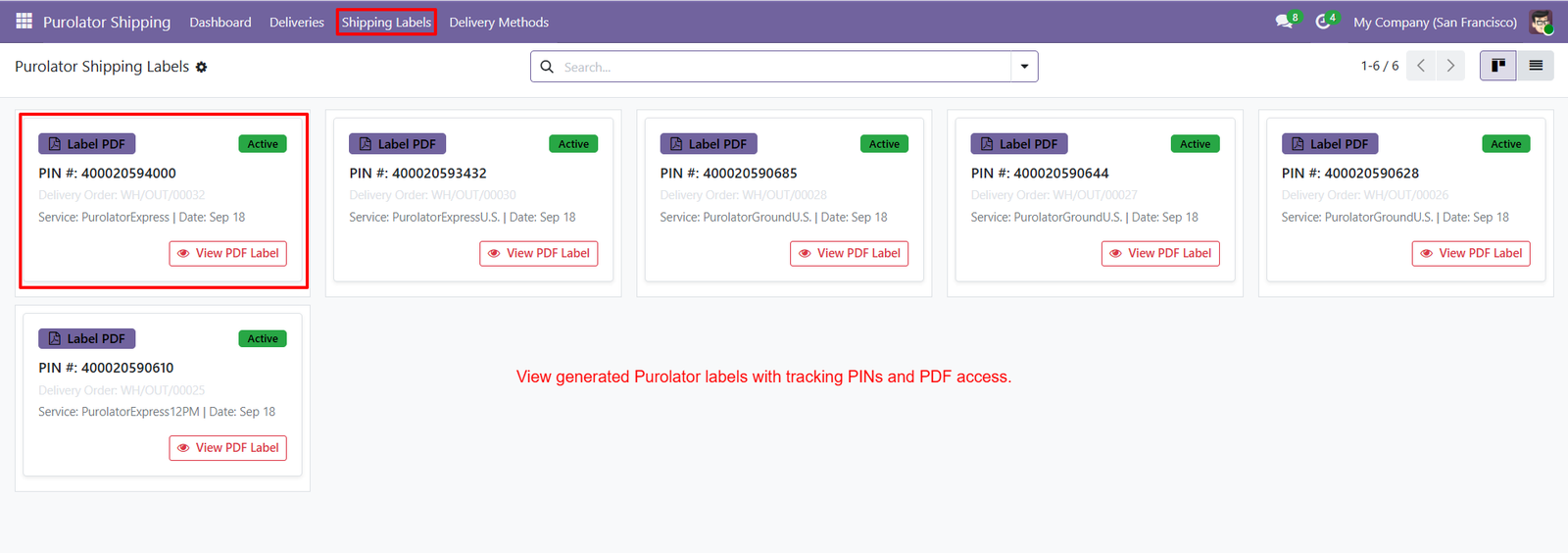
- Generated Label Overview: View available Purolator shipping label records in a structured interface, helping users identify generated labels and review associated shipment information efficiently.
- PDF Label Access: Open generated Purolator shipping labels using the available Label PDF option to review shipment documentation directly from the Odoo interface.
- Tracking PIN Display: View the tracking PIN associated with each shipping label, helping users identify shipments and connect labels with their corresponding tracking references.
- Delivery Order Reference: Display the related Odoo Delivery Order number alongside each label, making it easier to identify the fulfillment record associated with a shipment.
- Shipping Service Information: Review the Purolator shipping service associated with each generated label to identify the selected delivery option for individual shipments.
- Label Generation Date: View the displayed label date to identify when shipping documentation was recorded and distinguish labels associated with different shipment processing activities.
- Active Label Status: Identify labels displaying Active status, helping users review the availability status recorded for generated Purolator shipping label entries.
- Individual Label Preview: Select the View PDF Label option to open the corresponding shipping document and inspect its shipment information before printing or downloading.
- Convenient Label Retrieval: Locate previously generated shipping labels through the dedicated menu, reducing the need to search manually through unrelated Odoo records.
- Shipment Identification: Combine tracking PINs, Delivery Order references, and shipping service details to identify individual shipments within the shipping label management interface.
- Multiple Label Visibility: Review several generated shipping labels together, making it easier to access shipment documentation across multiple delivery orders from one screen.
- Purolator Express Labels: Identify shipping labels associated with Purolator Express services and access their corresponding PDF documents through the available label management options.
- Purolator Ground Labels: Review labels associated with Purolator Ground services to locate shipping documentation and identify the delivery records connected with those shipments.
- Tracking Information Organization: Keep tracking PINs visible alongside label details, helping users connect shipping documentation with the corresponding shipment identification information.
- Delivery Record Association: Use the displayed Delivery Order references to connect shipping labels with relevant Odoo fulfillment records and simplify internal shipment documentation lookup.
Step 8: Easy Shipping Method Selection: Select Purolator Shipping from the Odoo Sales Order shipping method interface to begin retrieving available shipping rates for the customer order.
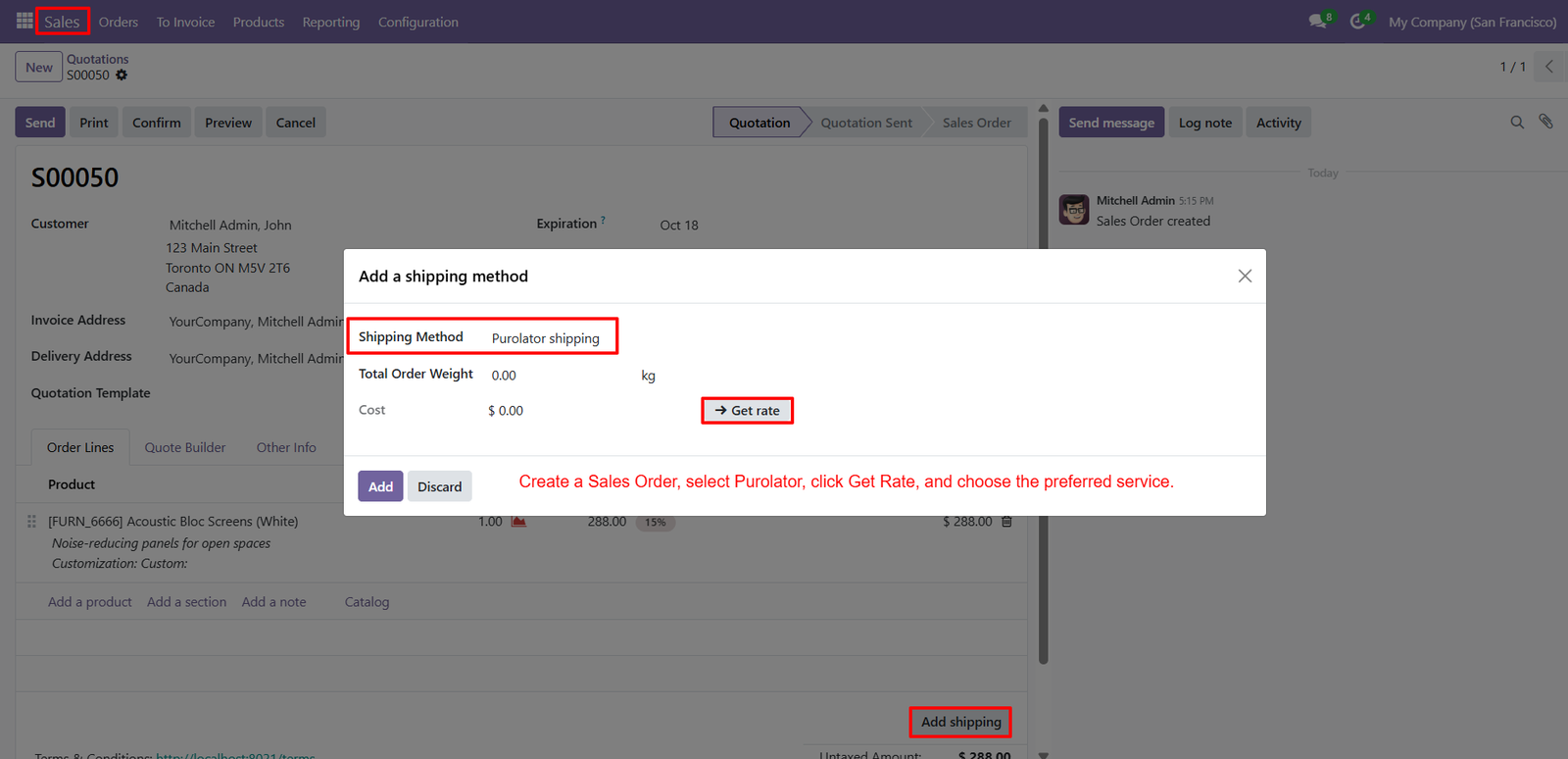
- Integrated Sales Order Workflow: Access the Add a Shipping Method window directly from the Sales Order to configure shipping without leaving the existing order management workflow.
- Purolator Shipping Provider: Choose the configured Purolator shipping method to connect the Sales Order with the available carrier rate retrieval functionality.
- Get Rate Functionality: Click the Get Rate button to retrieve available Purolator shipping rates according to the configured integration and shipment information.
- Shipping Cost Calculation: Review the shipping cost displayed in the shipping method window to understand the delivery charges associated with the selected Sales Order.
- Total Order Weight Display: View the Total Order Weight field to review the weight information available for the order before requesting shipping rates.
- Multiple Shipping Rate Options: Retrieve available Purolator service rates and review the returned options to identify a suitable delivery service for the customer order.
- Preferred Service Selection: Choose the preferred Purolator shipping service from the available rates to associate the selected delivery option with the Sales Order.
- Shipping Charge Management: Review the calculated shipping charge before adding the shipping method, helping users understand the delivery expense associated with the order.
- Add Shipping Method: Use the Add button to apply the selected shipping method and its associated shipping information to the Sales Order workflow.
- Discard Shipping Changes: Use the Discard option to close the shipping method window without applying the proposed shipping selection to the order.
- Customer Order Shipping: Configure Purolator shipping for customer orders in Odoo, supporting a centralized workflow for selecting delivery services and reviewing shipping charges.
- Quotation Shipping Configuration: Access shipping method selection from an Odoo quotation to review available Purolator delivery rates before finalizing the customer order.
- Shipping Provider Visibility: View Purolator shipping as the selected provider within the shipping method window to confirm which configured carrier is being used.
- Rate Retrieval Workflow: Follow the Get Rate process to retrieve available carrier options, review returned charges, and select a suitable service for shipment processing.
- Delivery Service Comparison: Compare available Purolator service rates and associated shipping details returned by the integration before choosing the preferred delivery option for the order.
Step 9: Available Shipping Services: Retrieve available Purolator shipping services in Odoo and review service identifiers, delivery dates, estimated transit times, and total charges before selecting preferred options.
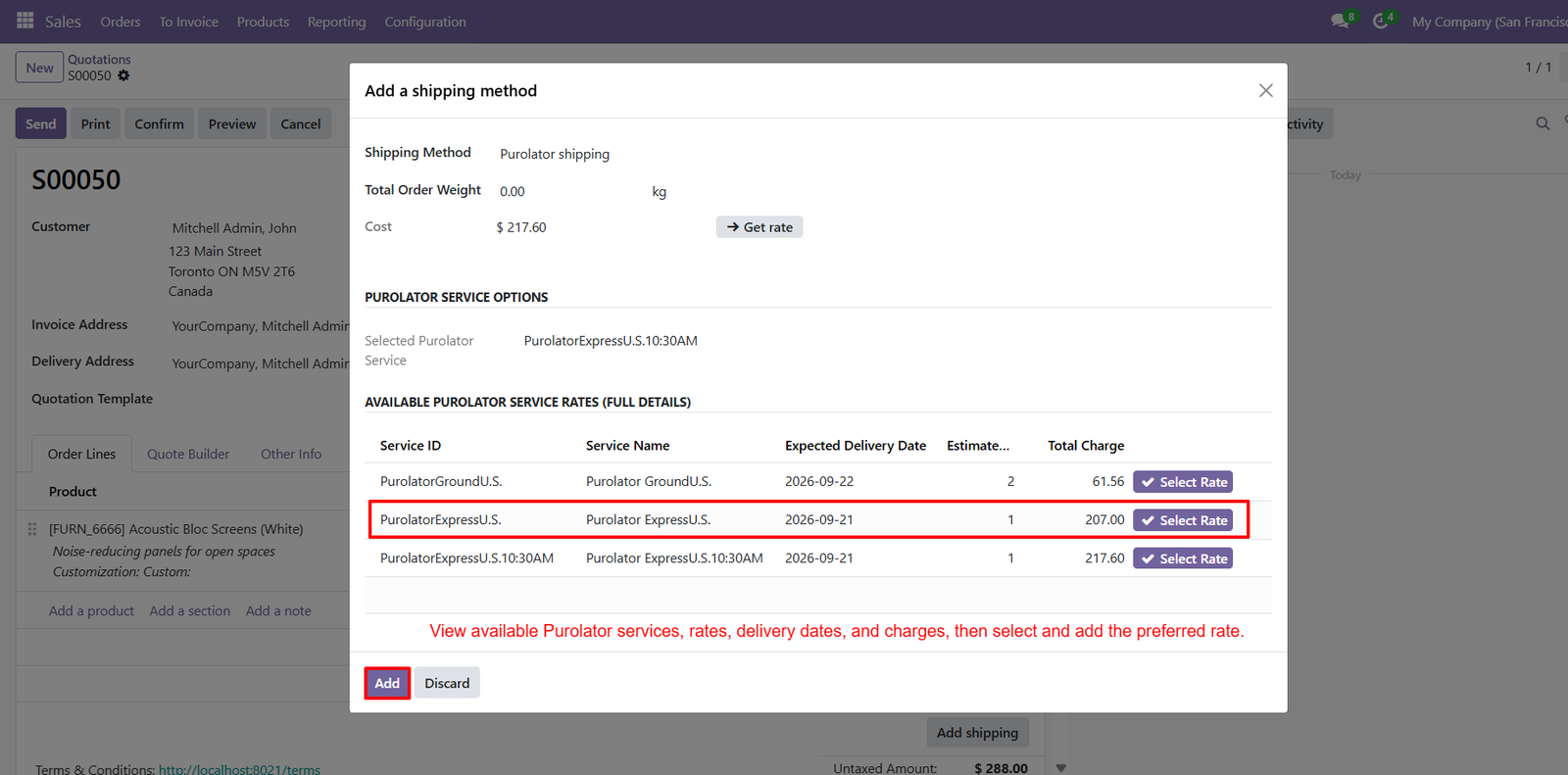
- Detailed Rate Comparison: Compare returned Purolator Ground and Express service rates in one table, helping users evaluate delivery costs and estimated arrival dates for orders.
- Purolator Ground Service: Review the available Purolator Ground service option, including its displayed delivery estimate and total charge, before selecting the appropriate shipping method for fulfillment.
- Purolator Express Service: Select the available Purolator Express service after reviewing its service identifier, expected delivery date, estimated transit time, and displayed shipping charge.
- Time-Specific Express Delivery: Review time-specific options such as Purolator Express U.S. 10:30 AM when returned, allowing users to compare available delivery commitments and charges.
- Expected Delivery Date: View the expected delivery date associated with each returned shipping rate to compare estimated arrival timelines before choosing a suitable carrier service.
- Estimated Transit Time: Compare the displayed estimates for available Purolator services to understand the expected delivery timeframe indicated by the shipping rate response.
- Total Shipping Charge: Review the Total Charge column for each available service to understand the quoted delivery expense before applying a shipping rate to the order.
- Individual Rate Selection: Use the Select Rate button beside a service to choose the corresponding Purolator shipping option for the current Odoo quotation or Sales Order.
- Selected Service Visibility: Review the Selected Purolator Service field to identify the service currently selected within the shipping method configuration window.
- Full Shipping Rate Details: Access the Available Purolator Service Rates section to review returned service identifiers, service names, delivery estimates, and charges together.
- Ground and Express Comparison: Compare available Ground and Express options side by side to evaluate the differences in quoted charges and estimated delivery timelines for shipments.
- U.S. Shipping Service Options: Review returned U.S. shipping services, including PurolatorExpressU.S. and PurolatorGroundU.S., when these options are available through the configured integration.
- Quotation Shipping Integration: Retrieve Purolator service rates directly from the Odoo quotation shipping window, keeping carrier selection connected with the existing sales workflow.
- Shipping Cost Review: Examine the displayed shipping cost before confirming the preferred rate, helping sales teams understand the delivery charge associated with the selected service.
- Get Rate Workflow: Click Get Rate to request available Purolator service options and populate the rate comparison section with the information returned by the integration.
Why Use the Purolator Shipping Integration for Odoo Module?
The Purolator Shipping Integration for Odoo helps businesses manage shipping activities directly within their Odoo ERP system. From retrieving shipping rates and comparing delivery services to generating PDF shipping labels and managing tracking references, this integration supports a more organized shipping workflow for sales, warehouse, and eCommerce operations.
Key Reasons to Choose This Module
- Seamless Odoo Integration: Connect Purolator shipping with Odoo Sales, Inventory, Delivery Orders, and website checkout to manage supported shipping activities within your existing business workflow.
- Real-Time Shipping Rates: Retrieve available Purolator shipping rates and review returned charges before selecting an appropriate delivery service for customer orders.
- Multiple Shipping Services: Compare available Purolator Ground, Express, Quickship, and other supported service options according to the rates returned by the carrier.
- Estimated Delivery Dates: Review estimated delivery dates and available transit estimates to make informed decisions when selecting shipping services for customer orders.
- Automated Shipment Creation: Create Purolator shipments through the configured delivery workflow, helping connect shipment processing with Odoo delivery records.
- PDF Shipping Label Generation: Access generated Purolator shipping labels in PDF format for convenient viewing, downloading, and printing during package preparation.
- Tracking PIN Management: View tracking PINs associated with shipments to identify delivery records and access relevant shipment references within Odoo.
- Website Checkout Convenience: Allow customers to select available Purolator delivery options during Odoo website checkout and review applicable shipping charges before confirming orders.
- Centralized Delivery Management: Manage delivery orders, recipients, carrier services, tracking references, scheduled dates, shipping costs, and available shipment statuses from a dedicated interface.
- Shipping Dashboard Insights: Monitor delivery statistics, shipment volumes, generated labels, shipping expenses, recent activities, and destination information through the integrated dashboard.
- Shipping Cost Visibility: Review quoted shipping rates and recorded delivery expenses to improve visibility into shipping costs associated with customer orders.
- Flexible Configuration: Configure Purolator credentials, shipping services, package types, label formats, integration levels, and supported connection environments according to business requirements.
- Sandbox Testing Support: Use the configured Sandbox environment to test the integration before switching to Production for live shipping operations, where supported by your account setup.
- Sales Order Compatibility: Retrieve shipping rates and select delivery services directly from the Odoo quotation or Sales Order shipping workflow.
- Improved Operational Efficiency: Keep shipping rate selection, shipment information, label access, and delivery records connected within Odoo to reduce repetitive manual coordination.