

Running an eCommerce business often means managing data across multiple platforms. Updating products, processing orders, maintaining inventory, and synchronizing customers manually can quickly become time-consuming and error-prone.
The Shopware Connector for Odoo eliminates these challenges by creating a secure bridge between your Shopware store and Odoo ERP. It automatically synchronizes products, customers, orders, categories, attributes, and inventory, allowing your business to operate from a single centralized system.
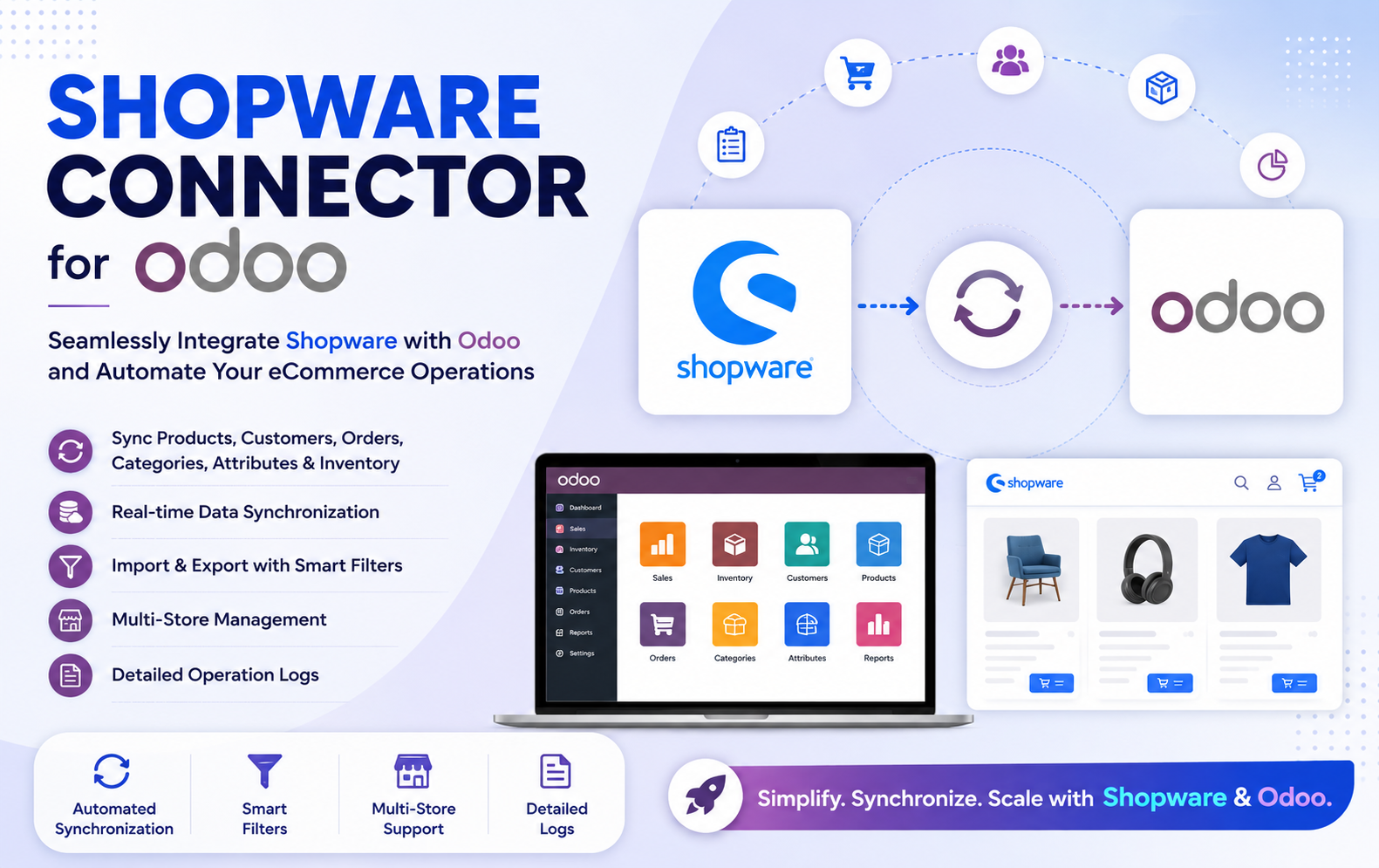
Key Features at a Glance
- Connect Shopware with Odoo effortlessly to automate business operations and maintain synchronized data across both platforms without manual intervention.
- Manage multiple Shopware stores from a single Odoo database while maintaining independent configurations, synchronization settings, and operation histories.
- Automatically import and export products between Shopware and Odoo while preserving accurate product mapping, pricing, and inventory information.
- Synchronize customer accounts, billing details, shipping addresses, and contact information to ensure consistent customer records across both platforms.
- Import Shopware orders into Odoo and export Odoo orders back to Shopware with complete order mapping and synchronization tracking.
- Keep inventory levels updated automatically between Shopware and Odoo to prevent overselling and maintain accurate stock availability.
- Import and export product categories while preserving the category hierarchy, ensuring consistent product organization across both systems.
- Synchronize product attributes and attribute values to maintain accurate product variations and specifications between Shopware and Odoo.
- Establish a secure connection using the Shopware Store URL, Access Key, and Secret Access Key for reliable communication.
- Import only the required records using configurable filters such as price range, stock availability, and date range to save time.
- Export selected orders and other records using configurable filters, allowing businesses to synchronize only relevant data efficiently.
- Monitor synchronization progress through a live dashboard displaying processing percentage, imported records, updated records, and current status.
- Pause ongoing synchronization tasks whenever needed and resume operations later without losing synchronization progress or processed records.
- View detailed logs containing synchronization status, processed records, timestamps, execution results, and error information for every operation.
- Maintain complete mapping between Shopware products
Use Cases: Who Needs This Module?
- Perfect for online retailers using Shopware who want to manage products, inventory, customers, and orders directly from Odoo while keeping both platforms synchronized.
- Ideal for companies operating multiple Shopware stores that need centralized management, independent store configurations, and seamless synchronization from a single Odoo database.
- Businesses handling large product catalogs and bulk orders can automate order processing, customer management, and inventory updates to improve operational efficiency.
- Retailers selling through both physical stores and Shopware can maintain real-time inventory synchronization, preventing stock discrepancies and overselling.
- Companies experiencing rapid growth can eliminate repetitive manual tasks by automating product imports, customer synchronization, and order management.
- Organizations that require accurate stock management can automatically synchronize inventory between Shopware and Odoo to ensure real-time stock visibility.
- Odoo administrators can monitor synchronization activities, review operation logs, troubleshoot issues, and manage multiple Shopware integrations from one centralized dashboard.
- Companies managing thousands of products can use advanced filters to import or export only the required records, significantly reducing synchronization time.
- Organizations processing high volumes of daily orders can automate order synchronization between Shopware and Odoo, improving fulfillment speed and reducing manual errors.
- Large organizations looking for a scalable integration solution can manage products, customers, orders, categories, attributes, and inventory from one unified Odoo environment while maintaining complete synchronization visibility.
Quick User Guide (Visual Walkthrough)
Scroll up to revisit the detailed image-wise walkthrough.
Configure one or multiple Shopware stores from a centralized Odoo interface.
Step 1: Click Upload the Module in the Apps section.
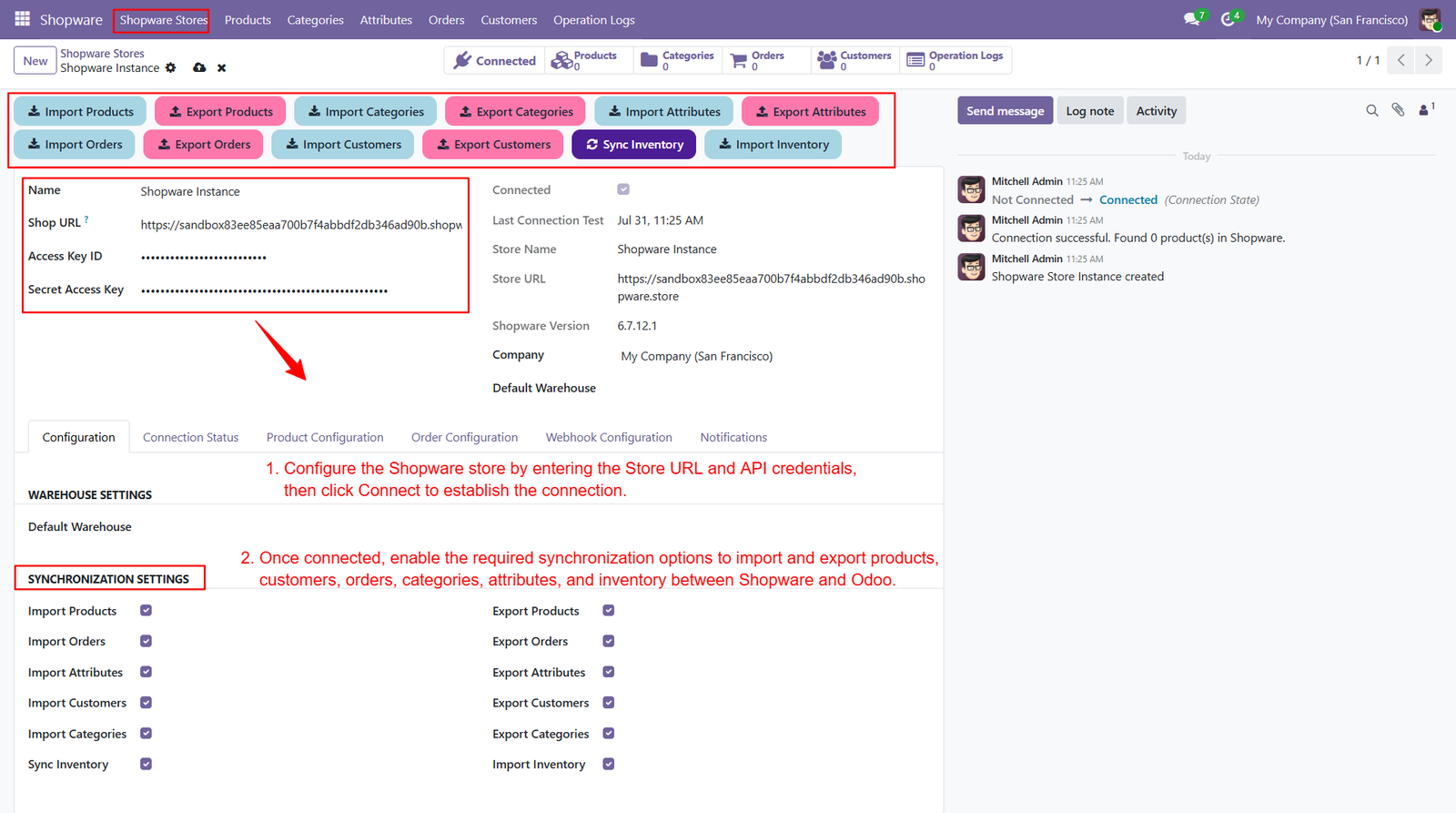
Step 2: Drag & drop the ZIP file or select from your system.
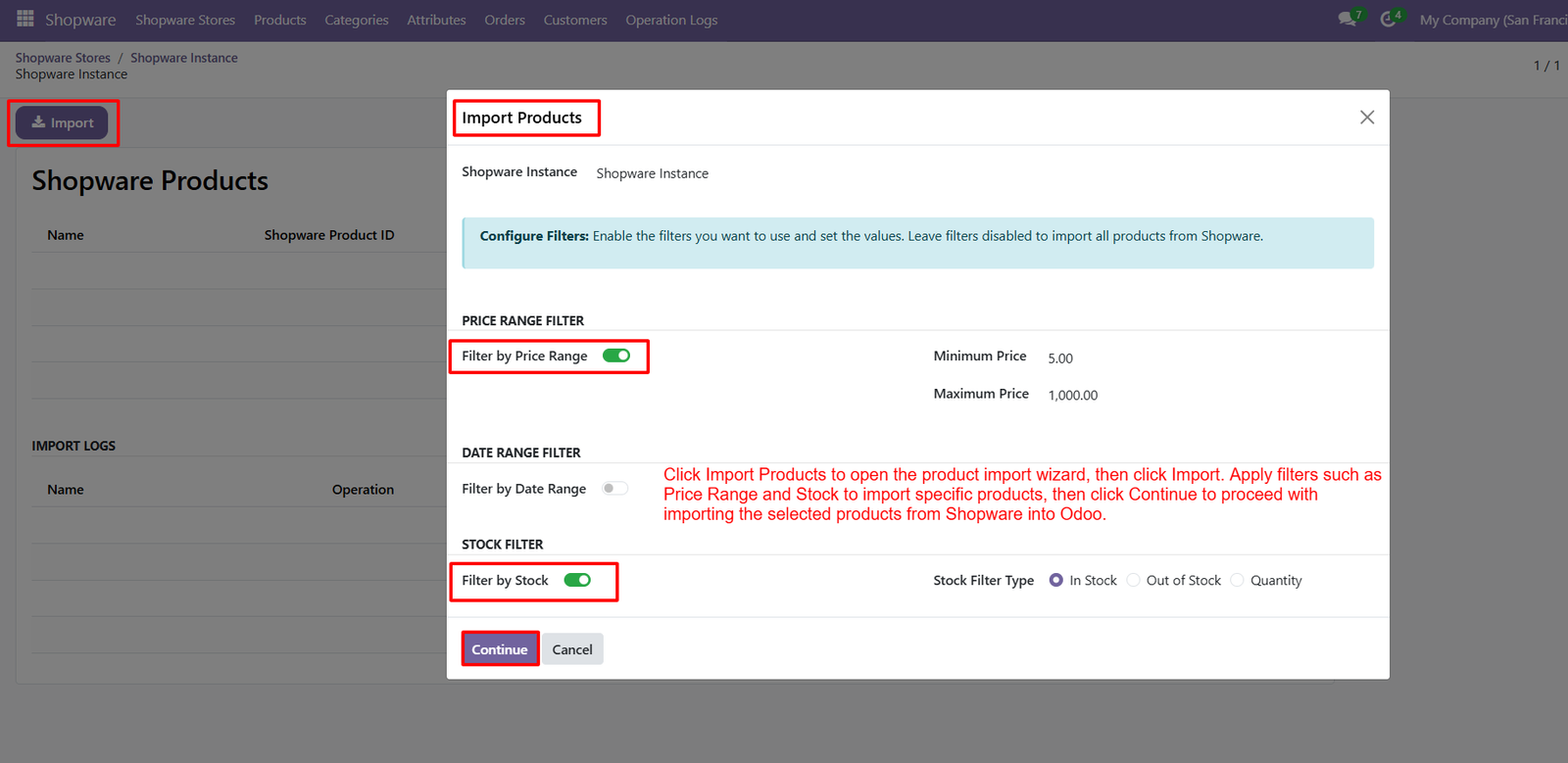
Step 3: Monitor the live product import progress between Shopware and Odoo with real-time synchronization status, completion percentage, and processing statistics.
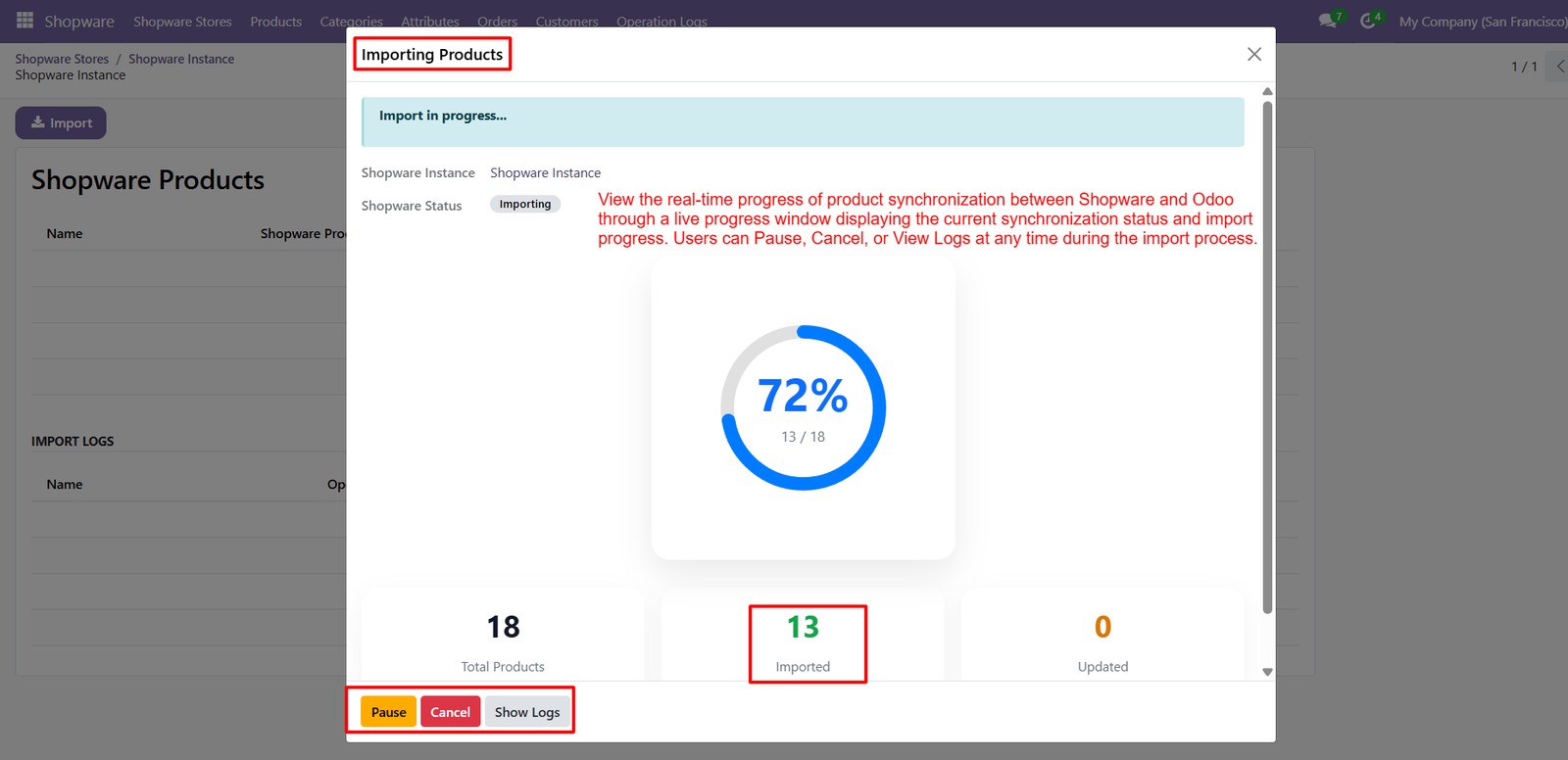
- View the total number of products being synchronized, including imported, updated, and remaining records during the ongoing import process.
- Track synchronization progress using an interactive progress indicator that displays completed records and overall import percentage in real time.
- Pause the import process whenever required to temporarily stop synchronization without losing already processed product records and progress.
- Cancel the ongoing import operation instantly if changes are needed before completing the synchronization between Shopware and Odoo.
- Access detailed synchronization logs directly from the progress window to monitor execution details, processed records, and system responses.
- Monitor import status continuously to identify synchronization performance and ensure products are transferred successfully without unnecessary delays or interruptions.
- Review imported product counts instantly during execution, allowing administrators to verify synchronization progress without waiting for completion.
- Receive complete visibility into product synchronization activities through a centralized progress dashboard designed for efficient monitoring and management.
- Improve operational efficiency by monitoring product synchronization in real time while maintaining full control over every import operation from Odoo.
Step 4: Review the complete product import summary showing total products, imported records, updated items, failed entries, and synchronization results after completion.
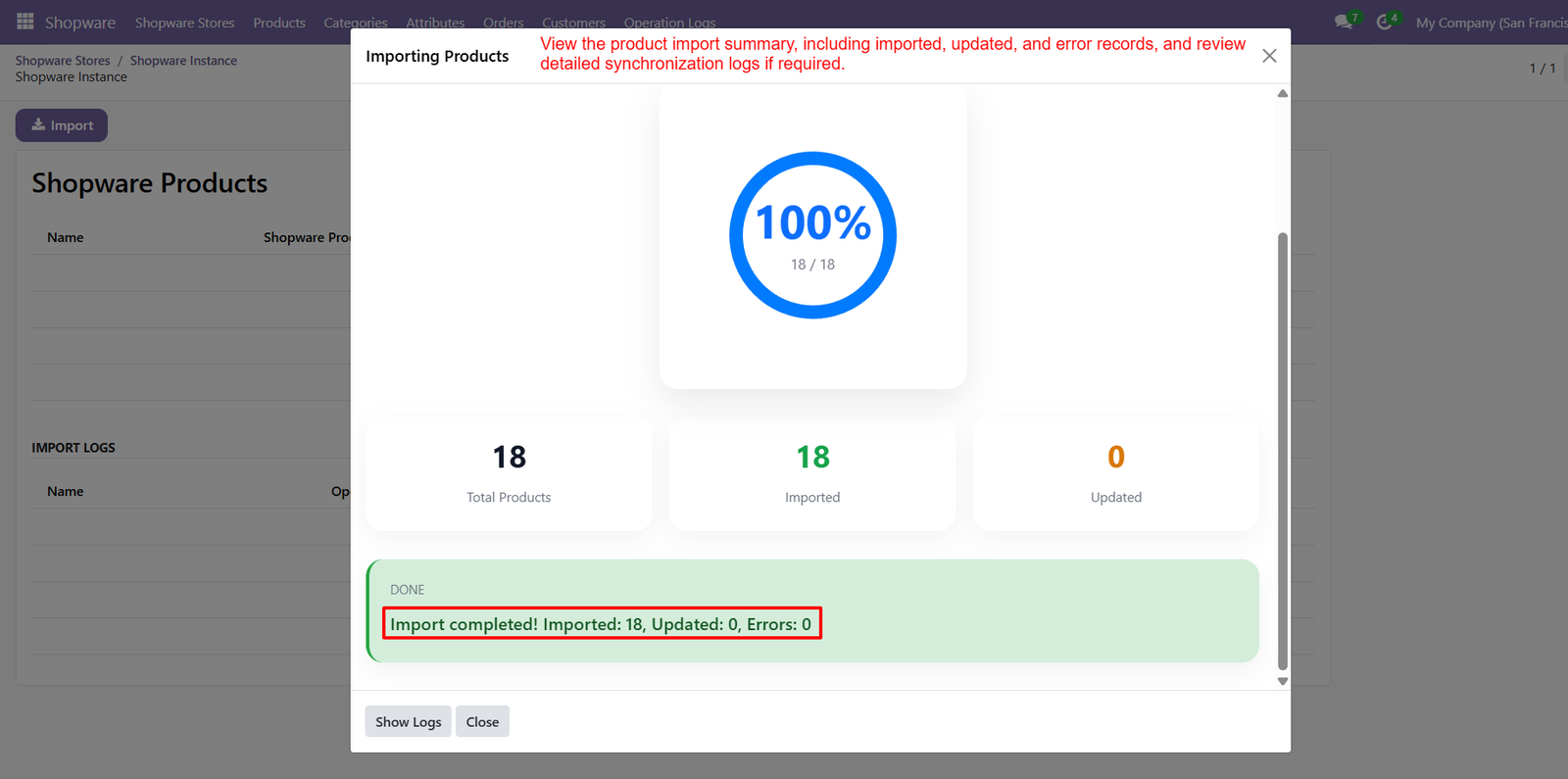
- Instantly verify whether all selected Shopware products have been successfully imported into Odoo through a clear synchronization completion dashboard.
- View the total number of processed products along with imported, updated, and error records for accurate synchronization verification and reporting.
- Confirm successful product synchronization using the completion status, ensuring every imported record is accurately transferred from Shopware to Odoo.
- Access detailed synchronization logs directly from the summary window to review execution details, processed records, and any system-generated messages.
- Identify synchronization errors quickly through the import summary, enabling administrators to troubleshoot failed records and maintain consistent business data.
- Monitor import accuracy by comparing total products against successfully imported and updated records displayed within the synchronization summary dashboard.
- Close the import process confidently after reviewing synchronization statistics, completion status, and detailed operation logs for complete transparency.
- Improve data reliability by validating successful product imports before continuing additional synchronization activities between Shopware and the Odoo ERP system.
- Maintain complete visibility of every product import operation through comprehensive summaries, detailed logs, synchronization statistics, and accurate processing results for administrators.
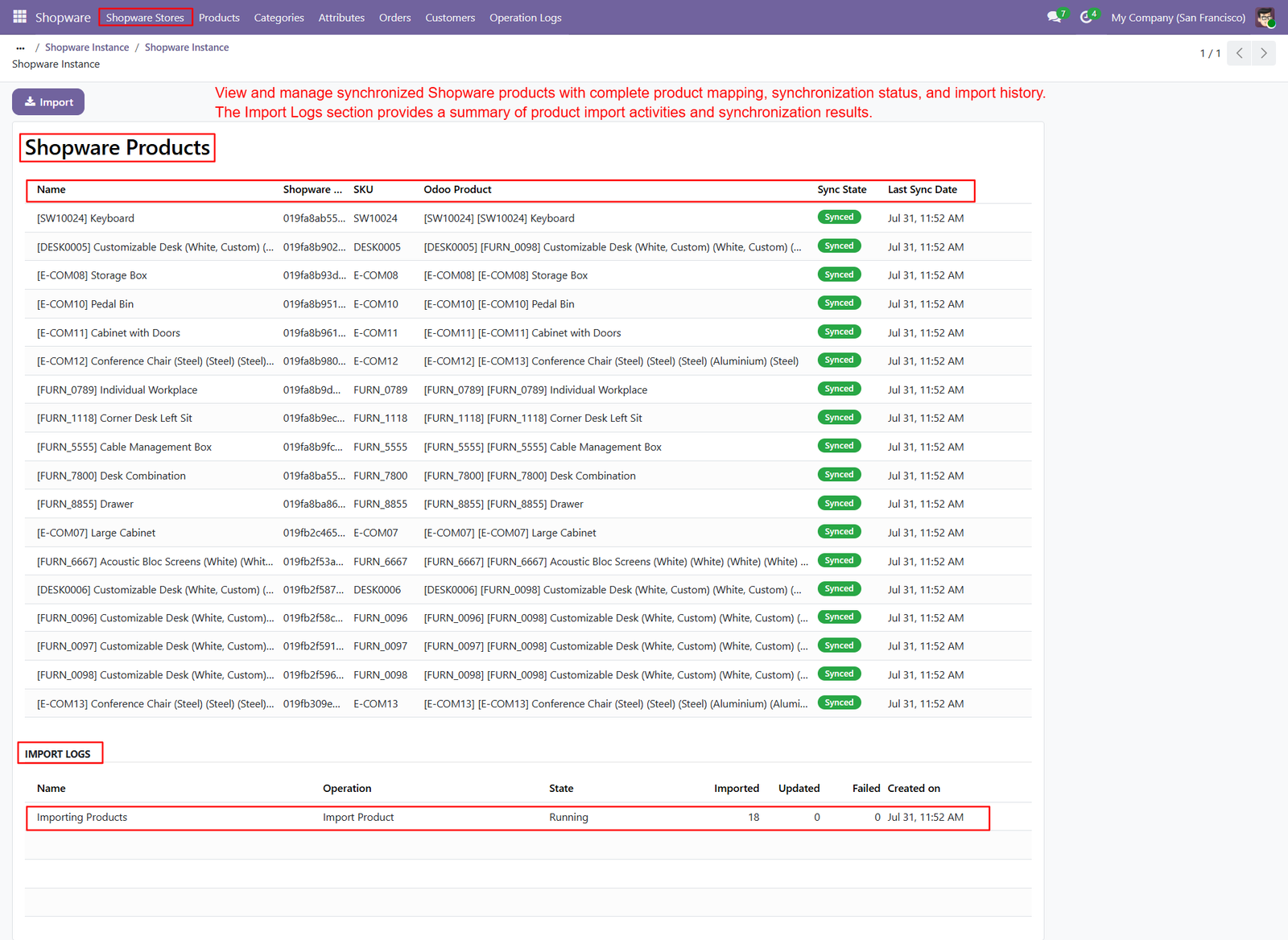
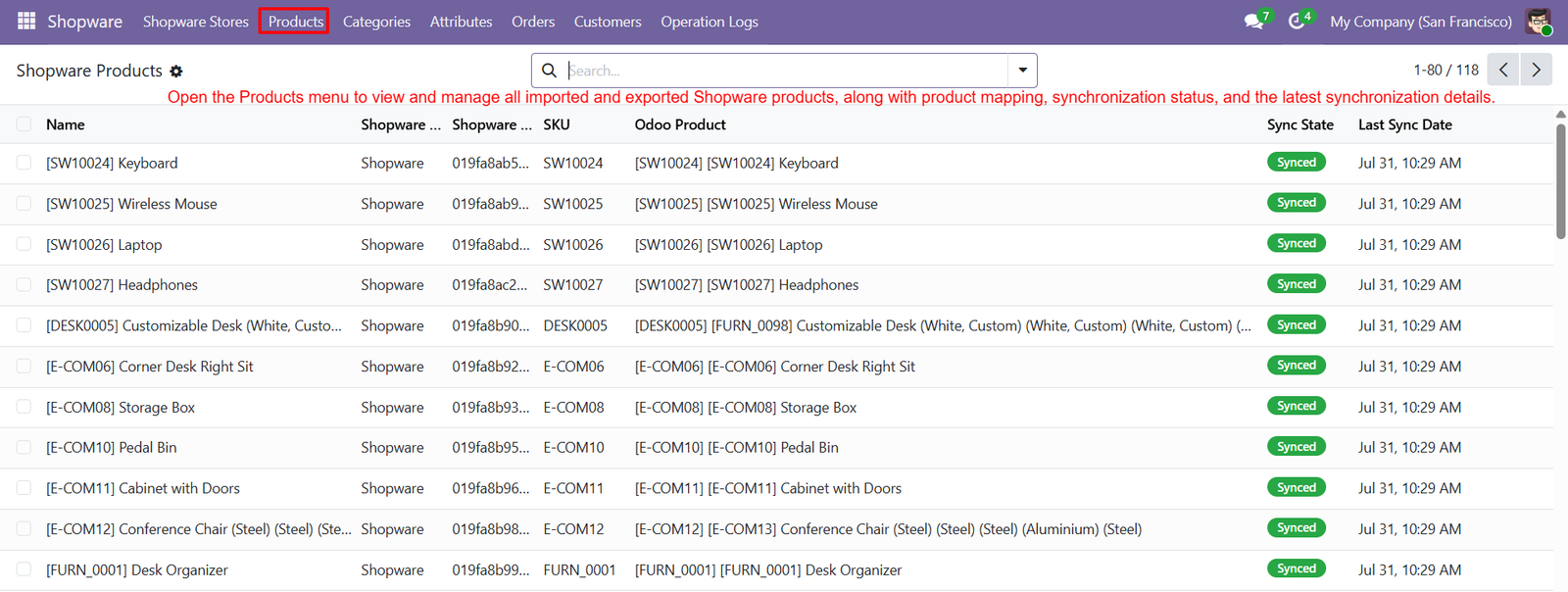
Step 5: View all synchronized Shopware products in one centralized interface with complete product mapping, synchronization status, and latest synchronization history.
Step 6: Export Odoo orders to Shopware using configurable filters, ensuring only selected records are synchronized accurately between both integrated business platforms.
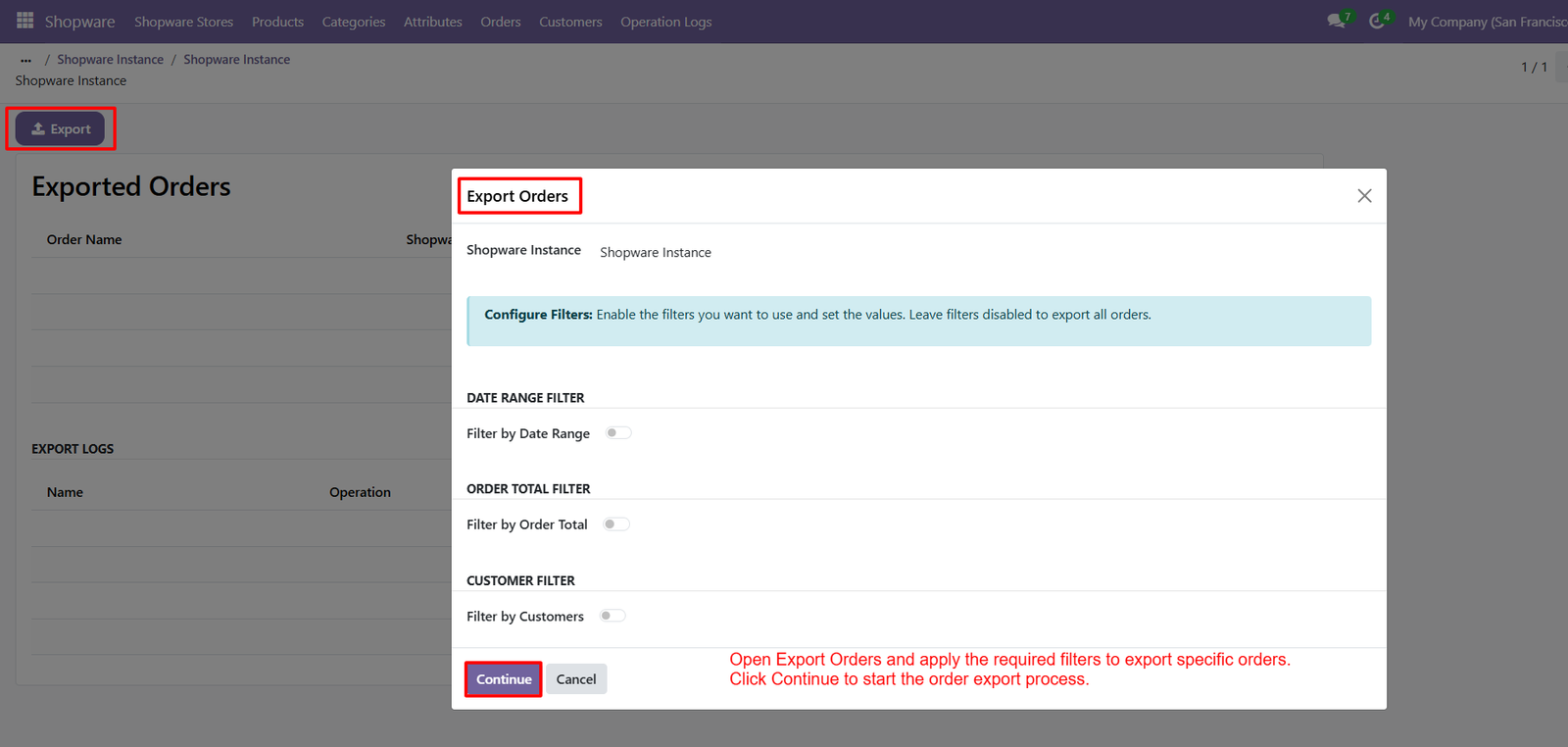
- Apply date range filters to export orders created within a specific period, simplifying order synchronization and reducing unnecessary data transfers.
- Filter orders based on order total values, allowing businesses to synchronize only relevant transactions according to operational requirements and policies.
- Export customer-specific orders by enabling customer filters, ensuring accurate synchronization for selected customers without affecting other existing order records.
- Configure multiple export filters simultaneously to improve synchronization efficiency and export only the required Shopware order data from Odoo.
- Start the order export process with a single click after configuring filters, providing a fast and streamlined synchronization workflow experience.
- Export orders securely from Odoo to Shopware while preserving complete customer information, products, totals, and order mapping details accurately.
- Reduce synchronization time by exporting filtered orders instead of the complete database, improving overall performance and operational productivity significantly.
- Maintain accurate order synchronization by exporting only validated business transactions, ensuring consistent order records across both Shopware and Odoo platforms.
- Simplify order management through flexible export options, intelligent filters, and seamless synchronization between Odoo ERP and the Shopware eCommerce platform.
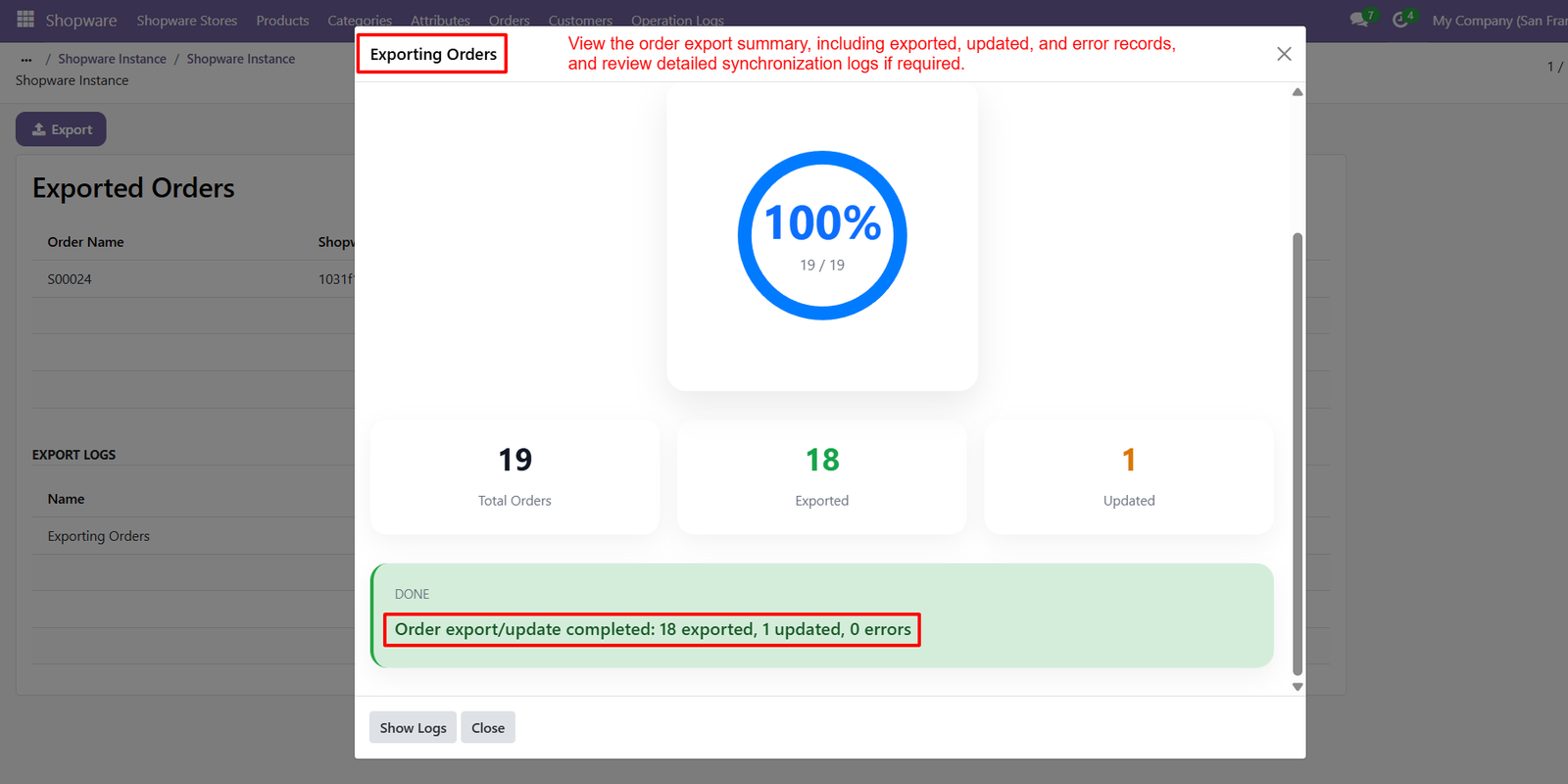
Step 7: Review the complete order export summary displaying total orders, exported records, updated orders, failed entries, and overall synchronization completion status clearly.
Step 8: View all exported Shopware orders from Odoo with complete order mapping, synchronization status, and latest synchronization history in one centralized interface.
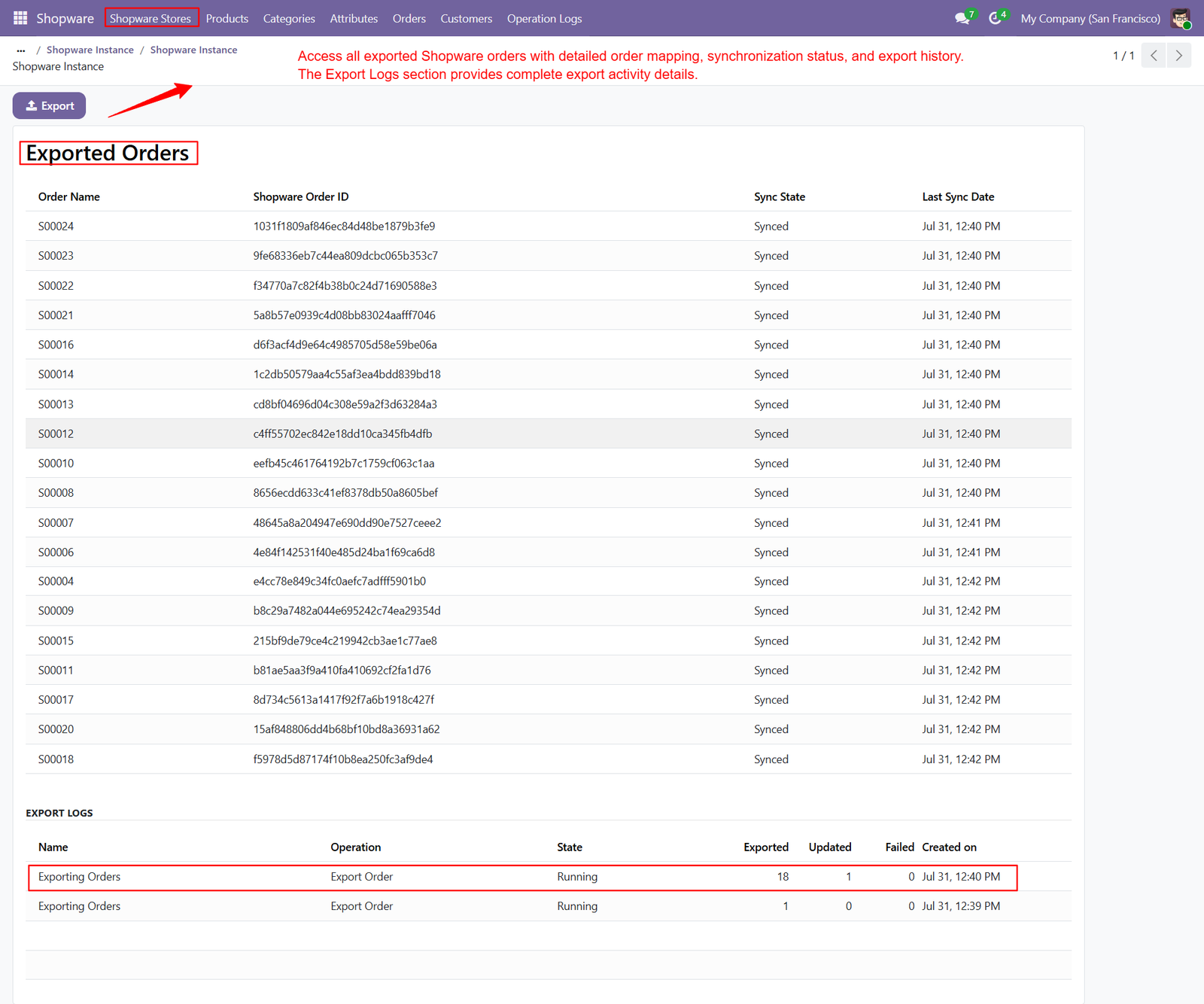
- Access Shopware Order IDs alongside corresponding Odoo order records, ensuring accurate order mapping and seamless synchronization between both integrated platforms.
- Monitor the synchronization status of every exported order to verify successful transfers and maintain consistent business data across Shopware and Odoo.
- Review the last synchronization date for each order, allowing administrators to track recent updates and verify completed export activities accurately.
- Manage exported Shopware orders directly from Odoo without accessing the Shopware administration panel for routine order synchronization and monitoring tasks.
- Maintain complete order mapping between Odoo and Shopware, ensuring every exported transaction remains accurately linked for future synchronization operations.
- Track synchronization history for exported orders to simplify auditing, reporting, troubleshooting, and verification of previous synchronization activities whenever required.
- Access the Export Logs section to review order export operations, processed records, execution status, timestamps, and synchronization performance summaries efficiently.
- Verify exported, updated, and failed order records through detailed export logs, ensuring complete transparency and reliable synchronization across integrated business systems.
- Centralize Shopware order management within Odoo by combining order mapping, synchronization history, export logs, and operational tracking into one unified interface.
Step 9: Monitor all import, export, and synchronization activities from a centralized Operation Logs dashboard with complete execution details and processing history.
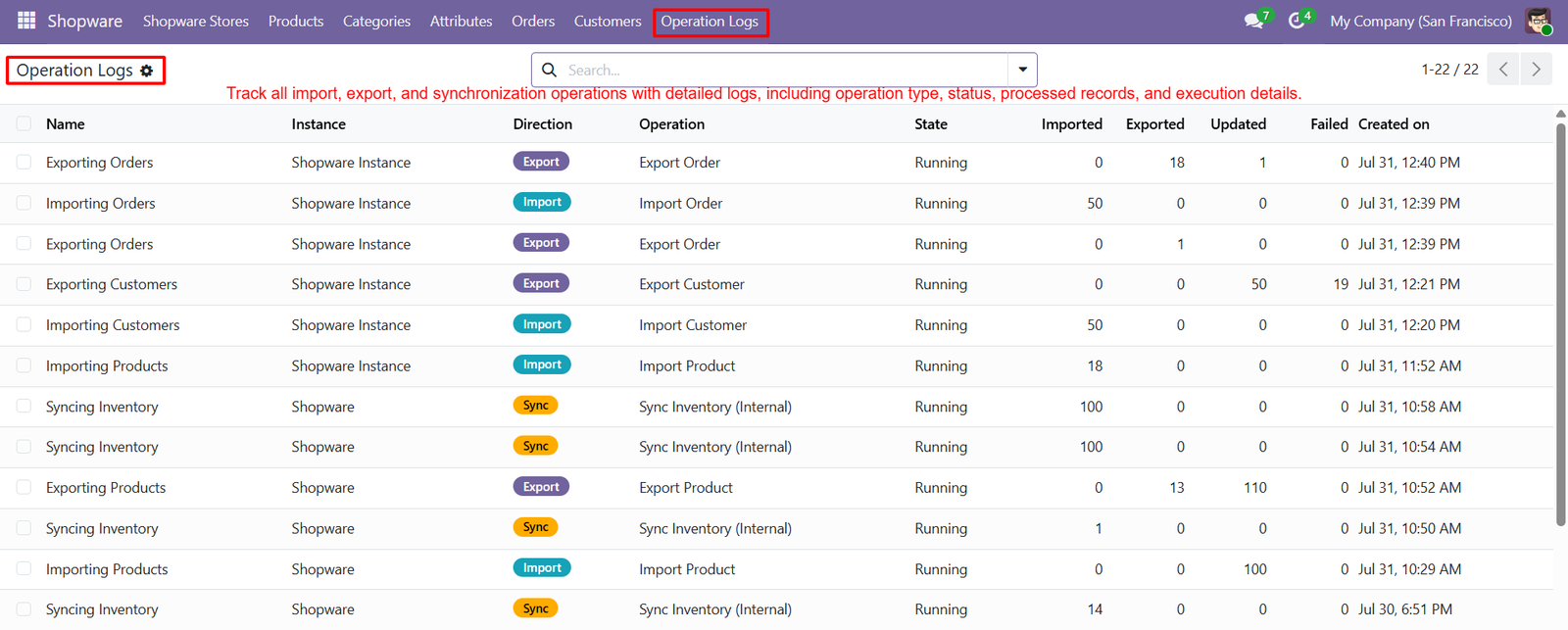
- View operation type, synchronization direction, execution status, and processed records to monitor every synchronization task between Shopware and Odoo accurately.
- Track imported, exported, updated, and failed records for each synchronization operation, ensuring complete visibility into every executed process consistently.
- Review execution timestamps for every synchronization activity, helping administrators identify completed operations and monitor historical synchronization performance effectively.
- Access detailed synchronization logs to troubleshoot failed operations quickly and maintain accurate product, customer, inventory, and order synchronization across platforms.
- Monitor real-time operation status, including running, completed, or failed processes, enabling better control over ongoing synchronization activities and system performance.
- Analyze synchronization history using comprehensive operation records that simplify auditing, reporting, troubleshooting, and verification of previous import and export activities.
- Improve operational transparency by maintaining complete synchronization logs containing execution details, processed records, timestamps, and operation results within Odoo.
- Quickly identify synchronization failures through detailed operation logs, allowing administrators to resolve issues and ensure consistent business data synchronization efficiently.
- Centralize synchronization monitoring with comprehensive operation logs, providing complete visibility into Shopware integration activities, execution progress, and historical synchronization records.
Step 10: Verify successfully exported Odoo orders directly within Shopware, ensuring complete synchronization of order details, customer information, and purchased products accurately.
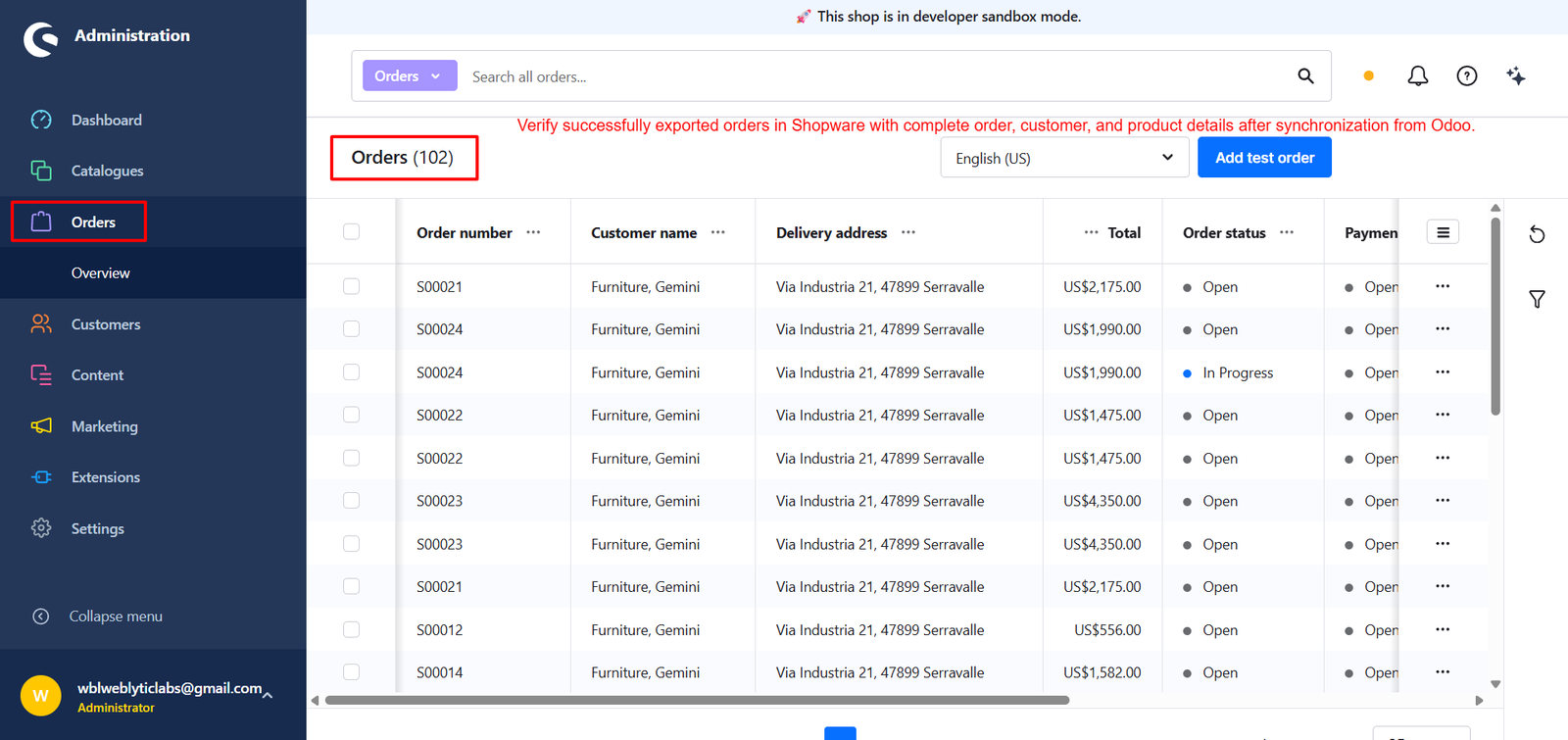
- Review exported order records in the Shopware administration panel to confirm successful synchronization between Odoo ERP and the Shopware platform.
- Validate customer details, billing information, shipping addresses, and ordered products after synchronization to ensure accurate order data consistency across systems.
- Confirm exported order totals, payment information, and order statuses to verify successful synchronization without missing or duplicate business transactions.
- Access synchronized Shopware orders instantly after export, allowing administrators to monitor completed transactions directly from the Shopware backend interface.
- Verify that every exported order retains complete product information, quantities, pricing, and customer details after synchronization from the Odoo system.
- Monitor synchronized orders inside Shopware to ensure exported transactions appear correctly with accurate order numbers and complete business information consistently.
- Improve synchronization reliability by validating exported Shopware orders before processing fulfillment, shipping, invoicing, and additional business operations within the platform.
- Ensure seamless business operations by comparing exported Shopware orders with corresponding Odoo records to maintain complete order synchronization accuracy consistently.
- Simplify export verification through the Shopware Orders interface, confirming successful synchronization of customers, products, payments, and order details from Odoo.
Step 11: View all imported and exported Shopware products from a centralized Odoo interface with complete product mapping and synchronization information available instantly.
Step 12: Manage multiple Shopware stores from a centralized Odoo interface, simplifying store administration, synchronization, and overall eCommerce business operations efficiently.
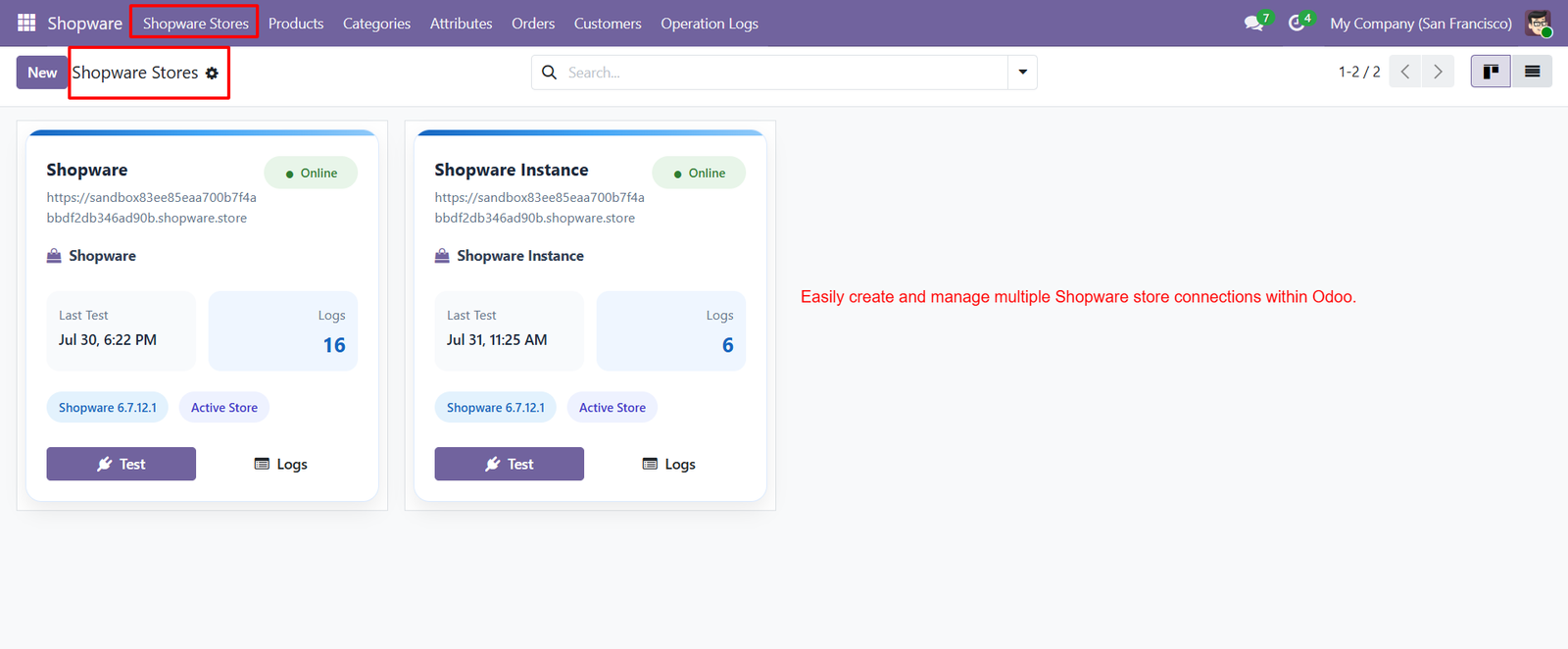
- Create and configure multiple Shopware store connections using separate API credentials while maintaining independent synchronization settings for each connected store.
- Monitor the connection status of every Shopware store through an intuitive dashboard displaying active stores, online status, and synchronization information.
- Perform connection tests for individual Shopware stores to verify secure API communication before starting synchronization between Shopware and Odoo platforms.
- Access dedicated synchronization logs for each connected Shopware store, helping administrators monitor activities and troubleshoot synchronization issues efficiently.
- Manage multiple Shopware instances without switching between different systems, providing centralized control over all connected eCommerce stores from Odoo.
- View the latest connection test date and synchronization status for every Shopware store to ensure reliable and uninterrupted business operations consistently.
- Configure independent synchronization settings for each Shopware store, allowing customized product, customer, inventory, and order synchronization requirements easily.
- Scale your business by connecting multiple Shopware stores to a single Odoo database while maintaining accurate synchronization and centralized management.
- Improve operational efficiency through centralized multi-store management, enabling seamless synchronization, monitoring, and administration of all Shopware stores from Odoo.
Why Use the Shopware Connector Module?
Managing an online business across multiple platforms can be challenging when products, customers, orders, inventory, and categories need to be updated manually. The Shopware Connector for Odoo eliminates these repetitive tasks by providing seamless integration between Shopware and Odoo. It automatically synchronizes critical business data, helping organizations improve efficiency, reduce manual effort, and maintain accurate information across both platforms.
Key Reasons to Use the Shopware Connector
- Automate Data Synchronization – Synchronize products, customers, orders, categories, attributes, and inventory automatically between Shopware and Odoo.
- Eliminate Manual Data Entry – Reduce repetitive work and minimize human errors by automating import and export operations.
- Centralized Business Management – Manage your entire Shopware store directly from Odoo without switching between multiple systems.
- Real-Time Inventory Updates – Keep stock quantities synchronized across both platforms to prevent overselling and inventory mismatches.
- Flexible Import & Export Filters – Import or export only the required products, customers, and orders using configurable filters.
- Support Multiple Shopware Stores – Connect and manage multiple Shopware stores from a single Odoo database with independent configurations.
- Live Synchronization Monitoring – Track synchronization progress in real time with detailed status indicators, progress bars, and operation summaries.
- Comprehensive Operation Logs – Monitor every import, export, and synchronization activity with detailed logs for auditing and troubleshooting.
- Accurate Product & Order Mapping – Maintain reliable mapping between Shopware and Odoo records to ensure consistent synchronization.
- Boost Productivity & Operational Efficiency – Automate daily eCommerce workflows, save valuable time, and improve overall business performance through centralized management.