

Manufacturing businesses often struggle with managing production workflows, raw materials, stock updates, and customer orders efficiently. Handling all these processes manually can lead to delays, stock shortages, and operational mistakes.
The Product Manufacturing, BOM & Production Orders module for PrestaShop helps businesses simplify and automate their manufacturing operations directly inside their store without requiring any external ERP system.
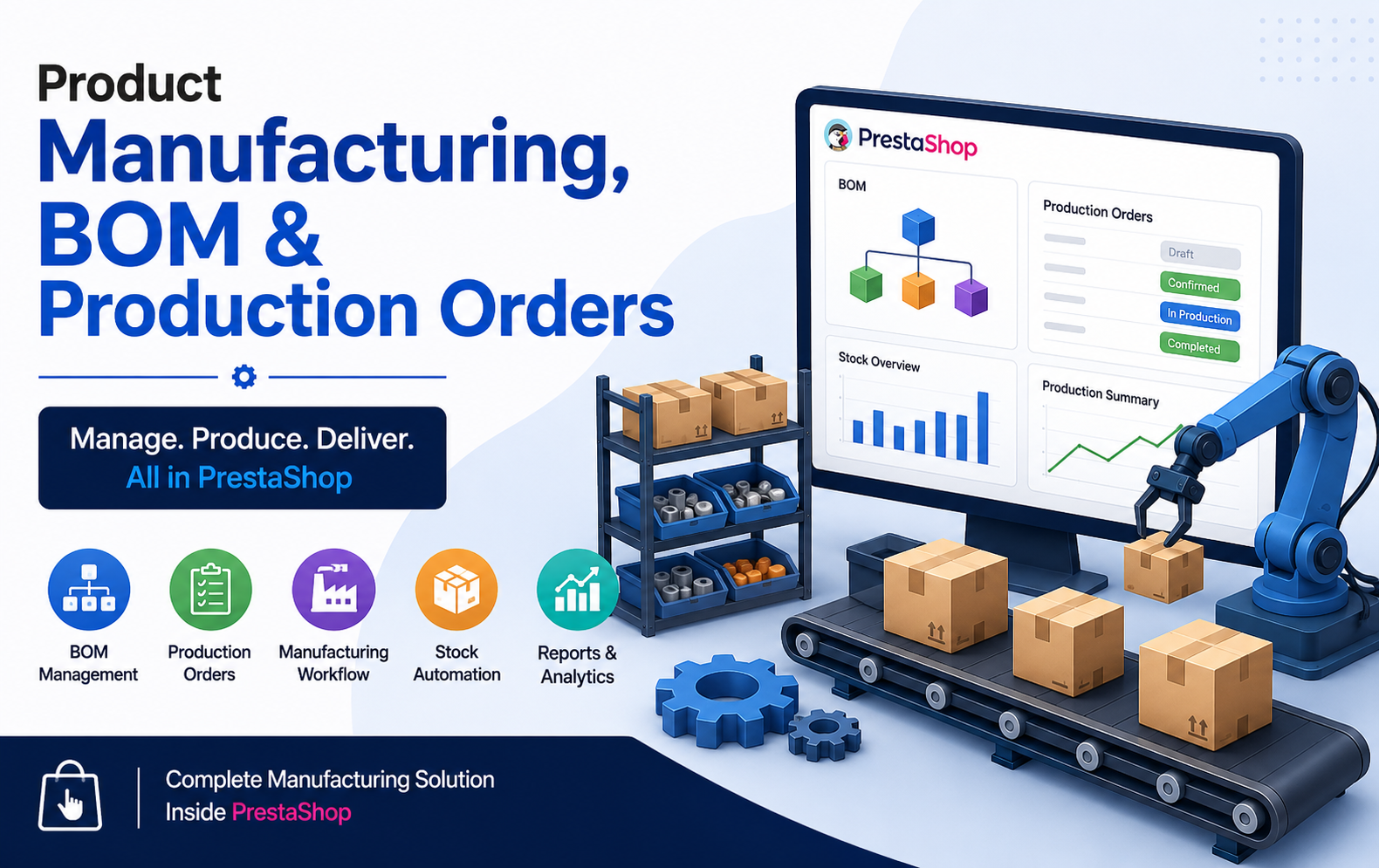
Key Features at a Glance
- Complete manufacturing management directly inside PrestaShop without requiring any external ERP or third-party software integration system.
- Create and manage Bill of Materials (BOM) easily for products with accurate component quantity configuration support.
- Automatically generate production orders whenever product stock becomes insufficient to fulfill customer purchase demand instantly.
- Support both Make-To-Order and stock-based manufacturing workflows for flexible business production management operations seamlessly.
- Track production orders using multiple statuses including draft, confirmed, production, completed, and cancelled workflow stages efficiently.
- Automatically update finished product inventory and component stock levels after production completion without manual stock adjustments.
- Validate raw material and component availability before production starts to prevent delays and manufacturing workflow interruptions effectively.
- Detect material shortages instantly with smart alerts and notifications for better manufacturing planning and inventory control management.
- Schedule production orders with planned manufacturing dates for improved workflow organization and operational efficiency management system.
- Configure production time and minimum production quantity for accurate planning and optimized manufacturing resource allocation processes.
Use Cases: Who Needs This Module?
- Furniture manufacturers needing structured BOM management and production workflow tracking for custom products, materials, and assembly operations efficiently.
- Electronics businesses managing multiple components, raw materials, and automated production orders for complex device manufacturing processes daily.
- Fashion and apparel companies producing made-to-order clothing while tracking fabrics, accessories, inventory, and manufacturing schedules accurately every season.
- Food production businesses requiring ingredient management, batch manufacturing, stock monitoring, and production planning for efficient operational workflow control.
- Automotive parts manufacturers handling component-based production processes, inventory synchronization, and production order automation within PrestaShop environment seamlessly.
- Handmade product sellers creating customized products using make-to-order workflows, material tracking, and production scheduling for customer orders efficiently.
- Printing businesses managing production jobs, raw materials, delivery timelines, and manufacturing workflow automation for customer-specific printing requirements successfully.
- Packaging industries controlling component stock, manufacturing operations, production timelines, and finished goods inventory management efficiently within PrestaShop platform.
- Cosmetic manufacturers tracking ingredients, packaging materials, production batches, and automated stock updates for smooth manufacturing workflow management processes.
- Industrial equipment manufacturers requiring production planning, BOM structures, inventory control, and order-linked manufacturing operations inside PrestaShop system.
Quick User Guide (Visual Walkthrough)
Scroll up to revisit the detailed image-wise walkthrough.
Import and export BOM and manufacturing data easily using CSV and Excel files for bulk management operations.
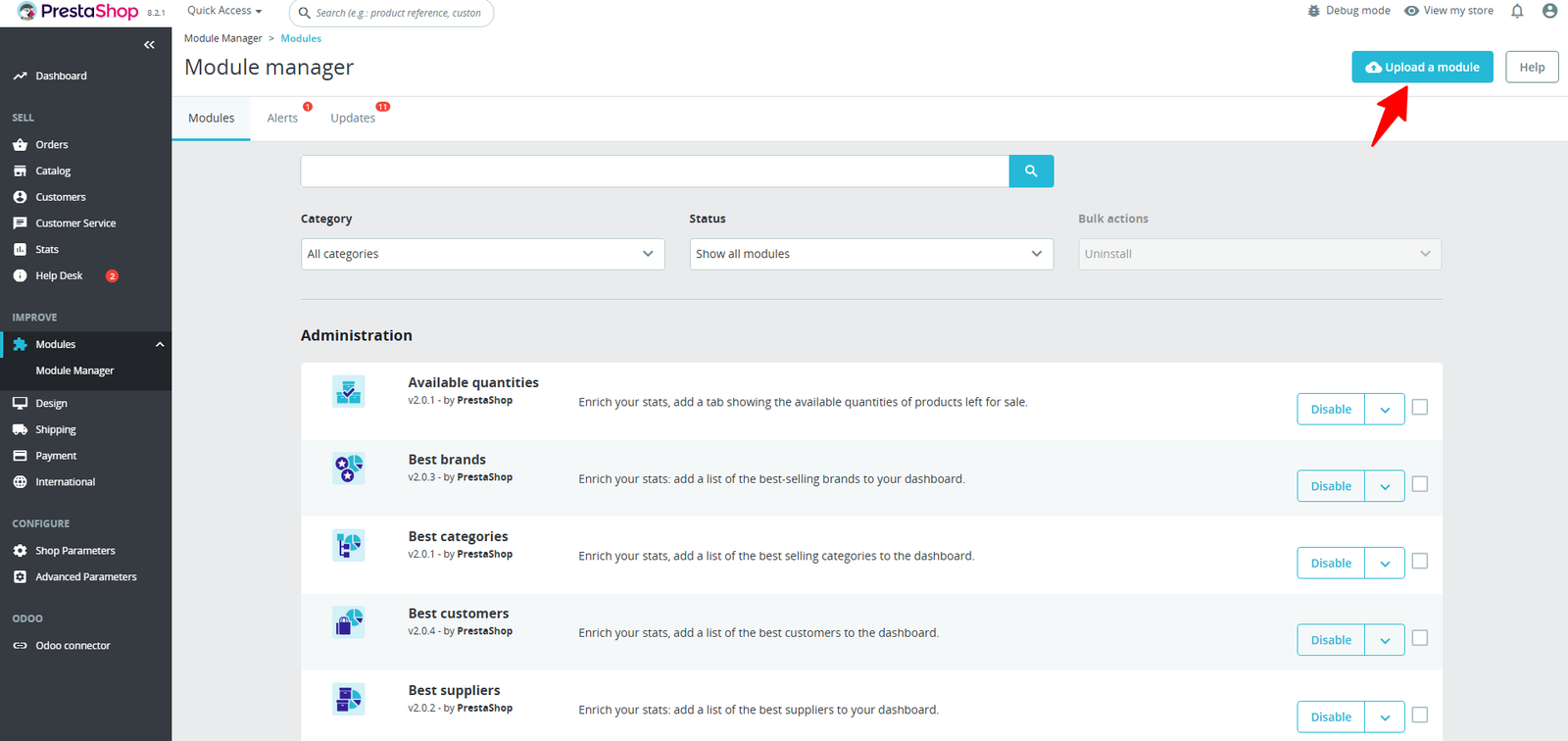
Step 1: Click Upload the Module in the Apps section.
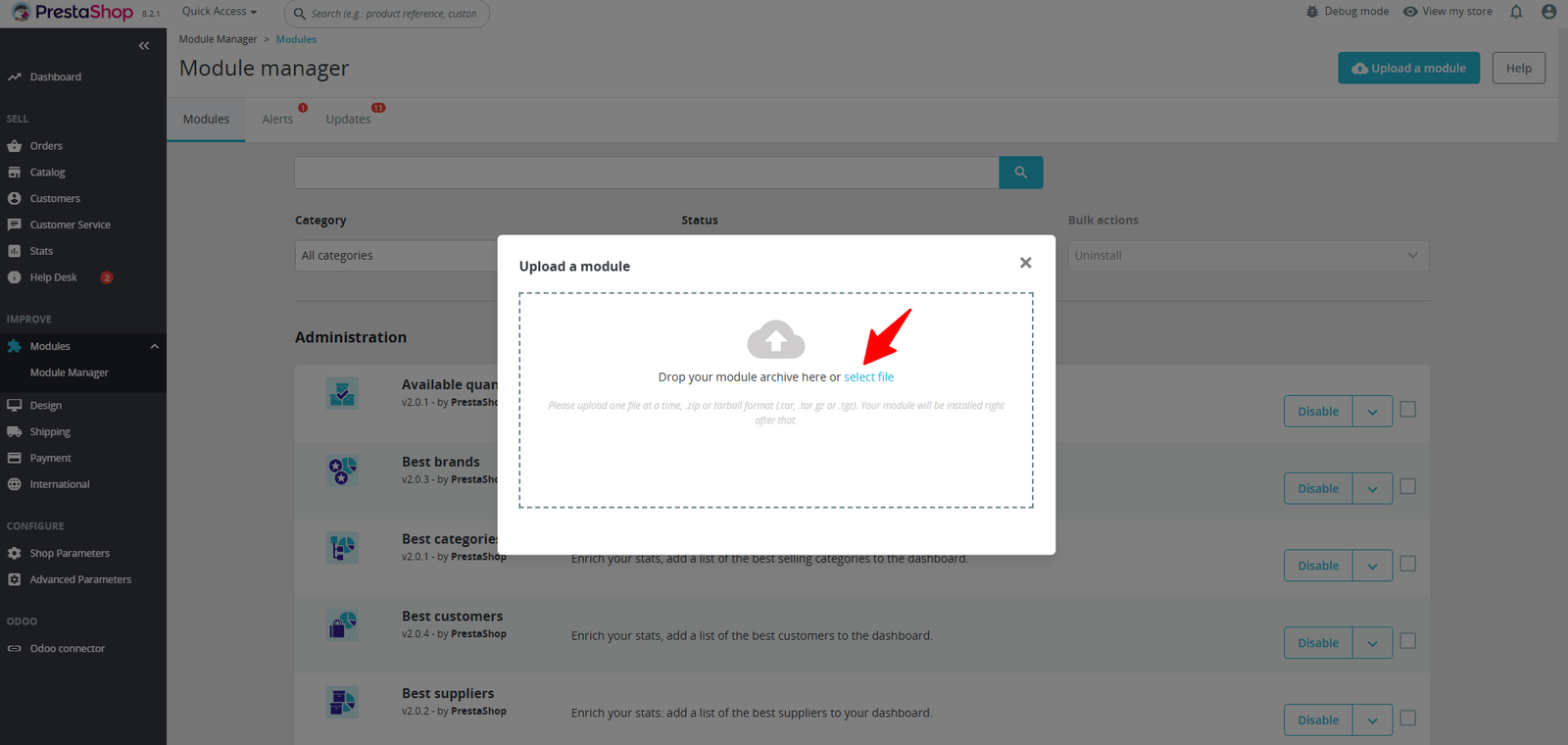
Step 2: Drag & drop the ZIP file or select from your system.
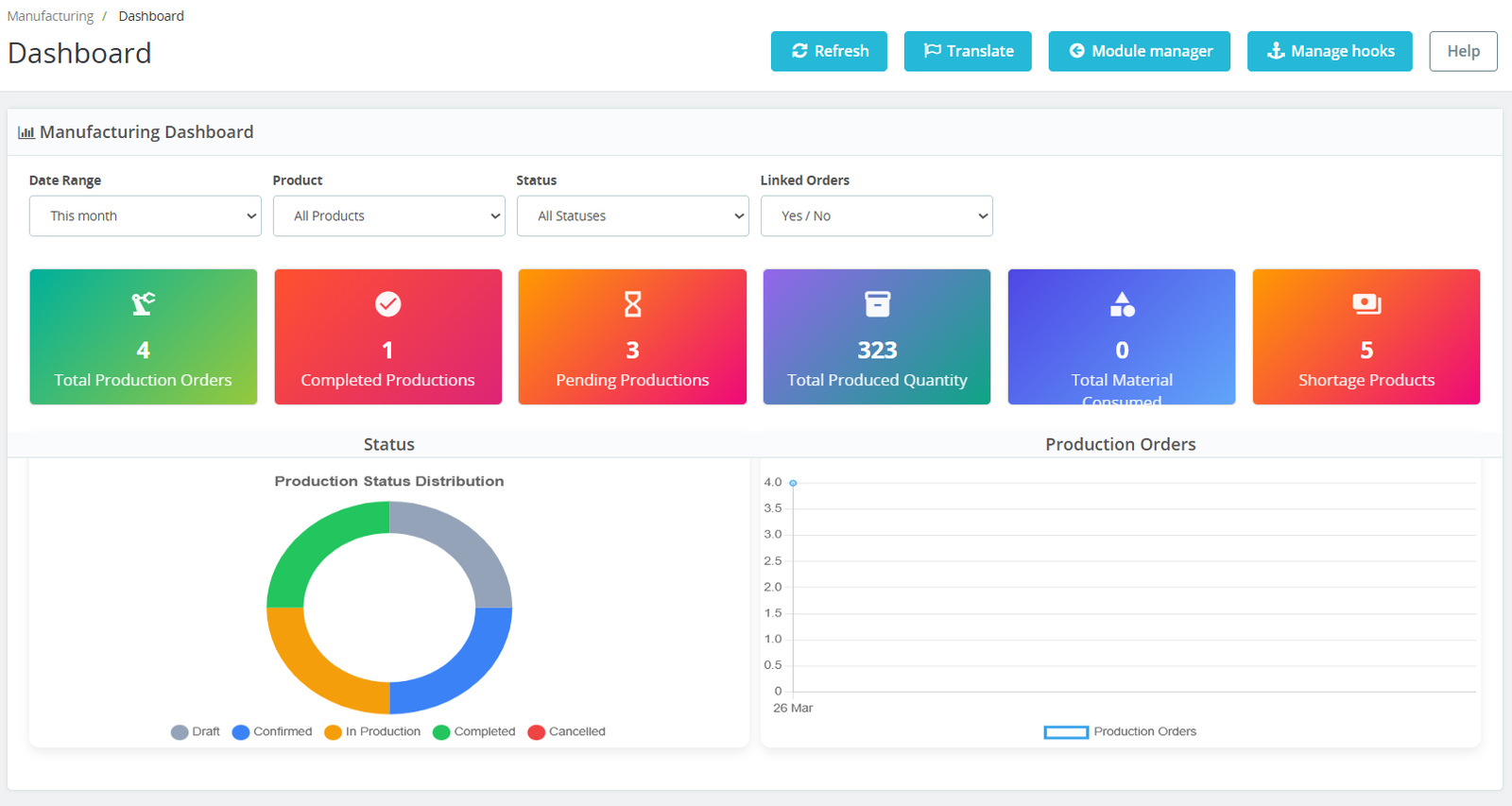
Step 3: Get a complete overview of your production operations at a glance. Track production orders, monitor completed and pending tasks, analyze material consumption, and identify shortages — all from one powerful dashboard.
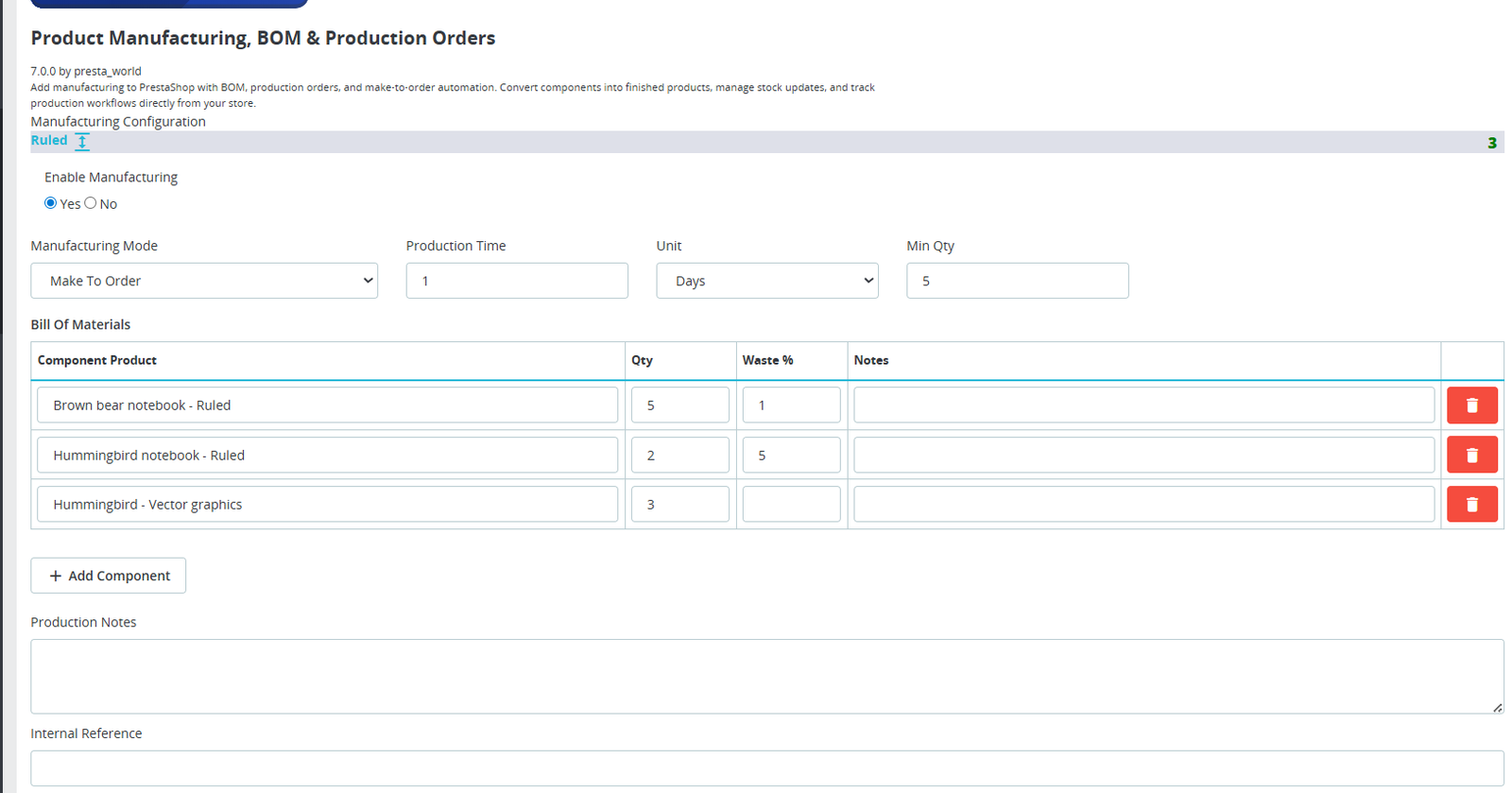
Step 4: Easily enable manufacturing for any product and define its Bill of Materials (BOM) in just a few clicks. Set production mode, time, quantities, and required components — all from a single, intuitive interface.
Step 5: Easily create, track, and manage all your production orders with a centralized list view. Monitor statuses, link orders, plan production dates, and stay in full control of your manufacturing workflow.
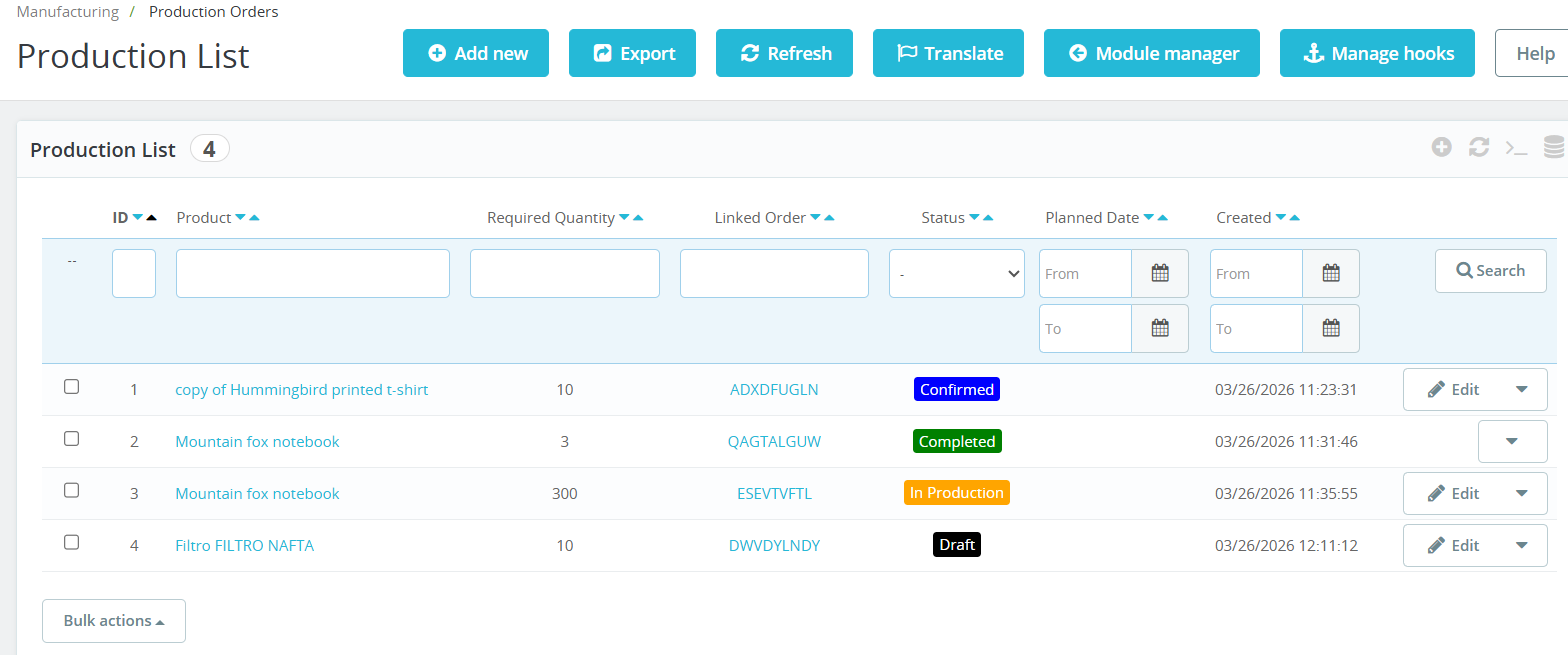
- Manage all manufacturing production orders from a single dashboard for better workflow visibility and operational control.
- Create new production orders instantly using the “Add New” button for faster manufacturing process management.
- Track every manufacturing order with live production statuses directly from the production list interface efficiently.
- Each production order can be connected with customer sales orders for complete order transparency and management.
- Define and monitor required manufacturing quantities accurately for proper production planning and material allocation.
- Plan manufacturing activities with scheduled production dates for organized workflow and resource management.
- Modify production orders easily using the quick edit option directly from the production listing screen.
- Perform bulk operations on multiple production orders simultaneously to save time and improve operational efficiency.
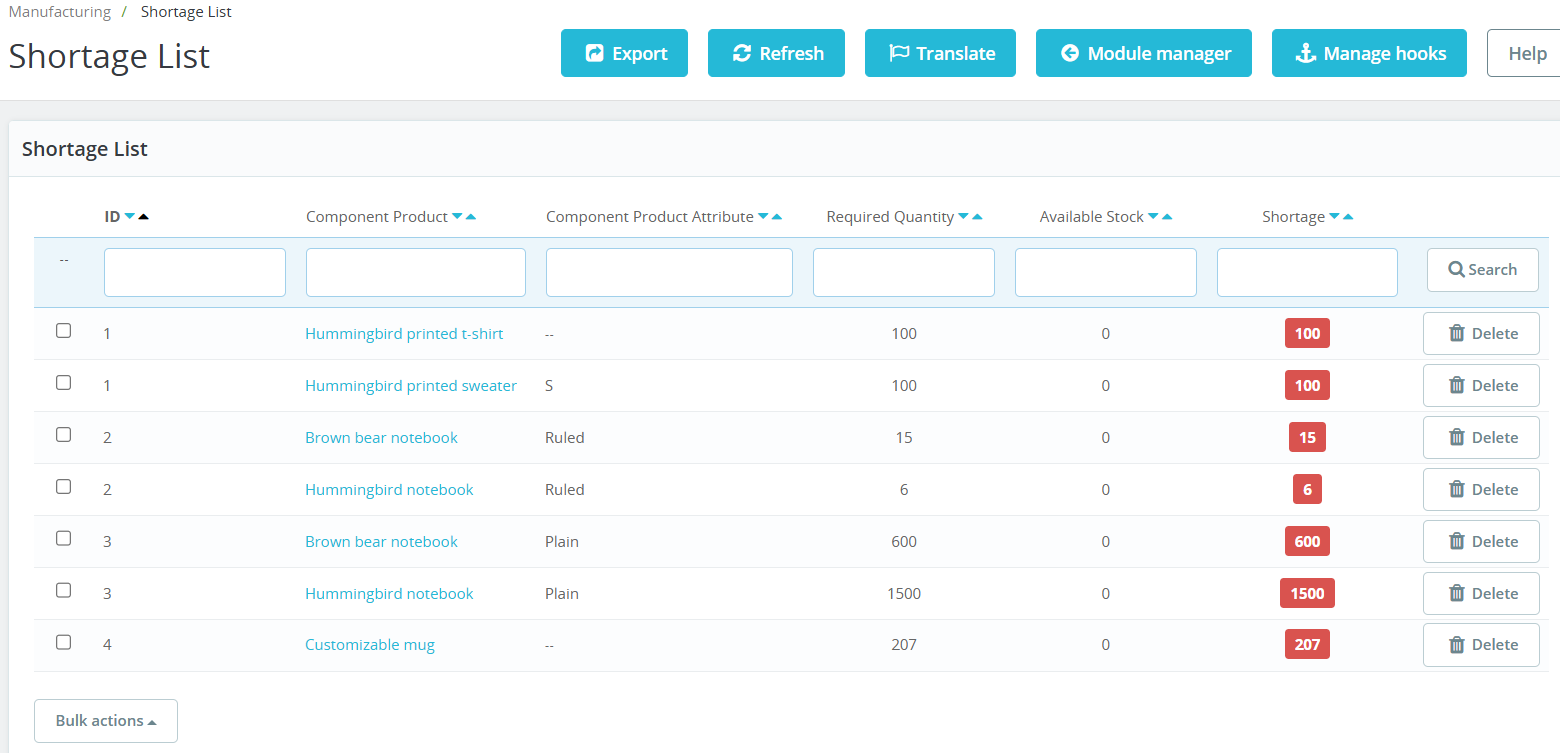
Step 6: Stay ahead of production delays by identifying component shortages in real time. Quickly see required vs available stock and take action before it impacts your manufacturing workflow.
(A) Detect Material Shortages Instantly
1. Import Setting :
- Track unavailable raw materials and components instantly to prevent manufacturing delays and workflow interruptions efficiently.
- Manage all production shortages from a single dashboard for better inventory visibility and manufacturing control operations.
- View exact required material quantities needed for production order completion and manufacturing workflow continuation successfully.
- Monitor available inventory levels directly alongside shortage quantities for quick inventory planning and procurement decision-making processes.
- The system automatically identifies insufficient stock items before production begins to avoid operational manufacturing disruptions effectively.
- Track shortages separately for individual components, raw materials, and product attributes with complete inventory accuracy support.
- Manage shortages based on product variants such as size, color, or specifications for precise manufacturing stock management.
- Shortage reports help purchasing teams order required materials on time for uninterrupted manufacturing operations and production continuity.
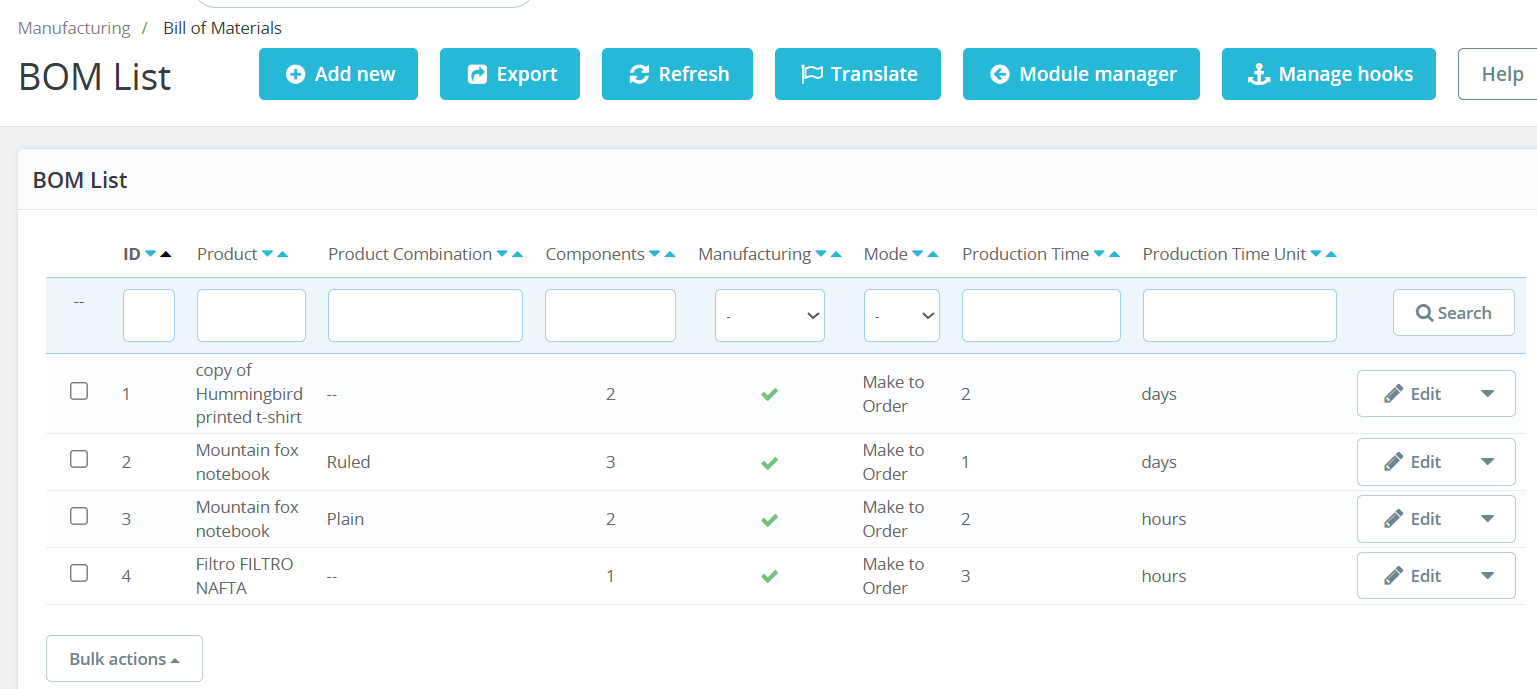
Easily manage and organize all your product components in one place. View, edit, and control BOM configurations, production modes, and manufacturing details for every product with full visibility.
2. Export Setting:
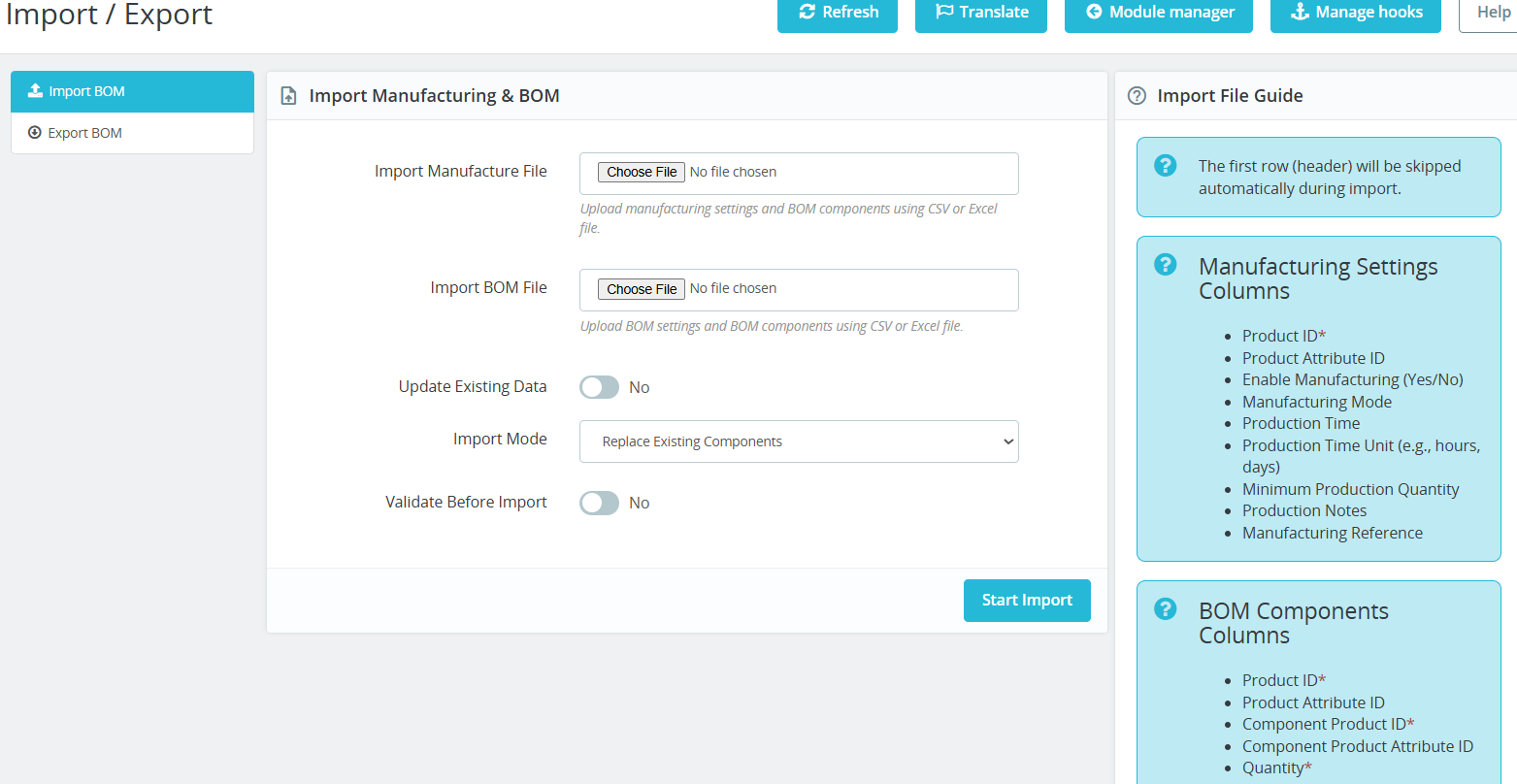
- Import manufacturing settings and production configurations quickly using CSV or Excel files without manual data entry processes.
- Upload multiple Bill of Materials (BOM) records simultaneously to save time and simplify manufacturing setup operations efficiently.
- The system supports both CSV and Excel file formats for flexible manufacturing data management and migration workflows.
- Quickly configure large manufacturing catalogs and BOM structures without manually creating each production configuration individually.
- Import BOM components with product IDs, attributes, quantities, and manufacturing relationships accurately for smooth production workflows.
3. Real-time setting
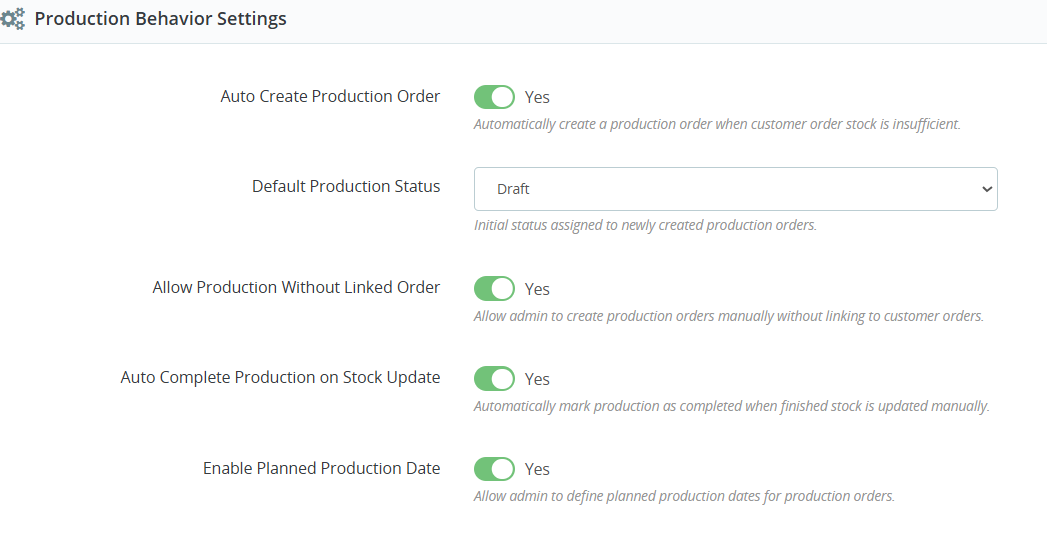
- Allow administrators to create production orders manually without connecting them directly to customer sales orders when required.
- Businesses can manage internal production workflows independently from customer orders for better operational flexibility and control.
- Automatically mark production orders as completed once finished product inventory gets updated in the stock management system.
- Automation minimizes repetitive administrative tasks and reduces the need for manual production order status updates regularly.
- Enable planned production dates for accurate manufacturing scheduling and improved workflow organization across production operations.
- Production scheduling helps businesses organize manufacturing timelines and allocate resources more effectively for operational efficiency.
- Track planned production activities clearly to monitor pending manufacturing operations and future production workloads efficiently.
Step 7: Take full control of your inventory during production. Validate component availability, automate material consumption, prevent overproduction, and manage stock behavior with flexible settings.
1. Import Setting :
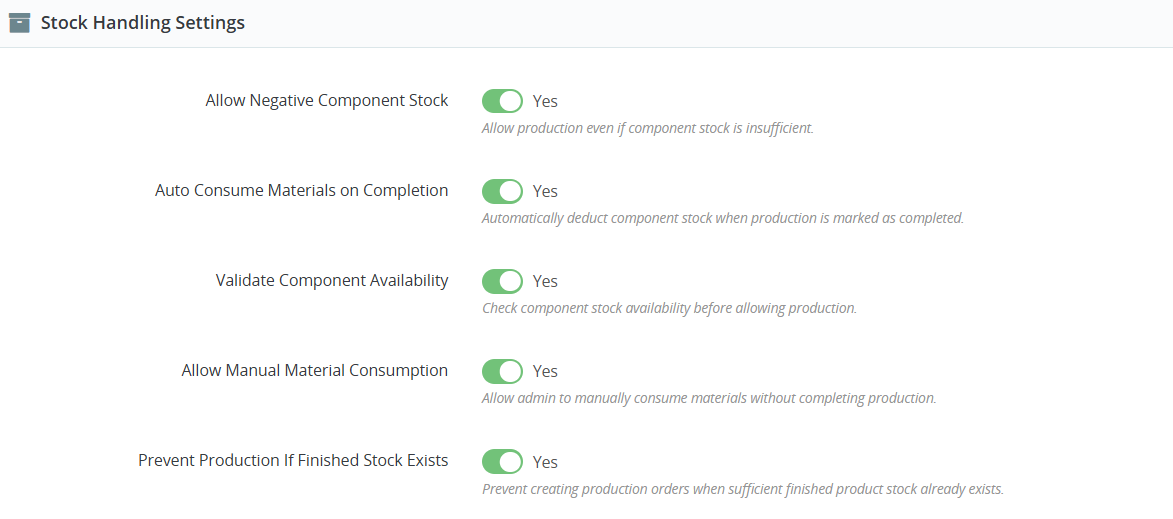
- Manage raw materials, components, and finished product inventory efficiently with powerful manufacturing stock handling automation controls.
- Enable production processes even when component stock becomes insufficient for flexible manufacturing workflow management operations.
- Businesses can continue urgent manufacturing operations without waiting for immediate raw material stock replenishment requirements.
- Automatically deduct component quantities from inventory once production orders are marked as completed successfully within the system.
- Stock levels remain updated automatically after manufacturing completion for accurate inventory and warehouse management operations consistently.
- Check raw material and component stock availability before allowing production orders to begin manufacturing workflows efficiently.
- Inventory validation helps prevent production failures caused by missing materials or insufficient component stock availability issues.
2. Real-time setting:
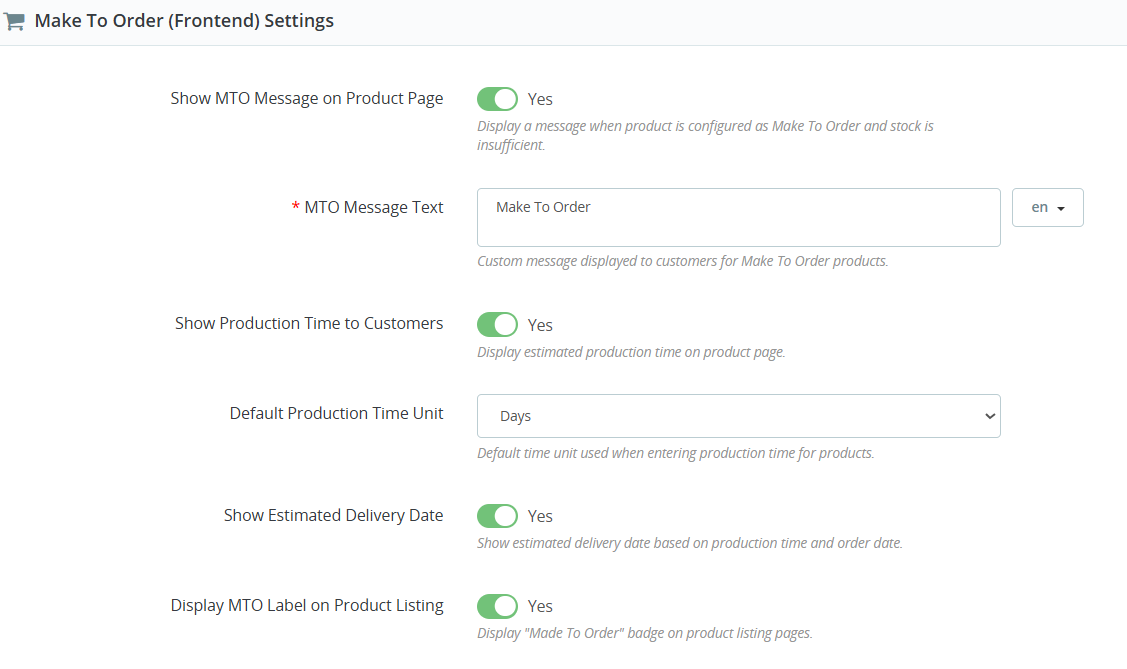
- Display Make-To-Order product information clearly on the storefront for better customer communication and shopping experience improvement.
- Automatically display a custom Make-To-Order message when product stock becomes unavailable or manufacturing is required before delivery.
- Businesses can personalize Make-To-Order messages according to branding, manufacturing process, or customer communication requirements easily.
- Customers receive clear information about production-based products before placing orders, reducing confusion and purchase uncertainty significantly.
- Show estimated production duration directly on product pages for better delivery expectation and order planning management.
Step 8: Stay informed at every stage of manufacturing with automated email alerts. Get notified for production creation, completion, shortages, cancellations, and keep customers updated in real time.
1. Import Setting :
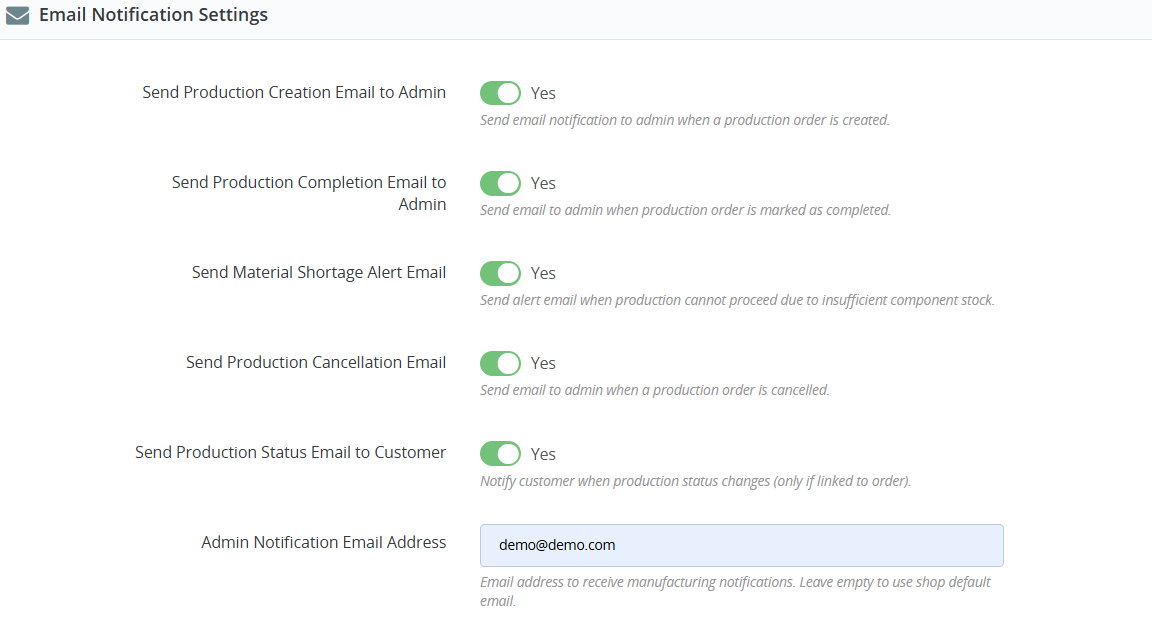
- Automated notifications ensure faster communication between teams, administrators, and customers during manufacturing operations continuously.
- Receive instant updates about production events, shortages, cancellations, and workflow changes without monitoring the dashboard constantly.
- Automatic production status updates improve customer trust and create a more professional manufacturing-based shopping experience online.
- Email notifications stay integrated with production orders, inventory management, and manufacturing workflows inside PrestaShop seamlessly.
- Instant material shortage notifications help businesses react quickly and maintain smooth manufacturing operations efficiently. Administrators can easily enable or disable specific manufacturing email alerts according to business communication preferences and workflows.
- Administrators can easily enable or disable specific manufacturing email alerts according to business communication preferences and workflows.
- Automated email communication saves valuable administrative time and improves manufacturing process management productivity significantly.
-
Why Use the Build Your Own Combo – Create Custom Box Module?
Managing manufacturing operations manually can become complicated as your business grows. The Product Manufacturing, BOM & Production Orders Module helps simplify and automate the entire manufacturing workflow directly inside your PrestaShop store.
Here are the main reasons why businesses should use this module:
1. Manage Manufacturing Inside PrestaShop
No need for expensive third-party ERP systems or external software. Everything from BOM creation to production tracking works directly within your PrestaShop admin panel.
2. Easily Create Bill of Materials (BOM)
Define raw materials, components, and quantities required for finished products. This improves production accuracy and reduces manual errors.
3. Automate Production Orders
The module can automatically create production orders whenever product stock becomes insufficient, helping businesses avoid stock shortages and delays.
4. Support Make-To-Order (MTO) Products
Perfect for businesses that manufacture products only after receiving customer orders. Customers can also view estimated production and delivery times.
5. Real-Time Stock Management
Automatically update stock levels for both components and finished products after production completion, ensuring accurate inventory tracking.