

Effective inventory management is one of the most important aspects of running a successful eCommerce business. Stock discrepancies caused by damaged products, expired items, customer returns, or inventory losses can directly impact profitability and operational efficiency.
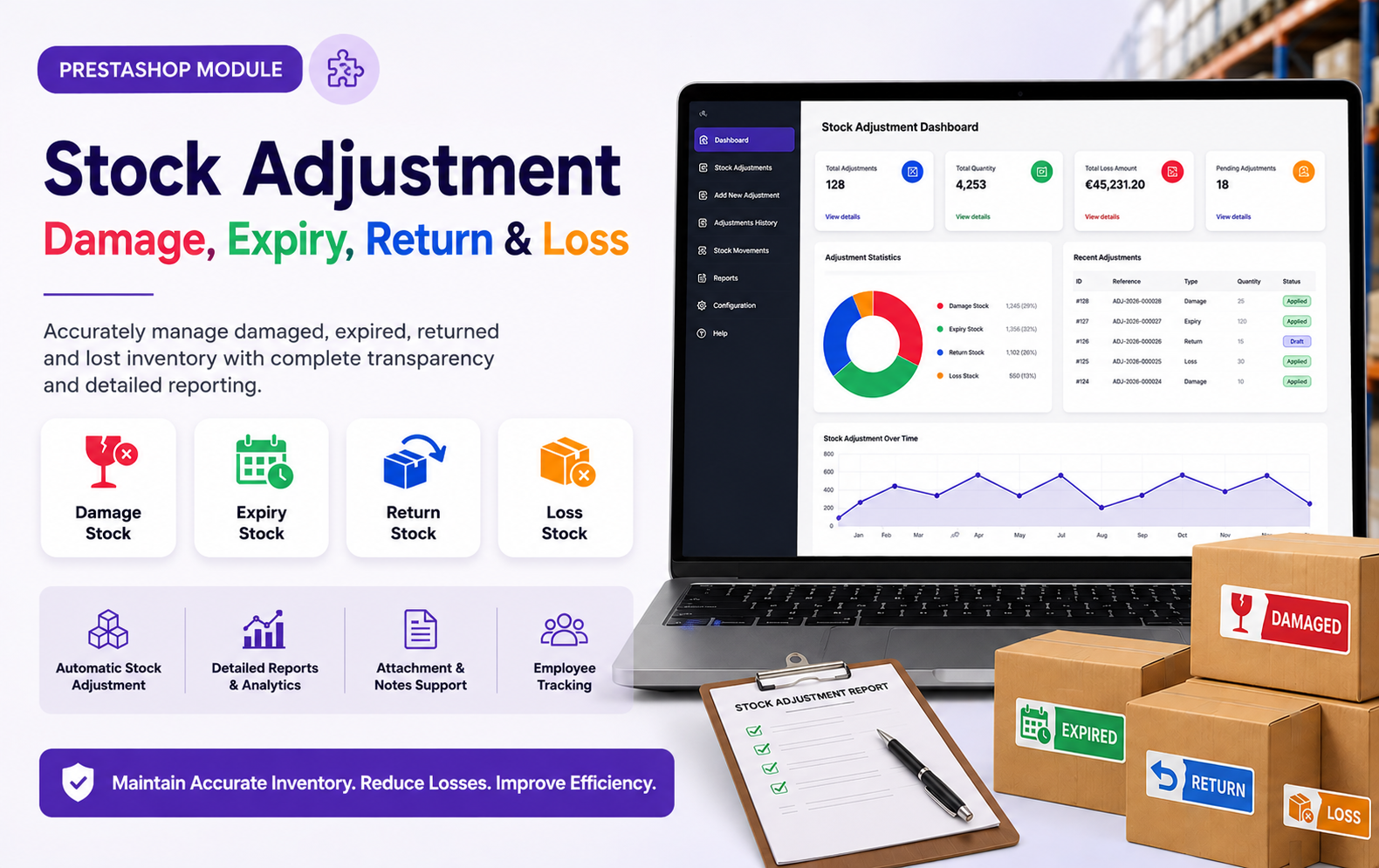
The Stock Adjustment – Damage, Expiry, Return & Loss module for PrestaShop helps merchants maintain accurate inventory records by providing a dedicated system to track and manage stock adjustments. With detailed reporting, employee tracking, notifications, and stock movement integration, this module ensures complete transparency in inventory operations.
Key Features at a Glance
Use Cases: Who Needs This Module?
- Manage damaged, expired, returned, and lost inventory efficiently while maintaining accurate stock records and reducing inventory discrepancies.
- Track stock adjustments across warehouses, monitor inventory losses, and ensure complete transparency in warehouse operations.
- Maintain accurate product availability, prevent overselling, and manage returned or damaged products effectively within the inventory system.
- Monitor expired products, record spoilage losses, and maintain compliance with inventory management and quality control requirements.
- Track expired medicines and damaged medical products while maintaining detailed records for audits and regulatory compliance.
- Manage inventory losses during transportation, storage, and handling with proper stock adjustment documentation and reporting.
- Record damaged raw materials, defective finished goods, and inventory discrepancies to maintain accurate production stock levels.
- Handle returned, damaged, or unsellable products efficiently while keeping inventory synchronized across sales channels.
- Centralize stock adjustment processes and gain complete visibility into inventory losses across multiple business locations.
- Generate detailed stock adjustment reports, audit trails, and inventory loss documentation for financial reporting and compliance purposes.
- Monitor stock movements, analyze loss trends, and identify products that frequently experience damage, expiry, or returns.
- Maintain accurate bulk inventory records and efficiently manage stock discrepancies, damages, and product returns.
- Track high-volume inventory adjustments caused by expiry, breakage, spoilage, and customer returns.
- Monitor product shelf life and manage expired inventory effectively to reduce losses and improve stock turnover.
- Establish a structured inventory control process that scales with business growth and improves operational efficiency.
Quick User Guide (Visual Walkthrough)
Scroll up to revisit the detailed image-wise walkthrough.
Identify loss trends, high-risk products, and operational inefficiencies using advanced reports and dashboard insights.
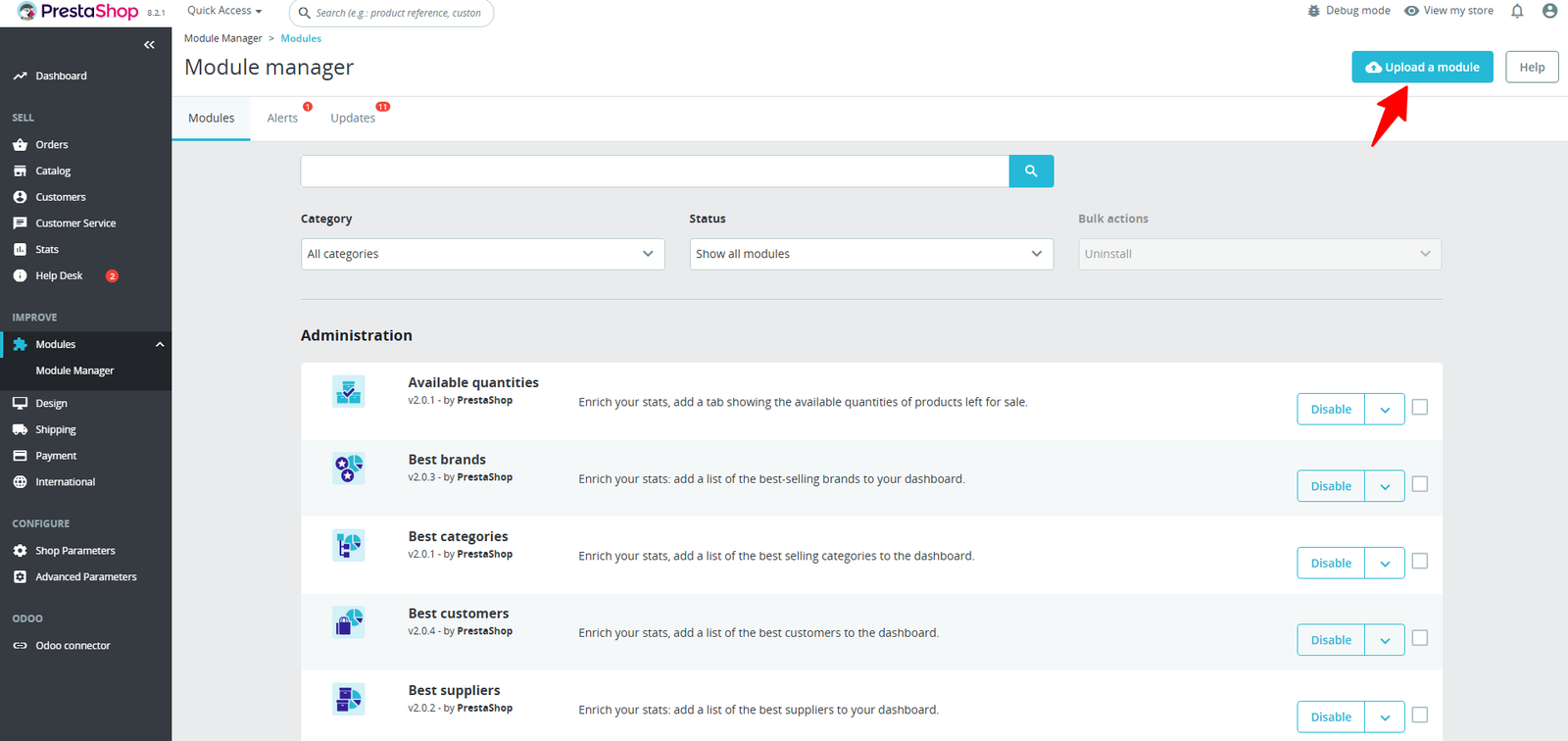
Step 1: Click Upload the Module in the Apps section.
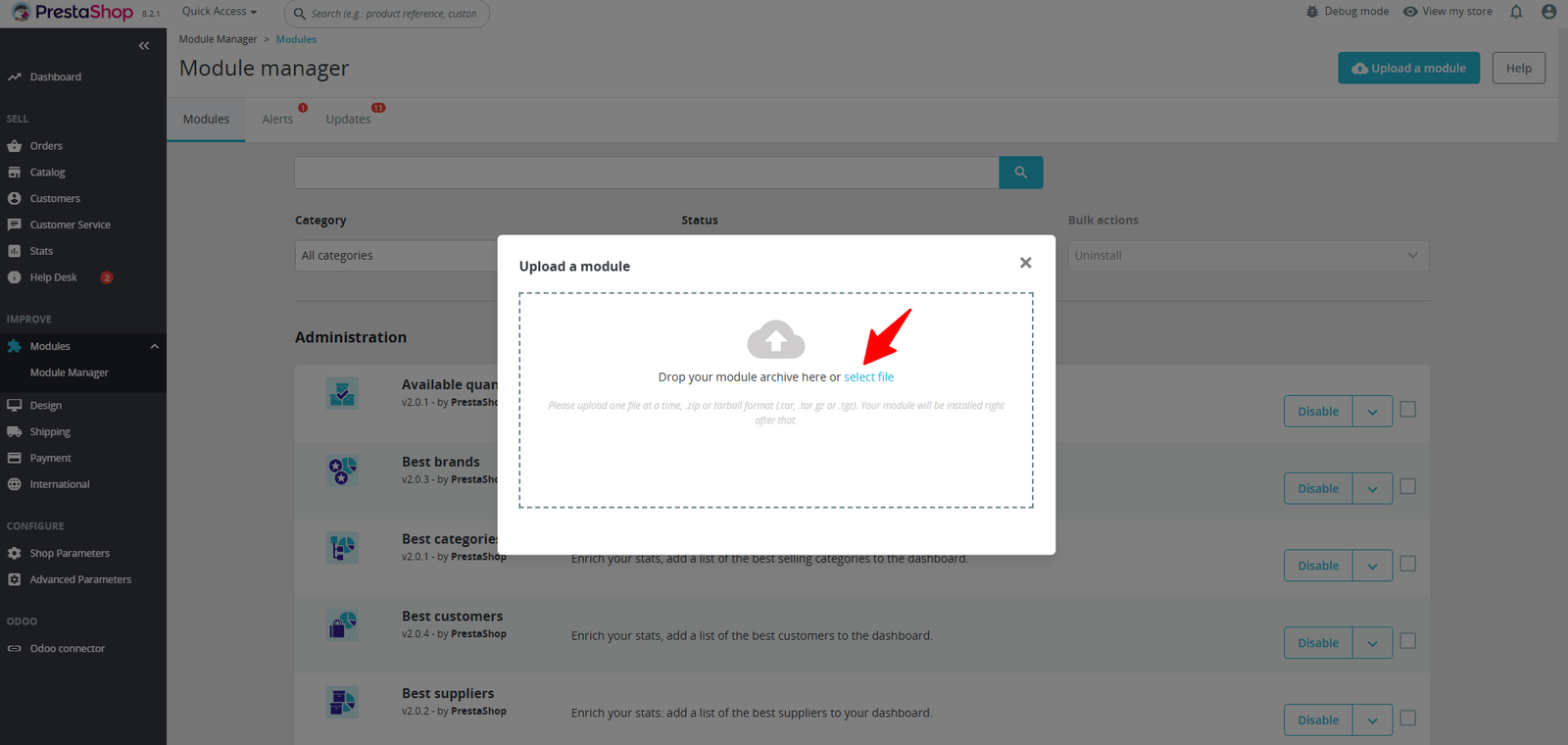
Step 2: Drag & drop the ZIP file or select from your system.
Step 3: Track stock damage, expiry, loss, and returns with real-time insights. View key statistics, identify high-loss products, monitor monthly trends, and manage recent adjustments — all from one powerful dashboard.
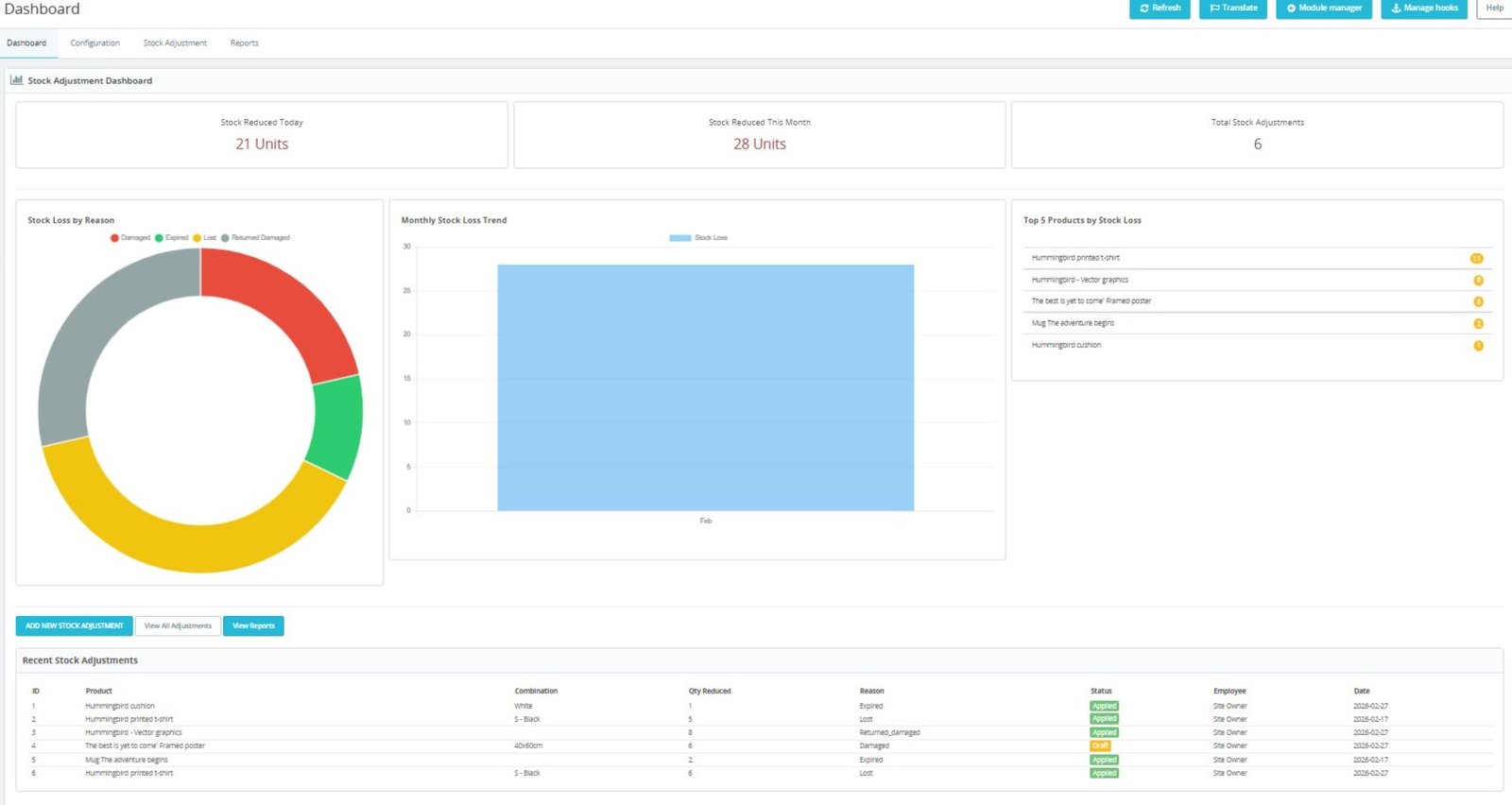
- Monitor daily stock reductions instantly through a centralized dashboard, helping administrators track inventory losses and adjustment activities efficiently.
- View monthly stock reduction statistics in real time, enabling better inventory planning and proactive stock management decisions.
- Track total stock adjustments from a single dashboard panel, providing complete visibility into inventory correction activities.
- Analyze stock losses by reason including damaged, expired, lost, and returned products using interactive visual charts.
- Identify the most common causes of inventory loss through graphical insights that support data-driven business decisions.
- Monitor monthly stock loss trends with visual analytics to understand patterns and reduce future inventory discrepancies.
- Discover seasonal inventory challenges by reviewing stock adjustment trends and loss fluctuations across different periods.
- Quickly identify top products contributing to stock losses and take corrective actions to improve profitability.
- Evaluate product-specific inventory performance using stock loss rankings displayed directly within the dashboard interface.
- Access recent stock adjustment records instantly with detailed information about products, quantities, reasons, and adjustment statuses.
Step 4: Customize stock adjustment rules with advanced settings like draft mode, quantity limits, negative stock prevention, attachments, and smart notifications to match your business workflow.
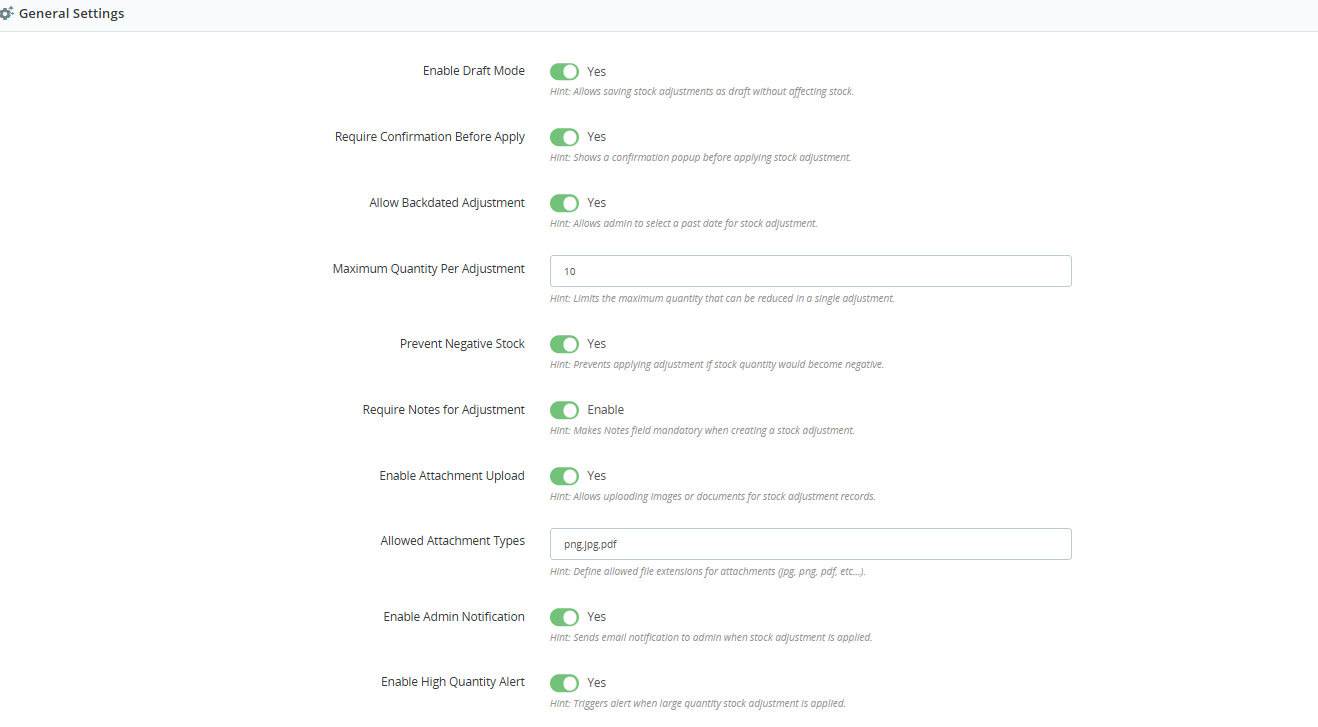
- Enable Draft Mode to save stock adjustments for review before application, preventing accidental inventory changes and operational errors.
- Require confirmation before applying adjustments to ensure administrators verify stock reduction actions before updating inventory records.
- Allow backdated stock adjustments for accurate historical inventory tracking and correction of previously unrecorded stock discrepancies.
- Set maximum quantity limits per adjustment to prevent excessive stock reductions and maintain inventory control standards.
- Prevent negative stock automatically by validating available quantities before processing any stock adjustment request successfully.
- Make adjustment notes mandatory to ensure every inventory change includes proper documentation and business justification details.
- Enable attachment uploads for storing images, invoices, reports, and supporting documents related to stock adjustments.
- Define allowed attachment formats to maintain secure file management and ensure compatibility with business documentation requirements.
- Send automatic admin notifications whenever stock adjustments are applied, improving monitoring and inventory oversight processes.
- Receive instant alerts for high-quantity stock adjustments to quickly identify unusual inventory activities and potential issues.
Step 5: Manage all stock reductions in one organized list. Track quantities, reasons, status, employees, and dates with powerful filters and quick edit options for efficient inventory control.
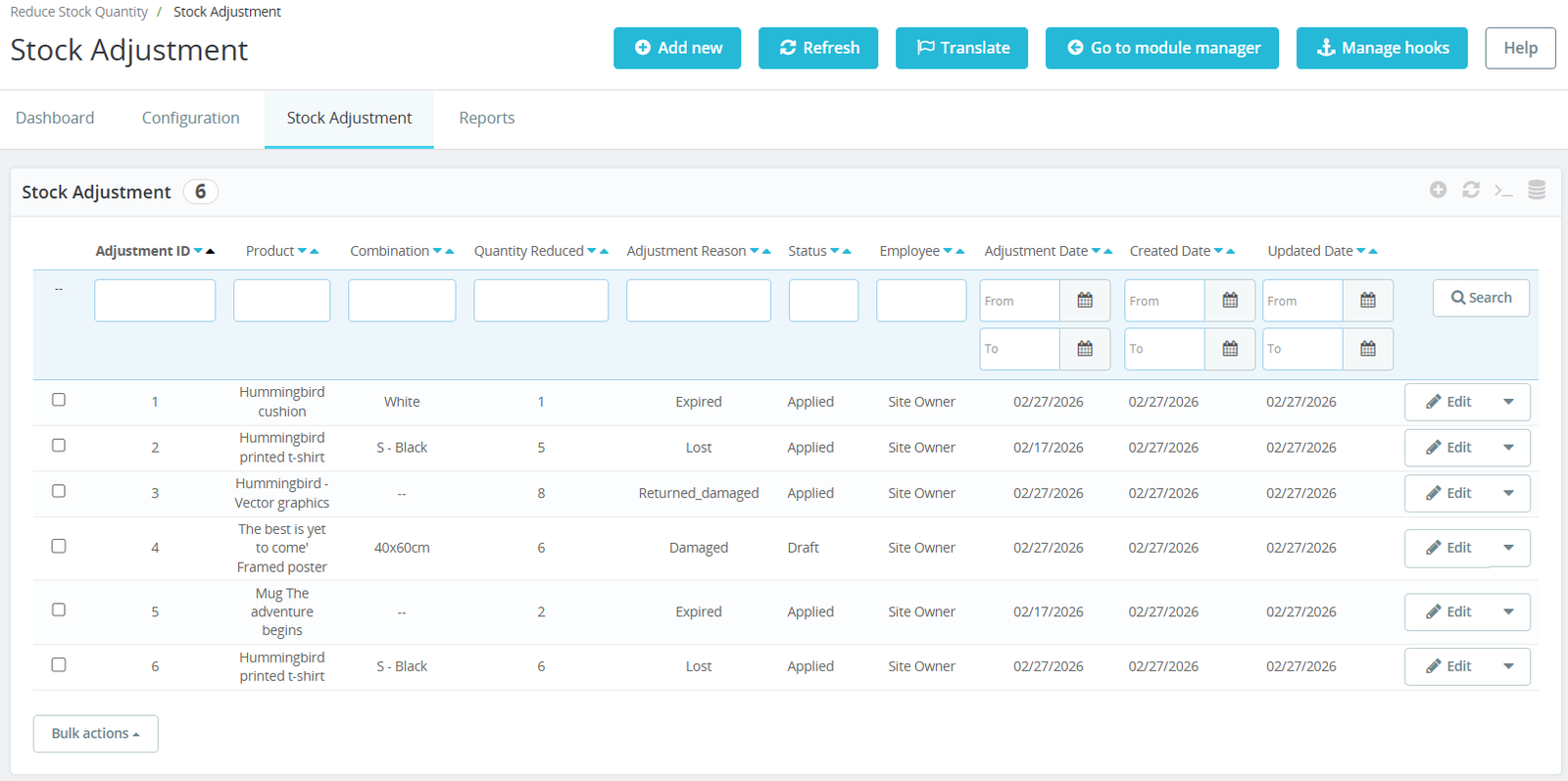
- Create and manage stock adjustments for damaged, expired, lost, and returned products from a centralized management interface.
- Maintain complete inventory accuracy by recording every stock reduction with detailed product, quantity, and adjustment reason information.
- Track adjustment status using Draft and Applied workflows to ensure proper review before inventory quantities are modified.
- Store adjustment records with employee information, creating transparent accountability for all inventory management activities performed.
- Manage product combinations separately, allowing precise stock adjustments for specific variants and inventory configurations.
- View all stock adjustment records in a structured grid designed for quick access and efficient inventory monitoring.
- Filter stock adjustments using product names, adjustment reasons, dates, employees, and statuses for faster record management.
- Search historical inventory adjustments instantly through advanced filtering options that simplify stock tracking and auditing processes.
- Track adjustment creation and update dates to maintain complete visibility over inventory correction timelines and activities.
- Monitor quantity reductions accurately to understand inventory losses and evaluate stock management performance across operations.
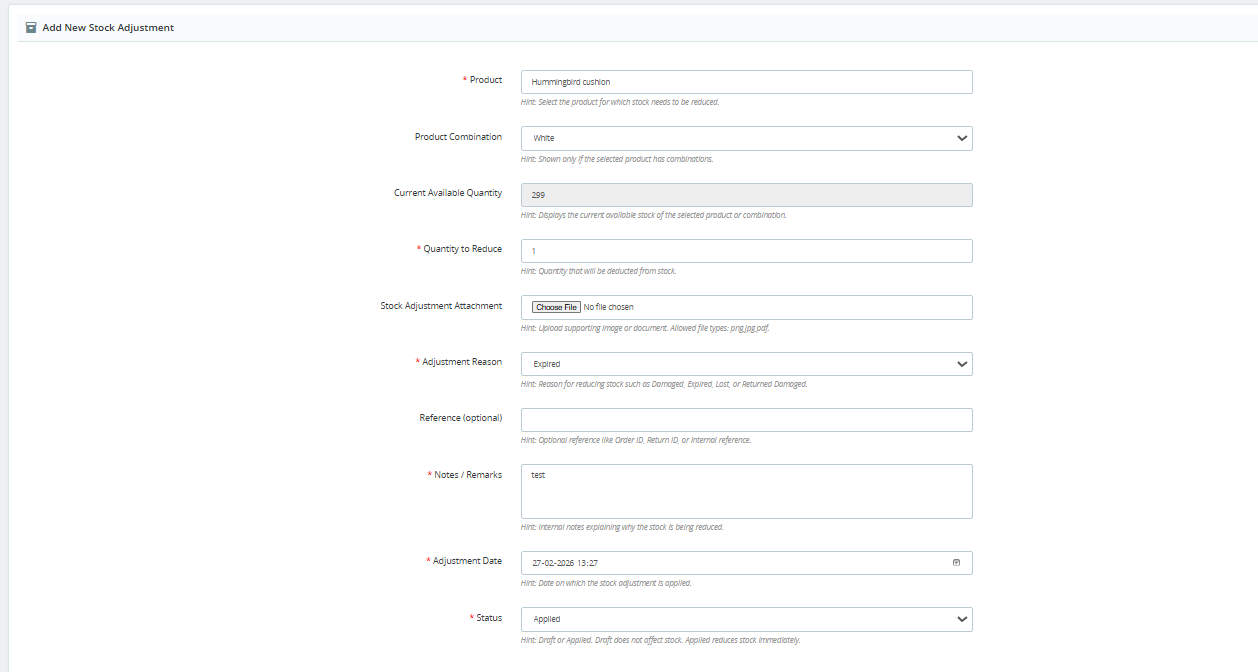
Step 6: Quickly reduce product stock for damage, expiry, loss, or returns with an easy-to-use form. Add quantities, reasons, attachments, notes, and apply adjustments instantly with full accuracy.
(A) Create Stock Adjustments in Seconds
1. Import Setting :
- Create new stock adjustments quickly by selecting products, quantities, and adjustment reasons through a simple, user-friendly interface.
- Choose specific product combinations to ensure accurate stock adjustments for individual variants and inventory configurations without affecting other products.
- View current available stock automatically before reducing inventory, helping administrators avoid incorrect stock adjustment decisions and errors.
- Specify the exact quantity to reduce for maintaining precise inventory records and improving overall warehouse stock accuracy consistently.
- Upload supporting documents or images as attachments to provide complete evidence for damaged, expired, returned, or lost inventory records.
- Select predefined adjustment reasons including damaged, expired, lost, or returned products for standardized inventory management and reporting processes.
- Add optional reference numbers such as order IDs, return IDs, or internal codes for better stock adjustment traceability.
- Include detailed notes and remarks explaining every inventory adjustment, improving documentation quality and warehouse accountability across business operations.
- Set custom adjustment dates to record inventory changes accurately, including historical or backdated stock adjustment entries when required.
- Choose adjustment status as Draft or Applied, allowing flexible approval workflows before inventory quantities are permanently updated.
2. Export Setting:
- Ensure inventory accuracy by validating product information before processing any stock reduction or adjustment request successfully.
- Simplify warehouse operations with an organized adjustment form designed for faster inventory updates and efficient stock management workflows.
- Maintain transparent inventory records by capturing every essential adjustment detail within a structured and easy-to-use management interface.
- Reduce manual inventory errors using guided input fields that ensure accurate stock adjustment data entry every time.
- Improve audit readiness by storing adjustment reasons, attachments, references, and notes alongside every inventory reduction record permanently.
- Support multiple warehouse scenarios by recording stock adjustments for damaged, expired, returned, or lost inventory items efficiently.
- Keep inventory documentation complete with mandatory adjustment details that improve reporting accuracy and operational transparency across warehouses.
- Accelerate stock adjustment processes through intuitive product selection and automated inventory information displayed within the adjustment form.
- Improve inventory control by recording every stock reduction event with complete product details and supporting business documentation.
- Create reliable stock adjustment records that enhance inventory accuracy, warehouse efficiency, and long-term inventory management performance across operations.
3. Real-time setting
- Create stock adjustments instantly by selecting products, quantities, and adjustment reasons through a simple and user-friendly interface.
- View current available stock in real time before reducing inventory, preventing accidental over-adjustments and stock inconsistencies.
- Select specific product combinations to perform accurate stock adjustments for individual variants and inventory configurations.
- Reduce stock quantities immediately while maintaining complete inventory accuracy across all products and warehouse operations.
- Upload supporting documents or images to provide evidence for damaged, expired, returned, or lost inventory adjustments.
- Choose predefined adjustment reasons to standardize inventory records and simplify stock loss tracking across business operations.
- Add optional reference numbers such as order IDs or return IDs for better traceability and inventory documentation.
- Include detailed notes and remarks explaining every stock adjustment to improve transparency and future inventory audits.
- Select adjustment dates to accurately record inventory changes according to actual warehouse operations and historical events.
- Apply stock adjustments immediately or save them as drafts for future review and approval before inventory updates.
Step 7: Generate detailed inventory loss reports with 5 different report types, including product, category, supplier, employee. Filter data easily and export reports in CSV or PDF for accounting, audits, and business insights.
1. Import Setting :
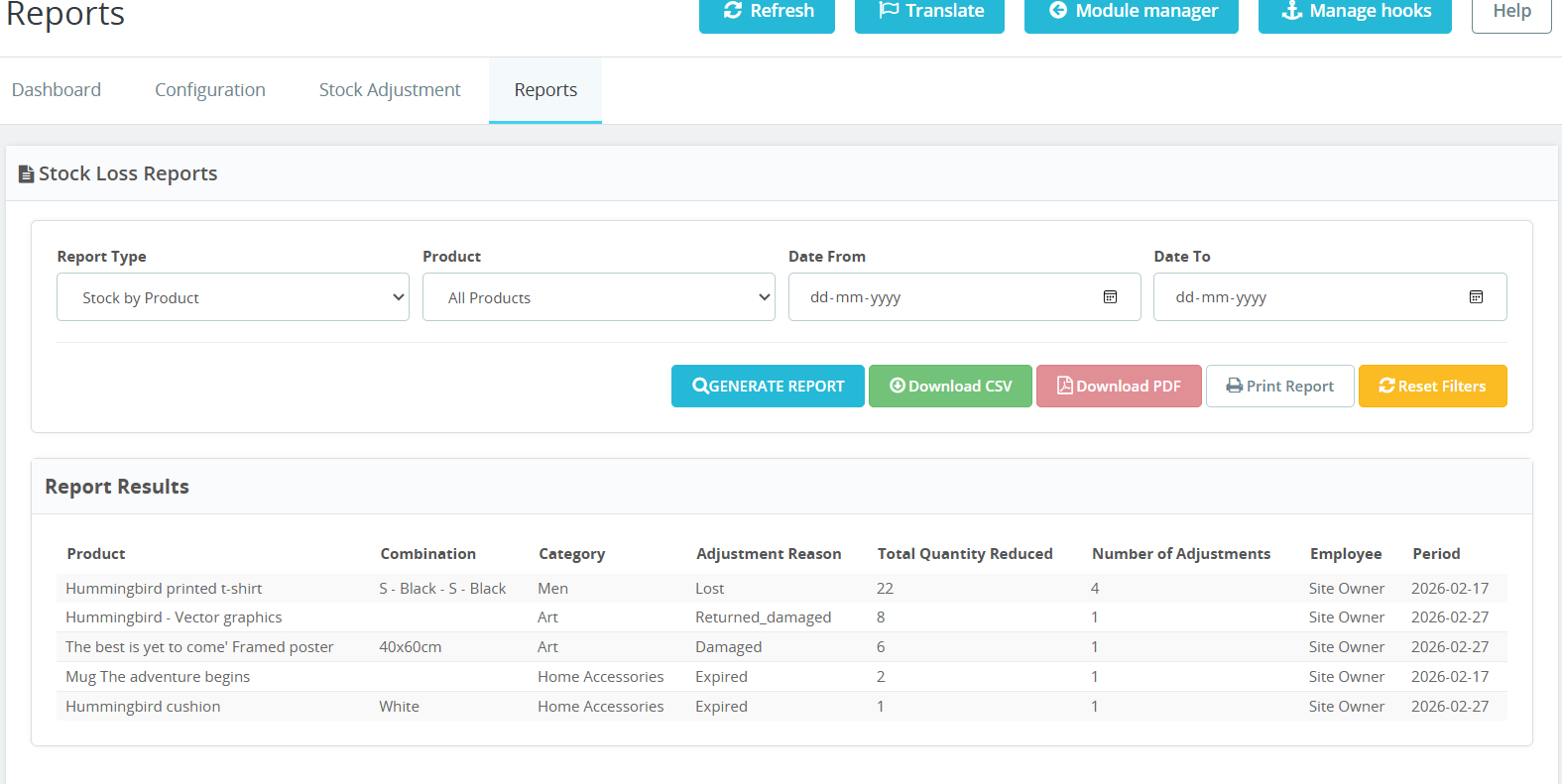
- Generate detailed stock loss reports using customizable filters for products, report types, and selected date ranges with complete accuracy.
- Analyze inventory losses by product to identify frequently damaged, expired, returned, or lost items affecting business profitability.
- Filter reports by specific products, making inventory analysis faster and helping administrators monitor individual product performance effectively.
- Select custom date ranges to generate historical stock adjustment reports for audits, compliance, and inventory performance evaluation.
- Export stock adjustment reports to CSV format for advanced spreadsheet analysis, reporting, and business data management purposes.
- Download professional PDF reports to share inventory summaries with management, auditors, and business stakeholders effortlessly.
- Print detailed stock adjustment reports directly from the module for physical documentation and warehouse operational records.
- Reset report filters instantly to generate new inventory reports without manually clearing previous search criteria or selections.
- View comprehensive report results including products, combinations, categories, adjustment reasons, and quantity reductions in organized tables.
- Monitor total quantity reduced and adjustment frequency to identify products with recurring inventory loss issues efficiently.
2. Real-time setting:
- Generate comprehensive stock loss reports instantly using customizable filters for products, report types, and selected date ranges.
- Analyze stock adjustments by product to identify inventory losses and improve warehouse management with accurate reporting insights.
- Filter reports using specific products to evaluate stock reduction patterns and make better inventory planning decisions efficiently.
- Select custom date ranges to generate historical inventory reports for audits, compliance, and operational performance analysis.
- Export stock adjustment reports in CSV format for advanced data analysis, accounting, and business record management purposes.
- Download professional PDF reports for inventory audits, management reviews, and official business documentation with a single click.
- Print detailed stock adjustment reports directly from the module for warehouse meetings and inventory verification processes.
- Reset report filters instantly to create new reports without manually clearing previously selected search criteria and settings.
- View product combinations alongside adjustment reasons for complete visibility into inventory changes across different product variants.
- Track adjustment reasons including damaged, expired, lost, and returned products through organized and easy-to-read reporting tables.
Step 8: Every stock adjustment is automatically recorded in the native PrestaShop stock movements table, ensuring accurate inventory history, employee tracking, and complete transparency for audits and stock control.
1. Import Setting :
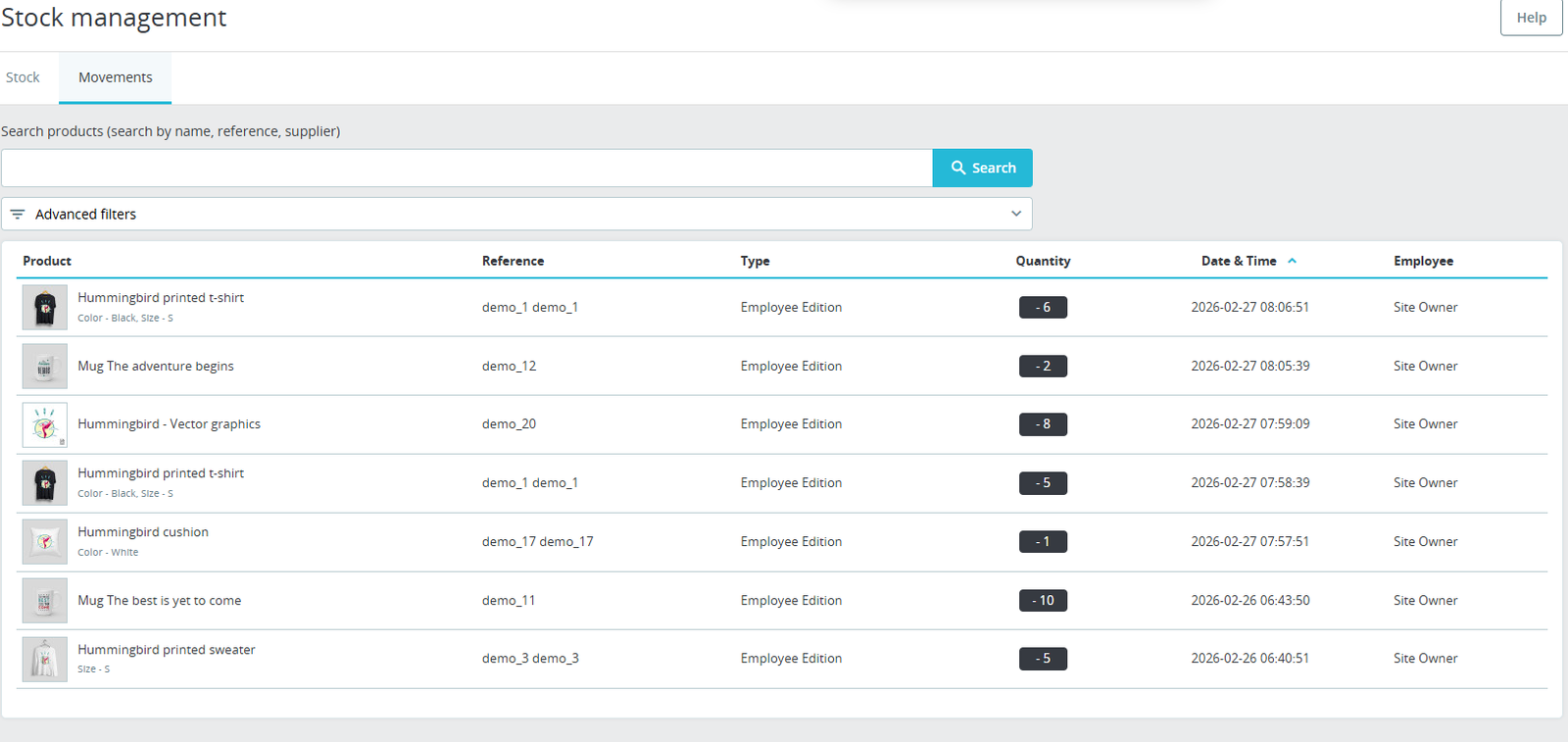
- Monitor every stock movement automatically with detailed records showing products, quantities, employees, and timestamps for complete inventory transparency.
- Track inventory changes in real time through the Stock Movements page, ensuring accurate and up-to-date stock management records.
- View product-specific stock movement history to understand inventory reductions and maintain complete operational accountability across warehouse activities.
- Search stock movement records quickly using product names, references, or suppliers for faster inventory tracking and management.
- Use advanced filters to locate specific stock movement records based on multiple criteria, improving reporting accuracy and operational efficiency.
- Monitor quantity changes instantly to identify inventory losses, stock corrections, and employee-initiated adjustments across all warehouse operations.
- Track employee activities responsible for stock movements, ensuring accountability and transparent inventory management throughout the organization.
- Review movement dates and timestamps to maintain accurate historical records for inventory audits and warehouse performance evaluations.
- Automatically synchronize stock adjustments with PrestaShop stock movement records, eliminating manual tracking and improving inventory consistency.
- Analyze inventory movement history to identify recurring stock issues and optimize warehouse operations with data-driven business insights.
Why Use the Stock Adjustment for Damage, Expiry, Return & Loss Module?
- Maintain accurate inventory records by tracking damaged, expired, returned, and lost products with a structured stock adjustment management system.
- Reduce manual inventory errors through automated stock quantity updates integrated directly with PrestaShop’s native stock management functionality.
- Prevent inventory discrepancies by recording every stock adjustment with complete product details, quantities, reasons, and employee information.
- Improve warehouse efficiency using organized workflows that simplify stock adjustment creation, approval, and inventory correction processes.
- Protect business profitability by identifying products with frequent stock losses through comprehensive reports and visual dashboard analytics.
- Strengthen inventory accountability by tracking every adjustment action, employee activity, and stock movement with complete historical records.
- Generate audit-ready reports that simplify financial reconciliation, compliance requirements, and inventory verification for business operations.
- Reduce inventory losses by monitoring damaged, expired, lost, and returned products through detailed reporting and actionable business insights.
- Prevent negative stock levels with built-in validation rules that ensure inventory quantities remain accurate and reliable at all times.
- Support better decision-making using real-time inventory statistics, stock loss trends, and product performance analysis from interactive dashboards.
- Maintain complete documentation by attaching images, invoices, and supporting files to every stock adjustment record for future reference.
- Increase operational transparency with centralized inventory management tools designed to improve stock accuracy, warehouse control, and business productivity.