

Managing inventory accurately is one of the biggest challenges for B2B businesses. Manual stock counting, mismatched inventory records, missing products, and operational delays can directly affect profitability and customer trust. The B2B Inventory Audit & Stock Verification Manager module helps businesses perform professional inventory audits without interrupting daily store operations.
This advanced PrestaShop module allows store owners to create stock audits, compare expected vs physical quantities, track discrepancies, generate reports, and maintain complete inventory history — all from a centralized dashboard.
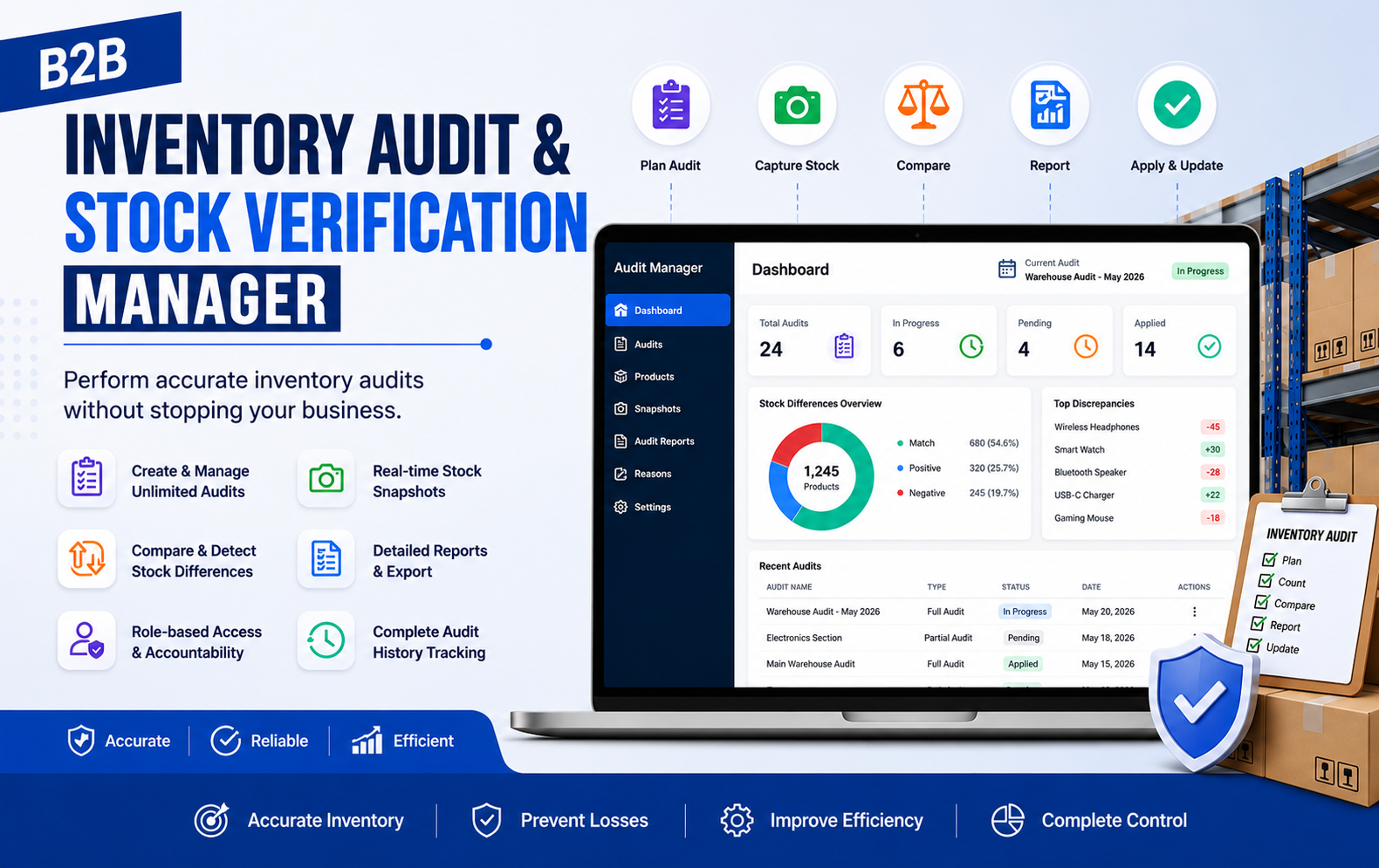
Key Features at a Glance
- Track stock movements during audits including sales, returns, transfers, and manual inventory quantity adjustments automatically.
- Calculate expected inventory quantities dynamically based on live stock activity and ongoing operational business changes continuously.
- Enter physical stock quantities manually using quick inline editing with convenient auto-save functionality for faster operations.
- Import physical inventory quantities in bulk using CSV files to reduce manual workload and improve efficiency significantly.
- Highlight positive and negative stock discrepancies instantly using visually clear indicators for faster inventory issue identification.
- Configure custom discrepancy thresholds to detect unusually large stock differences and prevent potential inventory management problems.
- Assign predefined or custom reasons for stock adjustments including damage, theft, losses, or warehouse operational mistakes.
- Maintain complete inventory audit history with employee actions, timestamps, and detailed stock movement tracking records securely.
- Review inventory audits carefully before applying stock changes to minimize human errors and maintain accurate inventory records.
- Apply inventory audit adjustments safely using controlled validation rules and secure stock quantity update mechanisms automatically.
- Generate detailed inventory audit reports with product-level breakdowns, discrepancy analysis, and stock adjustment performance insights effectively.
Use Cases: Who Needs This Module?
- B2B wholesalers needing accurate inventory tracking across large product catalogs, warehouses, and multiple ongoing business stock operations daily.
- Warehouse managers performing regular stock verification to identify discrepancies, damaged products, and inventory mismatches efficiently and accurately.
- Multi-store businesses requiring centralized inventory audits and synchronized stock management across different warehouse or retail business locations.
- eCommerce businesses wanting uninterrupted store operations while conducting real-time inventory audits and stock verification processes simultaneously.
- Retail businesses handling high-volume inventory and requiring automated stock discrepancy detection with detailed audit reporting capabilities included.
- Businesses managing multiple suppliers and needing supplier-wise inventory auditing for better stock visibility and operational inventory control.
- Companies requiring accurate year-end inventory audits for accounting, tax reporting, and financial compliance documentation preparation purposes effectively.
- Inventory teams seeking bulk stock import functionality through CSV files to speed up physical inventory verification processes significantly.
- Organizations needing complete inventory history tracking with employee accountability, timestamps, and detailed stock movement monitoring systems integrated.
- Businesses struggling with inventory losses caused by theft, damaged products, stock mismanagement, or warehouse operational inefficiencies regularly.
- Large-scale distributors requiring advanced stock discrepancy analysis and real-time inventory adjustment calculations during ongoing business operations continuously.
- Businesses wanting role-based employee permissions to secure inventory auditing processes and prevent unauthorized stock quantity modifications effectively.
Quick User Guide (Visual Walkthrough)
Scroll up to revisit the detailed image-wise walkthrough.
Companies needing detailed inventory audit reports exportable in CSV, Excel, and PDF formats for operational business analysis requirements.
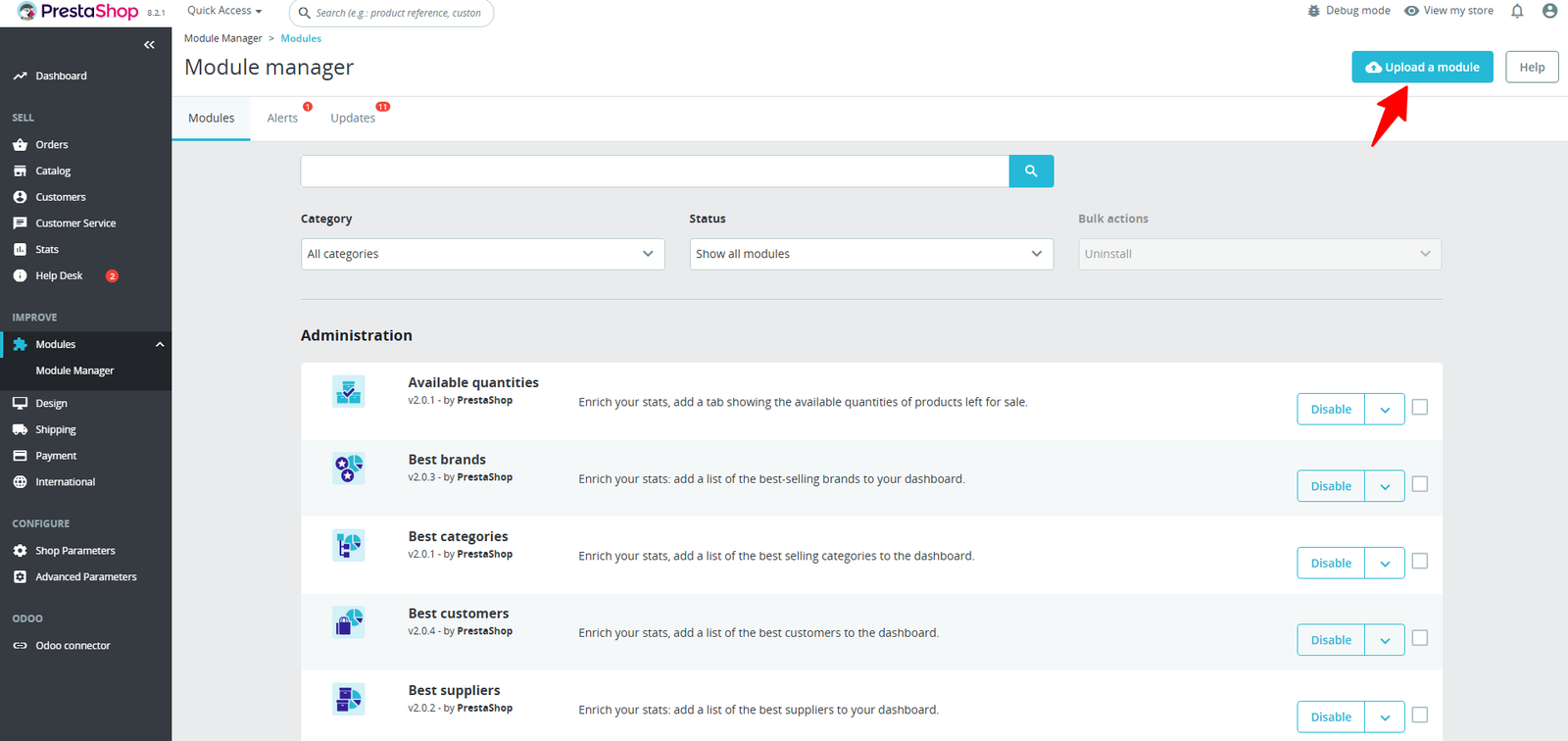
Step 1: Click Upload the Module in the Apps section.
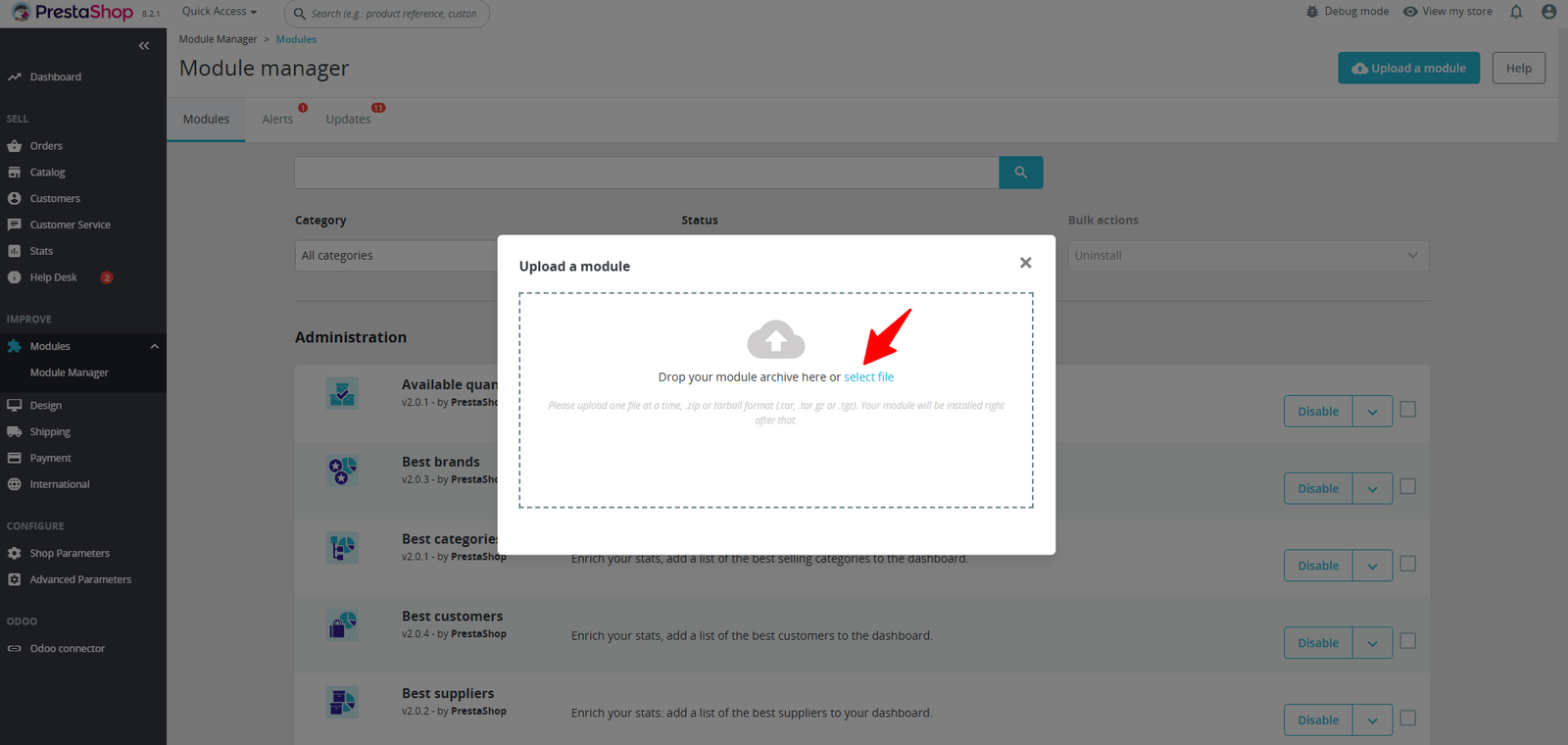
Step 2: Drag & drop the ZIP file or select from your system.
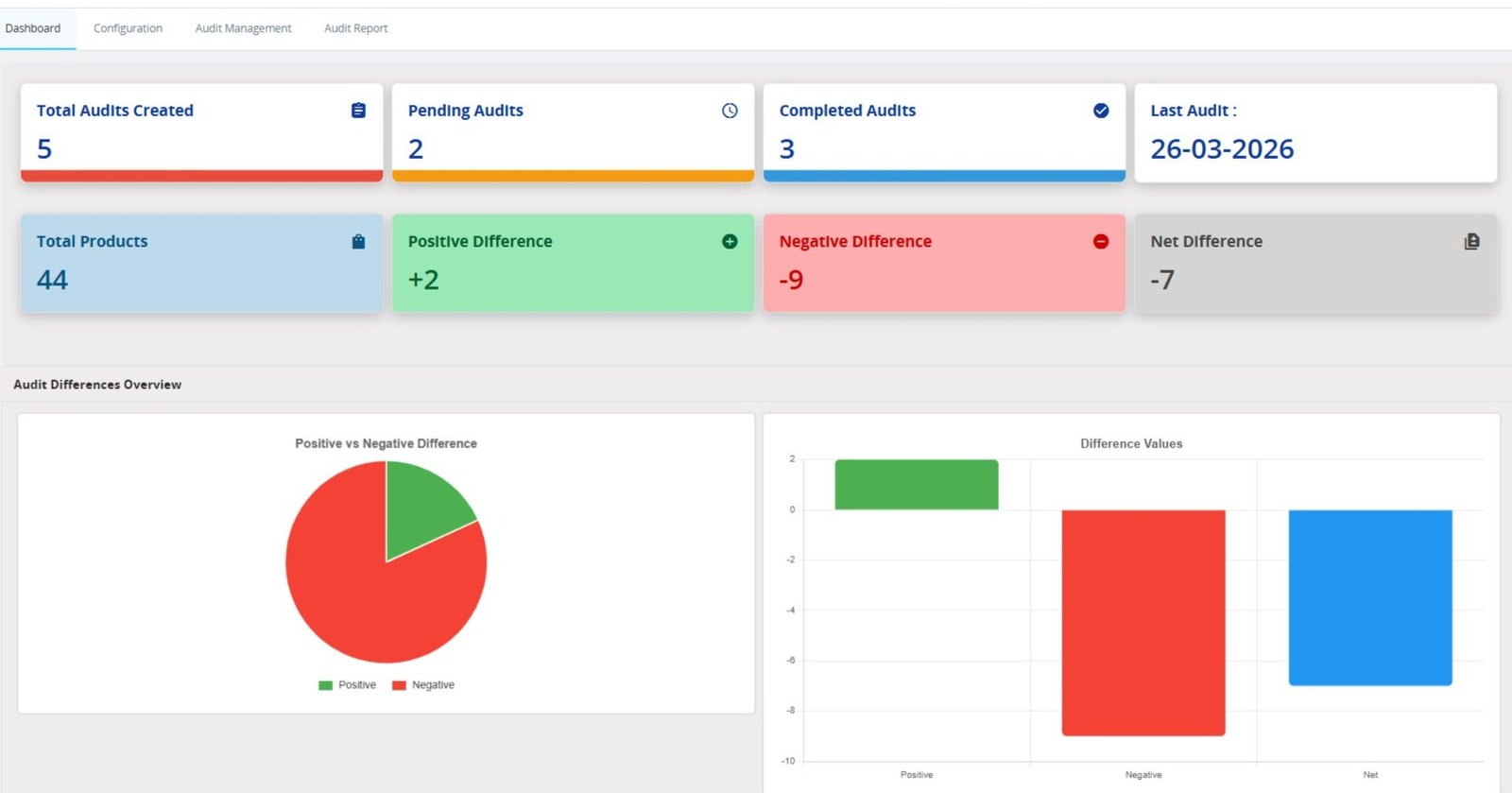
Step 3: Get a real-time overview of your inventory audits with key metrics like total audits, stock differences, and product coverage—all in one powerful dashboard.
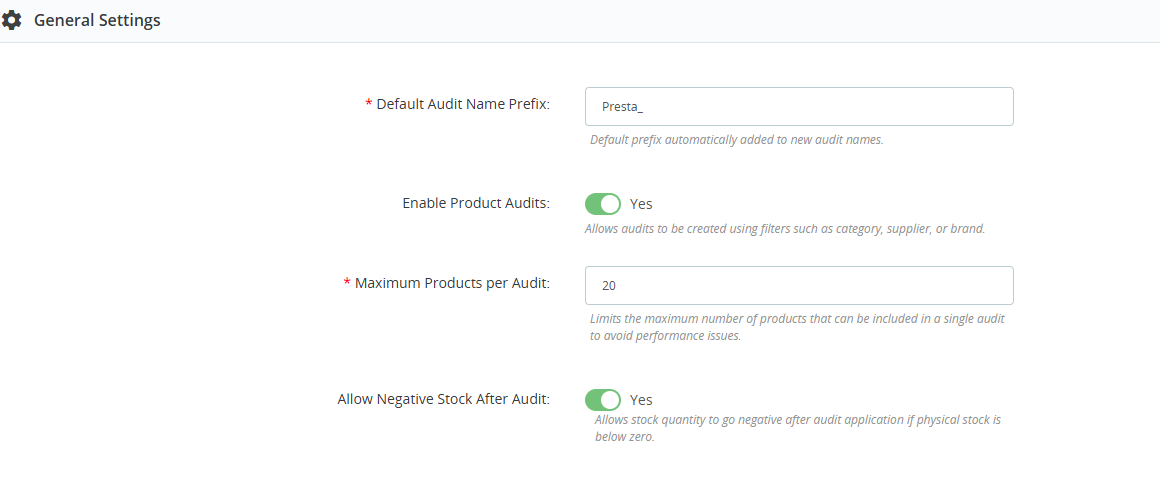
Step 4: Easily customize your inventory audit process with powerful settings—control product limits, enable smart filtering, and define stock behavior with full flexibility.
Step 5: Control how products load and display during audits with smart pagination and preloading—ensuring faster performance even with large catalogs.
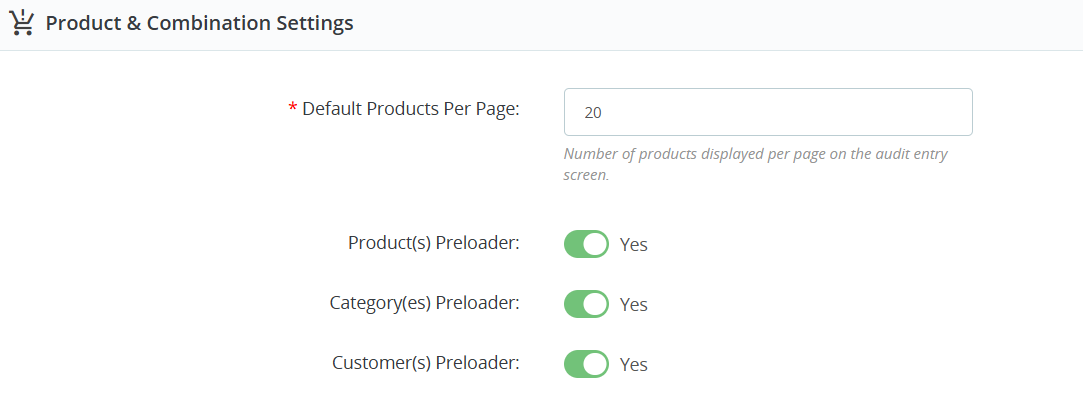
- Configure default products per page settings to improve audit entry screen performance and manage large inventory catalogs efficiently.
- Enable product preloader functionality for faster product loading and smoother inventory audit operations during stock verification processes consistently.
- Use category preloader settings to quickly access product categories and simplify inventory audit filtering management operations effectively.
- Activate customer preloader options for better customer-related inventory management and improved operational audit workflow performance significantly.
- Improve audit screen responsiveness by limiting displayed products per page and reducing unnecessary system loading operations effectively.
- Simplify inventory audit management using centralized product and combination configuration settings directly from the administration panel easily.
- Optimize inventory verification performance for businesses handling large product databases and complex stock management operations daily efficiently.
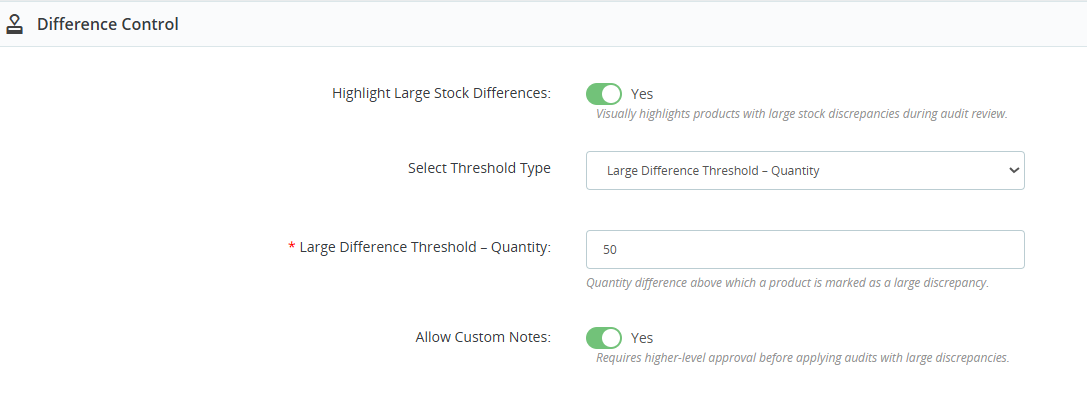
Step 6: Detect and highlight large stock discrepancies instantly with customizable thresholds, ensuring better accuracy and smarter inventory decisions.
(A) Advanced Stock Difference Control & Alerts
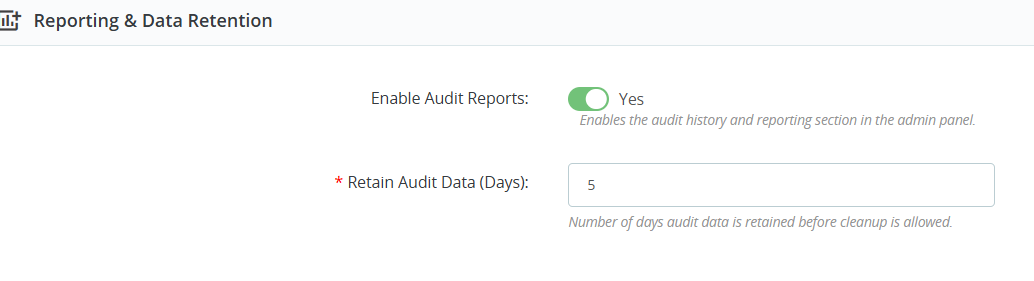
- Enable detailed audit reports to monitor inventory verification activities and maintain complete stock audit history records systematically and efficiently.
- Access centralized reporting sections directly from the administration panel for better inventory analysis and operational audit management control.
- Retain audit data for specific durations to ensure proper inventory record maintenance and future stock verification reference requirements.
- Configure audit data retention periods according to business compliance policies and inventory management operational requirements effectively and securely.
- Maintain organized inventory audit history for tracking stock discrepancies, inventory adjustments, and warehouse operational activities continuously and accurately.
- Improve inventory transparency using advanced audit reporting functionalities designed for accurate stock verification and management workflow monitoring processes.
- Store historical audit records securely for future analysis, compliance reporting, and operational inventory performance evaluation requirements consistently maintained.
- Simplify inventory report management through configurable audit retention settings directly accessible from centralized administrative configuration panels easily.
- Monitor inventory audit activities efficiently using detailed reporting systems that improve stock accuracy and warehouse operational visibility significantly.
- Prevent unnecessary database overload by automatically cleaning outdated audit records after configured inventory data retention periods expire successfully.
Improve business decision-making using historical inventory audit reports containing detailed stock movement and discrepancy tracking information accurately maintained.
2. Export Setting:
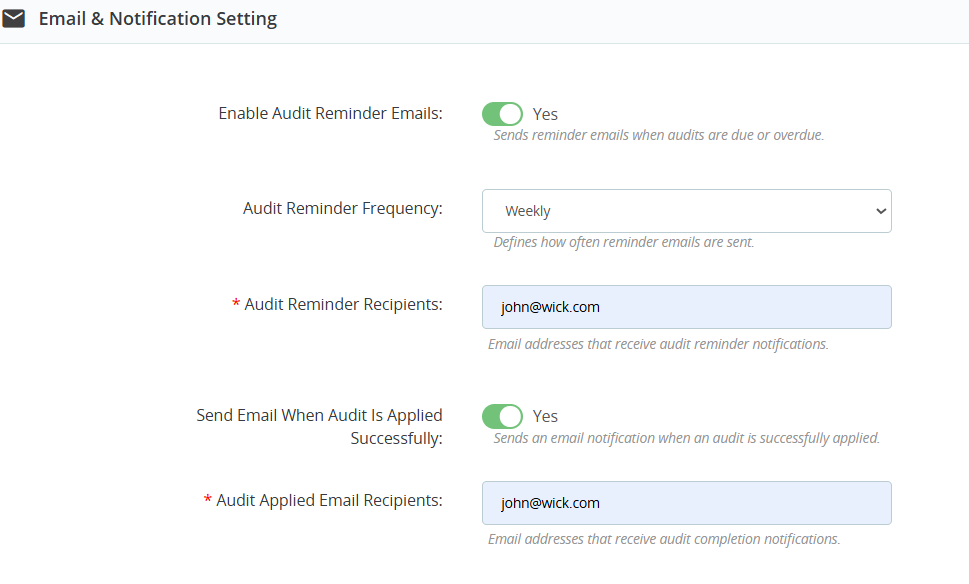
- Enable automated audit reminder emails to notify responsible employees about upcoming or overdue inventory verification tasks and audit schedules regularly.
- Configure weekly audit reminder frequencies to ensure timely inventory audits and maintain accurate stock verification management processes consistently.
- Send automated email notifications directly to assigned recipients responsible for inventory audit monitoring and warehouse stock verification operations efficiently.
- Improve inventory management communication through scheduled audit reminder emails sent automatically to designated warehouse and operational staff members.
- Ensure inventory audits are completed on time using configurable email reminder systems and automated notification management functionalities effectively integrated.
3. Real-time setting
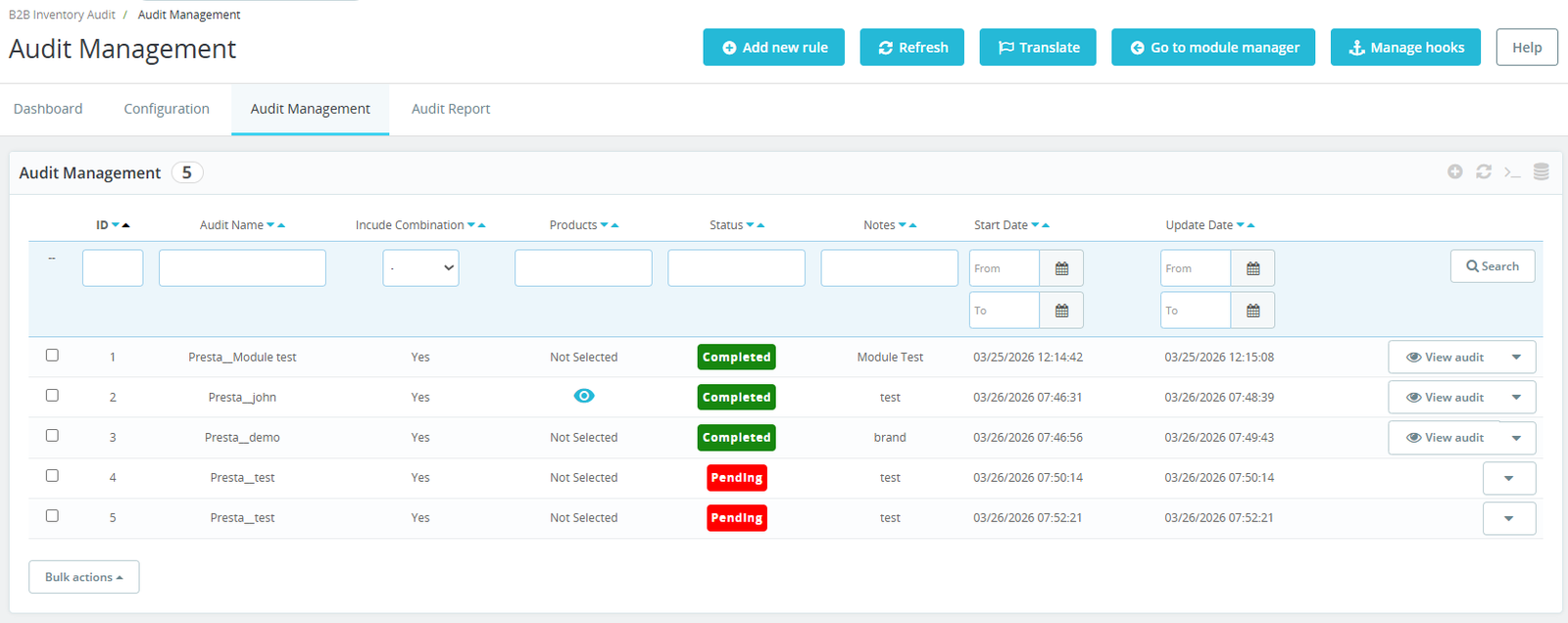
(i) Manage all inventory audits from a centralized dashboard designed for efficient stock verification and operational inventory control management processes.
(ii) Create new inventory audit rules quickly using dedicated management tools for organized warehouse stock verification operations and workflow handling.
Step 7: Easily set up precise inventory audits by selecting products, categories, brands, or suppliers—perfect for handling large catalogs efficiently.
1. Import Setting :
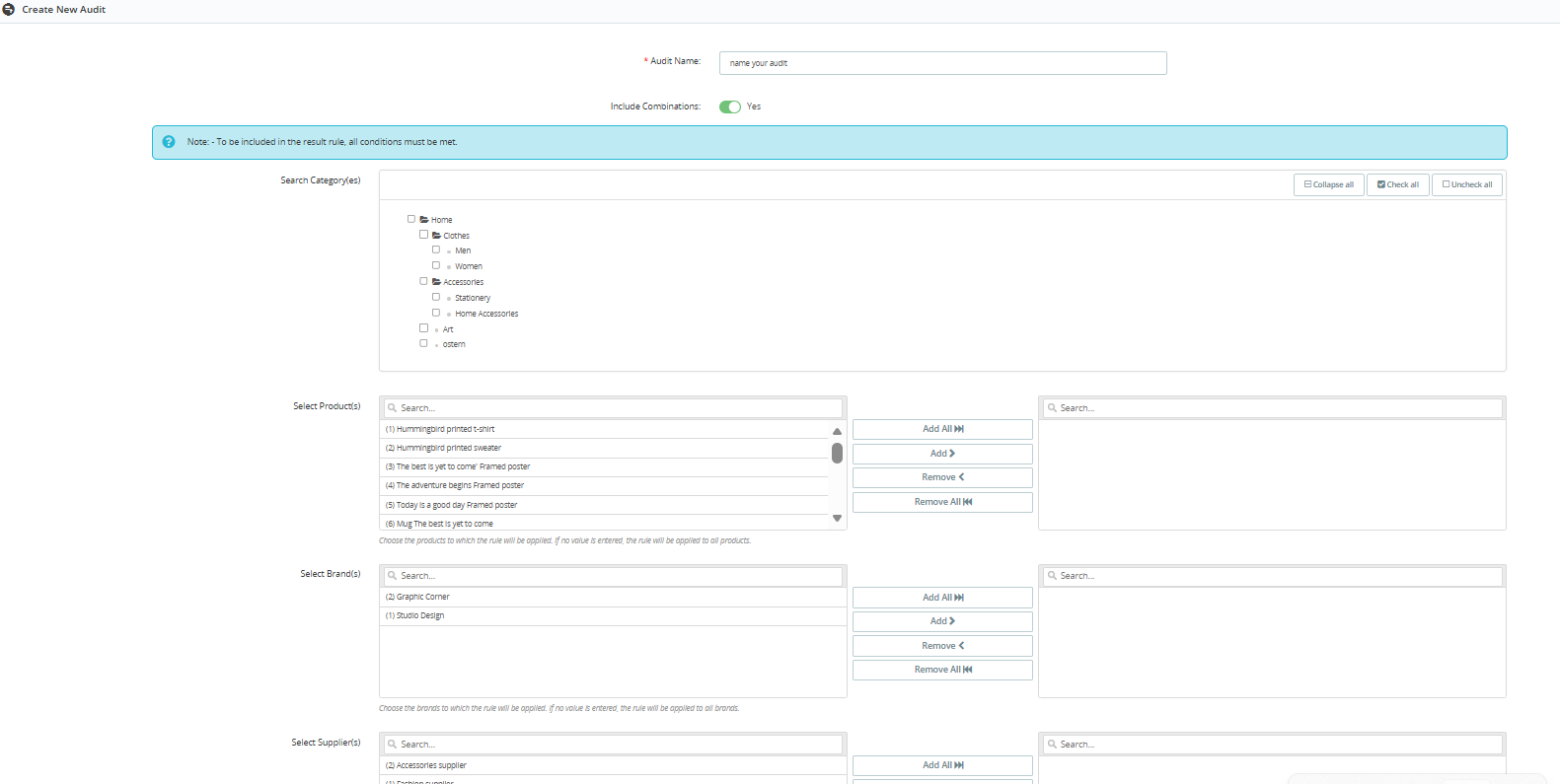
- Create customized inventory audits by selecting categories, products, brands, and suppliers for accurate stock verification management processes efficiently.
- Configure audit names easily for better identification and organized inventory audit workflow management across warehouse operations consistently maintained.
- Include product combinations during audits to ensure accurate stock tracking and detailed inventory verification management procedures effectively performed.
- Select specific product categories for targeted inventory audits and improved warehouse stock verification operational accuracy significantly enhanced.
- Search and filter categories quickly using integrated category selection tools designed for organized inventory management workflows conveniently accessible.
2. Real-time setting:
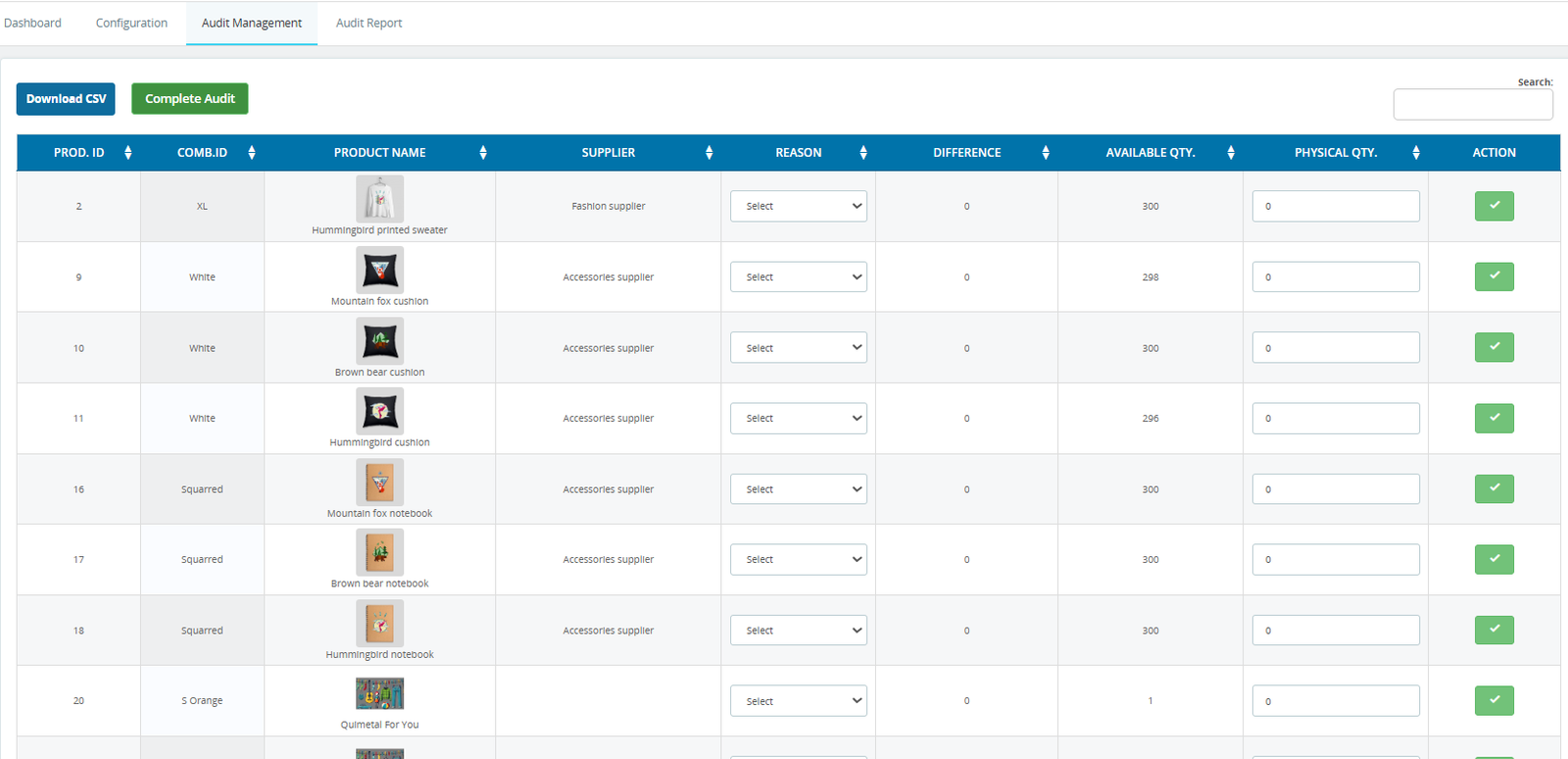
- Download inventory audit data instantly in CSV format for reporting, accounting analysis, and warehouse stock verification documentation purposes efficiently.
- Complete inventory audits directly from the management panel after verifying physical quantities and stock discrepancy information accurately entered.
- Compare available stock quantities with physical inventory counts for accurate warehouse stock verification and inventory management operations consistently maintained.
- Enter physical stock quantities manually during audits to identify inventory mismatches and improve warehouse operational accuracy significantly enhanced.
- Track product combinations and variants for detailed inventory verification and accurate stock management workflow operations effectively organized.
Step 8: Analyze every audit with detailed reports including stock differences, adjustments, and timelines—perfect for tracking inventory accuracy over time.
1. Import Setting :
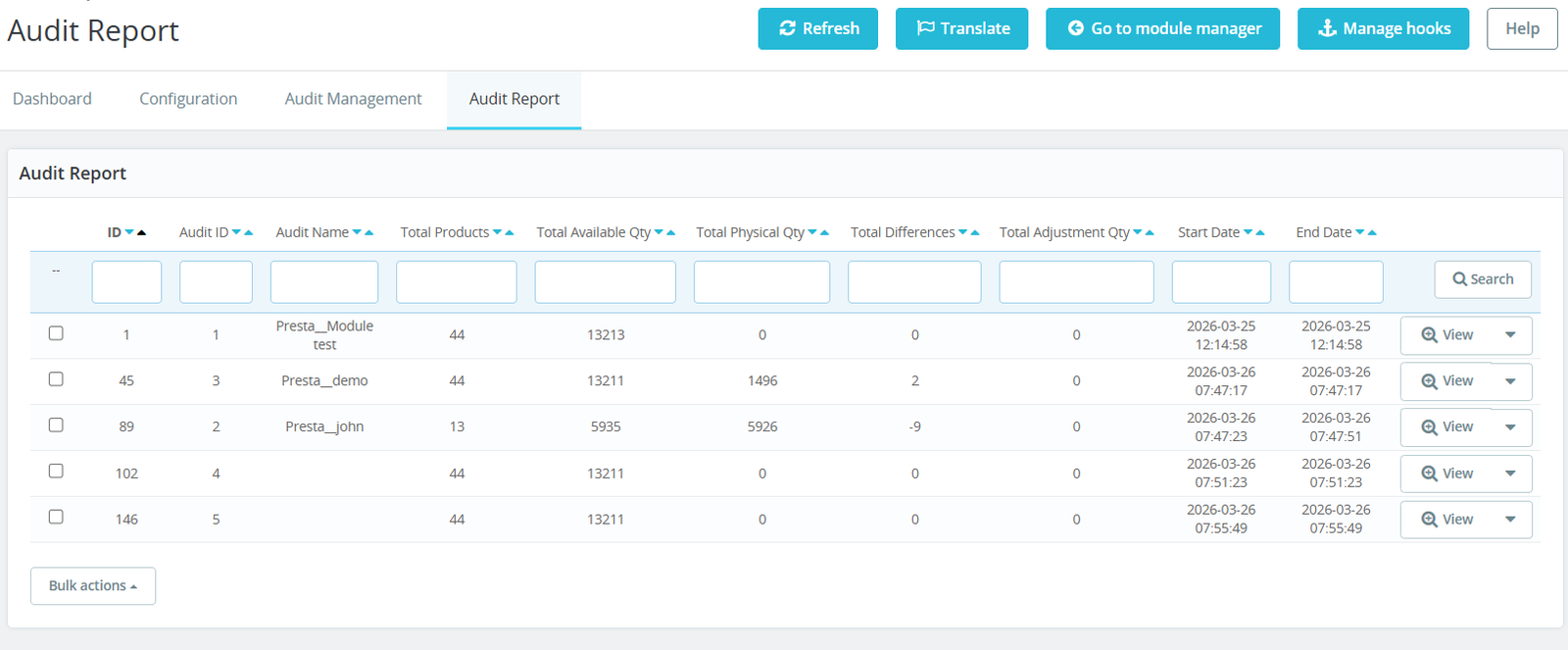
- View detailed inventory audit reports from a centralized dashboard for efficient stock verification and operational inventory performance monitoring consistently maintained.
- Track total products included in inventory audits for accurate warehouse stock management and inventory verification reporting operations effectively organized.
- Monitor total available stock quantities during audits to maintain accurate inventory tracking and warehouse operational visibility continuously improved.
- Compare physical inventory quantities against available stock records for reliable warehouse verification and discrepancy analysis management procedures efficiently.
- Identify total inventory differences instantly through structured audit reports designed for operational stock verification and inventory control accuracy significantly enhanced.
- Track inventory adjustment quantities directly within audit reports for better warehouse stock correction and operational inventory management oversight effectively maintained.
- Monitor audit start and end dates to maintain organized inventory verification schedules and warehouse operational accountability consistently documented.
- Access detailed audit records quickly using integrated view options for improved inventory analysis and warehouse management operations effectively streamlined.
- Simplify inventory report searching through advanced filtering tools designed for faster audit record retrieval and operational efficiency improvements significantly.
- Manage multiple inventory audit reports simultaneously from centralized dashboards supporting accurate warehouse stock verification management continuously maintained.
Why Use the B2B Inventory Audit & Stock Verification Manager Module?
Managing inventory accurately is essential for every growing B2B business. Manual stock verification methods often create inventory mismatches, operational delays, warehouse confusion, and financial losses. The B2B Inventory Audit & Stock Verification Manager Module provides a complete solution for performing professional inventory audits with accuracy, automation, and efficiency.
Here are the major reasons why businesses should use this powerful module:
1. Perform Inventory Audits Without Stopping Sales
The module allows businesses to continue store operations while inventory audits are running. Customers can place orders normally without interruptions.
2. Improve Inventory Accuracy
Accurate stock verification helps businesses reduce mismatches between physical inventory and system quantities, improving overall warehouse management efficiency.
3. Manage Large Product Catalogs Easily
The module is optimized for large inventories and supports smart filtering, pagination, and product preloaders for smooth performance.
4. Real-Time Stock Snapshot Functionality
Automatically capture inventory snapshots when audits begin to ensure accurate stock comparisons during warehouse verification procedures.
5. Detect Inventory Discrepancies Quickly
Instantly identify positive and negative stock differences using visual indicators and customizable discrepancy threshold management settings.