

In the fast-paced world of eCommerce, customers expect a smooth and uninterrupted shopping experience. Many shoppers browse products as guests, add items to their carts, and later decide to create an account or log in. However, losing cart data or previous guest orders during this process can negatively impact customer satisfaction and increase cart abandonment.
The Guest Cart Login Merge & Order Signup Sync module for PrestaShop solves this problem by automatically merging guest carts with customer accounts and attaching previous guest orders, addresses, and shopping activity after registration or login.
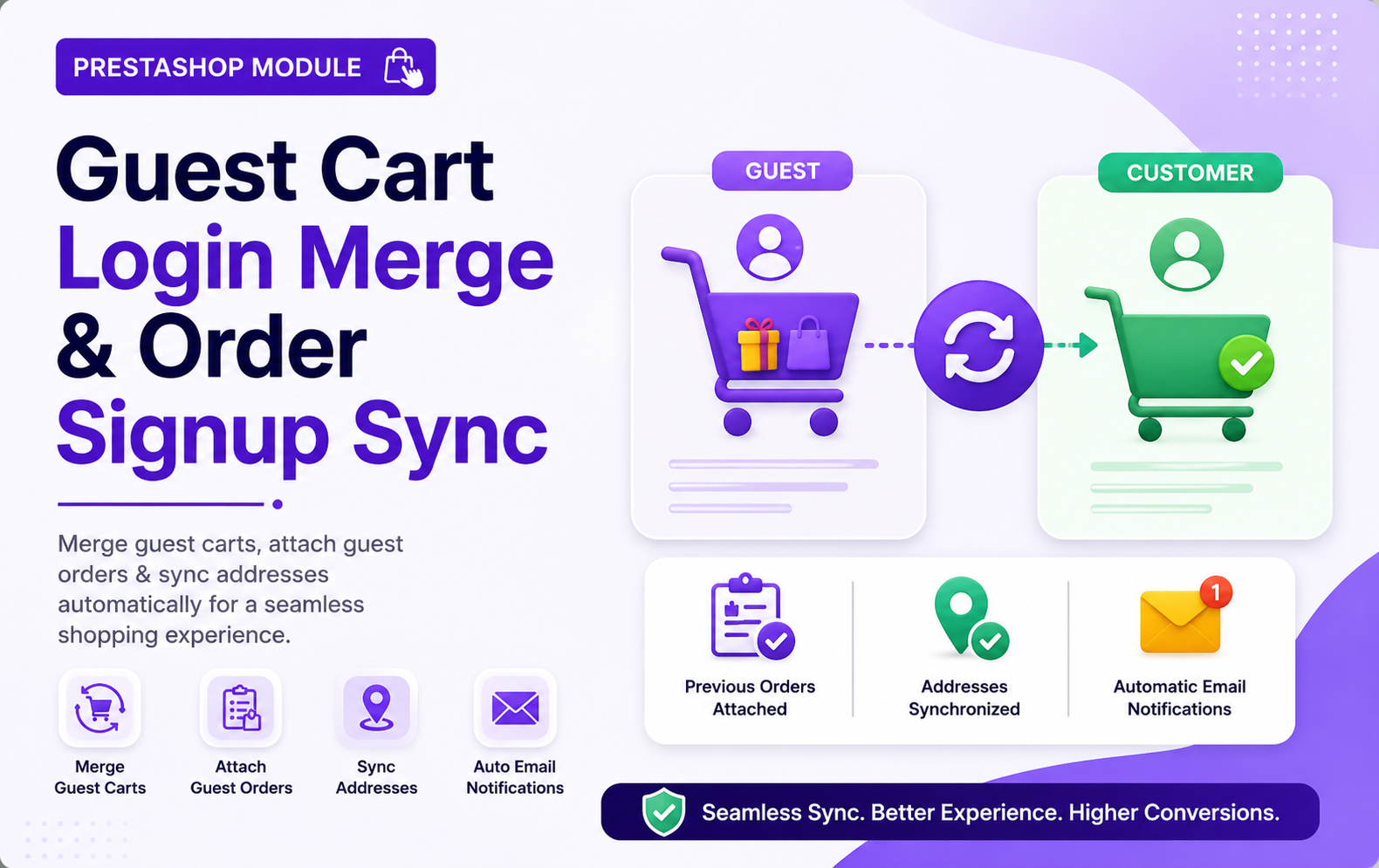
Key Features at a Glance
- Maintain complete customer purchase history by linking guest orders with registered customer accounts seamlessly.
- Detailed activity logs track cart merges, order attachments, customer actions, timestamps, and synchronization history accurately.
- Smart validation system ignores canceled or invalid guest orders during customer account synchronization process automatically.
- Dashboard reports display daily merge statistics, synced orders, address mappings, and customer activity information visually.
- Improve customer experience with uninterrupted shopping sessions between guest checkout and registered customer accounts seamlessly.
- Reduce cart abandonment rates by preserving customer shopping activity during login and account registration process.
- Support standard PrestaShop checkout flow and guest checkout functionality without requiring complex custom configuration changes.
- Fully automated background synchronization process works silently without interrupting customer shopping experience or store performance.
- Multi-store compatible module supports PrestaShop multishop environments for centralized guest and customer synchronization management.
- Enhance customer retention by preserving shopping data, addresses, and order history across multiple shopping sessions.
- manufacturing workflow interruptions effectively.
- Detect material shortages instantly with smart alerts and notifications for better manufacturing planning and inventory control management.
- Schedule production orders with planned manufacturing dates for improved workflow organization and operational efficiency management system.
- Configure production time and minimum production quantity for accurate planning and optimized manufacturing resource allocation processes.
Use Cases: Who Needs This Module?
- Online stores allowing guest checkout and customer account registration for smoother shopping continuity and improved customer experience management.
- eCommerce businesses struggling with abandoned carts caused by customers losing products after login or account creation process.
- PrestaShop merchants wanting to connect previous guest orders with registered customer accounts automatically using matching email addresses.
- Multi-device shopping stores where customers browse products as guests before logging in from another device later.
- Fashion and apparel stores needing uninterrupted shopping experiences while preserving carts, discounts, and customer purchase history accurately.
- Electronics stores handling large customer carts and requiring automatic synchronization between guest and registered shopping sessions seamlessly.
- Grocery and daily essentials stores wanting faster checkout experiences without forcing immediate customer account registration during purchases.
- High-traffic eCommerce stores needing automated guest-to-customer synchronization without manual order or address management efforts daily.
- Businesses aiming to improve customer retention by preserving shopping history, addresses, and previous guest purchases automatically.
- Stores offering promotional discounts and vouchers that must remain active during cart merge and synchronization operations.
Quick User Guide (Visual Walkthrough)
Scroll up to revisit the detailed image-wise walkthrough.
Simple Setup & Seamless Guest-to-Customer Synchronization Process
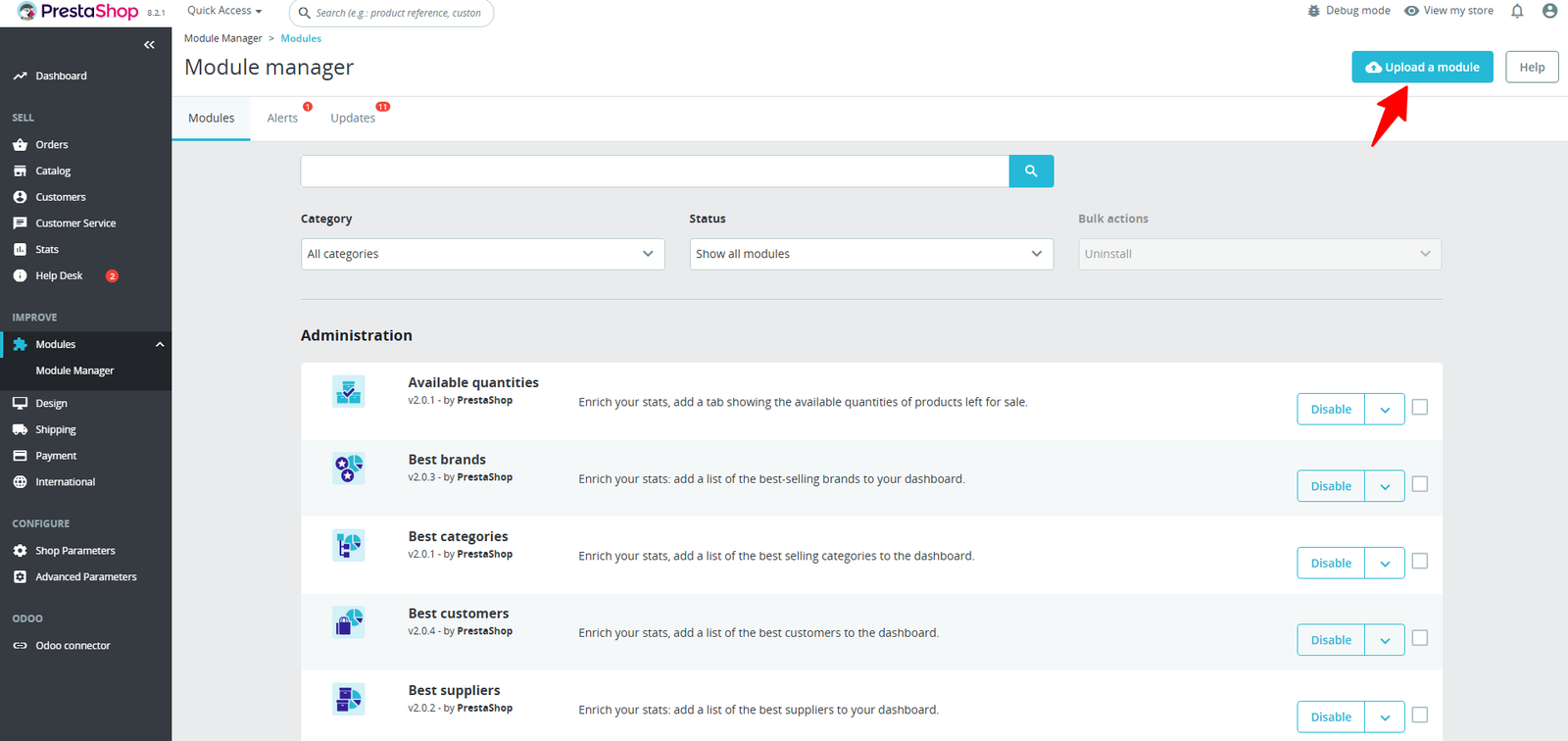
Step 1: Click Upload the Module in the Apps section.
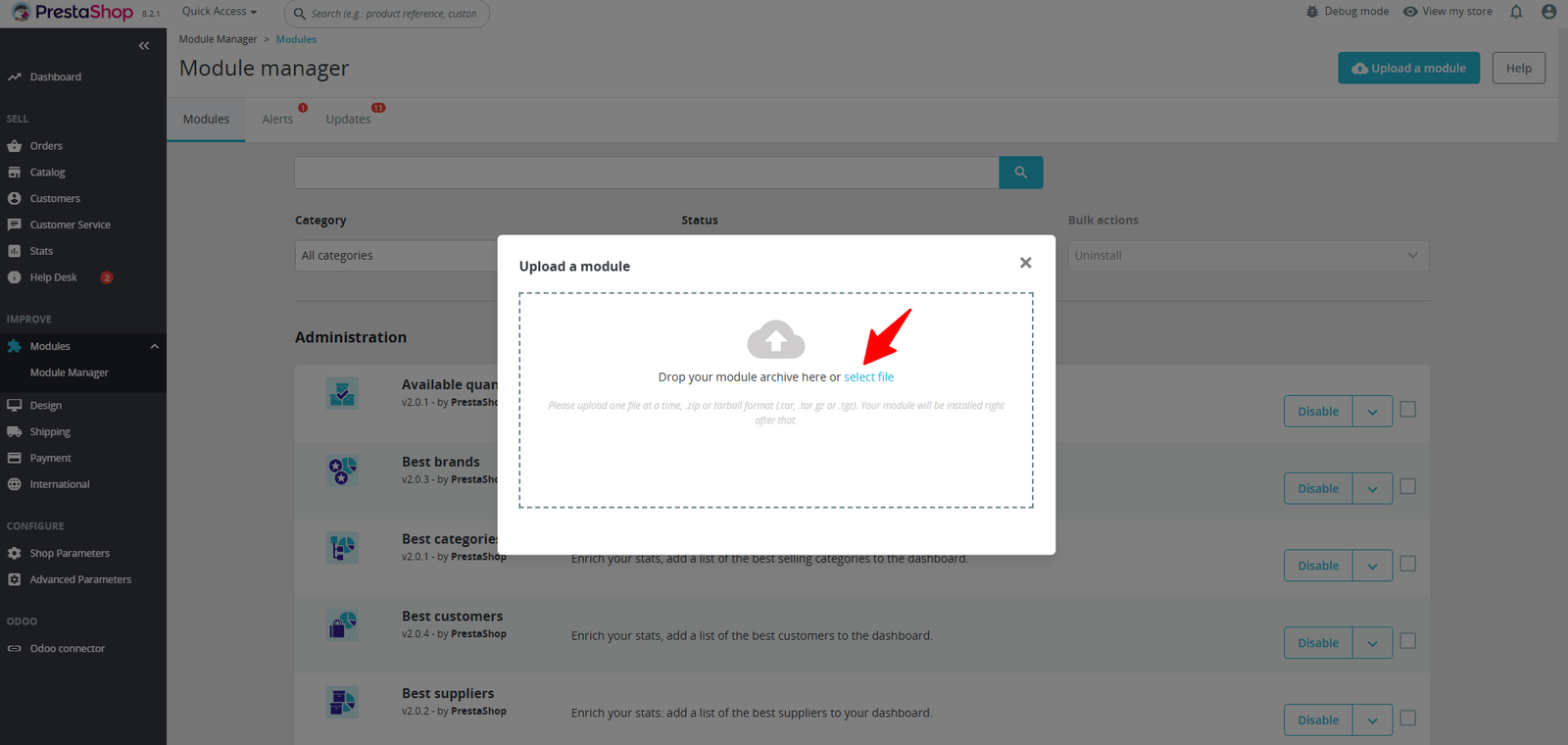
Step 2: Drag & drop the ZIP file or select from your system.
Step 3: Customers can add products to their cart without logging in. Their cart is safely stored and ready to be merged with their account after login.
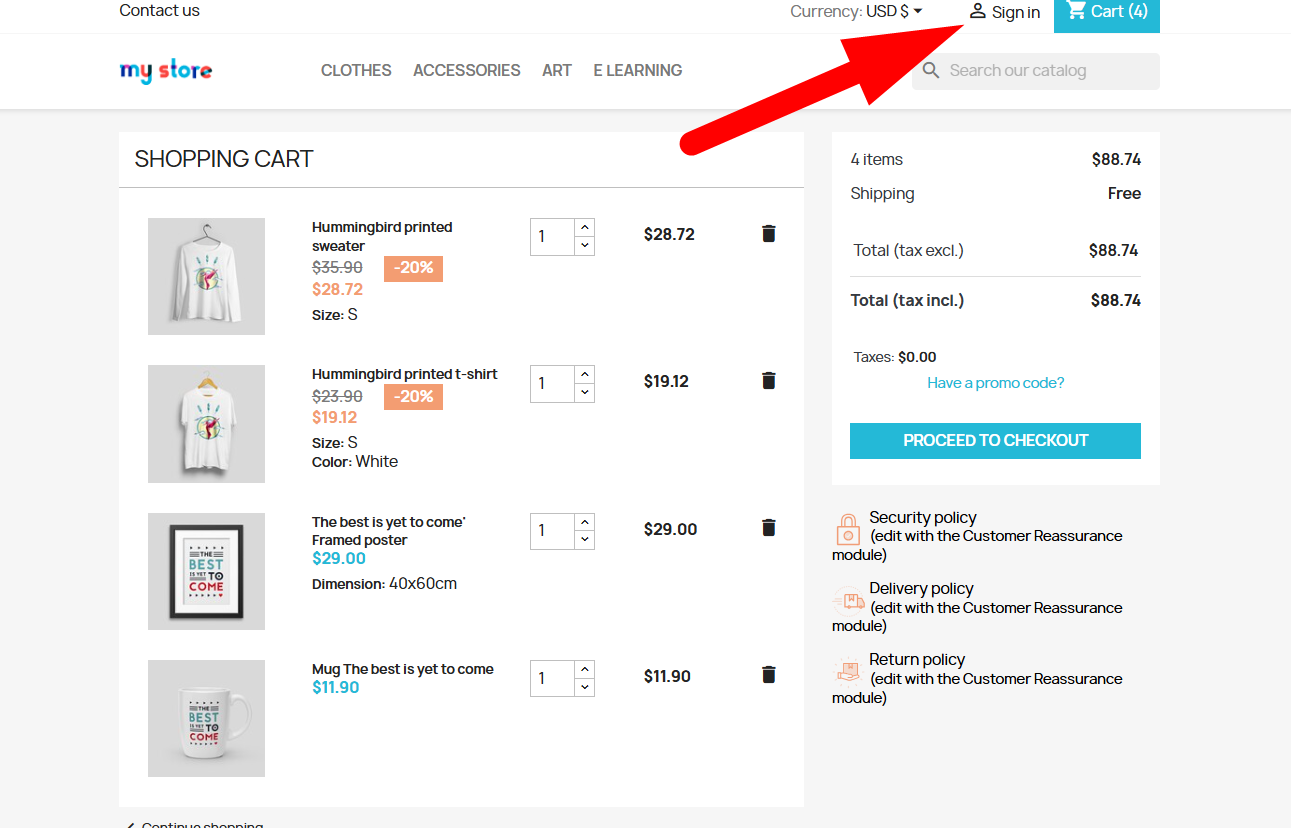
- Customers add products into the shopping cart as guests before deciding to sign in or create customer accounts later.
- Clicking the Sign In button starts the customer authentication process without removing existing guest cart shopping activities automatically.
- The module intelligently detects existing guest cart products during customer login and prepares synchronization between both shopping sessions.
- Guest cart products remain محفوظ and automatically transfer into the registered customer account after successful login process completion.
- Customers never lose selected products, quantities, discounts, or vouchers while switching from guest shopping to registered shopping accounts.
Step 4: When customers log in, the module detects their previous guest cart and lets them choose which items to keep — ensuring nothing is lost and shopping continues seamlessly.
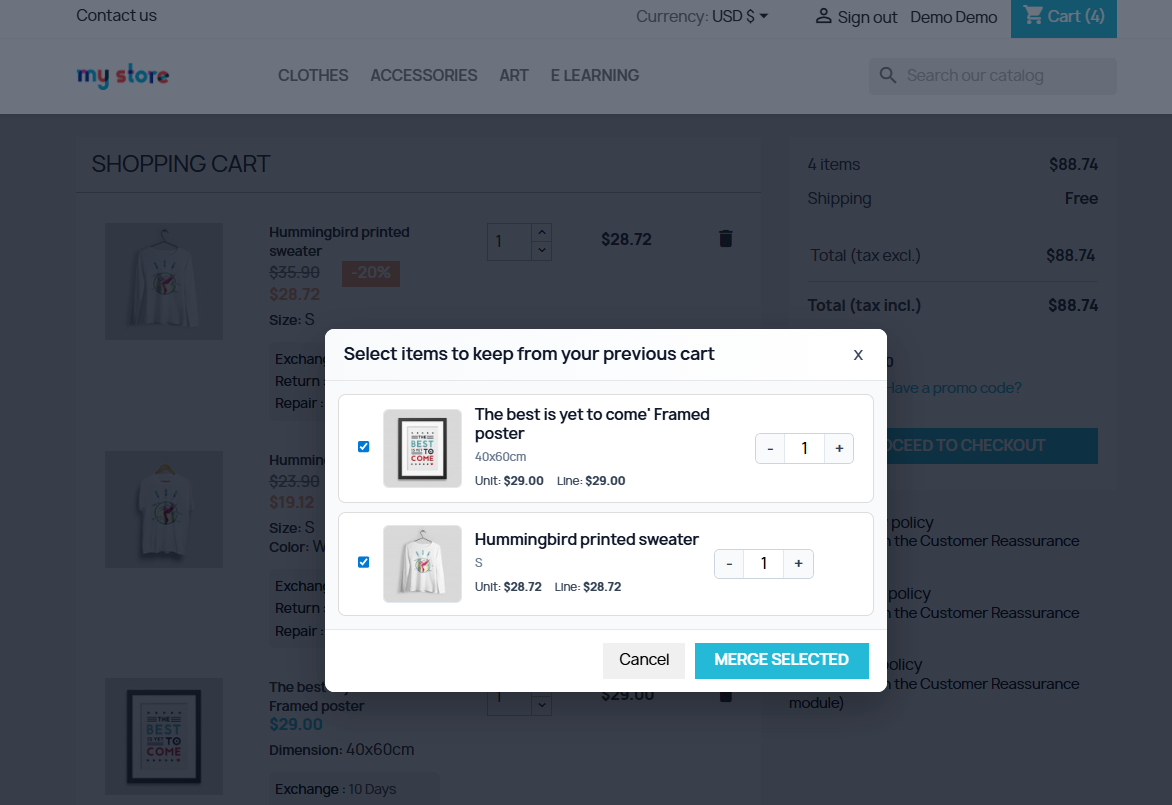
- Customers can manually choose which guest cart products they want to keep after successfully logging into their customer accounts.
- The module displays a smart popup allowing customers to review previous guest cart products before completing synchronization operations automatically.
- Customers gain full control over cart merging by selecting only required products from previous guest shopping sessions easily.
- Product quantities can be adjusted directly inside the merge popup before transferring items into the registered customer shopping cart.
- The merge selection popup creates a more flexible and personalized shopping experience for customers during login activities online.
Step 5: Customers can place orders as guests, and when they later register with the same email, their previous orders and addresses are automatically attached to their account for easy access.
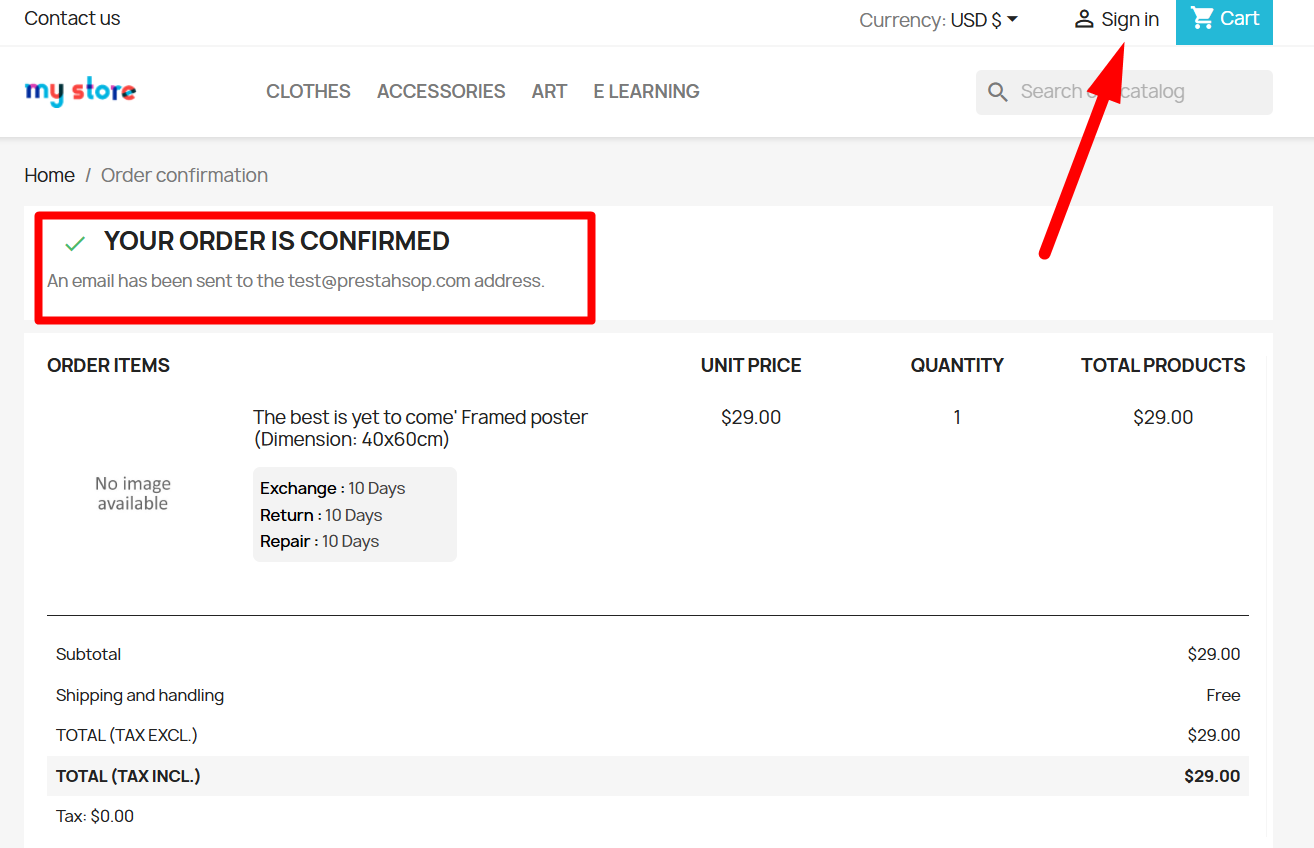
- Customers can place orders successfully as guests before deciding to sign in or create customer accounts later for synchronization purposes.
- The order confirmation page assures customers their purchase completed successfully while preserving shopping activity for future account synchronization automatically.
- Customers receive confirmation emails immediately after placing guest orders, improving trust and providing secure purchase verification information instantly online.
- The module allows customers to sign in later without losing previously completed guest orders or important purchase history records.
- Guest orders automatically connect with registered customer accounts when users sign in using identical email addresses during authentication process.
- Customers maintain complete order history visibility even when purchases were originally completed through guest checkout sessions previously online.
- The sign in option after order confirmation encourages customers to create accounts without disrupting completed purchase transactions successfully.
- Store owners can convert guest shoppers into registered customers while preserving previous order records and shopping activity automatically.
Step 6: Configure how guest carts, orders, and addresses are merged with customer accounts. Flexible settings let you automate the process while keeping full control over cart strategies, validations, and notifications.
(A) Full Control Over Guest Data Merging
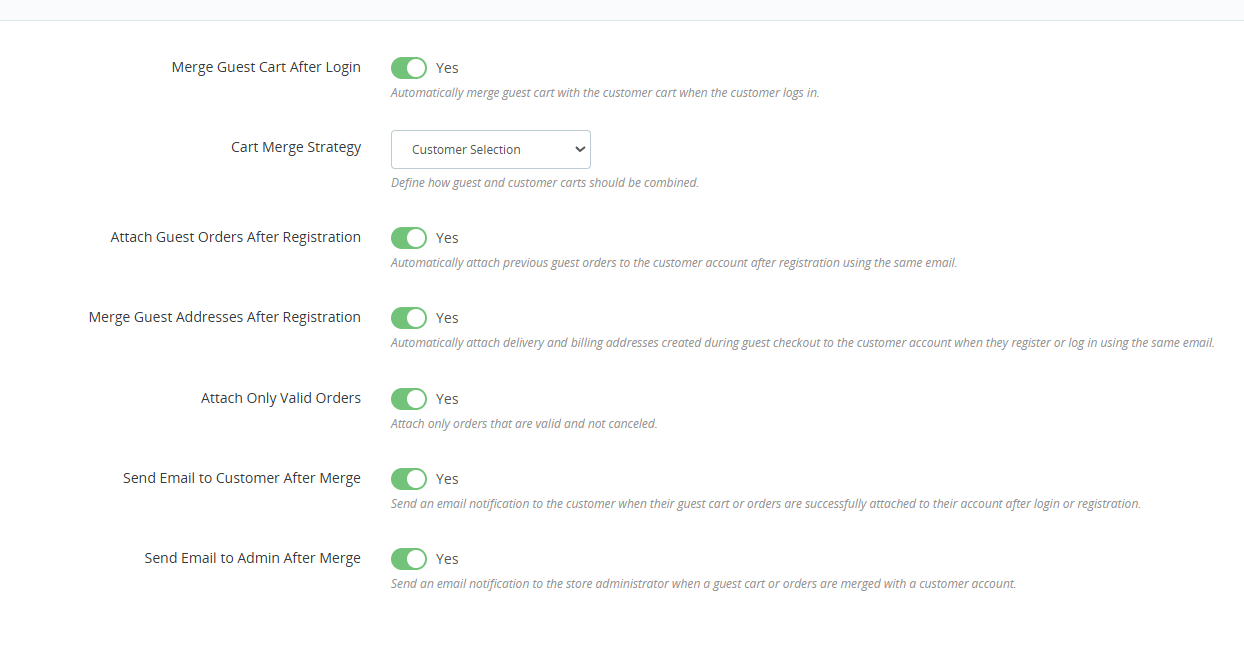
1. Import Setting :
- Enable automatic guest cart merging after customer login for uninterrupted shopping continuity and improved checkout experience across all user sessions.
- Configure flexible cart merge strategies allowing customer selection, cart replacement, or intelligent product synchronization between shopping sessions automatically.
- Automatically attach previous guest orders after customer registration using identical email addresses for complete purchase history management successfully.
- Merge guest checkout billing and delivery addresses directly into registered customer accounts after successful login or registration activities automatically.
- Attach only valid guest orders while ignoring canceled, refunded, or invalid purchases during synchronization and customer account merging operations.
- Send automatic email notifications to customers after successful guest cart, address, or order synchronization activities inside the online store.
- Notify store administrators instantly whenever guest cart or order information successfully merges with registered customer accounts automatically online.
- Customer selection merge strategy provides users complete control over which products remain after cart synchronization and login processes successfully.
2. Export Setting:
- Enable automatic guest cart merging after customer login for seamless shopping continuity and improved user experience across checkout sessions online.
- Customer Selection merge strategy allows users choosing preferred products before synchronizing guest cart items with registered customer accounts automatically.
- Attach guest orders after registration using matching email addresses to preserve complete purchase history inside customer accounts permanently.
- Merge guest checkout billing and delivery addresses automatically after customer registration for faster future checkout experiences and convenience.
- Attach only valid orders feature ignores canceled or invalid purchases during synchronization to maintain accurate customer order histories properly.
- Send automatic email notifications to customers after successful guest cart, address, or order synchronization activities inside the online store.
- Notify administrators instantly whenever guest carts or orders merge successfully with registered customer accounts during authentication processes automatically.
- Configuration settings provide flexible control over guest cart synchronization behavior according to specific business and shopping requirements efficiently.
3. Real-time setting
- Enable automatic guest cart merging immediately after customer login for seamless shopping continuity and uninterrupted checkout experiences across sessions.
- Customer Selection merge strategy allows shoppers choosing preferred products before synchronizing guest cart items with registered customer account carts.
- Automatically attach previous guest orders after registration using identical email addresses for maintaining complete customer purchase history records accurately.
- Merge guest checkout billing and delivery addresses directly into registered customer accounts after successful login or registration activities automatically.
- Attach only valid orders functionality prevents canceled or failed guest purchases from synchronizing with customer accounts during merge operations.
- Automatic customer email notifications confirm successful guest cart merging, synchronized orders, and account updates immediately after login activities online.
- Admin email notifications alert store administrators whenever guest carts or guest orders successfully synchronize with registered customer accounts automatically.
- Real-time configuration settings provide merchants complete control over guest cart synchronization workflows and customer account integration processes efficiently.
Step 7: Track every cart, order, and address merge with detailed logs. Monitor customer activity, verify successful merges, and maintain full transparency of all automated actions.
1. Import Setting :
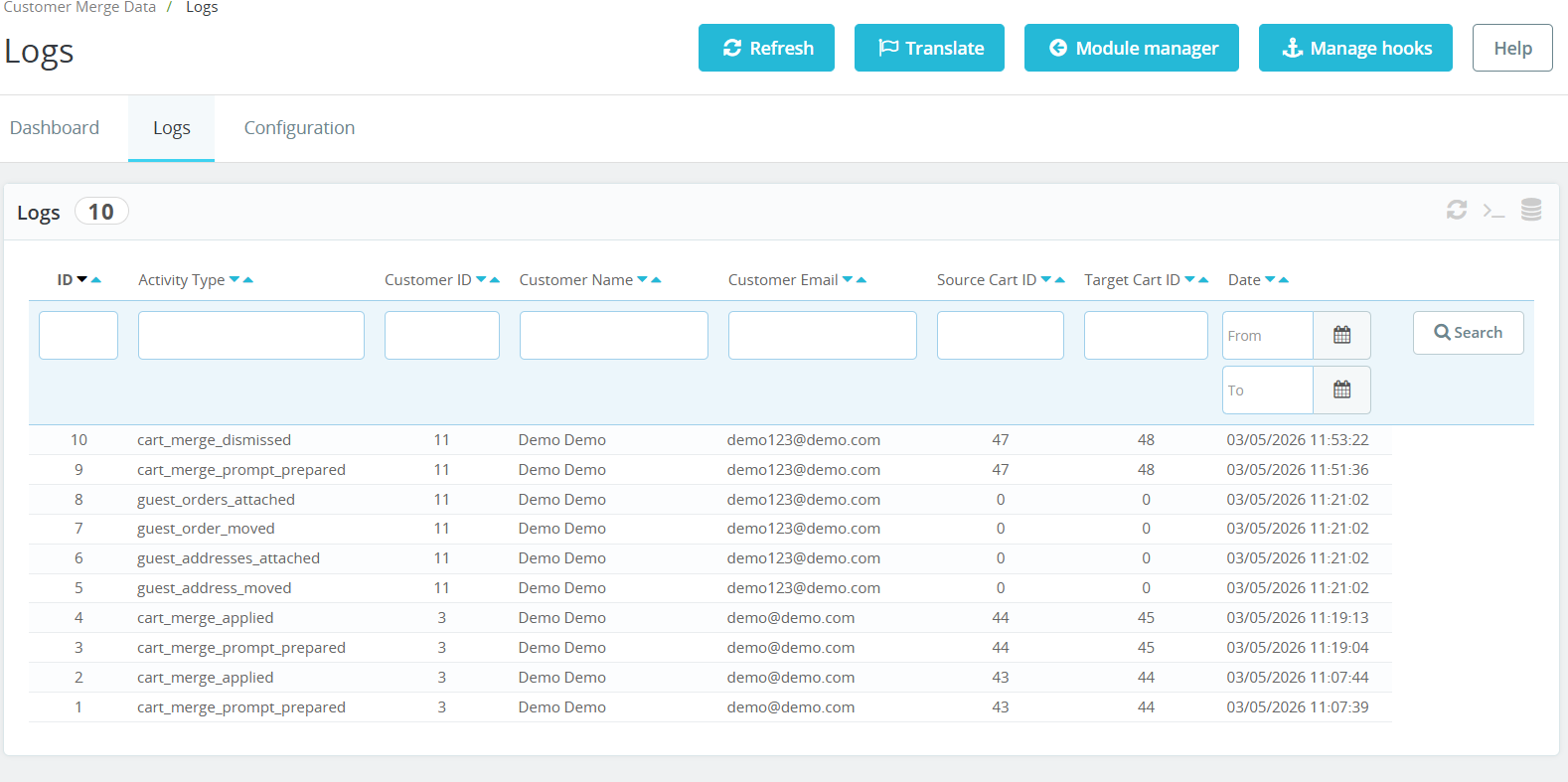
- Detailed activity logs track every guest cart merge operation with customer information, timestamps, and synchronized shopping session details accurately.
- Store administrators can monitor guest order attachments and customer account synchronization activities directly from the centralized logs management dashboard.
- The logs section records cart merge preparation events before final synchronization between guest carts and registered customer accounts automatically.
- Customer email addresses inside logs help administrators identify synchronized shopping activities and troubleshoot account synchronization issues efficiently online.
- Source cart and target cart identifiers provide complete visibility into cart transfer operations during customer login synchronization processes accurately.
- Real-time logging improves transparency by recording every synchronization action performed between guest checkout sessions and registered customer accounts automatically.
- Administrators can filter synchronization records using customer names, email addresses, cart identifiers, and activity types easily within dashboard.
- Date filtering functionality helps businesses analyze synchronization activities and customer merge operations during specific shopping periods accurately online.
2. Real-time setting:
- Real-time activity logs track every guest cart merge, order synchronization, and customer account attachment operation automatically inside the store dashboard.
- Store administrators can monitor customer merge activities instantly using detailed logs containing cart IDs, timestamps, and synchronization status information.
- The logs dashboard records successful guest order attachments after customer registration using matching email addresses for accurate purchase tracking.
- Every cart merge operation appears automatically inside activity logs, helping merchants monitor synchronization workflows and customer shopping behavior efficiently.
- Source cart and target cart identifiers provide complete visibility into guest-to-customer cart synchronization activities within store management systems.
- Customer email tracking inside logs helps administrators identify synchronized guest accounts and monitor merge operations accurately across shopping sessions.
- Real-time timestamps record exact synchronization activity moments for better auditing, troubleshooting, and customer account management processes efficiently online.
- The logs system maintains organized records for guest address synchronization, order movement, and cart merge confirmation activities automatically.
Step 8: Get a complete overview of guest data merging with visual reports, daily activity tracking, and real-time statistics for orders, carts, and addresses.
1. Import Setting :
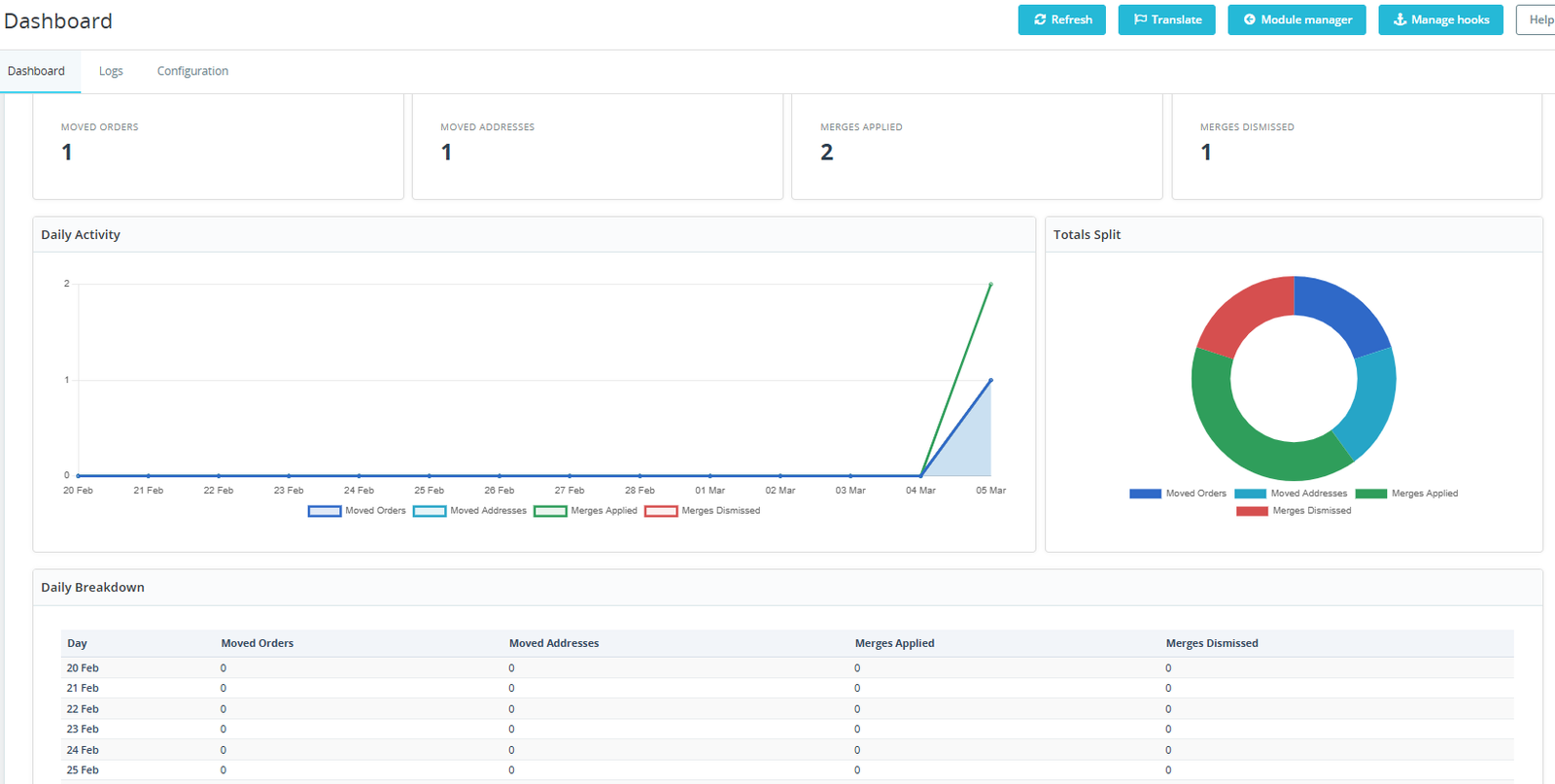
- Dashboard statistics provide real-time insights into moved orders, synchronized addresses, successful cart merges, and dismissed merge activities automatically.
- Store administrators can monitor guest-to-customer synchronization performance using visual charts and daily activity reporting tools efficiently online.
- Daily activity graphs display real-time synchronization trends helping merchants analyze customer merge behavior and shopping continuity patterns accurately.
- The dashboard summarizes moved orders instantly, improving visibility into successful guest order attachments after customer account registration activities online.
- Real-time moved address statistics help administrators track synchronized billing and delivery information across customer shopping sessions automatically and efficiently.
- Merge applied counters display successful synchronization operations, helping businesses evaluate module performance and customer shopping experience improvements consistently online.
- Merges dismissed reports identify customer-selected synchronization cancellations for better analysis of cart merge preferences and shopping behaviors accurately.
- Visual donut charts provide quick understanding of synchronization distribution between orders, addresses, successful merges, and dismissed merge activities clearly.
- Daily breakdown tables organize synchronization records by date for simplified reporting, monitoring, and customer merge activity analysis purposes efficiently.
- Real-time analytics improve administrative decision-making by displaying synchronization performance metrics directly inside the module dashboard interface automatically online.
Why Use the Guest Cart Login Merge & Order Signup Sync Module?
- Seamlessly merges guest cart products into customer accounts after login, preventing cart loss and improving the overall shopping experience significantly.
- Automatically syncs guest checkout orders with newly registered customer accounts, ensuring order history remains organized, accurate, and easily accessible.
- Helps increase customer satisfaction by preserving shopping activity during login, registration, or account creation without requiring manual cart recovery efforts.
- Reduces abandoned carts by maintaining selected products after authentication, encouraging users to complete purchases without restarting their shopping journey.
- Enhances store efficiency through automated customer-order synchronization, minimizing administrative tasks and eliminating duplicate or disconnected guest order records.
- Provides a smooth omnichannel shopping experience by keeping carts and orders connected across sessions, devices, and customer account interactions.
- Improves customer retention by offering a personalized shopping experience where previous guest activities remain linked after account registration or login.
- Supports better order management by associating historical guest purchases with registered customers, making tracking, support, and future marketing easier.