

Managing shipping manually can be time-consuming for businesses using Odoo. From calculating delivery costs and selecting shipping methods to generating labels and tracking shipments, every additional step can increase operational effort.
The Canada Post Shipping Integration for Odoo is designed to simplify this process by connecting Odoo with Canada Post. It allows businesses to calculate shipping costs, apply delivery charges, create shipments, generate shipping labels, and manage tracking information directly from Odoo.
With a centralized dashboard and dedicated shipping management screens, businesses can keep their Canada Post shipping operations organized and reduce manual work.
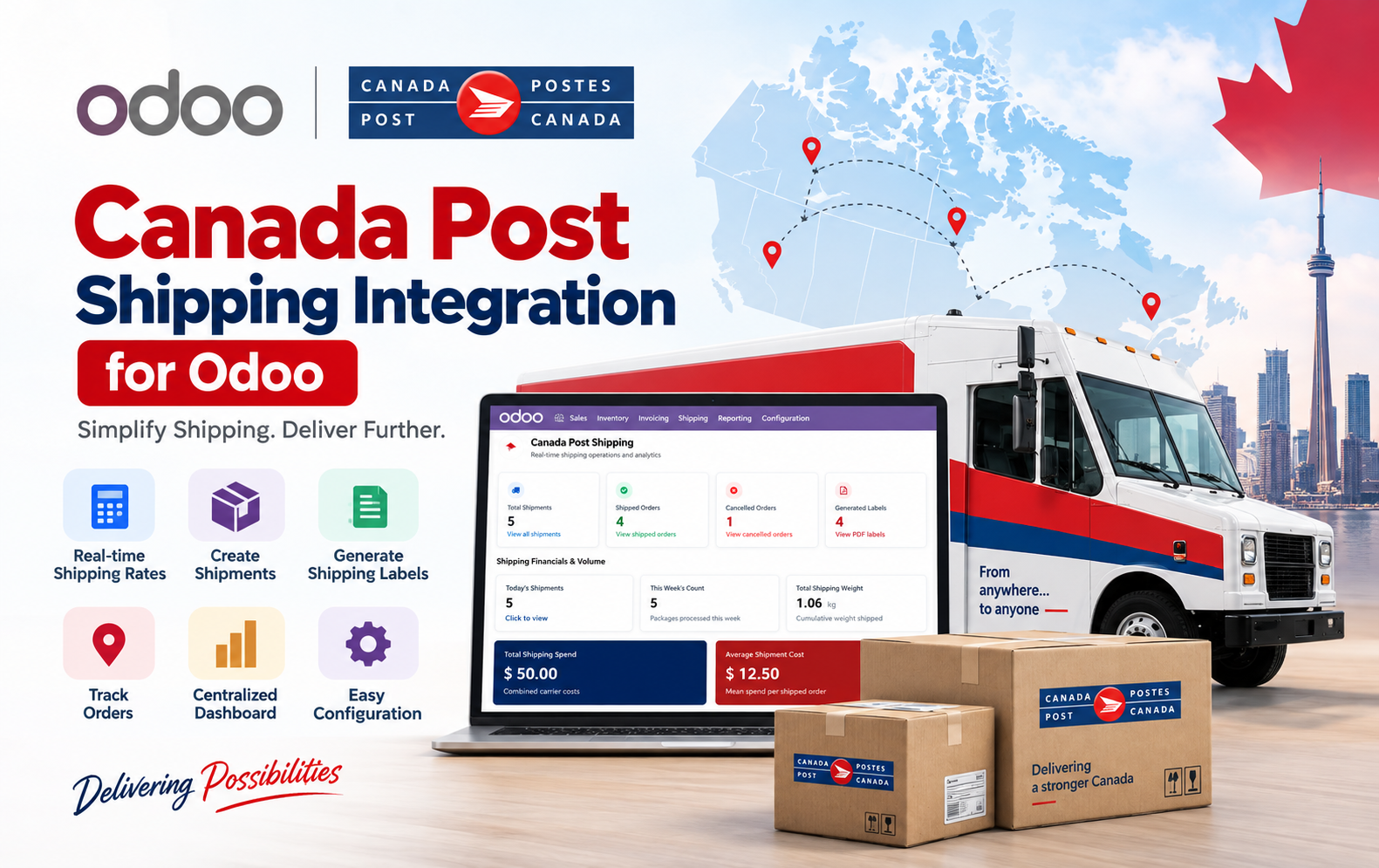
Key Features at a Glance
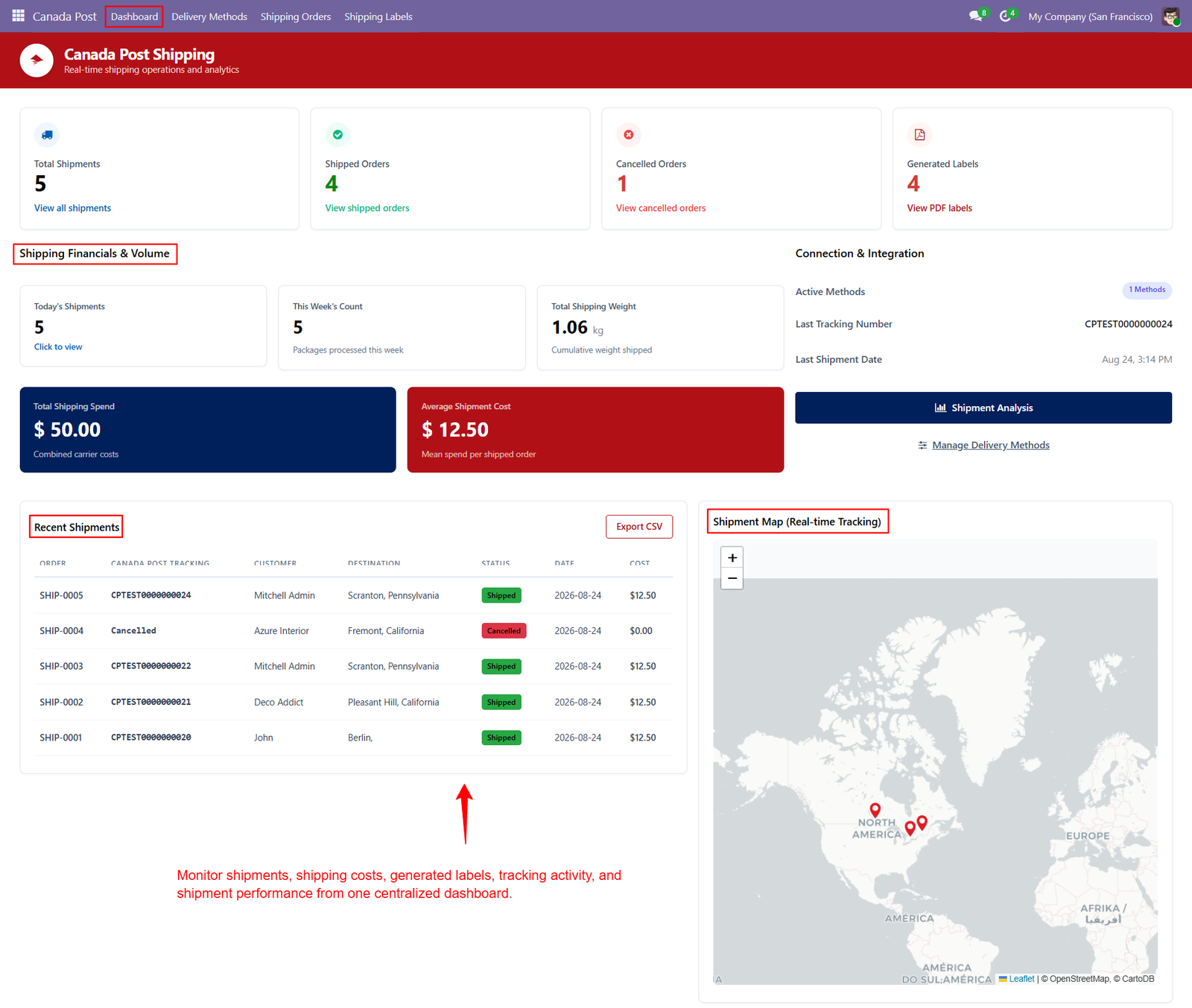
- Centralized Shipping Dashboard — Monitor shipments, costs, labels, tracking activity, and overall shipping performance from one centralized Odoo dashboard.
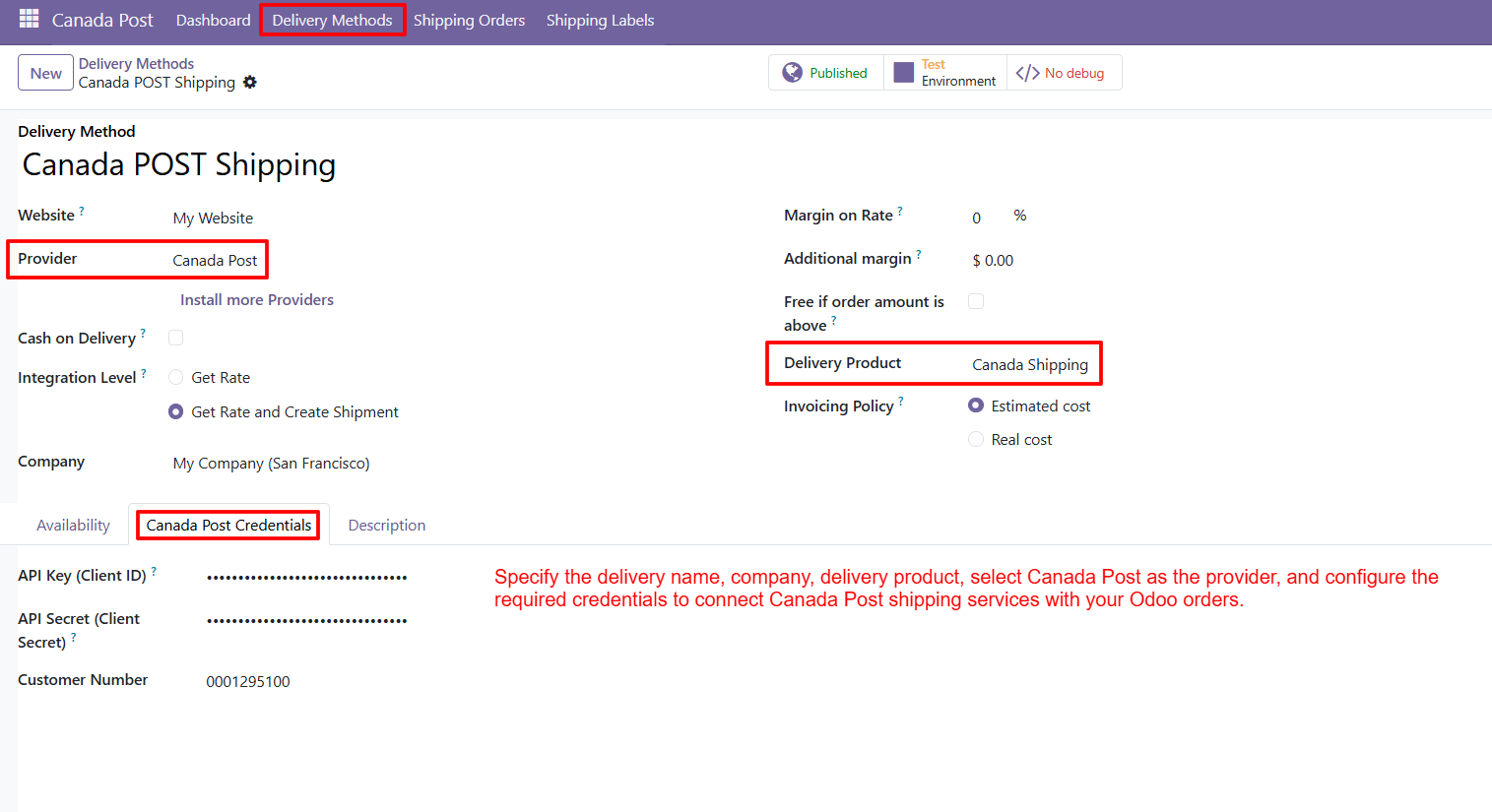
- Canada Post Delivery Configuration — Configure Canada Post as the delivery provider with company, delivery product, and required API credentials.
- Shipping Rate Calculation — Calculate applicable Canada Post shipping costs based on order and shipment details directly within Odoo.
- Real-Time Shipping Rates — Obtain shipping rates through the Canada Post shipping integration during the order fulfillment process.
- Easy Checkout Shipping Selection — Allow customers to select Canada Post as their preferred delivery method during website checkout.
- Automatic Delivery Charge — Apply the calculated Canada Post shipping charge directly to the customer order automatically.
- Shipment Creation — Create Canada Post shipments by validating the Delivery Order after confirming the related sales order.
- Tracking Reference Generation — Automatically generate and store the Canada Post tracking reference after successful shipment creation.
- Shipping Label Generation — Generate Canada Post shipping labels containing shipment, recipient, package, reference, and tracking information.
- PDF Shipping Labels — Access generated shipping labels as PDF documents directly from the Odoo shipping workflow.
- Shipping Order Management — Manage Canada Post shipping orders with delivery references, tracking numbers, labels, and parcel information.
- Shipment Tracking — Keep Canada Post tracking information available within Odoo for easier shipment monitoring.
- Tracking URL Access — Access the tracking URL associated with the generated Canada Post shipment from shipping order details.
- Parcel Information Management — View shipment weight, shipping cost, and customer information within the shipping order.
- Sender Details Management — Maintain sender information such as city, postal code, and country for shipping operations.
Use Cases: Who Needs This module?
1. E-commerce Businesses
Businesses selling products online can offer Canada Post as a delivery option, calculate shipping charges, and streamline order fulfillment directly through Odoo.
2. Retail Businesses
Retailers can manage customer shipments, delivery costs, tracking references, and shipping labels from a centralized Odoo workflow.
3. Wholesalers & Distributors
Wholesalers handling multiple orders can simplify shipment creation, label generation, and tracking while keeping shipping information connected to sales orders.
4. Businesses Shipping Across Canada
Companies regularly shipping parcels within Canada can use Canada Post integration to manage shipping activities and delivery charges efficiently.
5. Odoo E-commerce Users
Odoo websites using online checkout can allow customers to select Canada Post Shipping and automatically apply the calculated delivery charge.
6. Sales & Order Management Teams
Sales teams can calculate shipping costs from Sales Orders, apply delivery charges, and continue the fulfillment process without leaving Odoo.
7. Warehouse & Fulfillment Teams
Warehouse teams can validate Delivery Orders, create shipments, generate tracking references, and access shipping labels within Odoo.
8. Shipping & Logistics Teams
Shipping teams can manage shipping orders, parcel information, tracking numbers, labels, and sender/recipient details from one location.
9. Businesses Requiring Shipping Labels
Companies that need Canada Post shipping labels can generate and manage PDF labels directly within the Odoo shipping workflow.
10. Businesses Wanting Centralized Shipping Visibility
Organizations that want to monitor shipments, shipping costs, generated labels, tracking activity, and shipment performance from one dashboard can benefit from the module
Quick User Guide (Visual Walkthrough)
Scroll up to revisit the detailed image-wise walkthrough.
Step 1: Centralized Dashboard — Monitor all Canada Post shipments, shipping costs, generated labels, tracking activity, and shipment performance from one centralized dashboard.
Step 2: Canada Post Provider — Configure Canada Post as the delivery provider in Odoo and connect shipping services with company orders using required API credentials.
Step 3: Canada Post Shipping Option — Select Canada Post Shipping as the preferred delivery method during checkout to provide customers with a convenient shipping option easily.
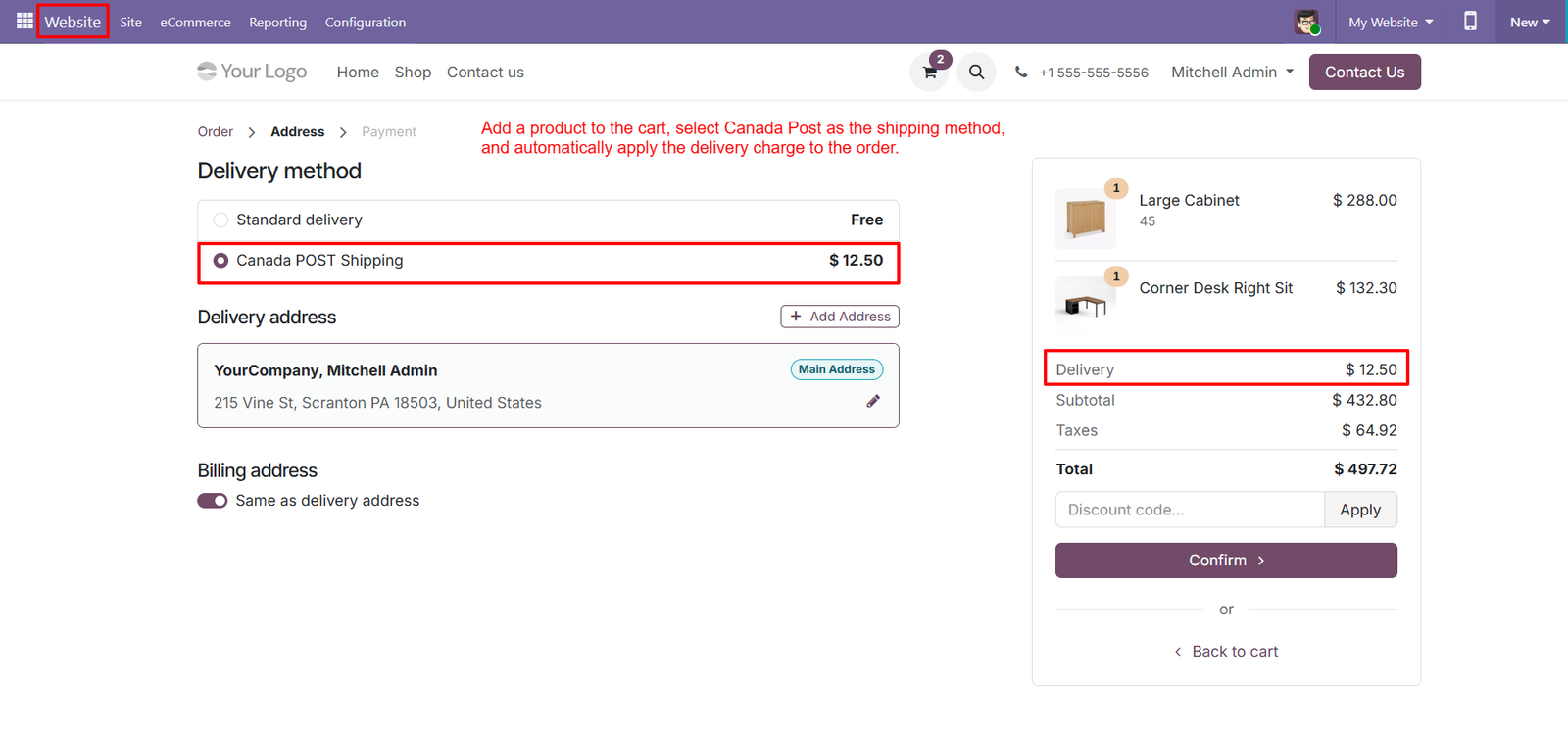
- Shipping Charge Display — View the calculated Canada Post delivery charge directly alongside the selected shipping method during the Odoo website checkout process seamlessly.
- Cart Product Selection — Add products to the shopping cart before selecting Canada Post Shipping as the delivery method for the customer order easily.
- Delivery Address — Review the delivery address displayed during checkout to ensure Canada Post shipping information is associated with the correct customer account.
- Automatic Delivery Charge — Automatically apply the Canada Post delivery charge to the order after selecting the shipping method during website checkout automatically.
- Cost Transparency — Clearly display the Canada Post shipping cost in the order summary so customers understand their delivery charges before final confirmation.
- Multiple Delivery Options — Compare Standard Delivery and Canada Post Shipping options during checkout to help customers select their preferred delivery service conveniently.
- Order Summary Visibility — Keep shipping costs visible within the checkout summary alongside products, subtotal, taxes, and total order amount for better overall transparency.
- Odoo Website Integration — Use the Canada Post delivery method to integrate shipping selection directly into the Odoo website ordering experience seamlessly.
- Simple Checkout Process — Provide customers with a straightforward checkout process by presenting Canada Post Shipping as an available delivery method conveniently.
- Calculated Shipping Price — Display Canada Post Shipping with its calculated price, allowing customers to understand the delivery cost before confirming their order confidently.
- Address and Shipping Connection — Maintain a clear relationship between the customer’s delivery address and the selected Canada Post shipping method during checkout seamlessly.
- Address Management — Let customers add or modify their delivery address before completing the Canada Post shipping selection and order confirmation process easily.
- Separate Delivery Charge — Show the delivery charge separately in the order summary, making Canada Post shipping expenses easy for customers to identify quickly.
- Delivery Method Selection — Use the checkout delivery section to present Canada Post Shipping alongside other available delivery methods configured within Odoo easily.
- Complete Order Total — Help customers review their complete order total after Canada Post shipping charges are added to the checkout summary clearly.
Step 4: Delivery Order Validation — Validate the Delivery Order to initiate Canada Post shipment processing directly from the Odoo sales and fulfillment workflow.
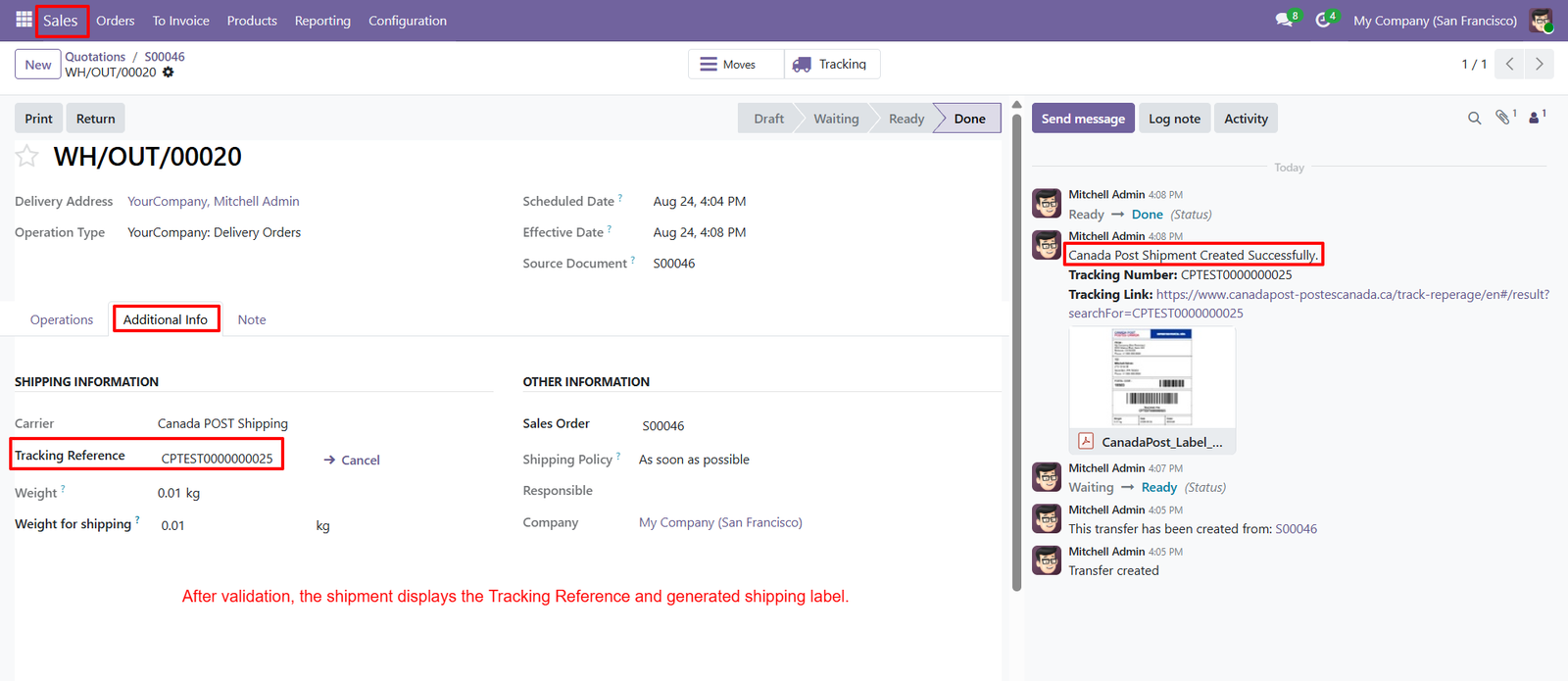
- Shipment Creation — Create a Canada Post shipment after successfully validating the Delivery Order associated with the confirmed customer order.
- Tracking Reference Generation — Automatically generate a unique Canada Post Tracking Reference when the shipment is successfully created through Odoo.
- Tracking Number Visibility — Display the generated tracking number within the Delivery Order for quick shipment identification and monitoring.
- Canada Post Carrier — Clearly display Canada Post Shipping as the selected carrier within the shipment’s shipping information section.
- Shipment Success Notification — Receive a confirmation message when the Canada Post shipment has been successfully created through the Odoo shipping workflow.
- Tracking URL Access — Access the available Canada Post tracking URL directly from the Delivery Order for convenient shipment tracking and reference.
- Shipping Label Availability — Make the generated Canada Post shipping label available directly within the Delivery Order after shipment creation.
- Additional Information — View dedicated shipping information, including carrier, tracking reference, shipment weight, and weight configured for shipping.
- Sales Order Connection — Keep the generated shipment connected with its original Sales Order, maintaining a clear relationship between sales and delivery.
- Shipment Status Updates — Follow Delivery Order status progression through Odoo stages, including Draft, Waiting, Ready, and Done shipment states.
- Tracking Information Centralization — Keep tracking references and shipment information centralized within Odoo instead of managing separate shipping records manually.
- Generated Label Attachment — Access the generated Canada Post label attachment from the shipment communication area after successful shipment creation.
- Shipment Activity Log — Review shipment-related messages and activities within Odoo to maintain visibility into the fulfillment process.
- Shipment Weight Display — View the shipment weight and configured shipping weight directly within the Delivery Order information for better parcel visibility.
- Shipping Policy Visibility — View the selected shipping policy within the Delivery Order alongside sales order and company information for fulfillment reference.
Step 5: Canada Post Branding — The generated label prominently displays Canada Post branding, making the shipping carrier immediately recognizable during parcel handling.
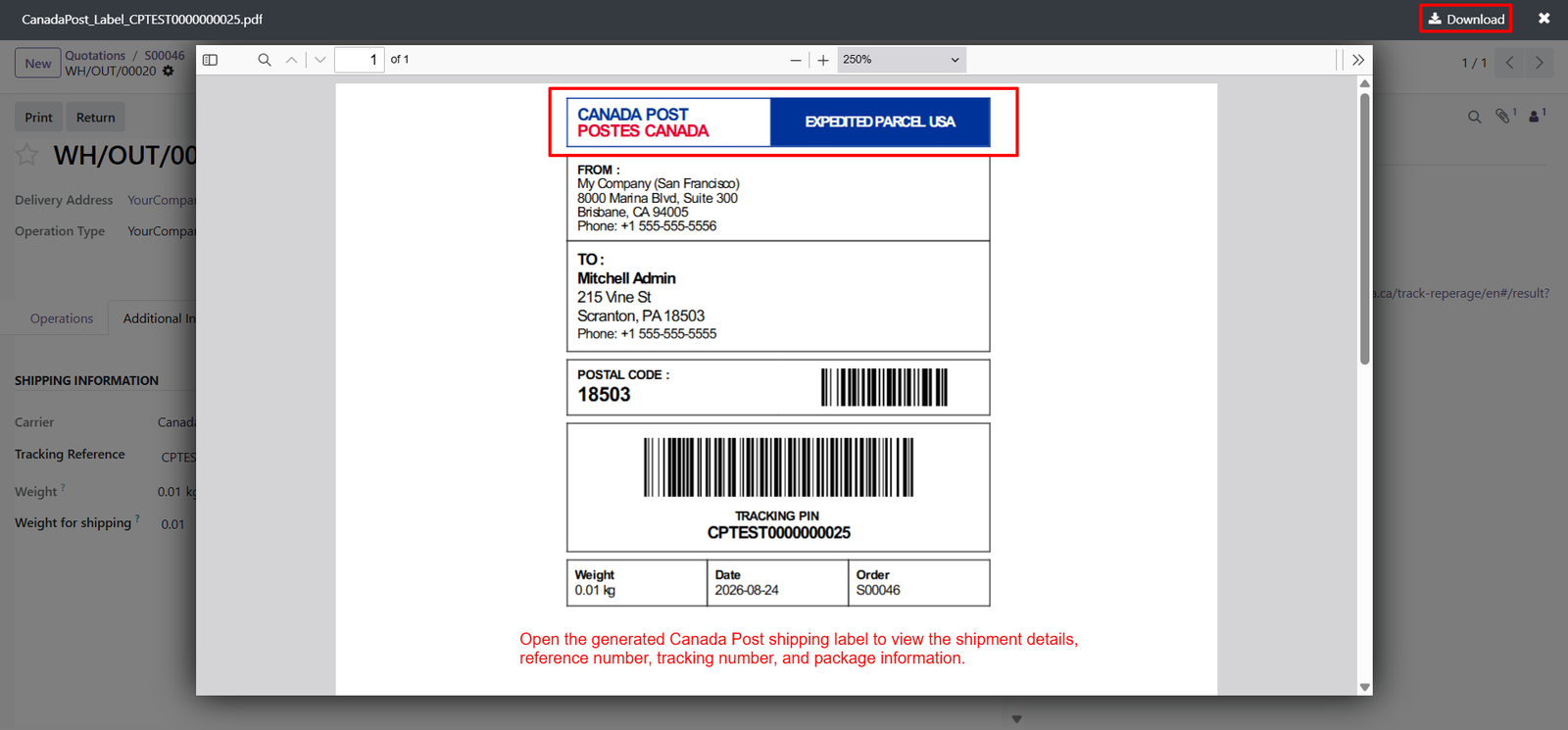
- Service Type — The label clearly identifies the selected service as Expedited Parcel USA, helping carriers understand the shipment service category easily.
- Sender Information — The label includes sender name, address, city, postal code, and phone details for clear shipment origin identification purposes.
- Recipient Information — Recipient name, street address, postal code, and phone number are displayed clearly for accurate delivery and handling operations.
- Postal Code Display — The recipient postal code appears prominently with a dedicated barcode, supporting efficient sorting and shipment processing operations.
- Tracking Barcode — A large machine-readable barcode is included, enabling scanning and quick identification throughout the complete shipping process easily.
- Tracking PIN — The tracking PIN is displayed beneath the barcode, providing an easy reference for shipment tracking and identification purposes.
- Package Weight — The label records package weight, helping shipping teams verify parcel information before transportation and delivery processing begins successfully.
- Shipment Date — The generated label displays the shipment date, providing useful timing information for fulfillment and delivery records management purposes.
- Order Reference — The related Odoo order number appears on the label, connecting the physical package with its corresponding customer order.
- Reference Visibility — Important shipment references are presented directly on the label, reducing the need to consult separate records during handling.
- Printable Shipping Label — The integration generates a printable PDF shipping label that can be opened and downloaded directly from Odoo.
- Downloadable PDF — Users can download the generated Canada Post label as a PDF for printing, fulfillment, and operational recordkeeping purposes.
- Shipment Identification — Tracking information, barcodes, and order references work together to make each parcel easier to identify throughout delivery operations.
- Delivery Accuracy — Clearly structured sender and recipient information helps shipping teams verify destinations and reduce address-related handling confusion during fulfillment.
- Barcode Scanning — Machine-readable barcodes support faster parcel identification and scanning during sorting, transportation, and shipment processing activities efficiently.
Step 6: Shipping Order Overview — View shipping order details including delivery reference, sales order, carrier, tracking number, shipping label, and tracking URL from one screen.
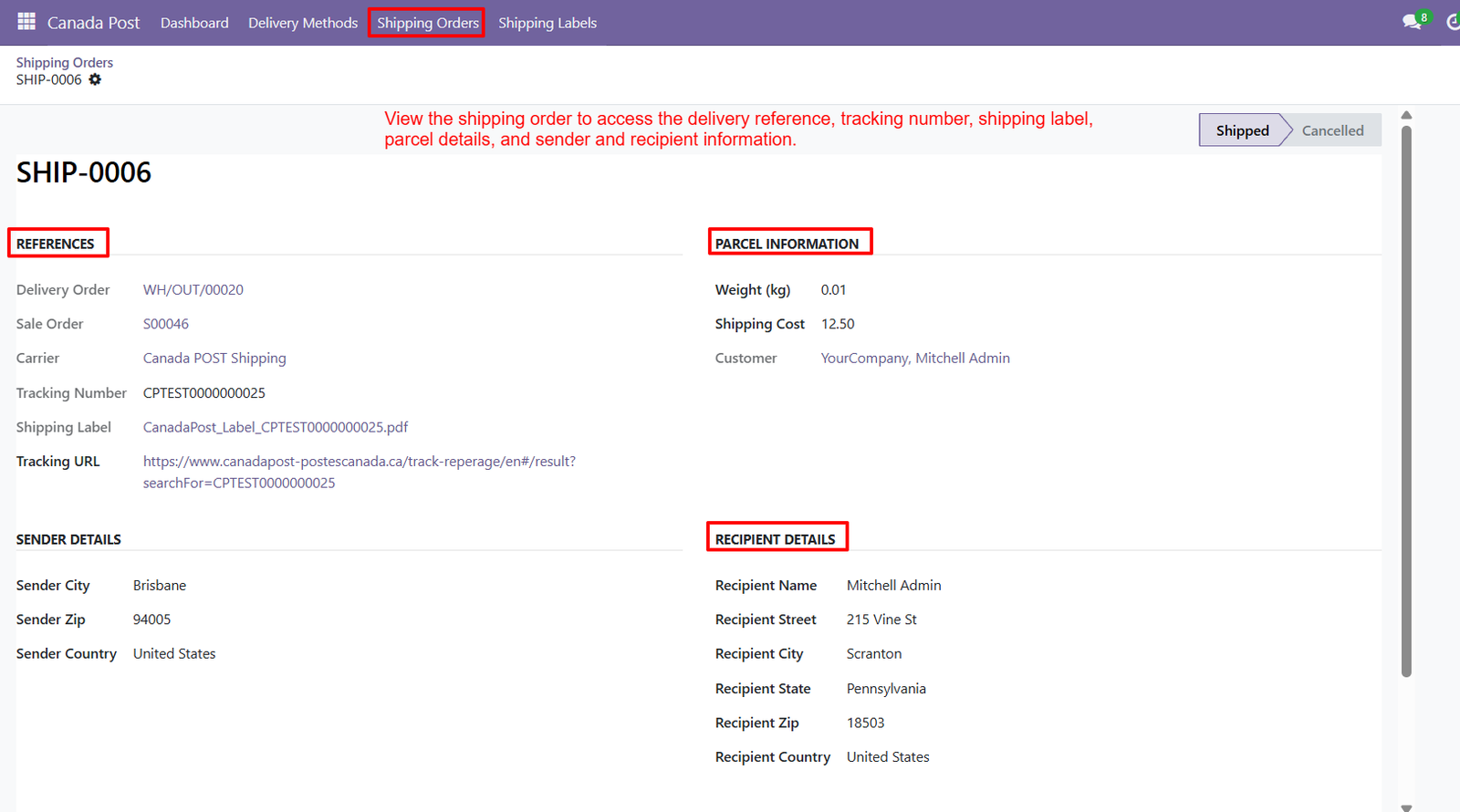
- Sales Order Connection — Access delivery orders linked with original sales orders, ensuring clear connection between customer purchases and Canada Post shipment records easily.
- Carrier Information — Clearly identify Canada Post Shipping as the selected shipping service for the displayed order record within Odoo system.
- Tracking Number — View the generated Canada Post tracking number directly within shipping order details for quick shipment identification and tracking purposes.
- Shipping Label Access — Open the generated Canada Post shipping label directly from the shipping order for convenient printing and fulfillment operations.
- Tracking URL — Access the available Canada Post tracking URL directly from the shipping order for convenient shipment monitoring and reference purposes.
- Parcel Weight — View the parcel weight associated with each shipping order, helping users maintain accurate package information throughout fulfillment operations.
- Shipping Cost — Monitor the shipping cost associated with the parcel directly within shipping order details for better expense visibility and management.
- Customer Information — View the customer associated with the shipment, providing clear visibility into order ownership and delivery processing requirements.
- Sender Details — Access sender city, postal code, and country information directly within the shipping order for accurate shipment origin identification.
- Recipient Name — View the recipient name associated with the shipping order, ensuring packages are connected with the correct customer information.
- Recipient Address — Access recipient street, city, state, postal code, and country details for complete delivery information within the shipping order.
- Delivery Reference — View the connected Delivery Order reference, making it easier to trace shipment fulfillment activities back to the corresponding Odoo operation.
- Shipping Order Status — Identify whether the shipping order is shipped or cancelled through clearly displayed status options within the dedicated shipping order interface.
- Centralized Shipment Information — Manage references, parcel details, sender information, recipient information, tracking, and shipping labels from one centralized Odoo shipping order screen.
- Tracking Visibility — Keep tracking information readily accessible alongside shipment references, customer details, carrier information, and delivery records for improved operational visibility.
Step 7: Centralized Label Management — Access all generated Canada Post shipping labels from one centralized Odoo screen for convenient management and quick shipment document retrieval.
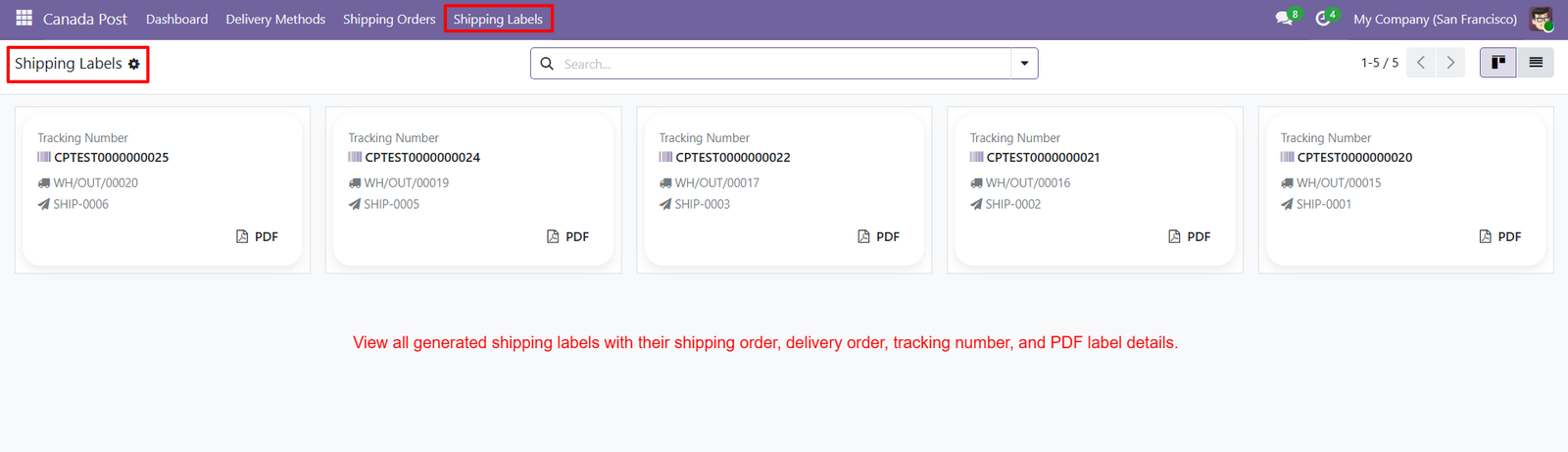
- Tracking Number Visibility — View tracking numbers clearly on each shipping label card to identify shipments and locate corresponding delivery information quickly whenever required.
- Delivery Order Access — Access linked Delivery Orders directly from label records, making it easier to connect generated labels with corresponding fulfillment operations easily.
- Shipping Order Access — View related Shipping Orders from each label card to maintain clear connections between shipping documents and individual customer deliveries easily.
- PDF Label Download — Download PDF shipping labels directly from the dedicated Shipping Labels screen for printing, packaging, and shipment preparation requirements during fulfillment.
- Multiple Label Management — Manage multiple generated labels from one interface, reducing navigation time and keeping Canada Post shipping documents organized efficiently for daily operations.
- Clear Label Cards — Use dedicated label cards to display essential shipment information in a clean, structured, and easily readable format for all users.
- Shipment Identification — Identify each generated label through its tracking number, Delivery Order, and Shipping Order references displayed together within the interface clearly.
- Quick Label Search — Quickly locate previously generated labels using the available search field, helping users find specific shipment documents efficiently whenever needed.
- Recent Label Visibility — Review five generated shipping labels simultaneously in the displayed interface, providing convenient visibility into recent label generation activity for users.
- Organized Label Records — Maintain organized label records by keeping tracking numbers connected with their corresponding Delivery Orders and Shipping Orders inside Odoo systems.
- Post-Shipment Label Access — Access shipping labels after shipment creation, ensuring generated PDF documents remain available for fulfillment and operational requirements whenever needed.
- Individual PDF Access — Use the PDF option on individual label cards to open or access the corresponding generated shipping document conveniently whenever required.
- Dedicated Label Section — Improve shipping document accessibility by presenting generated Canada Post labels together within a dedicated Shipping Labels management section for users.
- Centralized Documentation — Keep shipment documentation centralized by managing tracking references, delivery references, shipping orders, and PDF labels from one location within Odoo.
- Faster Fulfillment Preparation — Support faster fulfillment preparation by providing direct access to generated shipping labels without searching through separate shipment records manually.
Step 8: Sales Order Shipping — Add required products to the Sales Order before selecting Canada Post as the delivery method for shipment calculation and processing.
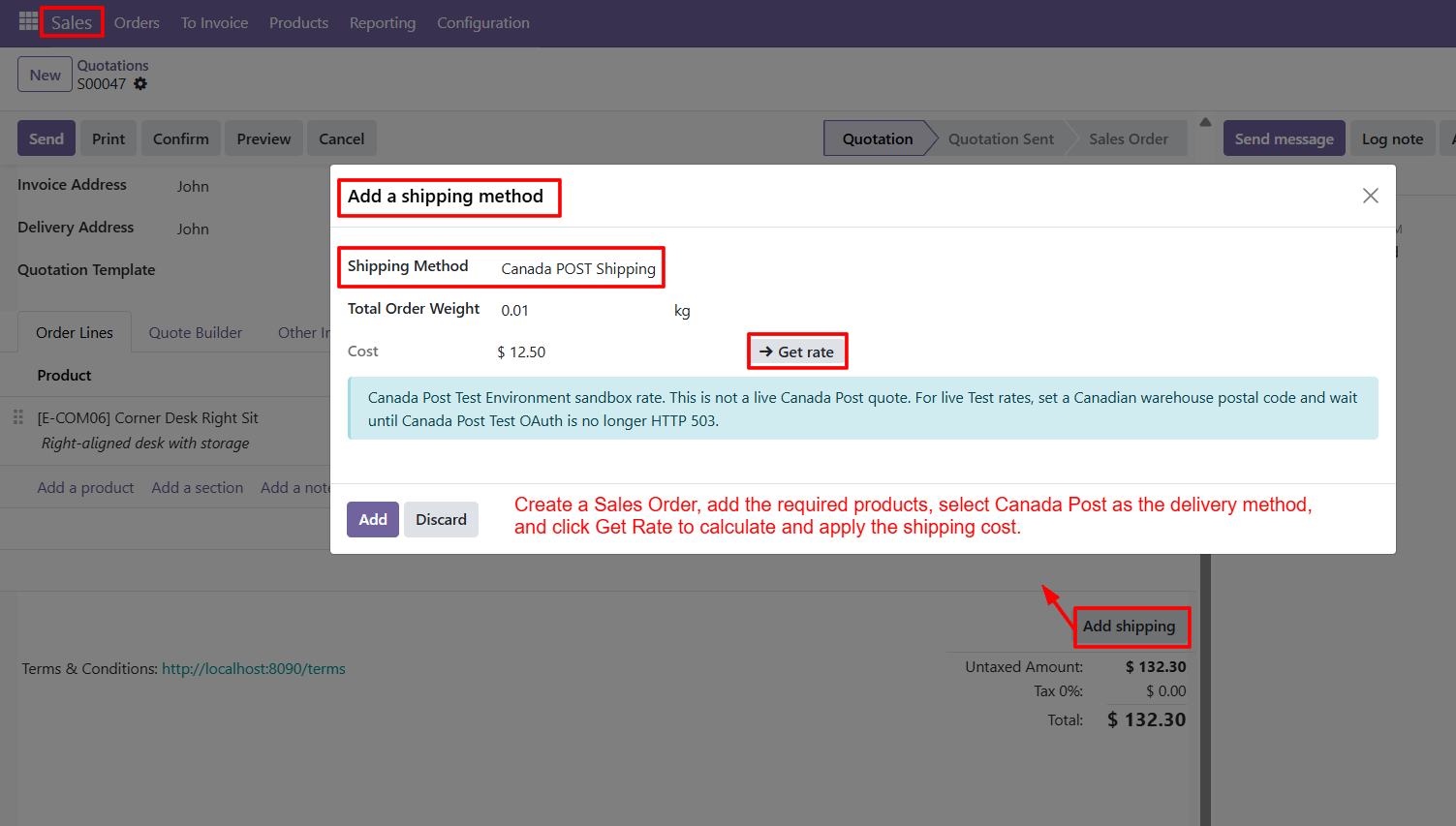
- Shipping Method Selection — Select Canada POST Shipping in the shipping method window to use Canada Post for the current customer order during checkout.
- Total Order Weight — Review the total order weight displayed in kilograms before calculating the applicable Canada Post shipping cost for fulfillment and delivery.
- Get Rate Button — Click Get Rate to calculate the Canada Post shipping cost associated with the products and order weight provided for shipping.
- Shipping Cost Display — View the calculated shipping cost directly in the dialog before adding the shipping method to the customer order for confirmation.
- Delivery Charge Application — Use the calculated rate to apply the Canada Post delivery charge to the Sales Order during order processing and fulfillment.
- Add Shipping Option — Click Add after reviewing the shipping method and calculated cost to add Canada Post shipping to the order successfully.
- Discard Option — Use Discard when you do not want to apply the Canada Post shipping method or delivery charge to the order.
- Canada Post Integration — Connect the Sales Order workflow with Canada Post rate calculation through the dedicated shipping method dialog available in Odoo seamlessly.
- Weight-Based Calculation — Calculate shipping costs using the total order weight shown within the Canada Post shipping method window during processing efficiently today.
- Shipping Confirmation — Confirm Canada POST Shipping as the selected delivery method before applying the calculated shipping cost to the customer order confidently.
- Cost Review — Review the displayed shipping cost before adding it, helping users verify the delivery charge within the Sales Order easily.
- Sales Order Support — Use the shipping method workflow from Odoo Sales Orders to calculate and apply Canada Post delivery charges during order processing.
- Product-Based Shipping — Add the required products first so the order contains shipment information needed for Canada Post rate calculation and processing efficiently.
- Delivery Cost Integration — Bring the calculated Canada Post delivery cost into the Sales Order through the Add shipping workflow available in Odoo directly.
- Shipping Workflow — Create a Sales Order, add products, select Canada Post, calculate the rate, and apply shipping cost before final confirmation efficiently.
Why Use the Canada Post Shipping Integration for Odoo Module?
The Canada Post Shipping Integration for Odoo helps businesses simplify and centralize their shipping operations by connecting Odoo with Canada Post. It supports rate calculation, delivery charges, shipment creation, shipping label generation, and tracking directly within Odoo.
Key Reasons to Use This Module
- Simplify Shipping Management — Manage important Canada Post shipping activities directly within your Odoo environment.
- Calculate Shipping Costs — Calculate applicable shipping costs based on shipment details before applying delivery charges to orders.
- Streamline Order Processing — Connect sales orders, delivery methods, shipping charges, and shipment creation in one workflow.
- Automate Label Generation — Generate Canada Post shipping labels containing shipment, recipient, package, reference, and tracking details.
- Easy Shipment Tracking — Keep tracking references and tracking information accessible from Odoo shipping records.
- Centralized Shipping Dashboard — Monitor shipments, shipping costs, generated labels, shipment weight, and recent shipping activity from one dashboard.
- Manage Shipping Orders — Access delivery references, tracking numbers, labels, parcel information, and sender and recipient details.
- Improve Shipping Visibility — Keep essential shipping information organized and accessible from centralized Odoo screens.
- Support Website Checkout — Allow customers to select Canada Post as a delivery method during the Odoo website checkout process.
- Reduce Manual Effort — Automate key shipping activities to make day-to-day order fulfillment more organized and efficient.