

Managing international shipping manually can be time-consuming, especially when businesses need to calculate shipping costs, create shipments, generate labels, and track parcels across different systems.
YunExpress Shipping Integration for Odoo connects your Odoo Sales, Inventory, eCommerce, and delivery operations with YunExpress, allowing businesses to manage their shipping workflow directly from Odoo. The integration supports shipping rate calculation, shipment creation, shipping label generation, tracking references, and centralized shipment management.
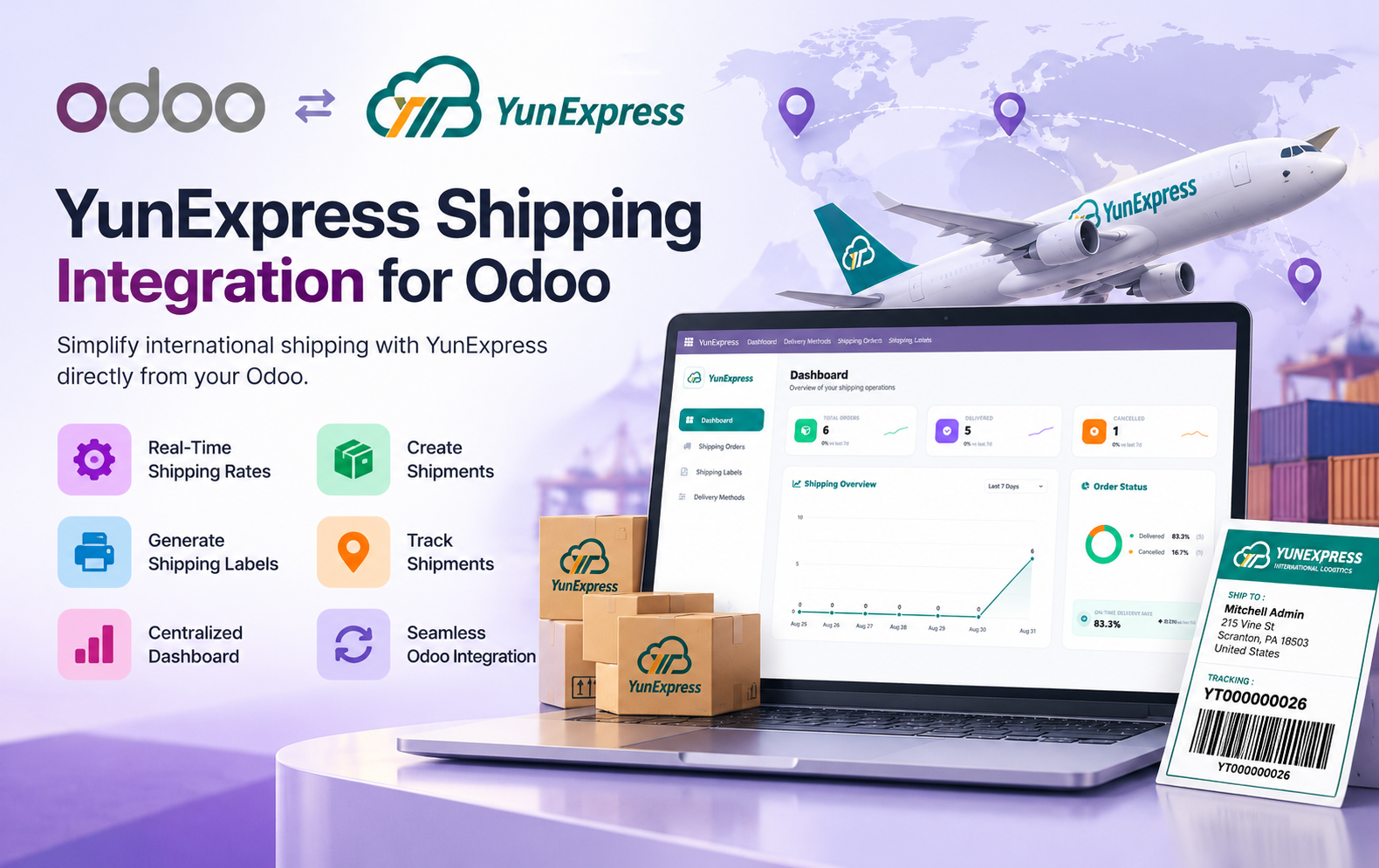
Key Features at a Glance
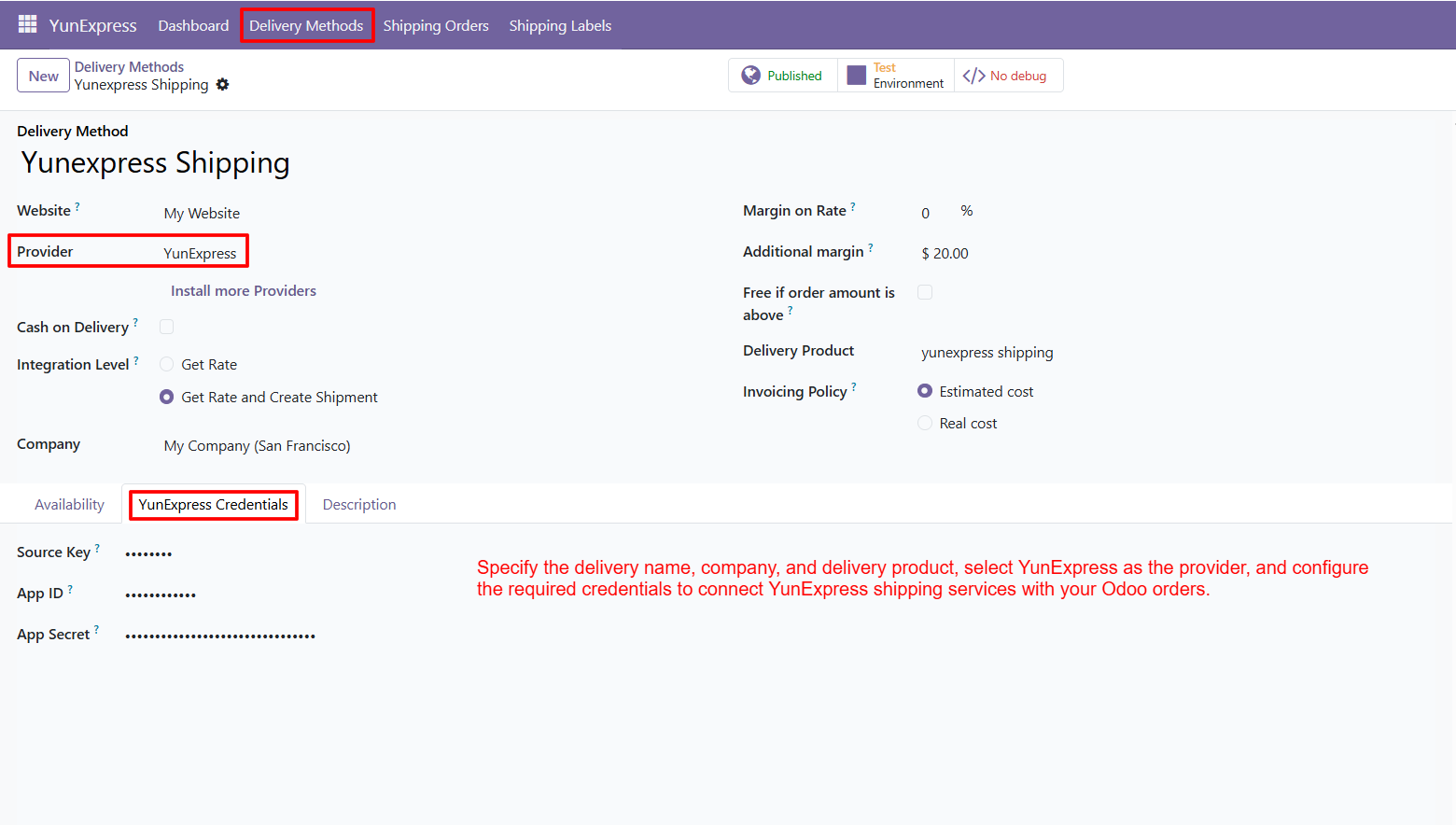
- YunExpress Delivery Method: Configure YunExpress delivery methods with delivery name, company, delivery product, provider selection, and required credentials directly inside your Odoo system.
- Shipping Rate Calculation: Calculate YunExpress shipping costs from Odoo Sales Orders and automatically apply the selected delivery charge to the customer order during checkout.
- Shipment Creation: Create YunExpress shipments from validated Odoo delivery orders while managing shipment references directly within the Odoo shipping and fulfillment workflow.
- Shipping Label Generation: Automatically generate YunExpress shipping labels containing tracking numbers, shipment references, recipient details, and package information for streamlined order fulfillment operations.
- Shipment Tracking: Store YunExpress tracking references and tracking URLs in Odoo for convenient shipment monitoring and easier access to delivery information when required.
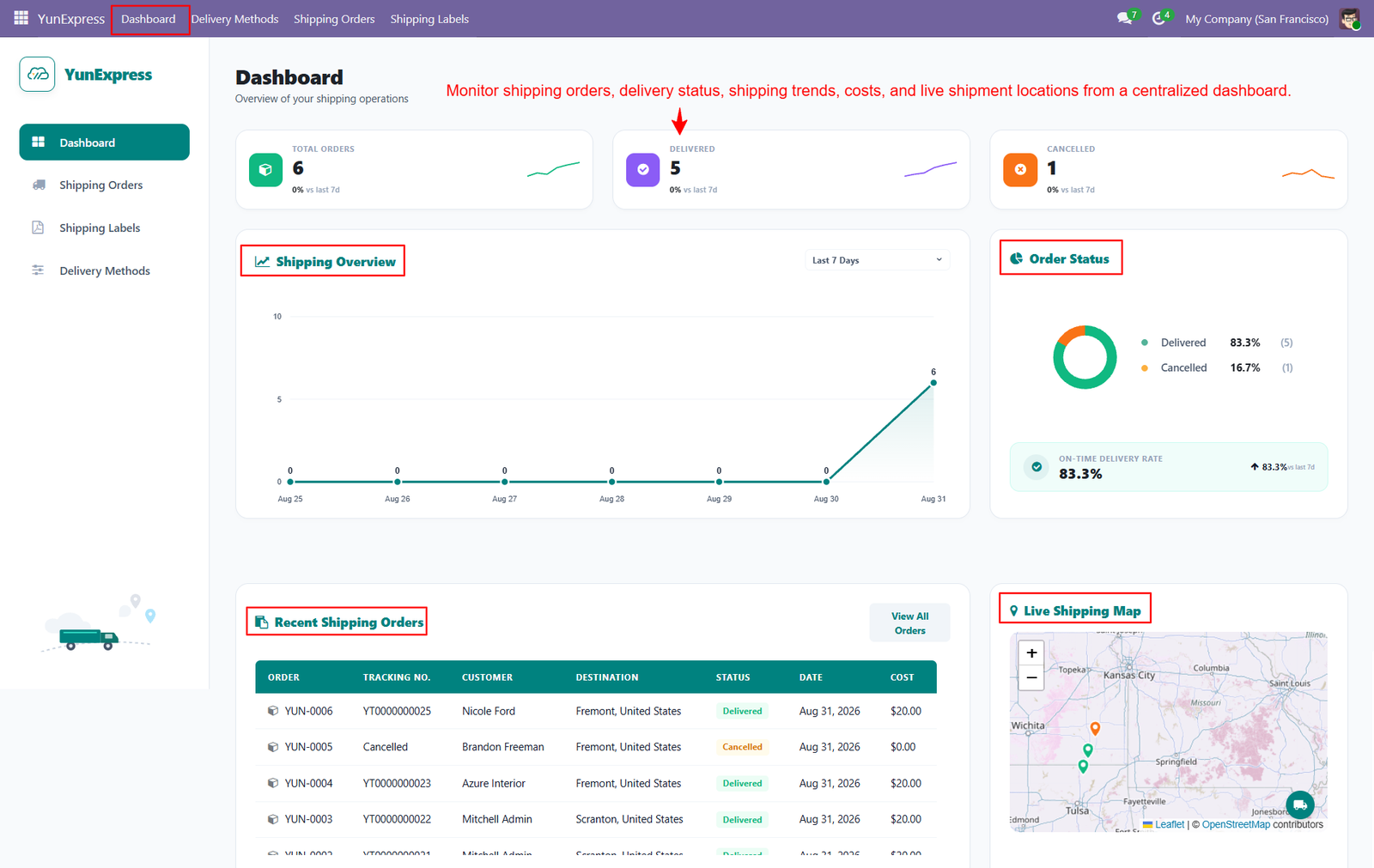
- Centralized Shipping Dashboard: Monitor shipping orders, delivery status, shipping costs, trends, labels, parcel details, and shipment locations from a centralized Odoo dashboard efficiently.
- Odoo Business Integration: Connect Odoo Sales, Inventory, eCommerce, and delivery operations with YunExpress for streamlined shipping management and connected order fulfillment.
- International Shipping: Support international shipping workflows by keeping YunExpress shipping information connected with Odoo orders throughout fulfillment, parcel management, and delivery operations.
- YunExpress Provider Configuration: Select YunExpress as the shipping provider and configure the required credentials to connect YunExpress services with Odoo orders securely and efficiently.
- Sales Order Shipping: Add products to an Odoo Sales Order, select YunExpress shipping, and calculate the applicable delivery charge before confirming the order.
- Tracking Reference Generation: Generate YunExpress tracking references after validating shipments, providing shipment identification for ongoing parcel management, delivery monitoring, and order tracking activities.
- Shipping Label Management: View generated YunExpress shipping labels with tracking numbers, delivery orders, and shipping order references from the dedicated Odoo labels section.
- Shipping Order Management: Review YunExpress shipping orders with delivery references, sales references, tracking details, shipping costs, and parcel information directly within Odoo easily.
- Sender & Recipient Details: Access sender and recipient details from YunExpress shipping orders, helping users review destination and shipment information within Odoo conveniently.
- Parcel Information: View parcel weight and shipping cost information within YunExpress shipping orders for centralized shipment and fulfillment management directly inside Odoo.
- Label Detail Access: Open generated YunExpress shipping labels to review shipment details, reference numbers, tracking information, recipient details, and package information quickly.
- Shipping Visibility: Manage YunExpress shipping operations through a centralized dashboard designed to improve visibility into orders, delivery status, costs, and shipment locations.
- Complete Shipping Workflow: Use the Odoo workflow to configure delivery methods, calculate rates, confirm orders, validate deliveries, generate tracking references, and shipping labels.
- eCommerce Shipping Integration: Support YunExpress eCommerce shipping by connecting order fulfillment activities with shipping rates, labels, tracking, and delivery management directly through Odoo.
- Reduced Manual Work: Reduce manual shipping work by managing YunExpress rates, shipments, labels, tracking references, parcel information, and orders within one Odoo system.
Use Cases: Who Needs This Module?
1. E-commerce Businesses
Online stores can use the module to calculate YunExpress shipping costs, create shipments, generate labels, and track customer orders directly from Odoo.
2. Cross-Border E-commerce Businesses
Businesses shipping products internationally can manage YunExpress cross-border deliveries while keeping shipping information connected with their Odoo orders.
3. International Retailers
Retail businesses handling international parcel fulfillment can streamline shipping operations through centralized rate calculation, shipment creation, tracking, and label management.
4. Online Marketplace Sellers
Marketplace sellers can manage YunExpress delivery information, shipping costs, tracking references, and generated labels through their Odoo environment.
5. Import & Export Businesses
Import-export businesses can manage international shipments, parcel information, sender details, recipient details, and tracking information from Odoo.
6. Logistics-Focused Businesses
Businesses managing frequent YunExpress shipments can use centralized shipping orders and dashboards to monitor delivery status, costs, parcels, and shipment locations.
7. Businesses Managing High Order Volumes
Companies processing multiple orders can reduce manual shipping work by integrating shipping rate calculation, shipment creation, labels, and tracking into their Odoo workflow.
8. Odoo eCommerce Users
Odoo eCommerce businesses can offer YunExpress as a delivery method and apply calculated shipping charges directly to customer orders.
9. Businesses Requiring Shipping Visibility
Companies that need centralized visibility can monitor shipping orders, delivery status, shipping trends, costs, labels, parcel details, and shipment locations from the dashboard.
10. Businesses Seeking Shipping Automation
Businesses looking to reduce manual shipping activities can connect YunExpress shipping operations with Odoo and manage the complete workflow from order to delivery.
Quick User Guide (Visual Walkthrough)
Scroll up to revisit the detailed image-wise walkthrough.
Step 1: Centralized Shipping Dashboard: Monitor all YunExpress shipping operations from one centralized dashboard with real-time visibility into orders, delivery status, costs, trends, and locations.
Step 2: Configure YunExpress delivery methods directly in Odoo by selecting YunExpress as provider and defining essential shipping settings for daily operations.
Step 3: Customers can compare available delivery methods and select YunExpress Shipping directly from the checkout page before completing their purchase order.
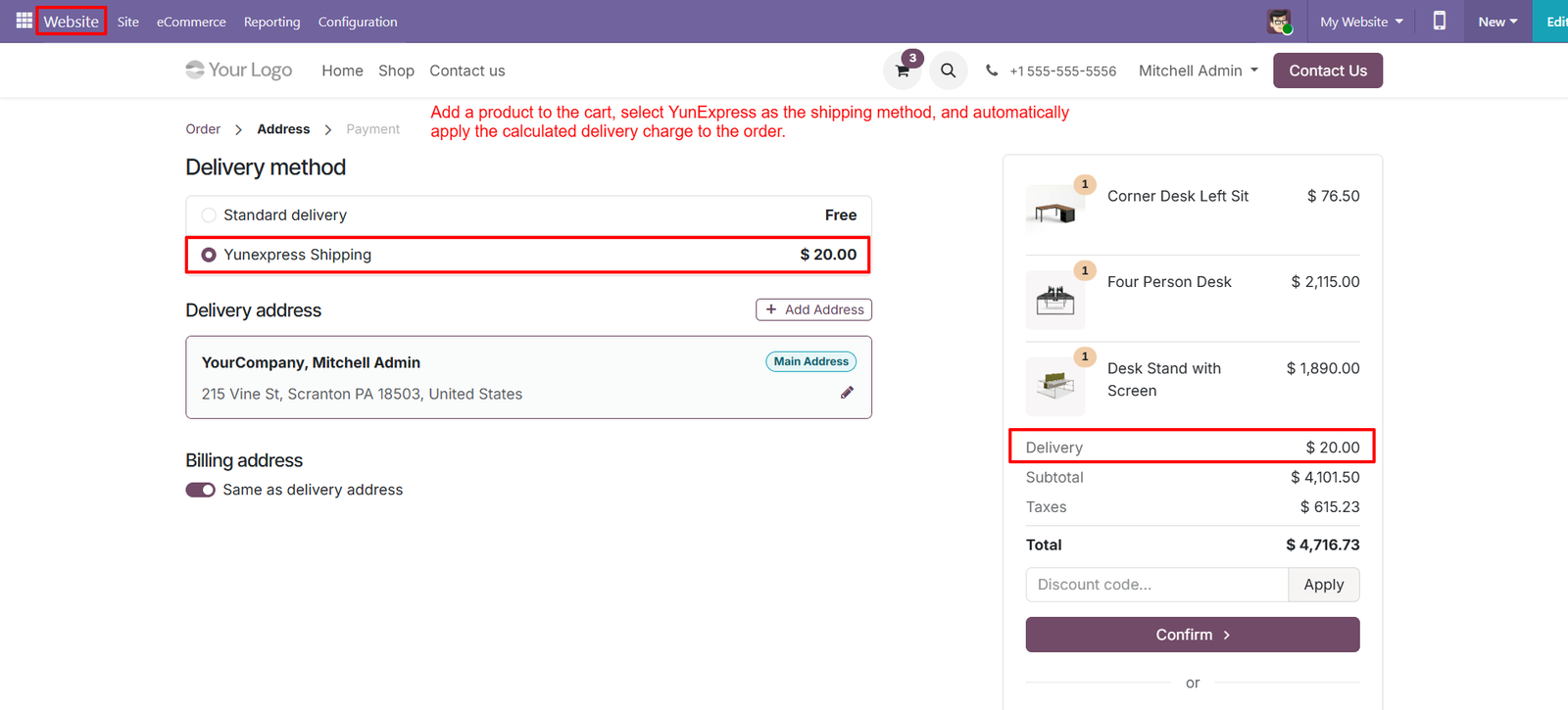
- YunExpress automatically calculates the applicable delivery charge and displays it clearly within the order summary during the checkout process smoothly.
- Choose YunExpress as the preferred delivery method to streamline shipping selection and ensure orders use the configured carrier automatically every time.
- Customers can review their delivery address before selecting YunExpress, reducing shipping errors and improving successful order fulfillment processes for businesses.
- Odoo displays the YunExpress shipping cost alongside products, subtotal, taxes, and total, providing complete pricing transparency before order confirmation.
- The configured YunExpress delivery rate is automatically added to the order, eliminating manual shipping calculations and reducing administrative effort significantly.
- YunExpress shipping integrates directly with Odoo Website checkout, allowing online stores to offer carrier-based delivery options within their storefront easily.
- Delivery charges update within the checkout summary, ensuring customers can see the financial impact of selecting YunExpress before payment confirmation.
- The checkout interface clearly highlights YunExpress Shipping, making the carrier easy to identify among multiple available delivery options conveniently.
- Businesses can configure YunExpress shipping costs in Odoo and automatically present those configured charges to customers during checkout seamlessly.
- Customers can confirm their delivery address and selected YunExpress method together, helping ensure accurate shipment information before order processing begins.
- Displaying delivery costs before confirmation builds customer trust by providing clear pricing information and reducing unexpected charges during checkout.
- The checkout summary keeps YunExpress delivery charges visible near totals, helping customers understand their complete purchase cost before confirmation easily.
- With YunExpress integrated into Odoo Website, businesses can create a more efficient checkout process while managing shipping charges automatically.
- Customers can select YunExpress without leaving the checkout page, creating a smoother purchasing experience and reducing unnecessary navigation between pages.
- YunExpress delivery charges appear alongside order totals, giving customers immediate visibility into shipping expenses before they confirm their purchases.
Step 4: Automatic Shipment Creation: Odoo automatically creates YunExpress shipments after order validation, reducing manual processing and improving overall fulfillment efficiency for businesses.
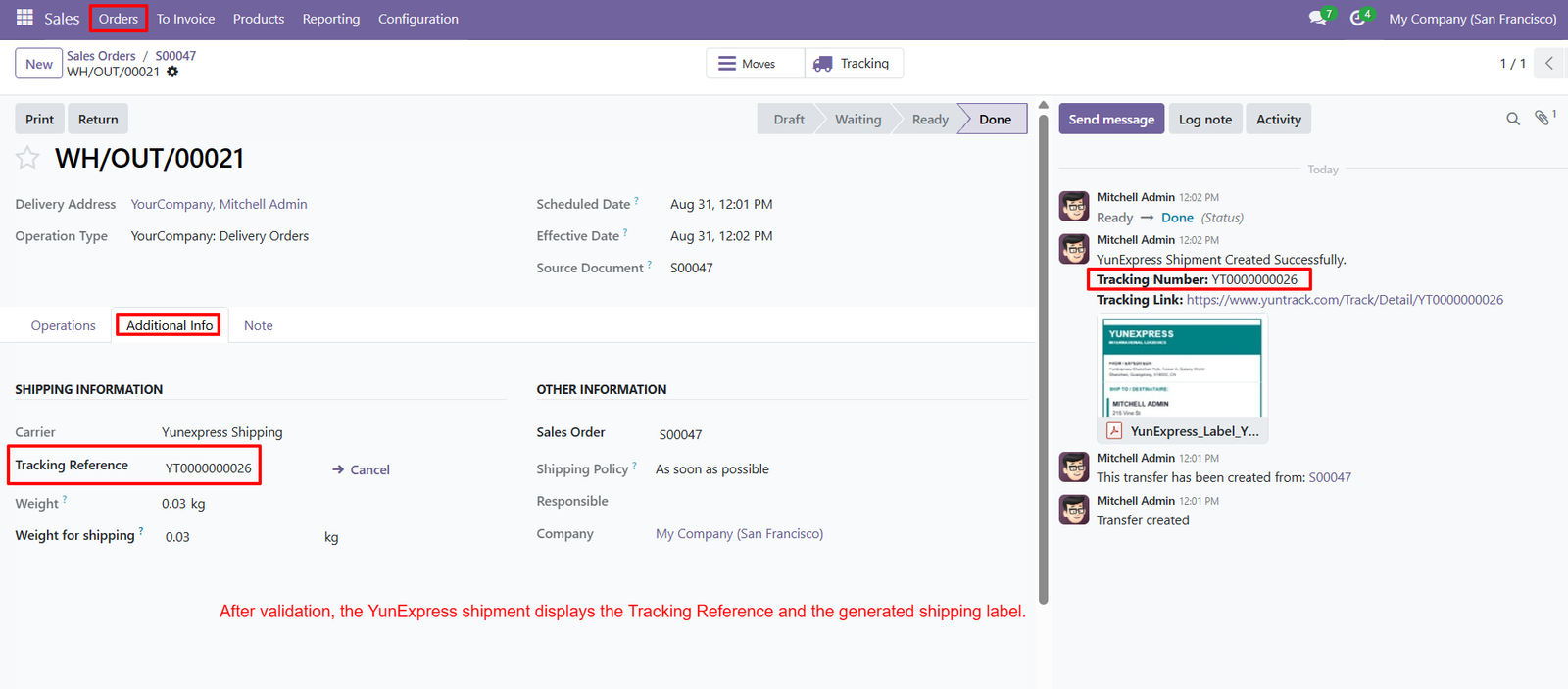
- Tracking Reference Generation: Each validated YunExpress shipment receives a unique tracking reference, making shipment identification and monitoring simple throughout delivery operations.
- Real-Time Shipment Tracking: Track YunExpress shipments using generated tracking references, helping businesses monitor delivery progress and provide customers with accurate shipment updates.
- Direct Tracking Link: Odoo provides a direct YunExpress tracking link, allowing users to access detailed shipment information quickly without manually searching tracking numbers.
- Shipping Label Generation: YunExpress automatically generates shipping labels after shipment creation, helping businesses prepare packages efficiently and accurately for carrier pickup.
- Downloadable Shipping Labels: Generated YunExpress shipping labels are attached to the shipment record, allowing users to access and download labels whenever required.
- Shipment Status Updates: Odoo displays shipment status information clearly, helping teams understand whether orders are ready, completed, transferred, or successfully processed.
- Carrier Information: The shipment record identifies YunExpress as the selected carrier, providing clear visibility into the shipping service used for fulfillment.
- Tracking Reference Visibility: Tracking references appear directly within the Additional Information section, allowing users to locate important shipment details without opening separate records.
- Shipment Weight Details: Odoo records shipment weight information alongside YunExpress details, helping businesses maintain accurate logistics data for shipping and fulfillment operations.
- Shipping Weight Management: The configured shipping weight is displayed within shipment information, supporting accurate carrier processing and better logistics record management.
- Sales Order Connection: YunExpress shipments remain connected with their original sales orders, creating better traceability between customer purchases and fulfillment operations.
- Shipment History: Odoo’s chatter records shipment creation and tracking events, providing teams with a useful history of YunExpress fulfillment activities.
- Automated Shipment Confirmation: Successful YunExpress shipment creation generates confirmation messages within Odoo, helping users verify that carrier processing completed successfully.
- Customer Delivery Transparency: Tracking information and shipment labels improve delivery transparency, allowing businesses to provide customers with clearer and more reliable shipping information.
- Reduced Manual Work: Automated shipment creation, tracking generation, and label processing reduce repetitive tasks and save valuable time for logistics teams.
Step 5: Generated YunExpress shipping labels provide complete shipment information, helping businesses prepare packages accurately and streamline daily fulfillment operations efficiently consistently.
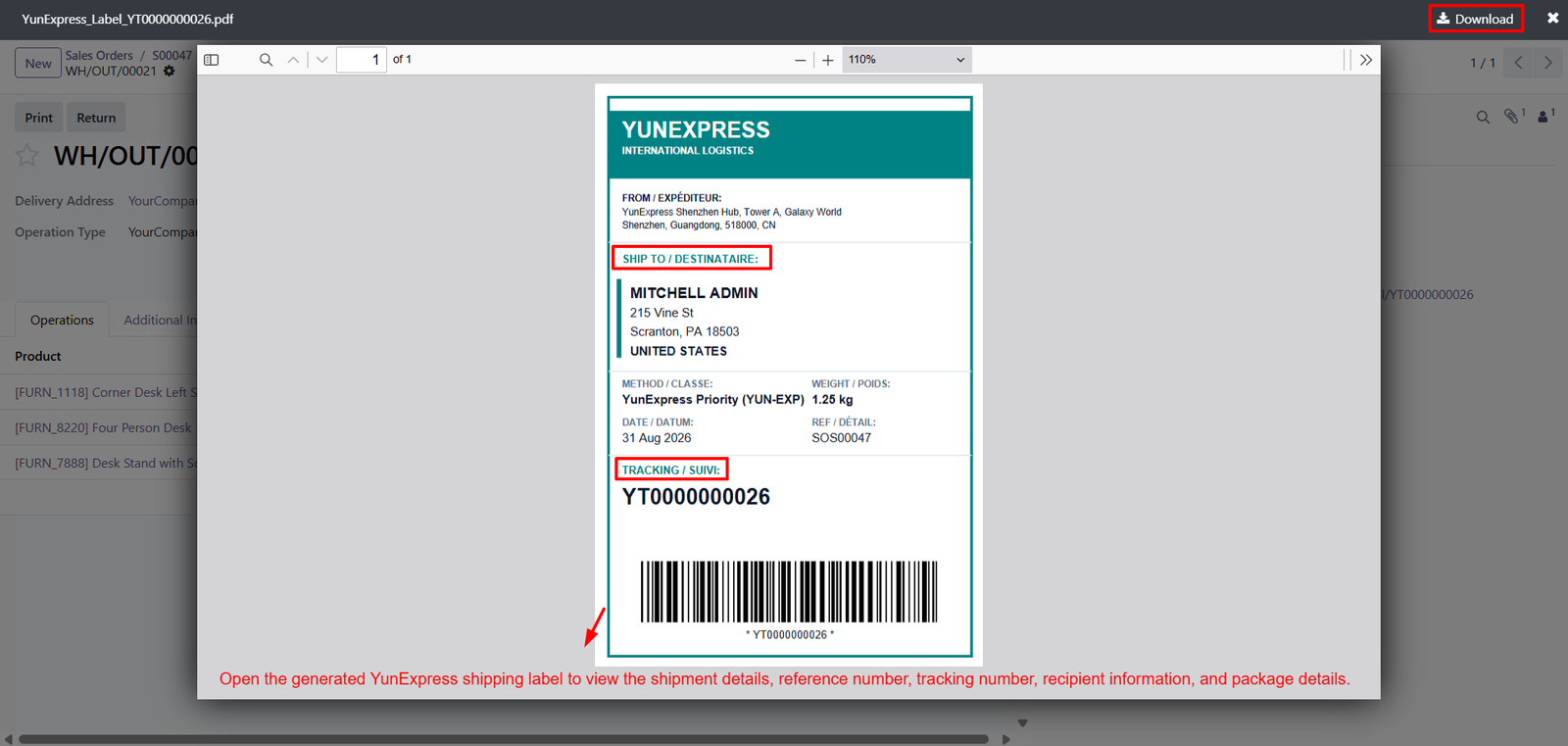
- Each label displays the recipient’s name and address, ensuring packages reach the correct destination without requiring manual documentation or verification.
- The shipping label clearly identifies YunExpress as the carrier, providing consistent carrier information for warehouse teams and delivery personnel dispatch.
- Shipment method details appear on the label, helping staff identify the selected YunExpress service before packages leave the warehouse delivery.
- The label displays package weight information, supporting accurate shipment handling and providing useful logistics details for warehouse operations and verification.
- Reference numbers connect physical packages with corresponding Odoo orders, improving traceability throughout the entire shipping and fulfillment process for teams.
- Unique tracking numbers are prominently displayed, allowing businesses and customers to monitor YunExpress shipments throughout their delivery journey from dispatch.
- Barcode information on the label supports faster package identification, scanning, processing, and tracking across warehouse and carrier operations and accurately.
- Shipment dates are included on labels, helping teams maintain accurate records and understand when packages were prepared for delivery efficiently.
- Recipient information is clearly organized, making labels easy to read and reducing potential delivery errors caused by incorrect addressing fulfillment.
- YunExpress labels provide package details in a structured format, helping warehouse employees verify shipment information before dispatching orders for delivery.
- Labels can be opened directly from Odoo shipment records, giving users convenient access to generated documentation whenever required during fulfillment.
- Downloadable shipping labels simplify warehouse preparation by allowing teams to save, print, and attach labels directly onto packages before dispatch.
- Generated labels help standardize shipping documentation, ensuring important recipient, carrier, reference, tracking, and package information remains consistently available throughout fulfillment.
- Tracking numbers printed alongside barcodes make shipments easier to scan, identify, and monitor throughout the YunExpress delivery workflow for teams.
- YunExpress shipping labels improve operational accuracy by reducing handwritten information and minimizing manual documentation during package preparation processes across warehouses.
Step 6: View complete YunExpress shipping orders in Odoo with tracking, parcel, shipping cost, sender, recipient, and reference information for better visibility.
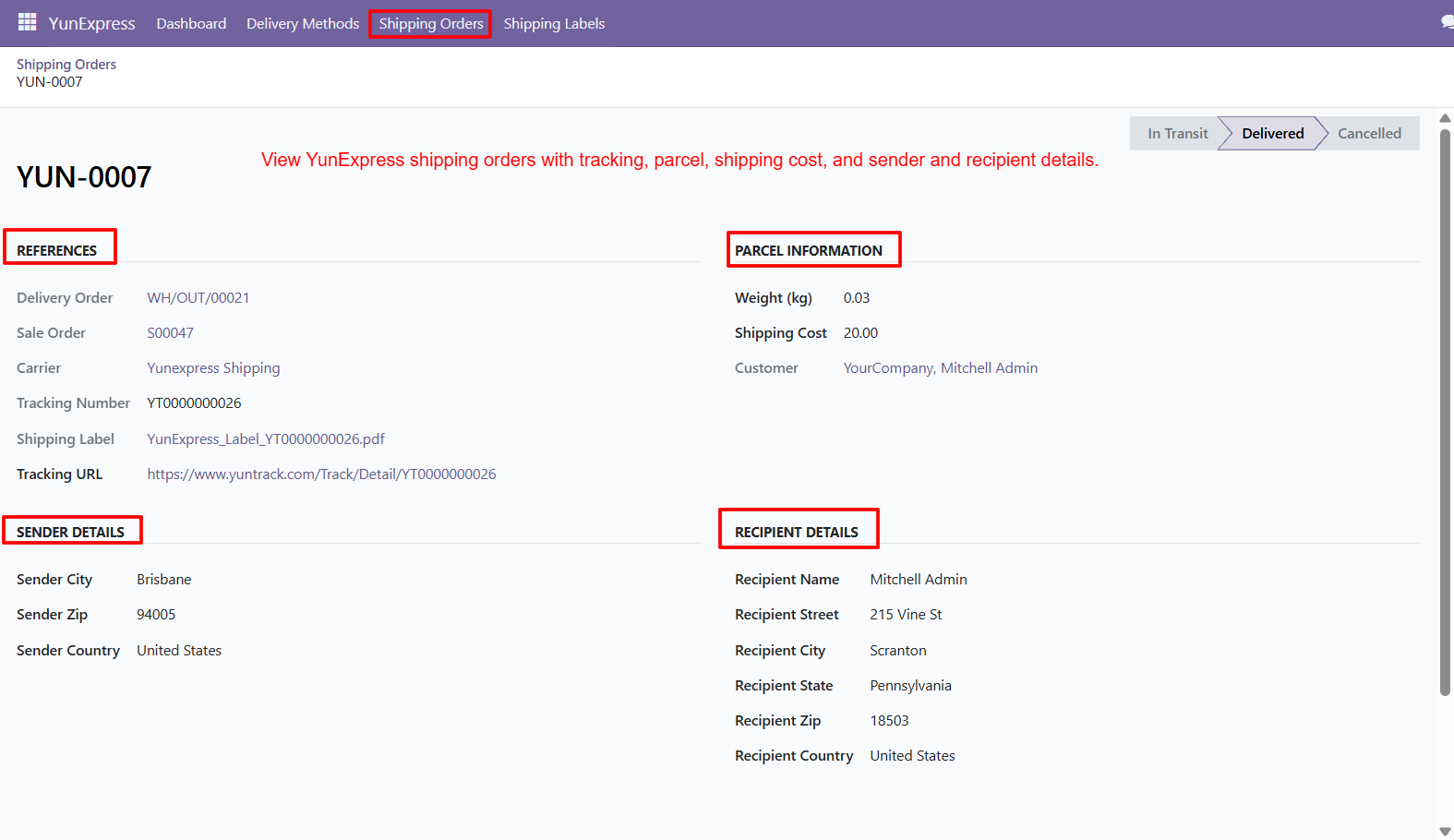
- Track delivery orders directly from YunExpress shipping records, helping teams connect carrier shipments with corresponding Odoo fulfillment operations and orders efficiently.
- Connect each YunExpress shipping order with its related delivery order, providing clear visibility between warehouse transfers and carrier shipments during fulfillment.
- Link YunExpress shipments with sales orders, making it easier to trace customer purchases from order confirmation through final delivery and fulfillment.
- Display the selected YunExpress carrier clearly, helping users identify which shipping service is responsible for processing each shipment within Odoo.
- Access unique tracking numbers from shipping order records, allowing teams to monitor packages and provide accurate delivery updates to customers.
- Open generated YunExpress shipping labels directly from order records, simplifying package preparation and reducing time spent searching shipping documentation efficiently.
- Use direct tracking URLs to access YunExpress shipment updates quickly, helping support teams respond to customer delivery questions more efficiently.
- Monitor parcel weight within shipping orders, supporting accurate logistics records and helping businesses manage shipment information consistently across daily operations.
- View shipping costs for individual parcels, giving businesses better visibility into carrier expenses and supporting accurate logistics cost management decisions.
- Review customer information alongside shipment details, ensuring teams can identify recipients and manage deliveries without switching between multiple Odoo records.
- Access sender details including city, postal code, and country, helping maintain complete information for YunExpress international shipping operations and documentation.
- Review recipient names and addresses directly within shipping orders, reducing errors and improving accuracy during shipment preparation and delivery processes.
- Monitor shipment progress using status stages such as In Transit, Delivered, and Cancelled for better visibility throughout fulfillment operations.
- Centralized shipping order records combine references, tracking, labels, costs, parcel details, and addresses into one Odoo management interface for teams.
- YunExpress shipping records improve operational transparency by keeping important shipment information organized and accessible within a single dedicated screen efficiently.
Step 7: View all generated YunExpress shipping labels in one centralized interface, making shipment documentation easier to organize, access, and manage efficiently.
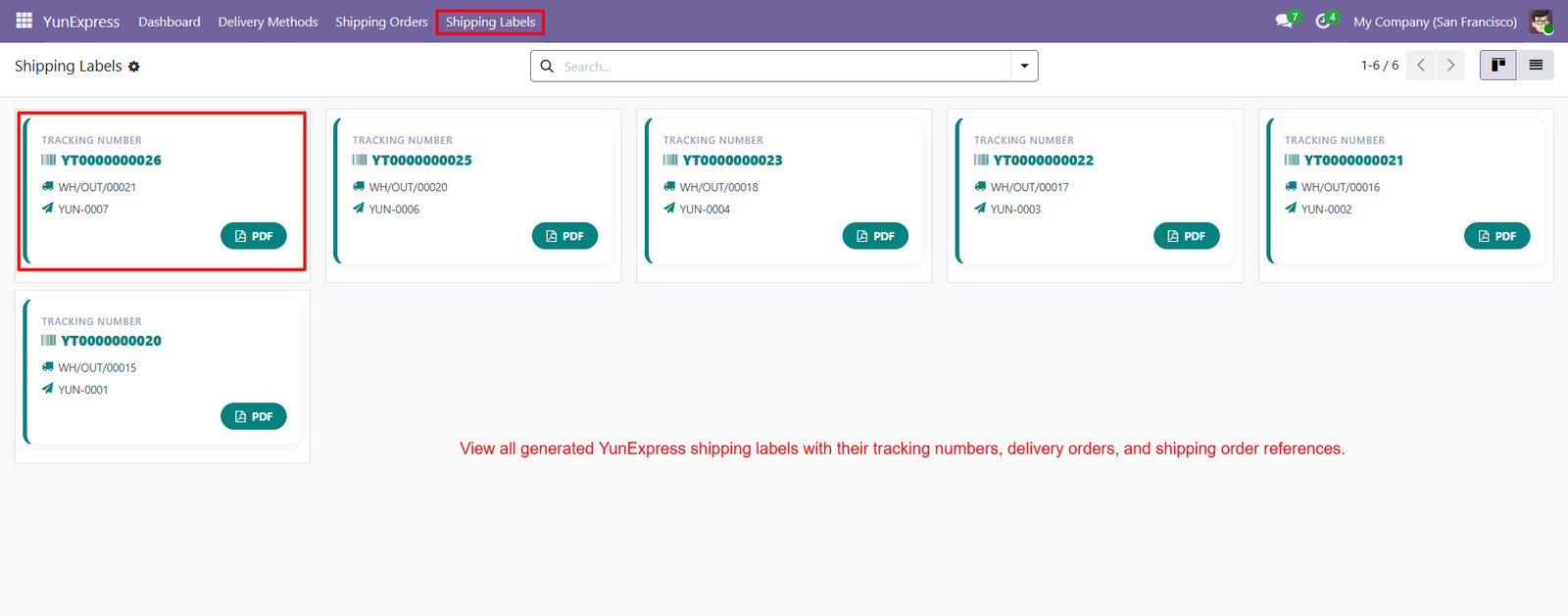
- Each shipping label displays a unique tracking number, helping businesses identify packages quickly and monitor their delivery progress throughout fulfillment operations.
- YunExpress labels are connected with delivery orders, creating clear relationships between generated shipping documents and corresponding warehouse operations for teams.
- Shipping labels include YunExpress shipping order references, allowing users to trace documents back to their associated carrier shipment records.
- Users can open generated PDF labels directly from the shipping labels interface, simplifying access to printable shipment documentation whenever required.
- Dedicated PDF buttons make label downloads convenient, helping warehouse teams quickly obtain documents needed for package preparation and carrier dispatch.
- Centralized label management reduces manual searching by keeping generated YunExpress shipping documents organized within one dedicated Odoo interface for users.
- Tracking numbers remain clearly visible on every label card, making package identification faster and improving shipment management across warehouse operations.
- Delivery order references displayed on labels help teams connect physical packages with corresponding Odoo delivery transactions for accurate fulfillment tracking.
- Shipping order references provide additional traceability, allowing businesses to connect generated labels with specific YunExpress shipping records quickly and efficiently.
- The shipping labels interface presents multiple generated labels together, helping teams manage numerous YunExpress shipments from one convenient location efficiently.
- Users can search available shipping labels using the built-in search functionality, making specific shipment documentation easier to locate within larger datasets.
- PDF label access supports efficient warehouse workflows by allowing teams to download required shipping documents without navigating multiple shipment records manually.
- Generated YunExpress labels help standardize shipping documentation, ensuring tracking and order references remain consistently available for every processed shipment record.
- Centralized shipping label visibility improves operational efficiency by reducing time spent locating carrier documents during daily package preparation and dispatch.
- Businesses can manage multiple YunExpress shipping labels efficiently, supporting higher shipment volumes without requiring separate manual documentation management processes daily.
Step 8: Create sales quotations with YunExpress Shipping selected as the delivery method, giving customers a convenient transparent shipping option during ordering.
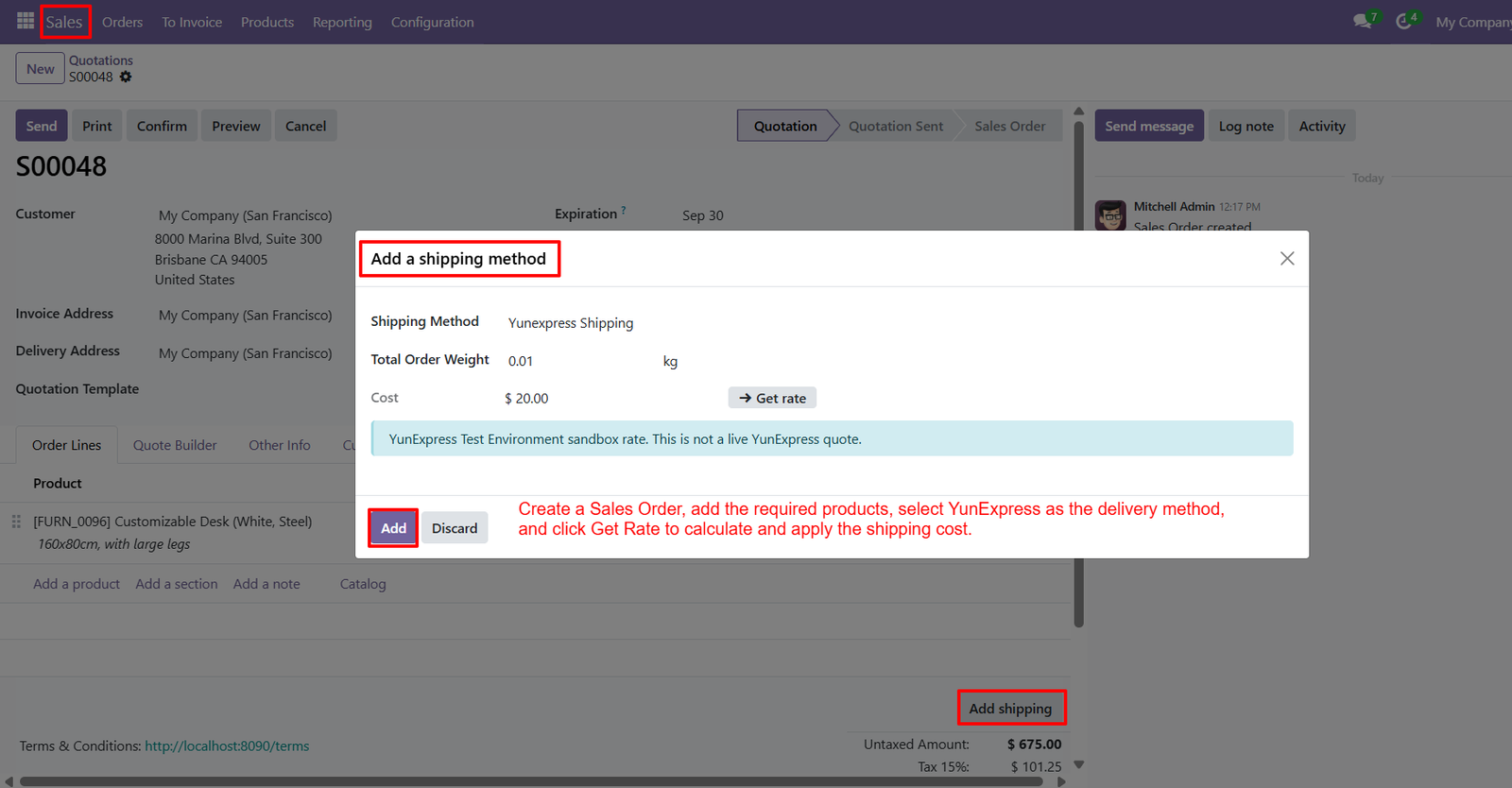
- Add required products to sales orders before selecting YunExpress, ensuring shipping calculations consider order contents and applicable package weight accurately.
- View total order weight directly within the shipping method window, helping businesses understand package weight used for shipping calculations accurately.
- Use the Get Rate button to calculate YunExpress shipping costs based on configured delivery settings and current order information automatically.
- YunExpress returns the calculated shipping cost, allowing businesses to review delivery charges before adding the shipping method to their quotation.
- Add the calculated YunExpress shipping method directly to the quotation, automatically including the delivery charge within the sales order totals.
- Test YunExpress shipping calculations using the available sandbox environment, helping businesses verify integration behavior before processing real customer shipments successfully.
- The sandbox environment clearly indicates displayed rates are not live quotes, helping users distinguish testing information from actual carrier pricing.
- Review the calculated YunExpress cost before confirmation, giving sales teams control over delivery charges presented to customers during quotation preparation.
- Add YunExpress shipping charges to quotations without manually calculating transportation costs, reducing repetitive work and improving sales order preparation efficiency.
- Select YunExpress from available delivery methods to connect the quotation with the configured carrier service and calculate shipping charges automatically.
- Shipping rates can be calculated according to order weight, helping businesses provide more relevant delivery pricing for different customer purchases.
- The shipping method window summarizes carrier information, order weight, and calculated cost, providing details before adding delivery charges to quotations.
- Using automated rate calculation helps reduce shipping price entry, minimizing calculation mistakes and improving consistency across sales quotations and orders.
- Businesses can integrate YunExpress shipping directly into their Odoo sales workflow, connecting quotations with carrier-based delivery pricing efficiently and conveniently.
- After calculating the rate, users can add YunExpress shipping to quotation, ensuring delivery charges become part of the order total.
Why Use the YunExpress Shipping Integration for Odoo Module?
The YunExpress Shipping Integration for Odoo helps businesses simplify shipping operations by connecting YunExpress services directly with their Odoo sales, website, and delivery workflows.
- Seamless YunExpress Integration: Connect your Odoo system directly with YunExpress for a centralized and efficient shipping management experience.
- Automatic Shipping Rate Calculation: Calculate YunExpress shipping costs based on order information and display applicable delivery charges during checkout.
- Easy Shipment Creation: Create YunExpress shipments directly from validated Odoo delivery orders without manually entering shipment information.
- Automatic Tracking Number: Generate and store YunExpress tracking numbers automatically, making shipment monitoring easier for businesses and customers.
- Shipping Label Generation: Generate YunExpress shipping labels directly from Odoo and access them conveniently whenever packages need to be dispatched.
- Website Checkout Integration: Allow customers to select YunExpress as their preferred shipping method directly during the Odoo Website checkout process.
- Centralized Shipping Dashboard: Monitor total orders, delivered shipments, cancelled orders, shipping trends, costs, and live shipment locations from one dashboard.
- Shipping Order Management: Manage YunExpress shipping orders with delivery references, sales orders, tracking numbers, labels, costs, and customer information.
- Dedicated Shipping Labels: Access all generated YunExpress labels from one centralized interface with tracking numbers and related order references.
- Improved Shipping Visibility: Keep carrier, tracking, parcel, sender, recipient, and shipping-cost information organized within your Odoo environment.
- Reduced Manual Work: Automate shipping calculations, shipment creation, tracking generation, and label generation to minimize repetitive administrative tasks.
- Better Customer Experience: Provide customers with transparent shipping costs, flexible delivery selection, and reliable tracking information throughout the delivery journey.
- Efficient Fulfillment Workflow: Connect quotations, sales orders, delivery orders, YunExpress shipments, tracking, and shipping labels within one integrated workflow.
- Better Logistics Management: Gain centralized visibility into shipping activities and use organized shipment data to improve logistics planning and decision-making.
- Scalable Shipping Operations: Manage multiple YunExpress shipments efficiently as your ecommerce business grows and shipping volumes increase.