

Managing a dental clinic involves much more than scheduling appointments. Dentists and clinic teams need to maintain patient records, document consultations, track dental conditions, manage treatments and medications, schedule follow-ups, generate reports, handle billing, and communicate important information with patients.
Dental Clinic Pro for Odoo brings these activities together in one connected system. From the patient’s first appointment to consultation, treatment, prescription, follow-up, reporting, and invoicing, the module helps dental professionals manage their daily workflow from a familiar Odoo interface.
It is designed for dentists, orthodontists, dental clinics, dental practices, oral healthcare centers, and other dental care businesses.
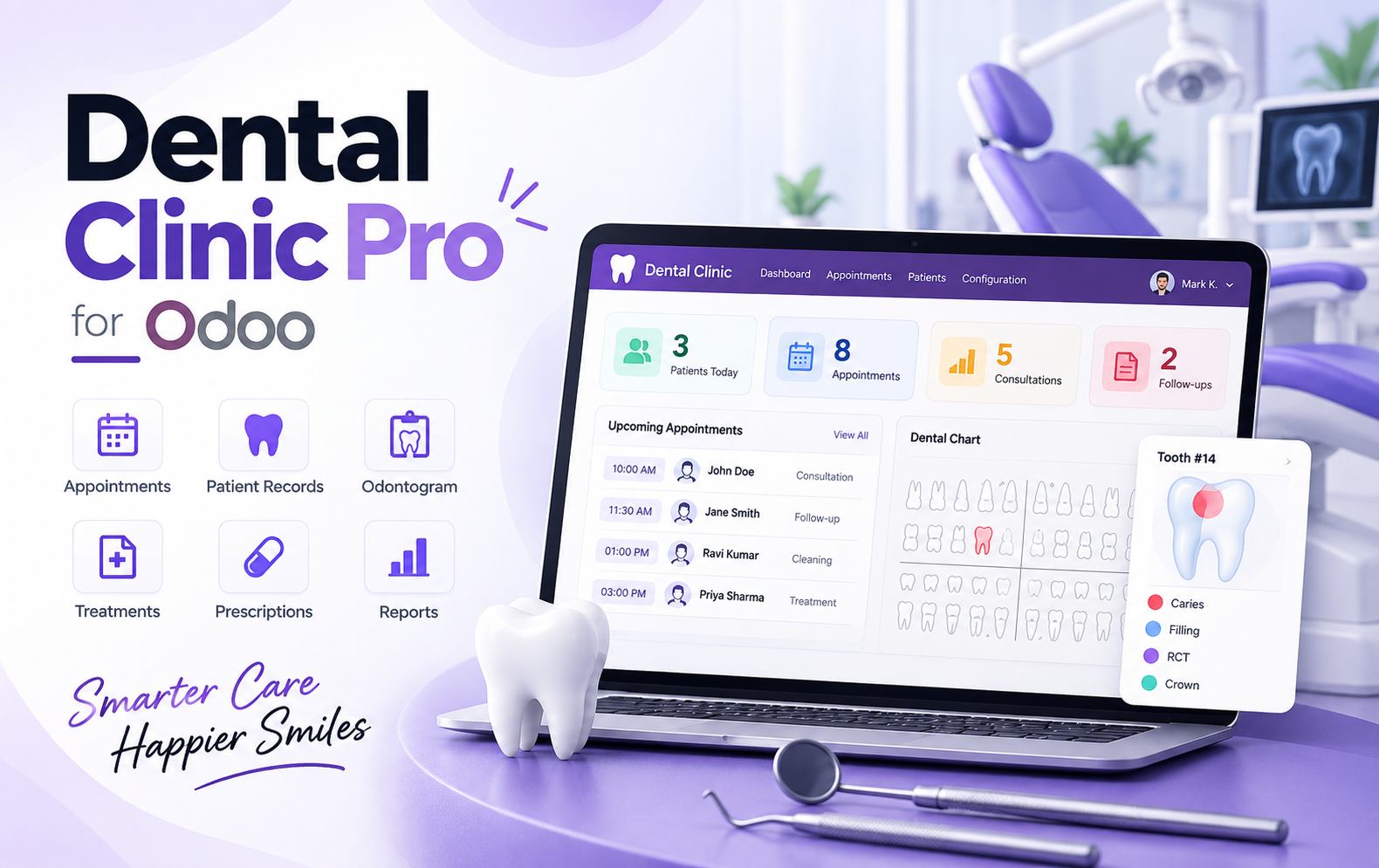
Key Features at a Glance
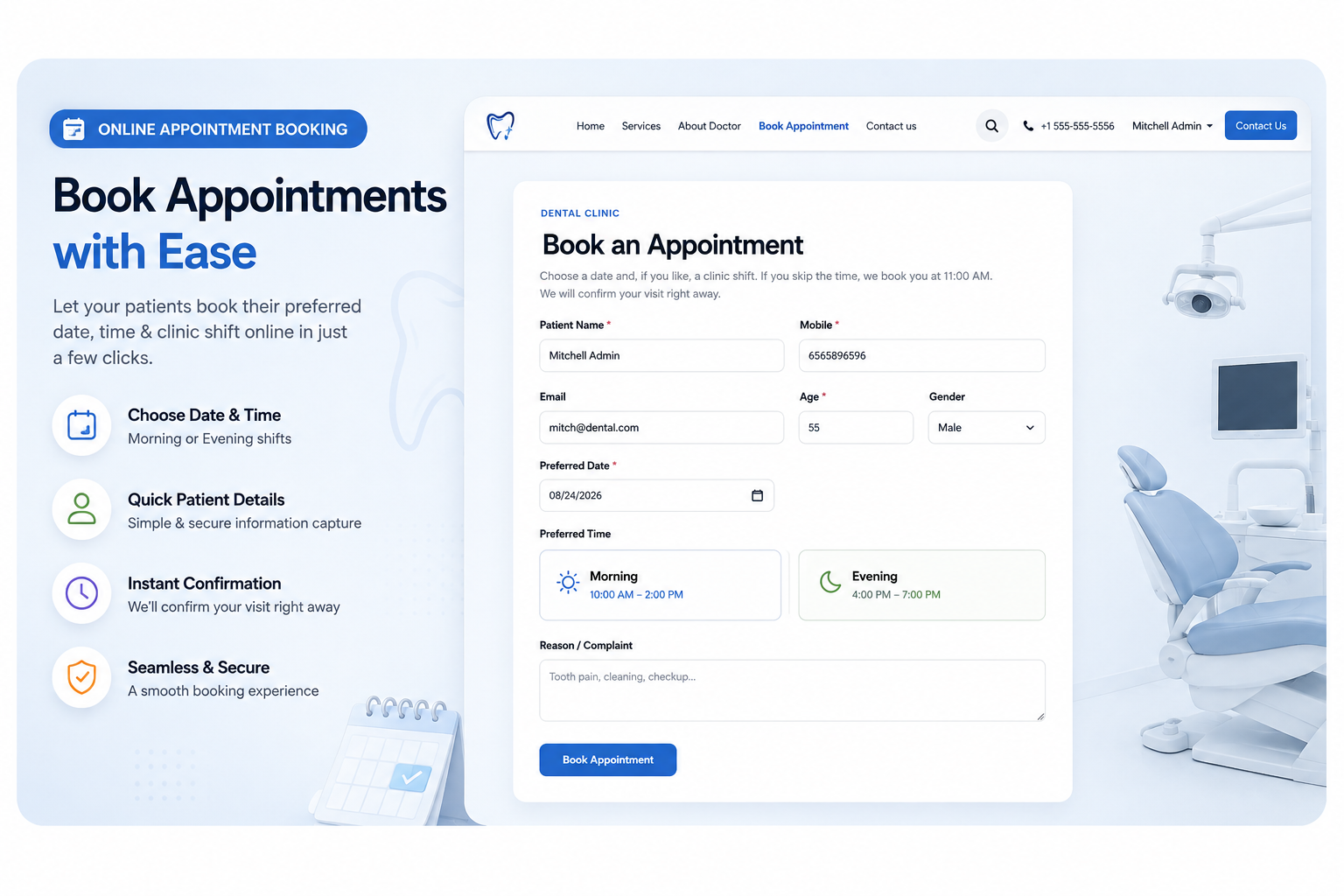
- Online Appointment Booking — Let patients request their preferred appointment dates and times directly through your dental clinic website.
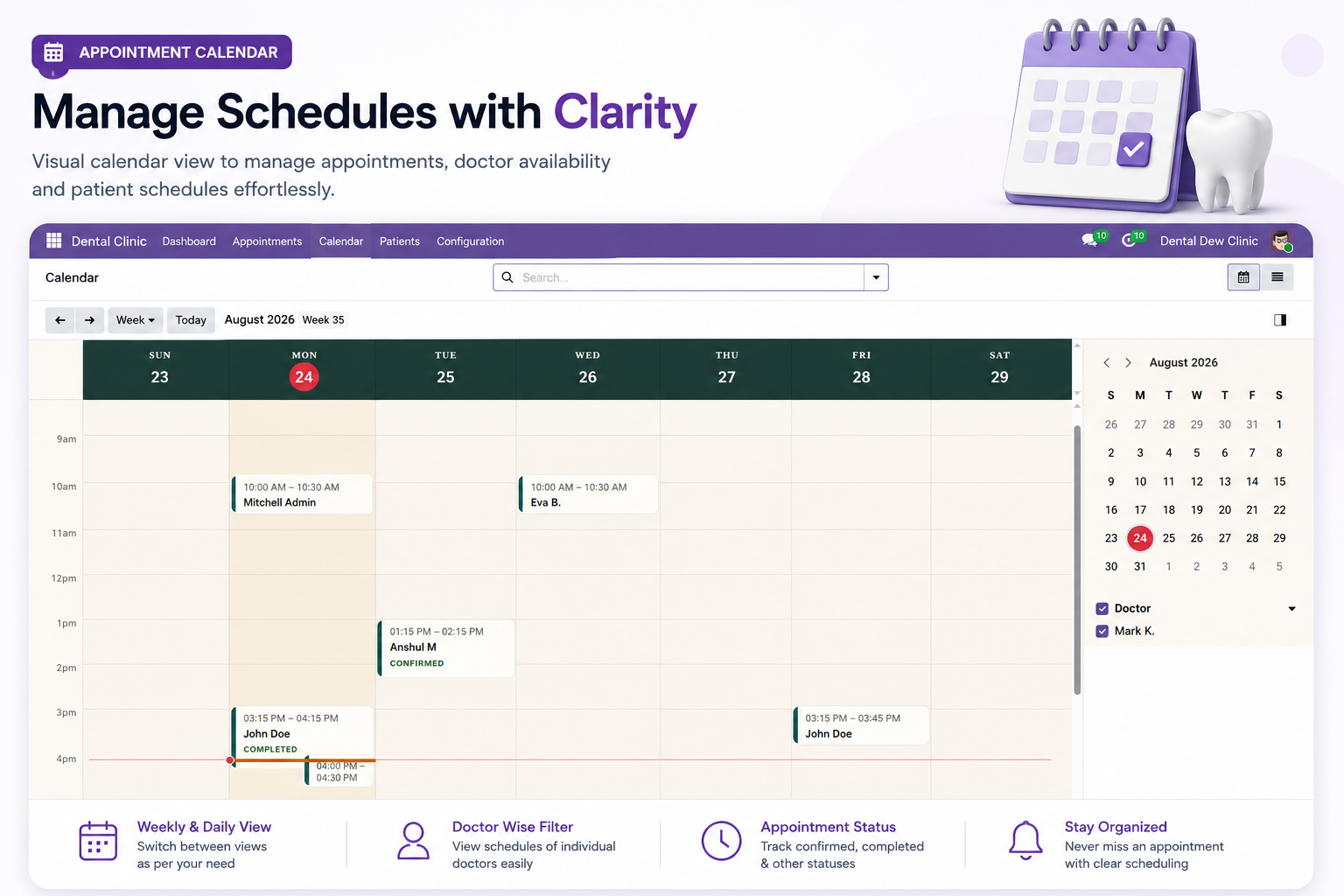
- Smart Appointment Calendar — Organize patient appointments with flexible daily and weekly calendar views for efficient clinic scheduling.
- Complete Patient Consultation — Record complaints, examination findings, clinical notes, advice, treatments, medications, and follow-ups together in one place.
- Interactive Digital Odontogram — Visually record and manage tooth conditions including Caries, Filling, RCT, Bridge, and other dental findings.
- Patient Medical History — Maintain important patient health information including medical conditions, allergies, medications, habits, and related notes.
- Treatment Management — Add multiple treatments while managing quantities, prices, discounts, subtotals, taxes, final amounts, statuses, and notes.
- Medication Management — Record medicines with strength, dosage, frequency, duration, instructions, quantity, pricing, and billing information.
- Easy Follow-Up Scheduling — Schedule future patient visits with follow-up dates, times, notes, and connected appointment relationships.
- Professional Treatment Reports — Generate printable reports containing patient details, findings, treatments, costs, advice, and follow-up information.
- Dental Prescription Reports — Create clear prescriptions containing complete medicine, strength, dosage, frequency, duration, and instruction details.
- Connected Appointment Workflow — Manage consultations, treatments, prescriptions, follow-ups, reports, and billing through one connected appointment record.
- Dental Clinic Dashboard — Monitor patients, consultations, appointments, no-shows, pending invoices, and revenue through a centralized dashboard.
- Centralized Appointment Management — View, filter, and track appointments with patient, doctor, status, billing, follow-up, source, and amount details.
- Patient Document Management — Keep supporting clinical documents and uploaded files connected with individual patient dental records.
- Connected Invoice Management — Create invoices directly from completed dental treatments and track appointments that are ready for invoicing.
Use Cases: Who Needs This module?
1. Dental Clinics
Manage appointments, patient records, consultations, treatments, prescriptions, follow-ups, and billing from one centralized system.
2. Individual Dentists
Organize daily appointments, maintain detailed patient histories, record dental conditions, manage treatments, and generate professional reports.
3. Orthodontists
Track patient consultations, dental conditions, treatment plans, prescriptions, follow-ups, and orthodontic care records efficiently.
4. Orthodontic Clinics
Coordinate multiple patients and appointments while maintaining organized treatment, medical history, prescription, and follow-up information.
5. Dental Practices
Connect clinical and administrative workflows, from appointment booking and consultation to treatment management, reporting, and invoicing.
6. Tooth Clinics
Maintain digital dental charts, patient information, treatment details, prescriptions, and appointment records in one Odoo-based system.
7. Oral Healthcare Centers
Centralize patient records, consultations, treatments, medications, follow-ups, documents, and billing for organized healthcare operations.
8. Dental Care Centers
Manage daily appointments, patient consultations, treatment information, prescriptions, reports, invoices, and patient communication efficiently.
9. Multi-Doctor Dental Clinics
Organize appointments and doctor schedules while keeping patient, consultation, treatment, and billing information connected.
10. Growing Dental Practices
Use a centralized Odoo workflow to manage increasing appointments, patient records, treatments, follow-ups, reports, and revenue.
Quick User Guide (Visual Walkthrough)
Scroll up to revisit the detailed image-wise walkthrough.
Step 1: Online Appointment Requests — Let patients request dental appointments online by selecting preferred dates and available clinic time slots through a simple booking form.
Step 2: Visual Appointment Calendar — Manage all dental appointments through a clear visual calendar that makes daily scheduling easier and more organized.
Step 3: All Patient Details — Access complete patient and appointment information instantly, keeping essential dental records organized and available during every consultation.
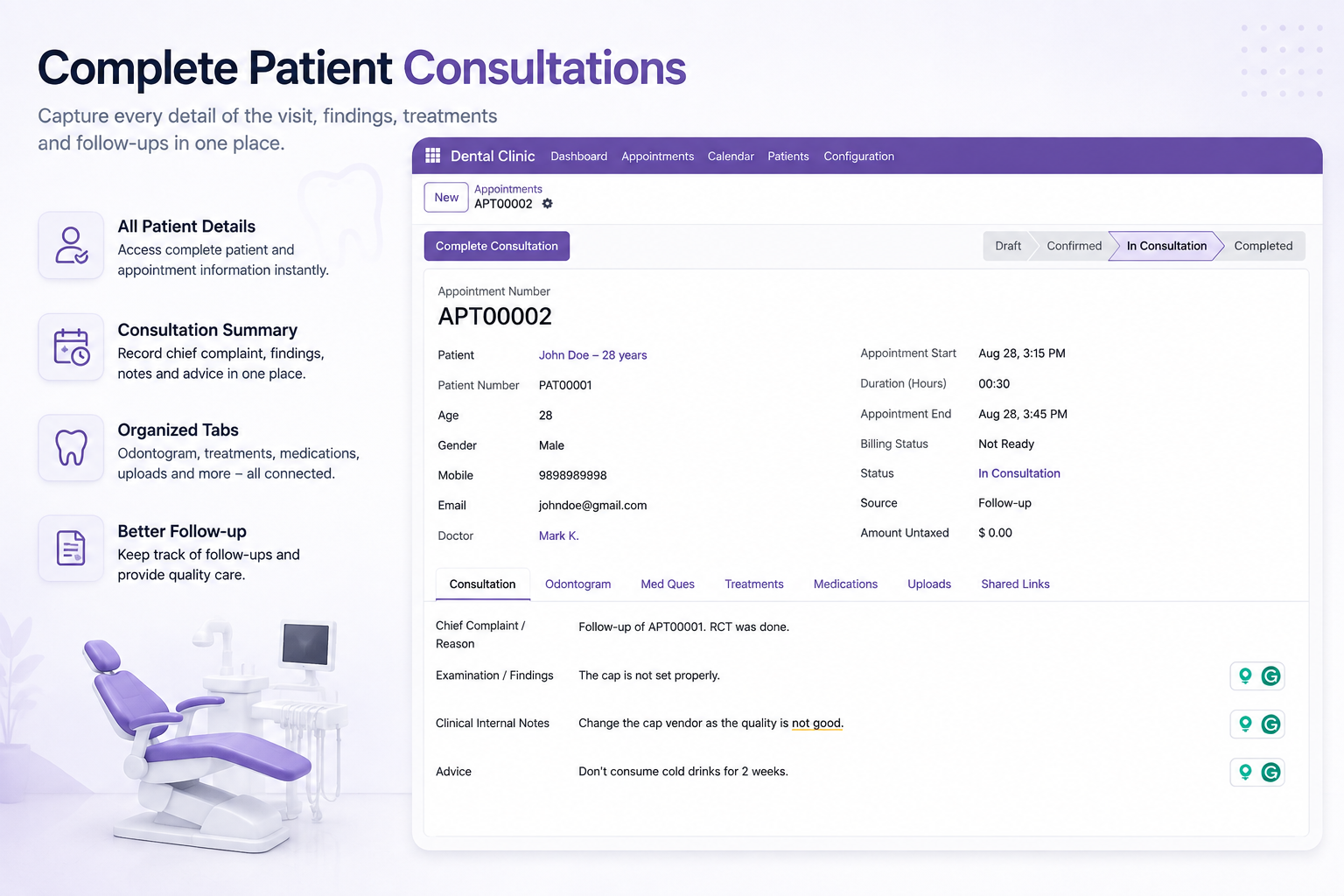
- Consultation Summary — Record chief complaints, examination findings, clinical notes, advice, and important consultation details together within one centralized patient record.
- Appointment Information — View appointment number, patient details, doctor, appointment timing, duration, billing status, source, and consultation status from one interface.
- Chief Complaint Recording — Document the patient’s primary complaint or reason for visiting, providing dentists with clear context before starting detailed examination procedures.
- Examination Findings — Record examination findings clearly within the consultation, helping maintain structured clinical information for the patient’s current dental visit.
- Clinical Internal Notes — Maintain internal clinical notes related to observations, treatment considerations, vendor concerns, or other important information throughout patient consultations.
- Patient Information Access — Quickly access patient name, number, age, gender, mobile, email, and assigned doctor directly from the consultation screen.
- Organized Consultation Tabs — Access Consultation, Odontogram, Medical Questionnaire, Treatments, Medications, Uploads, and Shared Links through clearly organized tabs.
- Digital Odontogram Access — Connect the consultation with an interactive odontogram, allowing dentists to review and manage recorded tooth conditions efficiently.
- Medical Questionnaire Access — Connect patient consultations with medical history and questionnaire information, helping dentists review relevant health details during dental visits.
- Treatment Access — Manage patient treatments alongside consultation information, keeping treatment details connected with findings and clinical documentation.
- Medication Access — Review and manage prescribed medications from the consultation workflow, maintaining medicine information alongside patient and appointment details.
- Patient Document Access — Keep uploaded patient documents connected with consultation records, making supporting clinical information easier to access when required.
- Shared Links — Provide access to shared links from the consultation record, keeping related patient resources connected within the overall workflow.
- Follow-Up Management — Keep track of patient follow-ups through consultation records, helping clinics maintain continuity between current and future appointments.
- Consultation Status Tracking — Track appointment progress through Draft, Confirmed, In Consultation, and Completed stages for better workflow visibility and management.
Step 4: Upper Lower Teeth — View upper and lower dental arches with tooth numbers for identification during patient examination and recording.
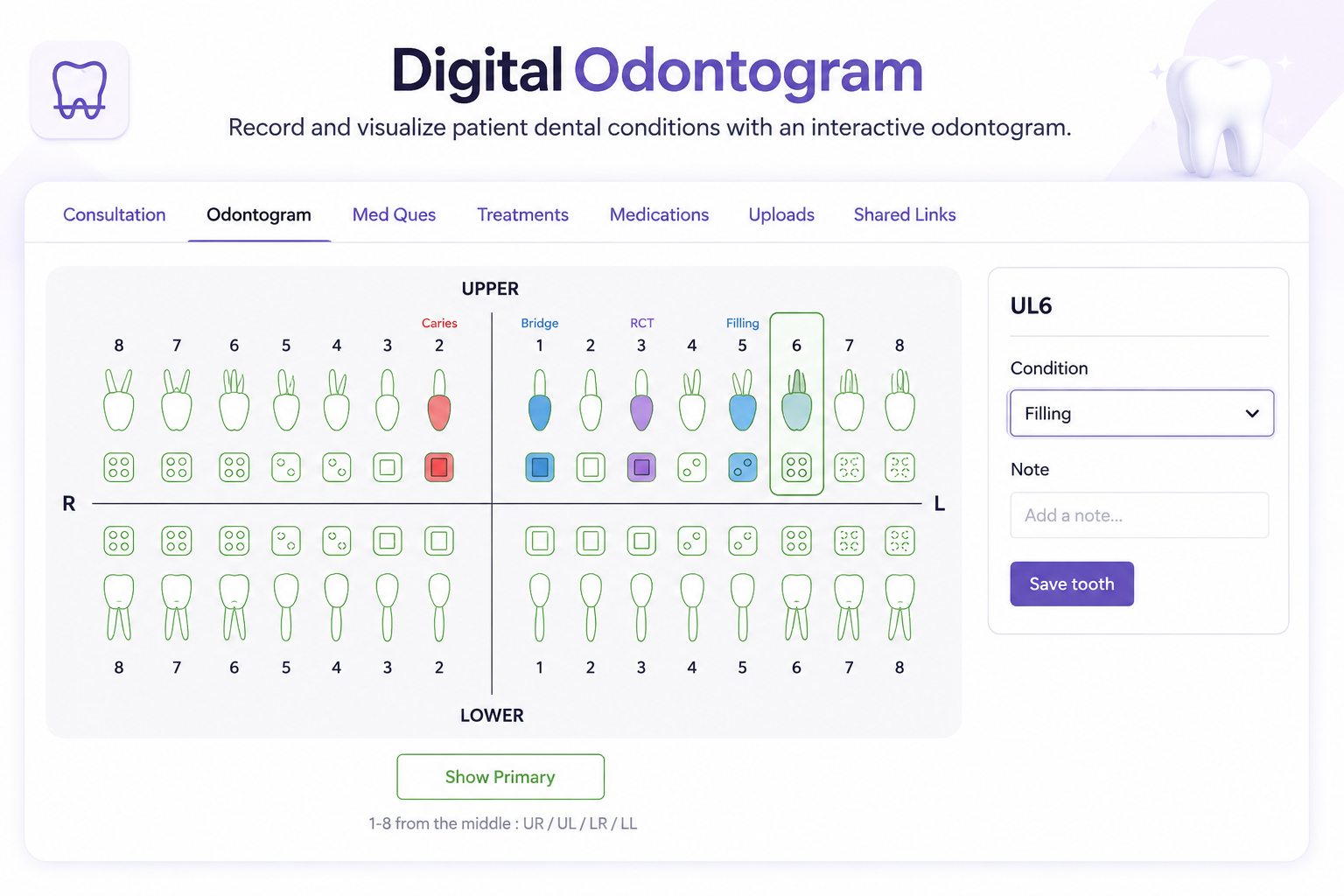
- Interactive Tooth Identification — Click and highlight specific teeth within the odontogram to review or update their dental condition information.
- Condition Visualization — Display recorded tooth conditions visually, making dental findings easier to identify across the patient’s complete tooth chart.
- Tooth Notes — Add clinical notes for selected teeth, providing context about recorded conditions, observations, or required dental treatment information.
- Save Tooth Details — Save selected tooth conditions and associated notes to maintain updated information within the patient’s dental record.
- Digital Dental Records — Maintain dental condition information digitally instead of relying on traditional paper-based tooth charting for patient records.
- Clear Tooth Numbering — Use organized tooth numbering across the odontogram to help dentists identify teeth during examination and documentation.
- Condition-Based Charting — Record multiple dental conditions across different teeth, creating a structured visual representation of the patient’s dental findings.
- Filling Records — Record filling conditions on specific teeth and maintain findings within the interactive dental chart for future reference.
- RCT Records — Identify teeth associated with RCT findings and maintain those records within the patient’s odontogram for future reference.
- Bridge Records — Mark teeth associated with bridge conditions, helping maintain structured dental information within the patient’s visual tooth chart.
- Caries Records — Highlight teeth with caries conditions, making affected areas visually identifiable within the interactive odontogram for clinical documentation.
- Tooth-Wise Documentation — Maintain dental findings according to individual teeth, helping organize clinical information and supporting detailed patient dental records.
- Primary Teeth View — Use the Show Primary option to access primary teeth information when managing records for applicable patients.
- Quadrant Organization — View teeth according to upper-right, upper-left, lower-right, and lower-left sections for organized dental chart navigation.
- Selected Tooth Panel — Review the selected tooth number and condition through a panel, keeping tooth-specific information accessible during documentation.
Step 5: Medical History Management — Maintain important patient medical history digitally, helping dental teams review relevant health information during consultations and treatment planning.
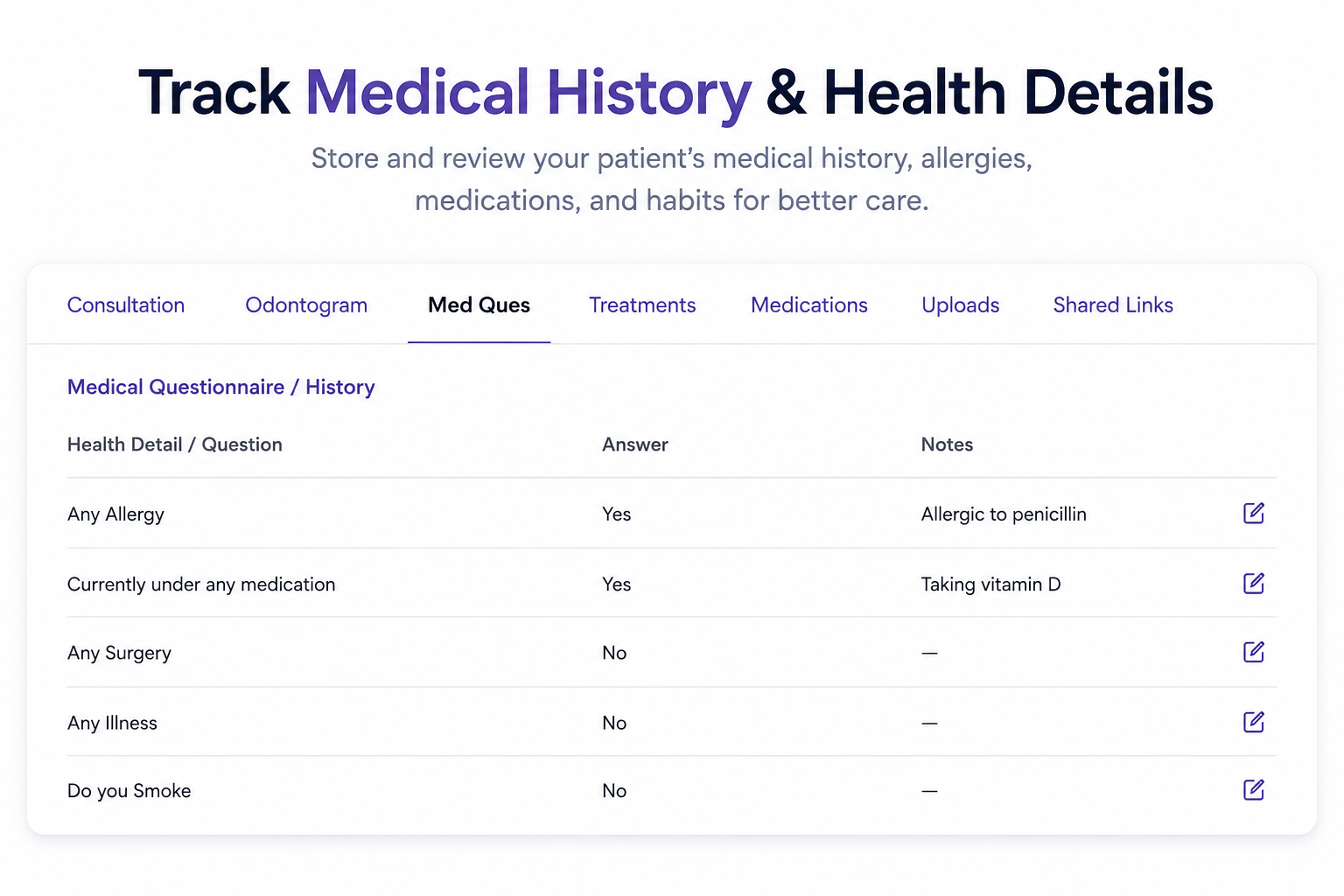
- Allergy Information — Record patient allergies with specific notes, helping dentists access important allergy information while reviewing individual patient medical histories.
- Current Medication Tracking — Document whether patients currently take medications and maintain related notes for better understanding during dental consultations and treatments.
- Surgery History — Record previous surgery information within patient medical history, providing dentists with organized health details during consultation and treatment.
- Illness History — Maintain information about previous illnesses and related notes, keeping important patient health details connected with dental records.
- Smoking Information — Record patient smoking-related responses within the medical questionnaire, providing additional health information for dental consultation and patient records.
- Medical Questionnaire — Use a structured medical questionnaire to collect important health questions, patient answers, and supporting notes within one interface.
- Health Detail Questions — Organize health-related questions clearly, allowing clinic teams to review individual patient responses and associated medical notes efficiently.
- Patient Health Notes — Add relevant notes alongside questionnaire answers, keeping additional health information connected with specific medical history questions.
- Answer Tracking — Record clear Yes or No responses for health questions, making patient medical information easier to review during consultations.
- Centralized Health Information — Keep allergies, medications, surgeries, illnesses, smoking information, answers, and notes together within the patient’s medical questionnaire record.
- Editable Medical Records — Use editing options beside individual health questions to update patient answers and notes whenever medical information changes.
- Organized Patient History — Maintain structured medical history information so dentists can quickly review important patient health details before providing dental care.
- Better Consultation Preparation — Review medical questionnaire information before consultations, helping dental teams understand recorded health details and relevant patient notes.
- Connected Patient Records — Keep medical history information connected with patient consultation records, creating a more organized approach to dental information management.
- Health Information Review — Review previously recorded medical answers and notes from one centralized interface while managing patient consultation and dental records.
Step 6: Multiple Dental Treatments — Add multiple dental treatments and manage their quantities, prices, discounts, taxes, subtotals, and final amounts within one organized treatment interface
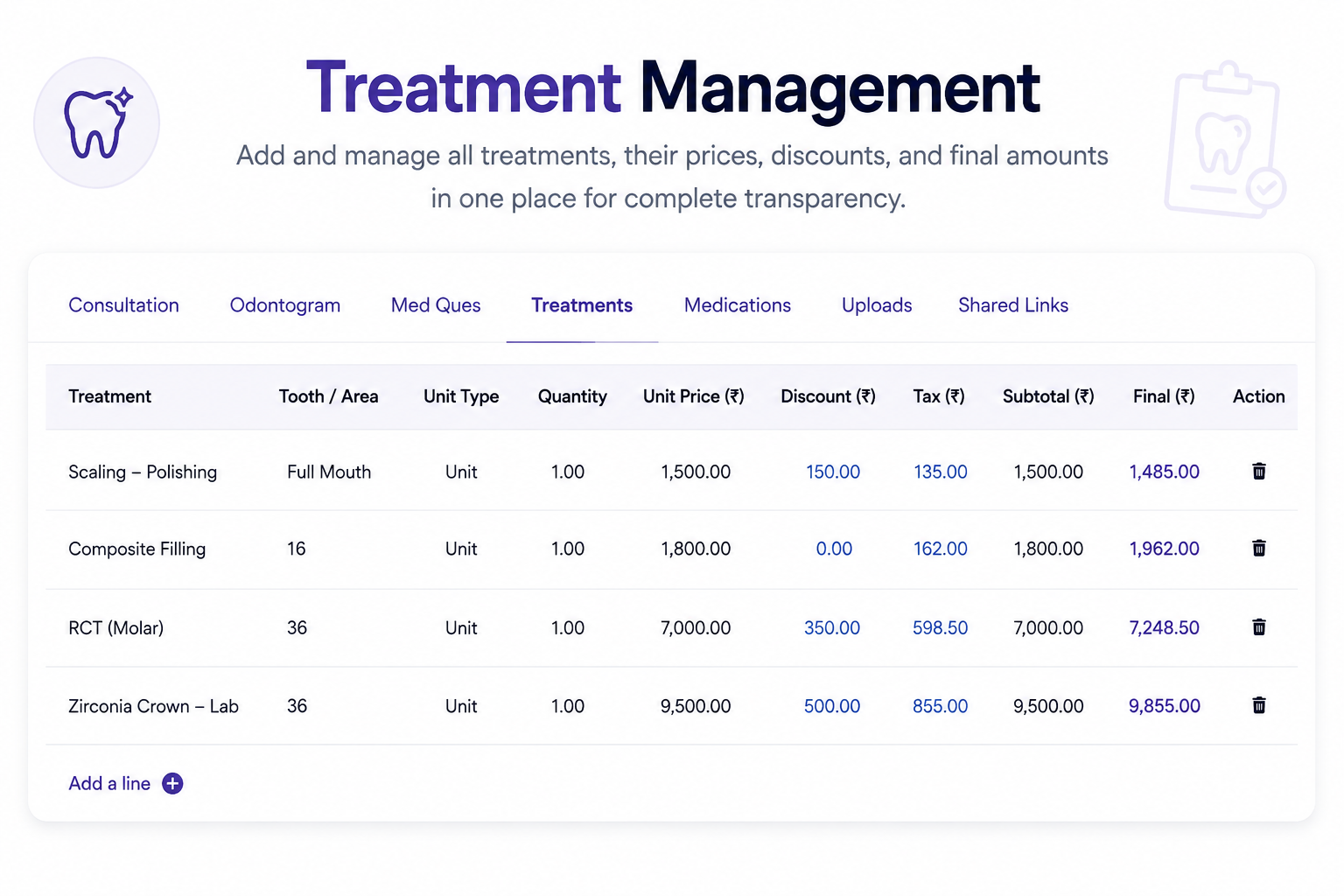
- Treatment & Tooth Area — Record treatment names alongside specific teeth or areas, helping dentists connect each selected treatment with the relevant dental treatment location.
- Unit Type Management — Choose appropriate unit types for treatments, providing a structured way to define quantities and calculate treatment pricing within patient records.
- Treatment Quantity — Set treatment quantities accurately to ensure pricing calculations reflect the actual number of units required for each specific dental procedure.
- Unit Price Management — Maintain unit prices for individual treatments, creating clear financial information for dental services recorded within the patient’s consultation treatment records.
- Treatment Discounts — Apply discounts to individual treatments, helping clinics maintain transparent pricing details while calculating adjusted treatment amounts for individual patients easily.
- Tax Management — Track applicable treatment taxes directly within treatment records, supporting clearer financial calculations and more organized dental billing information for clinics.
- Subtotal Calculation — View treatment subtotals alongside discounts and taxes, making individual service calculations easier to review before completing the patient billing processes.
- Final Amount Calculation — Calculate final treatment amounts automatically from recorded pricing information, helping maintain consistent financial details throughout the complete dental treatment workflow.
- Multiple Treatment Lines — Add multiple treatment lines to a patient record, allowing dentists to manage several procedures within one consultation and treatment record.
- Scaling & Polishing — Manage scaling and polishing treatments with defined treatment areas, quantities, pricing, discounts, taxes, and calculated final amounts within patient records.
- Composite Filling Records — Record composite filling procedures with tooth numbers, unit information, pricing, discounts, taxes, and final amounts for treatment documentation and billing.
- RCT Treatment Records — Document RCT procedures with specific tooth areas and detailed pricing information, helping maintain structured records for dental treatments and billing.
- Crown Treatment Management — Manage crown treatments with relevant tooth numbers, unit types, quantities, prices, discounts, taxes, and final payable amounts within patient records.
- Centralized Treatment Pricing — Keep treatment pricing information centralized, making it easier for dental teams to review services and associated financial details during consultations.
- Organized Treatment Table — Use an organized treatment table to compare procedures, tooth areas, quantities, prices, discounts, taxes, subtotals, and final amounts clearly easily.
Step 7: Medication Management — Manage prescribed medications within patient records, keeping medicine information organized and accessible throughout the dental treatment workflow.
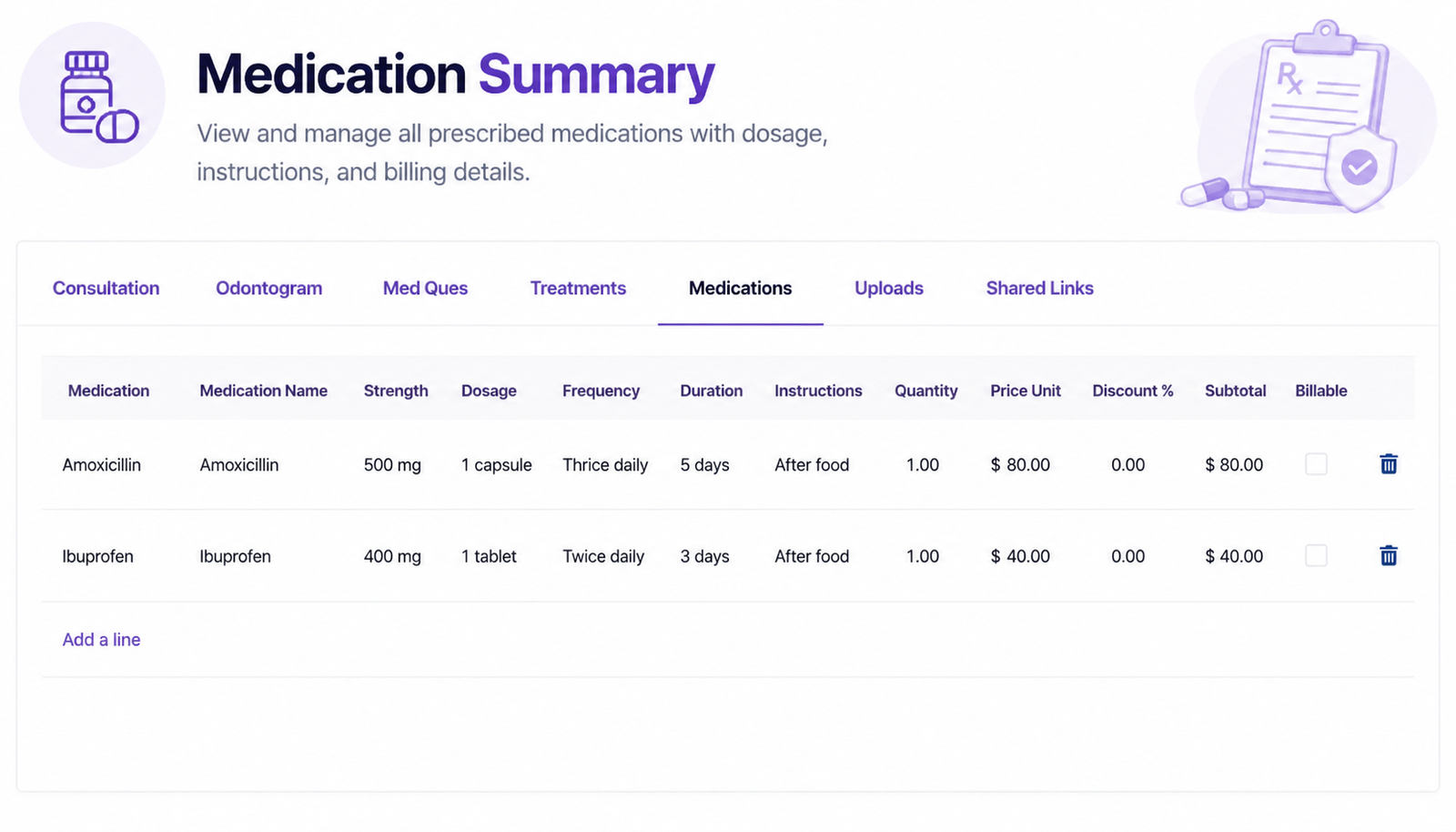
- Medication Name — Record specific medication names clearly, helping dental professionals maintain structured prescription information for each individual patient consultation.
- Medication Strength — Specify medicine strength such as 500 mg or 400 mg, providing clear dosage-related information within prescription records.
- Dosage Management — Record prescribed dosage details, helping patients and clinic staff understand the quantity of medicine required during treatment.
- Frequency Management — Define medication frequency such as twice daily or thrice daily for clearly organized prescription instructions.
- Treatment Duration — Specify medication duration in days, allowing prescription records to clearly communicate the intended treatment period for each medicine.
- Medication Instructions — Add specific instructions such as taking medicine after food, keeping important prescription guidance alongside medication information.
- Medication Quantity — Record medication quantities within prescription lines, helping maintain organized information about the prescribed amount for each medicine.
- Unit Price Management — Store individual medication prices, providing clear financial information alongside prescribed medicine details within patient treatment records.
- Medication Discounts — Track applicable medication discounts using dedicated discount fields, supporting organized pricing information within the prescription management workflow.
- Medication Subtotal — Display medication subtotals clearly, helping clinics review calculated amounts associated with individual prescribed medicines during billing preparation.
- Billable Medication — Mark medications for billing using the available billable option, connecting prescription information with relevant financial management processes.
- Multiple Medications — Add multiple medicines within one patient record, allowing dentists to manage complete prescriptions through a centralized medication interface.
- Add Medication Lines — Easily add new medication lines whenever additional medicines are required, keeping patient prescriptions flexible and comprehensively organized.
- Medication Record Organization — Maintain medicine names, strengths, dosages, frequencies, durations, instructions, quantities, prices, discounts, and subtotals together systematically.
- Prescription Information — Keep essential medication information structured within the patient’s consultation record for convenient review during ongoing dental treatment.
Step 8: Easy Follow-up Scheduling — Schedule follow-up appointments easily by selecting specific dates and times, keeping patient visits organized and ensuring timely continued dental care.
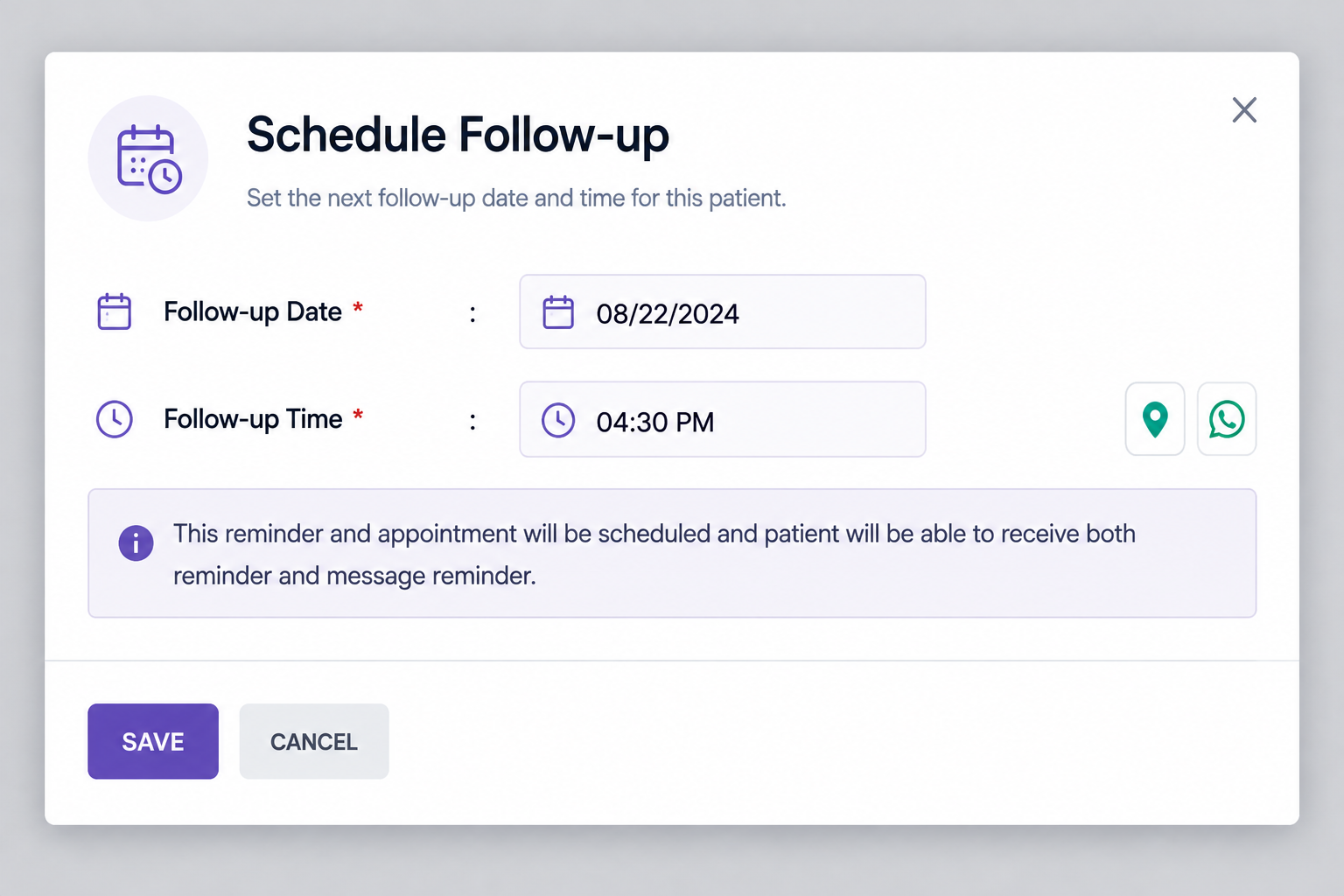
- Follow-up Date Management — Set follow-up dates directly within patient records, helping dental teams maintain schedules and coordinate upcoming consultations without unnecessary administrative effort.
- Precise Follow-up Times — Choose precise follow-up times for patients, making appointment planning more structured while supporting consistent scheduling across busy dental clinic operations.
- Appointment Reminders — Create reminders alongside follow-up appointments, helping patients remember upcoming visits and reducing the possibility of missed or forgotten dental appointments.
- Patient Visit Reminders — Provide patients with appointment reminders, ensuring important follow-up information reaches them clearly and supports better visit attendance and preparation properly.
- Message Reminders — Send message reminders to patients after scheduling follow-ups, improving communication and keeping patients informed promptly about their upcoming dental appointments.
- Organized Follow-up Schedule — Maintain organized follow-up schedules by recording appointment dates and times, allowing clinic staff to quickly review planned patient visits easily.
- Quickly Save Follow-ups — Save scheduled follow-up details with a simple action, making appointment management convenient for dentists and administrative staff throughout daily operations.
- Dedicated Scheduling Window — Use a dedicated follow-up scheduling window to manage the next patient visit efficiently without navigating through complicated appointment management processes.
- Future Consultation Planning — Schedule future consultations immediately after treatment, helping dental professionals maintain continuity of care and plan subsequent patient visits effectively efficiently.
- Accurate Follow-up Dates — Record follow-up appointment dates accurately, giving clinic teams a reliable reference for upcoming consultations and ongoing patient treatment planning easily.
- Clear Appointment Timing — Specify follow-up appointment times clearly, helping dentists coordinate availability while providing patients with precise information about their next scheduled visit.
- Integrated Reminders — Combine appointment scheduling and reminders within one workflow, reducing manual coordination and keeping follow-up communication connected with patient appointments efficiently.
- Simple Scheduling Interface — Manage follow-up scheduling through a clean interface, allowing staff to enter required information quickly and save appointment details with confidence.
- Calendar Date Selection — Use calendar-based date selection to choose appropriate follow-up days, making scheduling faster and reducing errors during appointment planning for patients.
- Dedicated Time Selection — Set appointment times using a time field, ensuring every follow-up visit contains clear timing information for patients and clinic staff.
Step 9: Professional Treatment Reports — Generate structured treatment reports containing patient information, visit details, complaints, findings, treatments, advice, and follow-up appointments clearly.
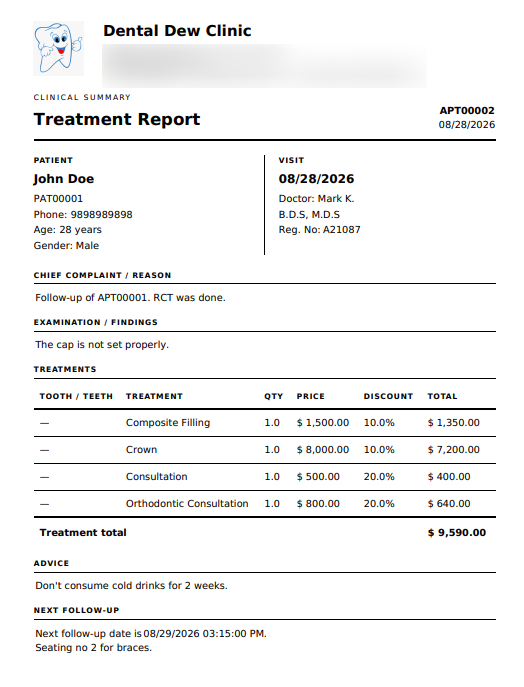
- Patient Information — Display essential patient details including name, patient number, phone, age, and gender for quick identification during consultations.
- Visit Information — Keep appointment date, doctor name, qualifications, and registration details organized within the treatment report for complete visit documentation.
- Chief Complaint Recording — Document the patient’s chief complaint or treatment reason clearly, helping dentists maintain accurate records of consultation requirements.
- Clinical Findings — Record examination findings in the treatment report, providing dentists with documented observations from each patient’s dental consultation and examination.
- Treatment Details — Present completed treatments with tooth information, treatment names, quantities, prices, discounts, and totals for transparent treatment documentation.
- Tooth-Wise Treatment Tracking — Include tooth or teeth references alongside treatments, helping dentists maintain clearer records of procedures performed during patient visits.
- Treatment Quantity — Record treatment quantities within reports, making individual procedures easier to understand and supporting accurate treatment and billing documentation.
- Treatment Pricing — Display individual treatment prices clearly, allowing patients and clinic teams to understand the financial details associated with procedures.
- Discount Management — Show applicable treatment discounts directly within reports, providing transparent pricing information and making discounted treatment amounts easier to review.
- Treatment Totals — Calculate and display treatment totals within the report, giving clinic staff a clear summary of overall treatment charges.
- Patient Advice — Include personalized dental advice in reports, ensuring important recommendations remain documented alongside treatment information for future reference.
- Next Follow-up — Display the next follow-up date and time clearly, helping dentists and patients stay informed about upcoming scheduled consultations.
- Follow-up Notes — Record important follow-up instructions, such as seating or treatment-related notes, alongside the next appointment details for better preparation.
- Clinical Summary — Combine important consultation information into one clinical summary, making patient treatment history easier for dental professionals to review.
- Doctor Identification — Display the responsible doctor’s name, qualifications, and registration number, maintaining clear professional information within every treatment report.
Step 10: Prescription Reports — Prescription reports organize prescribed medicines with strength, dosage, frequency, duration, and instructions for clear patient understanding and treatment compliance needs.
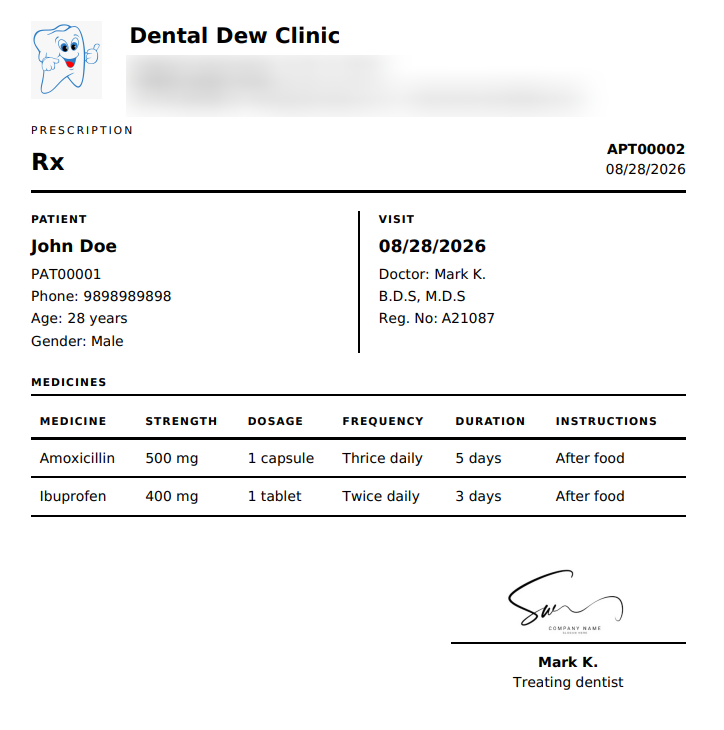
- Patient Details — Patient details display essential information including name, patient number, phone, age, and gender for accurate identification during prescription management processes.
- Visit Information — Visit information records consultation date, treating doctor, professional qualifications, and registration number within the prescription for complete clinical documentation purposes.
- Medicine Names — Medicine names are clearly listed, helping dentists and patients quickly identify every prescribed medication included within the patient’s treatment plan.
- Medicine Strength — Strength details specify medication potency, such as 500 mg or 400 mg, providing precise information for correct prescription understanding clearly.
- Dosage Instructions — Dosage instructions explain how much medicine patients should take, such as one capsule or one tablet during prescribed treatment periods.
- Medication Frequency — Frequency information clearly communicates how often medicines should be taken, helping patients follow the dentist’s prescribed schedule accurately each day.
- Treatment Duration — Treatment duration specifies the number of days each medicine should continue, supporting consistent adherence to the prescribed dental treatment plan.
- Medicine Instructions — Medication instructions include guidance such as taking medicines after food, helping patients understand important administration requirements for prescribed medications safely.
- Structured Medicine Table — Prescription tables organize medication information into structured columns, making medicine details easier to review, understand, and communicate with patients clearly.
- Professional Formatting — Professional prescription formatting separates patient, visit, and medicine sections, creating organized documentation suitable for clinic records and patient communication needs.
- Appointment Reference — Appointment references display the appointment number prominently, helping clinic teams connect prescriptions with the correct consultation and patient record efficiently.
- Doctor Identification — Doctor identification shows the treating dentist’s name and professional details, maintaining clear accountability for medications prescribed during the visit properly.
- Centralized Documentation — Prescription documentation keeps medicine information together in one place, reducing the need to search across multiple records during patient care.
- Clear Medication Records — Clear medication records help patients understand prescribed medicines, dosages, frequencies, durations, and instructions without unnecessary complexity or confusion during treatment.
- Prescription Signature — Prescription signatures provide a designated area for the treating dentist, supporting formal documentation and professional completion of the prescription report.
Step 11: Appointment Details — Manage appointment details including patient information, timing, doctor assignment, follow-up dates, billing status, consultation status, and treatment amounts efficiently.
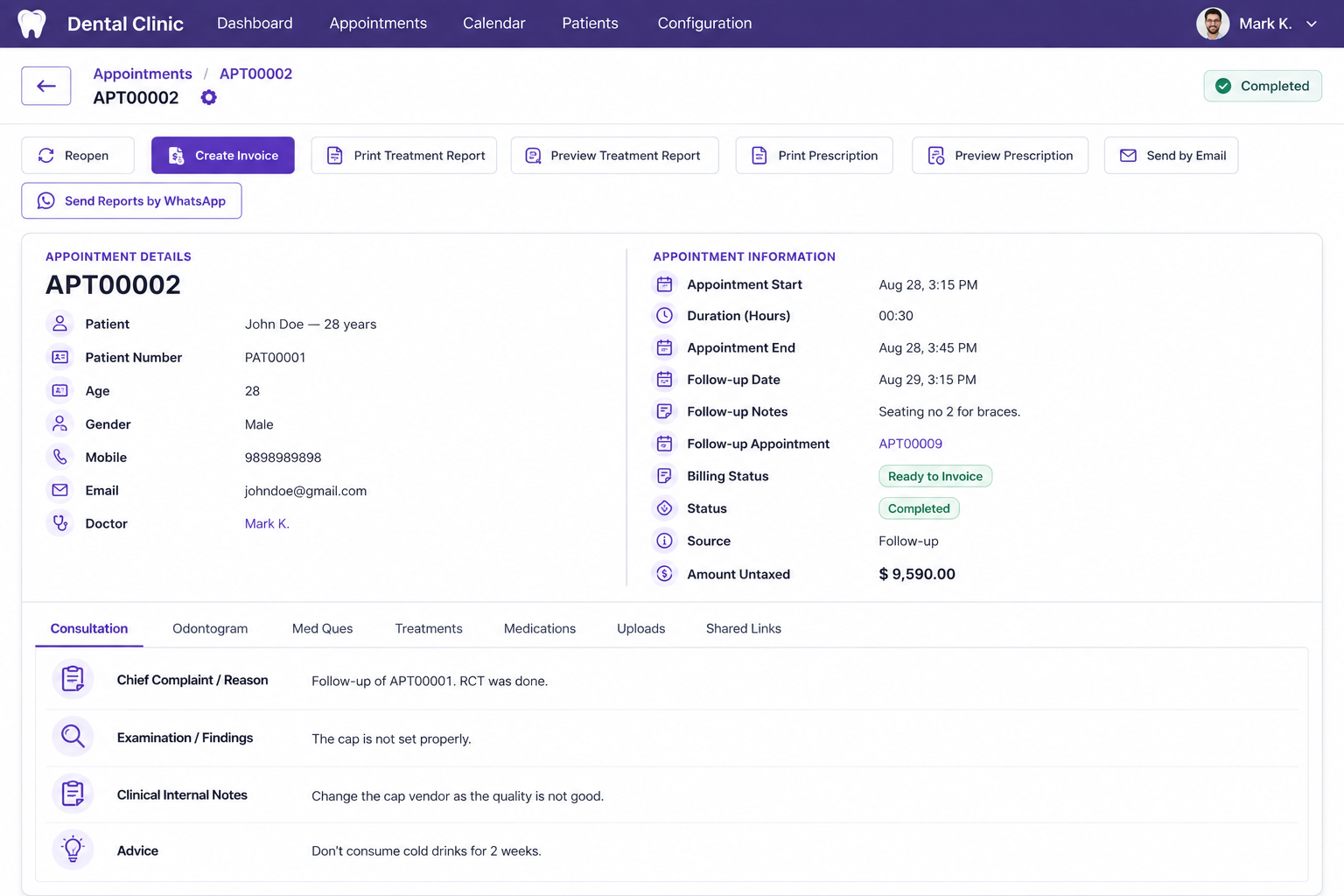
- Reopen Appointments — Reopen completed appointments when necessary, allowing clinic staff to continue managing records and make required updates after consultation completion.
- Create Invoices — Create invoices directly from completed appointments, connecting clinical services with billing information for streamlined financial management and accurate clinic records.
- Treatment Reports — Print treatment reports from appointment records, providing structured documentation of patient complaints, findings, treatments, advice, pricing, and follow-up information.
- Report Preview — Preview treatment reports before printing, helping clinic staff review patient information, consultation details, treatments, and totals for accuracy.
- Print Prescriptions — Print prescriptions directly from appointments, making prescribed medication information readily available for patients and maintaining organized clinical documentation.
- Prescription Preview — Preview prescriptions before sharing, allowing staff to verify patient details, doctor information, medicines, dosages, frequencies, durations, and instructions accurately.
- Email Reports — Send reports by email directly from appointment records, supporting convenient delivery of treatment reports and prescriptions to patients electronically.
- WhatsApp Reports — Share treatment reports through WhatsApp, providing an additional communication option for delivering important patient documents conveniently after appointments securely.
- Appointment Timing — Track appointment start and end times, helping clinics maintain organized schedules and understand consultation duration for each patient visit accurately.
- Follow-up Information — Record follow-up dates and notes within appointment information, keeping future care requirements connected to the patient’s current consultation record.
- Linked Follow-ups — Link follow-up appointments to previous visits, creating continuity between consultations and making upcoming patient care easier to track.
- Billing Status — Monitor billing status directly within appointments, showing whether records are ready for invoicing or have already been invoiced.
- Appointment Status — Track appointment status such as completed, scheduled, confirmed, or reopened, helping staff understand the current stage of every consultation clearly.
- Appointment Source — Store appointment source information, such as follow-up, alongside patient records, helping clinics understand how appointments were created and managed efficiently.
- Contact Details — Display patient contact details within appointments, giving clinic staff convenient access to phone numbers and email addresses during communication activities.
Step 12: Clinic Performance Overview — Monitor overall clinic performance through a centralized dashboard displaying important operational and financial insights in one convenient place.
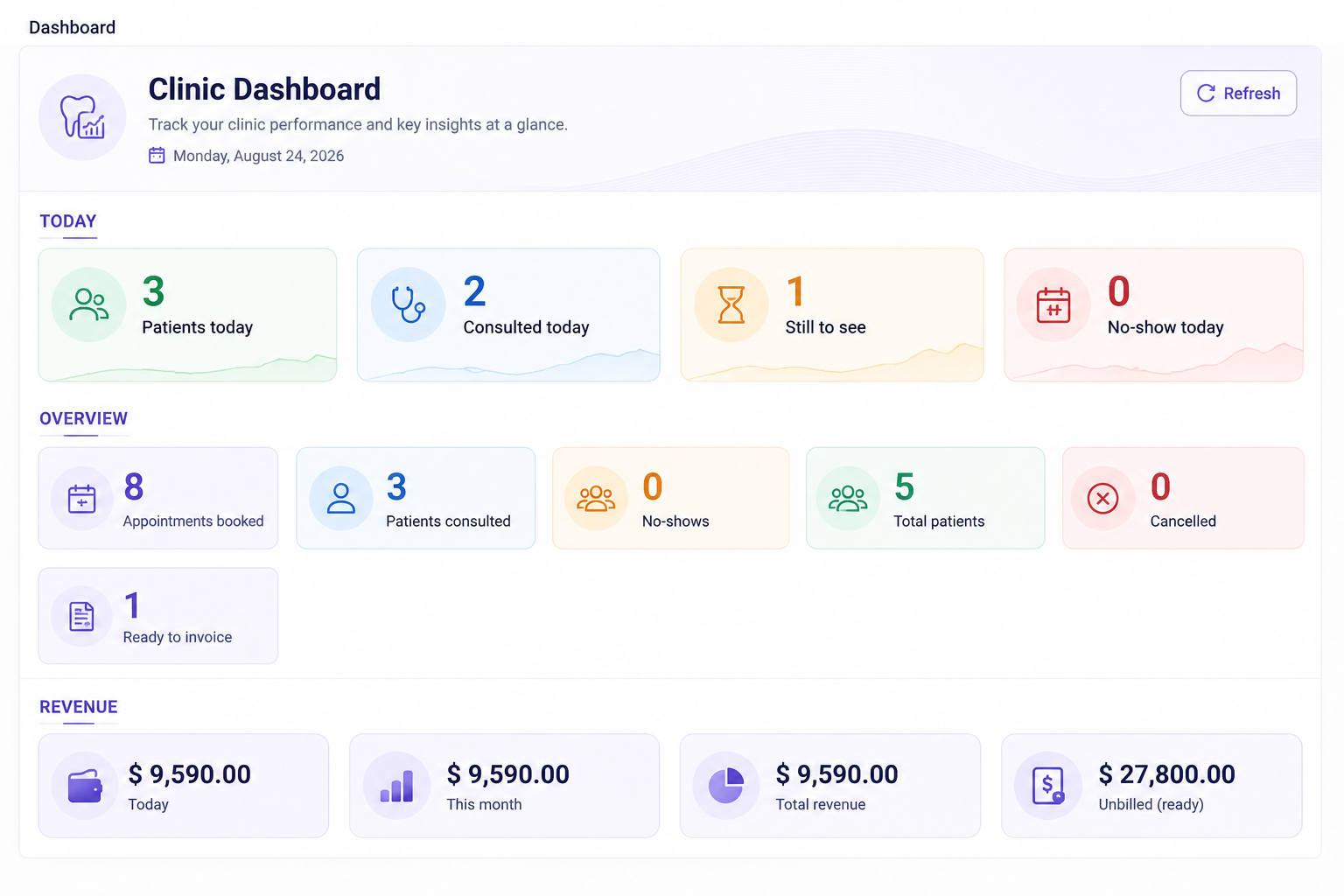
- Patients Today — View the number of patients scheduled for today, helping clinic staff understand daily patient workload and prepare accordingly.
- Consulted Patients — Track how many patients have already been consulted today, providing a quick view of completed consultations.
- Patients Still to See — Identify patients still waiting for consultation, helping dental teams manage remaining appointments efficiently throughout the day.
- No-Show Tracking — Monitor today’s no-show count, making it easier to understand missed appointments and maintain accurate daily clinic activity records.
- Appointments Booked — Display the total number of appointments booked, providing a quick overview of scheduled clinic activities and patient visits.
- Patients Consulted — Track the overall number of consulted patients, helping staff understand consultation activity across the clinic dashboard.
- No-Show Overview — Review overall no-show counts from the dashboard, providing visibility into missed appointments and daily scheduling performance.
- Total Patients — Display the total patient count, helping clinic teams quickly understand the number of patients managed within their records.
- Cancelled Appointments — Monitor cancelled appointment counts, allowing staff to maintain awareness of changes affecting the clinic’s appointment schedule.
- Ready to Invoice — Identify appointments ready for invoicing, helping clinic staff quickly locate completed services requiring billing action.
- Today’s Revenue — View today’s revenue amount directly from the dashboard, providing quick visibility into current clinic financial activity.
- Monthly Revenue — Track monthly revenue from the dashboard, helping clinic teams review financial performance for the current reporting period.
- Total Revenue — Display total revenue information in one dashboard section, giving staff a consolidated view of recorded clinic earnings.
- Unbilled Revenue — Monitor unbilled revenue amounts, helping identify completed or pending financial records that may require invoicing actions.
- Quick Refresh — Refresh dashboard information whenever required, allowing users to access updated clinic performance and operational figures conveniently.
Step 13: Appointment Management — Manage all patient appointments from one organized screen, making scheduling, monitoring, and daily clinic coordination much easier for dental teams.
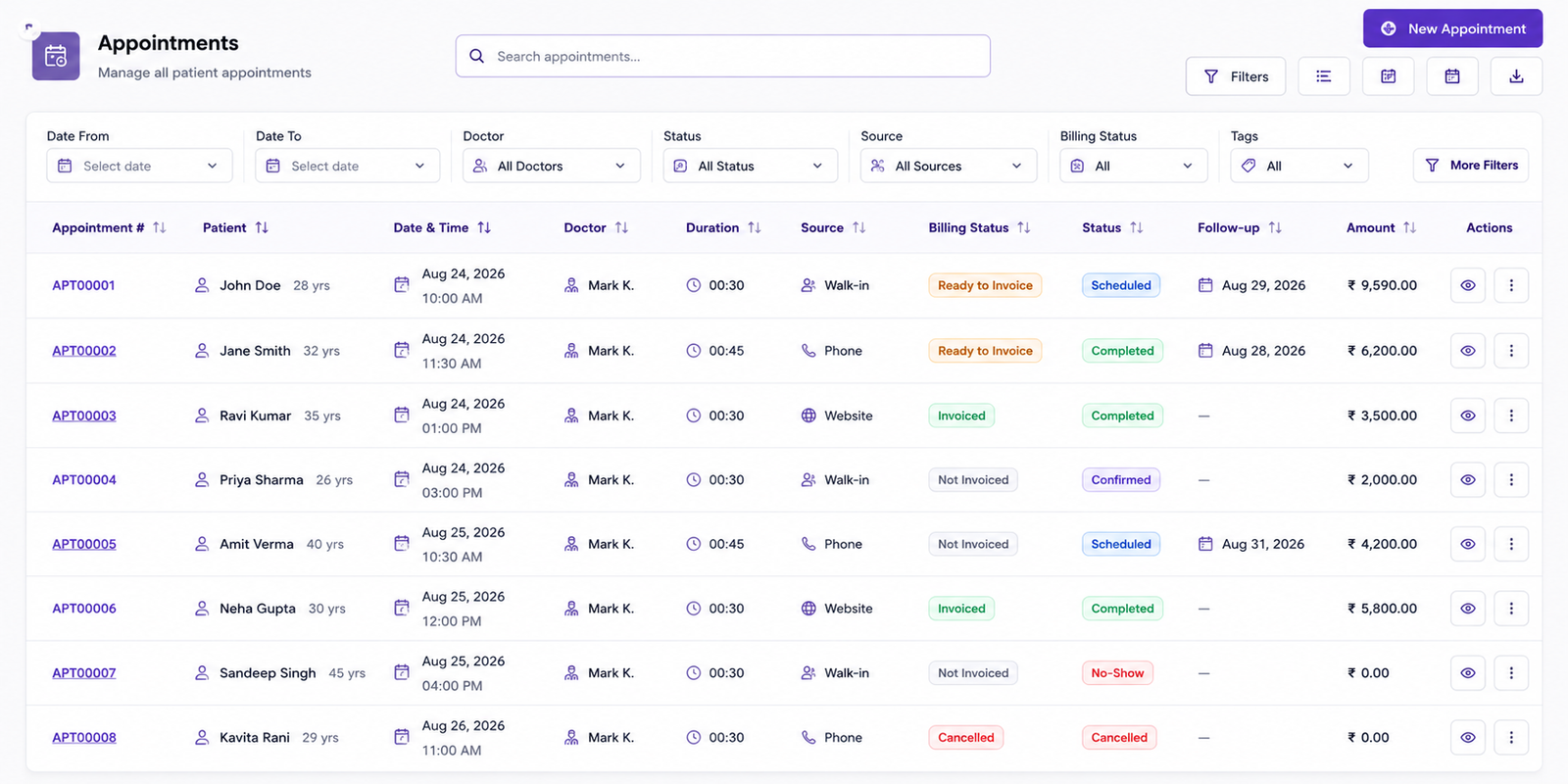
- Quick Appointment Search — Search appointments quickly using the dedicated search field, helping staff locate patient visits easily without manually browsing extensive appointment records.
- Advanced Appointment Filters — Filter appointments by date range, doctor, status, source, billing status, and tags for faster record discovery, review, and daily management.
- New Appointment Creation — Create new appointments directly from the appointments interface, allowing clinic staff to schedule patient visits efficiently and maintain organized records.
- Appointment Number Tracking — Track appointment numbers alongside patient names, making individual records easier to identify and access during daily clinic operations effectively efficiently.
- Patient Age Visibility — View patient ages within appointment listings, giving staff useful demographic information while reviewing scheduled and completed patient visits conveniently today.
- Date & Time Tracking — Monitor appointment date and time clearly, helping dental teams understand schedules, consultation timing, and upcoming patient visits throughout the day.
- Doctor Assignment — Assign doctors to appointments and view responsible practitioners directly within the appointment list for better scheduling and workload visibility overall.
- Duration Tracking — Track appointment duration, helping clinics understand consultation timing and organize schedules according to different patient visit requirements efficiently each day.
- Appointment Source Tracking — Identify appointment sources such as walk-in, phone, or website, providing visibility into how patients scheduled their dental appointments efficiently efficiently.
- Billing Status Management — Monitor billing status including ready to invoice, invoiced, and not invoiced, supporting organized financial follow-up for completed patient services accurately.
- Appointment Status Tracking — Track appointment statuses such as scheduled, completed, confirmed, no-show, and cancelled for clear visibility across all clinic activities daily daily.
- Follow-up Date Tracking — Record follow-up dates within appointment listings, helping staff quickly identify patients requiring future visits and continued dental care accurately today.
- Appointment Amount Visibility — View appointment amounts directly in the listing, allowing staff to review associated financial values while managing patient appointments efficiently consistently.
- Appointment Actions — Use additional action controls for individual appointments, providing convenient access to appointment-specific operations without leaving the main management interface easily.
- Multiple Filtering Options — Apply multiple filters to narrow appointment records, helping clinic staff focus on specific dates, doctors, statuses, sources, billing information, tags.
Step 14: Direct Email Reports — Send treatment reports, prescriptions, and follow-up details directly to patients through email, keeping important dental information accessible after every consultation.
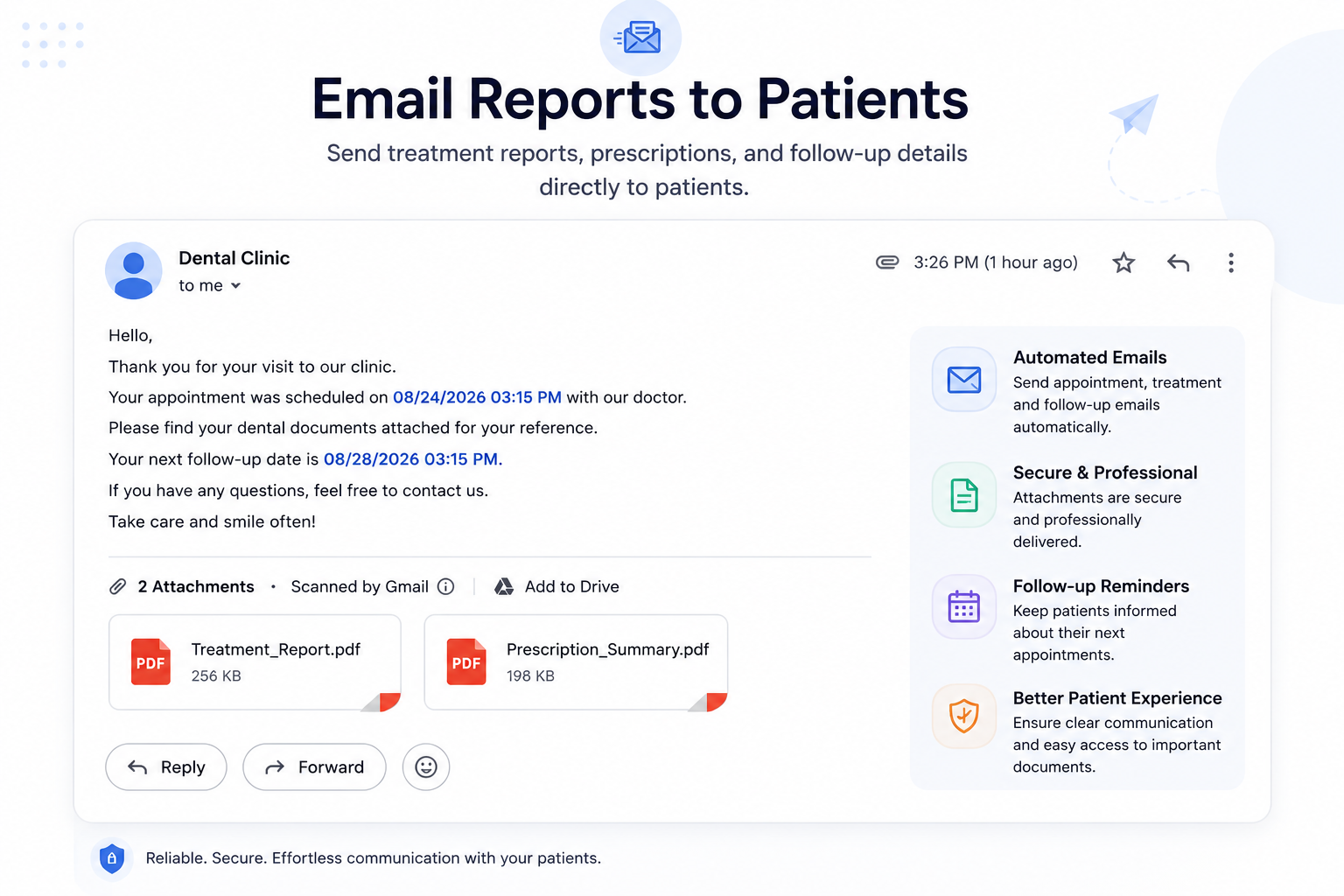
- Automated Emails — Automated emails help clinics send appointment, treatment, and follow-up information without requiring staff to manually prepare each patient communication process.
- Document Attachments — Attach treatment reports and prescription summaries to emails, allowing patients to receive essential dental documents together with their appointment information.
- Treatment Report Sharing — Treatment reports can be shared electronically, helping patients access documented findings, treatments, advice, and follow-up information conveniently after their clinic visit.
- Prescription Summaries — Prescription summaries can accompany patient emails, providing medication names, strengths, dosages, frequencies, durations, and instructions in an organized format clearly.
- Follow-up Details — Follow-up details included in emails help patients remember their next appointment date and time, supporting better continuity of dental care.
- Appointment Information — Email communication keeps appointment information organized, including scheduled dates and times that patients can easily review whenever needed online digitally.
- Secure Document Delivery — Secure document delivery allows clinics to share important attachments professionally, reducing dependence on printed documents for routine patient communication needs.
- Multiple PDF Attachments — Patients can receive multiple PDF attachments within one email, keeping treatment reports and prescription summaries conveniently grouped together for reference.
- Consistent Communication — Automated communication supports consistent patient messaging by providing appointment details, attached documents, and follow-up information through a standardized email process.
- Easy Document Access — Email reports improve accessibility by allowing patients to review treatment documentation from their email whenever they need important information later.
- Post-Appointment Communication — Clinics can communicate post-appointment information efficiently by combining personalized messages with relevant treatment reports and prescription documents within emails directly.
- Follow-up Reminders — Follow-up reminders can keep patients informed about upcoming appointments, helping them stay aware of scheduled visits and required continuing care.
- Digital Treatment Documentation — Treatment documentation delivered through email provides patients with a convenient digital reference for reviewing procedures, findings, advice, and related information.
- Medication Information — Prescription attachments make medication information easier to access, giving patients a digital copy containing prescribed medicines and their administration instructions.
- Patient Engagement — Professional email communication can strengthen patient engagement by delivering clear appointment information, clinical documents, prescriptions, and follow-up details electronically to patients.
Why Use the Dental Clinic Pro for Odoo Module?
Dental Clinic Pro for Odoo brings essential dental clinic operations into one organized system, helping clinics manage appointments, patients, consultations, treatments, prescriptions, follow-ups, and billing-related information efficiently.
- Complete Clinic Management — Manage essential dental clinic activities through one centralized Odoo module.
- Appointment Management — Schedule, track, confirm, complete, cancel, and monitor patient appointments easily.
- Online Appointment Booking — Allow patients to submit their preferred date, time, and clinic appointment details online.
- Digital Patient Records — Maintain patient information and consultation details in an organized digital format.
- Clinical Consultations — Record complaints, examination findings, clinical notes, and advice during consultations.
- Digital Odontogram — Visualize and record tooth conditions using an interactive digital odontogram.
- Treatment Management — Manage treatments with tooth or area, quantity, pricing, discounts, taxes, and final amounts.
- Medication Management — Record medicines along with strength, dosage, frequency, duration, and instructions.
- Treatment Reports — Generate structured treatment reports containing clinical and treatment information.
- Prescription Reports — Create organized prescriptions containing patient, doctor, and medication details.
- Follow-up Scheduling — Schedule follow-up dates and times while keeping follow-up notes connected to appointments.
- Email Communication — Send treatment reports, prescriptions, and follow-up details directly to patients through email.
- WhatsApp Reporting — Share patient reports through WhatsApp directly from appointment records.
- Clinic Dashboard — Monitor patients, consultations, appointments, no-shows, cancellations, invoicing status, and revenue from one dashboard.
- Billing Visibility — View billing status and appointment amounts to support organized financial follow-up.
- Centralized Information — Keep patient, appointment, clinical, treatment, medication, and follow-up information connected within Odoo.
- Better Record Organization — Structured sections make important dental information easier for clinic teams to access and review.
- Professional Documentation — Generate clear treatment and prescription documents for organized patient communication and clinic records.
- Improved Workflow — Connect appointment management, consultations, treatments, prescriptions, follow-ups, reports, and communication into one workflow.
- Odoo-Based Management — Manage dental clinic operations within the familiar Odoo environment, reducing the need for separate systems.