

Modern customers love flexibility and personalization while shopping online. The Build Your Own Combo – Create Custom Box module for PrestaShop allows store owners to offer customizable product bundles directly from the product page.
The Build Your Own Combo – Create Custom Box module is an excellent solution for merchants who want to deliver a more engaging and customizable shopping experience in their PrestaShop store.
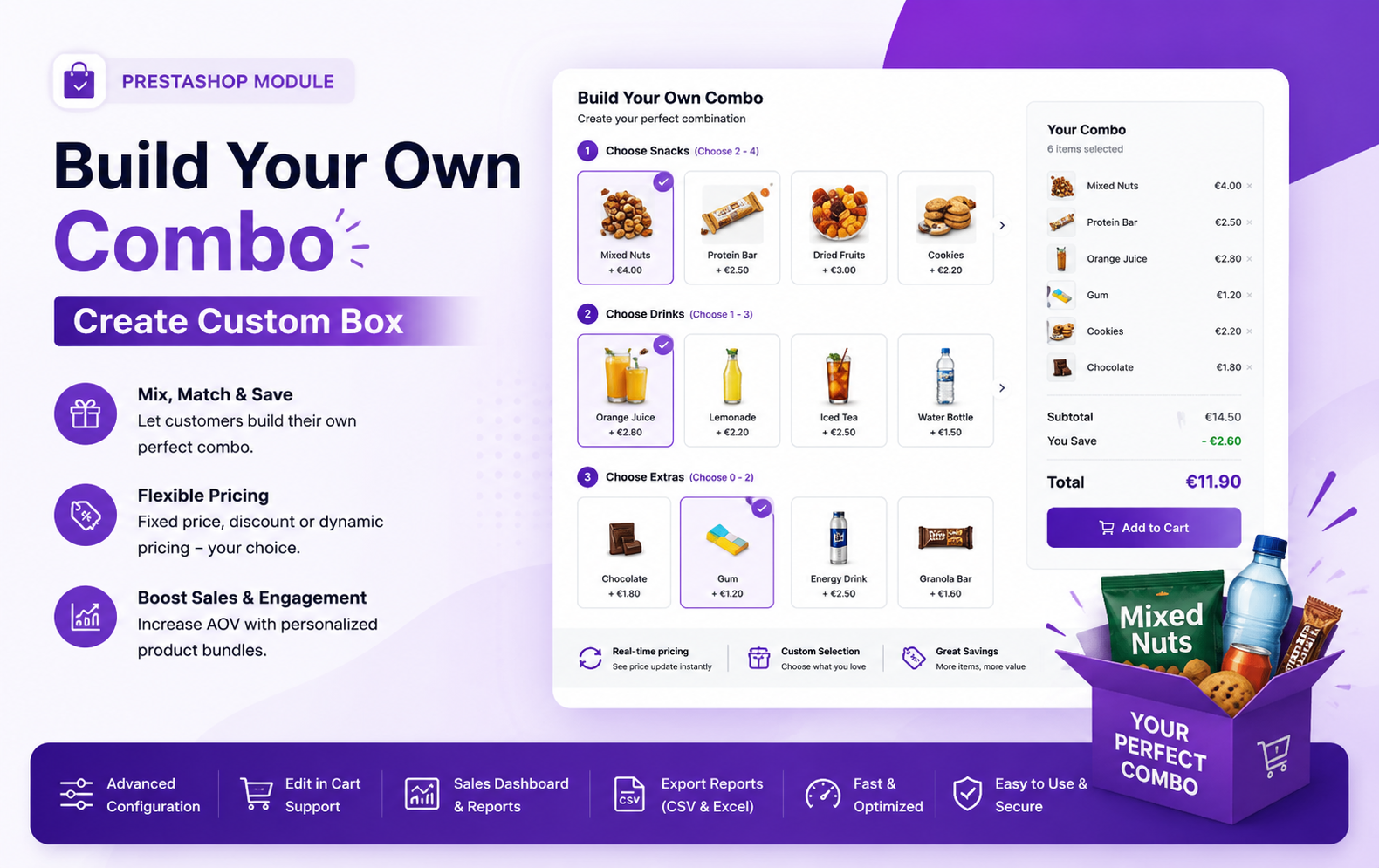
Key Features at a Glance
- Create customizable combo products directly from existing products
- Allow customers to build their own personalized bundles
- Support fixed price, discount percentage, and dynamic pricing methods
- Real-time price calculation based on selected products
- Set minimum and maximum product selection limits
- Display original price, discounts, and savings instantly
- Advanced product filtering by category, brand, supplier, or products
- Customers can edit combo selections directly from the cart
- Detailed combo product breakdown in cart and order pages
- Dedicated admin dashboard with sales analytics
- Seamless integration with PrestaShop checkout and order system
- User-friendly interface for both admin and customers
Use Cases: Who Needs This Module?
- Online grocery stores can let customers build personalized food hampers, snack boxes, or monthly grocery bundles easily and quickly.
- Beauty and skincare brands can offer customizable makeup kits, skincare routines, and gift boxes based on customer preferences and needs.
- Fashion and clothing stores can allow shoppers to create matching outfit combinations with accessories, footwear, and seasonal collections effortlessly.
- Electronics stores can create customizable gadget bundles including headphones, chargers, keyboards, and accessories for better upselling opportunities.
- Gift shops can help customers design personalized gift boxes for birthdays, anniversaries, festivals, and special occasions with flexible product selections.
- Pet supply stores can offer custom pet care bundles including food, toys, grooming products, and accessories tailored to different pets.
- Subscription box businesses can allow customers to choose monthly products themselves instead of receiving randomly selected items every month.
- Bakery and confectionery stores can provide customizable cake, chocolate, and dessert combo boxes for events and celebrations.
- Health and wellness stores can create fitness combo packs containing supplements, protein products, vitamins, and workout accessories conveniently.
- Baby product stores can let parents build personalized baby care kits including diapers, toys, feeding essentials, and skincare products.
Quick User Guide (Visual Walkthrough)
Scroll up to revisit the detailed image-wise walkthrough.
Create a main product that will act as the customizable combo or bundle product for customers.
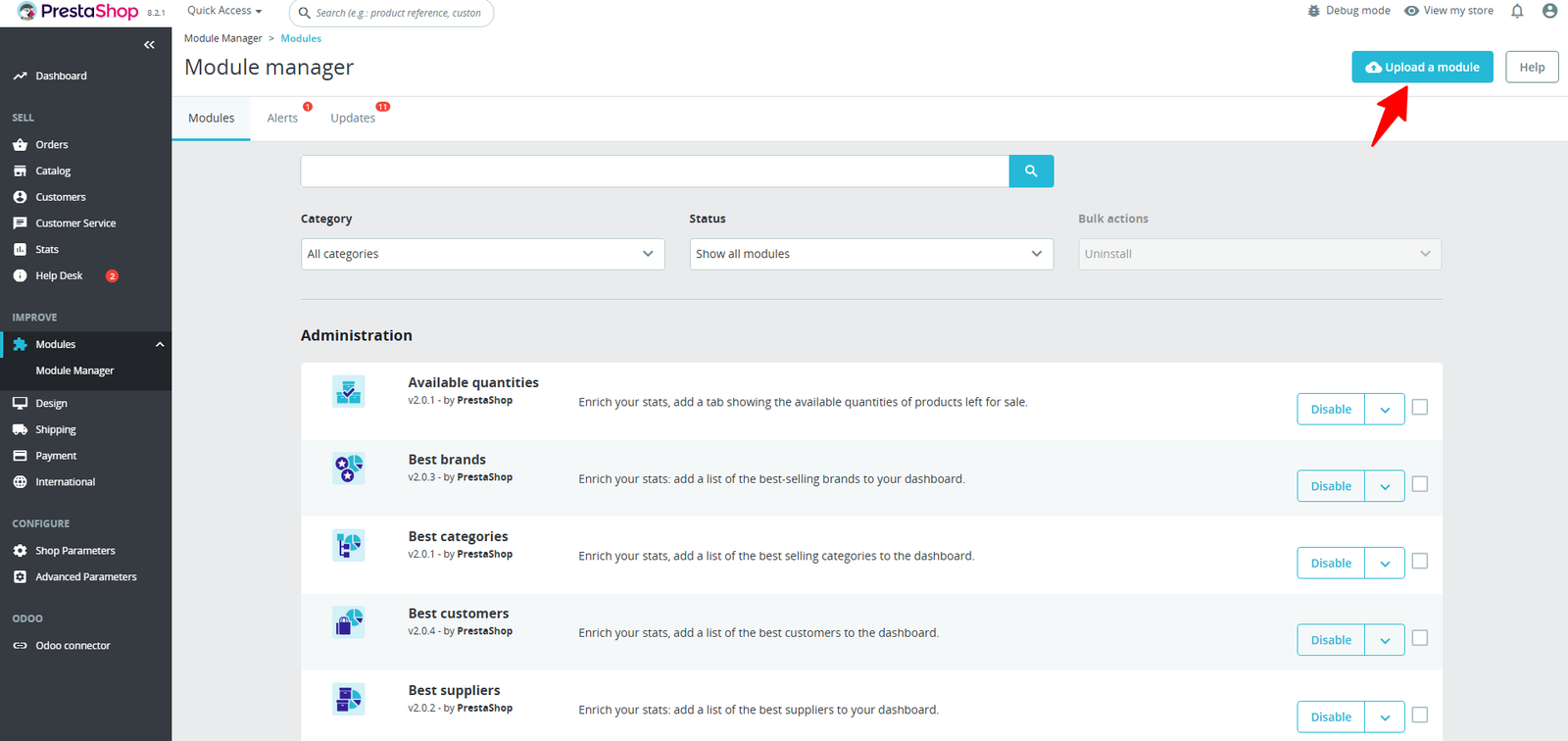
Step 1: Click Upload the Module in the Apps section.
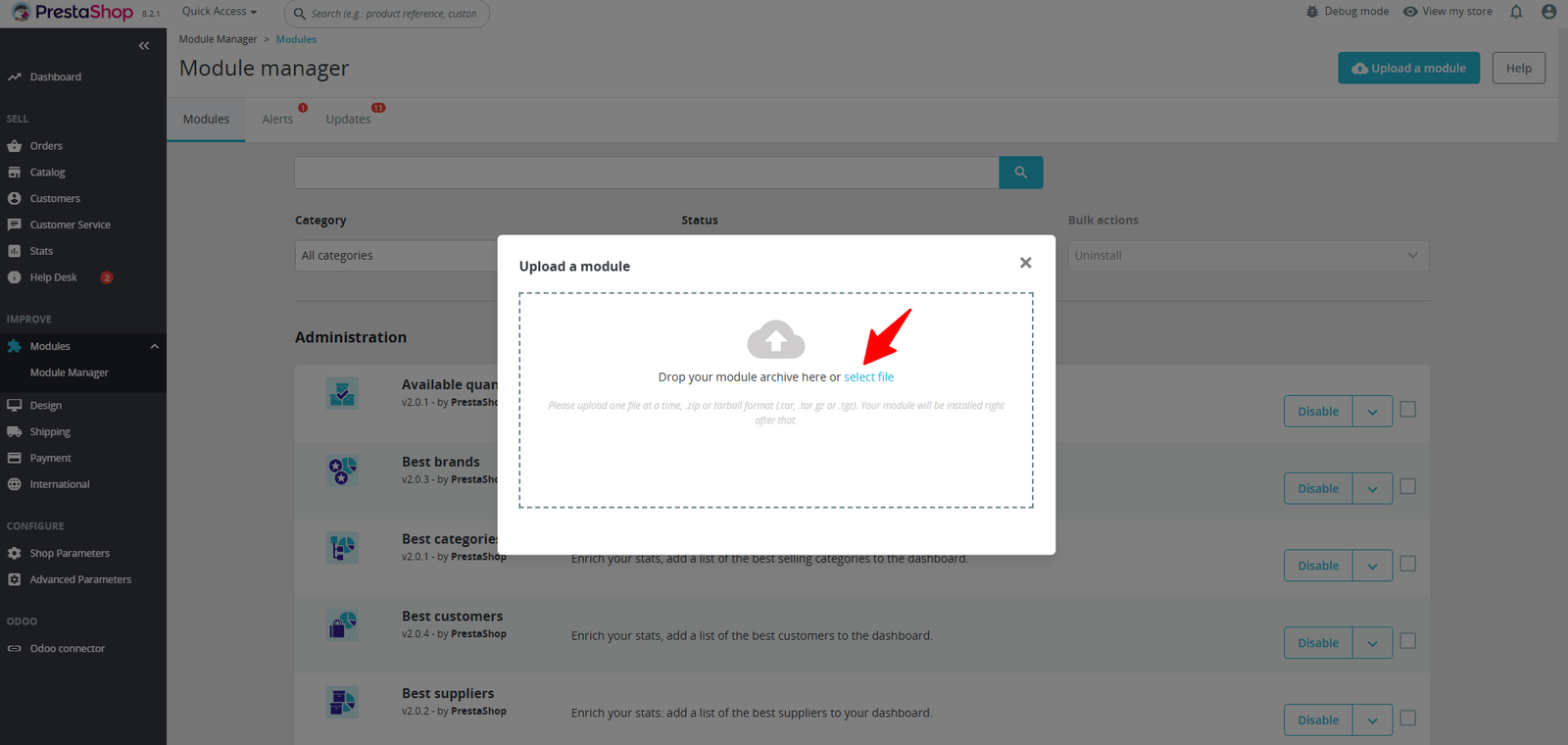
Step 2: Drag & drop the ZIP file or select from your system.
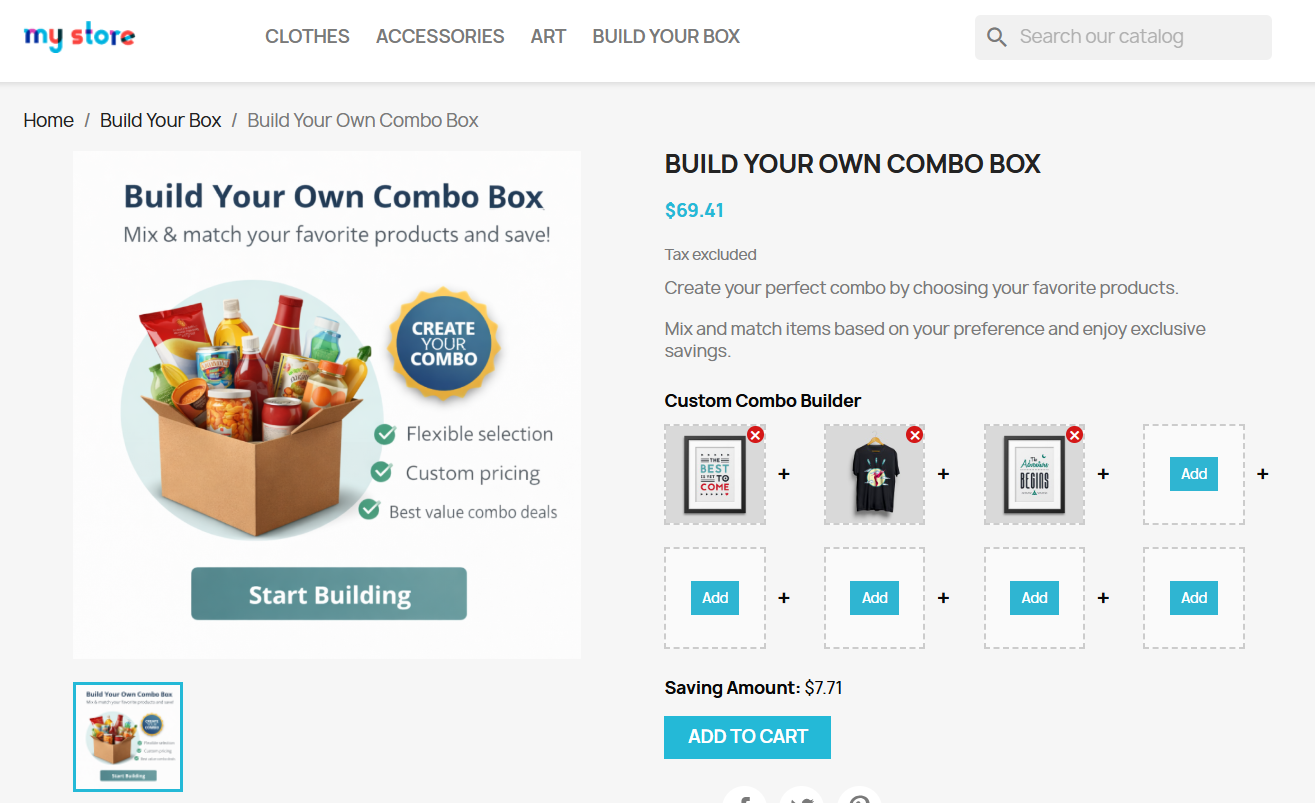
Step 3: Mix, match, and customize your favorite products with real-time pricing and instant savings—all in one seamless experience.
Step 4: Easily browse and select from multiple products with a smooth popup interface designed for quick and effortless combo building.
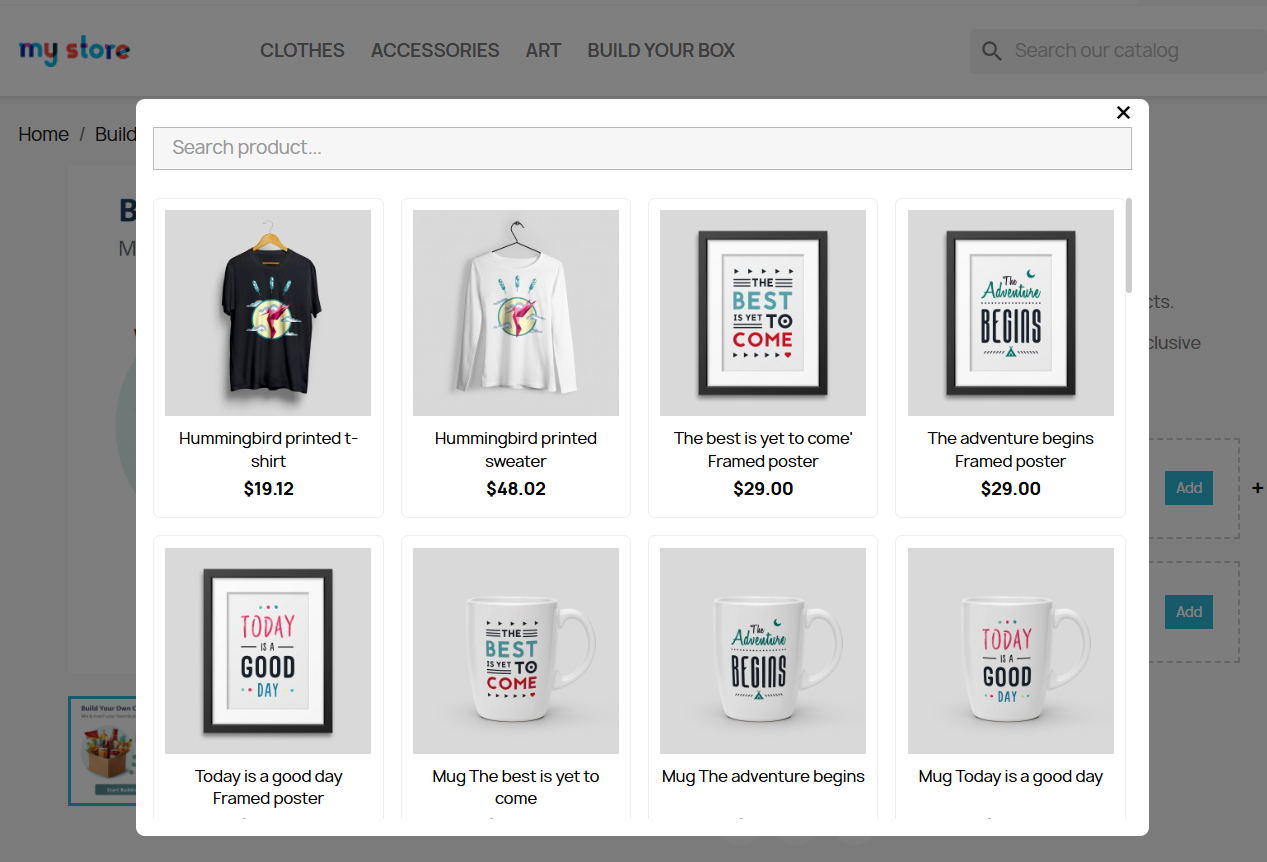
Step 5: Double-check your selected items, view your savings, and proceed to checkout with confidence.
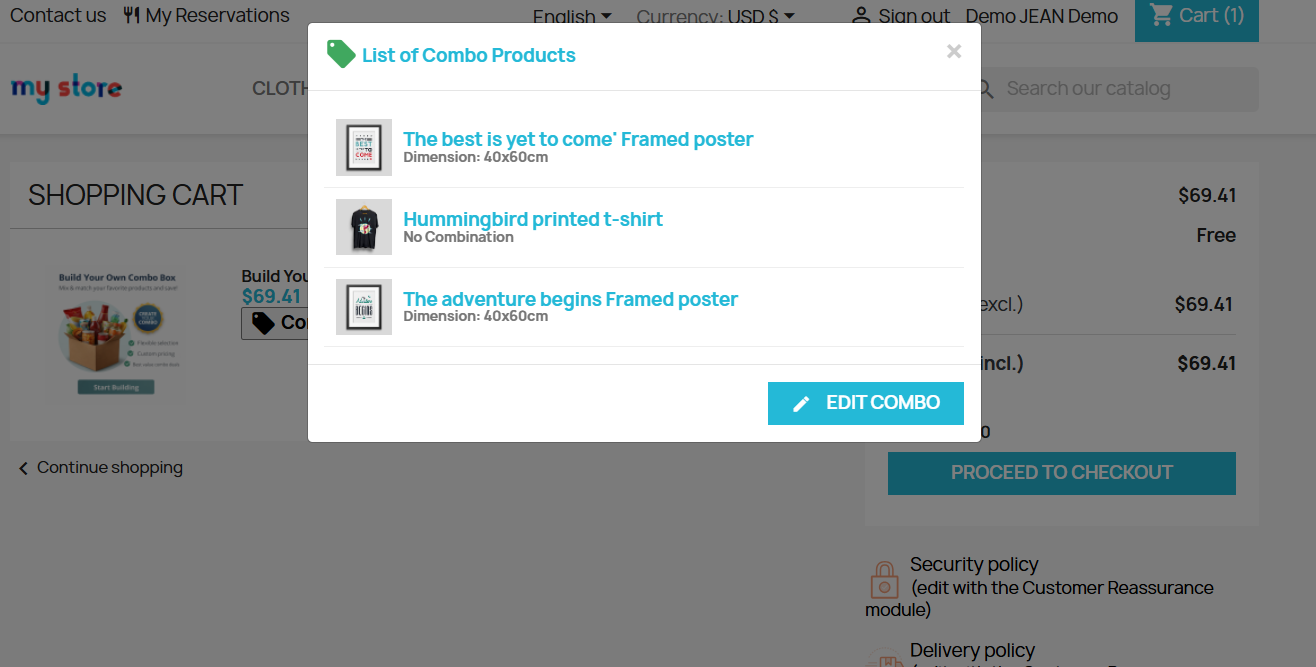
- Customers can view all selected combo products directly inside the shopping cart through a clean popup interface.
- The module displays complete combo product details including selected items, product variations, and combination information clearly.
- Users can easily review their personalized bundle before proceeding to the checkout process for better shopping confidence.
- The “Edit Combo” button allows customers to modify selected products without removing the combo from the cart.
- Customers can replace products, update selections, or customize combinations anytime before finalizing their purchase order.
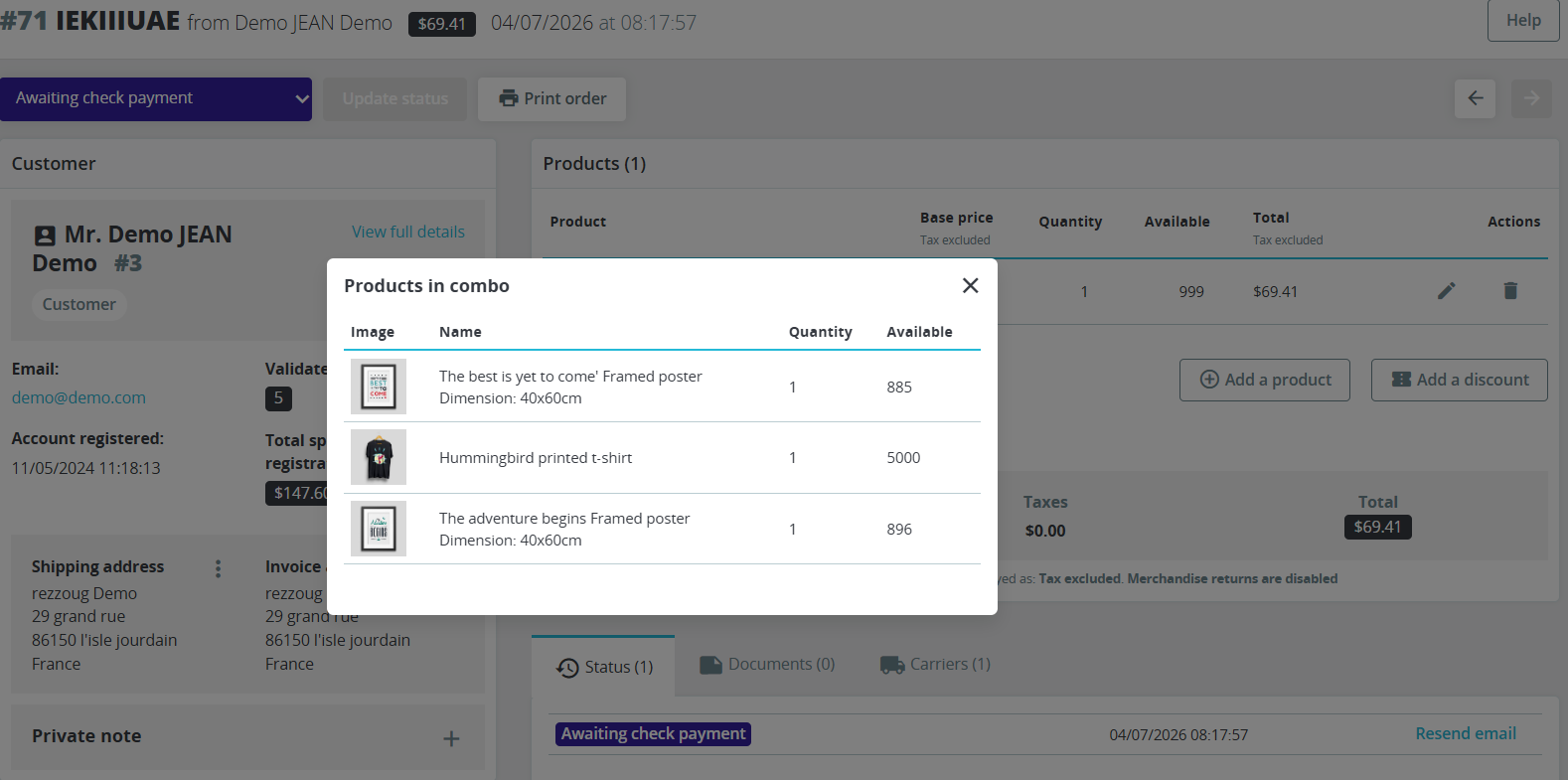
Step 6: Easily view all products included in a combo order with quantities and stock details for better order management and control.
(A) Admin Order Deatil – Complete Combo Breakdown
1. Import Setting :
- Admins can view complete combo product details directly from the order management page without opening multiple screens separately.
- The module displays all products included inside the combo with quantity, availability, and product variation information clearly.
- Store managers can quickly identify which products customers selected inside personalized combo bundles during order processing activities.
- Product images inside the combo popup improve visibility and help admins manage orders more efficiently and accurately.
- The system shows detailed combination attributes such as product dimensions, variants, or customization options for better order understanding.
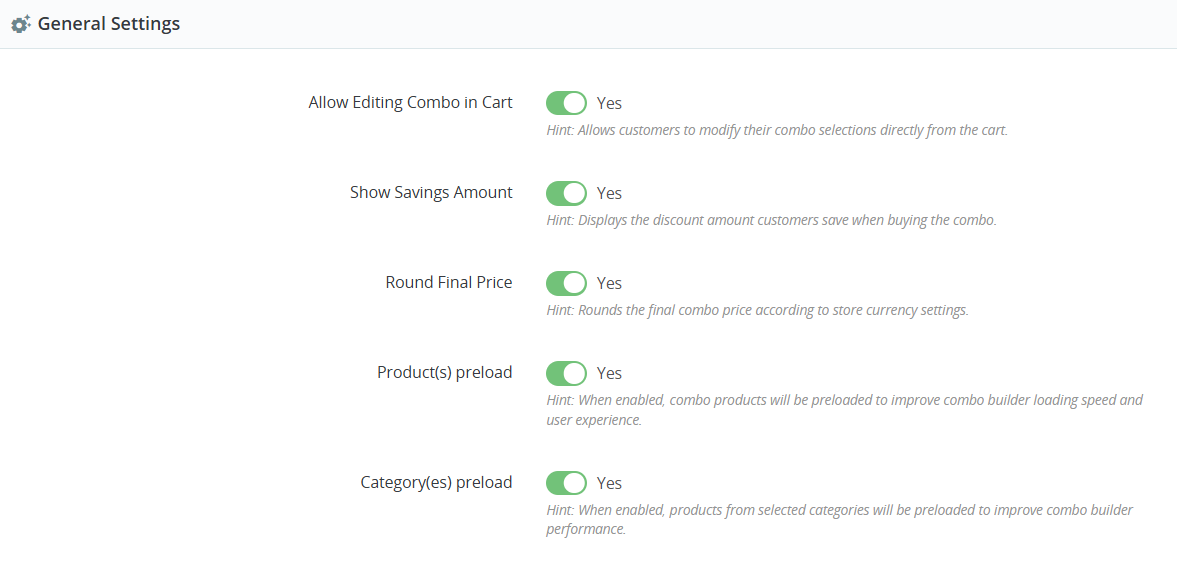
The module provides flexible general settings that help admins customize combo functionality according to business requirements easily.
2. Export Setting:
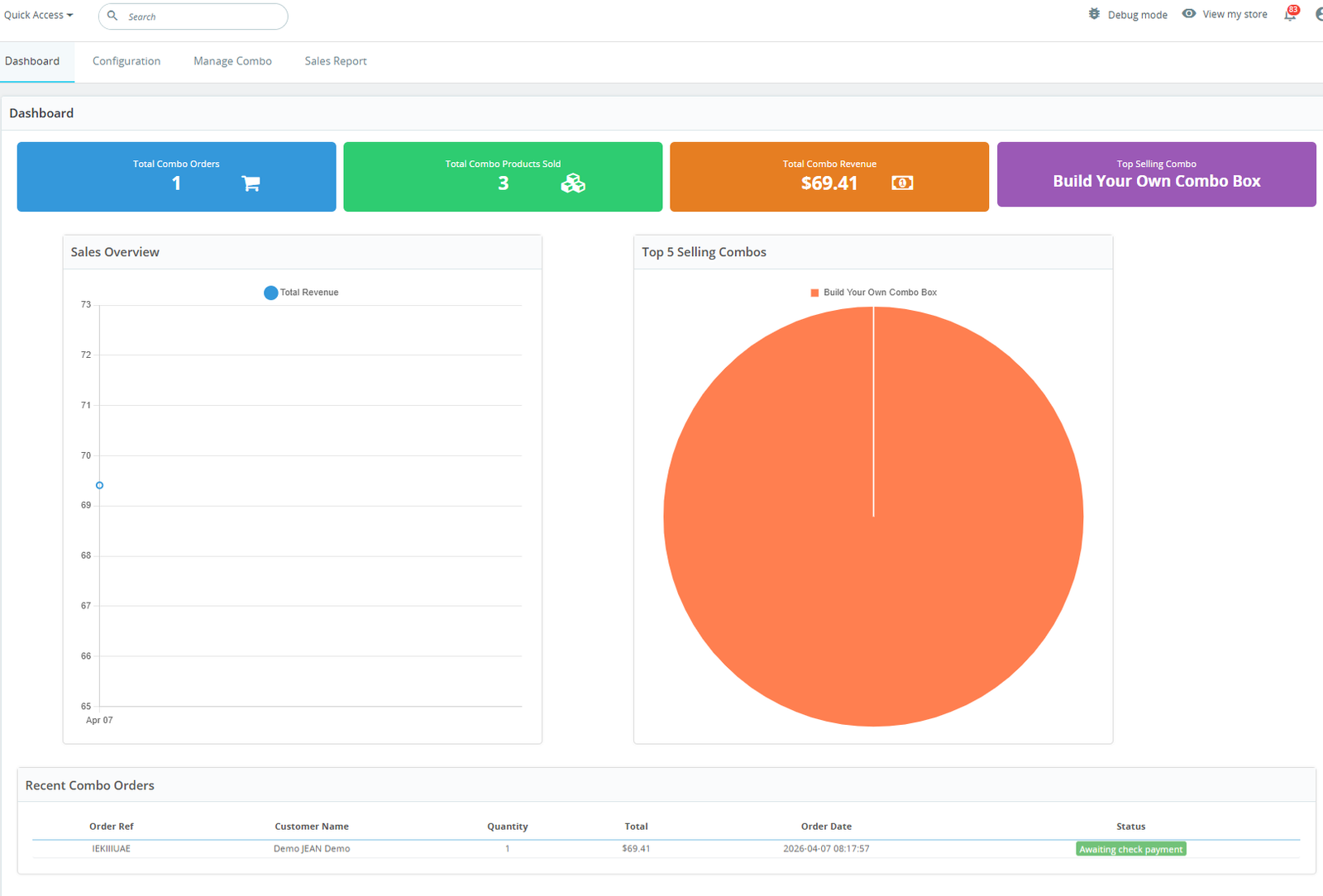
- The module includes a dedicated analytics dashboard for monitoring combo product performance and overall sales activity efficiently.
- Admins can track total combo orders directly from the dashboard with real-time order statistics and performance insights.
- The dashboard displays total combo products sold, helping store owners measure customer engagement and bundle popularity accurately.
- Revenue tracking functionality allows admins to monitor total earnings generated through customizable combo product sales easily.
The system highlights top-selling combo products, helping businesses identify their most successful and profitable bundle configurations quickly.
3. Real-time setting
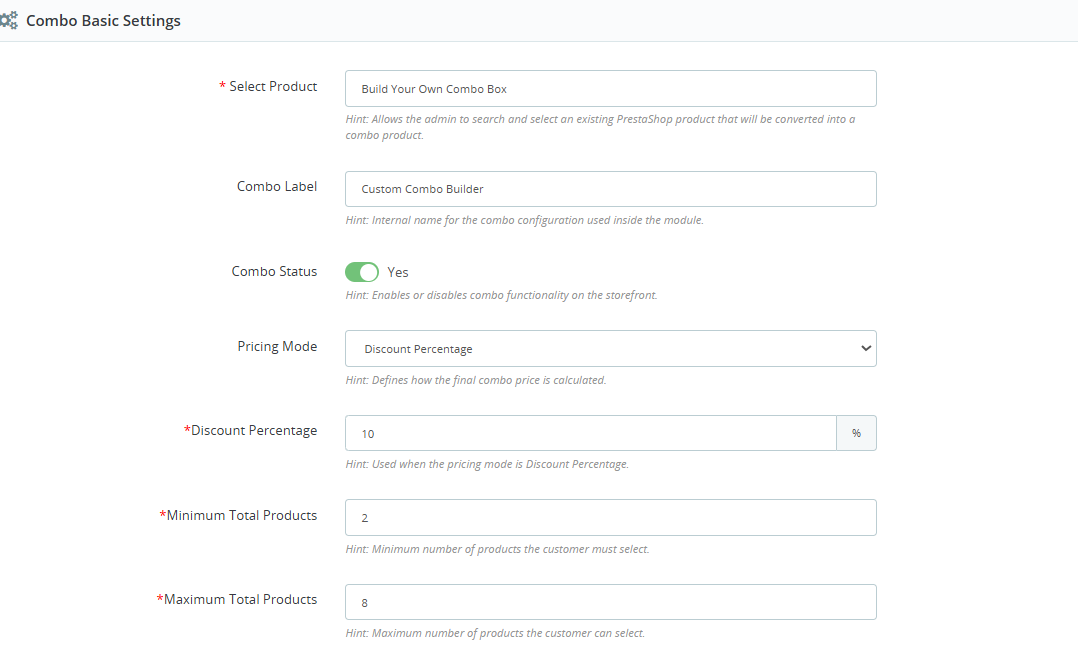
(i) The module provides an easy-to-use combo configuration panel for creating and managing customizable product bundles efficiently.
(ii) Admins can select any existing PrestaShop product and convert it into a personalized combo builder product instantly.
Step 7:Easily control which products, categories, brands, or suppliers are available in your combo builder for precise and targeted configurations.
1. Import Setting :
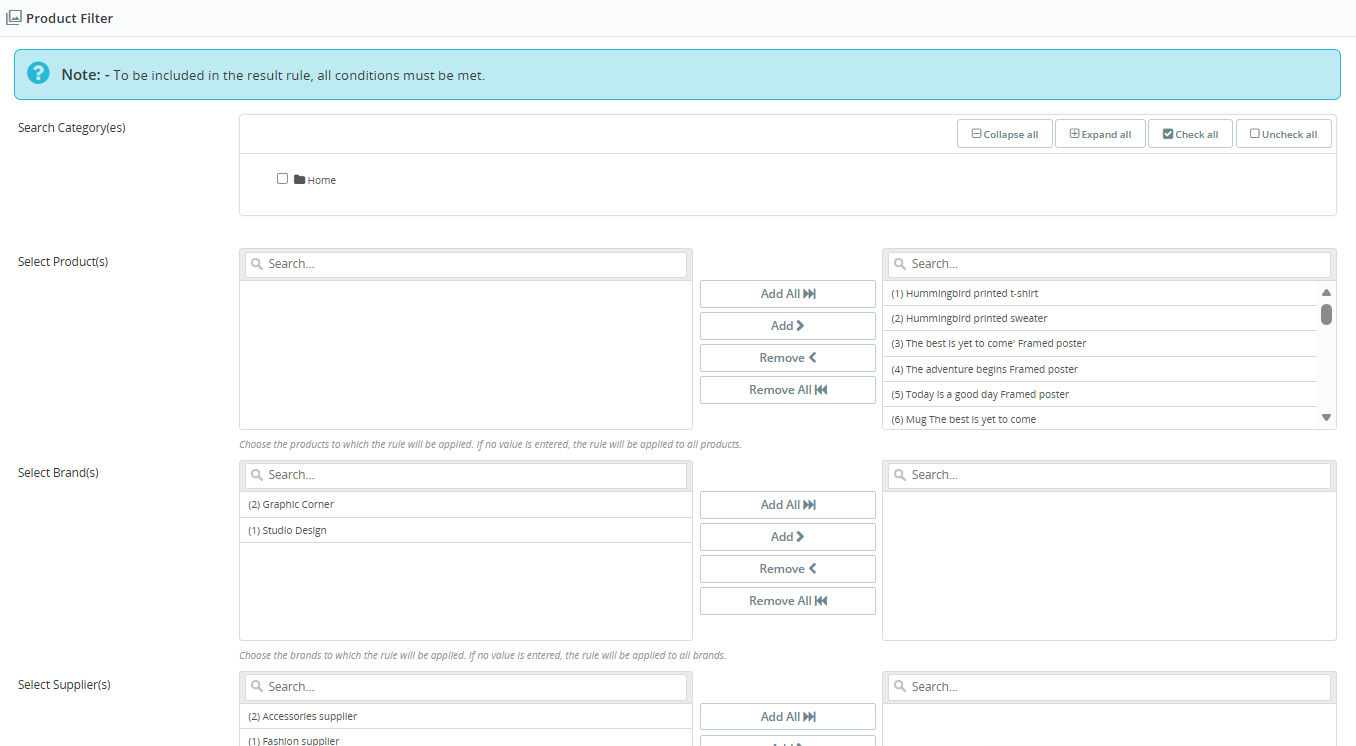
- The module includes an advanced product filtering system for creating highly customizable and controlled combo product configurations easily.
- Admins can filter combo products using categories, specific products, brands, and suppliers for better bundle organization management.
- Category-based filtering helps merchants display only relevant products inside combo builders for a more focused shopping experience.
Multiple product selection tools improve workflow and simplify large-scale combo product management for stores with extensive catalogs.
2. Real-time setting:
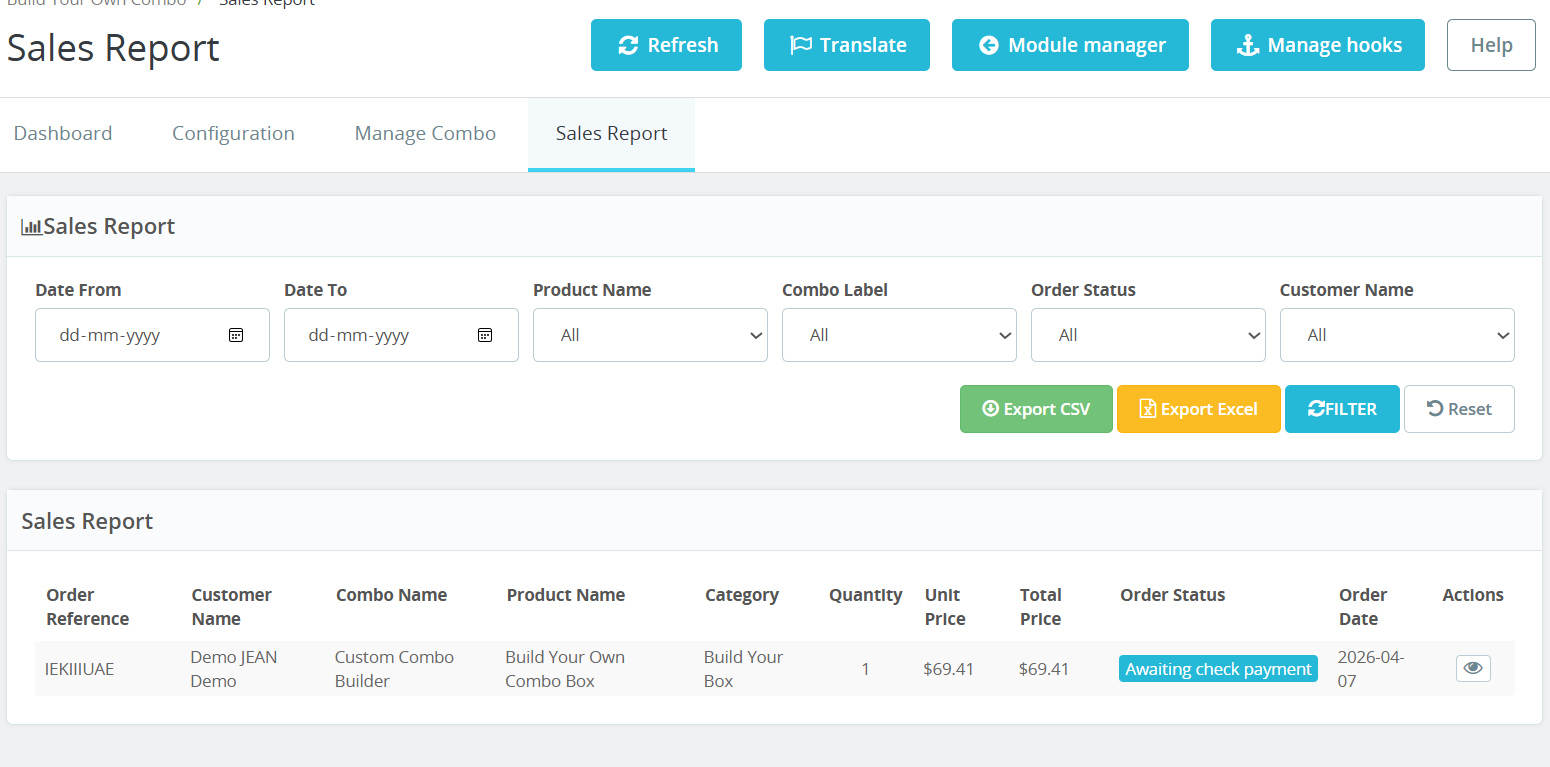
Step 8: Track combo sales with detailed reports, powerful filters, and easy export options to analyze performance and make smarter business decisions.
1. Import Setting :
- Product name filtering helps merchants track the sales performance of individual combo products more efficiently and clearly.
- Combo label filters allow admins to monitor different combo configurations and compare bundle performance using organized reporting tools.
- Order status filtering helps businesses identify completed, pending, canceled, or processing combo orders quickly from the reporting dashboard.
- Customer name filters make it easier to locate specific combo orders and review customer purchasing history instantly.
- The report table displays important order details including product name, quantity, category, pricing, and order status information clearly.
- Detailed sales analytics help businesses understand customer preferences and improve future combo marketing and sales strategies effectively.
Why Use the Build Your Own Combo – Create Custom Box Module?
The Build Your Own Combo – Create Custom Box module helps online stores deliver a more interactive, flexible, and personalized shopping experience for customers. Instead of purchasing fixed bundles, customers can create their own customized product combinations based on their preferences and needs.
This module is an excellent solution for increasing customer engagement, improving conversion rates, and boosting average order value through personalized product bundling.
Key Reasons to Use This Module
Personalized Shopping Experience
Customers can mix and match products to create their own custom bundles directly from the product page easily.
Increase Average Order Value
Combo offers encourage customers to purchase multiple products together, helping stores generate higher sales revenue consistently.
Flexible Pricing Options
Admins can configure fixed pricing, discount percentages, or dynamic pricing based on selected combo products automatically.
Real-Time Pricing Updates
Customers instantly see updated pricing, discounts, and savings while building their personalized combo product selections online.