

In today’s digital-first business environment, scheduling customer meetings should be fast, professional, and effortless. Whether you’re running a B2B store, offering consultations, technical support, or sales demonstrations, managing appointments through emails and phone calls wastes valuable time.
The Google Meeting & Calendar Scheduler module for PrestaShop eliminates this hassle by allowing customers and administrators to schedule, manage, and join Google Meet meetings directly from the PrestaShop store.
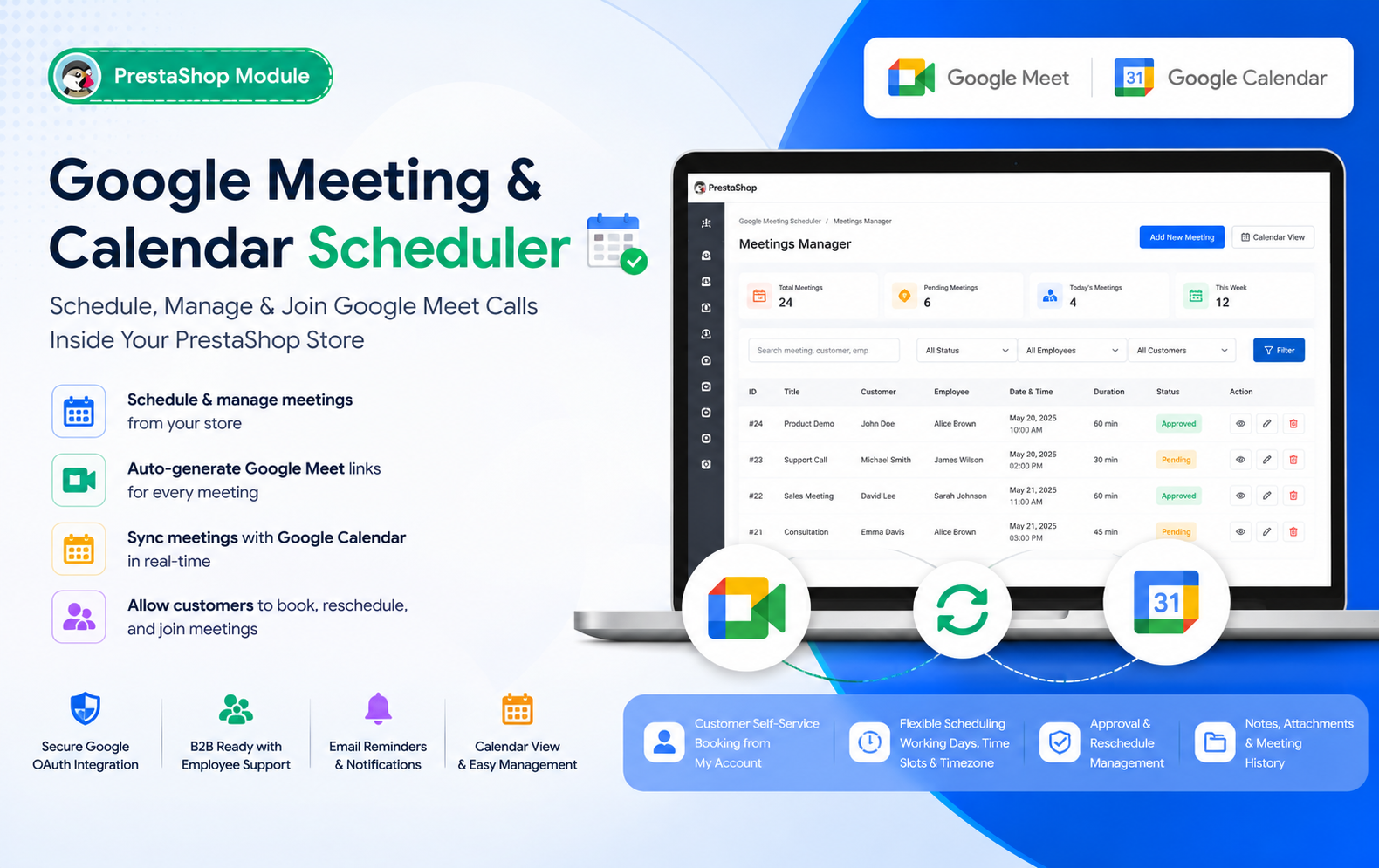
Key Features at a Glance
- Google Meet Integration – Automatically generate secure Google Meet links for every scheduled meeting, enabling seamless virtual communication between customers and administrators.
- Google Calendar Synchronization – Instantly sync all meetings with Google Calendar, ensuring schedules remain updated across your store and Google account.
- Customer Self-Service Booking – Allow customers to book meetings directly from their PrestaShop account without emails, phone calls, or manual assistance.
- Admin Meeting Management – Create, edit, approve, reject, reschedule, or cancel meetings from a centralized back-office dashboard with complete control.
- Interactive Calendar View – Manage appointments visually using daily, weekly, and multi-day calendar layouts that simplify scheduling and prevent conflicts.
- Automatic Meeting Link Creation – Every approved meeting automatically receives a unique Google Meet link, eliminating manual meeting setup.
- Employee Meeting Assignment – Assign meetings to specific employees, allowing organized customer support, sales consultations, and department-based scheduling.
- Flexible Working Hours Configuration – Configure business days, working hours, meeting durations, and available time slots to match your operational schedule.
- Timezone Support – Automatically adjust meeting times based on customer and administrator timezones for accurate global appointment scheduling.
- Meeting Approval Workflow – Choose between automatic or manual approval processes to maintain complete control over customer meeting requests.
- Customer Meeting Dashboard – Customers can view upcoming meetings, join sessions, reschedule appointments, or cancel bookings directly from their account.
- Advanced Search & Filters – Quickly locate meetings using filters based on customer, employee, meeting status, or scheduled dates.
- Email Notifications & Reminders – Send automated emails for meeting confirmations, approvals, cancellations, rescheduling, and reminder notifications.
- Meeting Notes & Attachments – Add internal notes, upload files, and maintain important meeting-related information within each appointment.
- Booking Restrictions – Set minimum booking notice, maximum advance scheduling limits, and daily appointment restrictions for better resource management.
Use Cases: Who Needs This Module?
- Companies can schedule product discussions, partnership meetings, and client consultations directly from their PrestaShop store using integrated Google Meet appointments.
- Businesses offering professional services can let customers easily book virtual consultations, reducing manual scheduling while improving customer convenience and communication.
- Sales representatives can schedule product demonstrations, onboarding sessions, and follow-up meetings with prospects through automated Google Meet appointment scheduling.
- Support agents can organize troubleshooting sessions, technical assistance, and live customer support meetings without relying on external scheduling applications.
- Business consultants, legal advisors, financial experts, and freelancers can accept appointment bookings directly from their PrestaShop-powered business websites.
- Educators, trainers, and coaches can schedule online classes, mentoring sessions, workshops, and one-on-one coaching through integrated Google Meet scheduling.
- Marketing agencies, web development companies, and software firms can efficiently manage client meetings, project discussions, and progress reviews within PrestaShop.
- Clinics, therapists, nutritionists, and wellness professionals can offer online appointment booking and virtual consultations using secure Google Meet integration.
- Schools, universities, and e-learning platforms can arrange student meetings, counseling sessions, admissions interviews, and faculty consultations with automated scheduling.
- HR teams and recruitment consultants can schedule candidate interviews, screening sessions, and employer discussions directly from their PrestaShop platform.
Quick User Guide (Visual Walkthrough)
Scroll up to revisit the detailed image-wise walkthrough.
Schedule Google Meet calls with full control over date, time, participants, notes, and attachments — all from a single, clean admin screen.
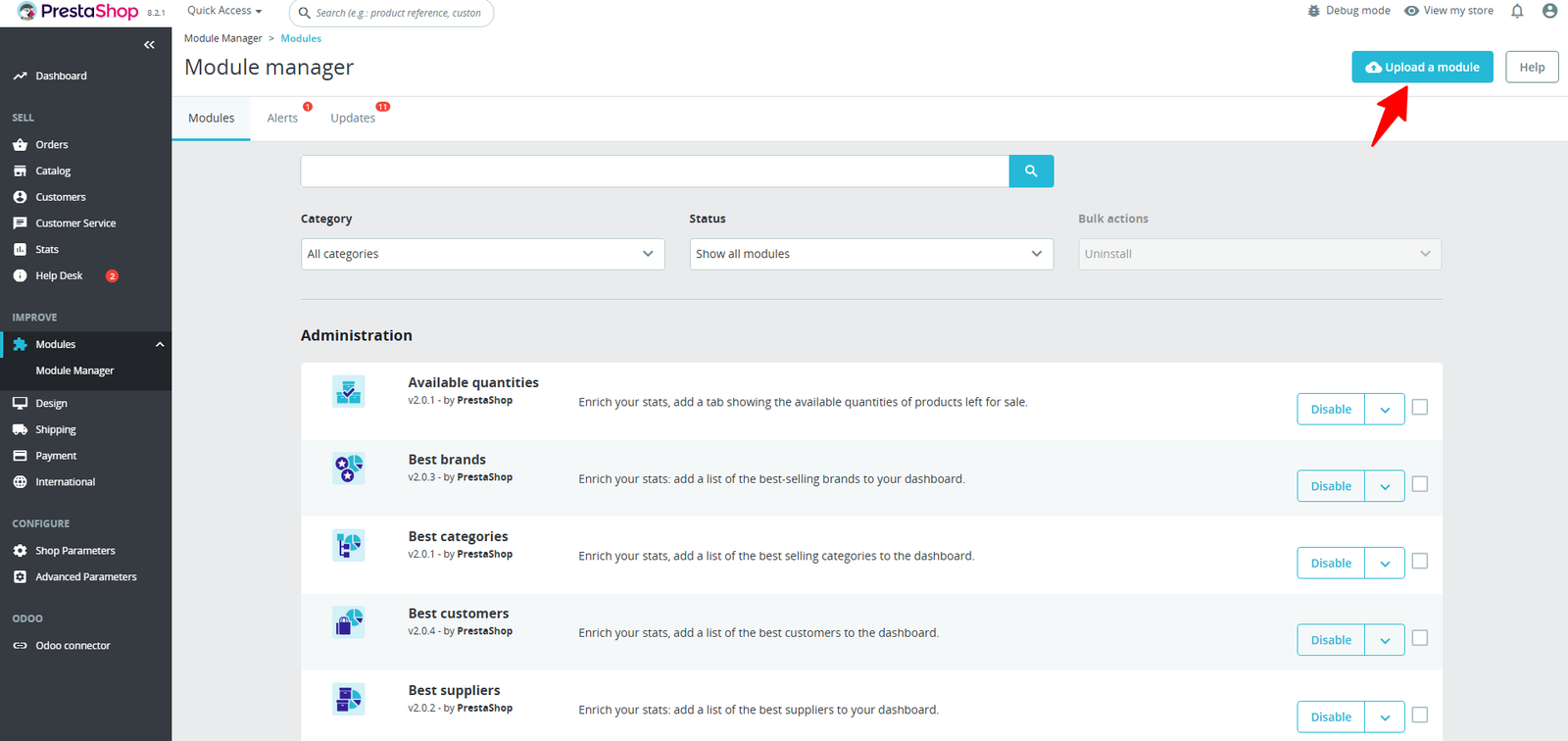
Step 1: Click Upload the Module in the Apps section.
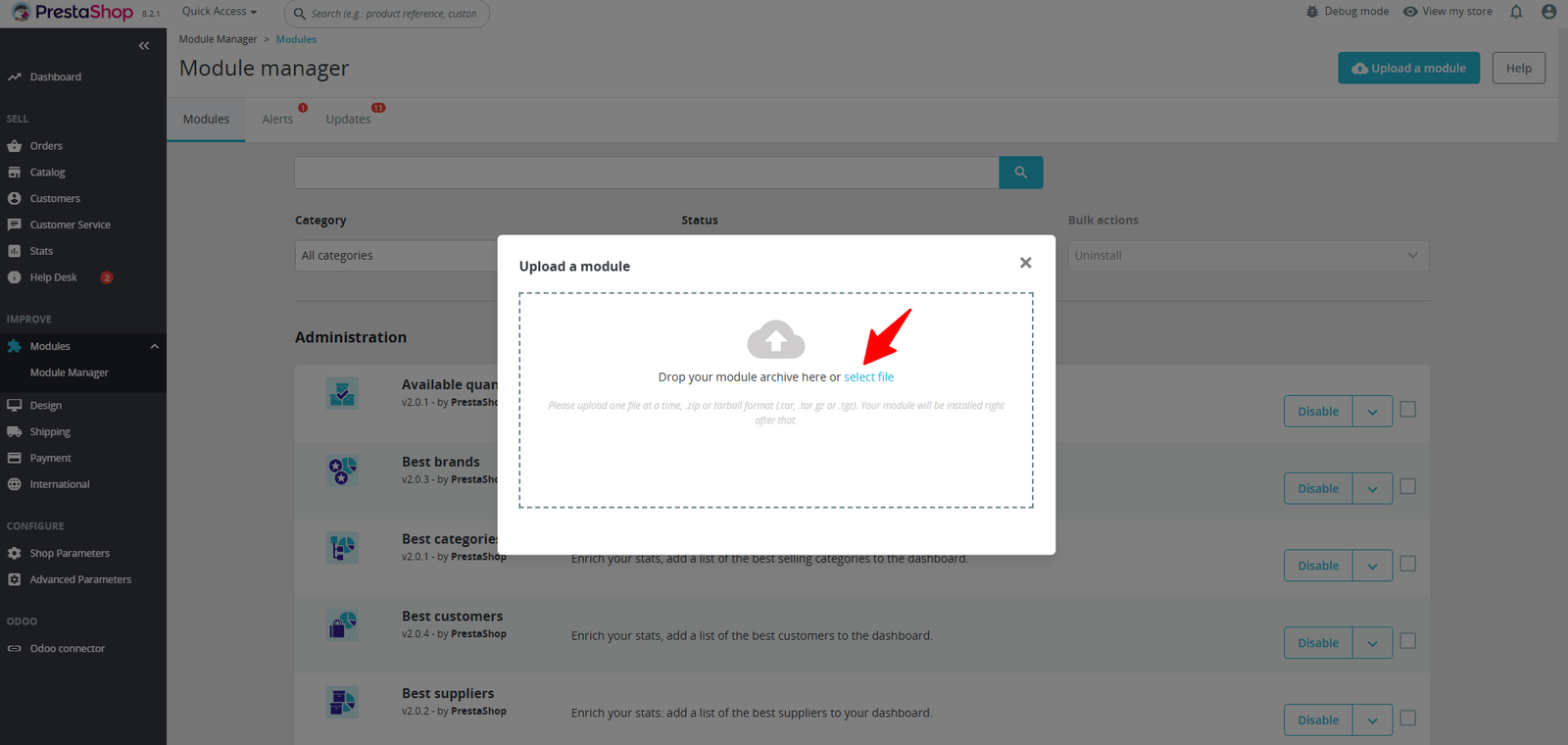
Step 2: Drag & drop the ZIP file or select from your system.
Step 3: View, search, and manage all Google Meet sessions in one place — with instant access to hosts, schedules, meeting links, and statuses.
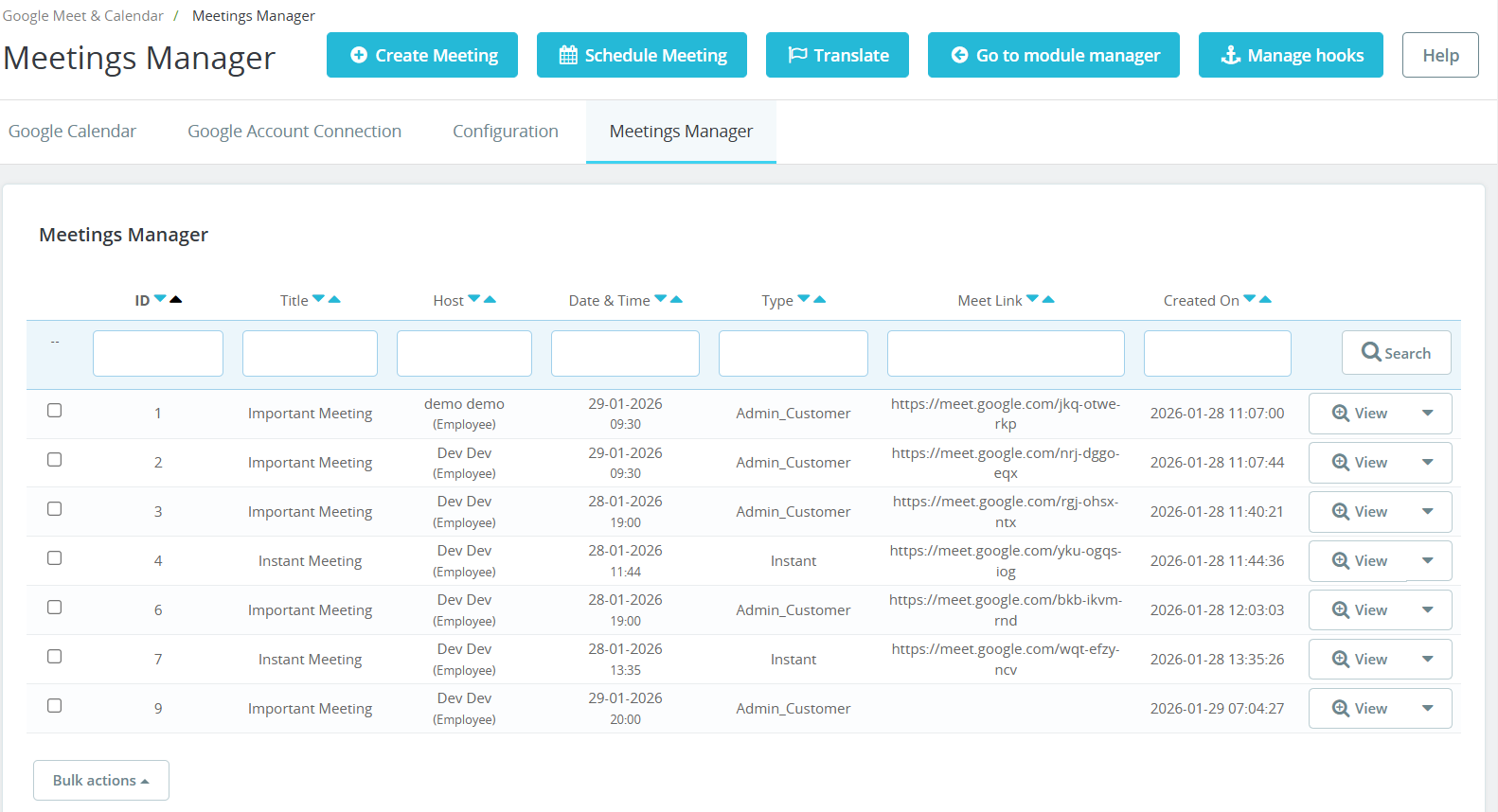
- View and manage all scheduled meetings from one organized interface, making appointment tracking faster and more efficient.
- Create new Google Meet meetings instantly using the Create Meeting button without leaving the PrestaShop back office.
- Plan meetings in advance by selecting the preferred date, time, participants, and meeting type directly from the dashboard.
- Quickly locate meetings using filters such as Meeting ID, Title, Host, Date & Time, Meeting Type, and Creation Date.
- Each meeting record displays essential details including meeting title, assigned host, scheduled date, meeting type, Google Meet link, and creation timestamp.
- Support different meeting categories such as Admin–Customer Meetings and Instant Meetings to suit various business requirements.
- Automatically generated Google Meet links are available for every meeting, allowing participants to join with a single click.
- Assign meetings to specific employees, enabling organized customer support, sales consultations, and internal collaboration.
- Use the View button to access detailed meeting information, update schedules, manage participants, or perform additional meeting actions.
- Sort meetings by ID, title, host, date, meeting type, or creation date for faster navigation and better organization.
Step 4: See all scheduled Google Meet sessions in a clean weekly calendar, filter by employee, and track availability at a glance — no double bookings, no confusion.
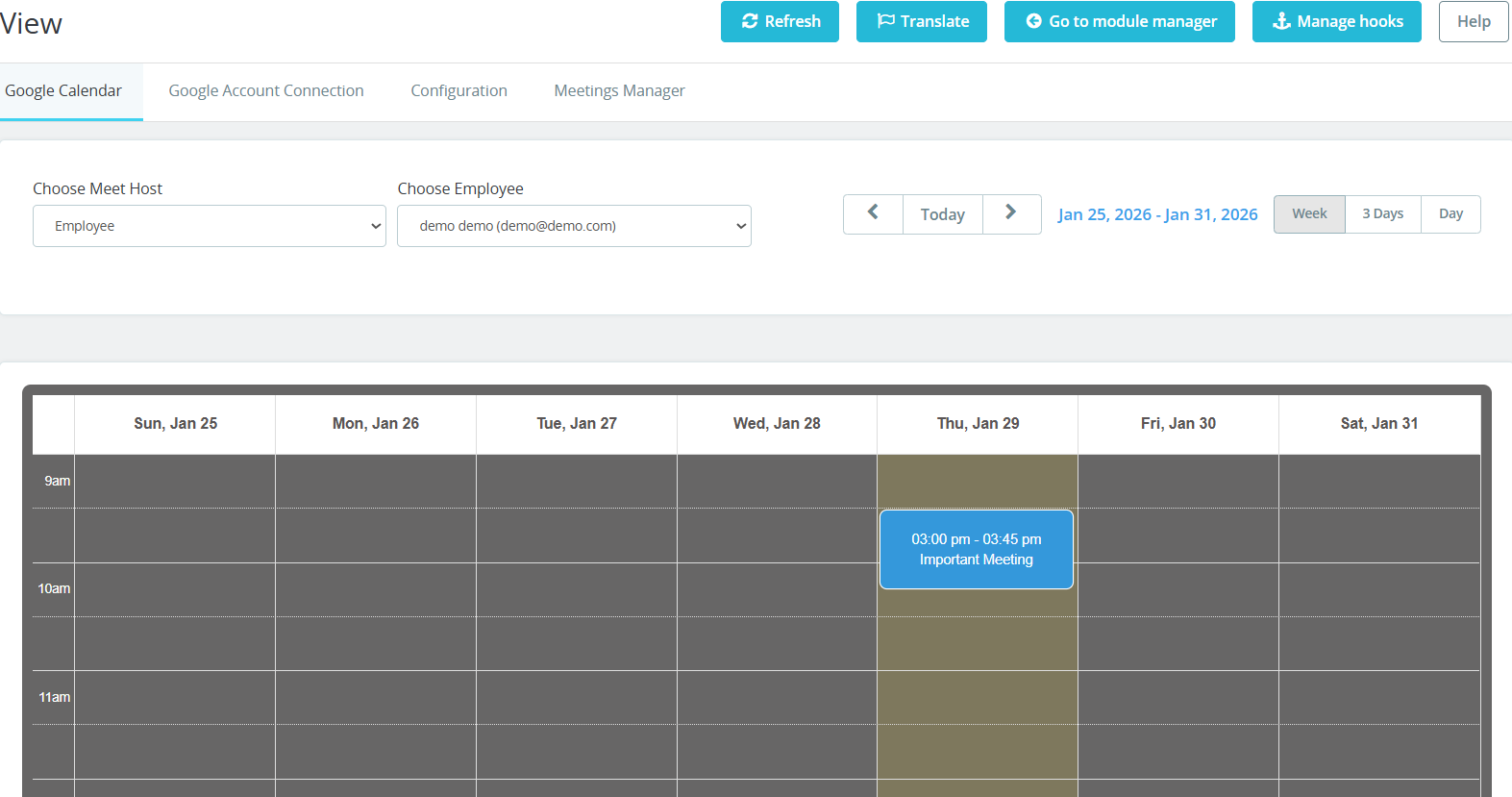
- View all scheduled meetings in a clean calendar layout, making it easier to organize appointments and monitor daily activities.
- Switch between Week, 3-Day, and Day views to manage meetings based on your preferred scheduling style.
- Select a specific employee to display only their meetings, helping teams manage individual schedules more efficiently.
- Choose different meeting hosts directly from the calendar, making it simple to organize meetings for multiple administrators or employees.
- Navigate to previous or upcoming weeks using intuitive calendar controls or instantly return to the current day with the Today button.
- Display meetings on a time-based schedule, allowing administrators to quickly understand appointment durations and availability.
- The visual calendar helps identify occupied time slots, reducing scheduling conflicts and avoiding overlapping meetings.
- Each scheduled meeting appears as a highlighted event with its title and time, making appointments easy to locate.
- Meetings remain synchronized with Google Calendar, ensuring accurate schedules across both platforms.
- Administrators can efficiently allocate employee availability and manage workloads by viewing all appointments in one calendar.
Step 5:Define working days, time slots, durations, timezones, and booking limits to keep meetings perfectly aligned with your business schedule.
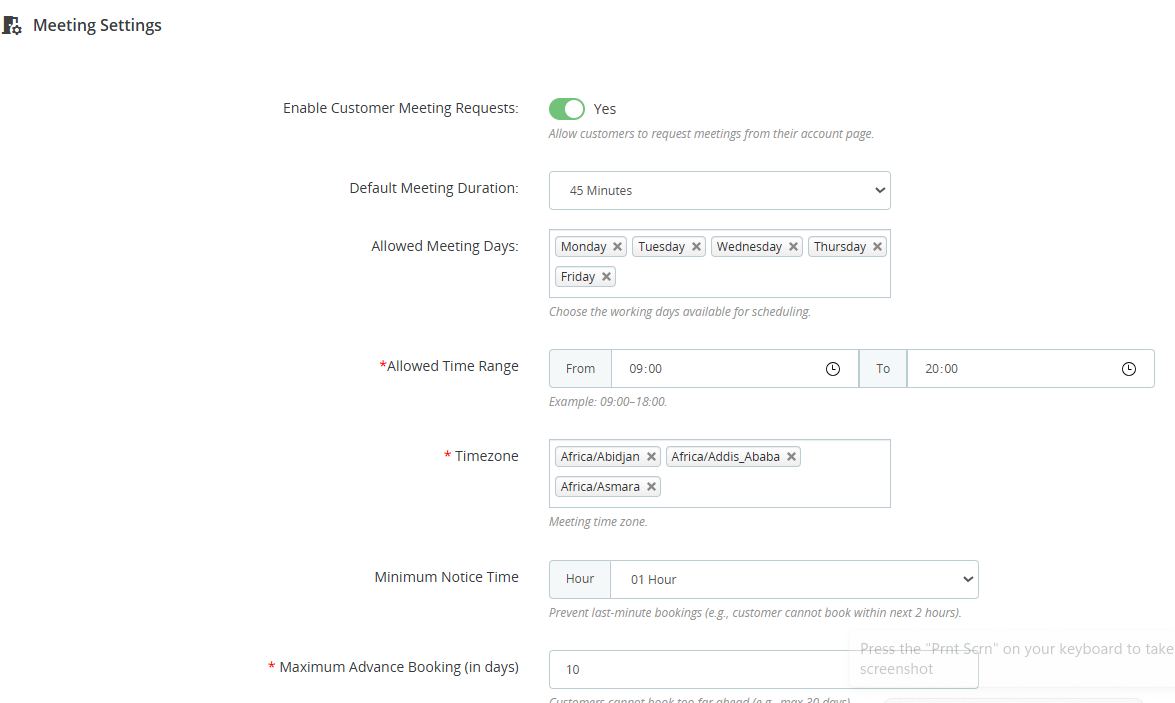
- Allow customers to request meetings directly from their My Account page, making appointment booking quick, convenient, and completely self-service.
- Define a standard meeting length, such as 15, 30, 45, or 60 minutes, ensuring consistent scheduling across all appointments.
- Select the days when meetings can be scheduled, allowing bookings only during your organization’s official business days.
- Specify the available meeting time range, such as 9:00 AM to 8:00 PM, preventing appointments outside working hours.
- Configure supported time zones so customers from different regions always view and book meetings at the correct local time.
- Require customers to book meetings a certain number of hours in advance, preventing last-minute appointment requests.
- Control how far into the future customers can schedule appointments, ensuring your calendar remains organized and manageable.
- Customize booking policies according to your business workflow, making the module suitable for support, sales, consulting, and training sessions.
- Automatically restrict customers from selecting unavailable dates, times, or non-working days, reducing scheduling errors.
- Well-defined scheduling rules keep your Google Calendar clean, organized, and free from unnecessary booking conflicts.
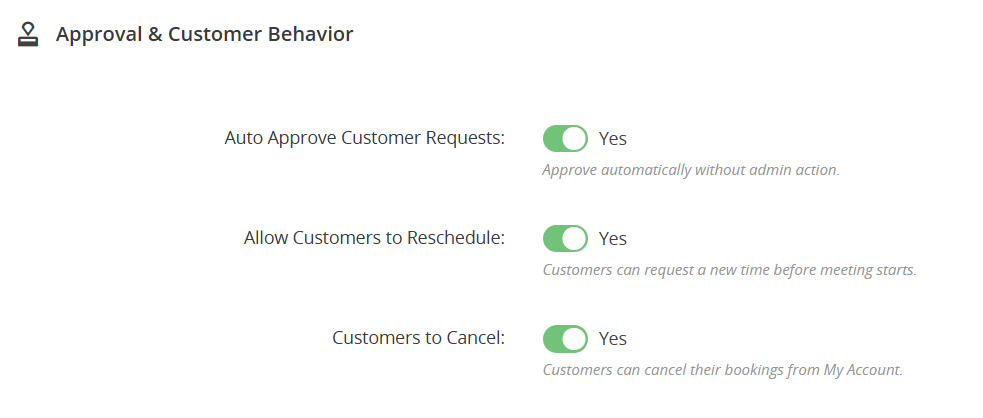
Step 6: Automatically approve meeting requests and let customers reschedule or cancel on their own — reducing admin workload while improving customer experience.
(A) Smart Approval & Customer Control
1. Import Setting :
- Enable automatic approval of customer meeting requests, eliminating manual verification and allowing appointments to be confirmed instantly.
- Disable auto-approval whenever required to review customer requests before confirming appointments, ensuring complete administrative control.
- Allow customers to reschedule their meetings before the scheduled time, reducing missed appointments and improving scheduling flexibility.
- Customers can manage their own appointments directly from the My Account section without contacting store administrators.
- Give customers the ability to cancel scheduled meetings whenever necessary, helping keep your appointment calendar accurate and up to date.
- Providing rescheduling and cancellation options offers greater convenience while delivering a professional and customer-friendly booking process.
- Automated approvals and self-service meeting management significantly reduce manual intervention, saving valuable time for administrators.
- Instant approvals and flexible booking management help maintain an organized calendar while minimizing scheduling conflicts.
- Customers can easily modify their bookings instead of skipping meetings, resulting in better attendance and improved communication.
- Administrators can customize approval rules according to business requirements, balancing automation with full control over customer appointments.
2. Export Setting:
- Enable automatic approval of customer meeting requests, allowing appointments to be confirmed instantly without requiring manual administrator intervention.
- Disable automatic approvals when needed, giving administrators complete authority to review and approve every meeting request individually.
- Allow customers to request a new meeting date or time before the scheduled appointment, providing greater flexibility and convenience.
- Customers can cancel their meetings directly from their My Account page without contacting the store administrator.
- Automating approvals and allowing self-service rescheduling significantly reduces manual workload for support and sales teams.
- Customers gain greater control over their appointments, resulting in a faster, smoother, and more satisfying booking process.
- Configure approval, rescheduling, and cancellation rules according to your organization’s workflow and customer service requirements.
- Minimize missed meetings and scheduling conflicts by allowing customers to update or cancel appointments before the meeting begins.
- Self-service appointment management reduces unnecessary communication and helps businesses manage calendars more efficiently
- Create a modern and reliable appointment scheduling system that improves customer trust while streamlining business operations.
3. Real-time setting
- Enable Auto Approve Customer Requests to instantly confirm meeting bookings without requiring manual administrator approval, saving time and speeding up the scheduling process.
- Keep automatic approval disabled whenever your business requires administrators to review and approve meeting requests before confirmation.
- Allow customers to reschedule their appointments directly from their My Account page, eliminating the need to contact your support team.
- Customers can cancel scheduled meetings themselves whenever plans change, ensuring an improved and convenient booking experience.
- Automating approvals and enabling customer self-service significantly reduces repetitive administrative tasks and support requests.
- Customers receive immediate booking confirmation when automatic approval is enabled, creating a smoother and more professional scheduling experience.
- Giving customers the ability to manage their own meetings increases convenience, flexibility, and overall satisfaction with your business.
- Automatic approvals remove unnecessary waiting periods, allowing meetings to be scheduled instantly and efficiently.
- Choose whether bookings require manual review or instant approval based on your organization’s workflow and business requirements.
- Customers can easily update or cancel appointments if their availability changes, helping maintain an accurate and up-to-date meeting calendar.
Step 7: Connect your store to Google Calendar and Google Meet using secure OAuth — meetings and links are created automatically, no manual work needed.
1. Import Setting :
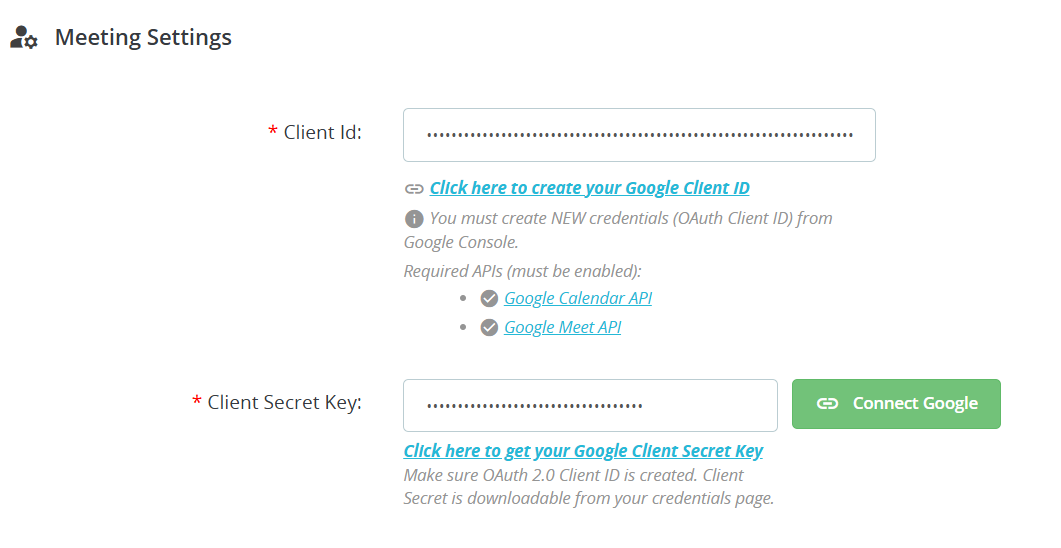
- Connect your Google account securely using Google’s OAuth 2.0 authentication, ensuring safe access without exposing sensitive account credentials.
- Easily enter your Google OAuth Client ID generated from the Google Cloud Console to establish a trusted application connection.
- Add the Google Client Secret Key to complete the authentication process and enable secure communication with Google services.
- Use the Connect Google button to instantly authorize your Google account and activate Google Meet and Calendar integration.
- Integrates directly with the Google Calendar API to automatically create, update, and synchronize meeting events in real time.
- Automatically generate secure Google Meet links for every scheduled appointment without requiring manual meeting creation.
- The configuration page includes helpful instructions and direct links for creating Google OAuth credentials, making setup quick and beginner-friendly.
- Once connected, all approved meetings are automatically synchronized with Google Calendar, ensuring schedules remain accurate and up to date.
- The module communicates with Google services through official APIs, providing stable performance and secure data transmission.
- Administrators can update or replace OAuth credentials whenever needed without affecting existing module functionality.
2. Real-time setting:
- Connect your PrestaShop store securely using Google’s OAuth 2.0 authentication, ensuring safe and authorized access to Google services.
- Easily enter your Google Client ID generated from the Google Cloud Console to establish a trusted API connection.
- Add the Google Client Secret to complete the secure authentication process and protect API communication.
- Use the Connect Google button to instantly authorize your Google account without complex configuration steps.
- Enable the Google Calendar API to automatically create, update, and synchronize meeting events with your Google Calendar.
- Integrate the Google Meet API to automatically generate secure Google Meet links for every scheduled appointment.
- Any meeting created, updated, rescheduled, or canceled in PrestaShop is instantly reflected in Google Calendar, ensuring real-time schedule consistency.
- Every approved appointment automatically receives a unique Google Meet link, eliminating manual meeting creation.
- The module communicates directly with Google APIs to automate meeting scheduling, event management, and synchronization.
- OAuth authentication ensures that sensitive Google account credentials remain protected and are never directly exposed within the store.
Step 8: Customers can view all their meetings, instantly join Google Meet calls, or schedule new sessions directly from their PrestaShop account.
1. Import Setting :
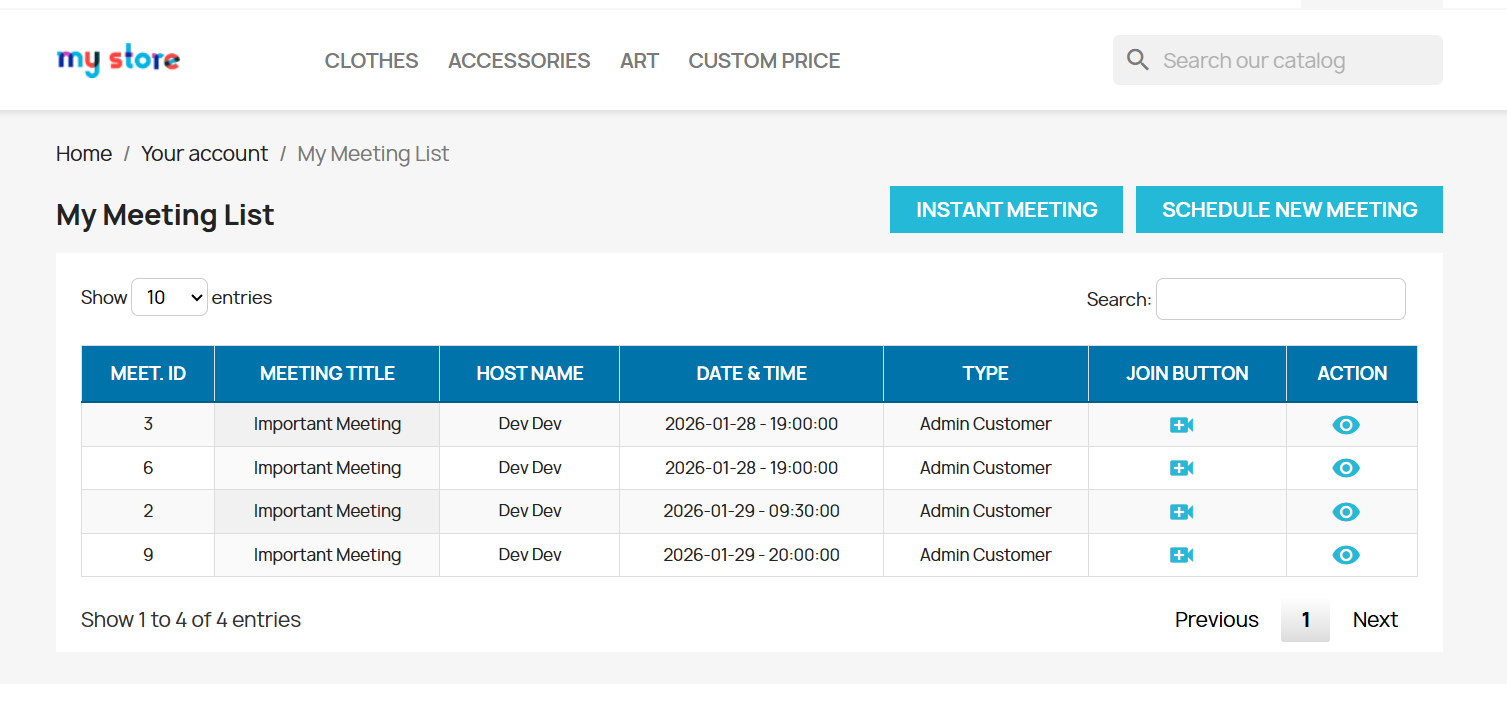
- Customers can access all scheduled meetings from one convenient page, making appointment management simple and organized.
- The Instant Meeting button allows customers to quickly start or request an immediate meeting whenever urgent assistance is needed.
- Customers can easily book future appointments by selecting their preferred date and time directly from their account.
- Each meeting displays important details including Meeting ID, Meeting Title, Host Name, Date & Time, and Meeting Type for easy reference.
- Customers can instantly join scheduled Google Meet sessions using the dedicated Join button without manually entering meeting links.
- The built-in search option enables customers to quickly find specific meetings using keywords or meeting information.
- All past and upcoming meetings are stored in one location, allowing customers to easily review their appointment history.
- Supports different meeting categories such as Admin–Customer Meetings and Instant Meetings, offering flexibility for various business needs.
- Customers can view complete meeting information, participant details, and additional actions through the View option.
- The clean, responsive dashboard provides a smooth and intuitive experience across desktop, tablet, and mobile devices.
Why Use the Google Meeting & Calendar Scheduler Module?
- Automate Meeting Scheduling – Eliminate manual appointment management by allowing customers to book meetings directly from your PrestaShop store.
- Google Meet Integration – Automatically generate secure Google Meet links for every scheduled appointment without any manual setup.
- Real-Time Google Calendar Sync – Keep your Google Calendar updated automatically whenever meetings are created, modified, or canceled.
- Improve Customer Experience – Give customers the flexibility to schedule, reschedule, cancel, and join meetings from their My Account page.
- Reduce Administrative Workload – Minimize emails, phone calls, and manual scheduling tasks with a fully automated booking system.
- Prevent Double Bookings – Visual calendar management and configurable scheduling rules help avoid appointment conflicts.
- Flexible Meeting Configuration – Set working days, business hours, meeting duration, booking limits, and approval rules according to your business needs.
- Employee-Based Scheduling – Assign meetings to different employees, making it easy to manage support, sales, and consultation sessions.
- Automated Email Notifications – Keep customers informed with automatic booking confirmations, reminders, approval notifications, and cancellation emails.
- Support Global Customers – Built-in timezone support ensures accurate scheduling for customers across different countries and regions.
- Enhance Business Productivity – Centralized meeting management helps your team stay organized while improving response times and operational efficiency.
- Ideal for B2B & Service Businesses – Perfect for online consultations, customer support, product demos, coaching sessions, virtual appointments, and business meetings.